Gmail Click Tracking: How It Works and What Breaks It
Gmail click tracking still works in 2026 — but proxies, prefetching, and security scanners inflate the numbers. Here's how tracked links actually work, what they cost you in deliverability, and how to read the data honestly.
TL;DR
- Gmail click tracking works by rewriting every link in your email so the click passes through a redirect domain before reaching the destination. That redirect is where the data comes from — and where the deliverability risk lives.
- Gmail itself does not block click tracking, but Google's link scanners, corporate security gateways, and inbox prefetching generate machine clicks that inflate reported CTR by anywhere from 10% to 300% on cold traffic.
- Open tracking is effectively dead for measurement (image proxying plus Apple Mail Privacy Protection); click tracking is degraded, not dead — you just have to filter it.
- A shared or freshly registered tracking domain is one of the fastest ways to get filtered at Gmail. A branded, warmed, HTTPS subdomain of your sending domain is the safe configuration.
- The highest-signal metric in 2026 is not clicks. It is replies from verified, deduplicated contacts — which is a data-quality problem before it is a tracking problem.
What is Gmail click tracking?#
Gmail click tracking is the practice of measuring whether a Gmail recipient clicked a link in your email, usually by rewriting that link so it routes through a redirect URL you control.
There is a common misconception worth killing immediately: Gmail does not offer click tracking. Google Workspace has no native "who clicked what" report for one-to-one mail. What people call "Gmail click tracking" is almost always one of three things:
- A sales-engagement extension — Mailtrack, Streak, HubSpot Sales, Yesware — that injects a redirect and a pixel into mail sent from the Gmail compose window.
- An ESP or cold-email platform — Instantly, Smartlead, Saleshandy, Mailchimp — that rewrites links server-side before the message hits Gmail's inbound filters.
- Google Analytics UTM parameters, which are not click tracking at all. They tell you what happened after someone reached your site; they tell you nothing about who clicked and never landed.
Only the first two produce a per-recipient click event. The third produces session data. Confusing the two is how teams end up reporting "click rates" that no one can reconcile with actual site traffic.
How does click tracking actually work?#
The mechanics are simple enough to describe in five steps, and understanding them is what lets you diagnose bad data later.
- Link rewriting. Your original link
https://tomba.io/pricingbecomeshttps://go.yourdomain.com/c/aH8s2K. The token encodes recipient ID, campaign ID, and the destination. - The redirect hop. When the link is opened, your tracking server logs a timestamp, IP, and user agent, then issues a 301 or 302 to the real destination.
- Attribution. The token maps the click back to a specific contact row, so your CRM shows "Sarah clicked the pricing link at 09:41."
- The pixel (separate system). Open tracking uses a 1×1 transparent image. Gmail proxies every image through
googleusercontent.com, caching it — which is why opens fire on delivery, not on reading. - Reporting. The platform divides unique clicks by delivered messages and shows you a CTR.
Steps 1–3 still work in Gmail. Step 4 is measurement theater. Step 5 is where the lies compound, because most tools do not separate human clicks from machine clicks before doing the division.
Why does Gmail distort click data?#
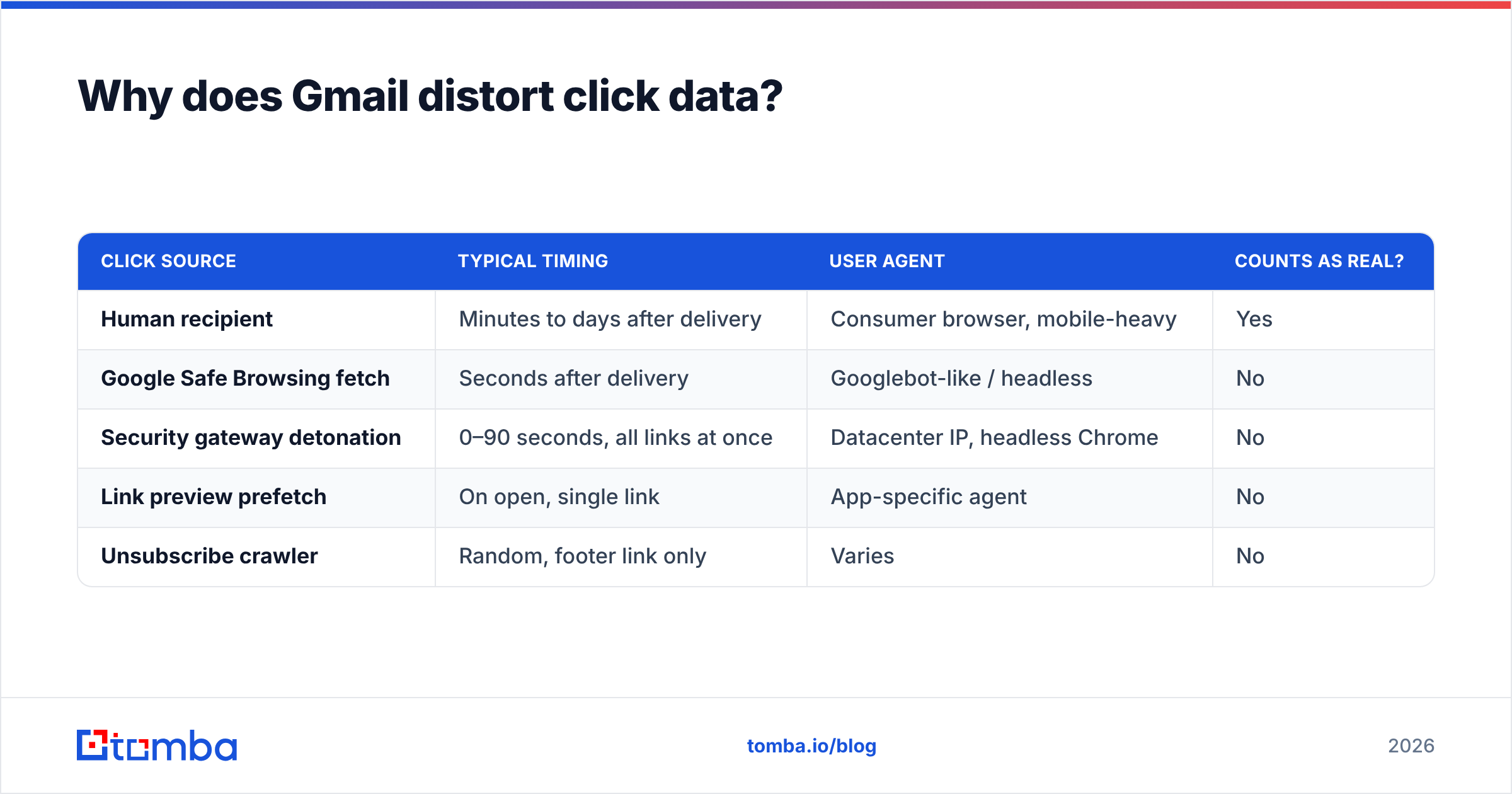
Four independent systems touch your links before a human ever does. Each one can register as a click.
Google's own link scanning. Gmail checks URLs against Safe Browsing. For unfamiliar redirect domains — exactly the kind click tracking creates — it may fetch the URL to inspect the destination. That fetch hits your redirect server and looks like a click.
Corporate security gateways. Proofpoint, Mimecast, Microsoft Defender for Office 365 Safe Links, and Barracuda all detonate links in a sandbox on delivery. If your prospect is at a mid-size or enterprise company with Google Workspace behind a security gateway, assume every link in the message gets clicked once by a machine, usually within seconds of delivery.
Prefetching and preview generation. Some clients and mobile apps prefetch link metadata to render a preview card. That is another server-side fetch.
Bulk anti-abuse crawling. If you send at volume from a new tracking domain, expect crawlers to sample your redirects.
The tell is timing and clustering. Real humans click on a distribution curve spread over hours and days. Machines click within 0–90 seconds of delivery, often several distinct links from the same message, from datacenter IP ranges, with headless or non-standard user agents. If you see a campaign reporting 40% CTR with 0% reply rate, you are not looking at engagement. You are looking at Proofpoint.
| Click source | Typical timing | User agent | Counts as real? |
|---|---|---|---|
| Human recipient | Minutes to days after delivery | Consumer browser, mobile-heavy | Yes |
| Google Safe Browsing fetch | Seconds after delivery | Googlebot-like / headless | No |
| Security gateway detonation | 0–90 seconds, all links at once | Datacenter IP, headless Chrome | No |
| Link preview prefetch | On open, single link | App-specific agent | No |
| Unsubscribe crawler | Random, footer link only | Varies | No |
Any tool that cannot show you the raw user agent and IP for a click event cannot help you filter this. That is the first question to ask a vendor.
Does click tracking hurt Gmail deliverability?#
Yes — but not because tracking is inherently penalized. It hurts when the implementation gives Gmail a reason to distrust you. Three specific failure modes account for nearly all the damage.
Shared tracking domains. If your platform defaults to track.somevendor.io and 4,000 other senders use the same host, you inherit their reputation. When one of them blasts a phishing-adjacent campaign, your links get flagged alongside theirs. This is the single most common cause of "my emails suddenly went to spam and nothing changed."
Domain mismatch. Your From domain is acme.com, your link points at acme.com, but the visible href resolves through clk-3x9.trackingnet.co. That mismatch pattern is a textbook phishing signature, and filters weight it accordingly.
HTTP redirects and long chains. A non-HTTPS redirect, or a chain of three hops before the destination, reads as cloaking. Keep it to one hop, always TLS.
Compare that to a clean setup: links.acme.com, CNAME'd to your provider, HTTPS with a valid certificate, aged at least two weeks, used only by you. That configuration is invisible to filters. Google's guidance in the Email sender guidelines is explicit that authentication alignment and consistent sending identity matter more than any single content feature — and your link domain is part of that identity.
The practical rule: track your links, but never let a stranger's domain sit between your recipient and your site. If you want to see whether your infrastructure is already carrying damage, run your sending IP and domain through a blacklist checker before you blame the copy.
What's the right Gmail click tracking setup?#
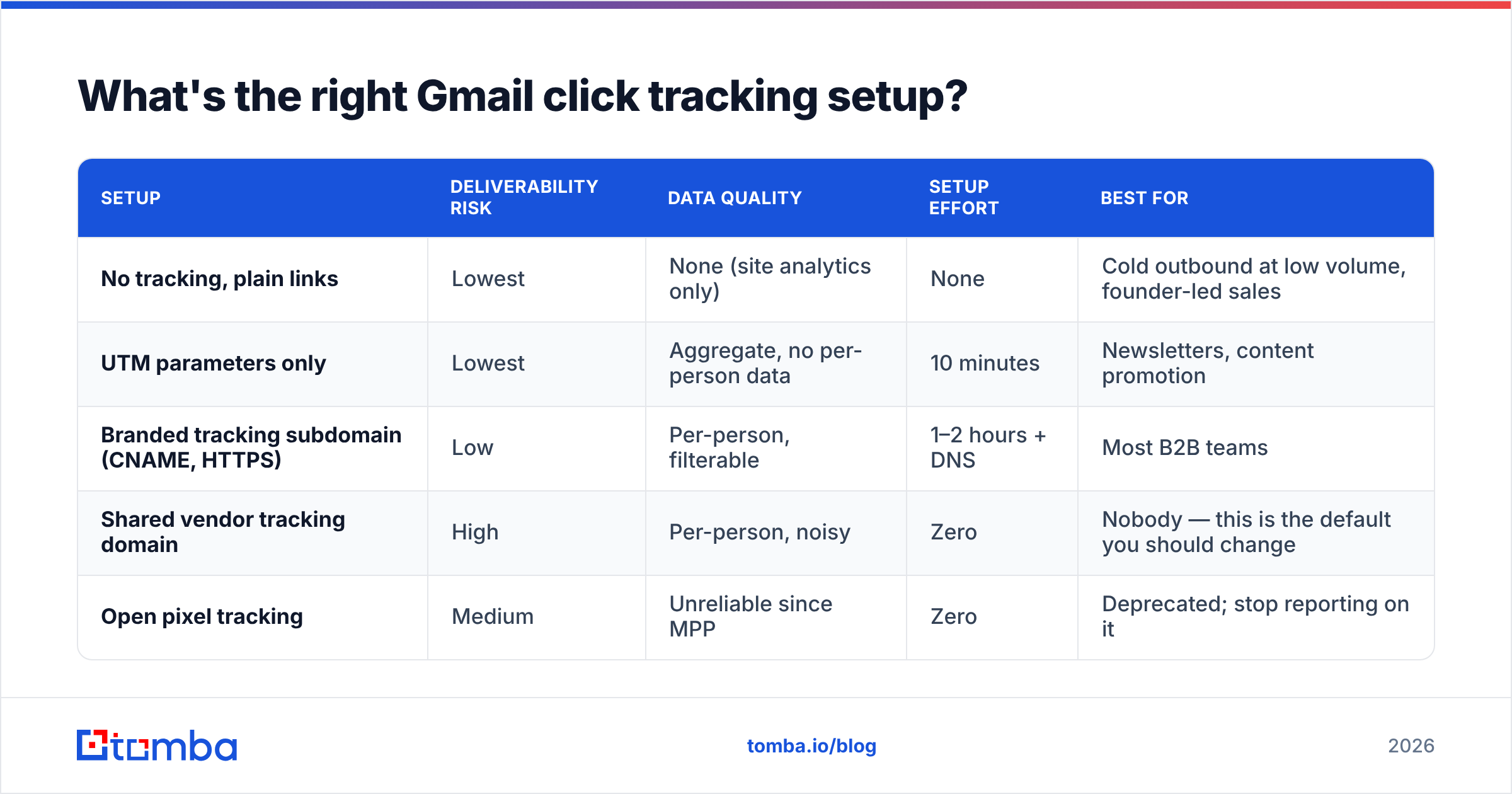
Here is how the common configurations actually compare when the recipient is on Gmail.
| Setup | Deliverability risk | Data quality | Setup effort | Best for |
|---|---|---|---|---|
| No tracking, plain links | Lowest | None (site analytics only) | None | Cold outbound at low volume, founder-led sales |
| UTM parameters only | Lowest | Aggregate, no per-person data | 10 minutes | Newsletters, content promotion |
| Branded tracking subdomain (CNAME, HTTPS) | Low | Per-person, filterable | 1–2 hours + DNS | Most B2B teams |
| Shared vendor tracking domain | High | Per-person, noisy | Zero | Nobody — this is the default you should change |
| Open pixel tracking | Medium | Unreliable since MPP | Zero | Deprecated; stop reporting on it |
The honest recommendation for most B2B outbound teams: branded subdomain, click tracking on, open tracking off entirely. Turning off the pixel removes one image request, one filter signal, and one metric your leadership will misread.
For high-value, low-volume outreach — the twenty accounts that actually matter this quarter — send with no tracking at all. Plain-text, single-link, no rewriting. The reply is your metric. That message reads as a human wrote it because a human did, and Gmail's filters are increasingly good at telling the difference.
How do you set up click tracking that survives Gmail?#
1. Register the subdomain. Use a subdomain of your sending domain: go.acme.com or links.acme.com. Never a lookalike domain you bought separately — that defeats the alignment you are trying to build.
2. Add the CNAME and provision TLS. Point it at your ESP's tracking host and confirm the certificate is valid. A cert warning on a redirect is fatal.
3. Verify your authentication is aligned. SPF, DKIM, and DMARC on the sending domain. Check your SPF record resolves within the ten-lookup limit — chained includes silently break this more often than people expect. Weak authentication plus an unfamiliar link domain is the combination that gets you filtered.
4. Warm the tracking domain alongside the sending domain. Do not attach a brand-new redirect host to a campaign going to 5,000 people on day one. Ramp it with the same curve you use for sending volume.
5. Enable click filtering in your platform. Exclude clicks that arrive under 10 seconds post-delivery, exclude known datacenter ASNs, exclude clicks where every link in the message fired simultaneously. If your platform can't do this, export raw events and filter in a spreadsheet.
6. Monitor at the domain level. Register both your sending domain and your tracking domain in Google Postmaster Tools and watch spam rate and domain reputation weekly. Anything above 0.10% user-reported spam rate needs attention before it becomes 0.30% and your inbox placement collapses.
That last point deserves emphasis: reputation problems show up in Postmaster before they show up in your reply rate. By the time your reps notice, you are two weeks into the damage.
Which tools handle Gmail click tracking best?#
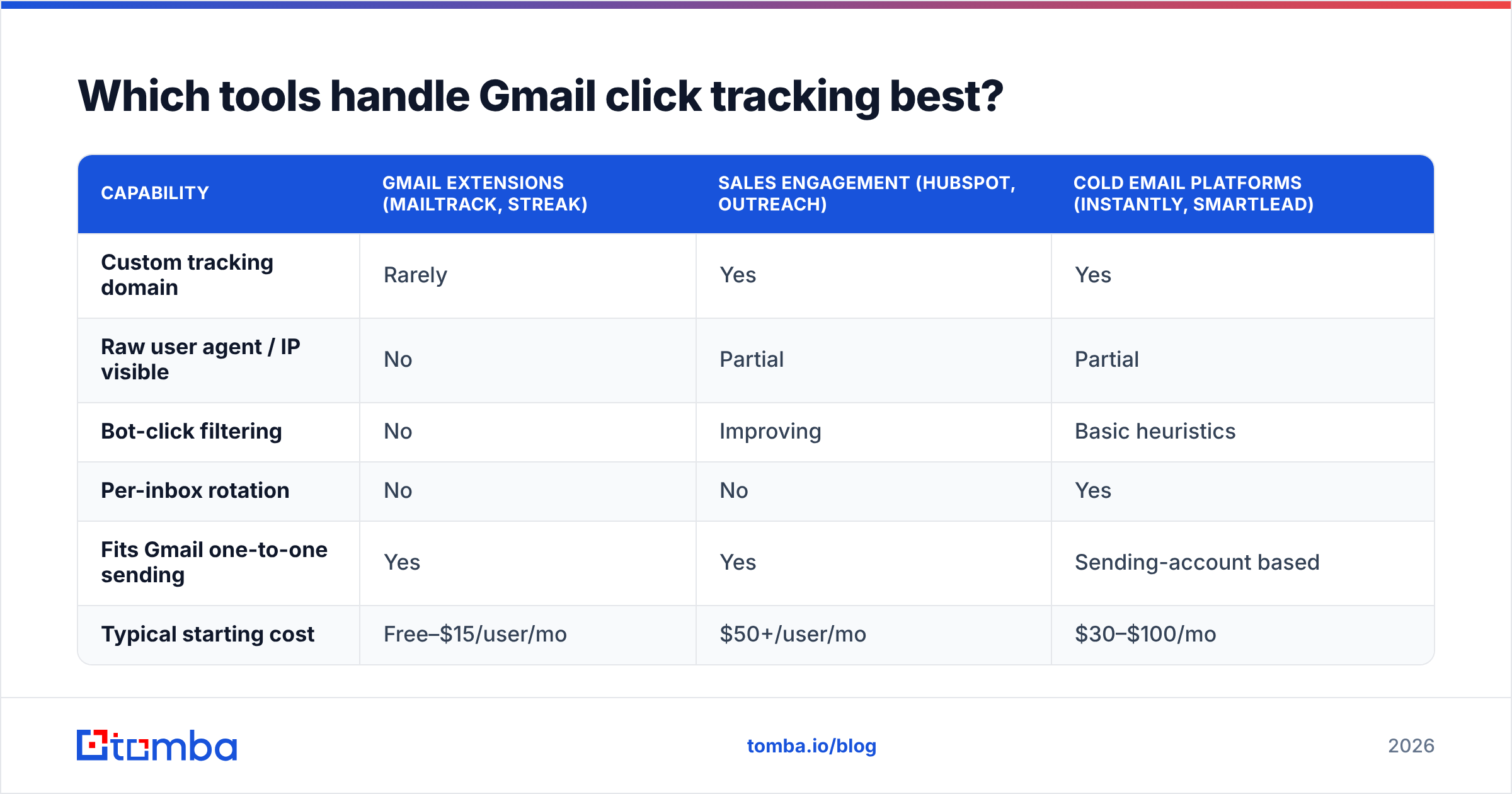
No tool eliminates machine clicks. The differences are in transparency — whether you can see the raw event and decide for yourself.
| Capability | Gmail extensions (Mailtrack, Streak) | Sales engagement (HubSpot, Outreach) | Cold email platforms (Instantly, Smartlead) |
|---|---|---|---|
| Custom tracking domain | Rarely | Yes | Yes |
| Raw user agent / IP visible | No | Partial | Partial |
| Bot-click filtering | No | Improving | Basic heuristics |
| Per-inbox rotation | No | No | Yes |
| Fits Gmail one-to-one sending | Yes | Yes | Sending-account based |
| Typical starting cost | Free–$15/user/mo | $50+/user/mo | $30–$100/mo |
If you are sending from Gmail directly and want per-recipient click data with minimal risk, a sales-engagement tool with a custom tracking domain is the practical middle ground. Extensions are convenient and genuinely useless for measurement at any volume — they cannot rotate domains, cannot filter bots, and cannot show you why a number is wrong. Vendor documentation from HubSpot and peer reviews on G2 are worth reading for the tracking-domain configuration specifics before you commit.
What should you measure instead of clicks?#
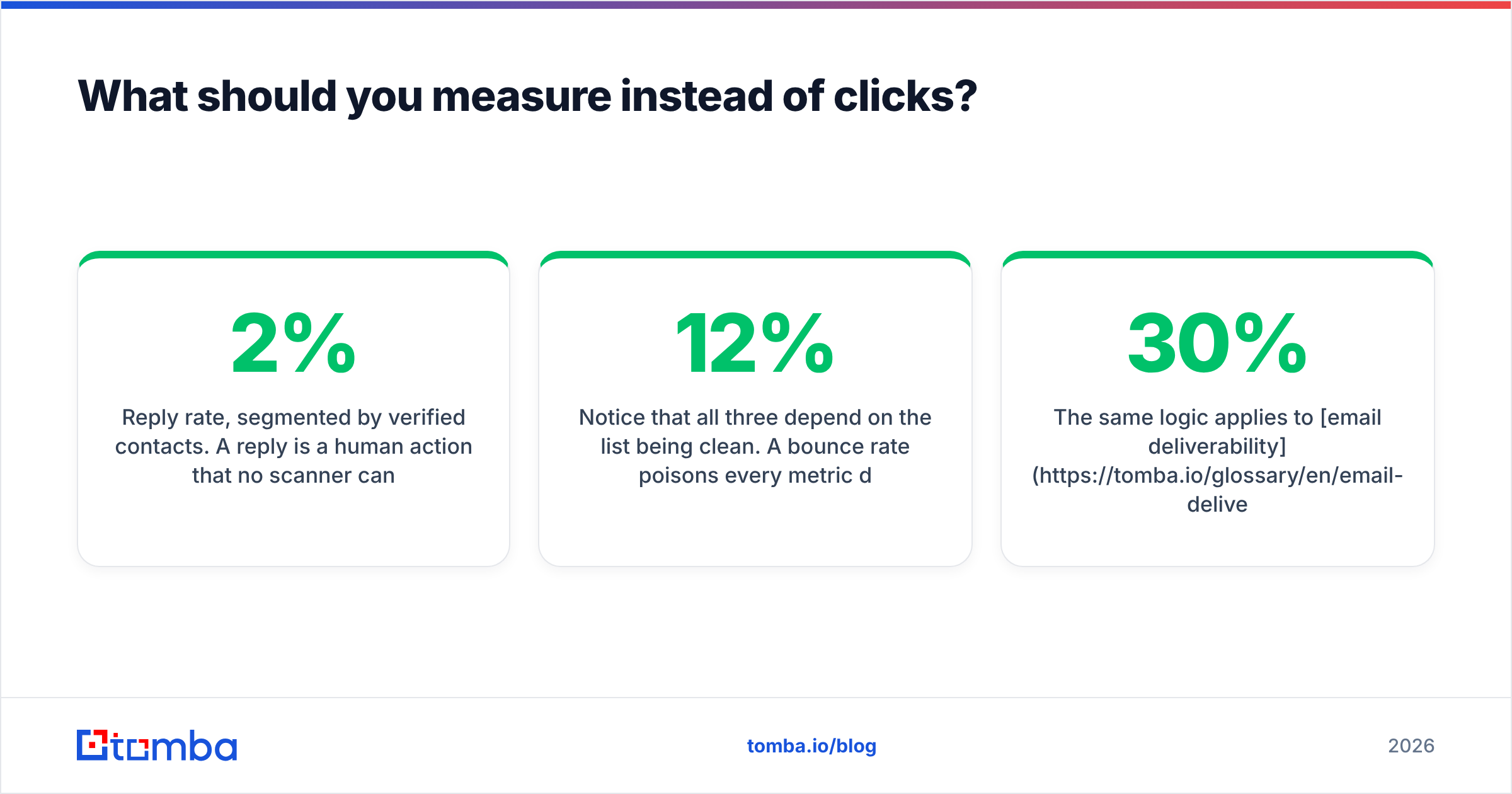
Clicks measure whether a link was fetched. That is a proxy for interest, and it was never a great one. In 2026, three metrics carry more signal.
- Reply rate, segmented by verified contacts. A reply is a human action that no scanner can fake. If your reply rate is under 2% on a well-targeted list, the problem is targeting or copy — not tracking.
- Positive reply rate. Separate "interested" from "unsubscribe me." Most teams report the combined number and quietly congratulate themselves.
- Meetings booked per 100 verified contacts. This normalizes for list quality, which is the variable that actually moves outcomes.
Notice that all three depend on the list being clean. A 12% bounce rate poisons every metric downstream and drags sender reputation with it — Gmail treats repeated hard bounces as a strong negative signal, and no amount of tracking sophistication compensates. Running your list through an email verifier before send does more for your reported numbers than any tracking configuration will.
The same logic applies to email deliverability generally. Tracking tells you what happened to messages that were delivered. It says nothing about the 30% that never arrived. Fix the arrival problem first.
Frequently asked questions#
Does Gmail block click tracking? No. Gmail delivers messages with rewritten links normally. What Gmail does is scan those links and, in some cases, filter senders whose link domains have poor reputation. The tracking is not blocked; the sender is.
Can recipients tell they're being tracked? Yes, if they hover. The status bar shows the redirect URL, not the destination. Technically sophisticated buyers notice. In some outbound contexts this actively costs you credibility, which is a real argument for tracking-free sending on your top accounts.
Is open tracking worth keeping on? For Gmail and Apple Mail audiences, no. Image proxying and Mail Privacy Protection mean opens fire on delivery for a large share of recipients. The number you get back is closer to a delivery confirmation than an engagement metric, and reporting it as engagement misleads everyone reading the dashboard.
Do UTM parameters affect deliverability? Not meaningfully. They are query strings on your own domain. Excessive parameter length can look untidy but is not a filtering signal on its own.
What CTR should I expect from Gmail recipients? After filtering machine clicks, 1–4% on cold outbound and 2–8% on opted-in lists is a realistic band. If you are seeing 20%+ on cold traffic, you have not filtered anything.
Where to start#
Fix the inputs before you optimize the measurement. Most "our click rate dropped" investigations end at the same place: the list contained stale, guessed, or catch-all addresses, bounces spiked, reputation slipped, and inbox placement quietly fell off a cliff while the tracking dashboard kept reporting a number that looked fine.
Start by building the list from verified, current data. The Tomba Email Finder returns business emails with a confidence score and source attribution, so you know which addresses are pattern-inferred and which are confirmed — and you can drop the guesses before they ever reach Gmail. The free tier includes 25 searches per month, Starter is $49/mo, and the Growth plan at $99/mo covers most outbound teams running multi-domain sending. Clean input, honest metrics, fewer mysteries in the dashboard.
Related guides#
Ready to find emails that actually work?
Join 150,000+ professionals who stopped guessing and started sending. Free credits on signup — no credit card required.
Get the Tomba newsletter
Practical outbound tactics and product updates — once every two weeks.
About the author