Gmail Email Extractor: How to Extract Gmail Addresses in 2026
Most Gmail email extractors scrape addresses that bounce, break Google's terms, or both. Here is what actually works in 2026 — the tool types, the accuracy gaps, and the legal lines you should not cross.
TL;DR
- "Gmail email extractor" describes four very different tools: inbox extractors (pull addresses out of your own Gmail), page scrapers (harvest
@gmail.comstrings off web pages), pattern generators (guessfirstname.lastname@gmail.com), and B2B finders (return verified business emails, occasionally Gmail-hosted). - Scraped Gmail lists bounce hardest. Free-mail addresses have no SMTP-verifiable pattern logic behind them, so guessing is close to worthless — you either find the address or you don't.
- Extracting from your own inbox is fine. Harvesting
@gmail.comaddresses off third-party sites sits on the wrong side of GDPR Article 6 and CAN-SPAM's harvesting provisions. - For B2B outbound, a company-domain address beats a Gmail address on deliverability, reply rate, and legal footing almost every time.
- Best workflow in 2026: extract from owned data (inbox, CRM, signups), enrich to work emails where possible, and verify everything before sending.
What is a Gmail email extractor?#
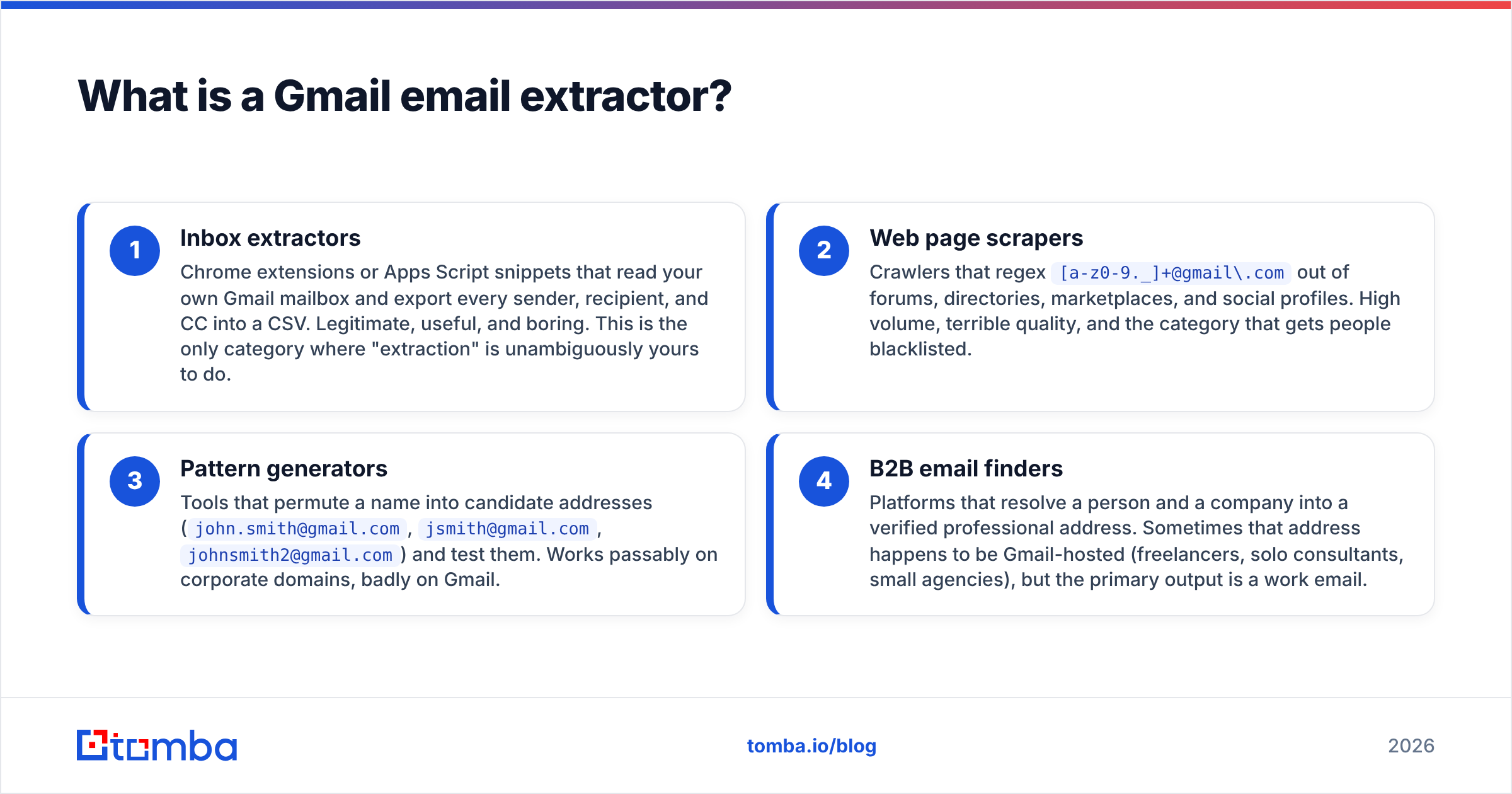
A Gmail email extractor is any tool that pulls @gmail.com addresses out of a source you point it at. That is where the agreement ends — the category is a bag of four unrelated products sold under one keyword.
Here is the honest breakdown:
- Inbox extractors — Chrome extensions or Apps Script snippets that read your own Gmail mailbox and export every sender, recipient, and CC into a CSV. Legitimate, useful, and boring. This is the only category where "extraction" is unambiguously yours to do.
- Web page scrapers — Crawlers that regex
[a-z0-9._]+@gmail\.comout of forums, directories, marketplaces, and social profiles. High volume, terrible quality, and the category that gets people blacklisted. - Pattern generators — Tools that permute a name into candidate addresses (
john.smith@gmail.com,jsmith@gmail.com,johnsmith2@gmail.com) and test them. Works passably on corporate domains, badly on Gmail. - B2B email finders — Platforms that resolve a person and a company into a verified professional address. Sometimes that address happens to be Gmail-hosted (freelancers, solo consultants, small agencies), but the primary output is a work email.
Most people who search for a gmail email extractor actually want #4 and land on #2. That mismatch is why so many extracted lists produce 30% bounce rates.
Why do Gmail addresses break pattern-based finding?#
Because Gmail usernames carry no organizational logic. On a corporate domain, stripe.com uses first@, shopify.com uses first.last@ — learn the pattern once and you can resolve everyone at that company. Think of it like apartment numbering: once you know the building runs 101, 102, 103, you can find any unit. Gmail is a field of unnumbered houses.
A Gmail username is whatever was available in 2007. john.smith@gmail.com was claimed decades ago; the actual John Smith you want is jsmith.nyc.1988@gmail.com or johnsmithmusic@gmail.com. There is no derivable rule.
Three compounding problems:
- Dot-blindness. Google ignores periods entirely.
j.o.h.n@gmail.comandjohn@gmail.comdeliver to the same mailbox. That means SMTP verification returns "valid" for permutations that no human ever uses, inflating false-positive rates in any tool that reports verification confidence. - Plus-addressing noise.
john+netflix@gmail.comis deliverable but was never meant for you, and filtering on it often lands the mail in a folder the owner never reads. - No catch-all signal. On corporate domains a catch-all verifier tells you whether "valid" means anything. Gmail accepts or rejects per mailbox, so you lose one of the most useful diagnostic layers — but you also lose the ability to distinguish an active mailbox from a dormant one created in 2011 and abandoned.
Net result: verification tools can tell you a Gmail address exists. They cannot tell you it belongs to the person you think it does, or that anyone still opens it.
Which extraction method should you use?#
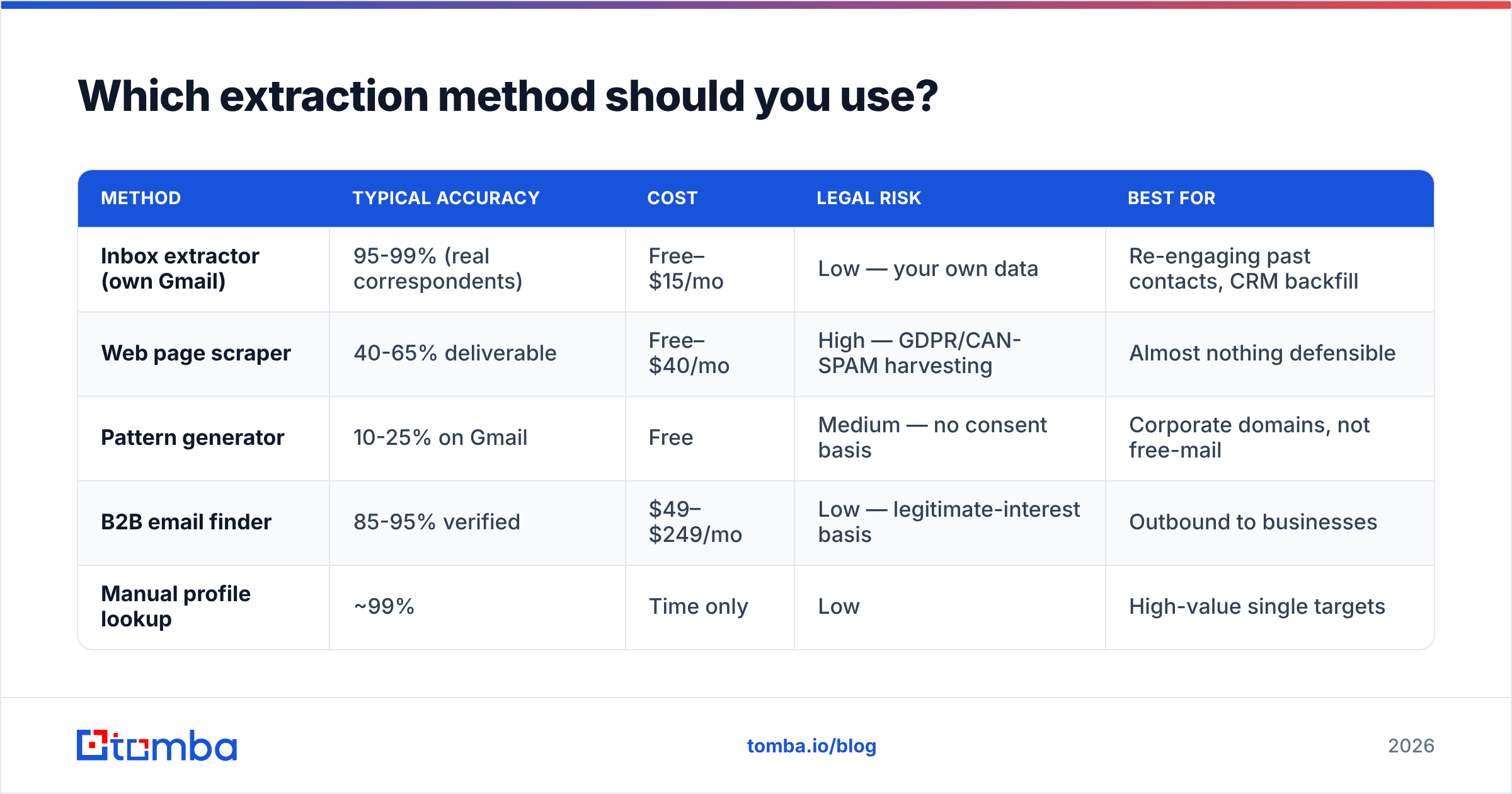
Match the method to the source you legitimately control. Here is how the four approaches compare on the metrics that actually determine outcomes:
| Method | Typical accuracy | Cost | Legal risk | Best for |
|---|---|---|---|---|
| Inbox extractor (own Gmail) | 95-99% (real correspondents) | Free–$15/mo | Low — your own data | Re-engaging past contacts, CRM backfill |
| Web page scraper | 40-65% deliverable | Free–$40/mo | High — GDPR/CAN-SPAM harvesting | Almost nothing defensible |
| Pattern generator | 10-25% on Gmail | Free | Medium — no consent basis | Corporate domains, not free-mail |
| B2B email finder | 85-95% verified | $49–$249/mo | Low — legitimate-interest basis | Outbound to businesses |
| Manual profile lookup | ~99% | Time only | Low | High-value single targets |
The pattern in that table is consistent: the cheaper and more automated the extraction, the worse the data and the higher the exposure. Scraping is the only row where you pay less and get less on every dimension.
If your goal is B2B outbound, method four is not a compromise — it's a strictly better product. A verified work address at acme.com outperforms a personal Gmail on inbox placement (corporate domains have reputation history), on reply rate (people triage work mail during work hours), and on compliance (legitimate interest is a defensible basis for B2B contact in the EU; unsolicited mail to a personal address is not).
Is extracting Gmail addresses legal?#
Short answer: extracting from your own mailbox is fine, harvesting from the web is not.
The distinction that matters is source and basis, not technique.
Generally defensible:
- Exporting contacts from a Gmail account you own or administer.
- Pulling addresses from your CRM, signup forms, or event registrations.
- Finding a business contact's work email for a relevant B2B pitch, with an opt-out in every message.
Generally not defensible:
- Regexing
@gmail.comstrings off forums, Facebook groups, or classified sites. - Buying a "5M verified Gmail leads" file. Nobody consented, and the "verified" claim is nearly always a stale SMTP ping.
- Guessing personal addresses and mailing them cold.
The specifics: CAN-SPAM does not ban commercial email outright, but the FTC treats address harvesting and dictionary attacks as aggravating factors that raise penalties per message. Under GDPR, a personal @gmail.com address is personal data regardless of where you found it, and "it was publicly visible" is not a lawful basis under Article 6 — publication is not consent. B2B contact at a company domain has a much stronger legitimate-interest argument, which is the practical reason to prefer work emails.
Google's own Gmail sender guidelines add an operational layer: since the 2024 bulk-sender rules, anyone sending over 5,000 messages a day to Gmail addresses must keep spam complaints under 0.3% and pass SPF, DKIM, and DMARC. Scraped lists blow through that threshold fast, and once your sender reputation drops, every Gmail recipient you have — including the good ones — starts landing in spam.

How do the main tool categories compare on price?#
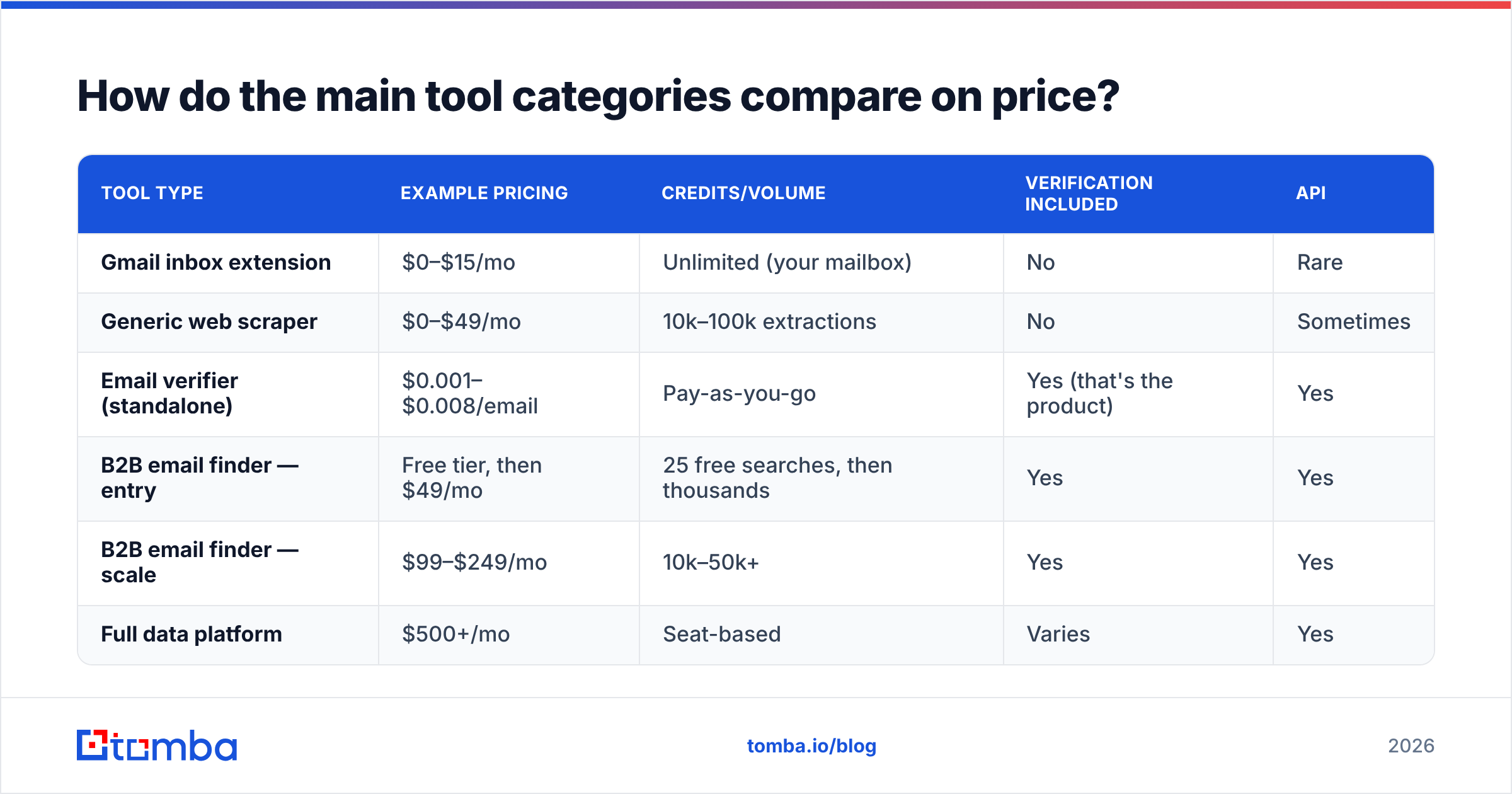
Pricing across this space is wildly inconsistent because the products aren't comparable. Here's the 2026 landscape at a glance:
| Tool type | Example pricing | Credits/volume | Verification included | API |
|---|---|---|---|---|
| Gmail inbox extension | $0–$15/mo | Unlimited (your mailbox) | No | Rare |
| Generic web scraper | $0–$49/mo | 10k–100k extractions | No | Sometimes |
| Email verifier (standalone) | $0.001–$0.008/email | Pay-as-you-go | Yes (that's the product) | Yes |
| B2B email finder — entry | Free tier, then $49/mo | 25 free searches, then thousands | Yes | Yes |
| B2B email finder — scale | $99–$249/mo | 10k–50k+ | Yes | Yes |
| Full data platform | $500+/mo | Seat-based | Varies | Yes |
Tomba sits in the fourth and fifth rows: a free tier at 25 searches per month, Starter at $49/mo, Growth at $99/mo, and Pro at $249/mo, with Enterprise negotiated. Full Tomba pricing is public. Peers like BookYourData take a different route — pay-per-record database access rather than per-search credits — which works well when you want a defined list up front rather than resolving contacts one at a time. Neither model is universally better; buy database access when you know the segment, buy search credits when you're chasing named accounts.
What you should refuse to pay for: any tool selling raw scraped Gmail volume with no verification layer. Extraction without verification is just a bounce list with extra steps.
What does a defensible Gmail workflow look like in 2026?#
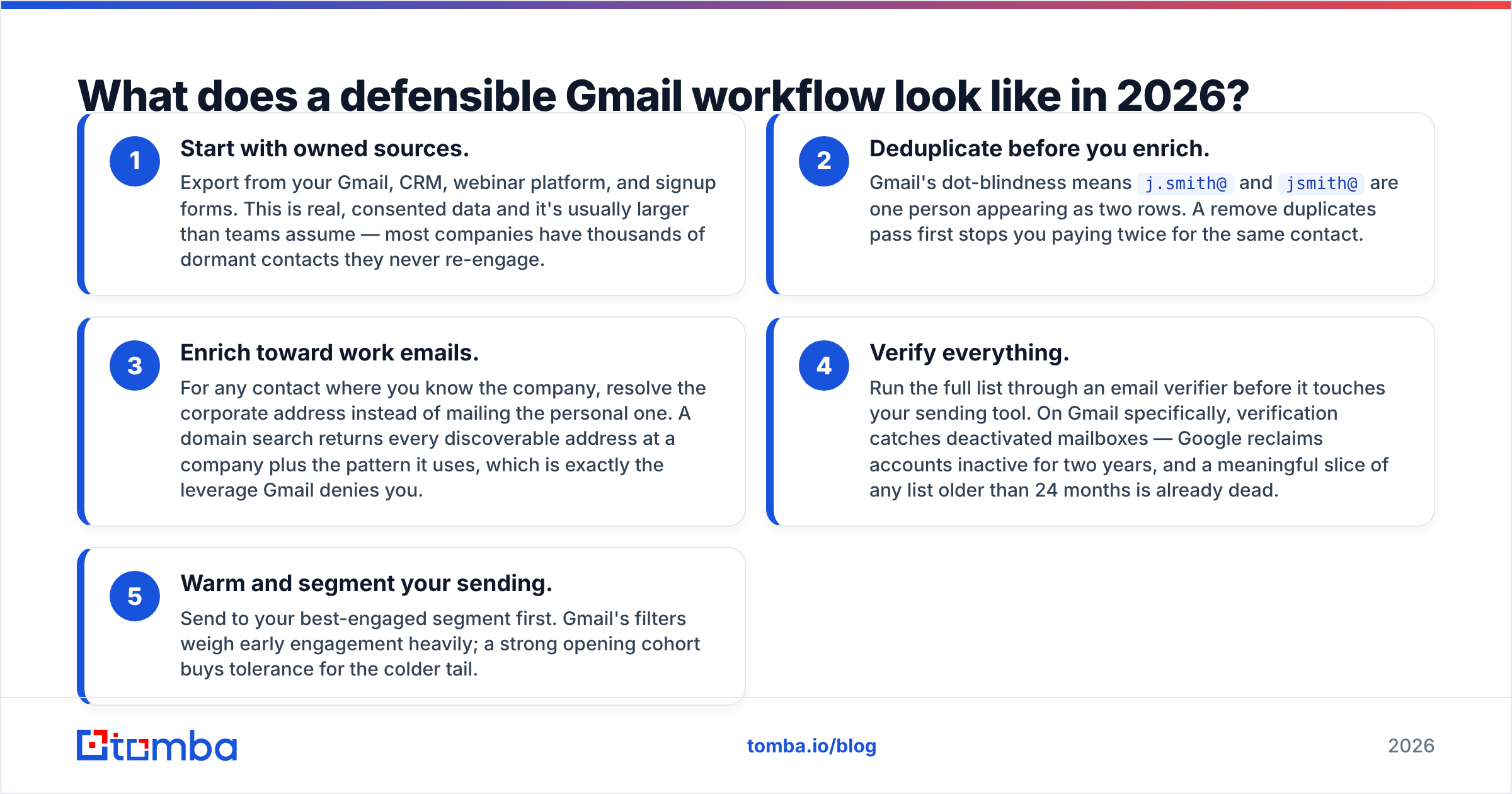
Five steps, in order. Skipping step four is how good campaigns die.
- Start with owned sources. Export from your Gmail, CRM, webinar platform, and signup forms. This is real, consented data and it's usually larger than teams assume — most companies have thousands of dormant contacts they never re-engage.
- Deduplicate before you enrich. Gmail's dot-blindness means
j.smith@andjsmith@are one person appearing as two rows. A remove duplicates pass first stops you paying twice for the same contact. - Enrich toward work emails. For any contact where you know the company, resolve the corporate address instead of mailing the personal one. A domain search returns every discoverable address at a company plus the pattern it uses, which is exactly the leverage Gmail denies you.
- Verify everything. Run the full list through an email verifier before it touches your sending tool. On Gmail specifically, verification catches deactivated mailboxes — Google reclaims accounts inactive for two years, and a meaningful slice of any list older than 24 months is already dead.
- Warm and segment your sending. Send to your best-engaged segment first. Gmail's filters weigh early engagement heavily; a strong opening cohort buys tolerance for the colder tail.
That workflow trades raw volume for deliverability, and the math favors it. A 500-address verified list at a 4% reply rate produces 20 conversations. A 10,000-address scraped list at a 0.15% reply rate produces 15 — and torches your domain in the process.
When is a Gmail address actually the right target?#
Sometimes it genuinely is the best address available, and pretending otherwise is unhelpful.
- Solo founders and freelancers. A one-person consultancy often runs entirely on Gmail. There is no
@company.comto find because the company is one laptop. - Creators, authors, and independent researchers. Contact addresses on personal sites and bylines are frequently Gmail. An author finder resolves these from article URLs, which is far more reliable than regexing the page.
- Pre-launch startups. Founders in stealth use personal mail until the domain is live.
- Recruiting. Candidates prefer personal addresses for job conversations — mailing someone's work account about leaving their job is a bad look.
- Warm reactivation. If a past customer signed up with Gmail, that's the address they gave you. Use it.
In each case the address comes from a legitimate source — a byline, a signup, a public business contact page for a one-person business — not from a bulk harvest. The source is what makes it defensible, not the domain.
What should you look for in an extraction tool?#
Six criteria, weighted by how much they affect outcomes:
- Verification built in, not bolted on. If the tool exports addresses it hasn't checked, you're buying half a product and paying a verifier for the other half.
- Confidence scores per address. A number you can threshold on beats a binary valid/invalid, especially on free-mail domains where certainty is genuinely lower.
- Transparent sourcing. Vendors who won't say where the data came from are usually aggregating scraped files. Ask, and read the answer — Tomba publishes its data sources for exactly this reason.
- API and workflow access. Manual CSV shuffling doesn't scale. A proper email finder API or a Google Sheets add-on keeps extraction inside your existing process.
- Credit rollover and honest limits. Check whether unused credits expire monthly and whether "searches" and "verifications" draw from the same pool.
- A real free tier. You cannot evaluate accuracy from a marketing page. Test 25 contacts you already know the answers for, then compare hit rate against the vendor's claim. Independent reviews on G2 are useful for support and billing signals, but accuracy you have to measure yourself.
Run that test on your own ICP, not on a generic sample. Accuracy varies enormously by geography, company size, and industry — a tool that hits 92% on US SaaS may hit 60% on European manufacturing.
The bottom line#
Skip the scrapers. The "gmail email extractor" category is dominated by tools that harvest low-quality addresses in ways that create legal exposure and wreck your sender reputation, and the addresses they return are the least valuable ones in B2B anyway.
Extract from what you own. Enrich toward work emails. Verify before every send.
When you need to resolve a real person at a real company into a deliverable address — including the Gmail-hosted freelancers and solo operators — the Tomba Email Finder does it with verification in the same call, starting free at 25 searches a month and scaling to $49/mo when you're ready. Test it against contacts you can already verify, then decide.
Related guides#
Ready to find emails that actually work?
Join 150,000+ professionals who stopped guessing and started sending. Free credits on signup — no credit card required.
Get the Tomba newsletter
Practical outbound tactics and product updates — once every two weeks.
About the author