Gmail IP Reputation Check: How to Test and Fix It in 2026
Gmail scores your sending IP and domain before it ever looks at your subject line. Here is how to actually check that score, read the data, and fix a bad one before your cold email stops landing.
TL;DR
- Gmail does not publish a single "IP reputation score." It publishes a bucketed rating (Bad / Low / Medium / High) inside Google Postmaster Tools, and only once your domain sends enough volume to register.
- A real gmail ip reputation check means three things at once: Postmaster Tools IP + domain reputation, blocklist status across the major RBLs, and your own spam-complaint and bounce data.
- Shared IPs (Google Workspace, most sending platforms) mean your IP reputation is largely inherited. Your domain reputation is the lever you actually control.
- The two fastest ways to tank reputation: sending to invalid addresses and sending to people who never asked. Both are fixable before you press send.
- Recovery takes 2–6 weeks of disciplined, reduced-volume sending. There is no reset button, no "clean IP" purchase that survives contact with reality.
What is a Gmail IP reputation check?#
A Gmail IP reputation check is the process of finding out how Google's spam filters currently rate the sending IP address and domain behind your email — before Gmail decides whether your next campaign lands in Primary, Promotions, or spam.
Think of it like a credit score for your mail server. A bank does not read your loan application first and then decide; it pulls your score, and the score decides how carefully anyone reads anything else. Gmail works the same way. Your subject line, your copy, your images — all of that gets weighed after the reputation gate. If the gate is closed, the best cold email you have ever written goes to spam.
Google exposes this through Google Postmaster Tools, which reports two separate reputations:
- IP reputation — the rating of the specific IP address your mail leaves from. Relevant if you are on a dedicated IP.
- Domain reputation — the rating of the domain in your authenticated
From/ DKIMd=value. Relevant to everyone, always.
Most people asking about a "Gmail IP reputation check" actually need the domain number. If you send through Google Workspace, Outlook 365, SendGrid shared pools, Instantly, Smartlead, or any standard SMTP provider, the IP is shared with hundreds or thousands of other senders. You did not earn that IP's reputation and you cannot single-handedly fix it. Your domain, however, is yours alone.
How do you actually check Gmail IP reputation?#
There is no single dashboard. You triangulate from four sources, in this order.
- Google Postmaster Tools (the source of truth). Add your sending domain, verify with a TXT record, wait 24–72 hours. Look at the IP Reputation and Domain Reputation tabs. Ratings are Bad, Low, Medium, High — no numeric score, deliberately.
- Blocklist / RBL status. Check whether your IP or domain appears on Spamhaus, SORBS, Barracuda, or SpamCop. A single listing on Spamhaus ZEN is a hard stop. Run a blacklist checker against both the IP and the root domain.
- Authentication records. SPF, DKIM, and DMARC must all pass and align. Since Google and Yahoo's 2024 bulk-sender rules, a missing DMARC record on a domain sending 5,000+ messages a day to Gmail is an automatic reputation drag. Verify with an SPF checker.
- Your own engagement metrics. Spam complaint rate must stay under 0.30% and ideally under 0.10%. Bounce rate under 2%. These are the inputs that produce the reputation rating — watching them is faster than watching the rating itself, which lags by days.
A useful mental shortcut: Postmaster Tools tells you what Gmail already decided. Your bounce and complaint data tells you what Gmail is about to decide.
What each Postmaster rating actually means#
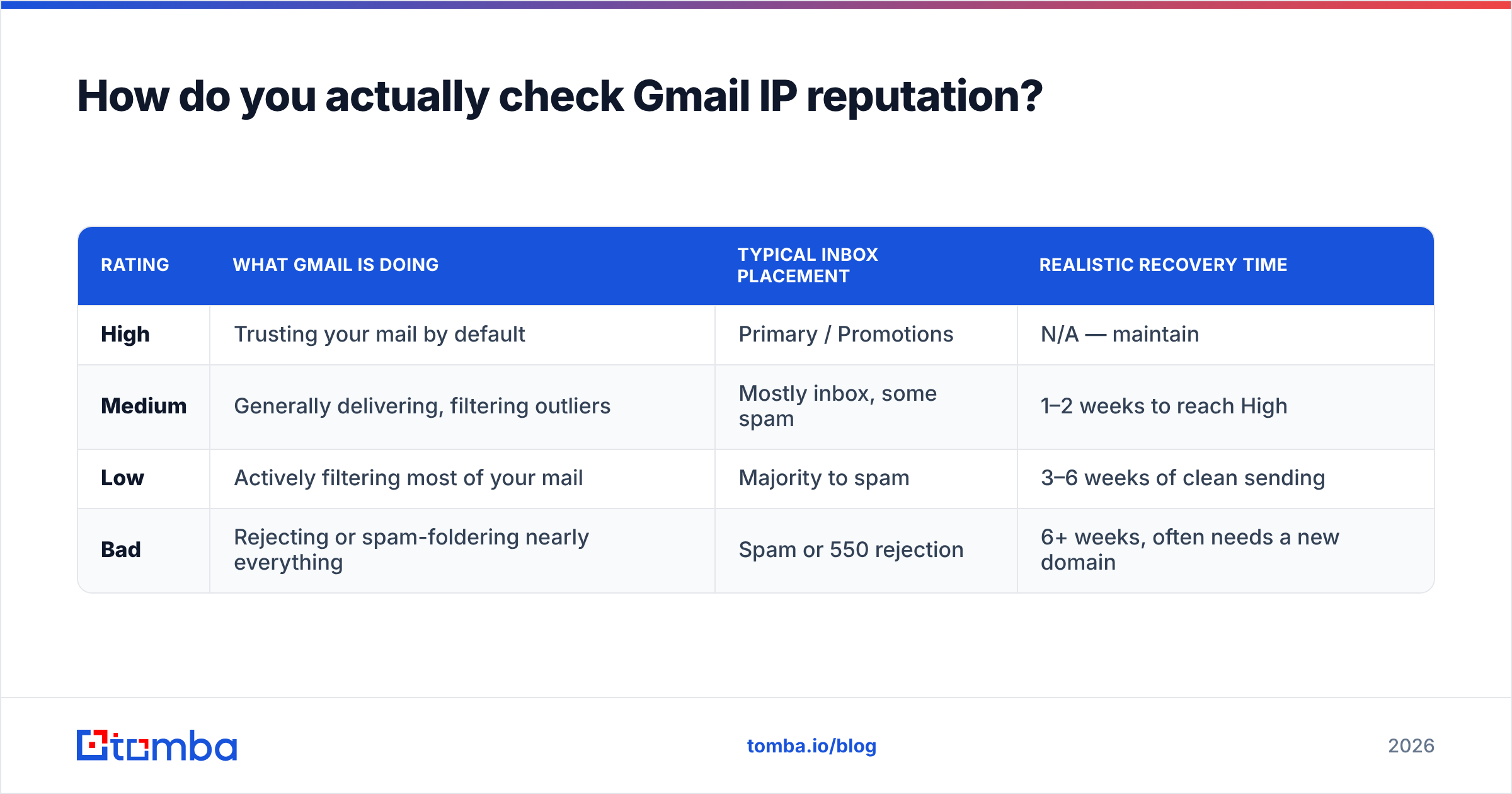
| Rating | What Gmail is doing | Typical inbox placement | Realistic recovery time |
|---|---|---|---|
| High | Trusting your mail by default | Primary / Promotions | N/A — maintain |
| Medium | Generally delivering, filtering outliers | Mostly inbox, some spam | 1–2 weeks to reach High |
| Low | Actively filtering most of your mail | Majority to spam | 3–6 weeks of clean sending |
| Bad | Rejecting or spam-foldering nearly everything | Spam or 550 rejection | 6+ weeks, often needs a new domain |
The gap between Medium and Low is the one that surprises people. Medium feels fine — replies still come in. Low is a cliff: the same list, the same copy, and suddenly a 70% drop in replies with zero warning email from Google.
Why does Gmail rate IPs and domains separately?#
Because spammers rotate IPs faster than they rotate brands. Separating the two lets Google punish a throwaway IP without punishing every legitimate sender who happens to share a data center, and lets it punish a domain that keeps migrating to fresh IPs.
Here is how the two interact in practice:
- Dedicated IP + established domain — both scores are yours. Full control, full responsibility. Worth it above roughly 100,000 messages/month.
- Shared IP + your own domain — the common case. The IP score is a shared average you can barely move; the domain score carries almost all the weight in filtering decisions.
- Shared IP + shared domain (e.g., sending from a platform's subdomain) — you control almost nothing. Avoid for cold outreach.
- Dedicated IP + brand-new domain — the worst possible start. No history on either signal, so Gmail defaults to suspicion. This is why warmup exists.
- Subdomain strategy — sending outbound from
mail.yourcompany.comisolates cold-email risk from your corporate root domain's reputation. Standard practice, and the single cheapest insurance policy in outbound.
For a working definition of the underlying concepts, Tomba's glossary entries on email deliverability and sender reputation are a decent five-minute primer.
Which tools should you use for a Gmail IP reputation check?#
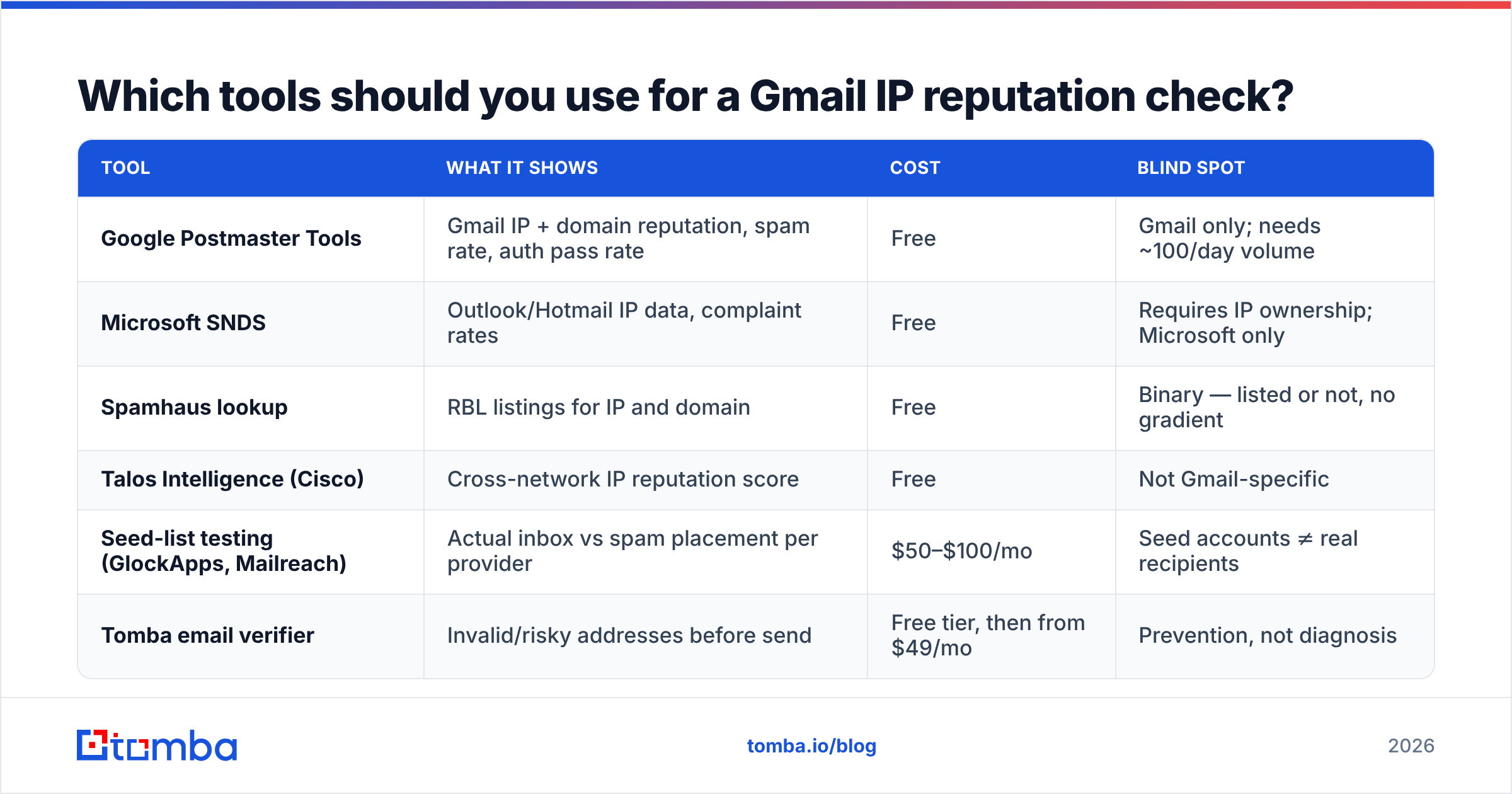
Postmaster Tools is mandatory and free, but it has a hard limitation: it only reports once your domain crosses roughly 100 messages per day to Gmail recipients, and it shows Gmail data only. Everything else in the stack fills a specific blind spot.
| Tool | What it shows | Cost | Blind spot |
|---|---|---|---|
| Google Postmaster Tools | Gmail IP + domain reputation, spam rate, auth pass rate | Free | Gmail only; needs ~100/day volume |
| Microsoft SNDS | Outlook/Hotmail IP data, complaint rates | Free | Requires IP ownership; Microsoft only |
| Spamhaus lookup | RBL listings for IP and domain | Free | Binary — listed or not, no gradient |
| Talos Intelligence (Cisco) | Cross-network IP reputation score | Free | Not Gmail-specific |
| Seed-list testing (GlockApps, Mailreach) | Actual inbox vs spam placement per provider | $50–$100/mo | Seed accounts ≠ real recipients |
| Tomba email verifier | Invalid/risky addresses before send | Free tier, then from $49/mo | Prevention, not diagnosis |
The last row is the one most teams skip and then regret. Reputation tools tell you the fire started. Verification stops the arson. Roughly the fastest way to move a domain from High to Low is a 5,000-contact blast to a scraped list where 15% of the addresses no longer exist — Gmail reads that bounce pattern as list-buying behavior, and it is not wrong.
How do you fix a bad Gmail reputation?#
Slowly, and by fixing the inputs rather than chasing the score. A concrete 30-day sequence:
Days 1–3: Stop and diagnose. Pause all cold campaigns. Pull Postmaster Tools data. Check every RBL. Confirm SPF, DKIM, and DMARC pass with alignment. Fix authentication first — it is binary and it is free.
Days 4–7: Clean the list.
Run the entire database through verification. Remove hard bounces, role accounts (info@, sales@, admin@), spam traps, and anything unverified. For catch-all domains, which return "accept-all" at SMTP level, use a dedicated catch-all check rather than guessing — those are the addresses that quietly drive up your unknown-user rate.
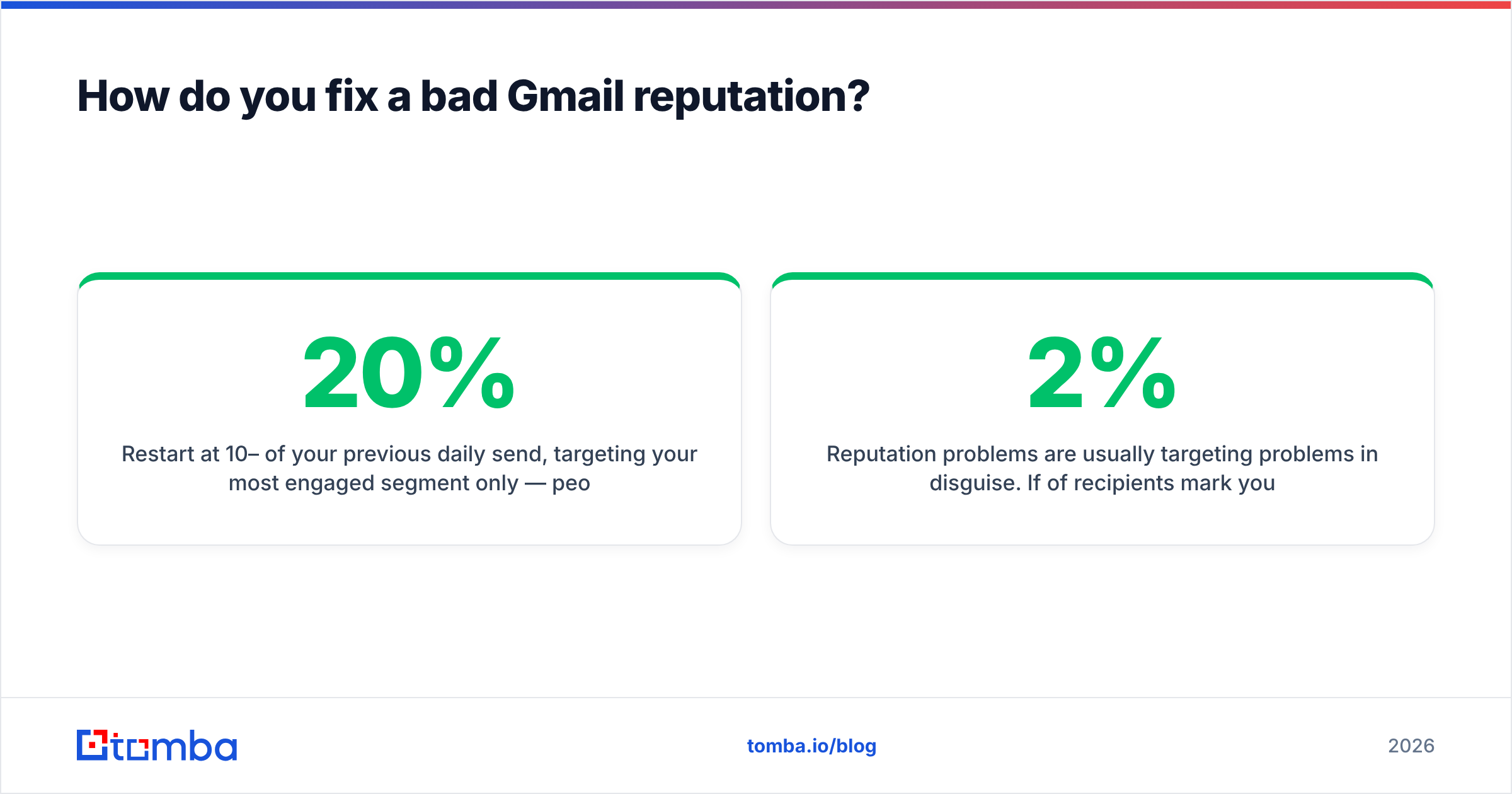
Days 8–21: Re-warm at low volume. Restart at 10–20% of your previous daily send, targeting your most engaged segment only — people who have replied or opened in the past 90 days. Positive engagement signals are the only thing that pulls a rating up. Increase volume by roughly 20% every three days if complaint rate stays under 0.10%.
Days 22–30: Rebuild targeting. Reputation problems are usually targeting problems in disguise. If 2% of recipients mark you as spam, the copy is not the issue — the audience is. Rebuild segments around real fit signals, and source contacts from verified data rather than scraped exports.
Ongoing: Monitor weekly. Postmaster Tools every Monday. Complaint rate on every campaign. A sender reputation checker for a quick outside-in read between Postmaster refreshes.
One thing that does not work: buying a new IP or domain and continuing the same behavior. Google's filters weight domain age, sending consistency, and engagement history. A fresh domain buys you about two weeks of neutral treatment before the same pattern produces the same rating. Multiple sources — including G2 reviews of deliverability tools and vendor postmortems — show the same cycle repeating across teams that treat domains as disposable.
What actually drives the rating up or down?#
Ranked by measured impact on Gmail's filtering, heaviest first:
- Spam complaint rate. The dominant signal. Above 0.30% sustained, expect a downgrade within days. Google's own bulk sender guidelines name this threshold explicitly.
- Unknown-user bounces. Sending to addresses that do not exist signals a purchased or stale list. Keep it under 2%; under 1% is achievable with verification.
- Positive engagement. Opens are weak signal in 2026 (Apple MPP and Gmail image proxying inflate them). Replies, "not spam" clicks, and message-moves-to-Primary are strong signal.
- Authentication and alignment. SPF + DKIM + DMARC passing with alignment is table stakes, not an advantage — but failing it is a heavy penalty.
- Volume consistency. 500/day every day beats 3,500 on Monday and nothing until the next Monday. Spikes look automated because they are.
- Unsubscribe friction. One-click list-unsubscribe headers (RFC 8058) are required for bulk senders. Making unsubscribing hard converts would-be unsubscribes into spam complaints, which cost roughly 100x more.
Notice what is absent from that list: subject-line wording, the number of links, the word "free," image-to-text ratio. Content filtering still exists, but for a domain with good reputation signals it is a rounding error. For a domain with bad signals, perfect copy will not save you. That is the entire reason a reputation check comes before a copy review.
Should you use a dedicated IP for cold outreach?#
Usually no — and this is where a lot of advice ages badly.
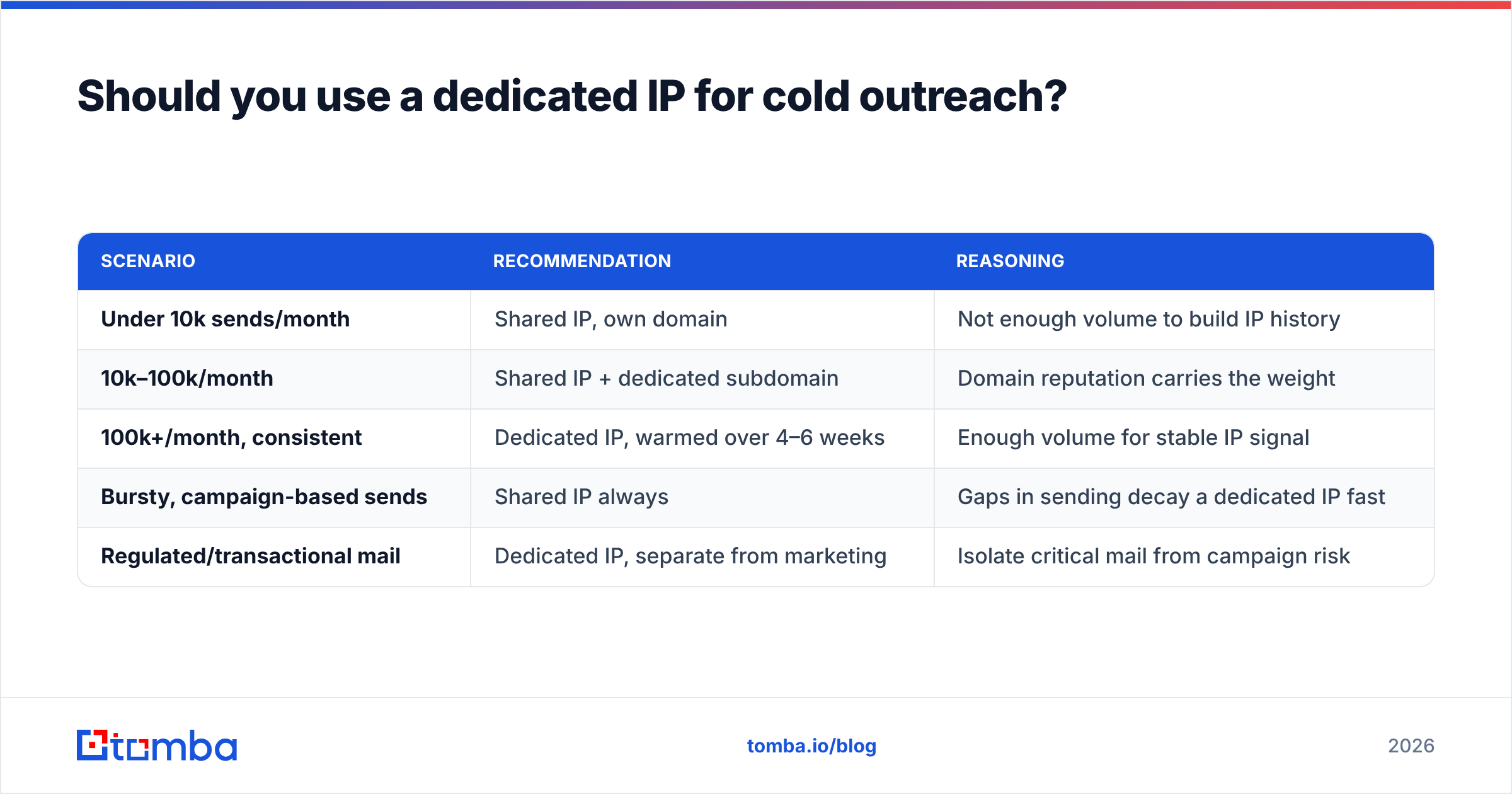
A dedicated IP means the reputation is 100% yours: no shared-pool neighbors dragging you down, no free-riding on a good pool. But it also means you start from zero history, and Gmail treats zero history as mild suspicion. You need consistent, meaningful volume (a common industry rule of thumb is 100,000+ messages/month) to generate enough signal for Gmail to build a stable IP reputation at all. Below that, the IP looks intermittent, and intermittent looks automated.
| Scenario | Recommendation | Reasoning |
|---|---|---|
| Under 10k sends/month | Shared IP, own domain | Not enough volume to build IP history |
| 10k–100k/month | Shared IP + dedicated subdomain | Domain reputation carries the weight |
| 100k+/month, consistent | Dedicated IP, warmed over 4–6 weeks | Enough volume for stable IP signal |
| Bursty, campaign-based sends | Shared IP always | Gaps in sending decay a dedicated IP fast |
| Regulated/transactional mail | Dedicated IP, separate from marketing | Isolate critical mail from campaign risk |
The subdomain-plus-shared-IP combination handles the vast majority of B2B outbound programs. It gives you a reputation surface you fully control (the subdomain) while letting the provider absorb the IP-level maintenance. Peers in the space — including tools like BookYourData that supply verified B2B contact data — make the same architectural point: the data quality feeding the send matters more than the IP topology carrying it.
How does list quality change your Gmail reputation math?#
Directly and immediately, because bounces and complaints are both downstream of who is on your list.
Run the arithmetic on a 5,000-contact send:
- Unverified scraped list: ~12% invalid → 600 bounces. That is a 12% unknown-user rate against a 2% ceiling. Reputation downgrade in one campaign.
- Verified list: ~1% invalid → 50 bounces. Well inside tolerance. No signal change.
- Verified + fit-targeted list: ~1% invalid, complaint rate near 0.05% because recipients recognize why they were contacted. Reputation trends up.
The difference between the first and third row is not a deliverability tool. It is sourcing. Pulling contacts through a domain search that returns current, pattern-verified addresses for a specific company produces fundamentally different data than exporting a stale CSV. And running the result through bulk verification before import closes the remaining gap.
This is also the argument against volume-first outbound. Doubling send volume on a mediocre list does not double replies — it doubles complaints, downgrades the domain, and cuts the effective delivery rate on the good half of the list too. The math compounds against you.
What should you monitor after you've fixed it?#
Set a weekly 15-minute ritual:
- Postmaster Tools domain reputation — trending direction matters more than the current bucket.
- Spam rate — the single most actionable number on the dashboard. Alarm threshold: 0.10%.
- Bounce rate per campaign — a sudden spike means a stale segment, not a Gmail change.
- Reply rate by segment — the earliest leading indicator of a targeting drift.
- DMARC aggregate reports — catches spoofing and misconfigured third-party senders before Gmail does.
If any of those move the wrong way two weeks running, drop volume by half and re-verify the list before doing anything else. Reputation problems are much cheaper to prevent than to unwind — a two-week volume cut costs less than a six-week recovery.
Get the inputs right before the score matters#
A gmail ip reputation check is diagnostic, not curative. The rating is a mirror: it reflects how many invalid addresses you send to, how many recipients mark you as unwanted, and whether your volume looks like a business or a bot. Fix those three inputs and the rating follows within weeks. Chase the rating without fixing them and you will be buying your fourth domain by Q3.
The cheapest place to intervene is at the source of the list. Tomba's email finder returns verified, pattern-confirmed business addresses with a confidence score attached, so the contacts entering your sequencer are ones that actually exist — which keeps unknown-user bounces near 1% instead of 12%. Start on the free tier (25 searches/month) to test accuracy against a segment you already know, then check Tomba pricing — Starter runs $49/month, Growth $99/month — when you are ready to run it across the whole pipeline. Protecting a domain reputation you have spent a year building is a lot easier than rebuilding one.
Related guides#
Ready to find emails that actually work?
Join 150,000+ professionals who stopped guessing and started sending. Free credits on signup — no credit card required.
Get the Tomba newsletter
Practical outbound tactics and product updates — once every two weeks.
About the author