Gmail Maximum Number of Recipients: 2026 Sending Limits Guide
Gmail caps you at 500 recipients a day on free accounts and 2,000 on Workspace — but the limits that actually stop your campaigns are the undocumented ones. Here is what really applies in 2026.
TL;DR
- Free Gmail accounts cap out at 500 recipients per rolling 24 hours; Google Workspace accounts get 2,000 per day (1,500 if the message is sent via SMTP relay from an external client, and 10,000 recipients/day for the Workspace SMTP relay service).
- A single message can address a maximum of 500 recipients in the To/Cc/Bcc fields combined — on both free and paid accounts.
- Those published numbers are ceilings, not targets. Google throttles far earlier when bounce rates, spam complaints, or send velocity look abnormal — new domains often get blocked at 30–50 sends/day.
- Hitting the cap triggers a temporary lockout ("You have reached a limit for sending mail") lasting 1 to 24 hours. There's no appeal button.
- The durable fix isn't more accounts — it's a clean list. Verified addresses, warmed domains, and multiple sending identities beat a single mailbox screaming into the void.
What is the Gmail maximum number of recipients?#
The Gmail maximum number of recipients is the number of individual email addresses a single account can send to inside a rolling 24-hour window. It's not a calendar-day counter — it's a sliding window, which is why people who "reset at midnight" still get blocked at 9 a.m.
Two different limits get confused constantly:
- Per-message recipient limit — how many addresses you can stuff into To, Cc, and Bcc on one email. That's 500 for both free and Workspace accounts (100 max if you're using an external SMTP client on a free account).
- Per-day recipient limit — the total across every message you send in 24 hours. 500 for free Gmail, 2,000 for most Workspace tiers.
If you send one email to 500 people on a free account, you've spent your entire daily allowance in one shot. If you send 500 individual emails to one person each, same result.
Google documents these in the Workspace Admin Help sending limits article, and they've been broadly stable since 2019 — but the enforcement layer around them has gotten much stricter since the 2024 bulk-sender requirements landed.
What are the exact Gmail sending limits in 2026?#
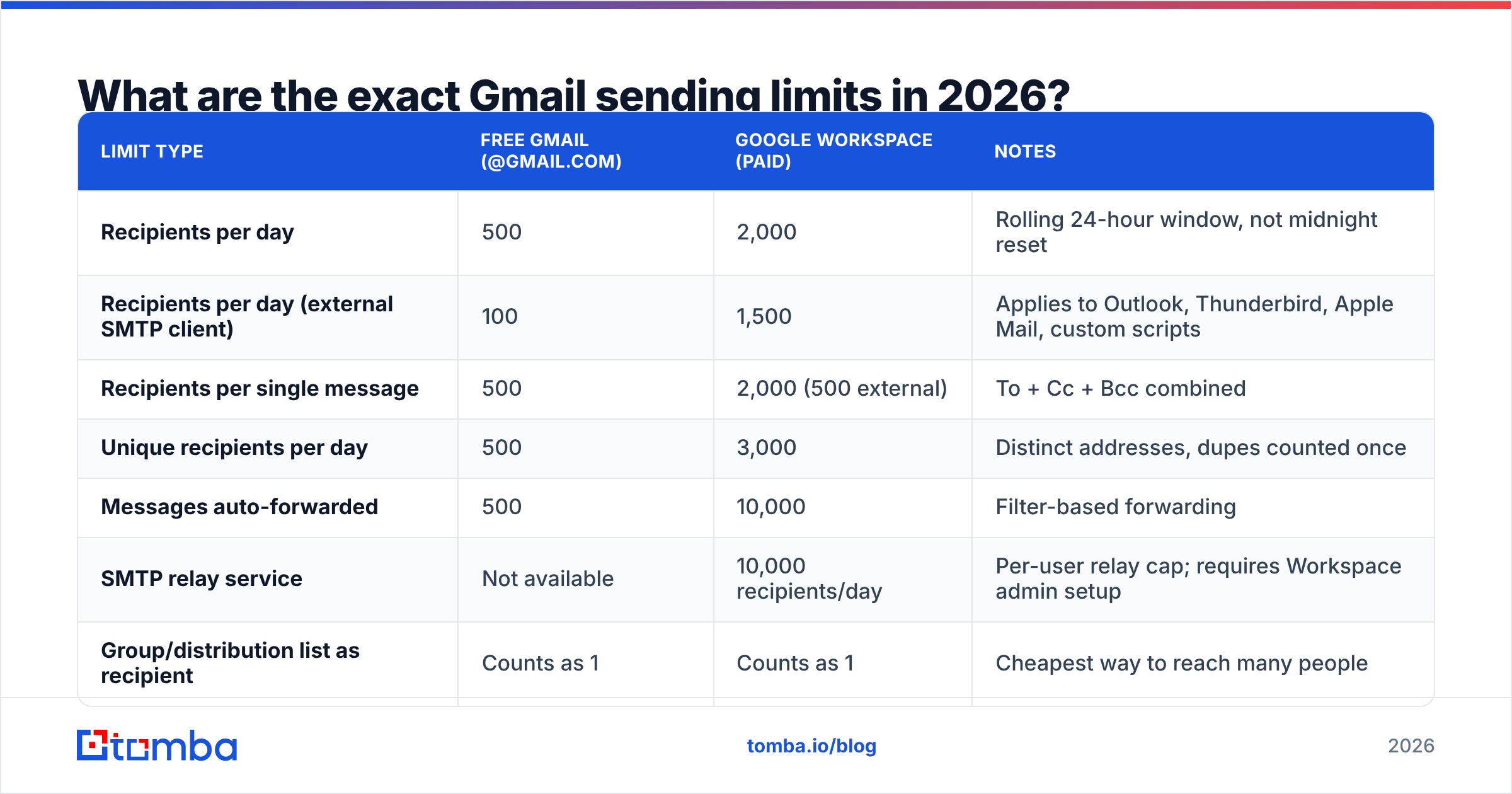
Here's the full breakdown, including the sub-limits most guides skip.
| Limit type | Free Gmail (@gmail.com) | Google Workspace (paid) | Notes |
|---|---|---|---|
| Recipients per day | 500 | 2,000 | Rolling 24-hour window, not midnight reset |
| Recipients per day (external SMTP client) | 100 | 1,500 | Applies to Outlook, Thunderbird, Apple Mail, custom scripts |
| Recipients per single message | 500 | 2,000 (500 external) | To + Cc + Bcc combined |
| Unique recipients per day | 500 | 3,000 | Distinct addresses, dupes counted once |
| Messages auto-forwarded | 500 | 10,000 | Filter-based forwarding |
| SMTP relay service | Not available | 10,000 recipients/day | Per-user relay cap; requires Workspace admin setup |
| Group/distribution list as recipient | Counts as 1 | Counts as 1 | Cheapest way to reach many people |
| Trial Workspace accounts | — | 500 | Full 2,000 unlocks after the trial converts |
Two details that catch people out:
- A Google Group counts as one recipient. Mailing a 300-person group costs you 1 against your daily total. This is the single most under-used lever in the entire limit system — though it's useless for personalized outbound.
- Trial Workspace accounts are capped at 500, same as free Gmail, until billing kicks in. Teams that buy Workspace specifically to lift the cap are often confused for the first 14 days.
Why does Gmail block you before you hit 500?#
Because the published number is a maximum, not an entitlement. Gmail runs a reputation model on every account, and the effective cap moves in real time based on signals it never shows you.
The main throttling triggers:
- Bounce rate. More than 2–3% hard bounces in a session and Gmail starts slowing you down. Above 5% and you can get suspended for the day regardless of how many sends remain. This is the number one reason cold campaigns die early.
- Send velocity. 200 emails fired in four minutes reads as automation. The same 200 spread over six hours reads as a human. Gmail cares about the shape of the curve, not just the total.
- Account age. A mailbox created last Tuesday has no reputation. Practical ceilings on brand-new accounts sit around 20–50 sends/day for the first two weeks, whatever the docs say.
- Spam complaints. Google's bulk sender rules require you to stay under a 0.3% complaint rate, with 0.1% as the target. Cross it and throttling is the gentle outcome; domain-level filtering is the harsh one.
- Content signals. Identical bodies across hundreds of messages, link shorteners, tracking pixels from burned domains, and attachment-heavy sends all pull your effective cap down.
The practical takeaway: your real limit is whatever Gmail decides it is today. Optimizing for the 500 number is optimizing for the wrong metric. Optimizing for email deliverability and sender reputation is what actually raises your ceiling.
What happens when you hit the recipient limit?#
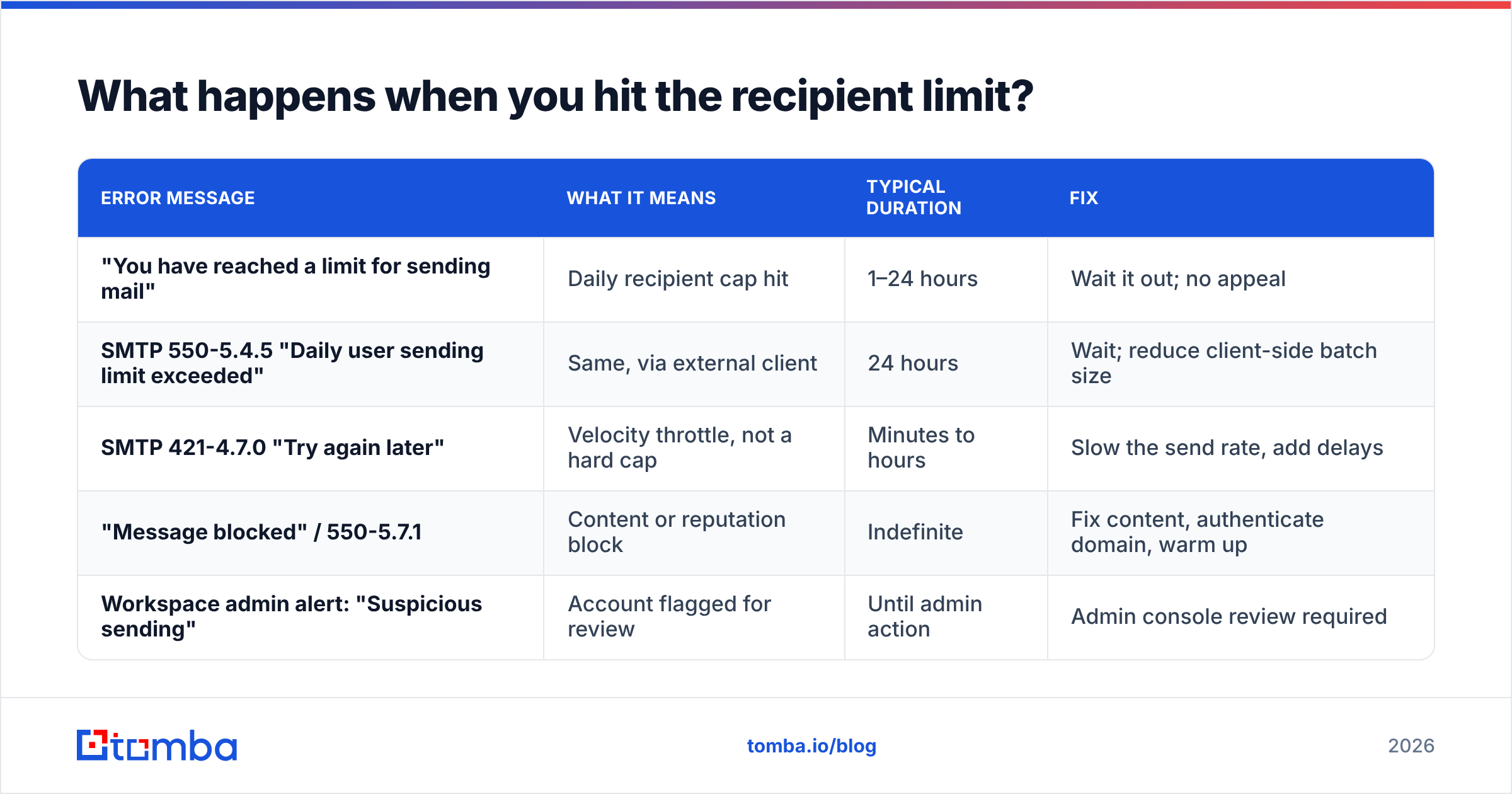
You get one of a small set of errors, and they mean different things.
| Error message | What it means | Typical duration | Fix |
|---|---|---|---|
| "You have reached a limit for sending mail" | Daily recipient cap hit | 1–24 hours | Wait it out; no appeal |
| SMTP 550-5.4.5 "Daily user sending limit exceeded" | Same, via external client | 24 hours | Wait; reduce client-side batch size |
| SMTP 421-4.7.0 "Try again later" | Velocity throttle, not a hard cap | Minutes to hours | Slow the send rate, add delays |
| "Message blocked" / 550-5.7.1 | Content or reputation block | Indefinite | Fix content, authenticate domain, warm up |
| Workspace admin alert: "Suspicious sending" | Account flagged for review | Until admin action | Admin console review required |
The 421 velocity throttle is the one worth understanding. It's not a punishment — it's a queue signal. Back off, insert 30–90 second gaps between sends, and Gmail generally lets you continue. Ignoring it and retrying aggressively is what escalates a soft throttle into a hard block.
There's no dashboard showing your remaining quota. Workspace admins can see aggregate send volume in the Admin Console reports, but individual users get no counter. You find the wall by hitting it.
How do you send to more people without breaking Gmail?#
Five approaches, ranked by how well they hold up.
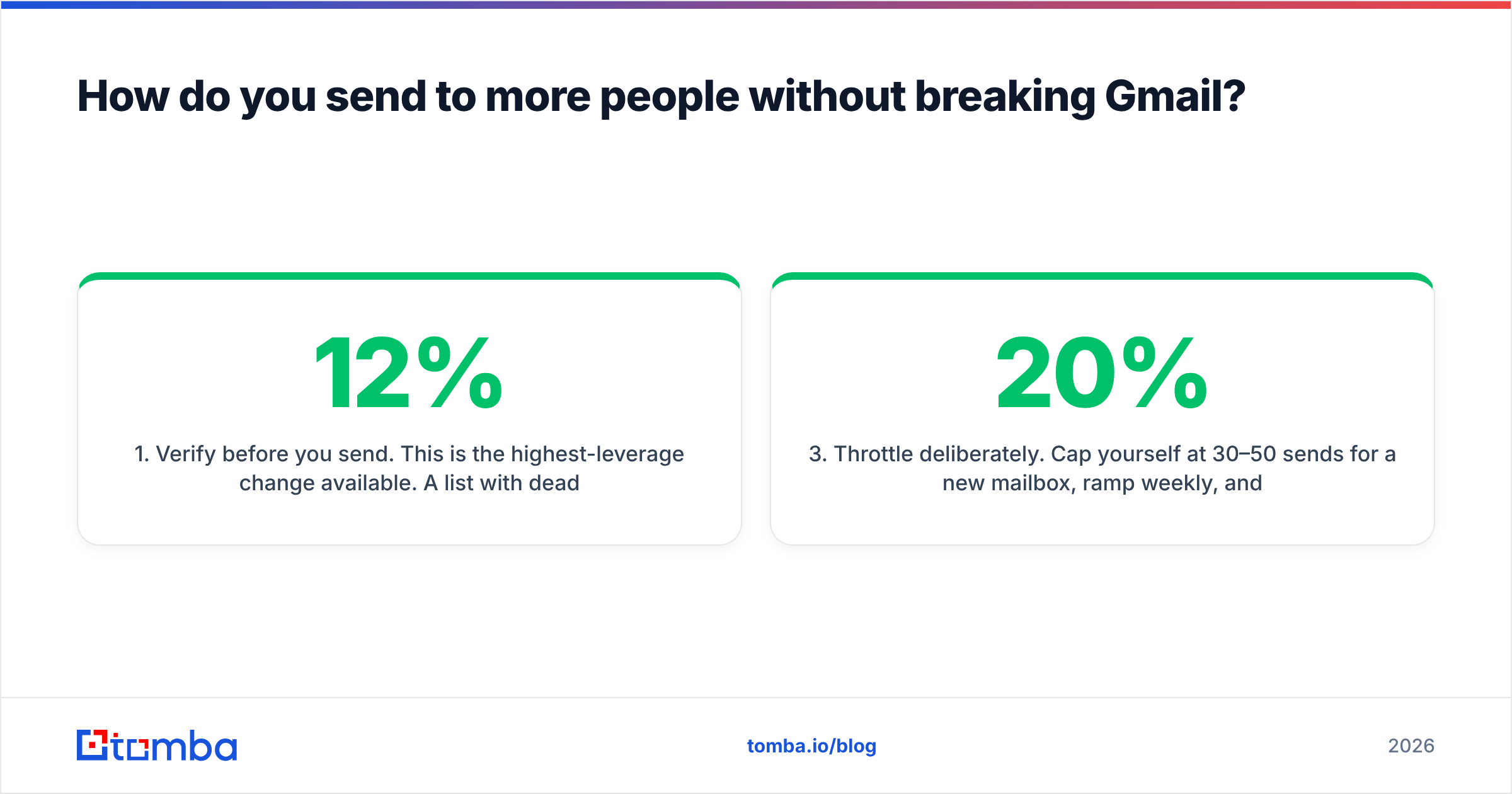
- Verify before you send. This is the highest-leverage change available. A list with 12% dead addresses will trigger a bounce-rate throttle long before you reach 500 sends. Running the list through an email verifier first drops hard bounces to the 1–2% range and lets you actually use your quota.
- Spread across multiple sending identities. Three warmed Workspace mailboxes on separate domains give you 6,000 recipients/day with real redundancy — if one gets throttled, the others keep going. This is how every serious outbound team operates. It is not a trick; it's basic risk distribution.
- Throttle deliberately. Cap yourself at 30–50 sends/day for a new mailbox, ramp 20% weekly, and plateau around 200–300/day per mailbox even on a 2,000 cap. Use an email warmup calculator to build the ramp schedule rather than guessing.
- Use Google Groups for internal announcements. One recipient charged, hundreds reached. Perfect for company-wide notices, useless for anything requiring personalization.
- Move bulk marketing off Gmail entirely. Newsletters, product announcements, and anything over ~2,000 recipients belong on a dedicated ESP with proper unsubscribe handling and dedicated IPs. Gmail is a mailbox, not a broadcast platform — using it as one is how domains get burned.
Are Gmail's limits stricter than other providers?#
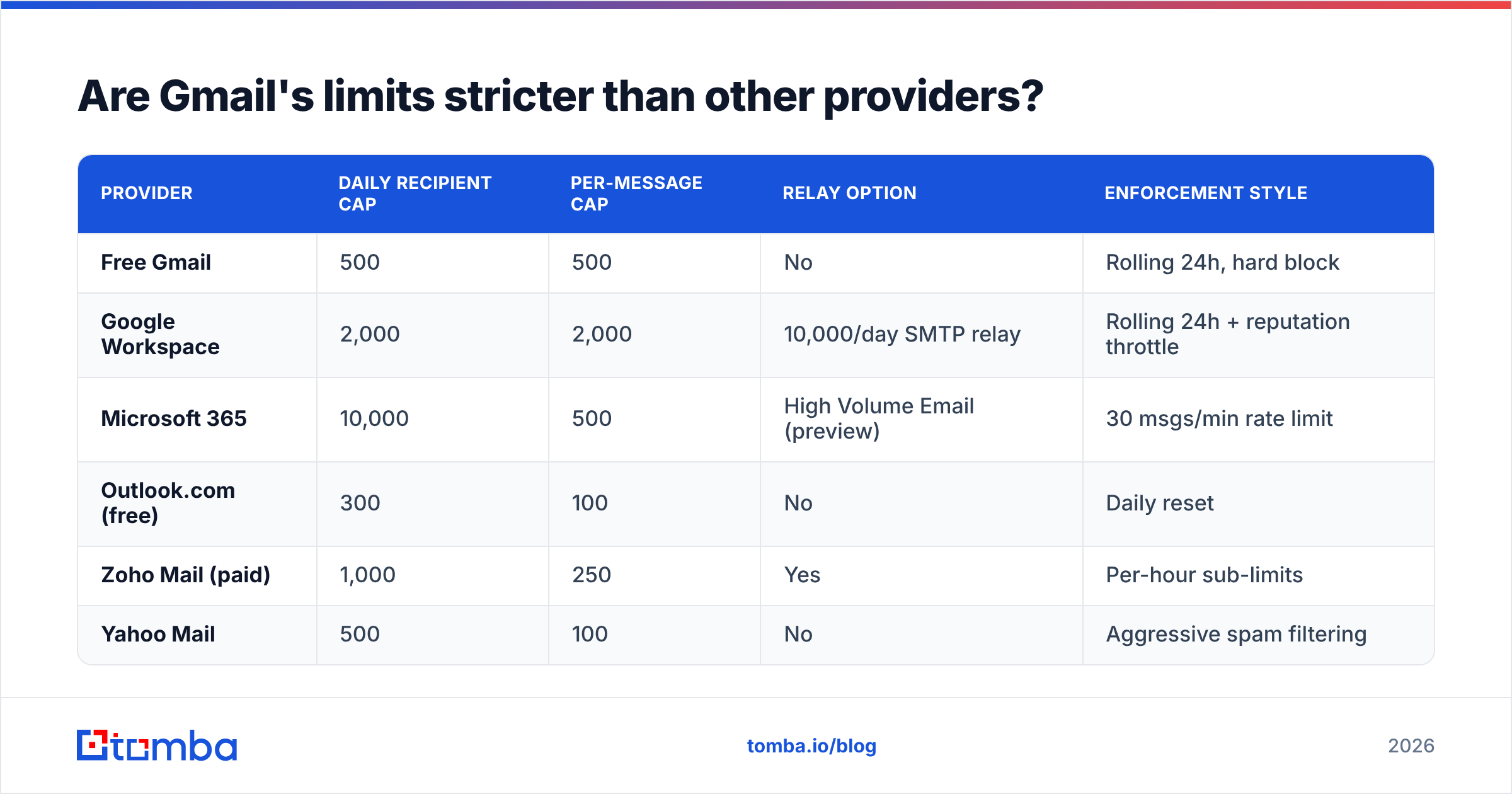
Gmail sits in the middle of the pack. Here's how the major business mailbox providers compare on daily recipient caps.
| Provider | Daily recipient cap | Per-message cap | Relay option | Enforcement style |
|---|---|---|---|---|
| Free Gmail | 500 | 500 | No | Rolling 24h, hard block |
| Google Workspace | 2,000 | 2,000 | 10,000/day SMTP relay | Rolling 24h + reputation throttle |
| Microsoft 365 | 10,000 | 500 | High Volume Email (preview) | 30 msgs/min rate limit |
| Outlook.com (free) | 300 | 100 | No | Daily reset |
| Zoho Mail (paid) | 1,000 | 250 | Yes | Per-hour sub-limits |
| Yahoo Mail | 500 | 100 | No | Aggressive spam filtering |
Microsoft 365 looks generous at 10,000/day, but its 30-messages-per-minute rate limit and 500-recipient per-message cap mean the practical throughput isn't wildly different. And Microsoft's reputation filtering is arguably harsher than Google's for cold outreach.
For a broader read on how mailbox providers evaluate senders, Gartner's coverage of email security and the vendor comparisons on G2 are useful — but the operational rule stays the same across all of them: reputation determines your ceiling, not the published spec sheet.
How do you keep bounce rates low enough to use your full quota?#
Bounce rate is the variable you control, and it's the one that decides whether your 500 or 2,000 is real or theoretical.
Verify at collection, not at send. Addresses decay at roughly 22–30% per year as people change jobs. A list built six months ago is already 12–15% stale. Verifying right before a campaign catches that decay; verifying only at import doesn't.
Handle catch-all domains explicitly. Catch-all servers accept everything at SMTP time, which means standard verification returns "unknown." Those addresses are the silent bounce source in most B2B lists. A dedicated catch-all verifier uses pattern analysis and secondary signals to score them instead of leaving them as coin flips.
Segment by risk tier. Send to verified-valid addresses first. Hold unknowns and catch-alls for a separate, smaller send on a different mailbox. If that batch bounces, you've contained the damage to one identity instead of poisoning your primary.
Check authentication before volume. SPF, DKIM, and DMARC are table stakes since 2024. Run your domain through an SPF checker before you scale send volume — a misconfigured SPF record will cap you at a fraction of your quota no matter how clean the list is.
Watch the trend, not the snapshot. A single 4% bounce day is noise. Three consecutive days above 3% is a pattern, and Gmail will act on it. Track weekly averages and pull back the moment the line trends up.
Should you use multiple Gmail accounts to get around the limit?#
Yes, with an important distinction between distribution and evasion.
Running several legitimate, separately-branded mailboxes — sales@, outreach@, a rep's personal address, each on its own warmed domain — is standard practice and completely defensible. Each is a real sender with a real reputation, and the volume per mailbox stays modest.
Creating twenty throwaway free Gmail accounts to blast the same list is evasion. Google detects it easily through browser fingerprints, IP overlap, recovery-number reuse, and content similarity across accounts. The outcome is usually mass suspension, and if the accounts share a recovery phone or payment method, the suspension can cascade to accounts you actually care about.
The line is simple: are these mailboxes something a real business would plausibly operate? Three sales reps with three mailboxes, yes. One person with twenty, no.
If you're building out multi-mailbox infrastructure, the bottleneck shifts from sending capacity to list quality fast. Pulling verified contacts by company via domain search or running lists through a bulk email finder keeps every mailbox fed with addresses that won't bounce — which is the whole point of having the extra capacity.
What's the practical sending plan for 2026?#
Put together, here's what a sustainable setup looks like for a team doing real outbound volume.
- Infrastructure: 3–5 Workspace mailboxes across 2–3 secondary domains. Primary domain reserved for replies and reputation-safe sending only.
- Warmup: 14–21 days per new mailbox, starting at 15–20 sends/day, ramping 20% weekly.
- Steady state: 150–250 sends per mailbox per day. Well under the 2,000 cap, comfortably inside every throttle threshold.
- List hygiene: Full verification pass within 7 days of every campaign. Hard-bounce suppression list maintained permanently and shared across all mailboxes.
- Monitoring: Weekly bounce rate, complaint rate, and reply rate per mailbox. Any mailbox over 3% bounces gets pulled from rotation for a week.
That setup yields 450–1,250 sends/day at a bounce rate that keeps every mailbox healthy indefinitely. Compare it to one free Gmail account trying to fire 500 unverified emails in an afternoon — same nominal ceiling, radically different outcome.
The pattern across every one of these levers is the same: your Gmail recipient limit is only as useful as the quality of the addresses you're spending it on. Five hundred sends to verified, correctly-formatted, currently-employed contacts will outperform two thousand sends to a scraped list every time — and it won't get your domain filtered.
Ready to spend your sending quota on addresses that actually exist?#
Gmail's recipient cap is fixed. Your bounce rate isn't. Tomba's Email Finder returns verified professional addresses with confidence scoring built in, so every send you make against your daily limit lands in a real inbox instead of burning quota on a bounce. Start on the free tier — 25 searches a month, no card — and if you're running multi-mailbox outbound at volume, Tomba pricing starts at $49/mo on Starter with bulk verification included.
Related guides#
// get started
Find, verify and enrich your first contacts today
Start on the free plan with 25 searches a month, then scale when your team is ready.
Free plan · No credit card required · GDPR & CCPA
// about the author