Gmail Rate Limits in 2026: Sending Caps, Errors, and Fixes
Gmail caps how many emails you can send per day, per API call, and per recipient — and the limits differ for free accounts, Workspace, SMTP relay, and the API. Here is the full 2026 breakdown with the errors each cap throws.
TL;DR
- A free Gmail account sends 500 messages per rolling 24 hours; Google Workspace paid accounts get 2,000/day via the web UI or Gmail API, and 10,000/day through SMTP relay.
- "Recipients" and "messages" are counted differently. One email to 100 people burns 100 external-recipient units, not one.
- The Gmail API has a second limit layer: 1.2 million quota units/minute per project and 15,000 units/minute per user — hitting it returns
429 rateLimitExceeded, not a bounce. - Most "Gmail rate limit" lockouts are actually reputation throttles triggered by bounces and spam complaints, not raw volume. Cleaning your list moves the ceiling more than upgrading your plan does.
- If you need more than ~2,000 sends/day, stop fighting Gmail and move cold outbound to a dedicated sending domain with a proper ESP or relay.
What are Gmail rate limits?#
Gmail rate limits are the hard caps Google places on how much mail a single account can send, how fast an application can call the Gmail API, and how many unique recipients you can touch in a rolling 24-hour window. Think of it like a toll bridge with three separate booths: one counts cars per day, one counts how fast cars arrive per minute, and one quietly refuses cars that look like they're carrying contraband. Pass all three and you're through. Fail any one and you get an error that looks nothing like the booth that stopped you.
The confusion comes from the fact that Google publishes these limits across four different documents — the Workspace admin help center, the Gmail API reference, the SMTP relay guide, and the sender guidelines — and none of them cross-reference the others. Meanwhile your sequencer just shows "550 5.4.5 Daily user sending limit exceeded" and you're left guessing which ceiling you hit.
Three rules make the whole system legible:
- The window is rolling, not calendar-based. Google does not reset your counter at midnight. If you burn 500 sends at 3pm Tuesday, you don't get fresh capacity until 3pm Wednesday. Batching everything into one morning blast is the fastest way to lock yourself out for a full day.
- Recipients count, not emails. A single message with 80 addresses in the To/CC/BCC line consumes 80 units against the external-recipient cap. Group aliases expand too.
- Limits are ceilings, not guarantees. Google can and does throttle accounts well below the published number when bounce rates, spam complaints, or authentication failures cross internal thresholds. The published cap is the best case for a clean sender.
What are the exact Gmail sending limits in 2026?#
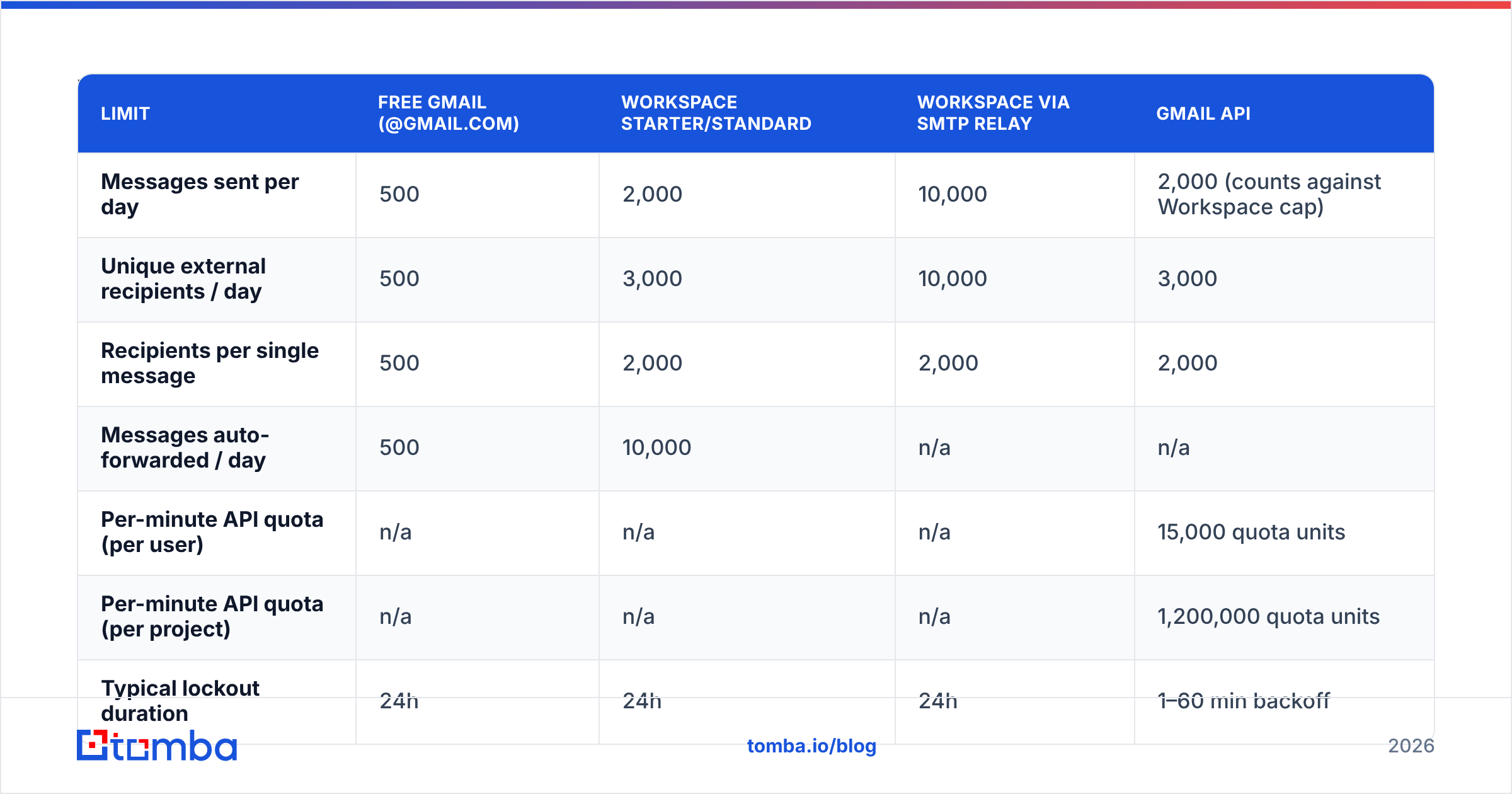
Here is the current picture across account types. Numbers are per rolling 24 hours unless noted.
| Limit | Free Gmail (@gmail.com) | Workspace Starter/Standard | Workspace via SMTP relay | Gmail API |
|---|---|---|---|---|
| Messages sent per day | 500 | 2,000 | 10,000 | 2,000 (counts against Workspace cap) |
| Unique external recipients / day | 500 | 3,000 | 10,000 | 3,000 |
| Recipients per single message | 500 | 2,000 | 2,000 | 2,000 |
| Messages auto-forwarded / day | 500 | 10,000 | n/a | n/a |
| Per-minute API quota (per user) | n/a | n/a | n/a | 15,000 quota units |
| Per-minute API quota (per project) | n/a | n/a | n/a | 1,200,000 quota units |
| Typical lockout duration | 24h | 24h | 24h | 1–60 min backoff |
| Error surfaced | 550 5.4.5 | 550 5.4.5 | 550 5.7.0 | 429 rateLimitExceeded |
A few gotchas the table can't capture:
- Trial Workspace accounts are throttled to 500/day for the first 30 days regardless of the plan you paid for. New domains are also soft-throttled — Google treats a two-week-old domain sending 2,000 messages as suspicious by default.
- SMTP relay's 10,000 is per domain, not per user, and it requires an admin to configure the relay service with either IP allowlisting or SMTP AUTH.
- Google Groups messages count against the sender's recipient quota based on group membership size at send time.

Which Gmail API quota actually stops you?#
The Gmail API doesn't count messages — it counts quota units, and each method has a different price. This trips up nearly every engineer who builds a sync or send integration for the first time.
messages.send— 100 units per call. Cheap. You will hit the daily message cap long before the per-minute quota.messages.list— 5 units. Nearly free, which is why polling loops feel safe until you multiply by user count.messages.get— 5 units per call, but fetching full bodies for 10,000 messages in a tight loop is 50,000 units in under a minute.threads.get— 10 units. Double the cost of a message fetch; batch by thread only when you genuinely need the thread.history.list— 2 units. This is the method you should be using for incremental sync instead of re-listing everything.users.watch— 100 units, but it replaces polling entirely with push notifications via Pub/Sub.
The per-user ceiling is 15,000 units/minute. That means roughly 150 sends per minute per mailbox before you get 429 rateLimitExceeded with a Retry-After hint. The per-project ceiling of 1.2 million units/minute only matters at multi-tenant scale — if you're running a SaaS that connects hundreds of customer inboxes, this is the wall you'll hit first, and Google's Gmail API usage limits documentation is the authoritative reference for requesting an increase.
The critical detail: a 429 is retryable, a 550 is not. Exponential backoff with jitter fixes the first. The second means you're locked out for the rest of the rolling window and retrying just extends your penalty.
Why do I get rate limited below the published cap?#
Because volume is only one of the three things Google measures. The other two are engagement and hygiene, and they can silently cut your effective ceiling to a fraction of the published number.
Google's own sender guidelines name a spam complaint rate above 0.3% as the threshold where filtering tightens. Bounce rate isn't published as a hard number, but sustained hard bounces above roughly 2–3% is where senders start reporting throttles. Hit either and Google doesn't send you a warning — it just starts deferring your mail with 421 4.7.0 temporary failures, which most sequencers retry blindly, which makes the pattern look even more like a spam cannon.
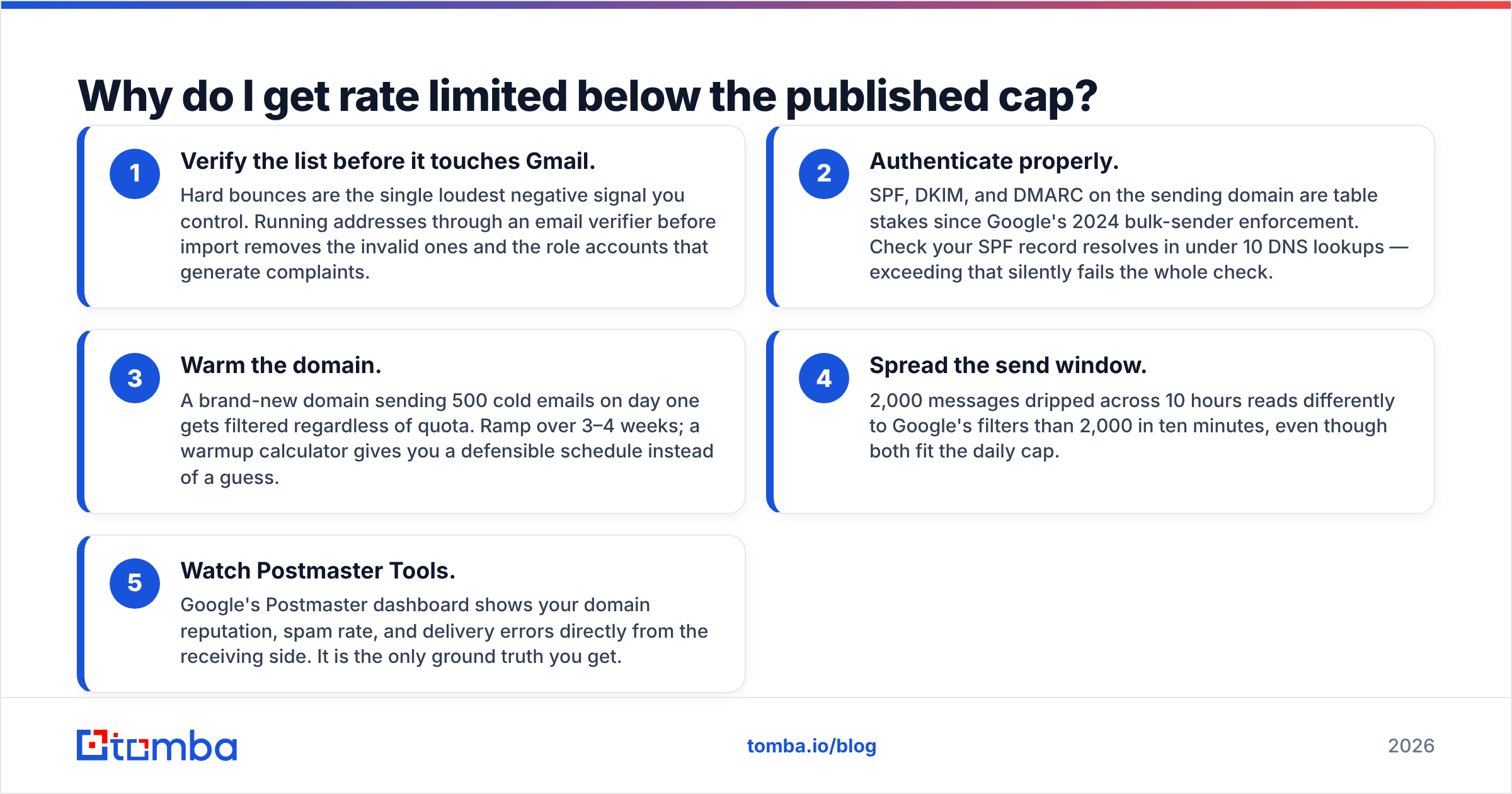
The practical fix order, cheapest first:
- Verify the list before it touches Gmail. Hard bounces are the single loudest negative signal you control. Running addresses through an email verifier before import removes the invalid ones and the role accounts that generate complaints.
- Authenticate properly. SPF, DKIM, and DMARC on the sending domain are table stakes since Google's 2024 bulk-sender enforcement. Check your SPF record resolves in under 10 DNS lookups — exceeding that silently fails the whole check.
- Warm the domain. A brand-new domain sending 500 cold emails on day one gets filtered regardless of quota. Ramp over 3–4 weeks; a warmup calculator gives you a defensible schedule instead of a guess.
- Spread the send window. 2,000 messages dripped across 10 hours reads differently to Google's filters than 2,000 in ten minutes, even though both fit the daily cap.
- Watch Postmaster Tools. Google's Postmaster dashboard shows your domain reputation, spam rate, and delivery errors directly from the receiving side. It is the only ground truth you get.
How do Gmail limits compare to dedicated sending platforms?#
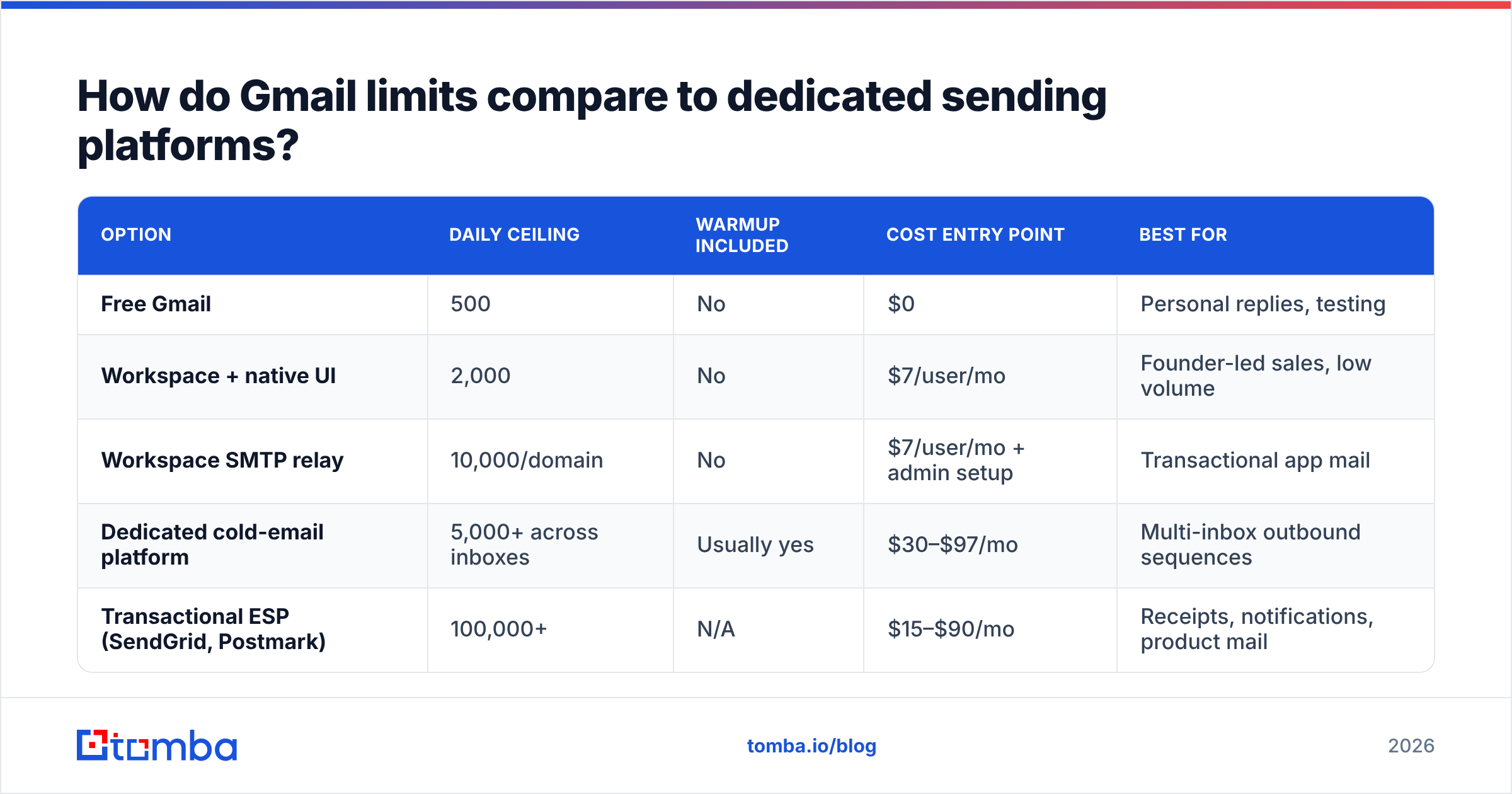
If you're doing real outbound volume, the honest answer is that Gmail is the wrong tool and no amount of quota tuning fixes that. Here's how the options stack up for a team sending cold outbound.
| Option | Daily ceiling | Warmup included | Cost entry point | Best for |
|---|---|---|---|---|
| Free Gmail | 500 | No | $0 | Personal replies, testing |
| Workspace + native UI | 2,000 | No | $7/user/mo | Founder-led sales, low volume |
| Workspace SMTP relay | 10,000/domain | No | $7/user/mo + admin setup | Transactional app mail |
| Dedicated cold-email platform | 5,000+ across inboxes | Usually yes | $30–$97/mo | Multi-inbox outbound sequences |
| Transactional ESP (SendGrid, Postmark) | 100,000+ | N/A | $15–$90/mo | Receipts, notifications, product mail |
Two things that table makes obvious. First, SMTP relay's 10,000 looks attractive but it is designed for application-generated mail — using it for cold outreach puts your primary domain's reputation directly at risk. Second, dedicated platforms don't beat Gmail by having a higher per-inbox limit; they beat it by rotating across many inboxes, each staying comfortably under Google's radar.
The pattern that actually works at scale: buy secondary domains, put 2–3 Workspace inboxes on each, cap each inbox at 30–50 sends/day, and rotate. Total throughput scales linearly with inbox count while every individual mailbox looks like a human. Compare that to hammering one mailbox at 2,000/day, which looks like exactly what it is.
What errors mean you hit a Gmail limit?#
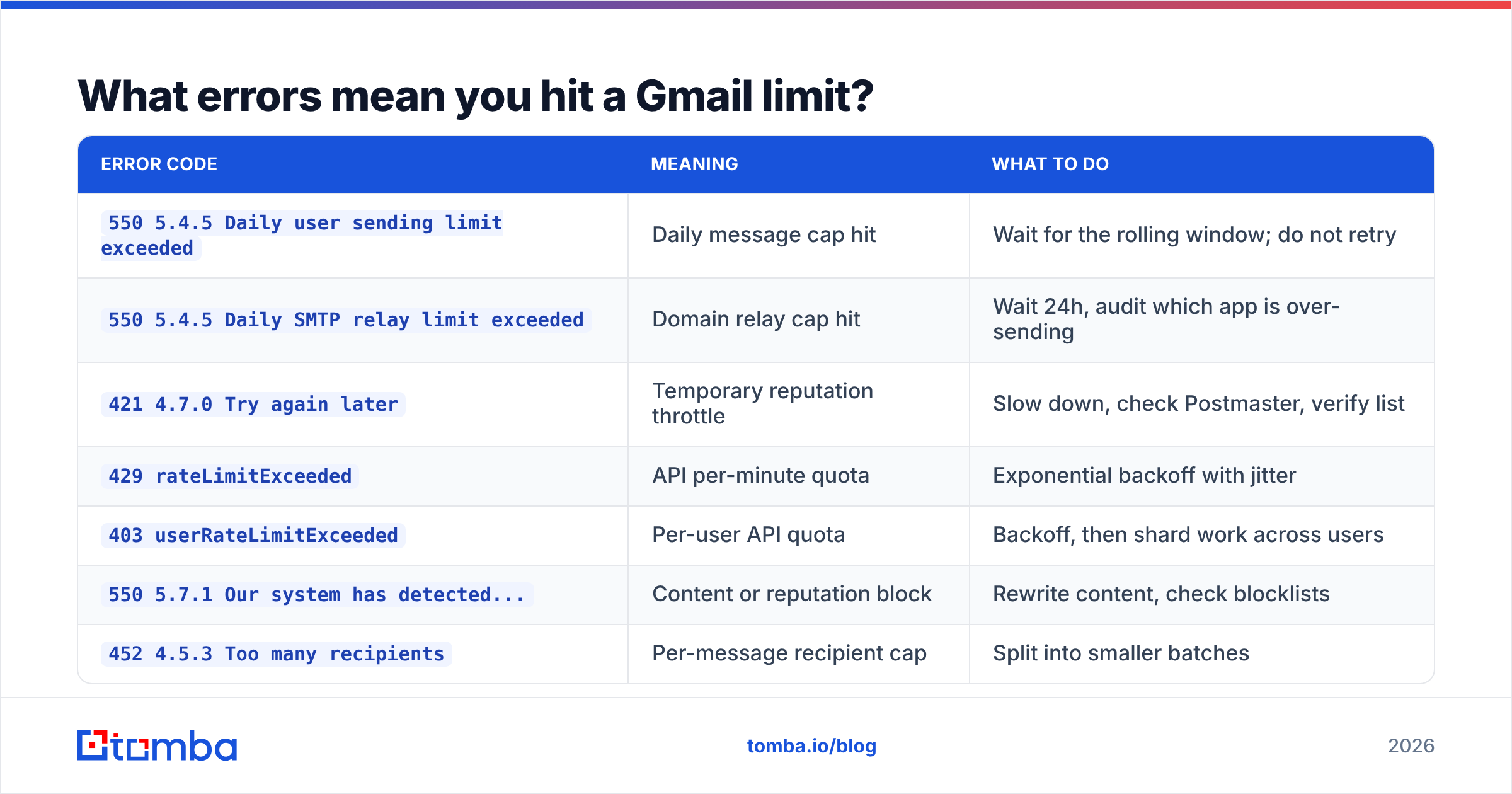
Decoding the error tells you whether to wait, retry, or fix something structural.
| Error code | Meaning | What to do |
|---|---|---|
550 5.4.5 Daily user sending limit exceeded |
Daily message cap hit | Wait for the rolling window; do not retry |
550 5.4.5 Daily SMTP relay limit exceeded |
Domain relay cap hit | Wait 24h, audit which app is over-sending |
421 4.7.0 Try again later |
Temporary reputation throttle | Slow down, check Postmaster, verify list |
429 rateLimitExceeded |
API per-minute quota | Exponential backoff with jitter |
403 userRateLimitExceeded |
Per-user API quota | Backoff, then shard work across users |
550 5.7.1 Our system has detected... |
Content or reputation block | Rewrite content, check blocklists |
452 4.5.3 Too many recipients |
Per-message recipient cap | Split into smaller batches |
The one people misread most often is 421 4.7.0. It's a soft bounce, so retry logic fires automatically — but the cause is reputation, not capacity. Retrying without changing anything is how a two-hour throttle becomes a week-long one. Run the domain through a blacklist checker and a spam checker before you touch the retry button.
How do you stay under the limits without killing pipeline?#
The counterintuitive answer: send fewer, better-targeted emails. Volume is the cheapest lever and the one Google punishes hardest. Precision is the expensive lever and the one that compounds.
Concretely:
- Cap each inbox at 40–50/day, well under the 2,000 ceiling. This keeps you invisible to volume-based filtering and leaves headroom for replies, which also count.
- Deduplicate aggressively. Sending the same person twice from two lists is a complaint waiting to happen. A remove duplicates pass on merged lists takes 30 seconds.
- Kill catch-all domains you can't confirm. Catch-all servers accept everything at SMTP time and bounce later, which wrecks your rate after the fact. A catch-all verifier resolves most of them before send.
- Separate transactional from outbound. Never let your cold sequencer and your app's password-reset emails share a domain. One bad campaign takes down both.
- Monitor per-inbox, not per-campaign. Your sequencer reports campaign stats; Google enforces per-mailbox. Track bounce rate by sending account so you can pull a single bad inbox before it drags the domain down.
- Build in a reply buffer. Replies and forwards consume quota too. If you're at 1,900/2,000 and a campaign gets traction, you can lock yourself out of responding to interested prospects — the worst possible failure mode.
Peer platforms in this space handle the ceiling differently. BookYourData, for example, focuses on pre-verified contact data so the bounce component of the reputation equation is handled before send — a sensible approach given that hygiene, not raw quota, is what usually caps real-world throughput. The general principle holds across vendors: fix the list before you fix the throttle.
Do free tools and extensions change the limits?#
No. Chrome extensions, mail-merge add-ons, and third-party sequencers that send through your Gmail account are subject to exactly the same caps, because the mail still leaves Google's servers on your account's credentials. An add-on advertising "unlimited sends" is either using SMTP relay under the hood, rotating through multiple accounts, or about to get you throttled.
The only genuine ways to increase throughput are: upgrade to Workspace, enable SMTP relay for application mail, add more inboxes/domains, or move sending to an external ESP with its own IPs. Everything else is repackaging the same 2,000.
Where tooling does legitimately help is upstream of the send. Building a list with a domain search that returns verified, pattern-confirmed addresses means a far higher share of your 2,000 daily units land in real inboxes instead of bouncing. That's not a limit increase — it's a yield increase, which is the number that actually matters. See where the data comes from if you want to audit sourcing before you trust it.
Frequently asked questions#
Does Gmail count replies against my daily limit? Yes. Replies, forwards, and any message you originate all consume message and recipient units. Only received mail is free.
Is the limit per account or per IP? Per account. Sending from a different device, network, or VPN does not reset anything.
Can I request a quota increase? For the Gmail API's per-project quota, yes — via the Google Cloud console. For per-user sending caps, no. Those are fixed by plan tier.
How long does a lockout last? Typically 24 hours from the moment you crossed the threshold, though Google states it can be shorter. Reputation-based throttles have no fixed duration and lift only when your metrics improve.
Do aliases have separate limits? No. Send-as aliases and delegated accounts draw from the primary account's quota.
Where to go from here#
The ceiling that matters isn't the one Google publishes — it's the one your bounce rate sets. A Workspace account with a 2 percent hard-bounce rate and clean authentication will out-deliver a relay-enabled domain sending garbage, every time.
Start upstream. Build lists from verified, pattern-confirmed sources so your daily quota is spent on addresses that actually exist. Tomba Email Finder returns confidence-scored professional addresses by domain, name, or company, with verification built into the same call — free tier covers 25 searches a month, and paid plans start at $49/mo if you need volume. Check Tomba pricing for the full breakdown. Fix the list, and the rate limits mostly stop being the problem you think about.
Related guides#
Ready to find emails that actually work?
Join 150,000+ professionals who stopped guessing and started sending. Free credits on signup — no credit card required.
Get the Tomba newsletter
Practical outbound tactics and product updates — once every two weeks.
About the author