Gmail Sender Guidelines 2026: Rules, Limits, and Fixes
Gmail's sender rules got stricter again. Here's what the 2026 thresholds actually enforce, which ones are hard blocks versus soft warnings, and the exact fix order when your inbox rate drops.
TL;DR — the gmail sender guidelines set three hard rules, plus one soft signal that does most of the damage.
- Gmail asks bulk senders for three things: signed mail (SPF, DKIM, DMARC), one-click unsubscribe on promo mail, and a spam rate under 0.3%. Aim for 0.1%.
- The 0.3% line is not a one-time cliff. Gmail reads it as a rolling signal. One bad send can dent your inbox rate for weeks.
- "Bulk sender" means roughly 5,000 emails to Gmail in one day. Cross that line once and the rules stick.
- Most inbox trouble starts with the list, not with DNS. DNS is an afternoon of work. Bad data is a tax you pay every month.
- Fix in order: auth, then list, then volume, then copy. Out of order wastes weeks.
What are the Gmail sender guidelines?#
The Gmail sender guidelines are Google's rules for anyone who mails @gmail.com and Google Workspace users. They began as tips. They turned into hard rules in February 2024. Google then tightened them through 2025 and 2026, with more weight on user reports and on clean unsubscribe flows.
Think of a building inspection. For years the inspector left a note on the door. Now the inspector locks the door. The rules barely moved. The way Google enforces them did.
There are two tiers. The tier you sit in drives every choice you make.
- All senders — valid SPF or DKIM, a matching forward and reverse DNS record on the sending IP, TLS on the way out, and a spam rate that stays in a normal band.
- Bulk senders (5,000+ Gmail emails a day) — SPF and DKIM, a DMARC record, a From domain that lines up with the signed domain, one-click unsubscribe (RFC 8058) on all promo mail, and a spam rate under 0.3% in Postmaster Tools.
The 5,000 count covers Gmail addresses only, not your whole send. And it sticks. Once you trip it, Google treats you as a bulk sender from then on. Sending 4,900 the next day will not reset you.
You can read the rules in Google's own sender guide. It is short. It is worth ten minutes.
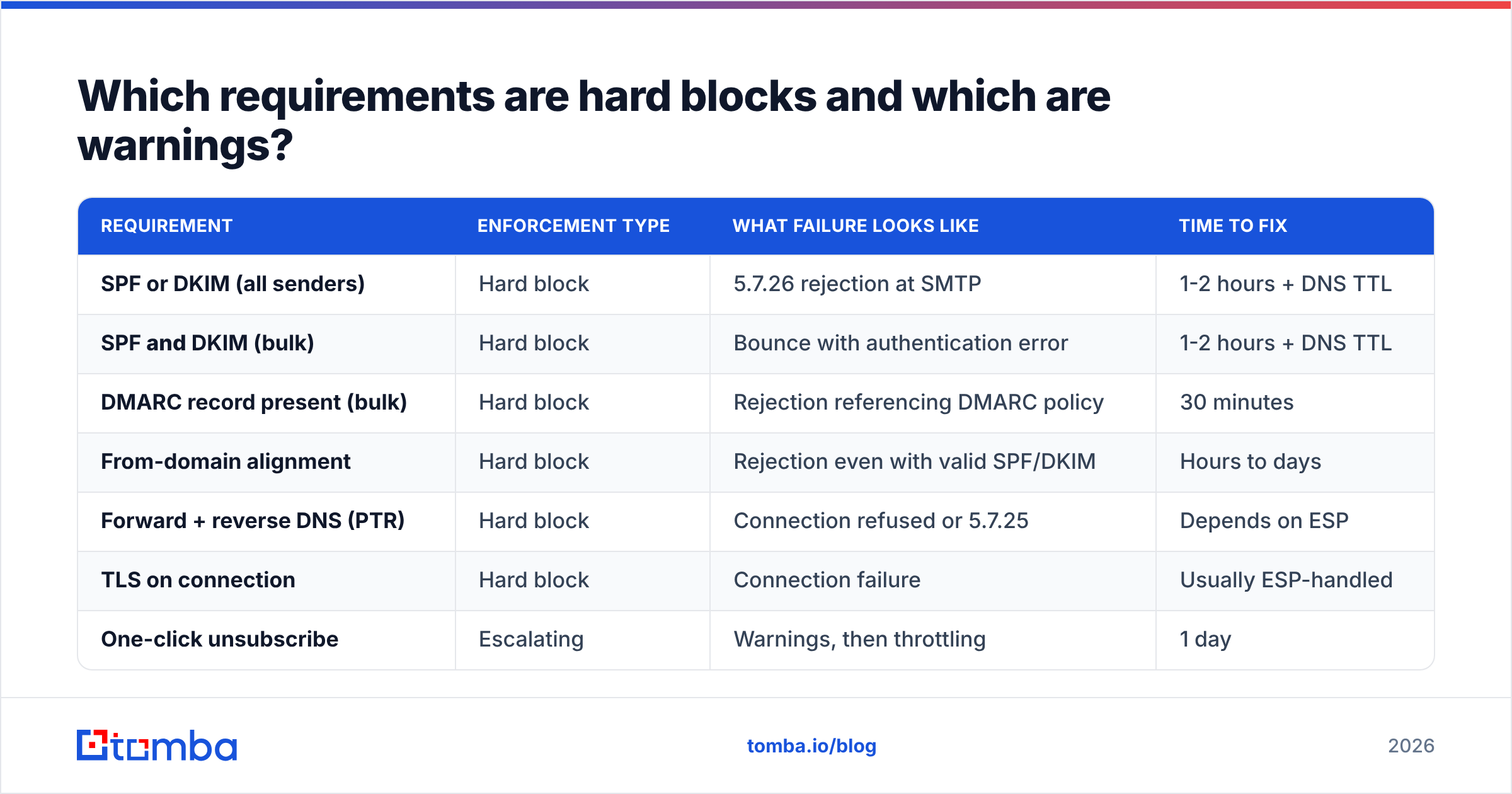
Which Gmail sender guidelines are hard blocks, and which are warnings?#
This split is the one most posts skip. It is also the one that sets your fix order.
| Rule | Type | What failure looks like | Time to fix |
|---|---|---|---|
| SPF or DKIM (all senders) | Hard block | 5.7.26 reject at SMTP | 1-2 hrs |
| SPF and DKIM (bulk) | Hard block | Bounce with an auth error | 1-2 hrs |
| DMARC record (bulk) | Hard block | Reject, cites DMARC policy | 30 min |
| From-domain alignment | Hard block | Reject even with SPF/DKIM | Hours to days |
| Forward + reverse DNS | Hard block | 5.7.25, or refused | Ask your ESP |
| TLS on the wire | Hard block | The connection fails | ESP handles it |
| One-click unsubscribe | Escalating | Warnings, then throttling | 1 day |
| Spam rate under 0.3% | Rolling signal | Spam folder, throttling | Weeks |
| Real, engaged people | Rolling signal | Slow inbox-rate decline | Ongoing |
Hard blocks are binary and fast. You either have the DNS records or you do not. Add them, wait for DNS to spread, and mail flows again. Nobody should lose sleep here.
Rolling signals are what kill a program. A spam rate that spikes to 0.8% for two days throws no error. It just buys you six weeks in the spam folder. Google's trust model has a memory. You cannot fix a moving average in one afternoon.
How do you check where you stand on the Gmail sender guidelines?#
Run four checks, in order, before you change a thing.
- Sign up for Google Postmaster Tools. Verify your domain. Then read the Spam Rate, Domain Reputation, and Authentication charts. It is free, and nothing else stands in for it.
- Test your DNS. Run the domain through an SPF checker and keep it under 10 lookups. Check that DKIM signs with a 2048-bit key. Check that a DMARC record exists.
- Check alignment, not just presence. This is where most bulk senders fail. Your From header says
hello@yourcompany.com, but your ESP signs asmail.esp-domain.com. SPF passes. DKIM passes. DMARC still fails. Fix it with a custom return-path and DKIM on a subdomain you own. - Audit the list. Pull 90 days of sends. Work out the hard-bounce rate per send. Over 2% means your data source hands you dead addresses.
That last one holds the real leverage, which brings us to the awkward part.
Why does list quality matter more than DNS?#
Because auth is a gate, and trust is a score.
SPF, DKIM, and DMARC prove you are who you say you are. They prove nothing about whether people want your mail. A clean, signed domain that mails a scraped list will still land in spam. A slightly sloppy sender with a list people asked for often gets a pass.
Gmail leans hard on what people do: opens, replies, "not spam" saves, archive without a read, and worst of all, the "Report spam" button. Hard bounces add up too. When a big share of your list does not exist, Google decides you do not vet your data, and it marks down the rest of your work.
That is why email verification sits upstream of every inbox fix. A verify pass catches dead addresses before they touch your score. On a list sourced six months ago, expect 15-25% decay from job changes alone. B2B data goes stale fast.
Catch-all domains muddy this. A catch-all server accepts every address at the domain, so a normal SMTP check returns "unknown" instead of valid or invalid. Mailing them blind is a bet against your own spam rate. A catch-all verifier uses pattern confidence and other signals to sort the likely-real from the likely-fake. That cuts bounce risk on big domains, where catch-all is common.
Upstream of that is sourcing. If your workflow guesses firstname.lastname@ and fires, you are making bounces on purpose. A real email finder returns a score per address instead of a guess. That shifts your bounce rate before a single mail is queued.
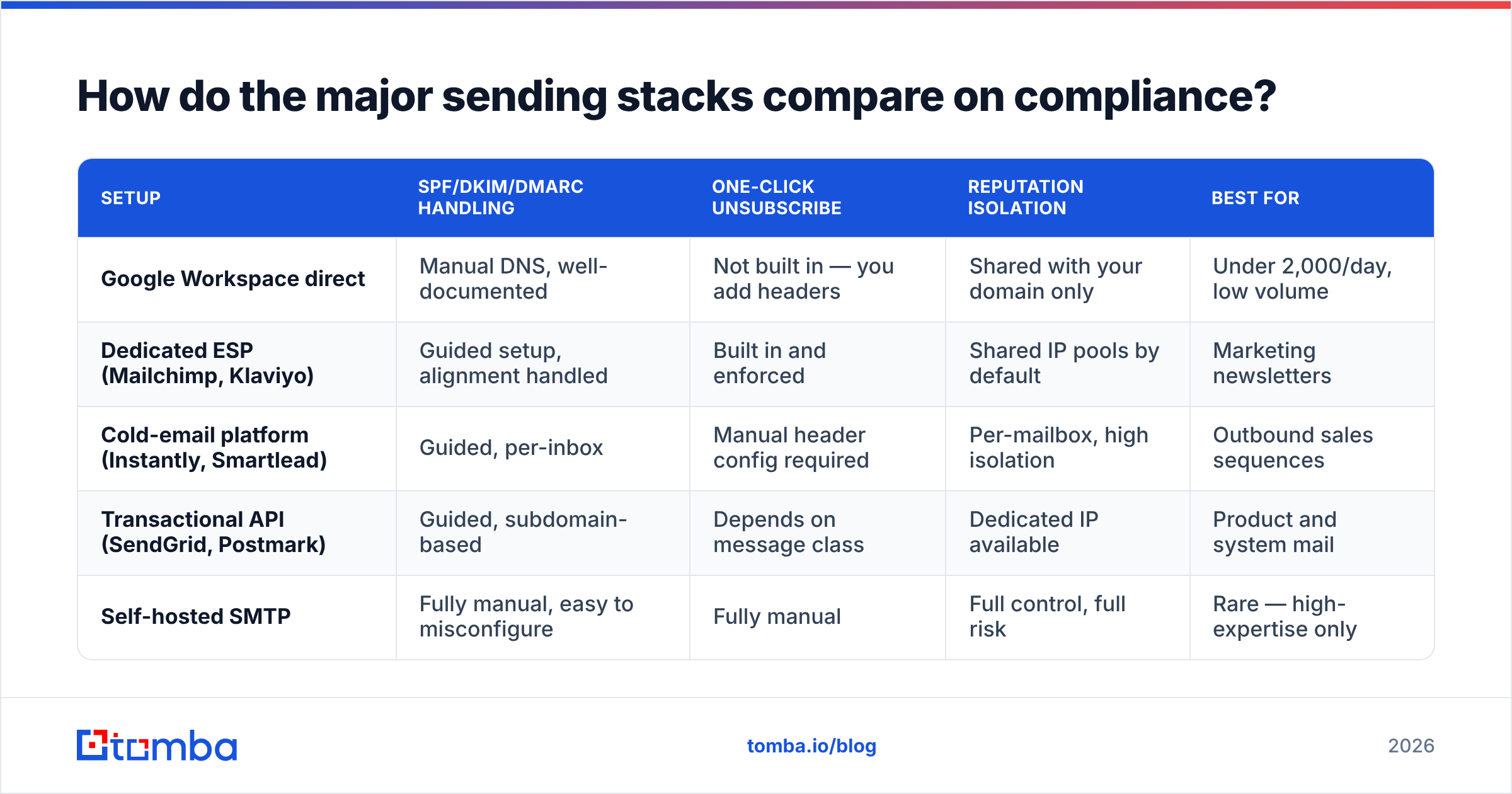
How do the major sending stacks compare?#
Some setups make these rules easy. Others leave the work to you.
| Setup | Auth handling | One-click unsubscribe | Reputation split | Best for |
|---|---|---|---|---|
| Google Workspace direct | Manual DNS, well documented | Not built in | Your domain only | Under 2,000 a day |
| ESP (Mailchimp, Klaviyo) | Guided, alignment handled | Built in | Shared IP pools | Newsletters |
| Cold email (Instantly, Smartlead) | Guided, per inbox | Manual headers | Per mailbox | Sales sequences |
| API (SendGrid, Postmark) | Guided, subdomain | Depends on the mail type | Dedicated IP option | Product mail |
| Self-hosted SMTP | Manual, easy to break | Manual | Full control, full risk | Rare |
The pattern is simple. Managed tools solve auth for you and leave list quality in your hands. Self-hosted flips that. Neither one solves the spam rate. That number comes from who you mail and what you say.
One note for outbound teams. Cold email tools spread sends over many mailboxes. That contains the damage, but it also thins your Postmaster Tools data. Google needs volume to score a domain. Spread 500 sends over 25 inboxes and no domain gets a real score. You dodge a bad grade. You also lose the gauge.

What is the correct fix order when your inbox rate drops?#
Work top to bottom. Skip a step and the ones above it will mask your result.
- Fix auth first. SPF, DKIM, DMARC, alignment. Until it passes, no other signal can be read.
- Stop the bleeding. Drop every hard bounce. Drop anyone with no opens in 180 days. Drop role accounts like
info@andsales@unless one is truly your buyer. - Cut volume, then ramp. If your sender reputation shows Low or Bad, drop to 20-30% of normal for two weeks. Mail only your warmest segment.
- Add one-click unsubscribe. You need the
List-UnsubscribeandList-Unsubscribe-Postheaders. The opt-out must clear in two days. A footer link alone does not count. - Then look at the copy. Spam words matter less than people think. Complaints come from a bad match: the reader does not know you.
- Check weekly, not in a panic. Postmaster Tools runs 2-3 days behind. Check only when things break and you always read old damage.
Step 1 is done when Postmaster Tools shows near-100% pass rates. Role accounts in step 2 complain far more than people do. And step 5 is about targeting, not adjectives.
Step 3 is where teams lose patience. Trust repair is slow. Plan on three to six weeks for a domain at Bad, not three to six days. Some teams burn the domain and start fresh. That works, but you throw away the name and start a new warmup.
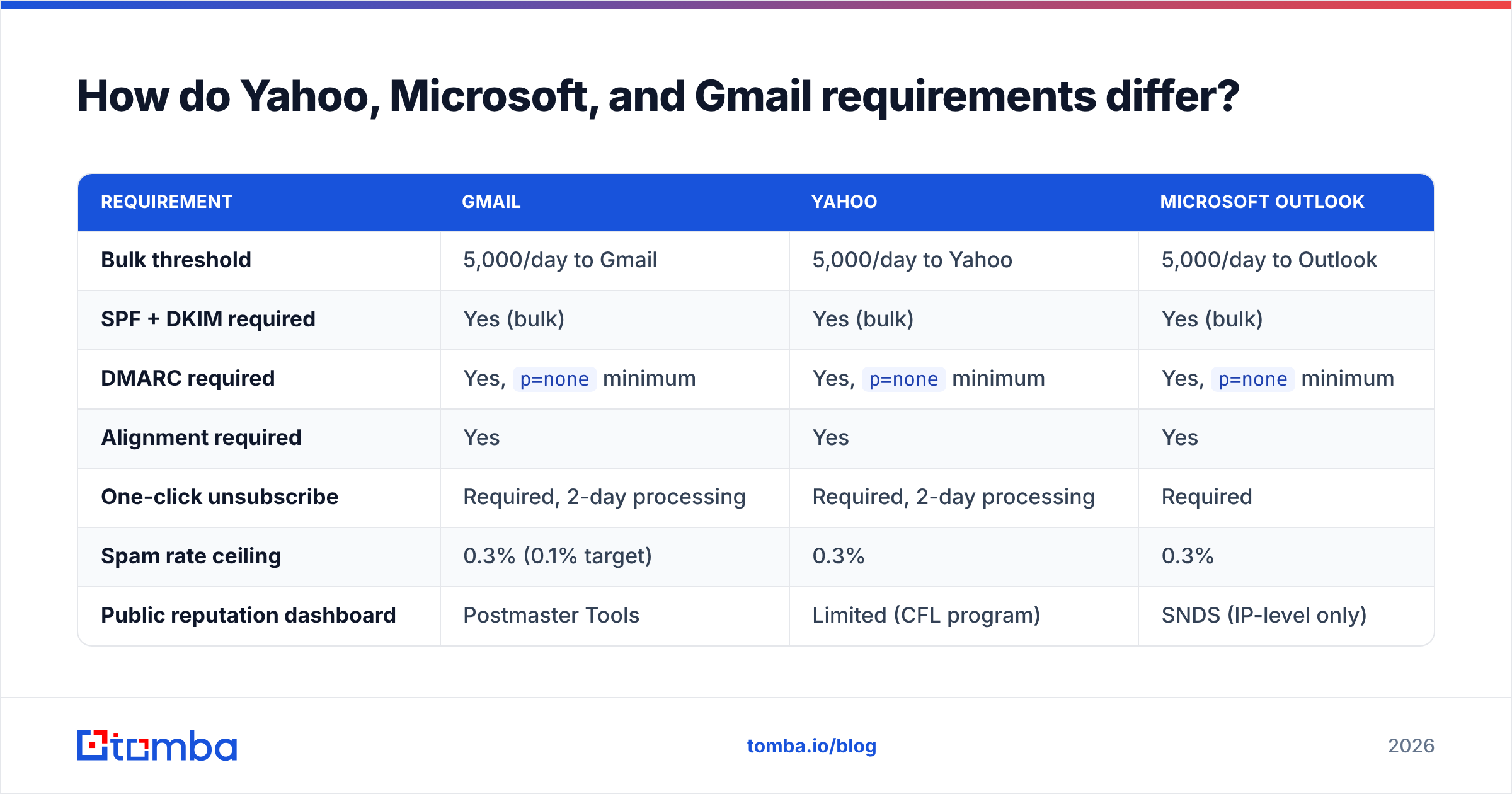
How do Yahoo and Microsoft rules differ from the Gmail sender guidelines?#
Gmail led. The others followed with small twists. At any real volume you end up meeting all three.
| Rule | Gmail | Yahoo | Outlook |
|---|---|---|---|
| Bulk line | 5,000/day | 5,000/day | 5,000/day |
| SPF + DKIM | Yes | Yes | Yes |
| DMARC | Yes, p=none |
Yes, p=none |
Yes, p=none |
| Alignment | Yes | Yes | Yes |
| One-click unsubscribe | Yes, 2-day | Yes, 2-day | Yes |
| Spam rate cap | 0.3% | 0.3% | 0.3% |
| Public dashboard | Postmaster Tools | Limited (CFL) | SNDS (IP only) |
Build to Gmail and you clear the rest. The gap is what you can see. Google gives you a real chart. Microsoft gives you SNDS, which is IP-level and of little use to domain senders. Yahoo gives you almost nothing. So Gmail is your canary. When Postmaster Tools dips, assume the others see the same thing.
Microsoft has been tightening on its own through 2025 and 2026. It now leans toward a reject, not the junk folder, for bulk mail that is not signed. If Outlook has waved you through on old goodwill, that window is closing.
What does a compliant sending setup look like end to end?#
Here is the shape, for a B2B team at moderate volume.
- Split domains by job. Marketing on
go.yourcompany.com. Sales on a lookalike domain. Product mail onmail.yourcompany.com. Never send cold mail from your main domain. - Start DMARC at
p=none, then tighten. Watch the reports for a month. Confirm every real source lines up. Then move top=quarantine. Jumping straight top=rejectkills invoices. - Verify before each send. A list you cleaned in January is not clean in June. Run a bulk verify pass before any big send.
- Warm a new domain over 4-6 weeks. Start at 10-20 mails a day. Favor people likely to reply.
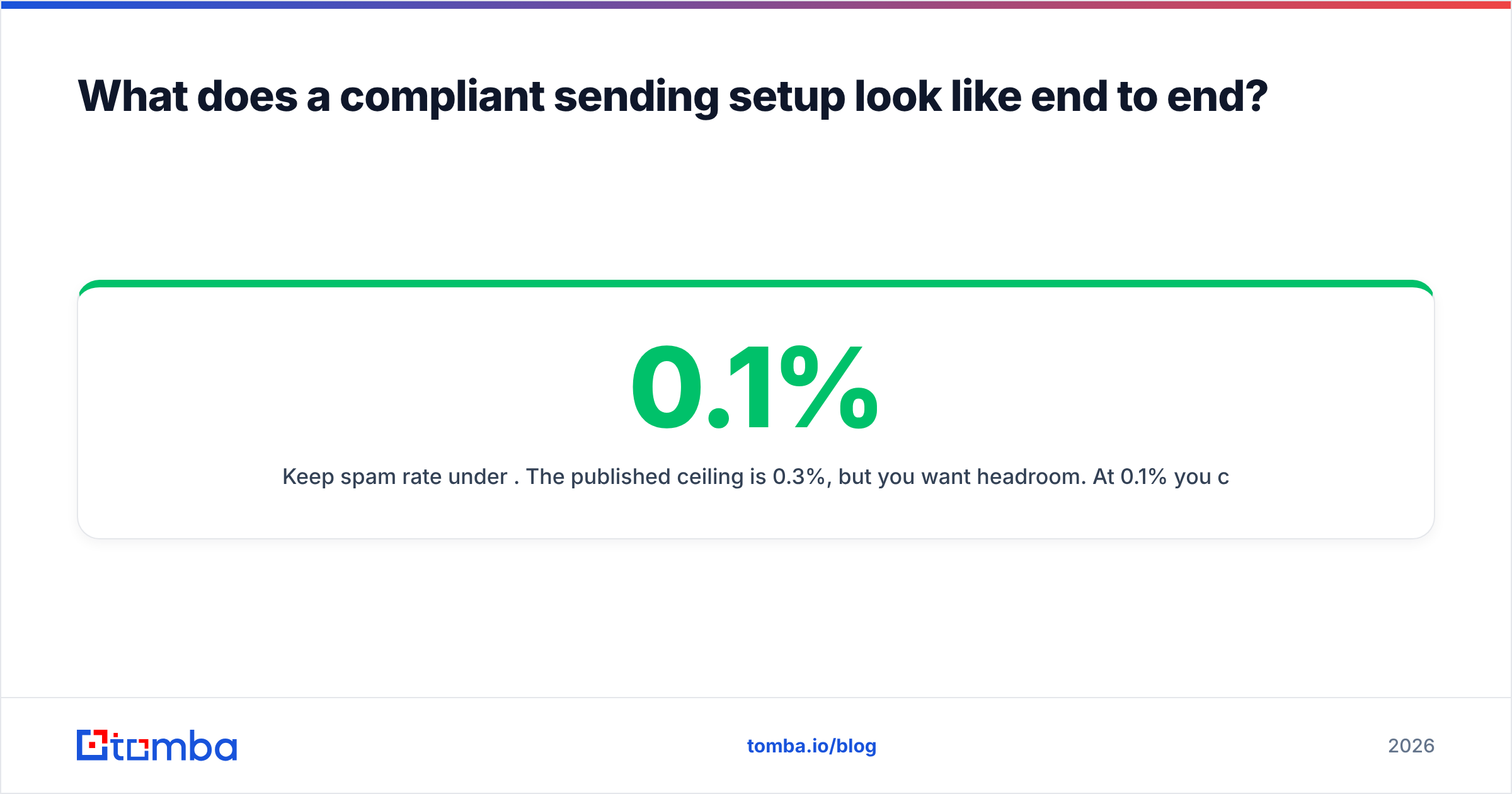
- Hold the spam rate at 0.1%. The cap is 0.3%, but you want room for one bad send.
- Track the funnel. Log bounce rate and reply rate per data source. If one source bounces more, cut it.
Comparing data vendors on this axis? A vendor's published data sources and check methods tell you more about your future bounce rate than any feature list. BookYourData and Tomba both publish that detail. Demand it, whoever you buy from. G2's lead intelligence category is a fair, neutral place to compare claims.
What are the most common Gmail sender guidelines mistakes?#
- Thinking a DMARC record equals DMARC pass. The record must exist and your mail must line up. Plenty of domains publish a fine record while every mail fails.
- Treating 0.3% as a target. It is a cap. Healthy senders sit at 0.05-0.1%.
- Adding an opt-out link but no headers. RFC 8058 wants headers a machine can read. Gmail only shows its own "Unsubscribe" button when they are there. Without it, people hit "Report spam" instead.
- Warming a domain with fake replies. Pods trade opens and replies in patterns that look nothing like real people. Google is very good at ignoring them.
- Ignoring the reply signal. The best lever in B2B outbound is mail people want to answer. It is also the slowest and least technical, so it gets skipped.
Getting your sending list right before you send#
The gmail sender guidelines reward one habit above all: mail real people who want to hear from you. Auth gets you through the door. Data quality decides whether you stay in the inbox.
If bounces are where your trouble starts, fix the input. Tomba Email Finder returns verified work addresses with a score attached. You know what you are mailing before you send, not after Postmaster Tools tells you. The free tier covers 25 searches a month. Paid plans start at $49/mo on Starter, with Growth at $99/mo and Pro at $249/mo. Full Tomba pricing is public if you want to weigh cost per verified contact against what a burned domain costs.
Related guides#
Ready to find emails that actually work?
Join 150,000+ professionals who stopped guessing and started sending. Free credits on signup — no credit card required.
Get the Tomba newsletter
Practical outbound tactics and product updates — once every two weeks.
About the author