Gmail Sending Limit Size: Daily Caps and 25MB Rules 2026
Gmail has two separate ceilings people confuse constantly: how many messages you can send per day, and how big each one can be. Here is what actually triggers a block, why 25MB attachments fail at 20MB, and how to work around both.
TL;DR
- "Gmail sending limit size" is really two limits: a daily message/recipient cap and a per-message size cap. They are enforced by different systems and fail in different ways.
- Free Gmail accounts: roughly 500 messages per day. Google Workspace accounts: roughly 2,000 messages per day, with a 10,000 total recipients per day ceiling.
- The attachment limit is 25MB per message — but because of base64 encoding, a file over about 18–20MB on disk will usually bounce.
- Hitting the daily cap does not delete your account. It locks sending for up to 24 hours and returns a
550-5.4.5 Daily user sending quota exceedederror. - Bounces from bad addresses burn your quota and your sender reputation. Verifying a list before you send is the cheapest fix available.
What does "Gmail sending limit size" actually mean?#
Two different numbers get collapsed into one search query, and mixing them up is how people end up debugging the wrong problem.
Limit one is volume. Google caps how many messages you can send in a rolling 24-hour window, how many recipients those messages can reach, and how many of those recipients can be external to your domain. This is an anti-spam control. It exists to stop a compromised account from blasting a million messages before anyone notices.
Limit two is size. Google caps how large a single message can be — headers, body, and attachments combined. This is an infrastructure control, and it is shared across most of the email ecosystem. Outlook, Yahoo, and most corporate gateways sit in the same 20–35MB neighborhood.
Think of it like a delivery van. Limit one is how many trips the van can make per day. Limit two is how much fits in the back on any single trip. Blowing past either one stops the delivery, but the error messages, the recovery time, and the fixes are completely different.
What are Gmail's daily sending limits in 2026?#
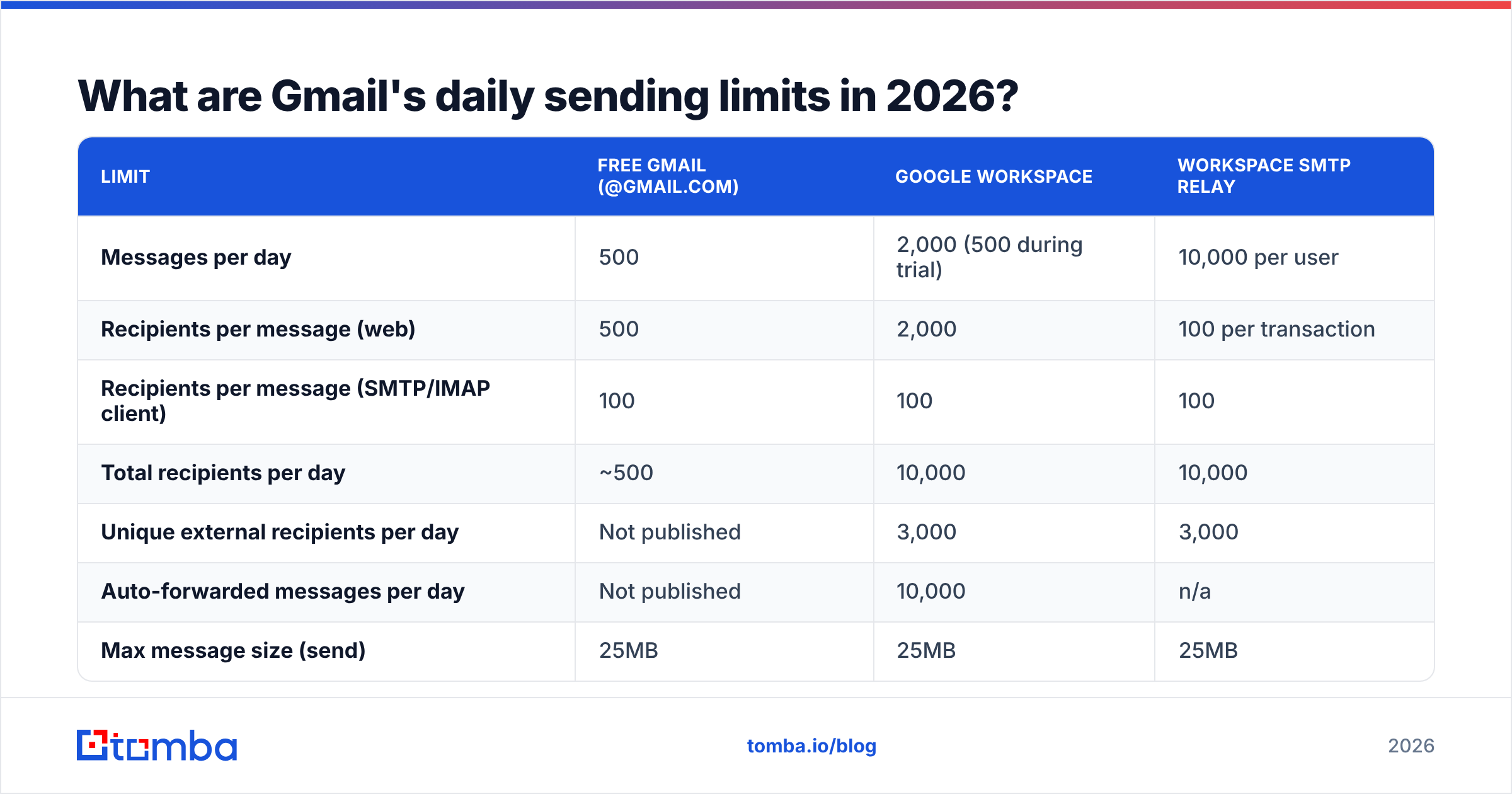
Google publishes these numbers, but they are scattered across several support pages and they differ by account type and sending method. Here is the consolidated view.
| Limit | Free Gmail (@gmail.com) | Google Workspace | Workspace SMTP relay |
|---|---|---|---|
| Messages per day | 500 | 2,000 (500 during trial) | 10,000 per user |
| Recipients per message (web) | 500 | 2,000 | 100 per transaction |
| Recipients per message (SMTP/IMAP client) | 100 | 100 | 100 |
| Total recipients per day | ~500 | 10,000 | 10,000 |
| Unique external recipients per day | Not published | 3,000 | 3,000 |
| Auto-forwarded messages per day | Not published | 10,000 | n/a |
| Max message size (send) | 25MB | 25MB | 25MB |
| Max message size (receive) | 50MB | 50MB | 50MB |
| Cost | Free | From $7.20/user/mo | Included with Workspace |
Two things people get wrong here constantly.
First, the 100-recipient cap for SMTP clients. If you connect Gmail to an outreach tool, a CRM, or Apple Mail over SMTP, the per-message recipient ceiling collapses from 500 (or 2,000) down to 100. Plenty of "why did my sequence stop" tickets trace back to exactly this.
Second, recipients count, not messages. A single message to 300 people consumes 300 recipient slots. Google's own Workspace sending limits documentation makes this explicit, and it is the reason a "we only sent 40 emails" claim can still trip a quota.
Why does a 25MB attachment fail at 20MB?#
Because email cannot carry raw binary data. Attachments get encoded before transmission, and encoding inflates them.
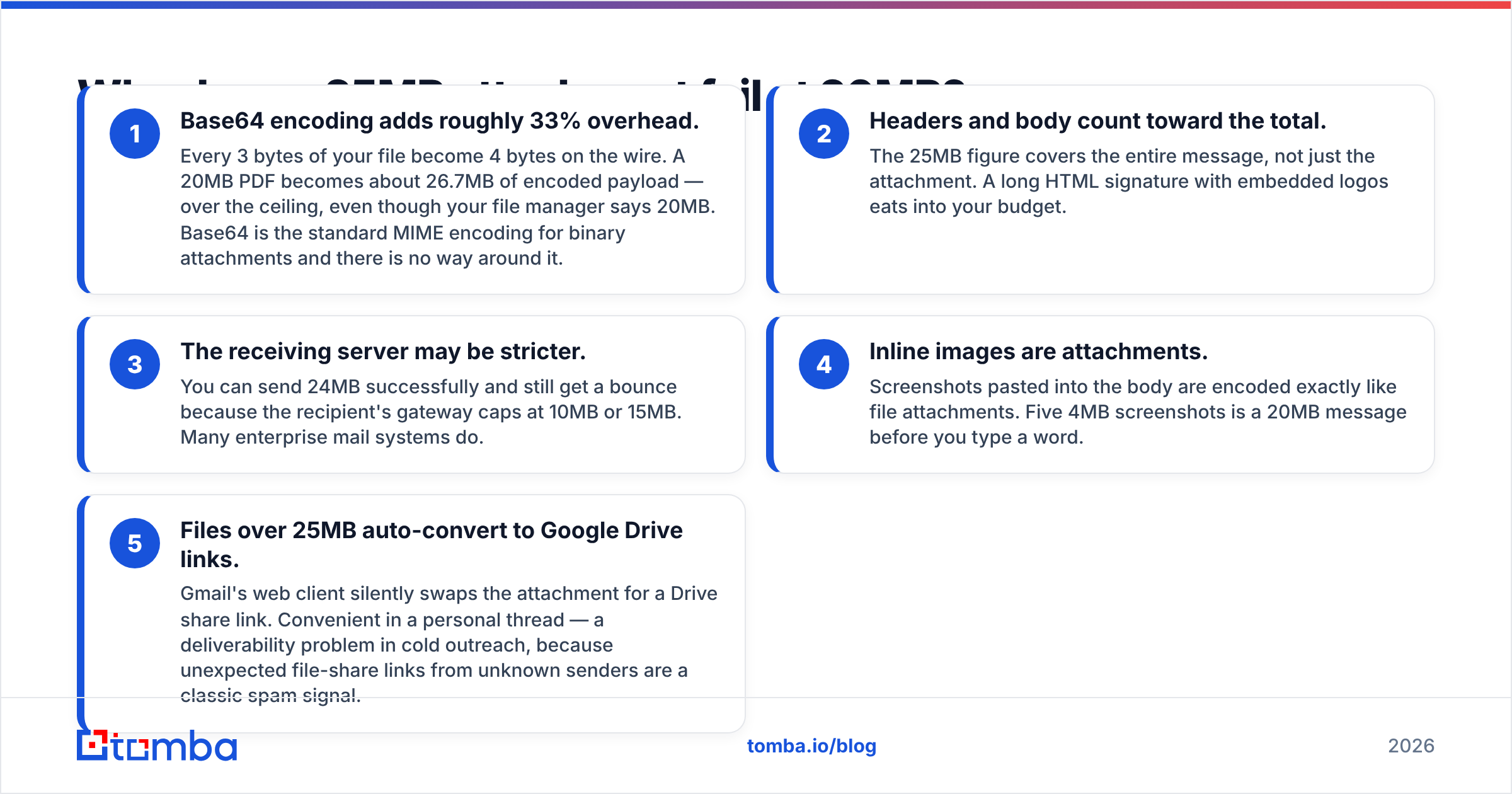
- Base64 encoding adds roughly 33% overhead. Every 3 bytes of your file become 4 bytes on the wire. A 20MB PDF becomes about 26.7MB of encoded payload — over the ceiling, even though your file manager says 20MB. Base64 is the standard MIME encoding for binary attachments and there is no way around it.
- Headers and body count toward the total. The 25MB figure covers the entire message, not just the attachment. A long HTML signature with embedded logos eats into your budget.
- The receiving server may be stricter. You can send 24MB successfully and still get a bounce because the recipient's gateway caps at 10MB or 15MB. Many enterprise mail systems do.
- Inline images are attachments. Screenshots pasted into the body are encoded exactly like file attachments. Five 4MB screenshots is a 20MB message before you type a word.
- Files over 25MB auto-convert to Google Drive links. Gmail's web client silently swaps the attachment for a Drive share link. Convenient in a personal thread — a deliverability problem in cold outreach, because unexpected file-share links from unknown senders are a classic spam signal.
Practical rule: keep real attachments under 18MB on disk. That leaves headroom for encoding and headers. Google's attachment guidance confirms the 25MB message ceiling and the Drive fallback behavior.

What happens when you hit a Gmail sending limit?#
Nothing dramatic, and nothing permanent — but the recovery is slower than most people expect.
If you exceed the daily message or recipient cap:
- Gmail's web interface shows a banner: "You have reached a limit for sending mail."
- SMTP connections return
550-5.4.5 Daily user sending quota exceeded. - Sending is blocked for up to 24 hours. Not exactly 24 — Google uses a rolling window, so partial capacity often returns sooner.
- Receiving is unaffected. Your inbox keeps working.
- Repeatedly hitting the cap, especially alongside high bounce or complaint rates, escalates to a full account suspension review.
If you exceed the message size cap:
- The message never leaves. You get an immediate rejection, usually
552 5.2.3 Your message exceeded Google's message size limits. - No quota is consumed, no reputation damage occurs. It is a clean failure.
The volume failure is the dangerous one. Google reads a quota breach as a signal that the account may be compromised or spamming. Combine it with a 15% bounce rate and you are not looking at a 24-hour timeout — you are looking at a domain that stops landing in inboxes entirely. That is a sender reputation problem, and it takes weeks to unwind.
How do you send more email without breaking Gmail?#
There is no trick that raises the ceiling on a single free account. There are legitimate ways to build capacity.
- Use Google Workspace, not free Gmail. The 4x jump from 500 to 2,000 messages per day costs about $7.20/user/month at the Workspace Business Starter tier. For anyone sending business email at volume, this is not optional.
- Add secondary sending domains. Buy variations of your primary domain (
getacme.comalongsideacme.com), authenticate each one properly, and split volume. This protects the primary domain's reputation, which is the actual asset you are defending. - Warm up every new mailbox. A brand-new inbox that sends 400 messages on day one gets filtered regardless of quota compliance. Ramp over 3–4 weeks. Our email warmup calculator gives you a day-by-day schedule.
- Use SMTP relay for transactional volume. Workspace's SMTP relay service handles 10,000 messages per user per day — appropriate for app notifications and receipts, not for cold outreach.
- Move bulk marketing off Gmail entirely. Newsletters and announcements belong on a dedicated ESP with list management, unsubscribe handling, and dedicated IPs. Gmail was never designed for that job.
- Compress and link, don't attach. For anything over a few megabytes, host the file and share a link from a domain the recipient already trusts.
Is Gmail the right tool for cold outreach?#
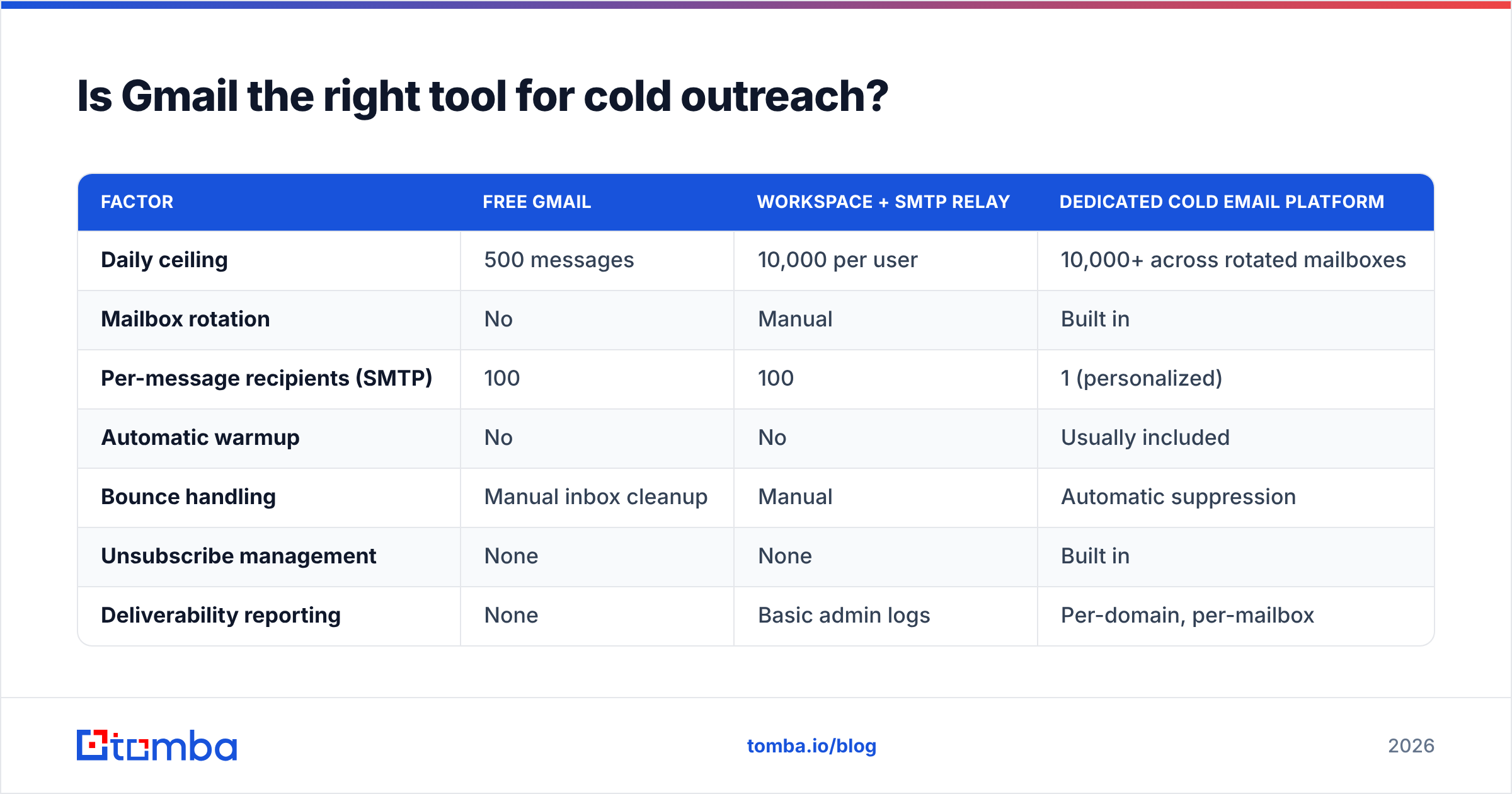
Gmail is excellent for one-to-one conversations and mediocre for scaled outbound. The comparison is worth seeing side by side.
| Factor | Free Gmail | Workspace + SMTP relay | Dedicated cold email platform |
|---|---|---|---|
| Daily ceiling | 500 messages | 10,000 per user | 10,000+ across rotated mailboxes |
| Mailbox rotation | No | Manual | Built in |
| Per-message recipients (SMTP) | 100 | 100 | 1 (personalized) |
| Automatic warmup | No | No | Usually included |
| Bounce handling | Manual inbox cleanup | Manual | Automatic suppression |
| Unsubscribe management | None | None | Built in |
| Deliverability reporting | None | Basic admin logs | Per-domain, per-mailbox |
| Cost | $0 | ~$7.20/user/mo | $30–$100+/mo |
| Best for | Personal threads | Transactional mail | Sequenced outbound |
The honest read: use Workspace as your sending infrastructure and layer a sequencing tool on top when volume exceeds roughly 50 cold emails per day per mailbox. Below that threshold, plain Gmail with disciplined list hygiene works fine and costs nothing extra.
What no tool in that table fixes is a bad list. Rotation, warmup, and throttling all assume the addresses are real.
How do you protect your daily quota from waste?#
Every message to a dead address costs you twice: one slot from your daily cap, and one bounce against your reputation.
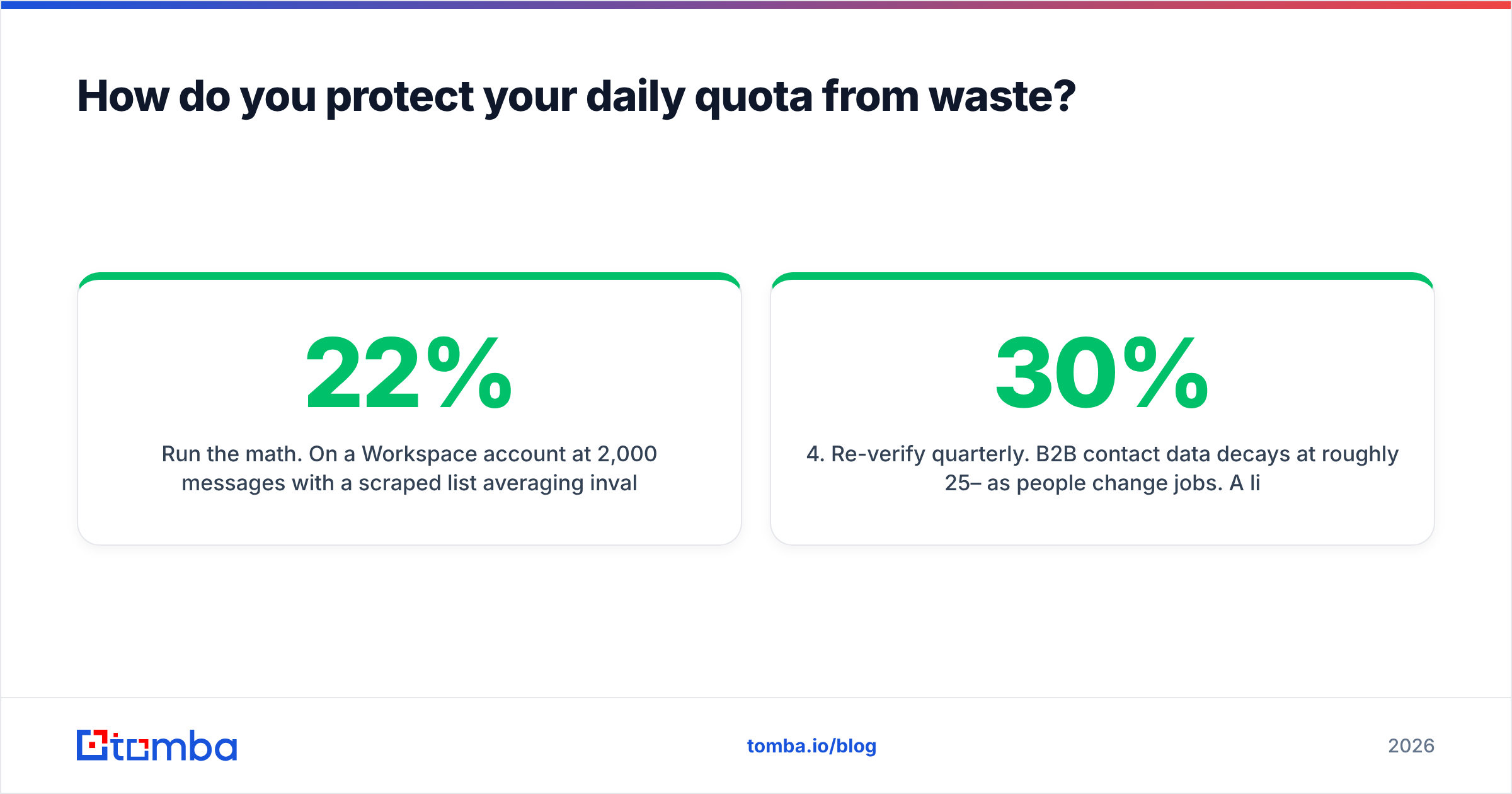
Run the math. On a Workspace account at 2,000 messages/day with a scraped list averaging 22% invalid, you burn 440 sends per day producing nothing but hard bounces. That is 22% of your capacity spent buying reputation damage. Mailbox providers start filtering aggressively above roughly 3% bounce rate; 22% is a fast route to the spam folder for every subsequent campaign.
The sequence that actually protects quota:
- Verify before you import. Run the list through an email verifier and remove hard bounces, role accounts, and disposables. For lists over a few thousand rows, use bulk verify rather than one at a time.
- Handle catch-all domains separately. Catch-all servers accept everything, so a standard SMTP check returns "valid" for addresses that do not exist. A catch-all verifier applies pattern analysis and secondary signals to score those addresses properly instead of guessing.
- Check the content before it sends. A spam checker catches the trigger phrases, link ratios, and formatting problems that get messages filtered even when the address is perfect.
- Re-verify quarterly. B2B contact data decays at roughly 25–30% per year as people change jobs. A list verified 12 months ago is not a verified list.
None of this raises your Gmail sending limit. It makes every message inside that limit count — which is the same outcome and costs a fraction of what an extra sending domain does.
What about Gmail's other hidden limits?#
A few caps that catch people off guard and rarely appear in the headline numbers:
- Google Groups: a group counts as one recipient toward your per-message cap, but external group members count individually toward your daily recipient total.
- Aliases and "send as": all aliases share the primary account's quota. Ten aliases do not give you ten times the capacity.
- Auto-forwarding: capped separately at 10,000 messages per day, with a 2,000 ceiling to any single destination address.
- Attachment file types: executables (
.exe,.bat,.jar, and dozens more) are blocked regardless of size — including inside password-protected archives, which Gmail inspects. - API sending: the Gmail API respects the same daily caps but has its own per-user rate quota measured in quota units per second. Bursty scripts hit that ceiling long before the daily one.
Frequently asked questions#
Can I request a higher Gmail sending limit? No. Google does not raise per-account caps on request. The supported path to more volume is more authenticated users or a dedicated bulk-sending service.
Does the 24-hour block reset at midnight? No. It is a rolling window. If you hit the cap at 3pm, capacity returns gradually from about 3pm the following day.
Do drafts, scheduled sends, or replies count? Scheduled sends and replies count when they leave. Drafts do not count until sent.
Is 25MB a hard limit or a guideline? Hard on send. Gmail accepts incoming messages up to 50MB, but it will not transmit an outgoing message above 25MB total encoded size.
Does using a paid outreach tool bypass the limit? No. If the tool sends through your Gmail mailbox, Google's caps apply exactly as they would in the web client. Tools distribute volume across several mailboxes — they do not raise any single mailbox's ceiling.
Where to start#
Fix the addresses before you fix the infrastructure. Most teams hitting Gmail's daily cap are not sending too much — they are sending to too many addresses that were never real, then paying for the failure twice in quota and reputation.
Build the list correctly from the start: use the Tomba Email Finder to source verified professional addresses by domain, name, or company, with confidence scores attached before anything hits your sending queue. The free tier covers 25 searches per month; paid plans start at $49/month on Tomba pricing if you need volume. Every address that arrives already verified is one more slot inside Gmail's ceiling doing actual work.
Related guides#
Ready to find emails that actually work?
Join 150,000+ professionals who stopped guessing and started sending. Free credits on signup — no credit card required.
Get the Tomba newsletter
Practical outbound tactics and product updates — once every two weeks.
About the author