Gmail SMTP Limits in 2026: Sending Caps, Errors & Fixes
Gmail caps SMTP sending far lower than most teams assume — and the number changes depending on whether you use a free account, Workspace, relay, or the API. Here are the real limits, the errors they trigger, and how to work around them safely.
TL;DR
- A free Gmail account allows roughly 500 recipients per rolling 24 hours via SMTP; Google Workspace paid plans allow 2,000 recipients per day (1,500 if you send via SMTP relay from a non-Google server without extra config).
- The cap counts recipients, not messages. One email to 40 people burns 40 units of your quota.
- Limits are enforced on a rolling 24-hour window, not at midnight. Blow through it and you get a temporary lockout of up to 24 hours with a
550-5.4.5 Daily user sending limit exceededbounce. - Per-connection and per-minute throttles exist too — Google will slow or drop you long before the daily cap if you hammer the server.
- Gmail SMTP is fine for transactional trickle and low-volume 1:1 outreach. It is the wrong tool for campaigns. Use a dedicated ESP for bulk, and keep your list clean so every send counts.
What are Gmail SMTP limits?#
Gmail SMTP limits are the hard caps Google places on how many messages and recipients a single account can push through smtp.gmail.com in a given period. They exist for one reason: Gmail is a mailbox provider, not a bulk sender. Every free mailbox that can blast 10,000 emails becomes a spam cannon within a week, so Google throttles aggressively.
Think of it like a residential water line versus an industrial supply. Your house pipe is perfectly sized for showers and dishes. Hook a fire hose to it and the pressure collapses — not because the water ran out, but because the pipe was never rated for that flow. Gmail SMTP is the house pipe.
Three separate ceilings apply simultaneously, and you hit whichever one comes first:
- Daily recipient cap — total recipients across all messages in a rolling 24-hour window.
- Per-message recipient cap — how many addresses can sit in To/CC/BCC on a single message.
- Rate throttles — undocumented per-minute and per-connection limits that trigger temporary deferrals.
Most people only learn about #1, get blocked, and never figure out that #3 was the actual culprit.
What are the actual Gmail sending limits in 2026?#
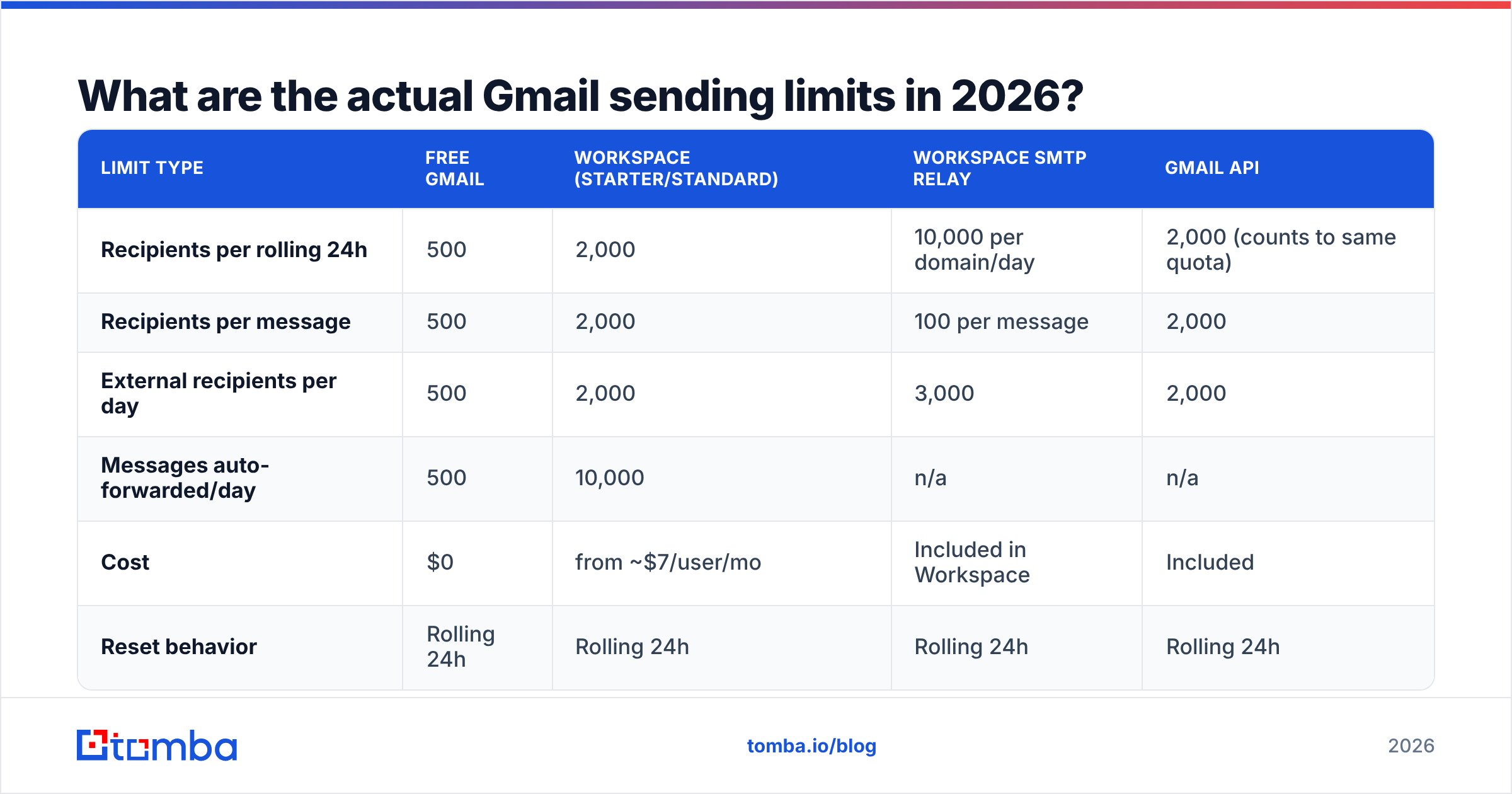
Google publishes these in the Gmail sending limits documentation, and they have been stable for several years. Here is the current picture:
| Limit type | Free Gmail | Workspace (Starter/Standard) | Workspace SMTP relay | Gmail API |
|---|---|---|---|---|
| Recipients per rolling 24h | 500 | 2,000 | 10,000 per domain/day | 2,000 (counts to same quota) |
| Recipients per message | 500 | 2,000 | 100 per message | 2,000 |
| External recipients per day | 500 | 2,000 | 3,000 | 2,000 |
| Messages auto-forwarded/day | 500 | 10,000 | n/a | n/a |
| Cost | $0 | from ~$7/user/mo | Included in Workspace | Included |
| Reset behavior | Rolling 24h | Rolling 24h | Rolling 24h | Rolling 24h |
A few details that trip people up:
- "Rolling" means rolling. If you sent 500 emails at 3pm Tuesday, you are not clear at midnight. You are clear at 3pm Wednesday, and only for the portion that aged out.
- New Workspace accounts start restricted. Google frequently applies a lower trial cap (often 500/day) for the first few weeks until billing and domain reputation establish.
- SMTP relay is per-domain, not per-user. The 10,000/day relay figure is a domain-wide pool shared by every user routing through it.
- The Gmail API does not give you more headroom. It draws from the same daily quota. Switching from SMTP to API changes your interface, not your ceiling.

Why do Gmail SMTP limits count recipients instead of messages?#
Because spam is measured by inbox impact, not by outbound message count. A single message with 300 BCC recipients does exactly as much damage to Gmail's network as 300 individual sends — arguably more, since BCC blasts are a textbook spam pattern.
This has a practical consequence most senders miss. If you run a weekly newsletter to 400 subscribers from a free Gmail account, you are consuming 400 of your 500 daily units in one shot. Add normal work email and you will hit the wall by lunch.
It also means list hygiene is a quota multiplier. Every dead address you send to burns a unit of an artificially scarce resource and earns you a bounce that damages sender reputation. Running your list through an email verifier before send is not a nice-to-have when your ceiling is 500 — it is the difference between reaching 480 real humans and reaching 390.
What errors mean you have hit the limit?#
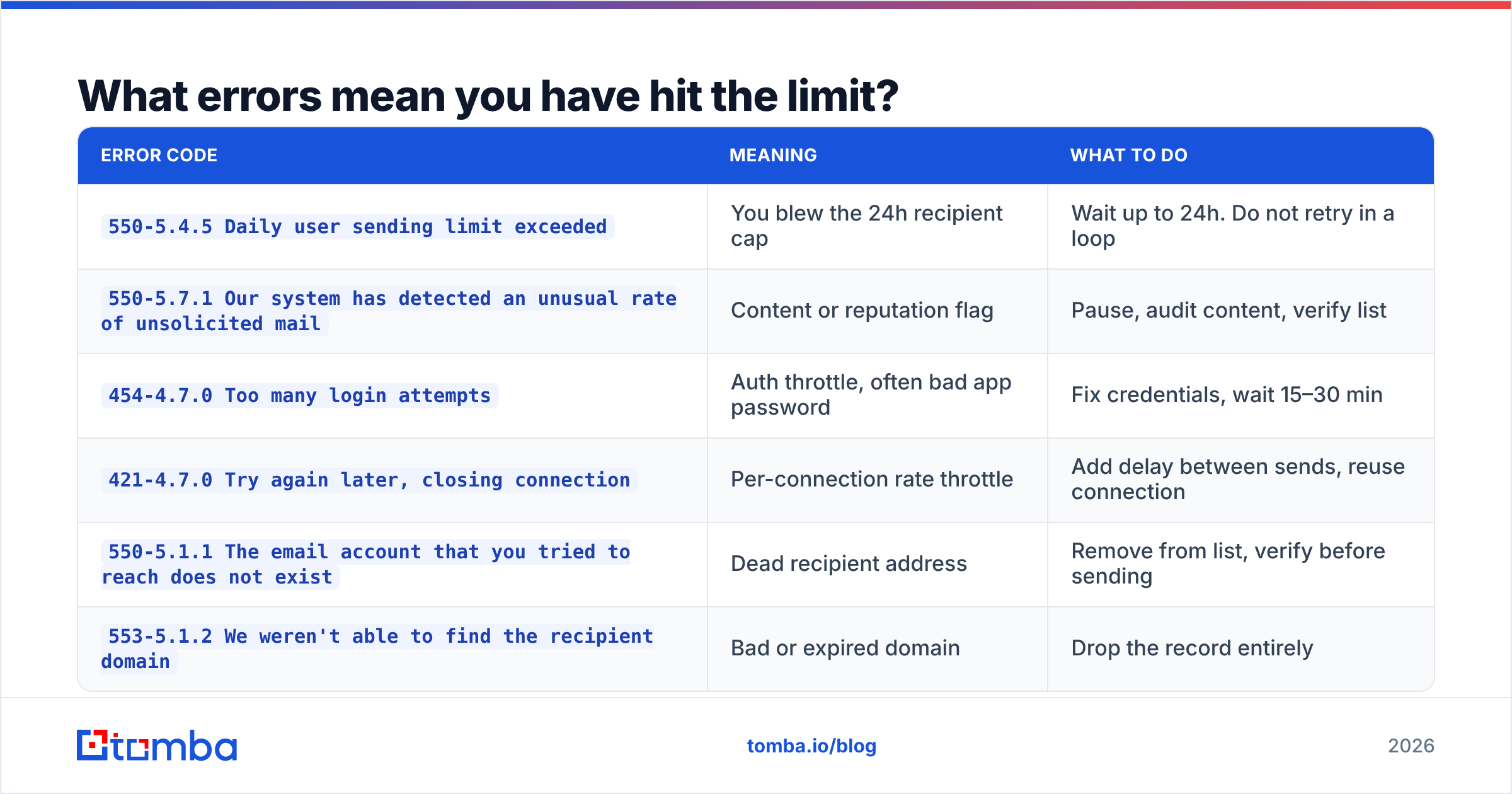
Gmail returns specific SMTP status codes. Knowing which one you got tells you whether to wait, slow down, or fix your setup.
| Error code | Meaning | What to do |
|---|---|---|
550-5.4.5 Daily user sending limit exceeded |
You blew the 24h recipient cap | Wait up to 24h. Do not retry in a loop |
550-5.7.1 Our system has detected an unusual rate of unsolicited mail |
Content or reputation flag | Pause, audit content, verify list |
454-4.7.0 Too many login attempts |
Auth throttle, often bad app password | Fix credentials, wait 15–30 min |
421-4.7.0 Try again later, closing connection |
Per-connection rate throttle | Add delay between sends, reuse connection |
550-5.1.1 The email account that you tried to reach does not exist |
Dead recipient address | Remove from list, verify before sending |
553-5.1.2 We weren't able to find the recipient domain |
Bad or expired domain | Drop the record entirely |
The 421 is the sneaky one. It is not a daily-limit error, but people read "try again later" as "I'm over quota" and start a retry loop that makes Google's throttle tighter. The correct response is to add 1–3 seconds of spacing between messages and keep a single authenticated connection open rather than reconnecting per message.
That last two rows matter more than the volume caps for most teams. Bounces from dead addresses are the fastest way to turn a healthy sending domain into a filtered one. If a meaningful share of your list is guesswork, fix the data before you fight the quota — a bulk verify pass costs less than a month of deliverability recovery.
Is Gmail SMTP good enough for cold outreach?#
Honestly? For genuinely low-volume, personalized 1:1 outreach — yes, with caveats. For anything resembling a campaign — no.
Here is the decision framework:
- Under 40 sends/day, fully personalized — Gmail SMTP is fine. You are well under every throttle, and sending from a real human mailbox with real reply behavior is actually good for email deliverability.
- 40–150 sends/day across multiple Workspace mailboxes — workable, but you need per-mailbox rate limiting, staggered send windows, and warmed domains. Most sequencing tools handle this.
- 150–500 sends/day — you are in the danger zone. Technically under the Workspace cap, but well inside the range where Google's spam heuristics start scoring you. Expect spam-folder placement before you expect a hard block.
- Over 500 sends/day — stop. Use a dedicated sending infrastructure (SendGrid, Postmark, Amazon SES, or a purpose-built outbound platform). Gmail SMTP will fail you, and the failure mode is silent inbox placement loss, not a clean error.
- Any bulk newsletter or announcement — use an ESP. Full stop. Gmail has no unsubscribe handling, no list management, and no suppression logic.
The uncomfortable truth is that hitting the daily cap is rarely the real problem. Teams that hit 2,000/day on Workspace are almost always already in spam folders — the quota just made the failure visible.
How do you work around Gmail SMTP limits safely?#
There are legitimate ways to increase throughput and illegitimate ways that get your domain burned. Know the difference.
Legitimate approaches:
- Add mailboxes, not volume per mailbox. Three Workspace users at 100 sends/day each is far safer than one user at 300. Each mailbox carries its own reputation.
- Use Google Workspace SMTP relay for application-generated mail. Configure it in the Admin console under Apps → Google Workspace → Gmail → Routing. This is the sanctioned path for app notifications, not for outbound sales.
- Move transactional mail off Gmail entirely. Password resets, receipts, and notifications belong on a transactional provider with dedicated IPs and proper bounce webhooks.
- Space your sends. A 30–90 second randomized gap between messages mimics human behavior and stays clear of the
421throttle. - Warm new domains and mailboxes. Ramp from 10–20 sends/day over 3–4 weeks. A warmup calculator gives you a concrete ramp schedule rather than a guess.
- Verify before you send. Every bounce you avoid is a quota unit recovered and a reputation hit prevented.
Approaches that will hurt you:
- Creating throwaway free Gmail accounts to multiply quota. Google links them by device, IP, and recovery data, and bans in clusters.
- Retrying
550-5.4.5in a loop. It extends the lockout. - Using BCC to fan out a "personalized" message to 200 people. This is the single strongest spam signal you can emit from a Gmail account.
- Buying a list and sending to it from any Gmail-family address. The bounce rate alone will trip the
5.7.1filter within one send.

How does Gmail compare to dedicated sending infrastructure?#
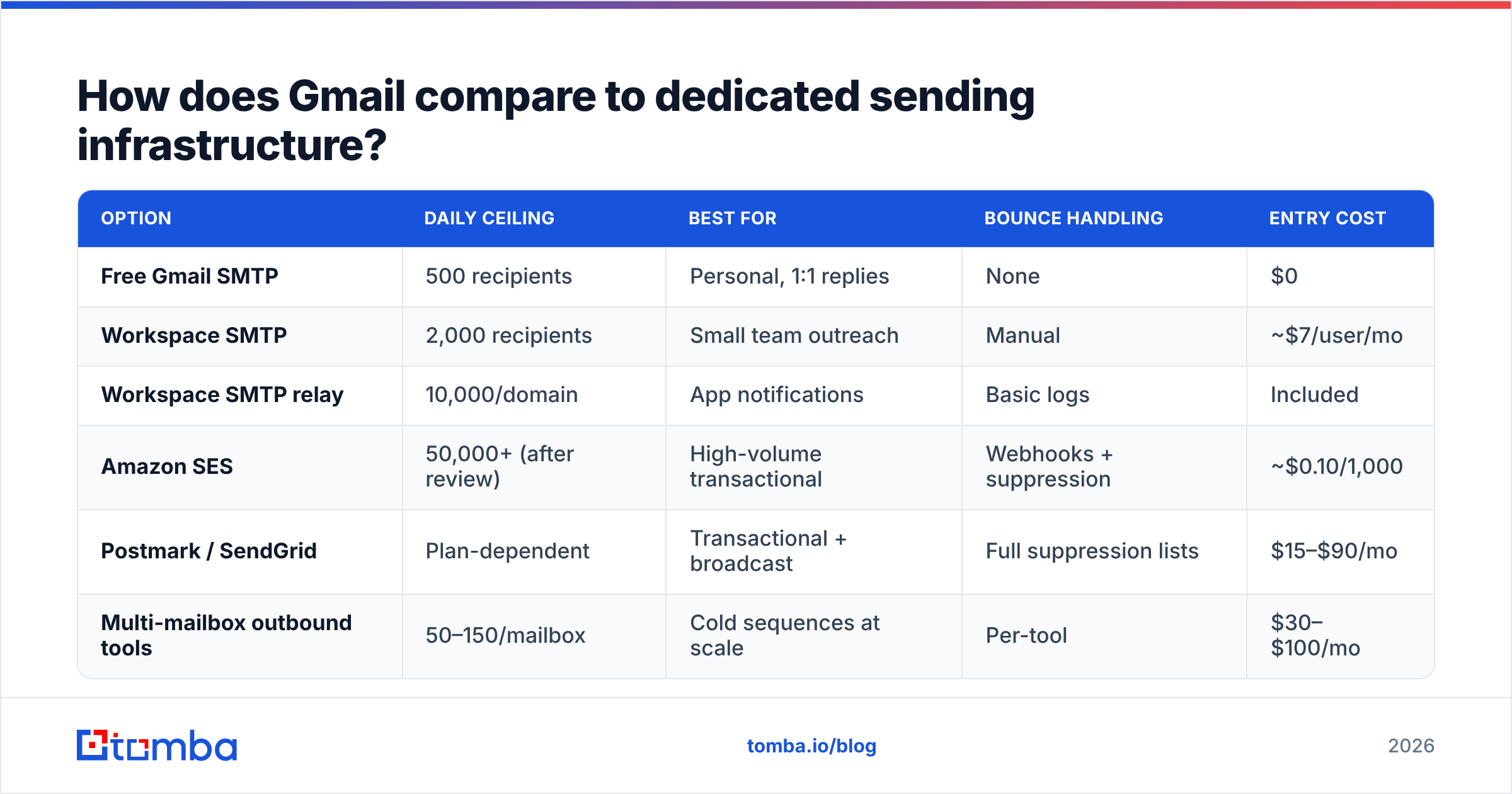
If you have outgrown Gmail SMTP, the alternatives split into transactional providers and outbound platforms. They are not interchangeable.
| Option | Daily ceiling | Best for | Bounce handling | Entry cost |
|---|---|---|---|---|
| Free Gmail SMTP | 500 recipients | Personal, 1:1 replies | None | $0 |
| Workspace SMTP | 2,000 recipients | Small team outreach | Manual | ~$7/user/mo |
| Workspace SMTP relay | 10,000/domain | App notifications | Basic logs | Included |
| Amazon SES | 50,000+ (after review) | High-volume transactional | Webhooks + suppression | ~$0.10/1,000 |
| Postmark / SendGrid | Plan-dependent | Transactional + broadcast | Full suppression lists | $15–$90/mo |
| Multi-mailbox outbound tools | 50–150/mailbox | Cold sequences at scale | Per-tool | $30–$100/mo |
Notice the pattern: the higher-ceiling options all include bounce handling and suppression management. That is not a coincidence. Providers who let you send a lot make you prove you are sending to real people. Gmail simply caps you instead.
Whichever direction you go, the input quality problem does not change. A dedicated ESP will happily send 50,000 emails to a list where 18% of addresses are dead — and then throttle you into oblivion when the bounce rate posts. Tools like Tomba, Hunter, and BookYourData all exist to solve the same upstream problem: making sure the addresses you spend quota on actually resolve. BookYourData leans toward pre-built verified lists by industry; Tomba leans toward finding and verifying addresses on demand from a domain or name, with a free email checker for one-off lookups.
What should you monitor to stay under the limits?#
Set up these checks before you need them, not after your first lockout:
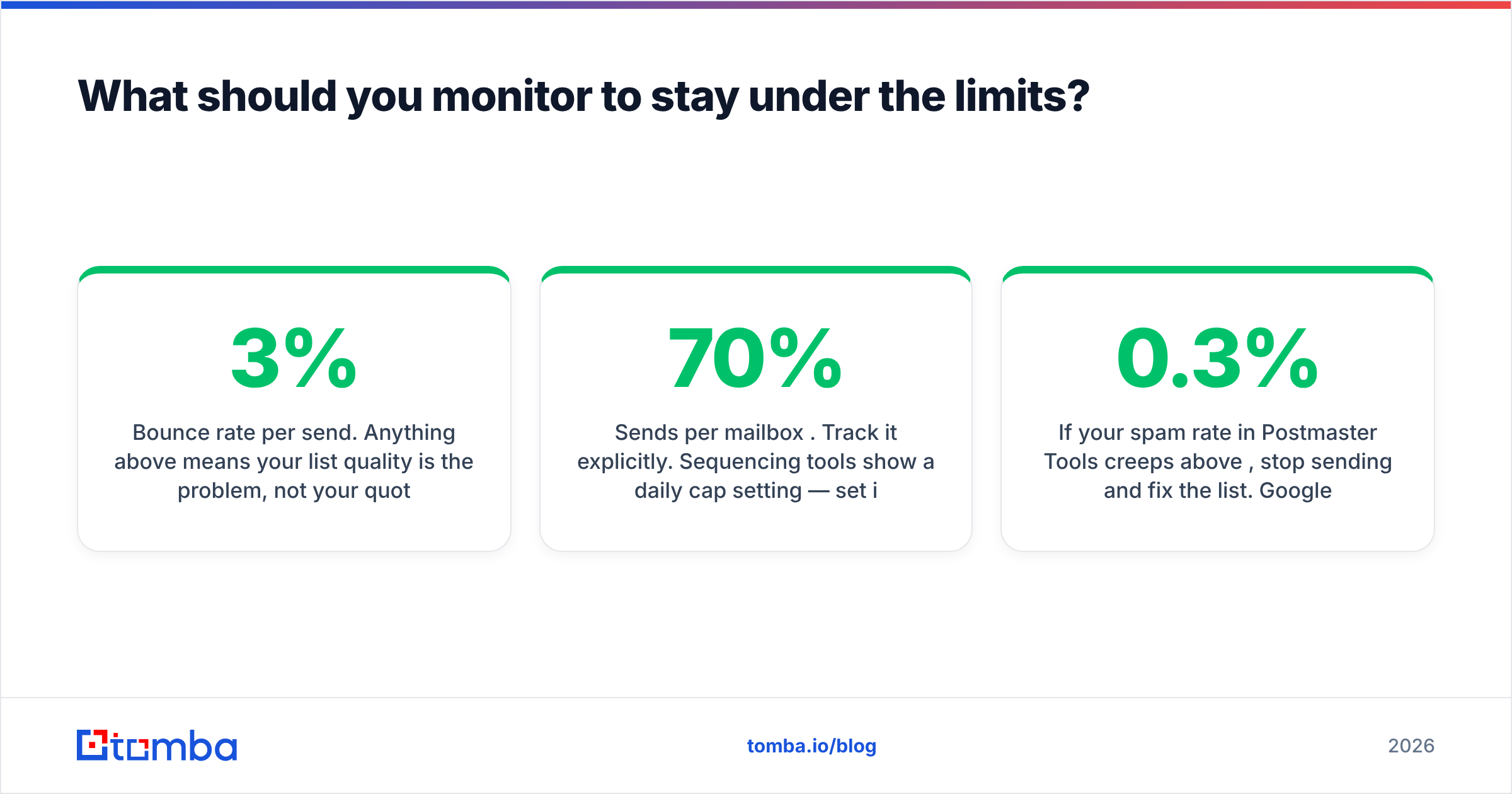
- Bounce rate per send. Anything above 3% means your list quality is the problem, not your quota. Above 5% and Gmail will act before you do.
- Sends per mailbox per day. Track it explicitly. Sequencing tools show a daily cap setting — set it to 60–70% of the hard limit, never 100%.
- Reply and complaint rates. Google weighs engagement heavily. A mailbox with zero replies and 400 daily sends is a filtering target regardless of quota compliance.
- SPF, DKIM, and DMARC alignment. Missing authentication does not consume quota, but it makes every other signal worse. Check your SPF record and confirm DKIM is signing for the exact sending domain.
- Postmaster Tools data. Google's own Postmaster Tools shows domain reputation, spam rate, and delivery errors directly from the receiving side. It is free and it is the only ground truth you get.
If your spam rate in Postmaster Tools creeps above 0.3%, stop sending and fix the list. Google's published threshold for bulk senders is 0.3%, and crossing it repeatedly triggers filtering that no quota management will save you from.
The bottom line#
Gmail SMTP limits are not really a volume problem — they are a signal. Google caps mailboxes at 500 or 2,000 recipients per day because mailboxes are meant for conversations, not campaigns. If you are bumping against the ceiling regularly, the answer is almost never "find a way to send more from Gmail." It is either "move to real sending infrastructure" or "send to fewer, better-qualified addresses."
That second option is usually cheaper and always more effective. Cutting a 500-address list down to the 320 addresses that actually exist and actually match your ICP will beat sending to all 500 on every metric that matters — deliverability, reply rate, and the quota you did not have to fight.
Start there. Use the Tomba Email Finder to source verified, deliverable addresses by domain, name, or company before they ever enter your sending queue — the free tier covers 25 searches a month, and paid Tomba plans start at $49/mo for teams doing real outbound volume. Fewer bounces, cleaner reputation, and every one of those 500 daily units spent on a person who can actually reply.
Related guides#
Ready to find emails that actually work?
Join 150,000+ professionals who stopped guessing and started sending. Free credits on signup — no credit card required.
Get the Tomba newsletter
Practical outbound tactics and product updates — once every two weeks.
About the author