Gmail SMTP Relay Server: Setup, Limits, and Real Costs
Google's SMTP relay looks like free infrastructure until the quotas, authentication rules, and 550 errors show up. Here's how it actually works, what it costs, and when a dedicated relay wins.
TL;DR
- A Gmail SMTP relay server (
smtp-relay.gmail.com) is a Google Workspace feature that lets your apps, scanners, and internal systems send mail through Google using your domain — it is not the same thing assmtp.gmail.com. - Relay is designed for higher volume than personal Gmail submission, but it is still quota-capped per user per day, and Google counts recipients, not messages.
- Setup fails for three predictable reasons: wrong port, IP not allowlisted, and a sender address Google refuses to authenticate.
- It is excellent for transactional and internal mail. It is a bad fit for cold outbound, marketing blasts, and anything sent to a list you have not verified.
- If you are sending to prospects, the relay is the last mile. Data quality — real, deliverable addresses — decides whether the relay ever gets a chance.
What is a Gmail SMTP relay server?#
A Gmail SMTP relay server is Google's outbound mail gateway for organizations. You point an application at smtp-relay.gmail.com, authenticate (or get allowlisted by IP), and Google accepts your message and delivers it to the recipient's mail server on your behalf.
Think of it like a corporate mailroom. Anyone in the building can drop an envelope in the bin, and the mailroom handles postage, routing, and the relationship with the postal service. You never talk to the post office directly. The mailroom also enforces house rules: it will not send 50,000 envelopes in an hour, and it will not put your company's return address on mail from a stranger.
That analogy explains most of the friction people hit. The relay is not raw SMTP infrastructure you rent — it is Google's reputation, lent to you conditionally. Every limit exists to protect that reputation.
Technically, the relay speaks standard SMTP and accepts connections on ports 25, 465, and 587. It is available to Google Workspace customers; consumer Gmail accounts do not get it.
How is SMTP relay different from smtp.gmail.com?#
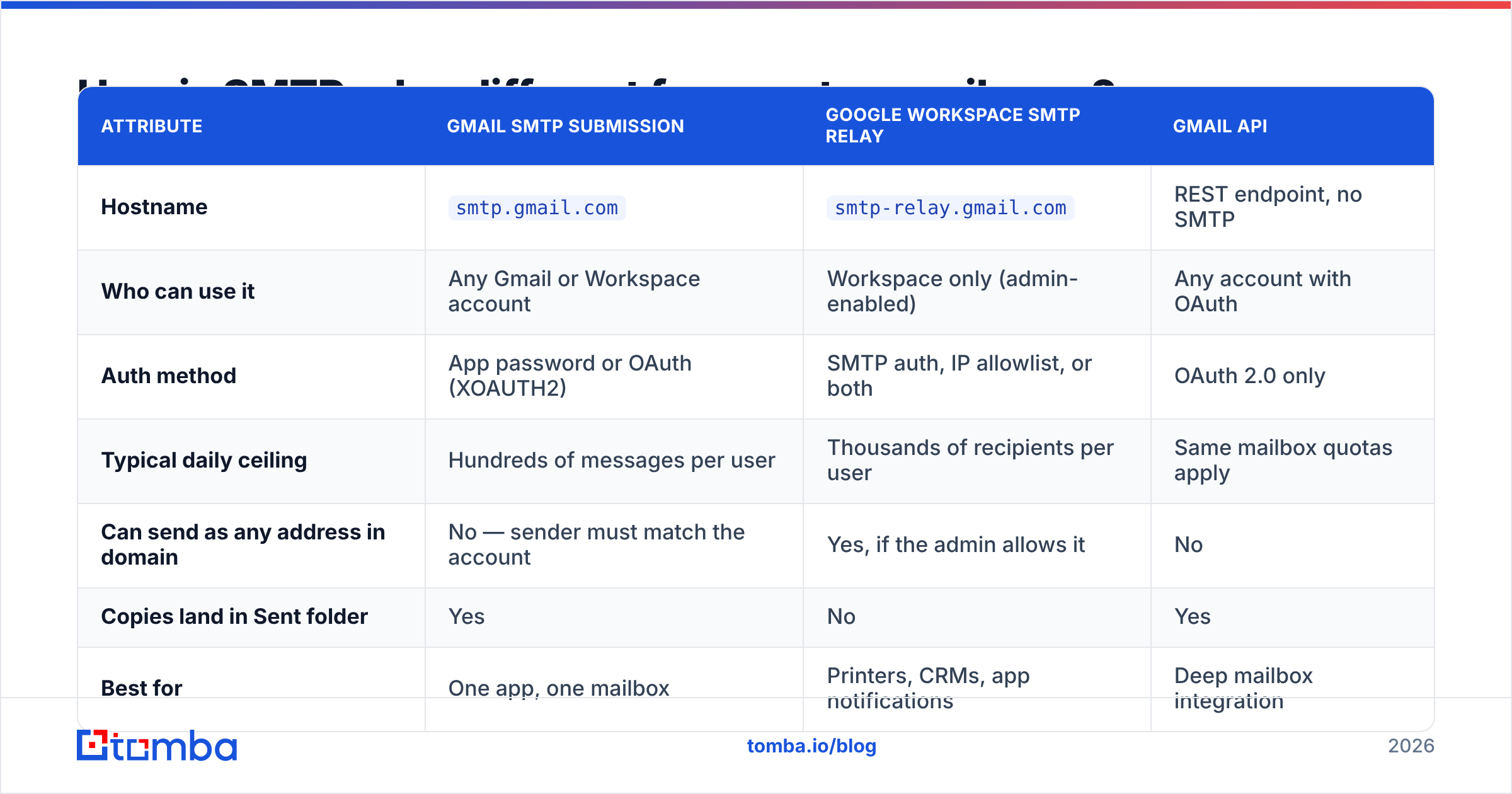
This is the single most common source of confusion, and getting it wrong wastes hours. Google exposes three separate outbound paths, and they behave differently.
| Attribute | Gmail SMTP submission | Google Workspace SMTP relay | Gmail API |
|---|---|---|---|
| Hostname | smtp.gmail.com |
smtp-relay.gmail.com |
REST endpoint, no SMTP |
| Who can use it | Any Gmail or Workspace account | Workspace only (admin-enabled) | Any account with OAuth |
| Auth method | App password or OAuth (XOAUTH2) | SMTP auth, IP allowlist, or both | OAuth 2.0 only |
| Typical daily ceiling | Hundreds of messages per user | Thousands of recipients per user | Same mailbox quotas apply |
| Can send as any address in domain | No — sender must match the account | Yes, if the admin allows it | No |
| Copies land in Sent folder | Yes | No | Yes |
| Best for | One app, one mailbox | Printers, CRMs, app notifications | Deep mailbox integration |
| Setup difficulty | Low | Medium (admin console required) | High (OAuth flow) |
The practical rule: if a single application sends as a single person, use smtp.gmail.com. If many systems send as many addresses across your domain, use the relay. If you need to read, label, or thread messages — not just send — use the API.
What are the actual limits on a Gmail SMTP relay server?#
Google publishes the numbers, and they change, so treat any figure you read in a blog post — including this one — as a starting point and confirm against Google's SMTP relay documentation before you build capacity planning around it.
What matters more than the exact digits is the shape of the limits:
- Recipients are the unit, not messages. One email to 40 people burns 40 units of quota, not one. Teams that budget by "messages per day" blow through the cap and never understand why.
- The cap is per user, per rolling 24 hours. It is not a calendar-day reset. Hit the ceiling at 3 p.m. and you are throttled until 3 p.m. tomorrow, not until midnight.
- There is also a per-message recipient limit. Large To/CC/BCC blocks get rejected outright rather than trimmed. Split them.
- Quota scales with licenses, not with need. More paid seats generally means more headroom. You cannot buy relay capacity as a standalone add-on.
- Sustained rate matters as much as volume. Firing your entire daily allowance in a five-minute burst triggers temporary deferrals (
421responses) even if you are technically under the daily cap.
The design intent is clear once you see the pattern: Google built this for steady operational mail — invoices, alerts, password resets, scan-to-email — not for campaigns.
How do you set up SMTP relay in Google Workspace?#
The configuration lives in the Admin console, not in any individual mailbox. You need super-admin access.
Step 1 — Turn on the service. In the Admin console, go to Apps → Google Workspace → Gmail → Routing, and find the SMTP relay service setting. Create a new relay configuration and name it after the system that will use it ("Warehouse scanner", "Billing app"), not something generic. You will thank yourself during the next audit.
Step 2 — Choose who can send. You get two allowed-sender options: only registered users in your domain, or any address (including external ones). Pick the narrower option unless you have a documented reason. "Any address" turns your relay into a potential open door.
Step 3 — Set authentication. You can require SMTP authentication with a Workspace account, restrict by public static IP, or require both. Both is the right answer for servers you control. IP-only is the only option for many older printers and appliances that cannot store credentials.
Step 4 — Enforce TLS. Check the "Require TLS encryption" box. Modern receiving servers increasingly deprioritize or reject cleartext SMTP, and there is no upside to leaving it off.
Step 5 — Configure the client. Point the application at smtp-relay.gmail.com. Use port 587 with STARTTLS for authenticated connections, 465 for implicit SSL, or 25 only for IP-allowlisted devices that support nothing else.
Step 6 — Fix your DNS. Publish an SPF record that includes _spf.google.com, sign with DKIM using the key Google generates in the Admin console, and publish a DMARC policy. Skipping this is the number-one cause of relayed mail landing in spam. Run a quick check with an SPF checker after propagation.
Step 7 — Send a test and read the headers. Look for spf=pass, dkim=pass, and dmarc=pass in the received message's authentication results. If any of the three says fail or none, stop and fix it before you send anything real.
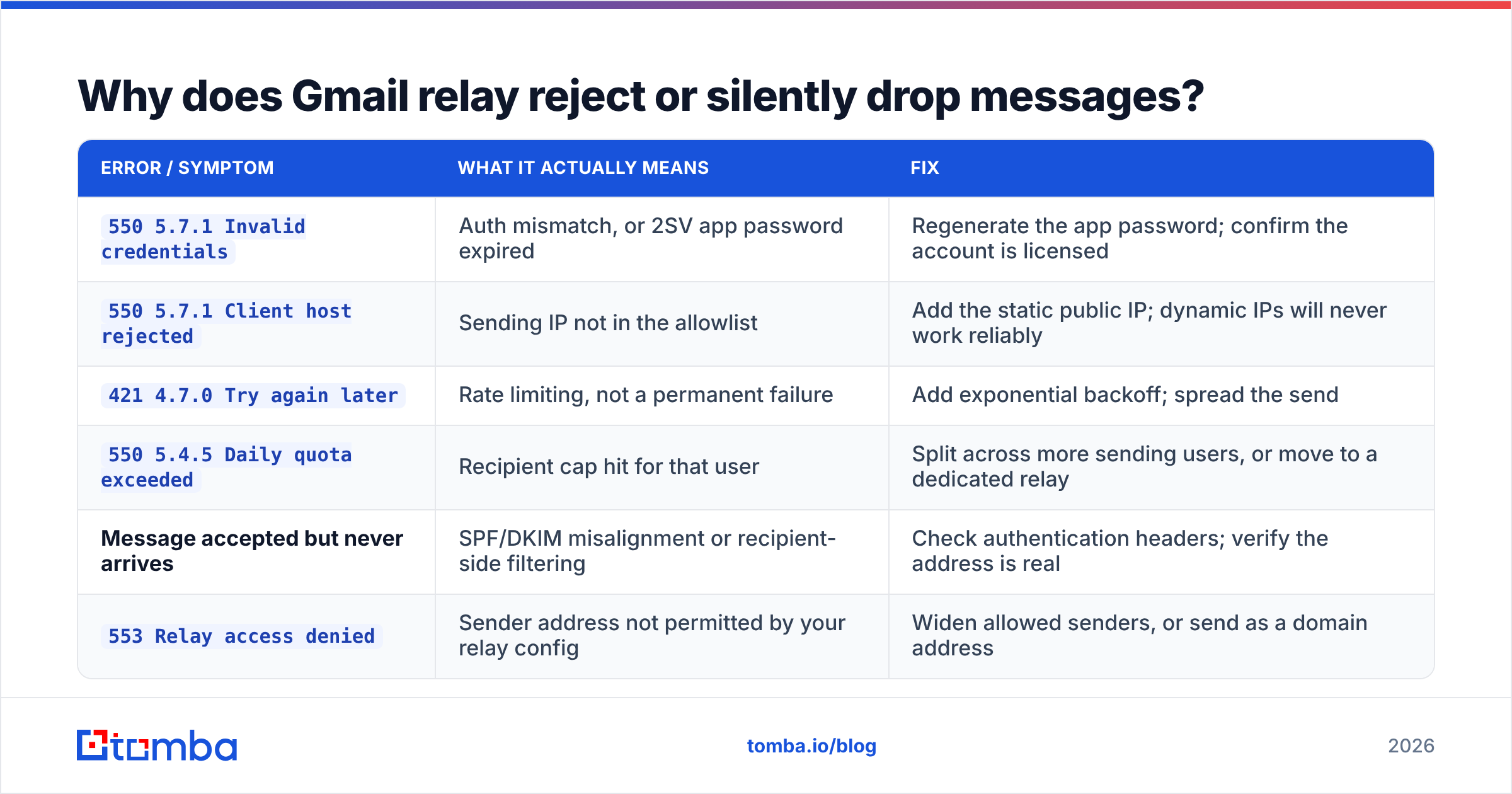
Why does Gmail relay reject or silently drop messages?#
Relay errors are terse and unhelpful on their own. Here is the translation table.
| Error / symptom | What it actually means | Fix |
|---|---|---|
550 5.7.1 Invalid credentials |
Auth mismatch, or 2SV app password expired | Regenerate the app password; confirm the account is licensed |
550 5.7.1 Client host rejected |
Sending IP not in the allowlist | Add the static public IP; dynamic IPs will never work reliably |
421 4.7.0 Try again later |
Rate limiting, not a permanent failure | Add exponential backoff; spread the send |
550 5.4.5 Daily quota exceeded |
Recipient cap hit for that user | Split across more sending users, or move to a dedicated relay |
| Message accepted but never arrives | SPF/DKIM misalignment or recipient-side filtering | Check authentication headers; verify the address is real |
553 Relay access denied |
Sender address not permitted by your relay config | Widen allowed senders, or send as a domain address |
The last two are the expensive ones, because they look like success from your side. Your logs show a 250 OK, your dashboard shows "sent", and the message is quietly sitting in a spam folder or bouncing off an address that stopped existing 14 months ago.
That is the moment most teams discover their list was the problem, not their SMTP config. Bounces to dead addresses damage sender reputation faster than almost anything else, and Google's relay applies that damage to your whole domain — including the mail your CEO sends by hand.
Is a Gmail SMTP relay server good enough for cold outbound?#
No, and it is worth being blunt about why.
Google Workspace's terms are explicit that the service is not intended for bulk unsolicited mail. Beyond policy, the mechanics work against you:
- Shared reputation. You are sending from Google's outbound IPs alongside millions of other tenants. You inherit that pool's reputation and contribute your bounce rate to your domain's.
- No dedicated IP. You cannot warm one, cannot isolate a bad campaign, and cannot separate transactional from promotional streams.
- Thin analytics. The relay gives you SMTP-level accept/reject. It does not give you per-message delivery, open, bounce classification, or complaint feedback loops the way a purpose-built provider does.
- Quota cliffs, not curves. You do not get gradually throttled with a warning. You get a hard stop mid-campaign.
- Account risk. Sustained spam complaints against relayed mail can result in the relay being suspended for your entire domain, which takes down your invoices and password resets along with your campaign.
Transactional mail, internal notifications, and scan-to-email? The relay is genuinely good, and it is included in a subscription you already pay for. Prospecting at volume? Use infrastructure built for it, and keep Google for the mail your business cannot afford to lose.
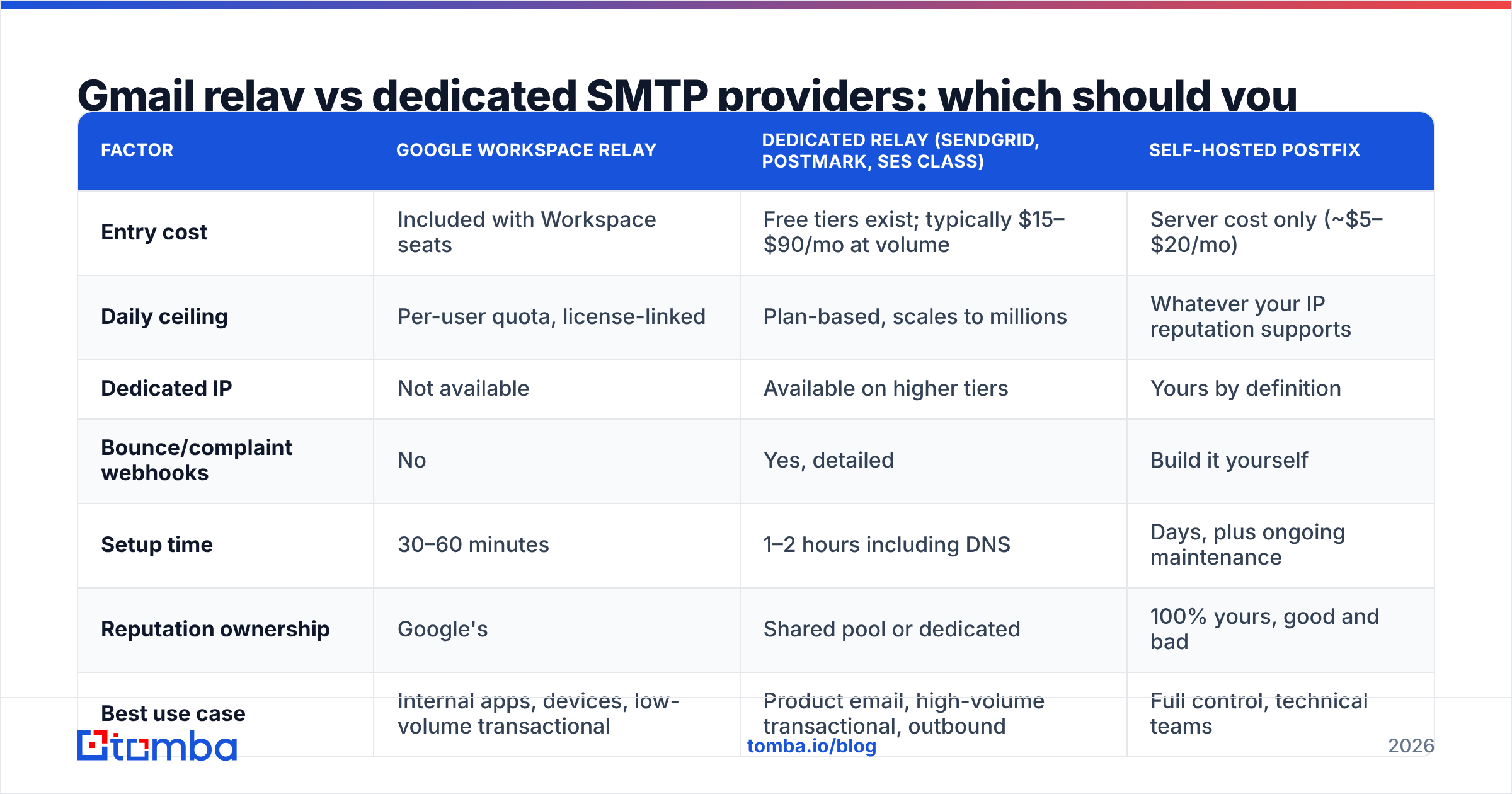
Gmail relay vs dedicated SMTP providers: which should you pick?#
| Factor | Google Workspace relay | Dedicated relay (SendGrid, Postmark, SES class) | Self-hosted Postfix |
|---|---|---|---|
| Entry cost | Included with Workspace seats | Free tiers exist; typically $15–$90/mo at volume | Server cost only (~$5–$20/mo) |
| Daily ceiling | Per-user quota, license-linked | Plan-based, scales to millions | Whatever your IP reputation supports |
| Dedicated IP | Not available | Available on higher tiers | Yours by definition |
| Bounce/complaint webhooks | No | Yes, detailed | Build it yourself |
| Setup time | 30–60 minutes | 1–2 hours including DNS | Days, plus ongoing maintenance |
| Reputation ownership | Google's | Shared pool or dedicated | 100% yours, good and bad |
| Best use case | Internal apps, devices, low-volume transactional | Product email, high-volume transactional, outbound | Full control, technical teams |
| Worst failure mode | Domain-wide relay suspension | Account review on high complaint rate | Silent IP blacklisting |
A pattern worth copying from teams that get this right: split the streams. Operational mail (receipts, alerts, resets) goes through the Gmail relay because reliability matters more than analytics. Marketing and outbound go through a dedicated provider on a separate subdomain, so a bad week on campaigns never touches the domain that sends your invoices. Providers like Postmark build their entire product around exactly this separation, and G2's deliverability category is a reasonable place to compare the field on real user reviews rather than vendor claims.
What should you fix before you blame the relay?#
Almost every "our Gmail relay has bad deliverability" ticket resolves into one of four things, and only one of them is the relay.
- Authentication is incomplete. SPF exists but DKIM does not, or DMARC is set to
p=noneand nobody reads the reports. Fix all three before touching anything else. Start with the fundamentals of email deliverability if the terms are unfamiliar. - The list is dirty. Every hard bounce is a signal to receiving servers that you do not know who you are mailing. Run your list through an email verifier before a send, and use a catch-all verifier for domains that accept everything — those are the ones that quietly inflate your "delivered" number while nothing reaches a human.
- The content triggers filters. Link shorteners, single-image bodies, and mismatched From/Reply-To addresses all cost you. A quick pass through a spam checker catches the obvious offenders in under a minute.
- Volume ramped too fast. New sending domains need weeks, not days. If you added a subdomain last Tuesday and started sending 5,000 a day on Wednesday, the relay is not your problem.
Fix those four and the relay usually turns out to have been working correctly the entire time.
Where does data quality fit into all this?#
The relay is plumbing. Plumbing does not decide what you pour into it.
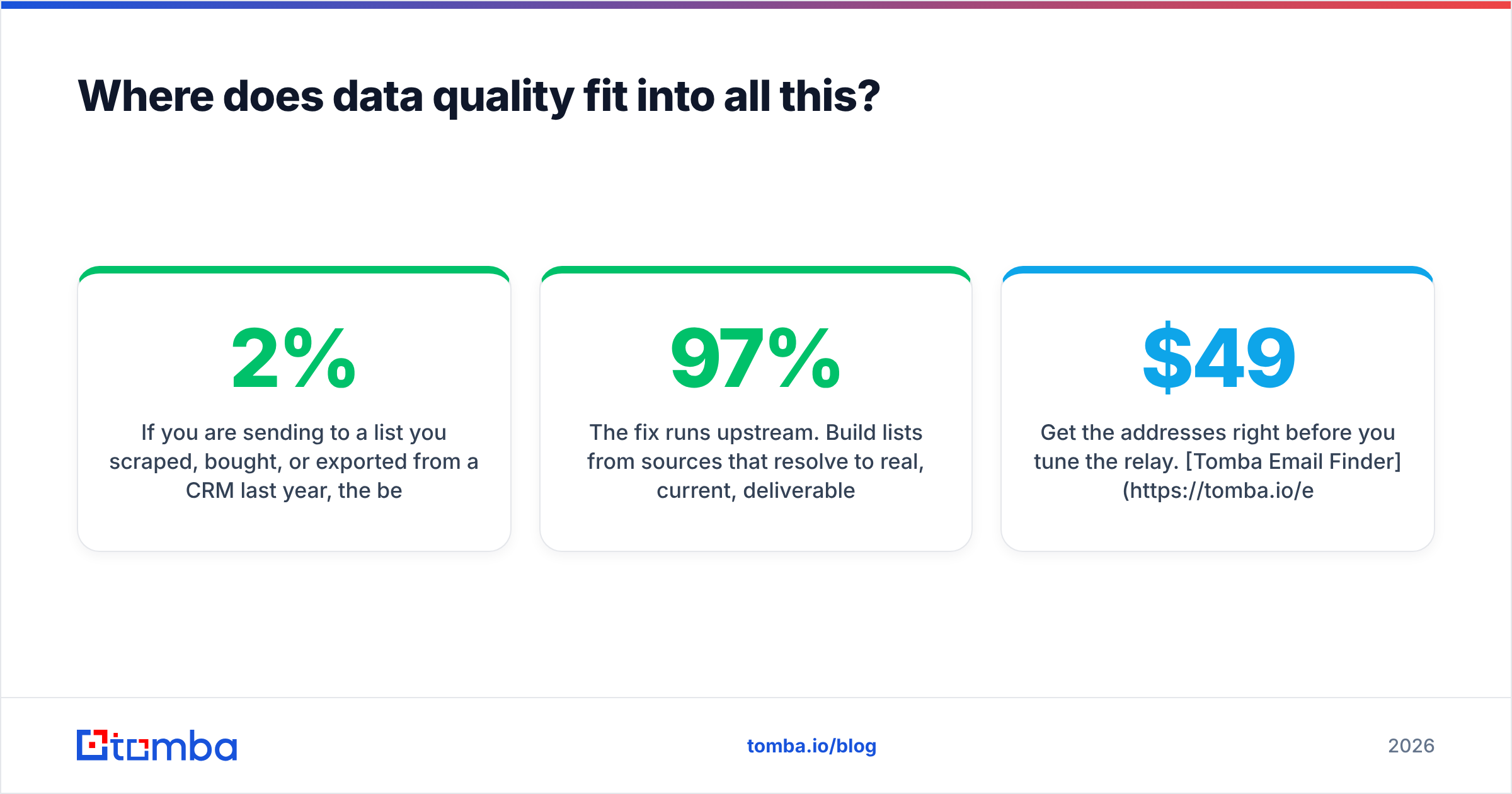
If you are sending to a list you scraped, bought, or exported from a CRM last year, the best SMTP configuration on earth cannot save the campaign. Invalid addresses generate hard bounces; hard bounces above roughly 2% get you throttled; throttling looks like a relay problem and gets escalated to an engineer who spends a day reading SMTP logs that were fine all along.
The fix runs upstream. Build lists from sources that resolve to real, current, deliverable addresses, verify them immediately before the send rather than at import time, and drop anything that comes back risky instead of "just trying it." A 300-contact list at 97% deliverability outperforms a 3,000-contact list at 60% on every metric that matters — including the one where your domain still works next month.
Get the addresses right before you tune the relay. Tomba Email Finder resolves verified professional addresses by name, company, or domain, with verification built into the same lookup — so what enters your Gmail SMTP relay server is a list that will actually land. Start free with 25 searches a month; paid plans begin at $49/mo on the Starter tier, with Growth at $99/mo. See full Tomba pricing or wire it straight into your stack with the Tomba API.
Related guides#
Ready to find emails that actually work?
Join 150,000+ professionals who stopped guessing and started sending. Free credits on signup — no credit card required.
Get the Tomba newsletter
Practical outbound tactics and product updates — once every two weeks.
About the author