Gmail SMTP Setup in 2026: Ports, App Passwords, Limits
Gmail SMTP works fine until you hit 500 recipients a day, a 535 auth error, or the spam folder. Here is the full 2026 setup, the real limits, and when to move on.
Gmail SMTP setup takes about five minutes. A host, a port, and an app password are all you need. The limits are what catch people out three months later.
TL;DR
- Gmail SMTP lives at
smtp.gmail.com, port 587 with STARTTLS or port 465 with implicit SSL. Port 25 is dead for outbound Gmail traffic. - Google retired "less secure app access." You now authenticate with an app password (2-Step Verification required) or OAuth 2.0. Your normal Gmail password fails with a
535error. - Free Gmail caps you at roughly 500 recipients per day. Google Workspace allows 2,000. The Workspace SMTP relay goes to 10,000. Those ceilings shape your architecture more than any feature does.
- Gmail SMTP fits transactional trickle: form notices, internal alerts, low-volume replies. It is a poor fit for bulk marketing and a risky one for high-volume cold outreach.
- Deliverability still rests on the boring stuff: SPF, DKIM, DMARC, a clean list, and a spam complaint rate under 0.3%.
What is Gmail SMTP and when should you actually use it?#
SMTP is the postal service of email. Your app writes the letter. SMTP is the courier that carries it to the recipient's mail server. Gmail SMTP means using Google's courier — smtp.gmail.com — with your Gmail or Google Workspace credentials, instead of running your own mail server or paying an email service provider.
SMTP is the protocol that moves mail between servers. Google opens an authenticated door to it. Your WordPress site, Python script, Zapier flow, or CRM hands the message over, and it goes out with Gmail's sending reputation behind it.
Gmail SMTP is the right call when:
- You send low volume from a real human mailbox. Notification emails, password resets on a small SaaS, contact-form forwards, one-to-one sales replies.
- You want messages in your Sent folder. Mail sent through Gmail SMTP as your own address shows up in your Gmail threads. An ESP API usually does not do that.
- You have zero appetite for infrastructure. No IP warming, no bounce webhooks, no MTA config.
- You need it working in ten minutes. Setup is fast once you know which port and which password.
It is the wrong call for newsletters to thousands of subscribers or multi-inbox cold email sequences. It is also wrong if you need per-message analytics, webhooks, and suppression lists. Google's terms discourage bulk unsolicited mail through consumer Gmail, and the daily caps enforce that in practice.
What are the correct Gmail SMTP settings in 2026?#
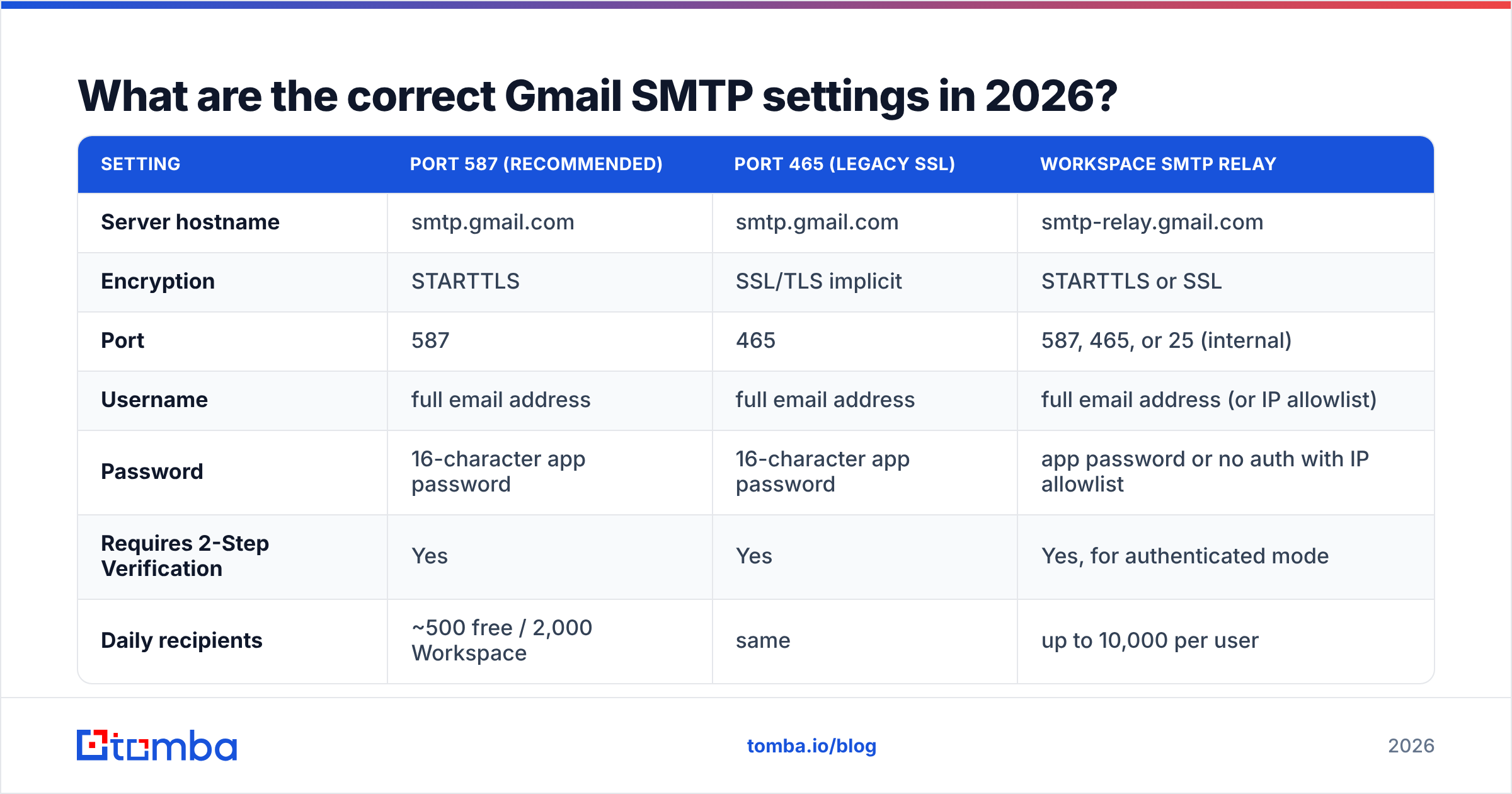
Here are the values that work today. If a tutorial tells you to use port 25 or to tick "allow less secure apps," it is out of date.
| Setting | Port 587 (recommended) | Port 465 (legacy SSL) | Workspace SMTP relay |
|---|---|---|---|
| Server hostname | smtp.gmail.com | smtp.gmail.com | smtp-relay.gmail.com |
| Encryption | STARTTLS | SSL/TLS implicit | STARTTLS or SSL |
| Port | 587 | 465 | 587, 465, or 25 (internal) |
| Username | full email address | full email address | full email address (or IP allowlist) |
| Password | 16-character app password | 16-character app password | app password or no auth with IP allowlist |
| Requires 2-Step Verification | Yes | Yes | Yes, for authenticated mode |
| Daily recipients | ~500 free / 2,000 Workspace | same | up to 10,000 per user |
| Best for | apps, scripts, plugins | older libraries | servers, printers, bulk internal mail |
Two details trip people up. First, the username must be the full address (you@yourdomain.com), not the local part. Second, the app password is shown with spaces for readability. Most libraries want it without spaces, though Google accepts both in most clients. Google's own Gmail SMTP documentation is the canonical reference if a client asks for something exotic, such as "authentication method: PLAIN vs LOGIN" (either works over TLS).
Gmail SMTP setup, step by step#
- Turn on 2-Step Verification. Open your Google Account security settings and enable it. Without 2SV, the app password screen does not exist. This is the single most common blocker.
- Generate an app password. Go to Google Account → Security → 2-Step Verification → App passwords. Name it after the app that will use it ("Nuxt backend," "WP Mail SMTP"). Google shows a 16-character string exactly once. Copy it into your secrets manager, not into a Slack message.
With the app password in hand, point your client at Google.
- Enter the server details. Host
smtp.gmail.com, port587, encryption STARTTLS, username your full address, password the app password. If your library has a boolean calledsecure, set it tofalsefor 587 andtruefor 465. That flag means "implicit SSL," not "is this encrypted." - Set the From address correctly. Gmail rewrites the From header if the address is not a verified alias on the account. Sending as
noreply@yourdomain.com? Add it under Settings → Accounts → "Send mail as" first. Otherwise messages go out as your primary address.
Then prove it works before you ship.
- Send a test and read the raw headers. Deliver to a mailbox on a different provider, open the original message, and confirm
SPF: PASSandDKIM: PASS. A quick SMTP tester also tells you whether the handshake, TLS, and auth succeed on their own, apart from your app code. - Store credentials as environment variables. Never commit an app password. Rotate it if a laptop is lost or a contractor rolls off.
Why did Google kill "less secure app access"?#
Because a plain username-and-password pair is a skeleton key. If a script on a hacked server holds your Gmail password, an attacker gets your mail, your Drive, your recovery flows, and every account that resets through your inbox.
App passwords limit the damage. Each one authorizes only SMTP, IMAP, or POP for a single client, and revoking one does not touch the others. OAuth 2.0 goes further: the token is short-lived, scope-limited, and revocable from a dashboard the user controls. Google phased out basic-auth access for Workspace accounts across 2024 and 2025, and consumer Gmail followed.
Practical consequences you should plan for:
- App passwords do not work if 2SV is off, and admins can disable them org-wide. If your Workspace admin has locked them down, OAuth 2.0 is your only route.
- Some client libraries still ship broken defaults. PHPMailer, Nodemailer, and
smtpliball work fine. The failures are almost always a wrong port/securecombination or a stale password. - A
535-5.7.8 Username and Password not acceptederror is rarely a typo. It is a missing app password 95% of the time.
What are Gmail's real sending limits?#
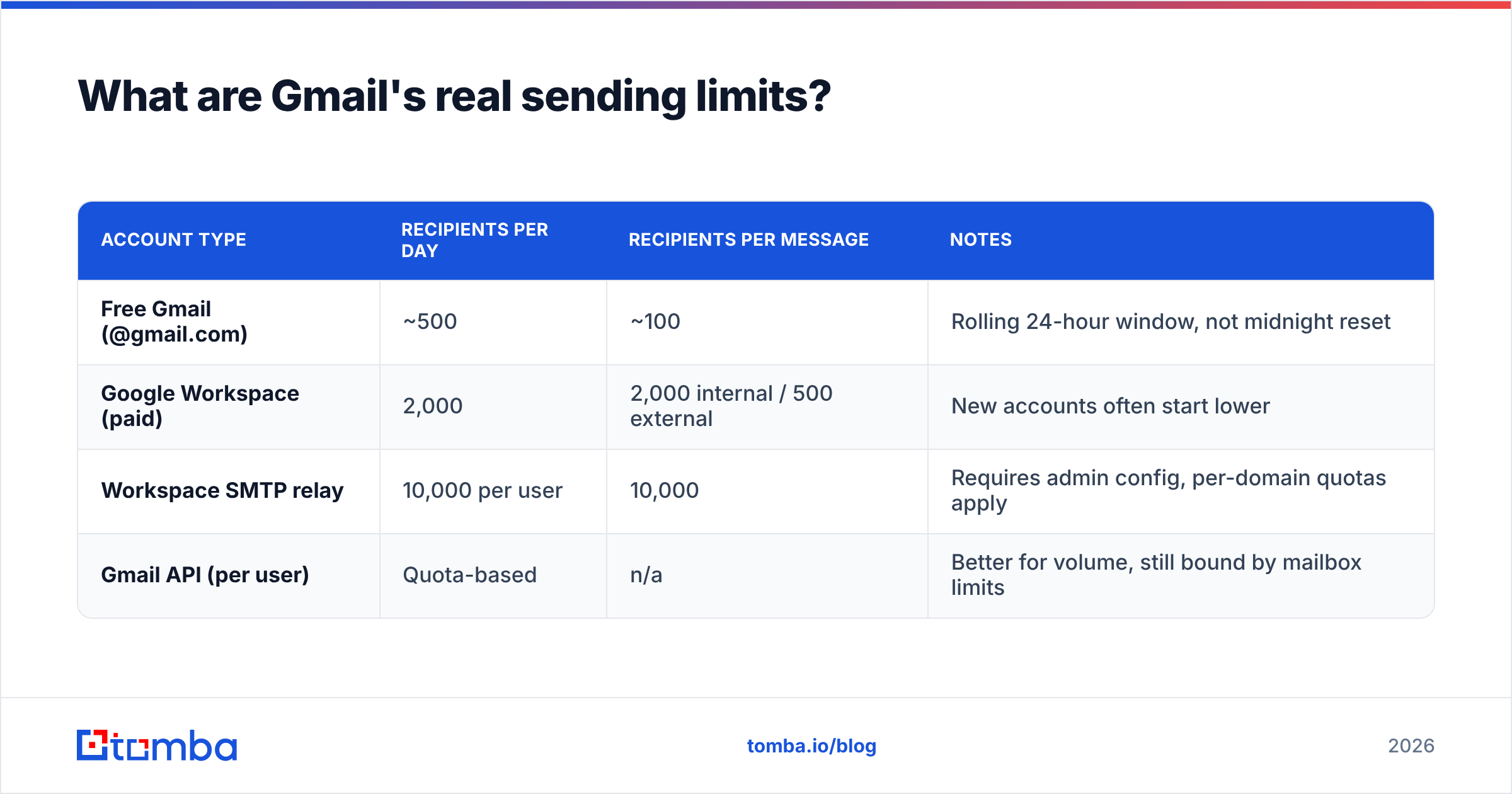
This is where most Gmail SMTP setup projects quietly die at month three. The published numbers, as of 2026:
| Account type | Recipients per day | Recipients per message | Notes |
|---|---|---|---|
| Free Gmail (@gmail.com) | ~500 | ~100 | Rolling 24-hour window, not midnight reset |
| Google Workspace (paid) | 2,000 | 2,000 internal / 500 external | New accounts often start lower |
| Workspace SMTP relay | 10,000 per user | 10,000 | Requires admin config, per-domain quotas apply |
| Gmail API (per user) | Quota-based | n/a | Better for volume, still bound by mailbox limits |
Two things to internalize. First, the counter is per recipient, not per message. One email to 100 people burns 100 units. Second, the window is rolling. Burning your quota at 4 PM does not reset at midnight. Expect a lockout of up to 24 hours, during which every send returns 550-5.4.5 Daily user sending limit exceeded.
New Workspace tenants also get throttled below the published ceiling for the first few weeks. Ramp up gradually rather than importing a 1,500-contact list on day one.
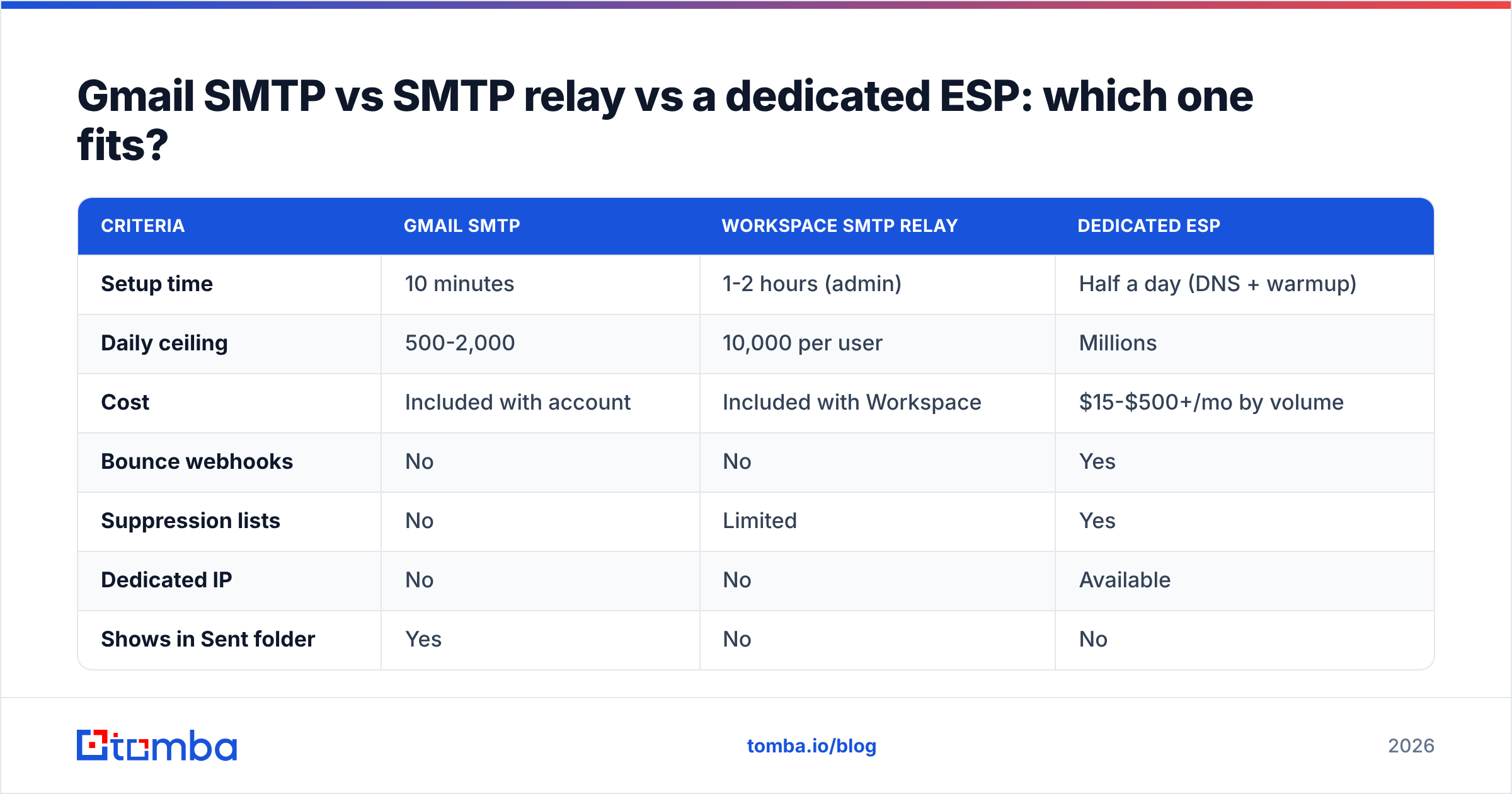
Gmail SMTP vs SMTP relay vs a dedicated ESP: which one fits?#
| Criteria | Gmail SMTP | Workspace SMTP relay | Dedicated ESP |
|---|---|---|---|
| Setup time | 10 minutes | 1-2 hours (admin) | Half a day (DNS + warmup) |
| Daily ceiling | 500-2,000 | 10,000 per user | Millions |
| Cost | Included with account | Included with Workspace | $15-$500+/mo by volume |
| Bounce webhooks | No | No | Yes |
| Suppression lists | No | Limited | Yes |
| Dedicated IP | No | No | Available |
| Shows in Sent folder | Yes | No | No |
| Best fit | Personal + transactional trickle | Servers, apps, printers, internal bulk | Marketing, product, high-volume |
The middle column is underused. Google's SMTP relay service lets a Workspace admin authorize sending by IP address. A server can then route mail through Google without holding user credentials at all. It handles 10,000 recipients per user per day. For most "our app outgrew Gmail SMTP" moments, that is the right answer — before you sign a full ESP contract.
How do you keep Gmail SMTP messages out of spam?#
Authentication is table stakes now. The Google and Yahoo bulk-sender rules took effect in 2024. Senders above 5,000 messages a day to Gmail addresses need aligned SPF, DKIM, and DMARC, one-click unsubscribe on commercial mail, and a spam complaint rate below 0.3%. Below that threshold the rules are "recommended," which in practice means enforcement arrives later.
Start with the DNS records:
- SPF. If you send from a custom domain through Google, your record must include
include:_spf.google.com. Verify it with an SPF checker rather than eyeballing the TXT record. A secondv=spf1record or more than 10 DNS lookups breaks it silently. - DKIM. Workspace does not sign with your domain key until you generate and publish it in the Admin console. Many domains run unsigned for years because nobody clicked "Generate new record."
- DMARC. Start at
p=nonewith an rua address. Read the reports for two weeks, then move to quarantine. Skipping the monitoring phase is how legitimate mail gets buried.
Then the human side:
- List hygiene. Bounces are the fastest way to trash a mailbox reputation, and Google will not let you rebuild it quickly. Run addresses through an email verifier before the first send, and re-verify anything older than 90 days.
- Content. Keep the HTML-to-text ratio sane, avoid link shorteners, and use a real reply-to. Google's filters weight engagement heavily. A message nobody opens teaches the filter something.
For the deeper mechanics of what filters actually measure, the email deliverability primer covers reputation signals in plain language.
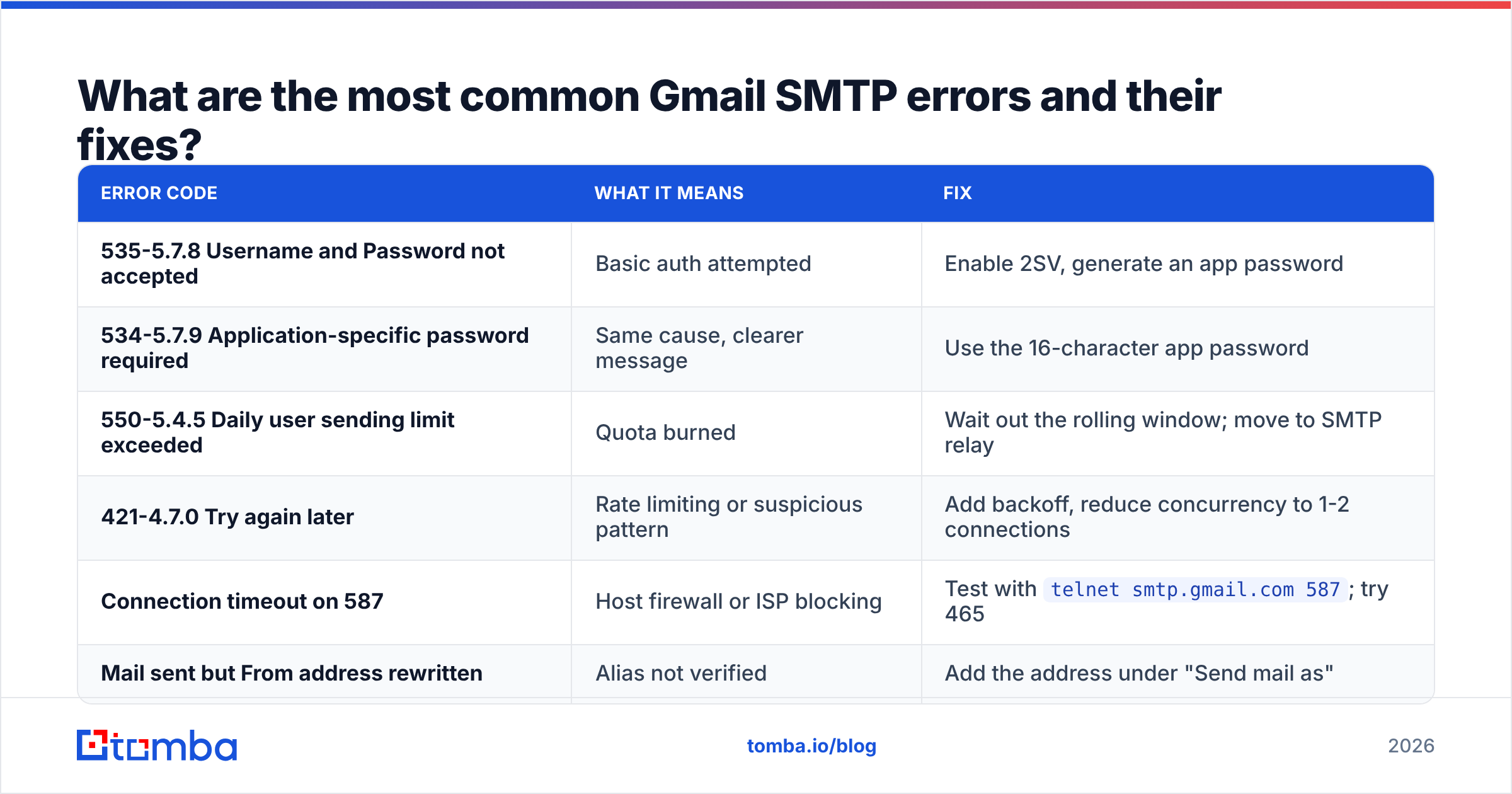
What are the most common Gmail SMTP errors and their fixes?#
| Error code | What it means | Fix |
|---|---|---|
| 535-5.7.8 Username and Password not accepted | Basic auth attempted | Enable 2SV, generate an app password |
| 534-5.7.9 Application-specific password required | Same cause, clearer message | Use the 16-character app password |
| 550-5.4.5 Daily user sending limit exceeded | Quota burned | Wait out the rolling window; move to SMTP relay |
| 421-4.7.0 Try again later | Rate limiting or suspicious pattern | Add backoff, reduce concurrency to 1-2 connections |
| Connection timeout on 587 | Host firewall or ISP blocking | Test with telnet smtp.gmail.com 587; try 465 |
| Mail sent but From address rewritten | Alias not verified | Add the address under "Send mail as" |
One extra tip. If mail sends fine locally but fails on a cloud host, check whether the provider blocks outbound SMTP ports by default. Several major clouds do, and the ticket to unblock takes a day.
Is Gmail SMTP good enough for cold outreach?#
Only at small scale, and only with discipline. A Gmail SMTP setup gives you the deliverability edge of a real, aged mailbox. But the 500-to-2,000 recipient ceiling means dozens of messages a day, not thousands. Every bounce costs you more, because you have no dedicated IP to absorb the damage.
If that is your model — a rep sending 40 personalized emails a day from their own inbox — Gmail SMTP is genuinely fine. It often beats a shared ESP IP pool. What kills those campaigns is not the transport layer. It is the list. Guessed addresses produce hard bounces, and a mailbox that bounces 8% of its volume starts landing in spam within a week.
That is the fix worth paying for: verified addresses before the first send, not a new SMTP provider after the reputation is already gone.
Get the list right before you touch the SMTP config. Tomba's Email Finder locates verified professional addresses by name and domain, with SMTP-level validation baked in, so the mail you push through Gmail actually lands. The free tier covers 25 searches a month, and paid plans start at $49/mo — see Tomba pricing for the full breakdown. Clean input, clean sender reputation, fewer 550s.
Related guides#
Ready to find emails that actually work?
Join 150,000+ professionals who stopped guessing and started sending. Free credits on signup — no credit card required.
Get the Tomba newsletter
Practical outbound tactics and product updates — once every two weeks.
About the author