Gmail Tracking Extension: The 2026 Guide to Open Tracking
Open tracking in Gmail is easy to install and easy to misread. Here's how the top extensions compare on accuracy, pricing, and privacy in 2026 — and when the data is actually worth acting on.
TL;DR
- A Gmail tracking extension injects a 1x1 pixel into your outbound mail and pings a server when that pixel loads — that's the whole mechanism, and every limitation flows from it.
- Since Apple Mail Privacy Protection and Gmail image proxying became defaults, raw open rates are inflated. Treat opens as a weak signal, link clicks and replies as strong ones.
- Free tiers exist everywhere. Mailsuite (Mailtrack) and Right Inbox are the cheapest real options; HubSpot and Streak bundle tracking into a CRM; Mixmax and Yesware target teams that need sequences.
- Tracking a bad address tells you nothing. Verify addresses before you send — a bounce is not a "no open."
- Pick by what you do after the notification. If you don't have a follow-up motion, tracking is just anxiety with a dashboard.
What is a Gmail tracking extension?#
A Gmail tracking extension is a browser add-on (usually Chrome, sometimes Firefox or Edge) that sits inside the Gmail interface and tells you when a message you sent was opened, when a link inside it was clicked, and sometimes where and on what device. Most of them also add scheduling, templates, mail merge, and reminders, because open tracking alone is a thin product.
The category splits into three groups that look identical in the Chrome Web Store and behave nothing alike:
- Lightweight trackers — Mailsuite (formerly Mailtrack), Right Inbox. Cheap, fast, they do read receipts and little else. Best for solo sellers, founders, recruiters.
- CRM-attached trackers — HubSpot Sales, Streak. Tracking is a feature of a pipeline tool. Every open logs against a contact record, which is where the value actually is.
- Sequence platforms with a Gmail plugin — Mixmax, Yesware, GMass. Tracking is bundled with multi-step campaigns, A/B tests, and reporting for a team.
Installing the wrong tier is the most common mistake. A one-person consultancy does not need a $59/seat sequencer, and a 12-rep team will outgrow a read-receipt tool inside a month.
How does email tracking actually work in Gmail?#
The extension rewrites your outgoing HTML before Gmail sends it. Two things get added:
- A tracking pixel — a transparent 1x1 image hosted on the vendor's server with a unique ID in the URL. When the recipient's mail client loads images, the request hits the server and gets logged as an "open."
- Wrapped links — every URL in your body is replaced with a redirect through the vendor's domain, so a click is recorded before the recipient lands on the real page.
That's it. There is no read receipt protocol, no confirmation from Gmail, no handshake. Everything the dashboard shows you is inferred from an image request. Email tracking has worked this way since the late 1990s, and the failure modes have not changed either:
- Images blocked → no open recorded, even though the person read every word.
- Images prefetched by a privacy proxy → open recorded, even though nobody looked at it.
- You open your own sent copy → a phantom open (most tools filter this, some don't).
- Corporate security gateways scan links on delivery → phantom clicks, sometimes within seconds of sending.

Are Gmail open rates still trustworthy in 2026?#
Directionally, sometimes. Absolutely, no.
Apple Mail Privacy Protection routes messages through a proxy that pre-loads images for every message delivered to Apple Mail, regardless of whether the user opens anything. Depending on your audience mix, that's typically 30–50% of B2B inboxes rendering as an automatic "open." Gmail has proxied images through googleusercontent.com since 2013, which strips useful location and device data and adds its own caching behavior.
The practical result: your reported open rate went up while your reply rate stayed flat. If you set thresholds on open rate — "anyone above 2 opens gets a call" — you are now calling people who never saw the message.
What still works:
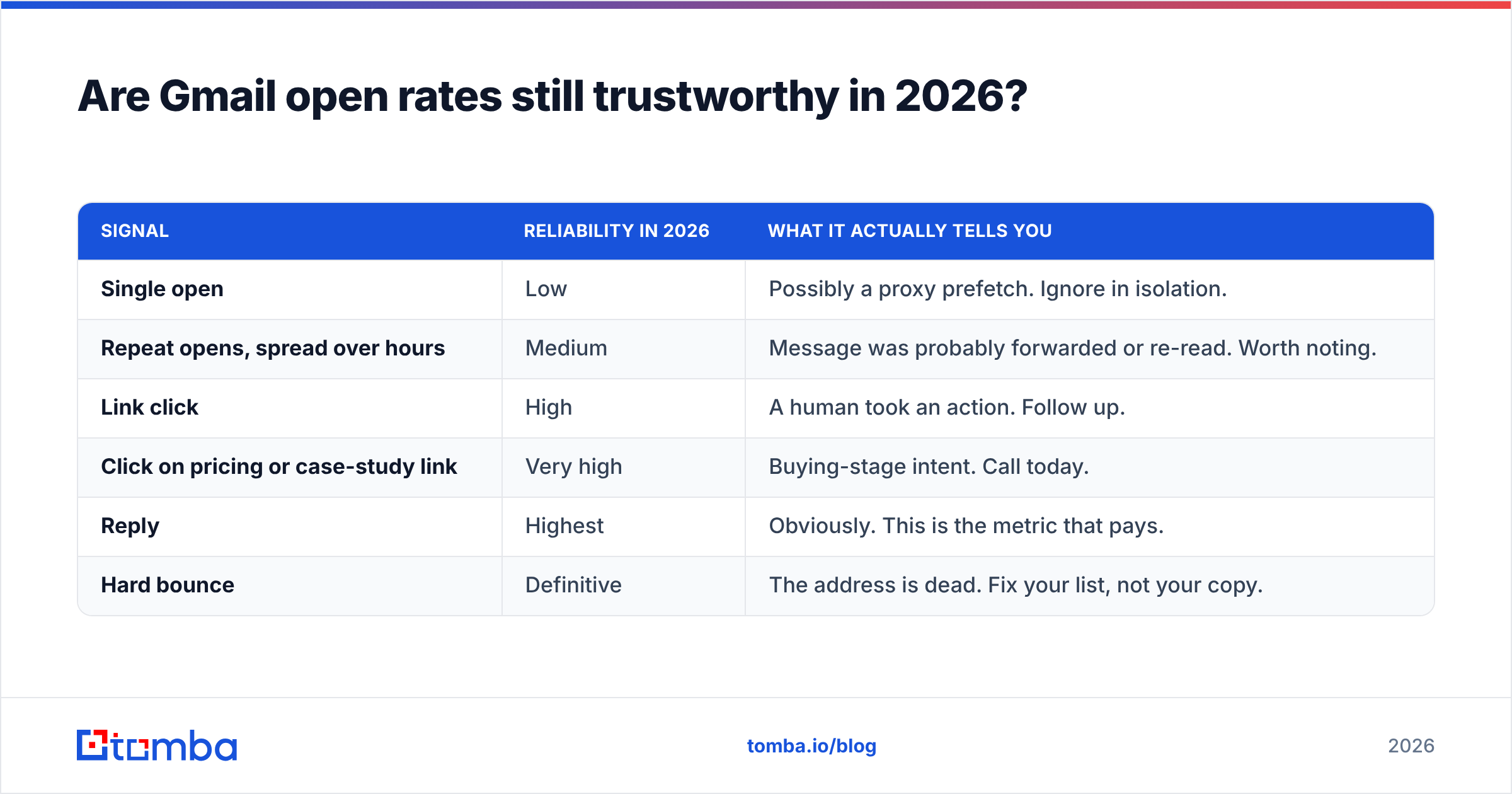
| Signal | Reliability in 2026 | What it actually tells you |
|---|---|---|
| Single open | Low | Possibly a proxy prefetch. Ignore in isolation. |
| Repeat opens, spread over hours | Medium | Message was probably forwarded or re-read. Worth noting. |
| Link click | High | A human took an action. Follow up. |
| Click on pricing or case-study link | Very high | Buying-stage intent. Call today. |
| Reply | Highest | Obviously. This is the metric that pays. |
| Hard bounce | Definitive | The address is dead. Fix your list, not your copy. |
Two changes fix most of the noise. First, stop reporting open rate as a KPI and switch to click and reply rate. Second, make sure the addresses you're tracking are real in the first place — run them through an email verifier before the campaign, because "0 opens" on an invalid address is a data problem masquerading as a copy problem.
Which Gmail tracking extension should you pick?#
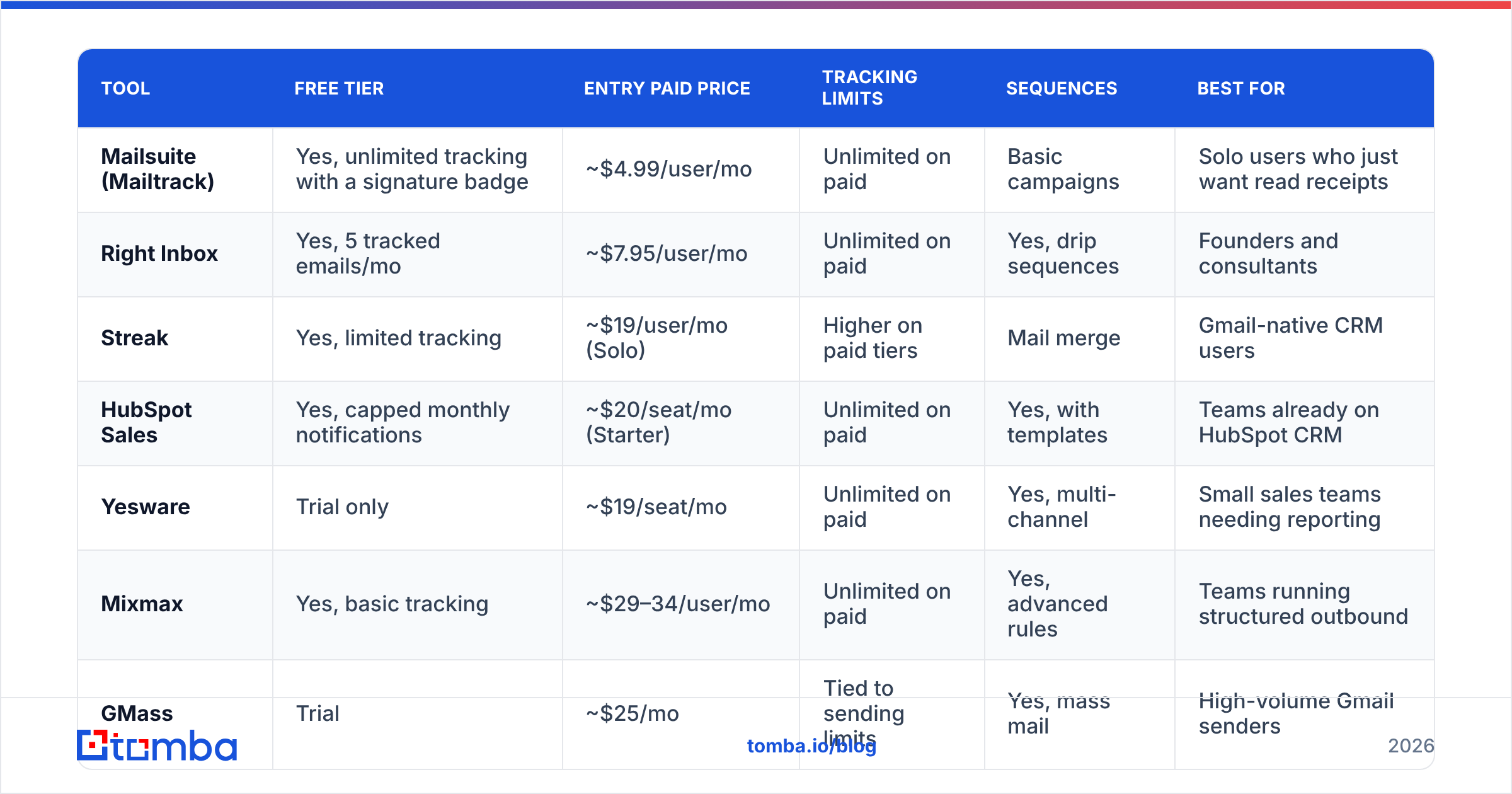
Prices below are the publicly listed entry tiers at the time of writing; vendors change them often, so confirm on the vendor's own page before you commit a team.
| Tool | Free tier | Entry paid price | Tracking limits | Sequences | Best for |
|---|---|---|---|---|---|
| Mailsuite (Mailtrack) | Yes, unlimited tracking with a signature badge | ~$4.99/user/mo | Unlimited on paid | Basic campaigns | Solo users who just want read receipts |
| Right Inbox | Yes, 5 tracked emails/mo | ~$7.95/user/mo | Unlimited on paid | Yes, drip sequences | Founders and consultants |
| Streak | Yes, limited tracking | ~$19/user/mo (Solo) | Higher on paid tiers | Mail merge | Gmail-native CRM users |
| HubSpot Sales | Yes, capped monthly notifications | ~$20/seat/mo (Starter) | Unlimited on paid | Yes, with templates | Teams already on HubSpot CRM |
| Yesware | Trial only | ~$19/seat/mo | Unlimited on paid | Yes, multi-channel | Small sales teams needing reporting |
| Mixmax | Yes, basic tracking | ~$29–34/user/mo | Unlimited on paid | Yes, advanced rules | Teams running structured outbound |
| GMass | Trial | ~$25/mo | Tied to sending limits | Yes, mass mail | High-volume Gmail senders |
A few honest notes on that table:
- The free tiers are real, not bait. Mailsuite's free plan tracks unlimited messages if you accept a signature badge on outgoing mail. For personal prospecting that badge is a bigger cost than the money — it announces to the recipient that you're tracking them.
- CRM-bundled tracking is worth more than standalone tracking if you already use the CRM. An open logged against a deal record beats a desktop toast you'll forget in ten minutes. HubSpot's sales tools and Streak both do this well.
- Seat pricing scales badly. A 10-person team at $34/seat is $4,080/year for what is, at its core, a pixel service. Price the outcome, not the feature.
- Deliverability cost is real. Link wrapping through a vendor domain and a remote pixel both nudge spam filters. On cold outbound to strangers, that matters more than the tracking data is worth. Check your sending setup with a spam checker before you scale.
Independent reviews on G2's email tracking category are useful for support quality and churn signals, less useful for accuracy claims — no vendor benchmarks itself against proxy inflation.
What should you check before installing one?#
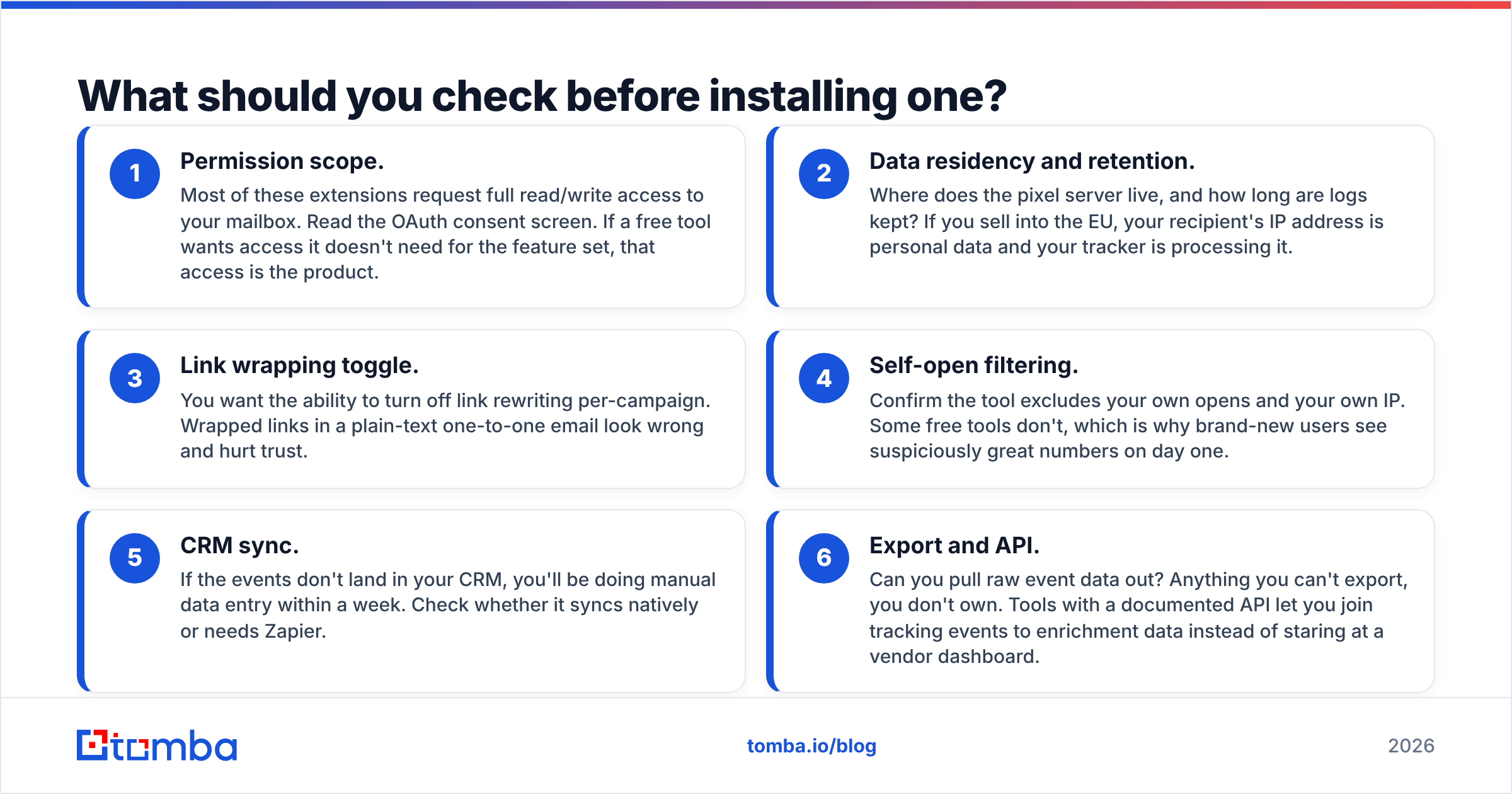
Run every candidate through these six checks. It takes twenty minutes and saves a migration later.
- Permission scope. Most of these extensions request full read/write access to your mailbox. Read the OAuth consent screen. If a free tool wants access it doesn't need for the feature set, that access is the product.
- Data residency and retention. Where does the pixel server live, and how long are logs kept? If you sell into the EU, your recipient's IP address is personal data and your tracker is processing it.
- Link wrapping toggle. You want the ability to turn off link rewriting per-campaign. Wrapped links in a plain-text one-to-one email look wrong and hurt trust.
- Self-open filtering. Confirm the tool excludes your own opens and your own IP. Some free tools don't, which is why brand-new users see suspiciously great numbers on day one.
- CRM sync. If the events don't land in your CRM, you'll be doing manual data entry within a week. Check whether it syncs natively or needs Zapier.
- Export and API. Can you pull raw event data out? Anything you can't export, you don't own. Tools with a documented API let you join tracking events to enrichment data instead of staring at a vendor dashboard.

Is tracking enough on its own?#
No — and this is where most Gmail tracking extension setups quietly fail.
Open tracking is a measurement layer. It tells you something about messages that were delivered to real humans. It tells you nothing about the two upstream problems that determine whether outbound works at all:
Problem one: you're emailing addresses that don't exist. A typical scraped or aged B2B list carries 15–30% invalid addresses. Those come back as bounces, drag your sender reputation down, and make your tracked open rate look terrible for reasons that have nothing to do with your subject line. No extension fixes this, because the tracker never sees a delivery.
Problem two: you're emailing the wrong people. Tracking a message sent to a generic info@ inbox produces a beautifully instrumented nothing. You need the individual's address — the person who owns the budget line — before instrumentation means anything.
The fix is sequencing, not more tooling: source verified individual contacts, verify them, send, then track. A domain search gives you the named contacts at a company along with the pattern their org uses, and running the list through verification before send means your open-rate denominator is honest. Once the list is clean, a tracking extension's data starts describing your copy instead of your data hygiene.
For teams building lists at volume, doing this at the row level in a spreadsheet is a waste of a week. A bulk email finder handles the sourcing and verification pass in one job, and the tracking extension picks up from there.
What are the privacy and compliance risks?#
Real, and increasingly enforced. Three things to know:
- GDPR. Pixel tracking that records IP address and user agent is processing personal data. In an EU B2B context you generally need a legitimate-interest basis, documented, plus disclosure in your privacy policy. "Everyone does it" is not a legal basis.
- Recipient perception. Tracking is invisible until it isn't. If a prospect notices a wrapped link hovering over
mailsuite.comort.yesware.comin a message that claims to be a personal note, you've traded the deal for a data point. On genuinely one-to-one email, turn wrapping off. - Internal policy. Some enterprises block tracking pixels at the gateway and flag senders who use them. If you sell to security-conscious industries — finance, healthcare, defense — assume your pixels are stripped and your links are pre-clicked by a scanner. Your data from those accounts is garbage; don't score leads on it.
The conservative setup: track clicks, skip opens, disclose in your privacy policy, and never make a tracking-derived claim to the prospect ("I saw you opened this three times") — it's the fastest way to end a conversation.
How do you set tracking up without hurting deliverability?#
Keep the send infrastructure boring and the data clean.
- Authenticate properly. SPF, DKIM, and DMARC on the sending domain, verified with an SPF checker before you scale volume.
- Warm new mailboxes before you push volume through them; a brand-new Google Workspace domain sending 200 tracked emails on day one is a classic self-inflicted spam folder.
- Cap daily volume per mailbox. Gmail's limits are the ceiling, not the target.
- Keep bounce rate under 2%. That is entirely a list-quality metric, and it is the single strongest lever on email deliverability you control.
- Use plain-text-heavy HTML. Fewer images, fewer wrapped links, better inbox placement — and the tracking pixel still works.
Which one should you actually install?#
Short answer, by situation:
- Solo, low volume, just want read receipts → Mailsuite or Right Inbox free tier. Upgrade only to kill the signature badge.
- Solo or small team who lives in Gmail and needs a pipeline → Streak. The CRM-in-Gmail model is the whole reason to pay.
- You already run HubSpot → HubSpot Sales, no debate. Native logging beats a second dashboard.
- A real outbound team with sequences and reporting needs → Mixmax or Yesware, priced by how much sequence logic you need.
- High-volume mail merge from Gmail → GMass, with the deliverability caveats above taken seriously.
And in every one of those cases, the tracking extension is the second thing you buy. The first is accurate contact data, because pixels can only measure emails that arrive.
Start with the list, not the pixel. Tomba's Email Finder sources verified professional addresses by name, domain, or company, with verification built into the same pass — so the open rates your Gmail tracking extension reports are measuring your message, not your data. Start free with 25 searches a month; paid plans begin at $49/mo, and full Tomba pricing scales to Growth at $99/mo and Pro at $249/mo for teams running outbound at volume.
Related guides#
Ready to find emails that actually work?
Join 150,000+ professionals who stopped guessing and started sending. Free credits on signup — no credit card required.
Get the Tomba newsletter
Practical outbound tactics and product updates — once every two weeks.
About the author