Gmail Warmup in 2026: How to Warm Up a Gmail Inbox Safely
Gmail warmup is not a 14-day countdown you can buy your way out of. Here is the schedule, the tooling comparison, and the signals that actually move Gmail's spam filter in 2026.

TL;DR
- Gmail warmup is the process of building sender reputation on a new domain and mailbox by ramping volume slowly, with real engagement, over 4–8 weeks. It is not a switch you flip.
- Warmup tools that trade replies inside a closed network help with volume ramp, but Google's 2024 bulk-sender rules made engagement quality — not raw reply count — the thing that scores.
- A safe ramp for a new Google Workspace mailbox: 5–10 sends/day in week 1, roughly doubling weekly, capped around 40–50 cold sends/day per mailbox forever.
- Warmup fails for one of three reasons 90% of the time: broken authentication (SPF/DKIM/DMARC), a dirty list producing bounces, or ramping faster than your reply rate justifies.
- The highest-leverage deliverability fix is usually not warmup at all — it's verifying your list so your bounce rate stays under 2%.
What is Gmail warmup, and why does it exist?#
Gmail warmup is the deliberate, gradual increase of sending volume from a new mailbox or domain, paired with positive engagement signals, so Google's spam filter learns to trust you before you send at scale.
Think of it like a credit score. A brand-new mailbox has no credit history. If you walk into the bank on day one and ask for a $200,000 loan, you get declined — not because you're a bad borrower, but because there's no evidence either way, and the default assumption for unknown senders is caution. Warmup is the process of taking out the small loans and paying them back on time until the bank raises your limit.
Technically, Gmail scores inbound mail against a bundle of per-domain and per-IP signals: authentication pass/fail, complaint rate, bounce rate, engagement rate (opens, replies, "not spam" marks, moves out of Promotions), sending pattern consistency, content and link reputation, and how long the domain has existed. A cold domain with zero history that suddenly emits 400 near-identical messages in an hour trips nearly every heuristic Google has.
Since February 2024, Google's bulk sender requirements formalized part of this: senders pushing over 5,000 messages a day to Gmail must authenticate with SPF and DKIM, publish a DMARC record, offer one-click unsubscribe, and keep spam complaint rates below 0.3%. Cold outbound teams rarely hit 5,000/day per domain, but the filter logic behind those thresholds applies to everyone at smaller scale.

How long does Gmail warmup actually take?#
Four to eight weeks for a new domain. Two to three weeks for a new mailbox on an already-warm domain. Anyone selling you a "14-day guaranteed warmup" is selling you a timer, not a reputation.
The variable that matters most is domain age, not mailbox age. If you bought getacme.io last Tuesday, the domain itself has no history — and Google weighs domain reputation heavily. Best practice is to register your cold-outreach domains at least 30 days before you intend to send anything, let them sit with DNS configured, then start warmup.
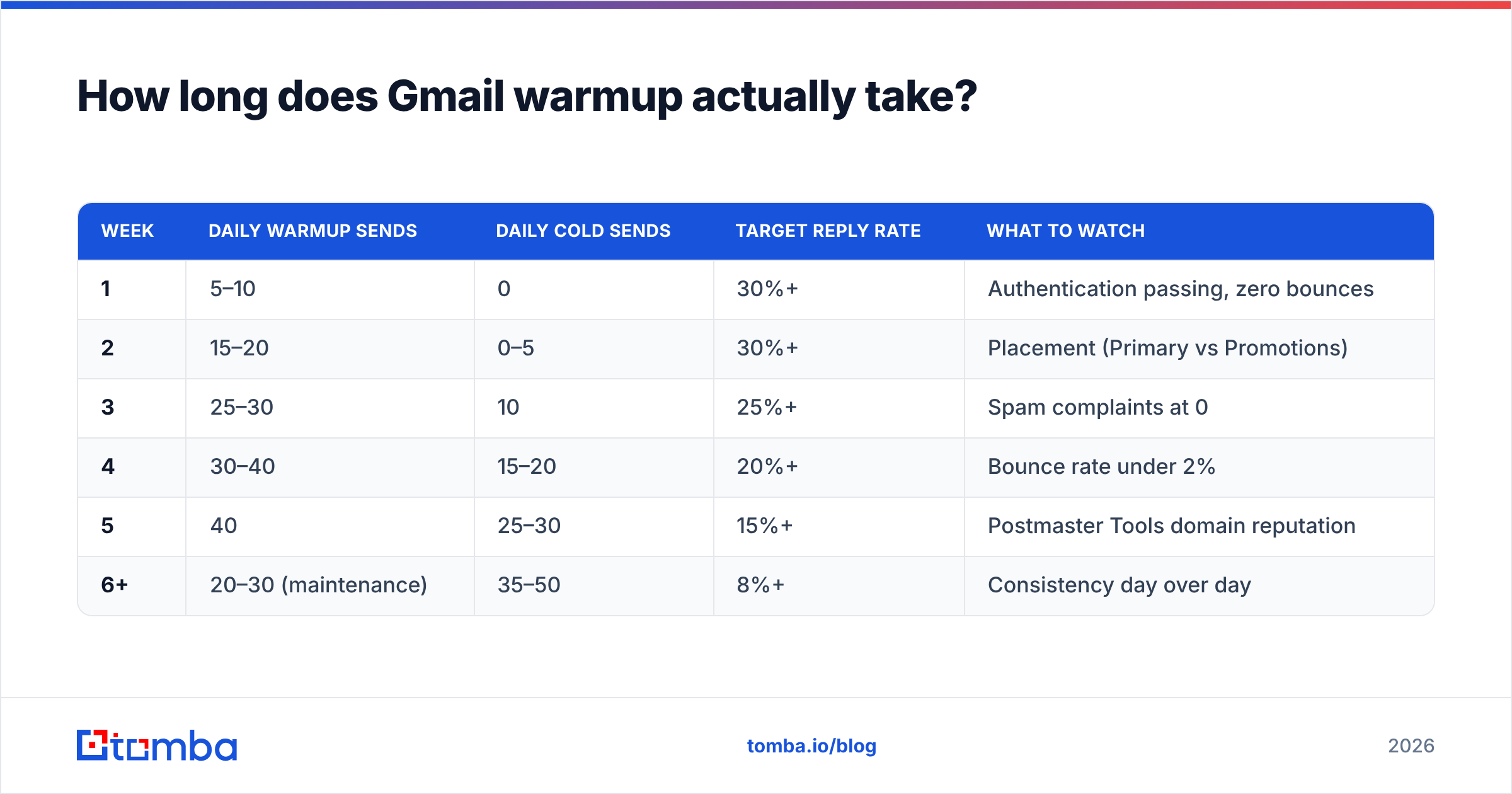
Here's a schedule that holds up in practice for a single Google Workspace mailbox on a fresh domain:
| Week | Daily warmup sends | Daily cold sends | Target reply rate | What to watch |
|---|---|---|---|---|
| 1 | 5–10 | 0 | 30%+ | Authentication passing, zero bounces |
| 2 | 15–20 | 0–5 | 30%+ | Placement (Primary vs Promotions) |
| 3 | 25–30 | 10 | 25%+ | Spam complaints at 0 |
| 4 | 30–40 | 15–20 | 20%+ | Bounce rate under 2% |
| 5 | 40 | 25–30 | 15%+ | Postmaster Tools domain reputation |
| 6+ | 20–30 (maintenance) | 35–50 | 8%+ | Consistency day over day |
Two things people get wrong reading a table like this. First, the "daily cold sends" column is a ceiling, not a target — if your replies dry up in week 3, you hold, you don't advance. Second, warmup never fully stops. Keeping 20–30 warmup sends a day running underneath your cold campaigns gives Gmail a positive engagement floor when a bad campaign inevitably underperforms.
What signals does Gmail actually score?#
Six categories, in rough order of how quickly they can sink you:
- Authentication — SPF, DKIM, and DMARC must all pass. A DMARC policy of
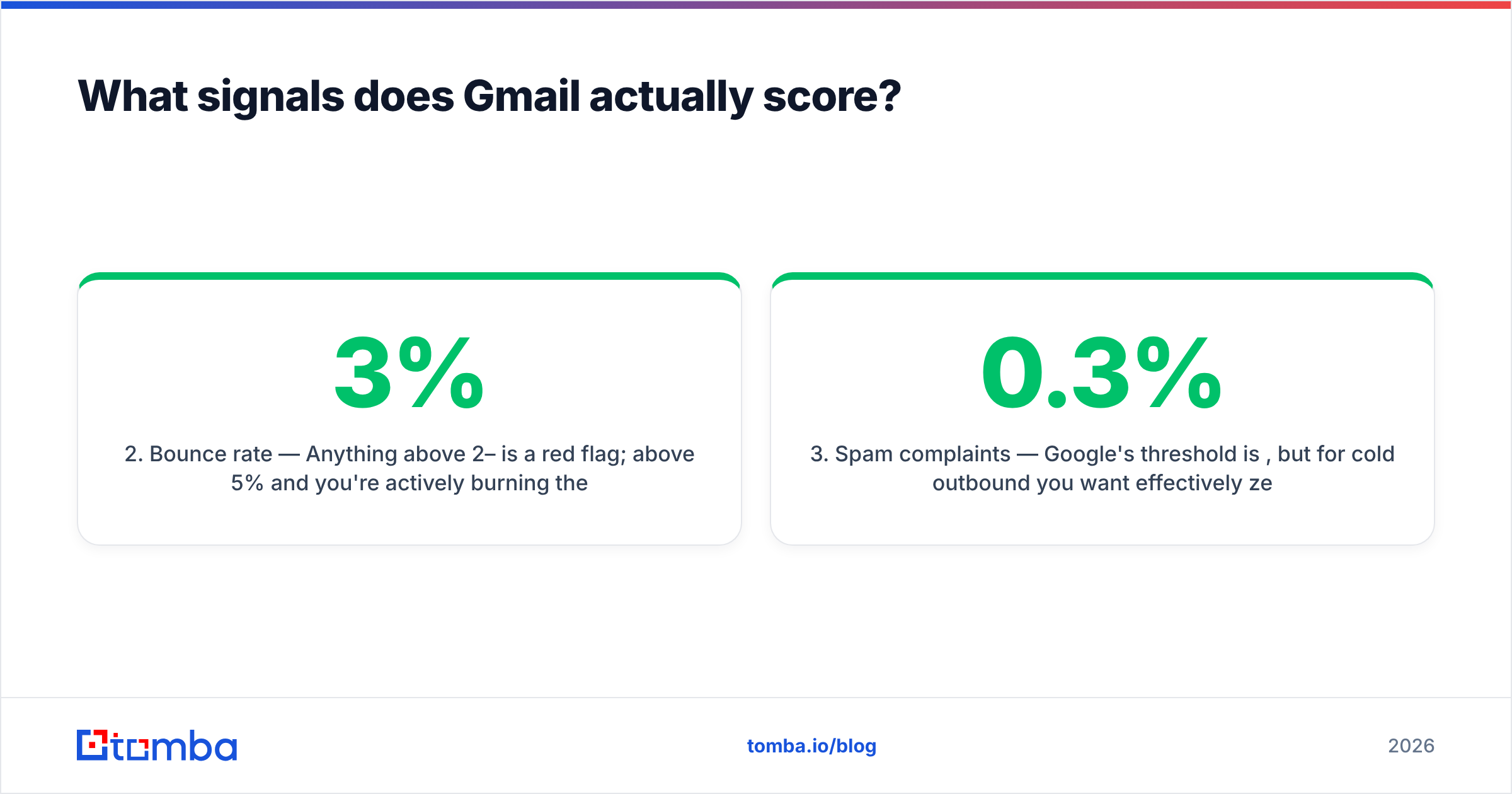
p=noneis acceptable to start;p=quarantineis better once you've confirmed alignment. Check your record with an SPF checker before you send a single message. - Bounce rate — Anything above 2–3% is a red flag; above 5% and you're actively burning the domain. This is a list-hygiene problem, not a warmup problem, and no warmup tool can fix it.
- Spam complaints — Google's threshold is 0.3%, but for cold outbound you want effectively zero. One complaint per 1,000 sends is already uncomfortable.
- Positive engagement — Replies count more than opens. Opens count more than nothing. A message moved from Spam to Inbox is the strongest single positive signal available.
- Volume consistency — 40 sends a day, five days a week, beats 200 on Monday and zero until Friday. Erratic patterns look automated because they are.
- Content and link reputation — Shortened links, tracking domains with no history, spam-trigger phrasing, and image-heavy HTML all drag on scoring. Run drafts through a spam checker before a campaign goes live.
Notice what isn't on that list: how many warmup emails you sent. Volume of warmup activity is an input, not an output. Google scores the outcome.
Screenshot placeholder: Google Postmaster Tools domain reputation dashboard showing the High / Medium / Low / Bad band over a 30-day window.
Do Gmail warmup tools actually work?#
They work for what they are, which is narrower than the marketing suggests. A warmup tool connects your mailbox to a network of other mailboxes; those mailboxes send each other messages, open them, reply, and pull anything that lands in Spam back into the Inbox. That generates the engagement pattern Gmail rewards.
The honest caveats:
- Network quality varies enormously. If the pool is full of throwaway domains with terrible reputation, you are building relationships with bad neighborhoods. Ask any vendor how they police their network.
- Google has gotten better at pattern detection. Warmup exchanges that use templated bodies, unnatural timing, or the same small set of participating domains are increasingly detectable.
- Warmup can't compensate for a bad list. If 8% of your addresses bounce, no amount of reply-trading offsets that.
- Warmup can't compensate for bad copy. If nobody replies to your actual campaigns, the warmup network's fake replies are propping up a number your real sending will immediately undo.
Treat warmup tooling as one of three legs. The other two are authentication and list quality, and those are the ones you control directly.
Which Gmail warmup tool should you use?#
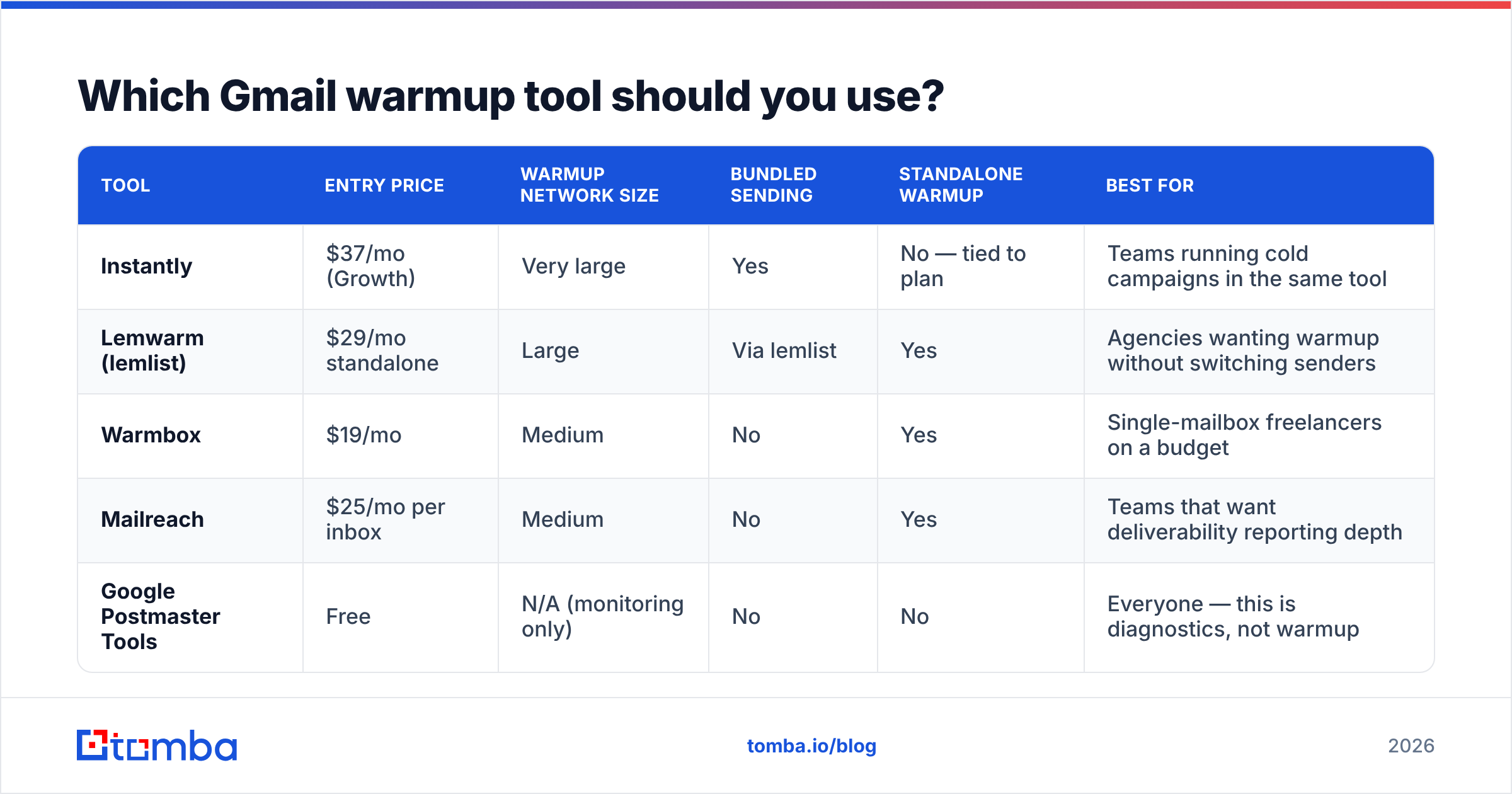
Depends on whether you need warmup alone or warmup bundled into a sending platform. Here's how the common options compare on the attributes that actually differ:
| Tool | Entry price | Warmup network size | Bundled sending | Standalone warmup | Best for |
|---|---|---|---|---|---|
| Instantly | $37/mo (Growth) | Very large | Yes | No — tied to plan | Teams running cold campaigns in the same tool |
| Lemwarm (lemlist) | $29/mo standalone | Large | Via lemlist | Yes | Agencies wanting warmup without switching senders |
| Warmbox | $19/mo | Medium | No | Yes | Single-mailbox freelancers on a budget |
| Mailreach | $25/mo per inbox | Medium | No | Yes | Teams that want deliverability reporting depth |
| Google Postmaster Tools | Free | N/A (monitoring only) | No | No | Everyone — this is diagnostics, not warmup |
Prices move; check each vendor's page before you commit. The pattern worth noticing is that per-inbox pricing compounds fast. Running 10 mailboxes at $25 each is $250/month on warmup alone, before you've paid for data or a sending platform. That math is why most teams eventually consolidate warmup into whatever tool already sends their campaigns.
Screenshot placeholder: Instantly warmup dashboard showing per-mailbox health score, daily ramp curve, and spam-recovery count.
One tool that belongs in the monitoring column and gets skipped too often: Google Postmaster Tools is free, it's Google's own read on your domain, and it's the only place you'll see your actual domain reputation band. If you're warming up without it connected, you're driving with the dashboard covered.
How do you set up Gmail warmup step by step?#
- Buy the domain 30+ days early. Use a variant of your primary domain (
try-acme.com,acme-hq.com) so a burned reputation never touches your main corporate domain. - Configure DNS fully before sending. SPF, DKIM, DMARC, and a custom tracking domain with its own CNAME. Verify each one resolves. Confirm you're not on any blacklist from a previous owner — recycled domains carry history.
- Fill out the mailbox like a human. Real name, profile photo, a signature with a working phone number and address. Use an email signature generator if you want something clean fast.
- Start warmup, send zero cold email. Week 1 is warmup only. Resist the urge.
- Clean your list in parallel. This is the week to run your prospect list through an email verifier so that when you do start sending, your bounce rate is near zero. Verifying 2,000 addresses costs less than repairing one burned domain.
- Begin cold sending in week 2 or 3, small. Five to fifteen a day, to your best-fit, most-likely-to-reply segment. You want early replies to be real replies.
- Watch Postmaster daily, ramp weekly. If domain reputation drops from High to Medium, stop advancing and hold volume for a full week.
What breaks Gmail warmup most often?#
Bounces from an unverified list. By a wide margin the number one killer. You can execute a flawless 6-week ramp and destroy it in one afternoon by uploading a scraped list with a 12% invalid rate. Gmail reads high bounce rates as a signature of purchased data, and the penalty is immediate.
This is where the sequencing matters: warmup builds trust slowly, bounces spend it instantly. Run every list through verification before it touches a warmed mailbox. If your data source produces catch-all domains — common with larger enterprises — use a catch-all verifier rather than guessing, since catch-all domains accept everything at SMTP and then silently discard invalid addresses, which produces the worst kind of failure: no bounce, no delivery, no signal.
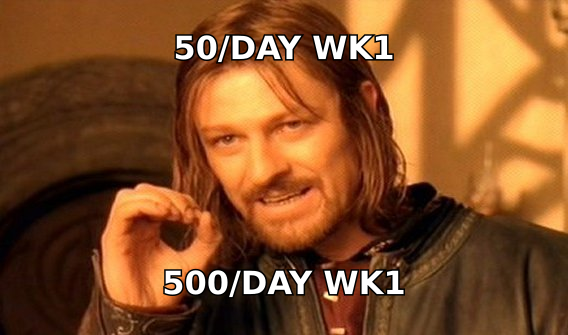
Volume cliffs. Going from 40/day to 300/day because a quarter is ending. Gmail notices step functions.
Reusing the same body text. If 200 recipients receive character-identical HTML, that fingerprint is trivially clusterable. Vary the copy, not just the merge fields.
Sending to people who have no reason to reply. Warmup builds a reputation your campaigns then have to justify. If your targeting is wrong, your reply rate collapses in week 4 and the reputation follows it down. Good email deliverability is downstream of good targeting more often than people admit.
Ignoring Promotions-tab placement. Landing in Promotions is not spam, but it's not the Primary tab either. Heavy HTML, multiple links, and tracking pixels push you there. Plain-text-looking messages with one link stay in Primary far more reliably.
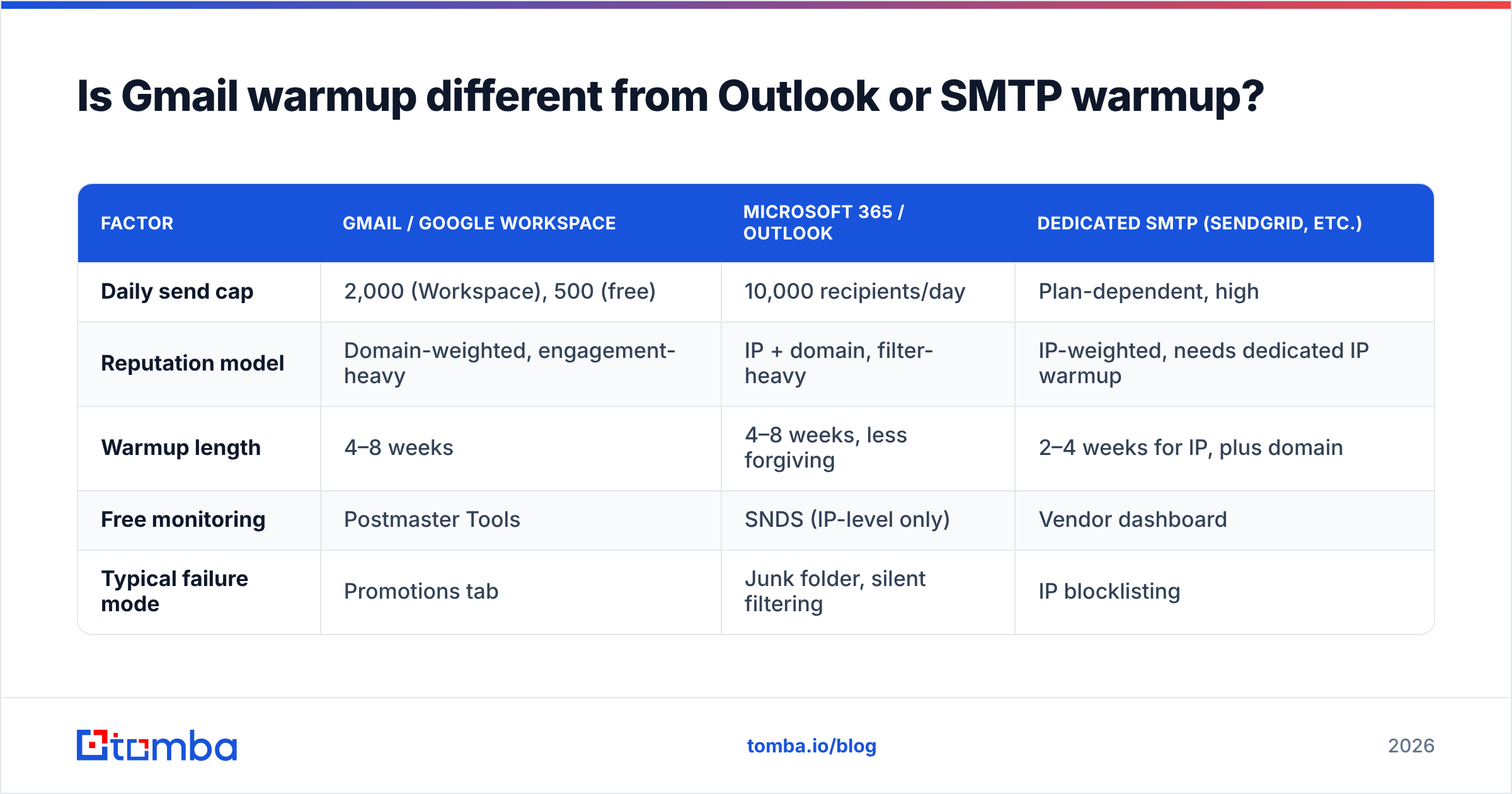
Is Gmail warmup different from Outlook or SMTP warmup?#
Yes, in ways that matter operationally.
| Factor | Gmail / Google Workspace | Microsoft 365 / Outlook | Dedicated SMTP (SendGrid, etc.) |
|---|---|---|---|
| Daily send cap | 2,000 (Workspace), 500 (free) | 10,000 recipients/day | Plan-dependent, high |
| Reputation model | Domain-weighted, engagement-heavy | IP + domain, filter-heavy | IP-weighted, needs dedicated IP warmup |
| Warmup length | 4–8 weeks | 4–8 weeks, less forgiving | 2–4 weeks for IP, plus domain |
| Free monitoring | Postmaster Tools | SNDS (IP-level only) | Vendor dashboard |
| Typical failure mode | Promotions tab | Junk folder, silent filtering | IP blocklisting |
Microsoft's filter is generally considered stricter on cold outbound and gives you less visibility into why. Gmail at least tells you your reputation band. If you're running multi-provider outbound, warm each provider separately — reputation does not transfer.
How many mailboxes do you actually need?#
Work backwards from your target. If you want 500 cold sends a day and each warmed mailbox safely carries 40, you need 12–13 mailboxes, which at Google Workspace pricing is roughly $85–$100/month in seats plus warmup tooling on top.
That arithmetic pushes most teams toward a different conclusion: send fewer, better-targeted emails. A 40-send-per-day mailbox aimed at a verified, well-researched list will out-produce a 400-send-per-day sprawl aimed at scraped data — and it won't cost you a domain every quarter. Reply rate is the only metric that survives contact with a spam filter.
If you're building that verified list, the domain search approach — pull every known contact at a target company, then verify — gives you far better-fit prospects than exporting a generic filter from a database. Fewer names, higher hit rate, healthier warmup.
What does a healthy warmed mailbox look like?#
Concrete benchmarks after a completed 6-week warmup on a cold-outbound domain:
- Bounce rate: under 2%, ideally under 1%
- Spam complaint rate: under 0.1%
- Postmaster domain reputation: High or Medium (Low means stop and diagnose)
- Reply rate on real campaigns: 5–12% depending on targeting quality
- Inbox placement on a seed test: 90%+ Primary or Inbox
- Daily volume: 35–50 cold sends, consistent across weekdays
If you're missing on bounce rate, fix the data. If you're missing on complaints, fix the copy and the targeting. If you're missing on reputation while the first two look fine, you ramped too fast — hold volume for two weeks and let it recover.
Where should you spend your deliverability budget?#
Roughly: 50% on data quality, 30% on authentication and infrastructure, 20% on warmup tooling. Most teams invert that and wonder why a $25/month warmup subscription didn't save a domain that was sending to a list with a 9% invalid rate.
Warmup is real and worth doing. It's also the part of deliverability with the most vendors and the loudest marketing, which is why it absorbs attention out of proportion to its impact. The unglamorous work — verifying every address before it enters a sequence, keeping SPF and DMARC aligned, holding volume when reputation dips — is what keeps mailboxes alive past month six.
Start with the list, not the ramp. Warmup protects a domain; clean data is what keeps it protected. Run your prospect list through Tomba's Email Finder to source verified, deliverable addresses at the companies you're targeting, with verification built into the same workflow — so the first campaign your freshly warmed mailbox sends doesn't bounce it back to zero. The free tier covers 25 searches a month; paid plans start at $49/mo on Tomba pricing, and every result comes with a confidence score you can filter on before a single send.
Related guides#
Ready to find emails that actually work?
Join 150,000+ professionals who stopped guessing and started sending. Free credits on signup — no credit card required.
Get the Tomba newsletter
Practical outbound tactics and product updates — once every two weeks.
About the author