GMass vs Instantly: Which Cold Email Tool Wins in 2026?
GMass lives inside Gmail. Instantly runs hundreds of inboxes from its own sending layer. They solve different problems — and picking wrong costs you a domain. Here is the honest breakdown.
TL;DR
- GMass is a Gmail extension. It sends from your existing Google account, uses your Gmail interface, and inherits Google's daily sending limits. Simple, cheap, and capped.
- Instantly is a standalone cold email platform. It connects unlimited (or near-unlimited) sending inboxes, rotates between them, and includes a warmup network. Built for volume outbound, not for personal mail merge.
- Price is not the deciding factor. GMass starts around $25/user/month and Instantly around $37/month, but the real cost difference shows up in the extra inboxes and domains Instantly assumes you will buy.
- Neither tool finds or verifies your leads properly. Both bolt on lead databases, but the accuracy tier is not the same as a dedicated finder + verifier stack — which is where most cold email actually dies.
- Rule of thumb: under ~300 sends/day from one identity → GMass. Multi-inbox, multi-domain, agency-scale outbound → Instantly.
What are GMass and Instantly, exactly?#
They are not the same category of product, even though they compete for the same search queries.
GMass is a Chrome extension that turns Gmail into a mail merge and sequencing tool. You compose in the normal Gmail window, pick a Google Sheet as your list, and hit a modified send button. Replies land in your Gmail thread. Reporting lives in Gmail labels. There is no separate application to log into, which is exactly the point — the learning curve is roughly one afternoon.
Instantly is a dedicated cold outreach platform. You connect sending accounts (Google Workspace, Microsoft 365, or SMTP), and Instantly distributes a campaign across all of them, rotating sends so no single inbox looks abnormal. It ships with a warmup network, a unified inbox for replies, campaign analytics, and an add-on lead database.
The distinction that actually matters:
- Sending identity. GMass sends as you, from one account. Instantly sends from a pool of accounts you own and manage.
- Volume ceiling. GMass is bounded by Google's per-account limits (roughly 500 external recipients/day on Workspace, lower on free Gmail). Instantly's ceiling is however many inboxes you are willing to pay for and warm.
- Where replies live. GMass replies stay in Gmail — great for solo operators, painful for a team of five SDRs. Instantly centralizes replies in a shared unibox.
- Infrastructure burden. GMass needs one healthy domain. Instantly effectively requires you to buy secondary domains, set up SPF/DKIM/DMARC on each, and warm them before you send anything.
- Team model. GMass licenses per user. Instantly licenses per workspace with inbox-based tiers, which changes the math fast once you have more than two people sending.
If you internalize only one thing: GMass is a tool for your inbox, Instantly is infrastructure for a sending operation.

How do GMass and Instantly compare feature by feature?#
Here is the head-to-head on the attributes that decide real campaigns, not the ones that decide feature-matrix screenshots.
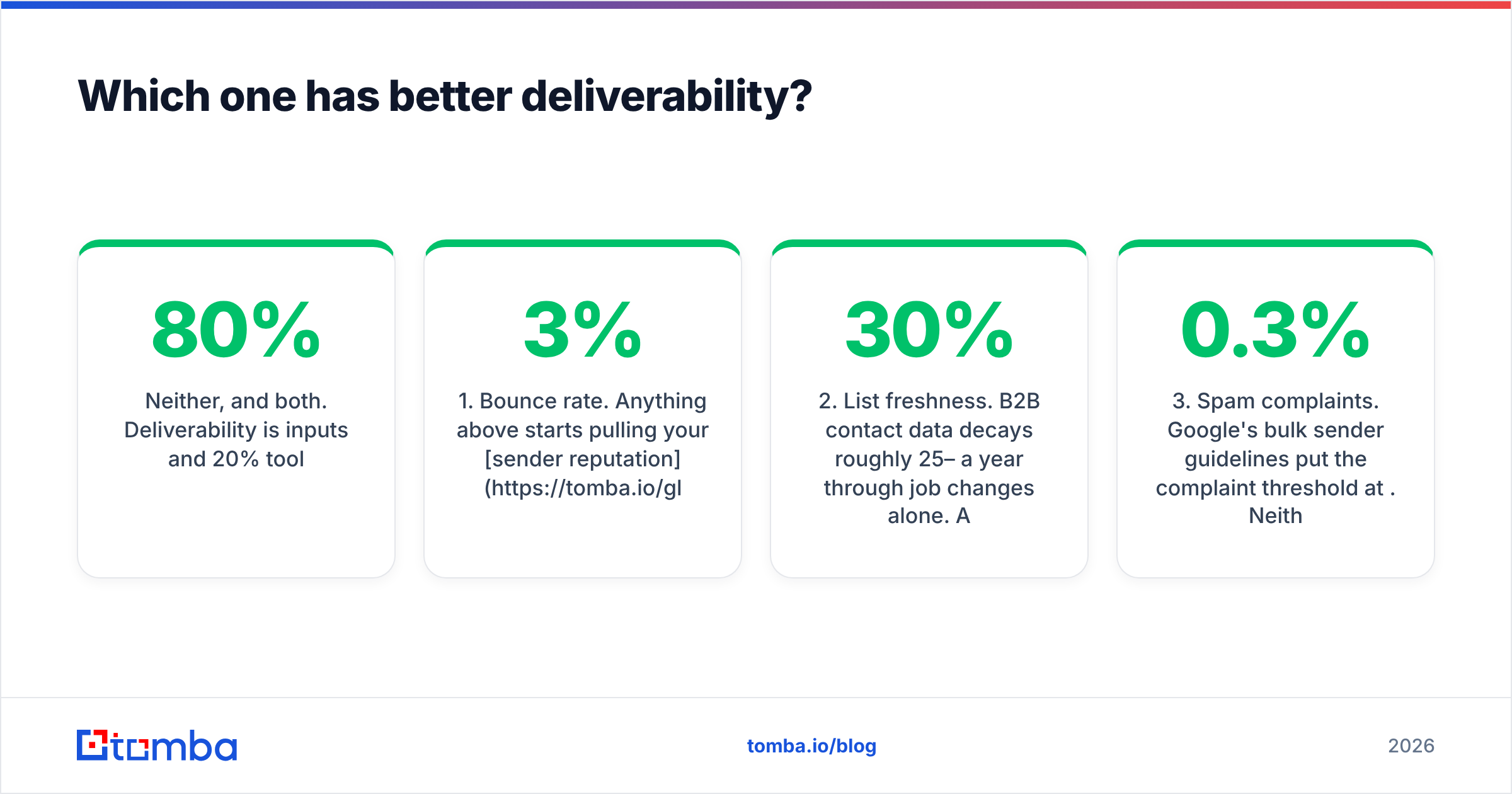
| Feature | GMass | Instantly |
|---|---|---|
| Where it runs | Chrome extension inside Gmail | Standalone web app |
| Sending accounts | 1 (your Gmail/Workspace) | Unlimited on higher tiers, rotated |
| Practical daily volume | ~500/day (Google limit) | 10,000+/day with enough inboxes |
| Built-in warmup | Limited / add-on | Yes, included warmup network |
| Unified reply inbox | No — replies land in Gmail | Yes, shared unibox |
| Sequences / follow-ups | Yes, auto follow-up until reply | Yes, multi-step with conditions |
| A/B testing | Basic | Multi-variant with auto-optimization |
| List source | Google Sheets (native) | CSV upload, API, built-in lead DB |
| Email verification | Basic, add-on | Built-in verification credits |
| CRM integrations | Light (Sheets, Zapier) | Native + API + webhooks |
| Entry price | ~$25/user/mo | ~$37/mo |
| Best for | Solo founders, recruiters, newsletters | Agencies, SDR teams, high-volume outbound |
Two rows deserve elaboration.
Warmup. Instantly's warmup network is a genuine differentiator for cold outbound at scale — accounts exchange and mark mail as important on a schedule, building interaction signals. GMass has warmup capability but it is not the product's centre of gravity, because a single established Gmail account with real human history usually does not need it. If you are already emailing customers from that address daily, you have organic warmup. If you just bought five domains, you do not, and you need Instantly's approach or an equivalent. Run your ramp schedule through an email warmup calculator before you send campaign one — the most common failure is going 0 → 200/day on a two-week-old domain.
Unified inbox. This looks like a nice-to-have until you have three reps and 40 replies a day. Then it becomes the difference between a managed pipeline and a pile of missed conversations. GMass's Gmail-native model is elegant for one person and structurally wrong for a team.
Which one is actually cheaper?#
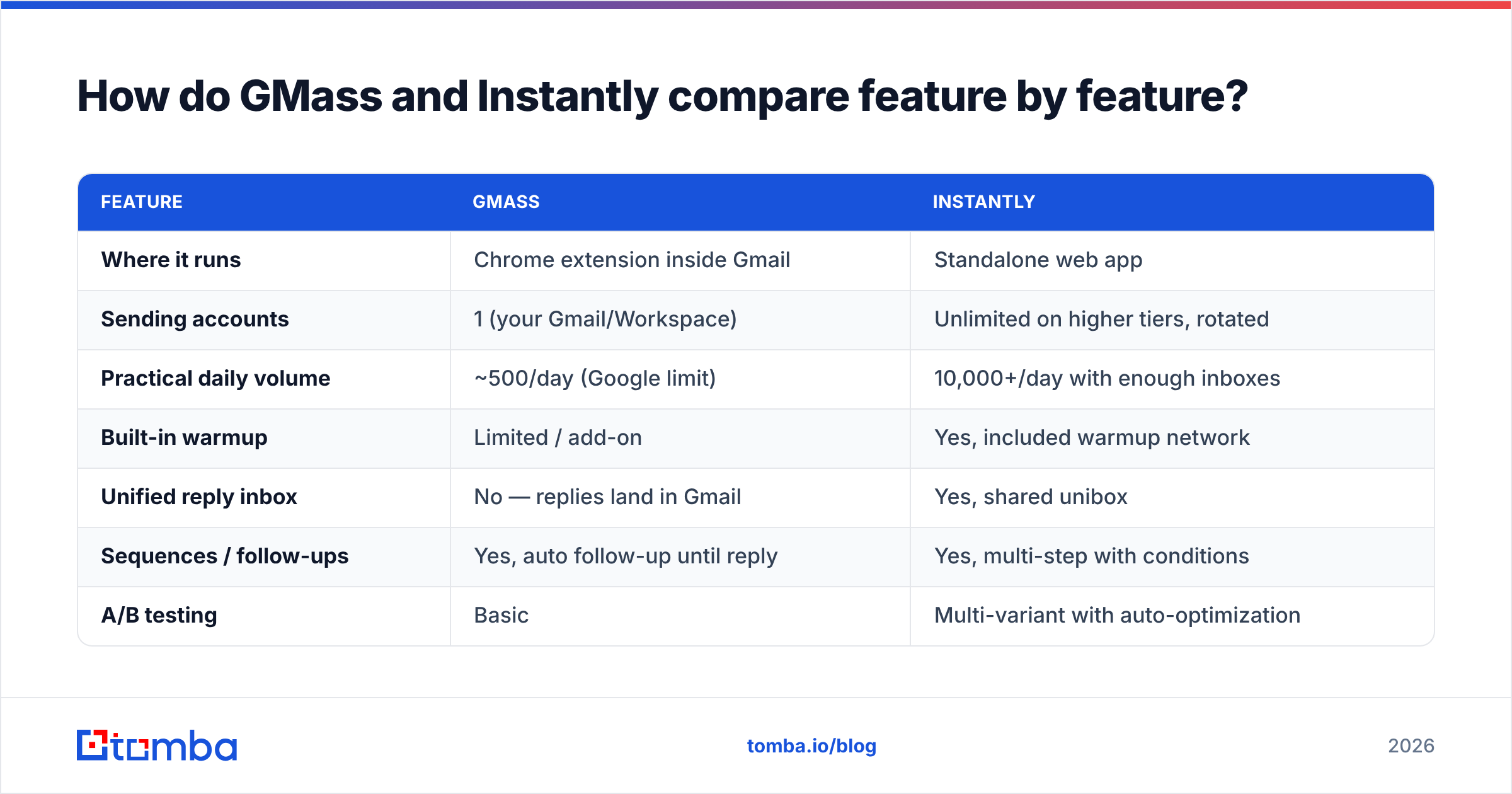
Sticker price favours GMass. Total cost of ownership is more interesting.
| Cost line | GMass (solo) | Instantly (small team) |
|---|---|---|
| Platform | ~$25/user/mo | ~$37–$97/mo depending on tier |
| Extra sending domains | $0 (use your main) | ~$12/yr × 3–5 domains |
| Extra mailboxes | $0 | ~$6/inbox/mo × 6–15 inboxes |
| Warmup | Included/minor | Included |
| Verification | Bring your own | Credit-based, add-on tiers |
| Realistic monthly total | $25–$35 | $120–$300+ |
Note the pattern: Instantly's list price is not the number you should budget. A typical agency setup — three domains, three inboxes each, mid-tier plan — lands well north of $150/month before a single lead is purchased. That is not a criticism; you are buying sending capacity that GMass structurally cannot provide. But comparing $25 to $37 and concluding "similar price" is the single most common mistake in this evaluation.
GMass's cost curve is flat until it isn't. One user, one domain, 500 sends/day: $25. Five users: $125 and five separate reply inboxes to manage. At that point Instantly's architecture is cheaper per useful send, even at a higher invoice.
Pricing on both platforms shifts; check the vendors directly before you commit budget, and read G2's cold email software category for how real buyers rate the support experience — that is the axis review sites capture better than feature pages do.
Which one has better deliverability?#
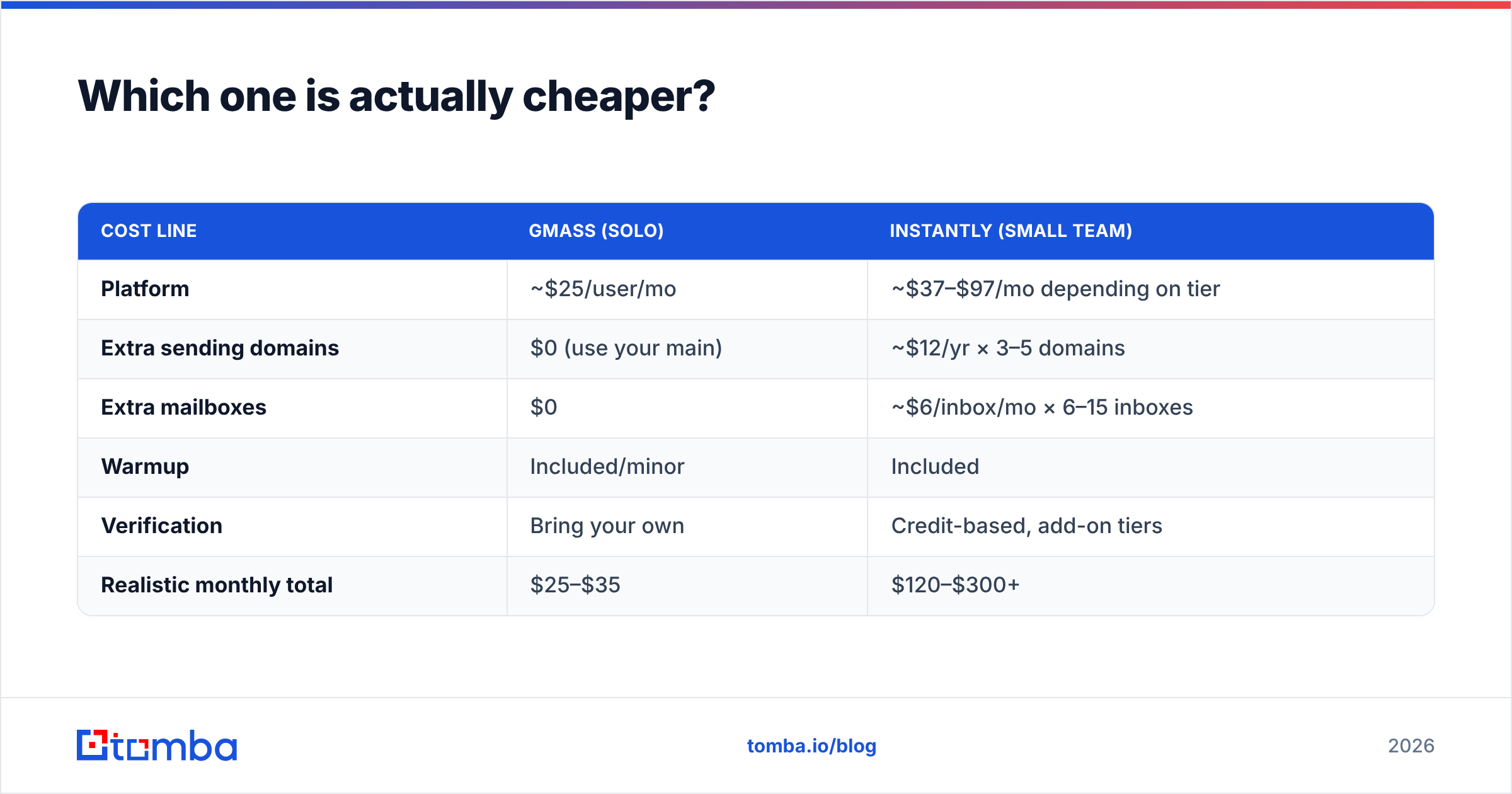
Neither, and both. Deliverability is 80% inputs and 20% tool.
The tool-side factors:
- GMass sends through Google's infrastructure. That is excellent IP reputation you did not have to earn — but you inherit Google's spam filtering opinions of your account, and one bad campaign taints the address you use for everything else. There is no blast radius containment.
- Instantly rotates across inboxes, so a single burned account does not kill a campaign. That containment is the real deliverability feature. The trade-off: you now manage authentication records across every domain, and a misconfigured SPF record on domain four silently tanks a fifth of your volume.
The input-side factors — which dominate:
- Bounce rate. Anything above 3% starts pulling your sender reputation down. Above 8% and mailbox providers start routing you to spam regardless of which tool you paid for.
- List freshness. B2B contact data decays roughly 25–30% a year through job changes alone. A six-month-old list is a bounce generator.
- Spam complaints. Google's bulk sender guidelines put the complaint threshold at 0.3%. Neither GMass nor Instantly can save you from a bad offer sent to the wrong ICP.
- Authentication. SPF, DKIM, and DMARC on every sending domain. Non-negotiable since 2024, and unenforced by both platforms — they will happily let you send from an unauthenticated domain.
- Content and volume ramp. Link-heavy HTML from a cold domain is a reliable way to get filtered. Plain-text-looking mail from a warmed domain is not.

Points 1 and 2 are why the tool choice matters less than people assume. If your list is guessed patterns and scraped junk, GMass will burn your primary domain and Instantly will burn five cheaper ones. Run every list through an email verifier before it touches either platform. On catch-all domains — increasingly common in enterprise — standard SMTP checks return "unknown," which is where a dedicated catch-all verifier earns its keep instead of you gambling on a coin flip.
Who should choose GMass?#
Pick GMass if you recognise yourself here:
- Solo founder or consultant doing 50–300 highly personalized sends per week from your real address, where replying from your actual identity is a feature and not a compliance problem.
- Recruiter running candidate outreach out of a Google Sheet, where the sheet is the workflow and you have no appetite for a second system.
- Newsletter or community operator sending merge-field mail to an opted-in list from Gmail.
- Anyone with one strong, aged domain who cannot afford to fragment sender identity across throwaway domains.
- Budget-constrained testers who want to validate whether cold email works for their offer before building sending infrastructure.
GMass's honest weakness: it does not scale past the Gmail account, and it does not organize a team. Trying to run six reps on six GMass licenses is how you end up with no shared visibility into what was sent to whom.
Who should choose Instantly?#
Pick Instantly if:
- You need 1,000+ sends/day. This is not a GMass problem you can configure around; it is a Google account limit.
- You run an agency with multiple client campaigns needing isolated sending domains and separate reporting.
- You have an SDR team that needs one shared reply queue, assignment, and a manager view of pipeline. The unibox alone justifies the switch.
- You want managed warmup and do not want to run a separate warmup subscription.
- You are building repeatable outbound, not running a one-off campaign — the setup overhead only amortizes if you keep sending.
Instantly's honest weakness: complexity and cost creep. You are now a domain administrator whether you wanted the job or not, and every new domain is a new DNS configuration that can quietly fail. Teams that skip the infrastructure hygiene get worse deliverability on Instantly than they would have gotten on GMass, because they have five ways to misconfigure instead of one.
If neither shoe fits, the category is deeper than these two — our roundups of Instantly alternatives and Saleshandy alternative options cover the middle ground where sequencing tools like Smartlead, Lemlist, and Reply.io sit.
What do both tools get wrong about your data?#
Both platforms have moved into lead data — Instantly with a built-in B2B database, GMass with list-building helpers. This is a rational land grab and a poor reason to consolidate.
Sending platforms optimize for sending. Their data layers are licensed or bundled, refreshed on someone else's schedule, and priced as an attachment to the core product. When a contact bounces, the sending tool has no incentive to explain why — it just charges you the send.
A cleaner architecture separates the three jobs:
- Find — resolve a name plus a company domain into a real, current mailbox. A dedicated email finder does this against live sources rather than a static snapshot.
- Verify — SMTP-level validation, catch-all handling, role-account and disposable-address flagging, before the address enters a campaign.
- Send — GMass or Instantly, depending on the volume answer above.
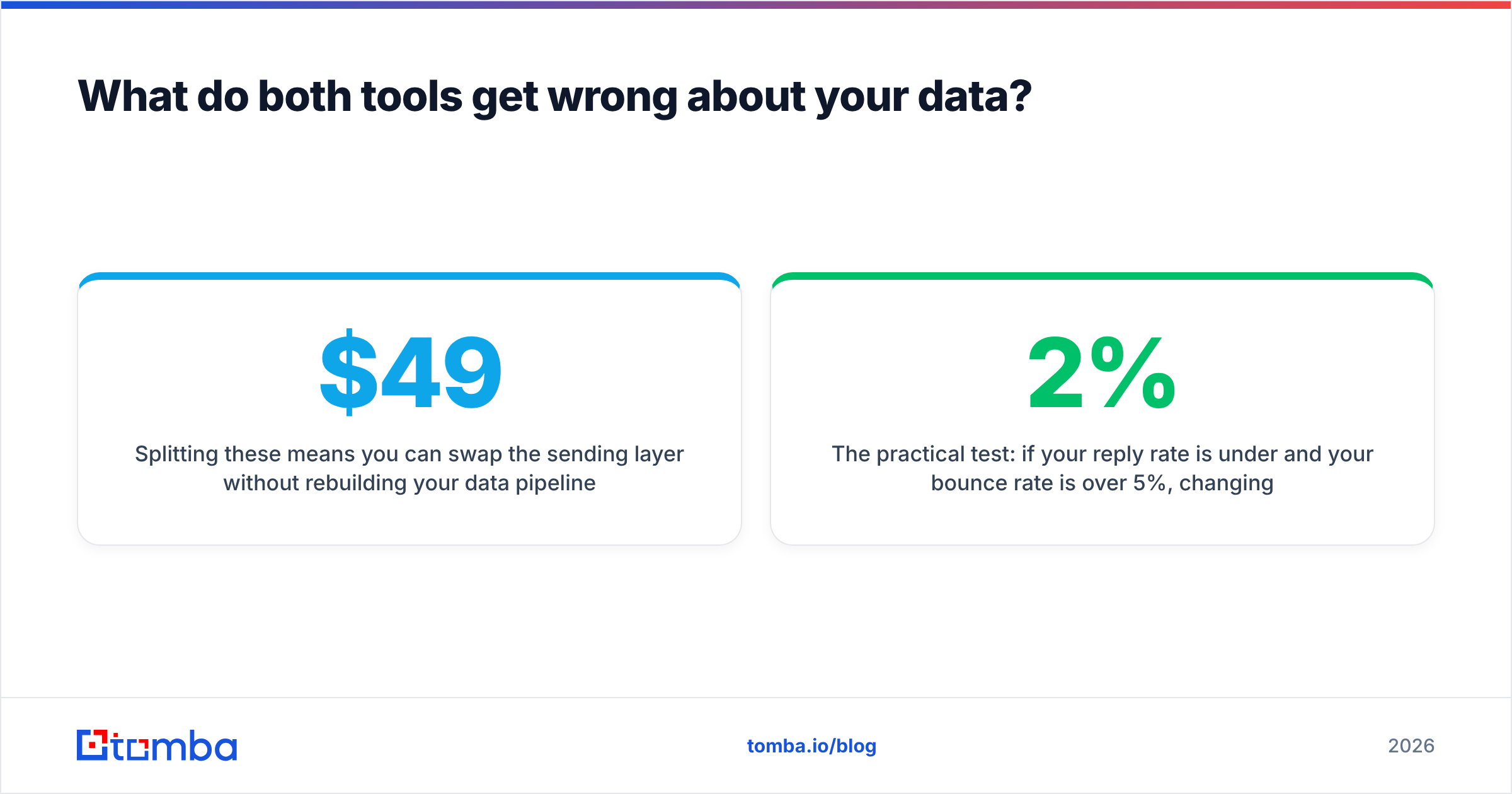
Splitting these means you can swap the sending layer without rebuilding your data pipeline, and you can audit bounce causes instead of guessing. It also means your CRM gets enriched records rather than just "sent/opened/replied" events. Tomba's data enrichment and bulk email finder handle the first two steps at list scale, and pricing runs from a free tier at 25 searches/month up through Starter at $49/month and Growth at $99/month — see full Tomba pricing for the tier breakdown.
The practical test: if your reply rate is under 2% and your bounce rate is over 5%, changing sending platforms will not fix it. Fix the list first.
What is the verdict on GMass vs Instantly?#
Choose GMass when one person sends from one trusted identity and simplicity beats scale. It is the better tool for the first six months of any outbound experiment, and for many solo operators it is the last tool they will need.
Choose Instantly when volume, team coordination, or client isolation forces you into multi-inbox sending. It is genuinely better architecture for that job, and the extra cost buys containment you cannot fake inside Gmail.
Choose neither as your data source. Both are sending layers. The quality of what you feed them determines whether either one works.
If you are about to launch a campaign on either platform, start upstream. Use the Tomba Email Finder to build the list from real, current contact records, verify it before the first send, and let GMass or Instantly do the one job it is actually built for. The free tier gives you 25 searches to test accuracy against a list you already know the answers to — the only benchmark that matters.
Related guides#
Ready to find emails that actually work?
Join 150,000+ professionals who stopped guessing and started sending. Free credits on signup — no credit card required.
Get the Tomba newsletter
Practical outbound tactics and product updates — once every two weeks.
About the author