GMass vs Salesbot (2026): Cold Email or Sales Chatbot?
GMass sends cold email from Gmail. Salesbot answers conversations inside your CRM. They get compared constantly and they solve opposite halves of the funnel. Here's how each one actually performs, what it costs, and which one your team should buy first.
TL;DR
- GMass is a sending tool. It lives inside Gmail and turns your inbox into a mail-merge engine for cold email, newsletters, and multi-step follow-ups.
- Salesbot is a conversation tool. Kommo's no-code bot builder replies to inbound messages across WhatsApp, Instagram, and web chat, then moves deals through pipeline stages automatically.
- They are not direct substitutes. GMass fills the top of the funnel with outbound volume; Salesbot handles what happens after someone raises a hand.
- On raw cost, GMass is cheaper for a solo sender; Salesbot only makes sense if you're already paying for Kommo as your CRM.
- Neither tool finds or verifies contact data. Whichever you pick, the accuracy of your list decides your bounce rate — not the sender.
What is GMass and who actually uses it?#
GMass is a Chrome extension and Gmail add-on that converts your existing Google Workspace account into a mass-sending platform. You write a draft, pick a Google Sheet as your data source, and GMass merges rows into personalized sends — one message per recipient, each one delivered through Gmail's own SMTP rather than a third-party relay.
That architecture is the whole pitch. Because messages leave from your real mailbox, they inherit your domain's sending history and land in the same threads your replies do. There's no separate sending domain to warm, no unfamiliar IP pool, and no learning curve if your team already lives in Gmail.
The feature set is narrow and deep:
- Mail merge from Google Sheets with unlimited custom fields, fallback values, and conditional content blocks.
- Automatic follow-up sequences that stop the moment someone replies — the single most used feature in the product.
- Behavioral segmentation, so you can build a new campaign from "everyone who opened but didn't reply" in two clicks.
- A built-in verifier and warmup add-on sold separately from the core plan.
- Reply and bounce tracking written back into a Gmail label structure you can actually audit.
Who it fits: founders, recruiters, agency owners, link builders, and small sales teams sending somewhere between 200 and 10,000 emails a month from a handful of mailboxes. Who it doesn't fit: enterprise revenue teams that need multichannel sequencing, dialer integration, and role-based permissions. GMass has never pretended to be Outreach. Check the official GMass site for the current feature matrix before you commit — the product ships changes frequently.
The practical ceiling is Google's, not GMass's. A standard Workspace account caps external recipients at roughly 2,000 per day, and real-world deliverability degrades well before that number if your list is unverified. Which brings us to the part nobody enjoys.

What is Salesbot and what problem does it solve?#
Salesbot is the no-code automation builder inside Kommo, the messenger-first CRM formerly known as amoCRM. You drag blocks onto a canvas — send message, wait, ask question, branch on answer, move deal to stage, assign to rep — and the bot executes that flow whenever a trigger fires.
The triggers are what make it a sales tool rather than a support chatbot. A Salesbot can fire when a new lead enters a pipeline stage, when someone messages your Instagram business account, when a WhatsApp conversation goes cold for 48 hours, or when a form on your site is submitted. It qualifies, it collects missing fields, it books time, and it hands off to a human with context attached.
Where GMass optimizes for one-to-many push, Salesbot optimizes for many-to-one pull. It is genuinely good at:
- Instant first response on inbound channels, which is the single strongest predictor of whether an inbound lead converts.
- Qualification questions that write straight into CRM custom fields instead of a rep's notes app.
- Stage-based nudges — following up on a proposal that's sat untouched for a week without a human remembering to.
- Round-robin assignment once qualification passes a threshold you define.
- Multichannel continuity, keeping the same thread across WhatsApp, Telegram, Instagram, and email inside one deal record.
The catch is coupling. Salesbot is not a standalone purchase. You buy Kommo, and Salesbot comes with the plan. If your CRM is HubSpot, Pipedrive, or Salesforce, Salesbot isn't on the table — you'd be evaluating their native workflow tools instead.
Are GMass and Salesbot even competitors?#
Mostly no, and the search volume behind "gmass vs salesbot" reflects a real confusion worth clearing up: both get filed under "sales automation," so buyers compare them as if they're interchangeable line items. They aren't.
Think of it like a restaurant. GMass is the flyer campaign that fills the dining room. Salesbot is the host who greets people at the door, seats them, takes the first order, and flags the table when the server should come by. Swapping one for the other doesn't work — you'd either have an empty restaurant or a full one with nobody working the floor.
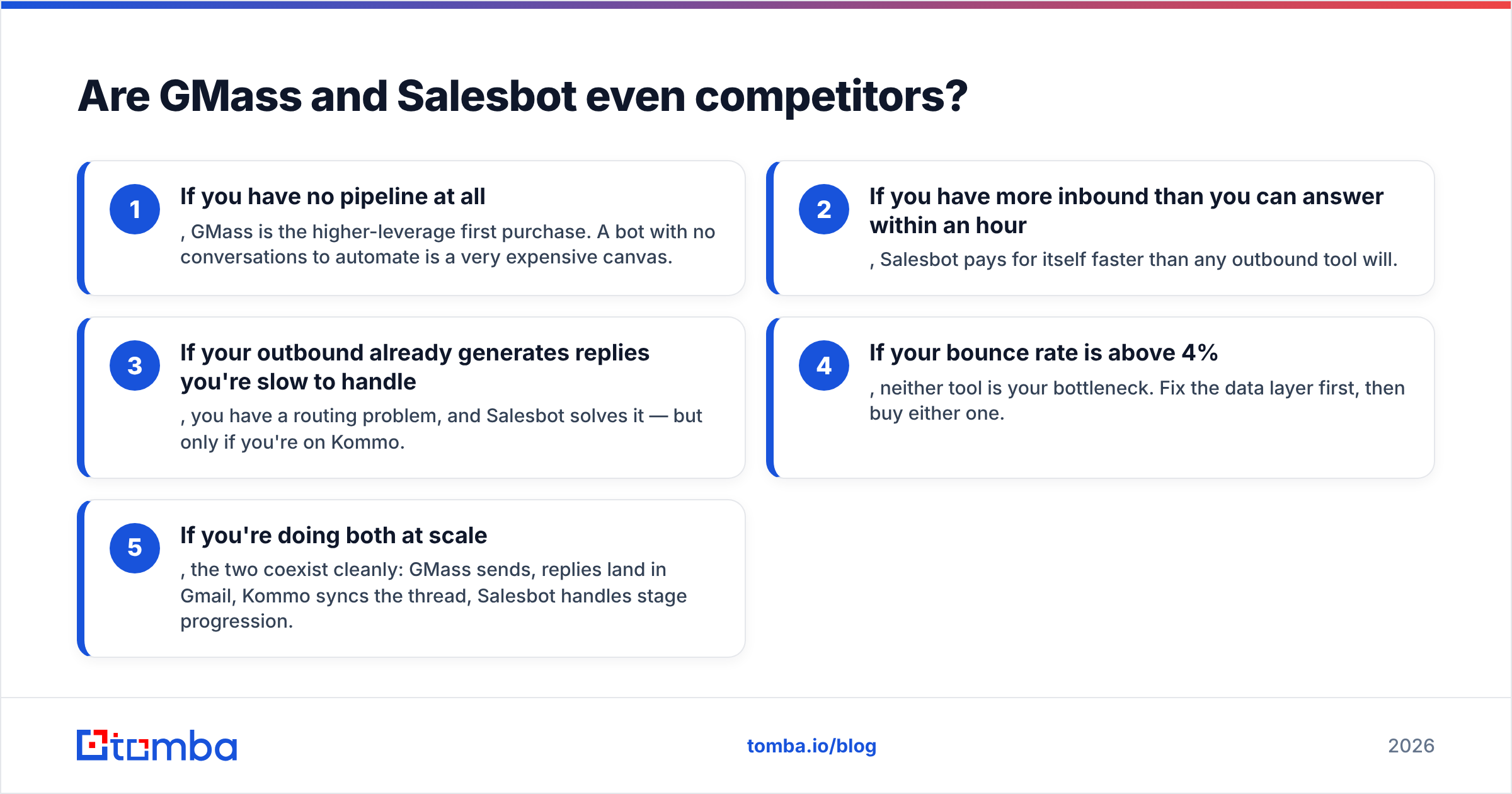
The honest framing is sequencing, not selection:
- If you have no pipeline at all, GMass is the higher-leverage first purchase. A bot with no conversations to automate is a very expensive canvas.
- If you have more inbound than you can answer within an hour, Salesbot pays for itself faster than any outbound tool will.
- If your outbound already generates replies you're slow to handle, you have a routing problem, and Salesbot solves it — but only if you're on Kommo.
- If your bounce rate is above 4%, neither tool is your bottleneck. Fix the data layer first, then buy either one.
- If you're doing both at scale, the two coexist cleanly: GMass sends, replies land in Gmail, Kommo syncs the thread, Salesbot handles stage progression.
How do GMass and Salesbot compare feature by feature?#
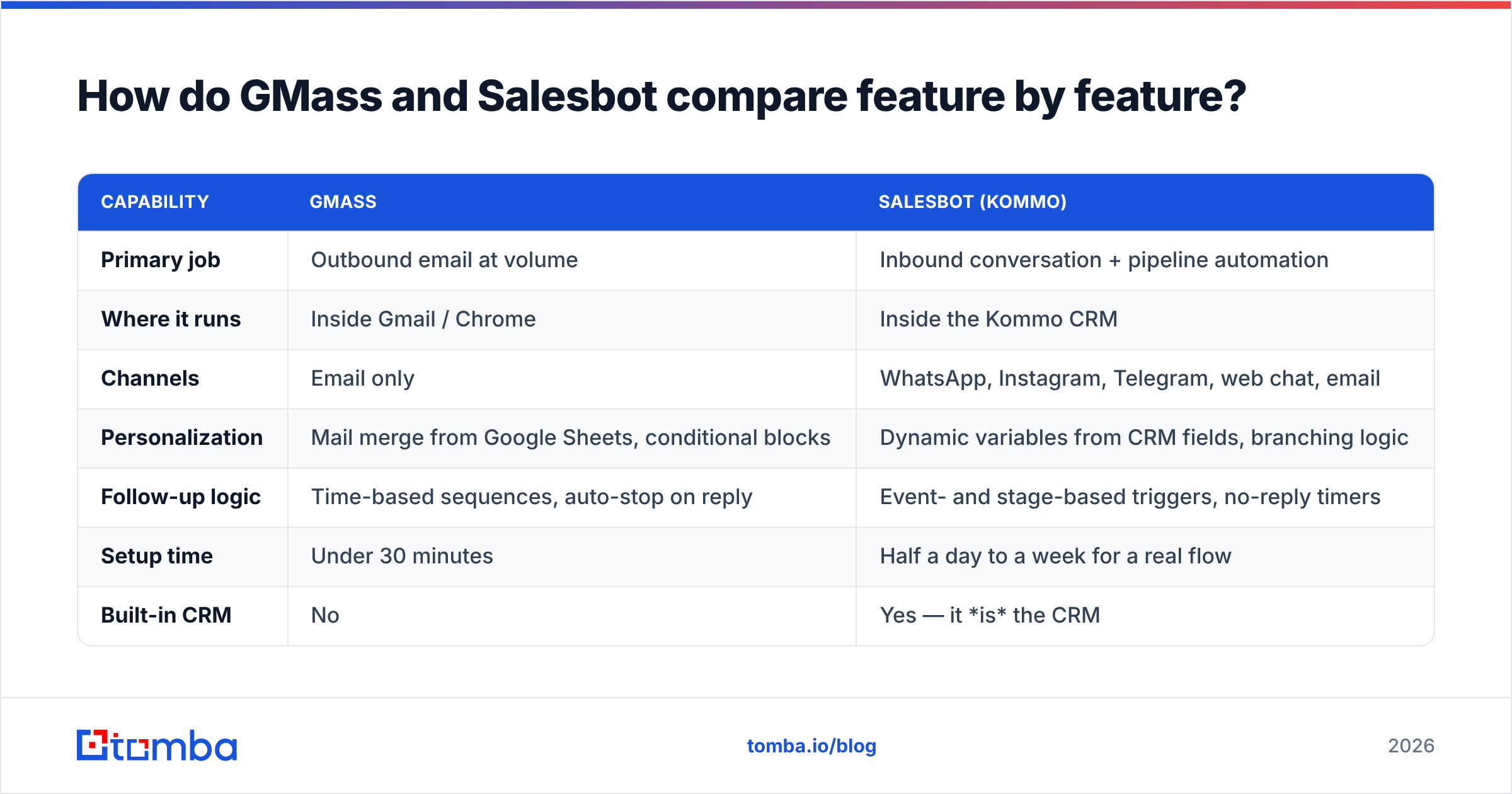
| Capability | GMass | Salesbot (Kommo) |
|---|---|---|
| Primary job | Outbound email at volume | Inbound conversation + pipeline automation |
| Where it runs | Inside Gmail / Chrome | Inside the Kommo CRM |
| Channels | Email only | WhatsApp, Instagram, Telegram, web chat, email |
| Personalization | Mail merge from Google Sheets, conditional blocks | Dynamic variables from CRM fields, branching logic |
| Follow-up logic | Time-based sequences, auto-stop on reply | Event- and stage-based triggers, no-reply timers |
| Setup time | Under 30 minutes | Half a day to a week for a real flow |
| Built-in CRM | No | Yes — it is the CRM |
| Contact data included | No | No |
| Reporting | Opens, clicks, replies, bounces per campaign | Deal velocity, stage conversion, bot completion rate |
| Best for | Founders, recruiters, agencies, SDR pods | Ecommerce, local services, messenger-heavy markets |
| Weakest at | Multichannel, complex routing | Cold outreach at volume |
The row that matters most is contact data included: No / No. Both products assume you arrive with a list. GMass merges whatever is in your spreadsheet — including the 14% of rows that were guessed from a name pattern and never checked. Salesbot enriches nothing; it works with whatever the contact typed into your chat widget.
What does each one cost in 2026?#
Pricing changes often, so treat these as directional and confirm on the vendors' own pages before you buy.
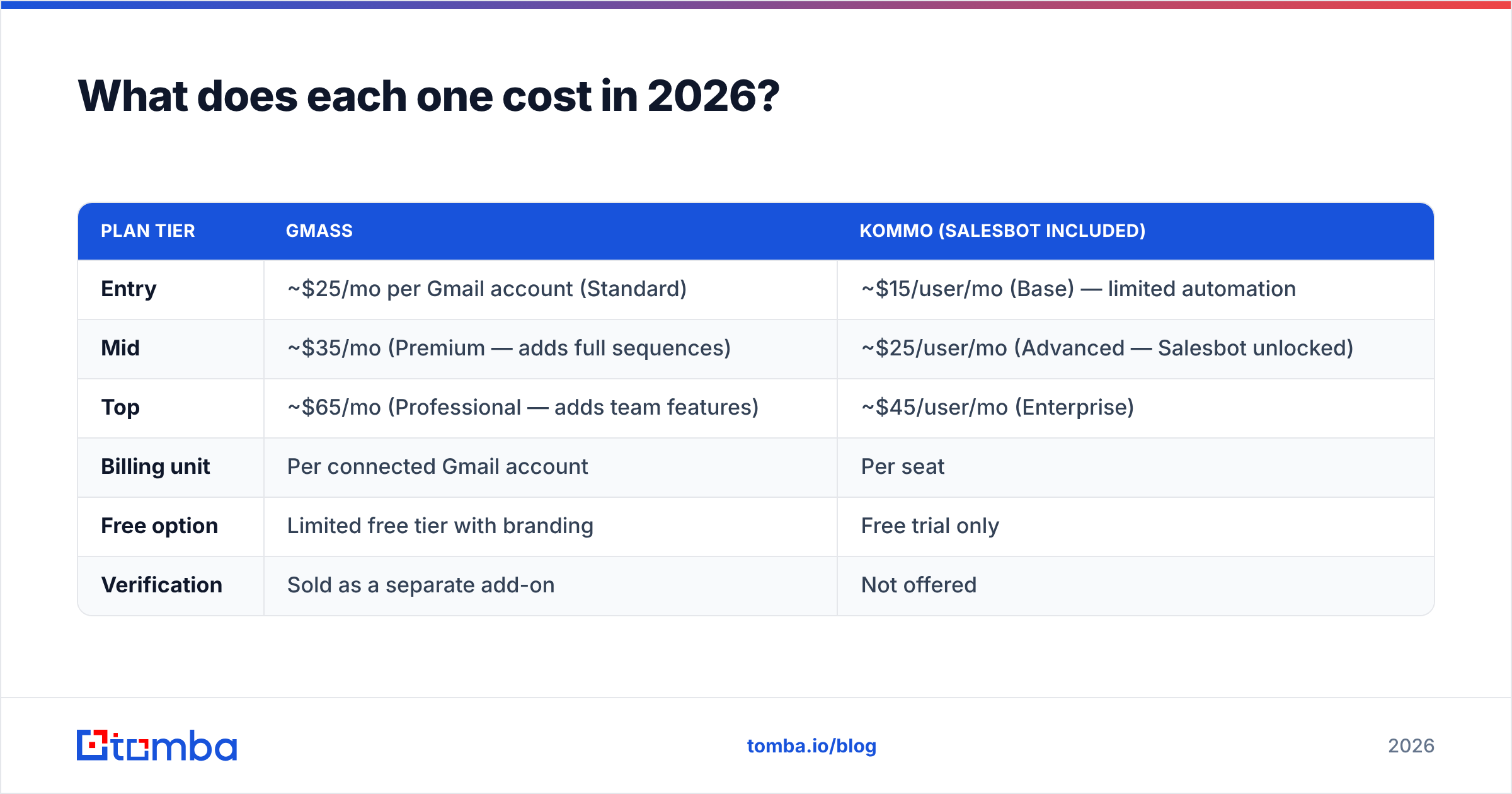
| Plan tier | GMass | Kommo (Salesbot included) |
|---|---|---|
| Entry | ~$25/mo per Gmail account (Standard) | ~$15/user/mo (Base) — limited automation |
| Mid | ~$35/mo (Premium — adds full sequences) | ~$25/user/mo (Advanced — Salesbot unlocked) |
| Top | ~$65/mo (Professional — adds team features) | ~$45/user/mo (Enterprise) |
| Billing unit | Per connected Gmail account | Per seat |
| Free option | Limited free tier with branding | Free trial only |
| Verification | Sold as a separate add-on | Not offered |
Two cost traps worth flagging.
GMass scales by mailbox, not by seat. If your deliverability plan involves five sending domains with three mailboxes each — the standard cold email setup in 2026 — you're paying fifteen times the sticker price. That math surprises people who budgeted for "$35 a month."
Kommo scales by seat, whether or not the seat uses Salesbot. A ten-person team on Advanced pays roughly $250/month, and the bot builder is one feature inside that. If only two people touch automation, you're still buying ten seats. On the other hand, you're getting an entire CRM, so comparing it head-to-head against a $35 Gmail extension is apples to orchards. Independent review volume on G2 is a reasonable sanity check on whether each tool's support and reliability match its price.
Which tool wins for cold outbound in 2026?#
GMass, without much argument — but with a large asterisk about the environment it now operates in.
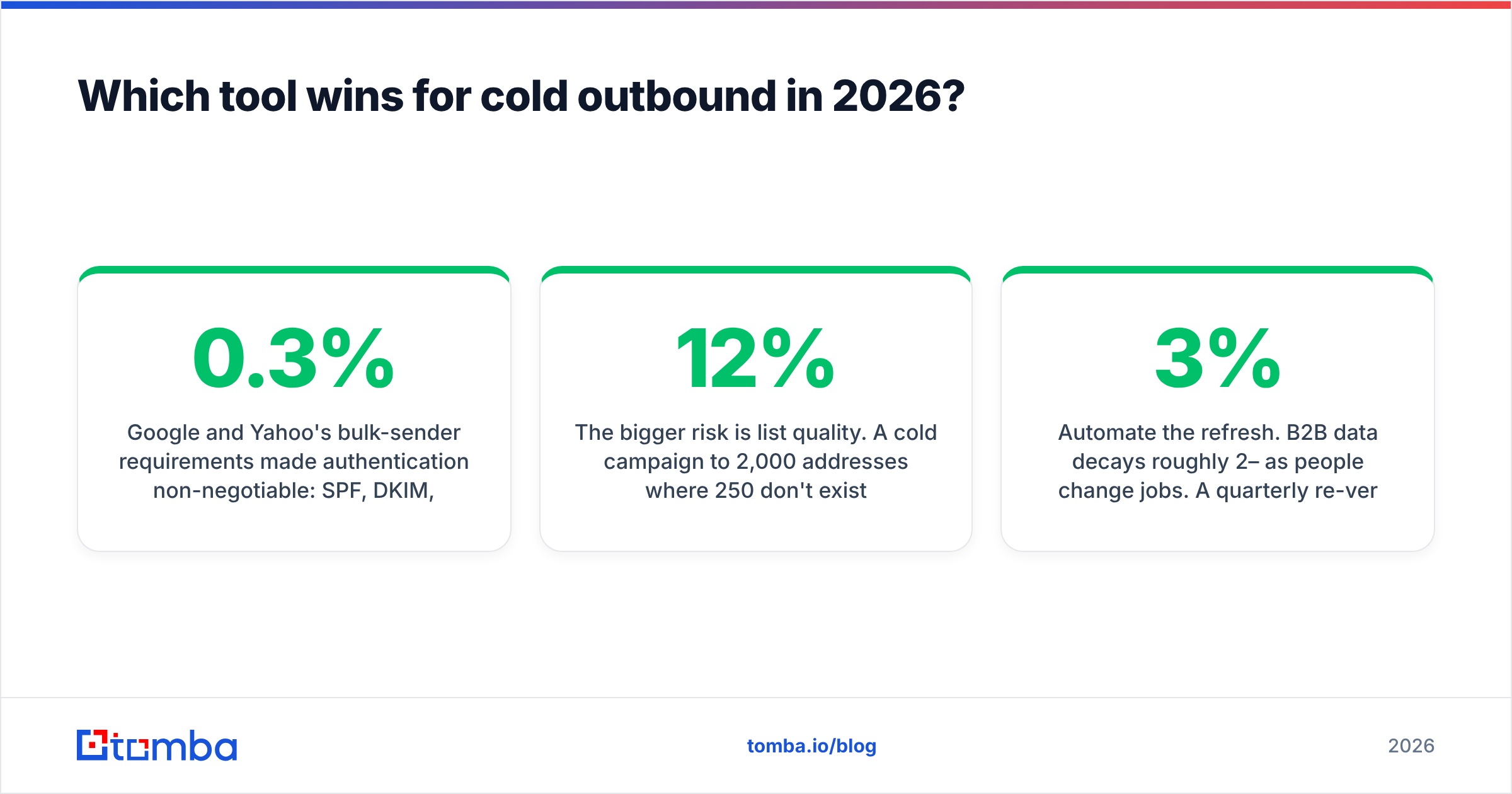
Google and Yahoo's bulk-sender requirements made authentication non-negotiable: SPF, DKIM, DMARC, one-click unsubscribe, and a spam complaint rate held under 0.3%. GMass handles the unsubscribe header and gives you complaint visibility, but it cannot fix a misconfigured domain. Run your records through an SPF checker before your first campaign, not after your third one tanks.
The bigger risk is list quality. A cold campaign to 2,000 addresses where 250 don't exist produces a bounce rate above 12%. Mailbox providers read that as a spam signal regardless of how good your copy is, and your domain reputation absorbs the damage permanently. GMass sells verification as an add-on precisely because it knows this — but you can also verify upstream and arrive with a clean file.
That's a workflow decision, not a tool decision:
- Build the list from the source. Use domain search to pull every public address at a target company along with the confidence score attached to each.
- Verify before export. Push the whole file through an email verifier so invalid and role-based addresses never reach your Sheet.
- Handle catch-all domains separately. They pass basic syntax checks and still bounce; a dedicated catch-all verifier is the only way to score them honestly.
- Automate the refresh. B2B data decays roughly 2–3% per month as people change jobs. A quarterly re-verify through the Tomba API keeps a list usable for a year instead of a quarter.
Do that and GMass performs like the product demos suggest. Skip it and no sender on the market saves you.
Which tool wins for inbound and pipeline follow-through?#
Salesbot, decisively — with the caveat that you have to buy Kommo to get it.
Response speed is the whole game on inbound. Lead-response research has been consistent for over a decade: contacting a new inbound lead within five minutes dramatically outperforms contacting them within an hour, and by day two most of the value is gone. Humans cannot hold that SLA across evenings and weekends. A bot can, and Salesbot's stage-triggered design means the automation lives where the deal lives instead of in a disconnected chat widget.
It's also strong at the unglamorous middle of the pipeline. Proposals go quiet. Demos get booked and not confirmed. Deals sit in "negotiation" for three weeks because everyone assumed someone else was chasing. Stage-timer bots fix that category of loss without adding headcount, and the ROI is easier to prove than almost any outbound spend.
Where Salesbot underdelivers: anything requiring judgment. Branching logic is still logic. If your qualification depends on reading nuance in a reply, the bot will either over-qualify or hand off constantly, and reps will start ignoring its output. Keep flows short — collect three fields, book a slot, hand off — and it earns its keep. Build a twelve-node decision tree and you've created a maintenance burden nobody on the team wants to own.
What do both tools assume you already have?#
A contact layer neither of them provides.
GMass needs verified email addresses in a spreadsheet. Salesbot needs an inbound conversation that already happened. Between those two states sits the actual work of B2B go-to-market: identifying who to talk to, finding a reachable address, confirming it's live, and enriching it with enough context that the first message isn't generic.
That's where a dedicated data layer sits in the stack. Tomba's email finder resolves a name and domain into a verified professional address with a confidence score; data enrichment fills in job title, company size, and social profiles so your merge fields have something real to merge. Pricing runs from a free tier at 25 searches per month up to Growth at $99/mo, with full Tomba pricing published rather than gated behind a call.
The stack that actually works looks like this: source and verify with a data tool, send with GMass, catch and route with Salesbot or whatever your CRM offers. Three layers, three jobs, no overlap. Buying a sender to solve a data problem — or a bot to solve a volume problem — is how teams end up with four subscriptions and the same pipeline.
So which should you buy first?#
Answer three questions honestly.
- Do you have more leads than you can contact, or more capacity than leads? More capacity than leads means outbound, means GMass.
- What CRM are you on? If it isn't Kommo, Salesbot is off the table and you should compare its native automation instead.
- What's your current bounce rate? Above 4% and your next purchase should be verification, not sending or automation.
For most small teams reading this, the sequence is: clean data first, GMass second, conversational automation third — once there's enough inbound to justify it. For messenger-led businesses in markets where WhatsApp is the default channel, invert the first two.
And if the honest answer is "our list is the weak link" — which it is more often than anyone admits — start there. Run your target accounts through the Tomba Email Finder to build a verified, confidence-scored list before a single message leaves your outbox. The free tier is enough to test 25 contacts against whatever you're currently using, and the difference in bounce rate will tell you everything you need to know about which layer of your stack actually needed the budget.
Related guides#
Ready to find emails that actually work?
Join 150,000+ professionals who stopped guessing and started sending. Free credits on signup — no credit card required.
Get the Tomba newsletter
Practical outbound tactics and product updates — once every two weeks.
About the author