GMass vs Tami AI (2026): Which Cold Email Tool Wins?
GMass lives inside Gmail. Tami AI wants to run the whole outbound motion. We compare pricing, deliverability controls, and data quality, then name the setup we would actually run in 2026.
TL;DR
- GMass is a Gmail extension, not a platform. It turns your inbox into a mail-merge engine with sequences, list-building from Gmail search, and reporting. If your team already lives in Google Workspace, the learning curve is close to zero.
- Tami AI positions itself as an AI outbound agent, not a send tool: it aims to research prospects, draft personalized copy, and manage replies with less manual sequence-building. Verify current features and pricing on the vendor's own site before you commit — this category ships changes monthly.
- Price shape differs more than price level. GMass bills per Gmail seat at roughly $25–$55/user/month depending on tier. AI-agent tools typically bill per workspace or per contact researched, which scales differently once you add SDRs.
- Neither tool fixes your data. Both send against the list you hand them. Bounce rate is decided upstream, by whoever finds and verifies the addresses.
- Our pick: GMass for lean, Gmail-native teams sending under ~5,000 emails/month; an AI-agent tool like Tami AI when personalization research is your bottleneck and you have budget to test it. Pair either with a verified data source.
What is GMass, and who actually uses it?#
GMass is a Chrome extension and Gmail add-on that bolts mail merge, drip sequences, and campaign analytics directly onto your existing Gmail or Google Workspace account. You compose in the normal Gmail window, pull recipients from a Google Sheet or a Gmail search, insert merge tags, and hit a modified send button.
That architecture explains both its strengths and its ceilings. Because sends leave through your own Gmail account, you inherit Google's sending limits (typically 500/day on consumer Gmail, 2,000/day on Workspace) and your own domain reputation. There's no shared IP pool to hide behind, and no separate sending infrastructure to configure. You can read the current feature list on gmass.co.
Typical GMass users: solo founders, agency owners, recruiters, university outreach teams, and small sales teams who want cold email without adopting a full sales engagement platform. The tool is deliberately unglamorous, and that's the appeal.
What is Tami AI, and how is it different?#
Tami AI belongs to the newer "AI SDR" or AI outbound agent category, which grew fast between 2024 and 2026. Rather than giving you a sequence builder and asking you to write six steps, agent-style tools aim to do the research-and-draft work: pull signals about an account, generate a first-touch email that references something real, adapt follow-ups based on replies, and surface the conversations a human should take over.
Two honest caveats before you read further.
First, this category moves fast and vendor claims outrun independent testing. Where GMass has a decade of public reviews on G2, newer AI agents have thinner third-party evidence. Check current reviews and request a live demo against your own ICP rather than trusting a feature grid — including this one.
Second, "AI personalization" is only as good as the underlying data. An agent that researches the wrong person at the wrong company writes a beautifully personalized email to nobody.

How do GMass and Tami AI compare head-to-head?#
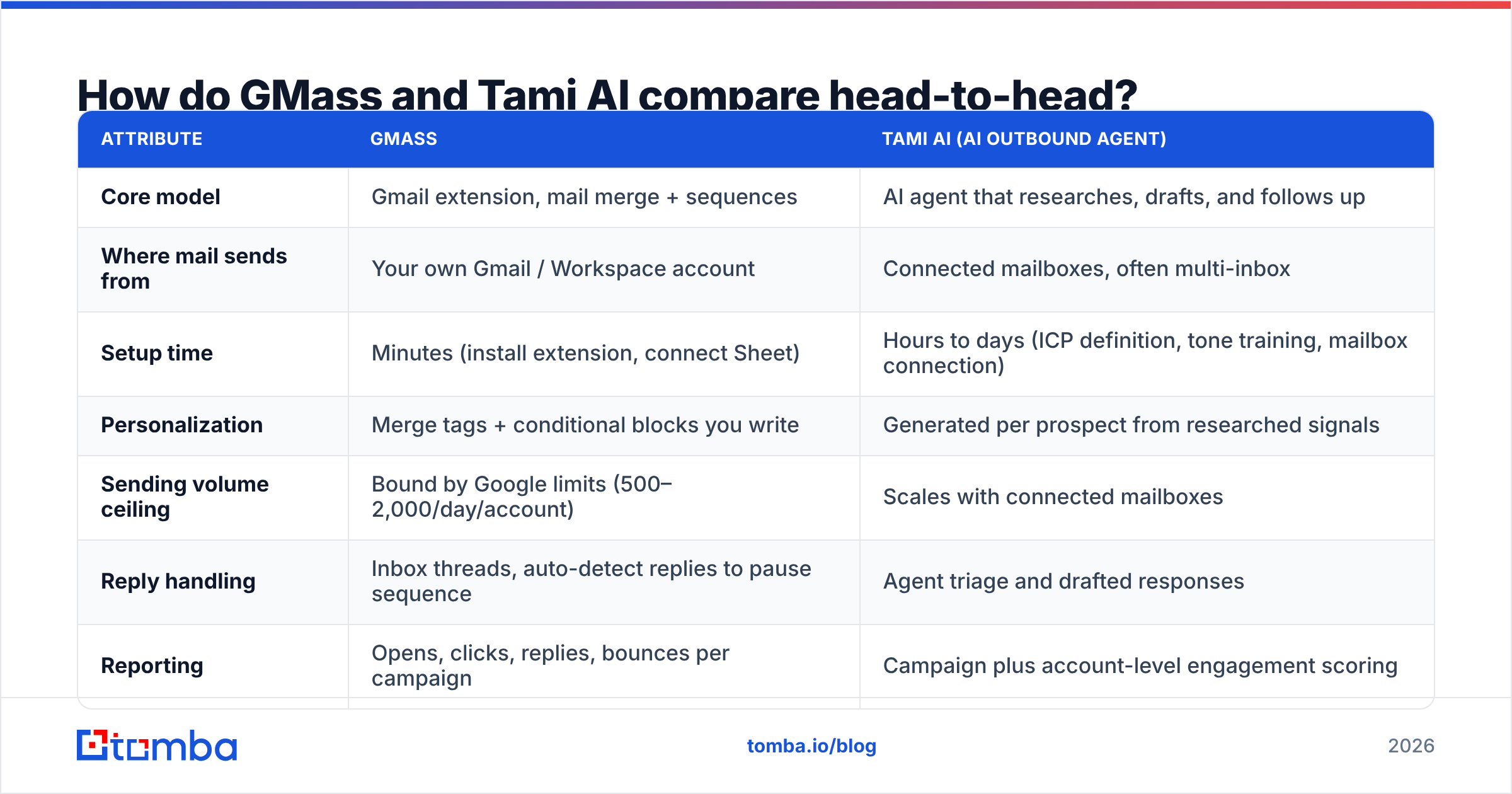
| Attribute | GMass | Tami AI (AI outbound agent) |
|---|---|---|
| Core model | Gmail extension, mail merge + sequences | AI agent that researches, drafts, and follows up |
| Where mail sends from | Your own Gmail / Workspace account | Connected mailboxes, often multi-inbox |
| Setup time | Minutes (install extension, connect Sheet) | Hours to days (ICP definition, tone training, mailbox connection) |
| Personalization | Merge tags + conditional blocks you write | Generated per prospect from researched signals |
| Sending volume ceiling | Bound by Google limits (500–2,000/day/account) | Scales with connected mailboxes |
| Reply handling | Inbox threads, auto-detect replies to pause sequence | Agent triage and drafted responses |
| Reporting | Opens, clicks, replies, bounces per campaign | Campaign plus account-level engagement scoring |
| Built-in contact data | None — bring your own list | Some agents bundle a database; coverage varies |
| Email verification | None native | Varies; verify before trusting |
| Best for | Gmail-native teams, low complexity, tight budget | Teams whose bottleneck is research and copy, not sending |
| Weakest at | Scaling past a few thousand sends/month | Cost predictability and output review overhead |
The row that matters most for most buyers is the second-to-last: neither tool is a data vendor first. GMass is explicit about it. AI agents sometimes blur the line by bundling a contact database, which is where quality varies wildly.
What does GMass do better than an AI agent?#
Four things, concretely:
- Cost predictability. A flat per-seat fee means your bill doesn't move when a campaign runs hot. AI agents that price per researched contact or per generated email can produce surprising invoices in month two.
- Transparency of output. You wrote the email. You know exactly what went out to 400 people. Agent-generated copy needs a review workflow, and teams that skip that review ship embarrassing sends.
- Zero-migration adoption. Your reps already know Gmail. No new UI, no CRM sync project, no enablement deck.
- Deliverability by constraint. Google's daily caps are annoying, but they force the low-volume, high-relevance behaviour that actually keeps domains healthy in 2026. Tools that make it trivial to send 20,000 emails a week make it trivial to burn a domain.
Where does Tami AI pull ahead?#
Also four, and they're real:
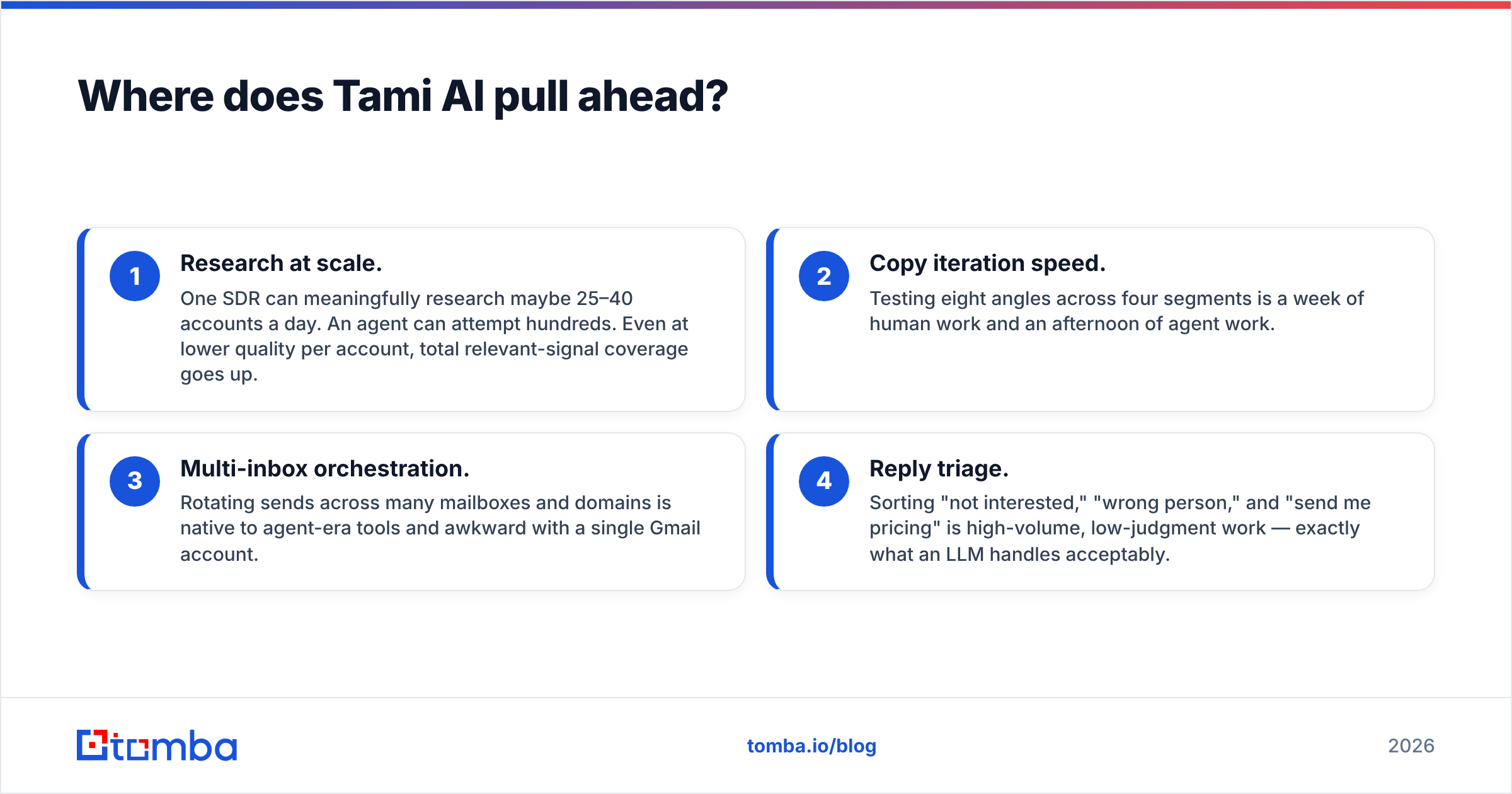
- Research at scale. One SDR can meaningfully research maybe 25–40 accounts a day. An agent can attempt hundreds. Even at lower quality per account, total relevant-signal coverage goes up.
- Copy iteration speed. Testing eight angles across four segments is a week of human work and an afternoon of agent work.
- Multi-inbox orchestration. Rotating sends across many mailboxes and domains is native to agent-era tools and awkward with a single Gmail account.
- Reply triage. Sorting "not interested," "wrong person," and "send me pricing" is high-volume, low-judgment work — exactly what an LLM handles acceptably.
If your pipeline problem is "we don't send enough relevant emails," an agent helps. If your problem is "our emails bounce and land in spam," an agent makes it worse, faster.
What does each one cost in 2026?#
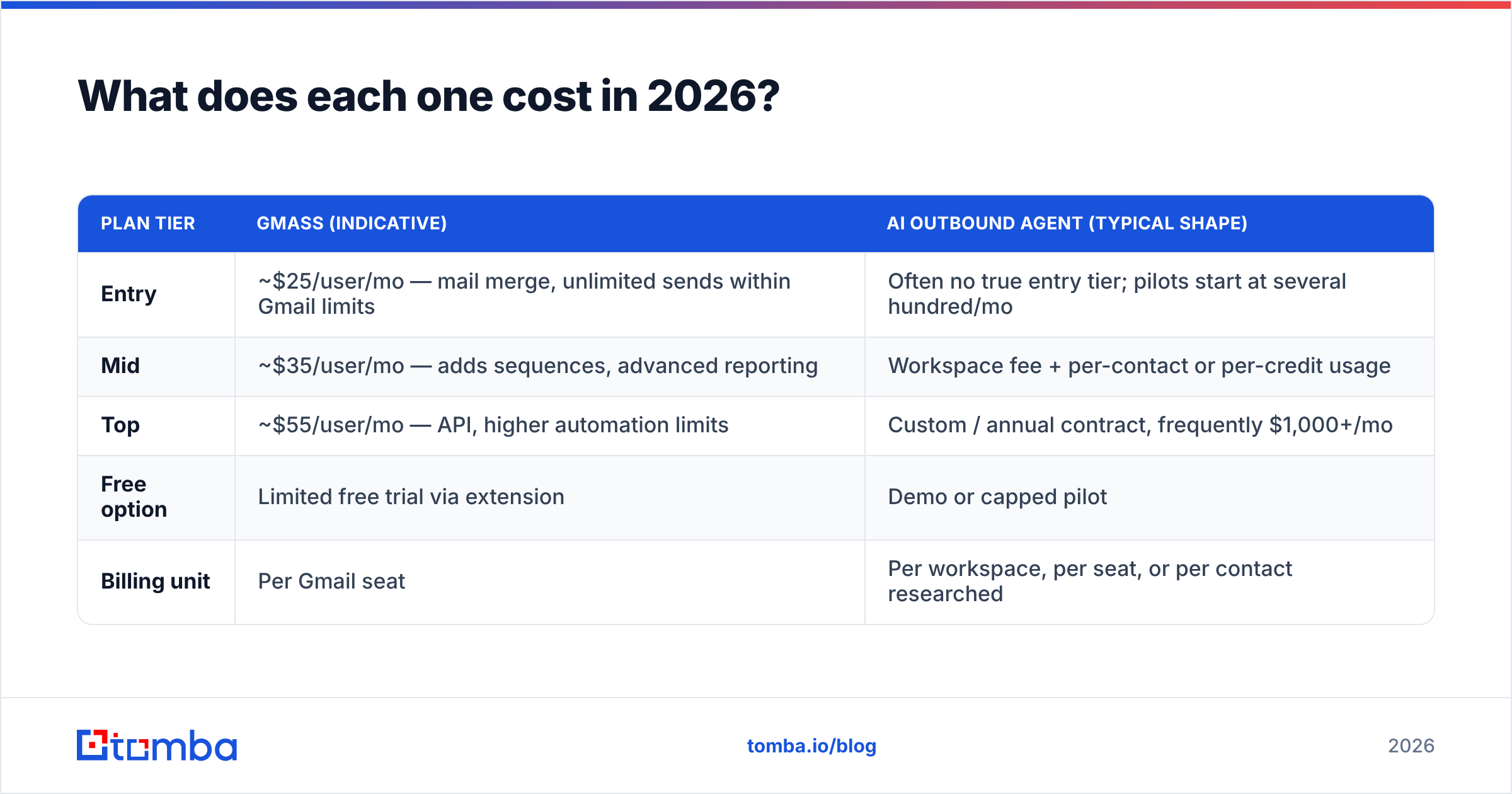
| Plan tier | GMass (indicative) | AI outbound agent (typical shape) |
|---|---|---|
| Entry | ~$25/user/mo — mail merge, unlimited sends within Gmail limits | Often no true entry tier; pilots start at several hundred/mo |
| Mid | ~$35/user/mo — adds sequences, advanced reporting | Workspace fee + per-contact or per-credit usage |
| Top | ~$55/user/mo — API, higher automation limits | Custom / annual contract, frequently $1,000+/mo |
| Free option | Limited free trial via extension | Demo or capped pilot |
| Billing unit | Per Gmail seat | Per workspace, per seat, or per contact researched |
Treat both columns as indicative and confirm on the vendors' current pricing pages — GMass has adjusted tiers repeatedly, and AI-agent pricing is often negotiated rather than listed.
The strategic point: GMass costs scale with headcount, agent costs scale with activity. A three-person team sending 3,000 emails a month will almost always pay less with GMass. A three-person team trying to cover 40,000 accounts a quarter has a genuine business case for an agent.
Which one protects your deliverability better?#
Neither, by itself. Deliverability is decided by four things, and tool choice is the fourth-most important.
- Authentication. SPF, DKIM, and DMARC must be correct on every sending domain. Google and Yahoo's bulk-sender requirements made this non-negotiable — see Google's sender guidelines. Run a quick SPF checker before your first campaign, not after your first spam complaint.
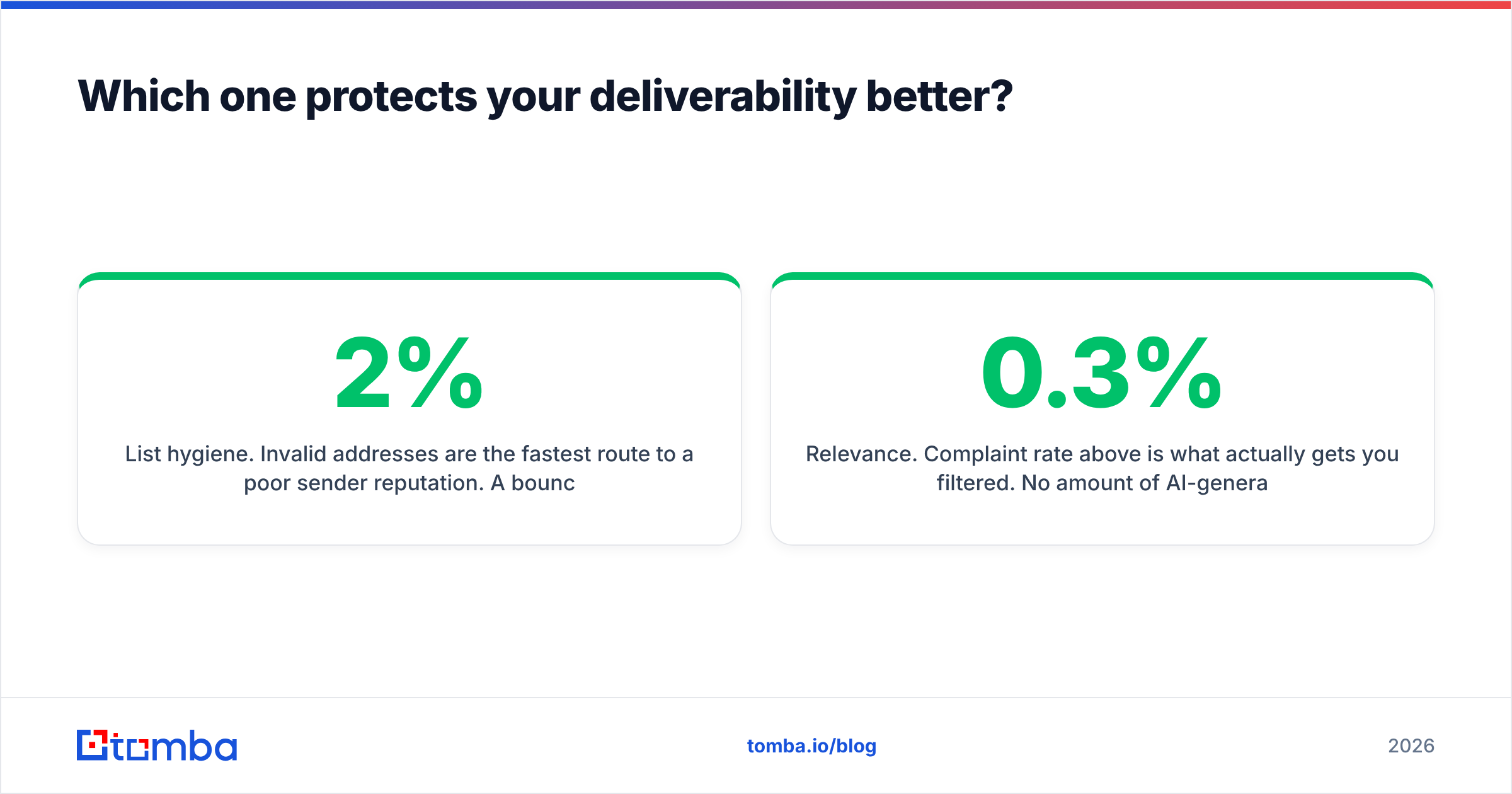
- List hygiene. Invalid addresses are the fastest route to a poor sender reputation. A 2% bounce rate is a warning; 5% is a problem. This is upstream of GMass and upstream of any agent.
- Volume ramp. New domains need weeks of gradual warming. Agent tools that unlock 10k/day on day one are handing you a loaded gun.
- Relevance. Complaint rate above 0.3% is what actually gets you filtered. No amount of AI-generated flattery fixes a badly targeted list.
GMass's Gmail-bound limits provide accidental protection. Agent platforms provide power and expect you to supply the discipline. Choose accordingly, and be honest about which kind of team you run.
What do both tools assume you already have?#
A clean, verified list. This is the gap nobody's pricing page mentions.
GMass reads recipients from a Google Sheet. Tami AI works from whatever contacts you point it at. Neither tool is responsible for whether first.last@company.com is the right pattern, whether that person still works there, or whether the domain is catch-all.
That's the job of a dedicated data layer:
- Find the address. Use an email finder that resolves name plus domain into a real mailbox, with a confidence score rather than a guessed permutation.
- Verify before send. Run every address through an email verifier so bounces are caught before Google counts them against you.
- Handle catch-all domains separately. Roughly a fifth of B2B domains accept everything at SMTP level. A catch-all verifier gives you a real risk signal instead of a shrug.
- Enrich for personalization inputs. Title, seniority, company size, and tech stack are what make agent-written copy specific. Feed them in via data enrichment rather than hoping the model infers them.
- Do it in batches. For list-level work, a bulk email finder beats one-off lookups and keeps your credit spend visible.

Teams that get this right report bounce rates under 2% and don't spend Fridays rebuilding sender reputation. Teams that skip it blame the sending tool.
So which should you choose in 2026?#
Use this as a decision rule rather than a scoreboard.
Choose GMass if:
- You're on Google Workspace and sending under ~5,000 emails a month.
- Budget is a real constraint and you want a fixed line item.
- You (or one person) can write good copy and just need it merged and scheduled.
- You want zero onboarding friction and no procurement conversation.
Choose Tami AI (or a comparable AI outbound agent) if:
- Research time, not send capacity, is your bottleneck.
- You run multiple domains and mailboxes and need orchestration.
- You have someone who will actually review and tune agent output weekly.
- You can run a 60-day paid pilot and measure reply rate against your current baseline — not against the vendor's case study.
Run both if: you use GMass for founder-led, high-touch outreach from a personal inbox, and an agent for scaled top-of-funnel from secondary domains. That split is more common than the "one platform to rule them all" pitch suggests.
And if you're still weighing broader options, tools like Instantly, Saleshandy, and Reply.io occupy the middle ground between GMass's simplicity and an agent's ambition — an Instantly alternative comparison is a reasonable next stop.
What questions should you ask on the demo call?#
- What's the measured bounce rate on lists sourced through your platform, not your best customer's anecdote?
- Does pricing change if I double volume mid-month? Show me the overage math.
- Can I export everything — contacts, copy, reply data — if I leave?
- Who owns deliverability when a domain gets flagged: your support team or mine?
- What happens to my sending if you have an outage on a Tuesday morning?
Vendors that answer these crisply are worth piloting. Vendors that redirect to feature demos are not.
Start with the layer both tools depend on#
Whichever sender you pick, the constraint is the same: a verified, current, correctly-attributed contact list. GMass will merge whatever you give it. An AI agent will personalize whatever you give it. Garbage in, bounced out.
Tomba's Email Finder resolves names and domains into verified professional addresses with confidence scoring, catch-all detection, and enrichment fields you can pipe straight into GMass's Google Sheet or an agent's contact object. The free tier gives you 25 searches a month to test accuracy against a list you already know the answers to — Starter is $49/month when you're ready to scale, with full pricing details published rather than quoted.
Test it on 50 contacts you can verify manually. That's a cheaper experiment than a burned domain.
Related guides#
Ready to find emails that actually work?
Join 150,000+ professionals who stopped guessing and started sending. Free credits on signup — no credit card required.
Get the Tomba newsletter
Practical outbound tactics and product updates — once every two weeks.
About the author