GMass vs UpLead (2026): Sending Tool vs Lead Database
GMass is a Gmail-based sending tool. UpLead is a B2B contact database. Comparing them head-to-head only makes sense once you know which half of your outbound stack is actually broken.
TL;DR
- GMass and UpLead are not competitors. GMass is a Gmail-native sending and mail-merge layer. UpLead is a B2B contact database you buy records from.
- If your problem is "I have a list and no way to send it," GMass is the cheaper answer, starting around $25/month per user.
- If your problem is "I have no list," UpLead is the relevant tool, and it starts around $99/month for a few hundred credits.
- Buying both is common and costs roughly $125 to $250 per user per month. Splitting the data layer off to a dedicated email finder and verifier usually costs less for the same coverage.
- The expensive mistake is running GMass at volume on unverified data. Gmail will throttle you long before your prospects reply.
What are GMass and UpLead, actually?#
They sit on opposite ends of the outbound pipeline.
GMass is a Chrome extension that turns Gmail into a cold email platform. You paste a list into a Google Sheet, connect it, write your merge fields, and GMass sends through your own Gmail or Google Workspace mailbox. Follow-ups, open and click tracking, unsubscribe handling, and behavior-triggered sequences all live inside the Gmail UI you already use.
UpLead is a B2B contact database. You filter a directory of company and person records by industry, headcount, technology stack, job title, and location, then spend credits to reveal verified emails and direct dials. Nothing gets sent. UpLead hands you rows; what happens next is your problem.
Here is the split in plain terms:
- GMass owns delivery. Merge fields, threading, auto follow-ups, reply detection, scheduling, and inbox-level sending from a real Gmail address.
- UpLead owns discovery. A searchable database of roughly 160 million contacts with real-time verification at reveal time and 50-plus search filters.
- Neither owns the middle. List hygiene between "exported from UpLead" and "loaded into GMass" is on you, and that gap is where most cold email programs quietly die.
- Both have a Chrome extension, but they do different jobs. GMass extends Gmail. UpLead extends LinkedIn and company websites.
- Only UpLead charges per record. GMass charges per seat regardless of how many addresses you email, which flips the unit economics entirely.
Once you see it that way, "gmass vs uplead" stops being a shootout and becomes a budgeting question: where is your outbound actually leaking?
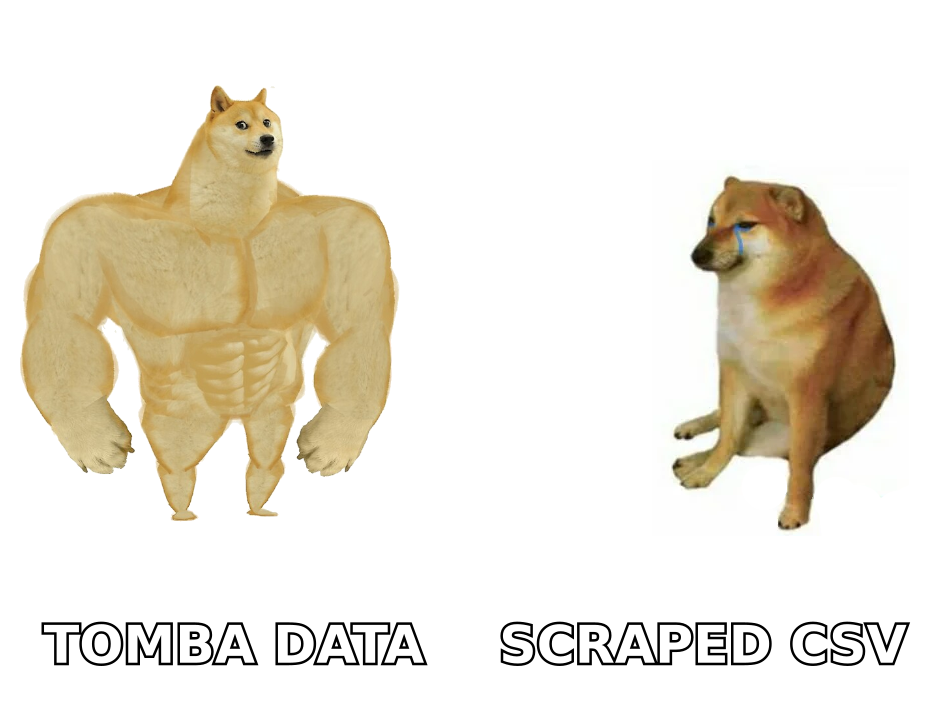
How do GMass and UpLead compare feature by feature?#
| Capability | GMass | UpLead |
|---|---|---|
| Primary job | Send cold email from Gmail | Source B2B contact records |
| Contact database | None (bring your own list) | ~160M contacts, 50+ filters |
| Email verification | Add-on verification credits | Real-time verify on reveal |
| Sequences / follow-ups | Yes, auto-stop on reply | No |
| Direct dial phone numbers | No | Yes, on higher tiers |
| Technographics / intent | No | Yes |
| Sending infrastructure | Your Gmail/Workspace mailbox | None |
| CRM sync | Limited, via Sheets/Zapier | Native HubSpot, Salesforce, Pipedrive |
| Deliverability ceiling | Gmail limits: 500/day free, 2,000/day Workspace | Not applicable |
| Chrome extension | Gmail-side composing | LinkedIn and site-side capture |
| Best for | Solo founders, agencies, Gmail-first teams | SDR teams that need net-new accounts |
The row that matters most is the last technical one. GMass inherits Google's sending limits because it sends as you, not through a dedicated ESP. That is a feature for deliverability and a hard ceiling for scale. If your motion requires 8,000 sends a day, you need multiple Workspace seats and inboxes, and your GMass cost multiplies with them.
UpLead has no such ceiling because it never touches your outbox. Its constraint is credits. Burn through 170 credits in week one and you either upgrade or wait for the reset.
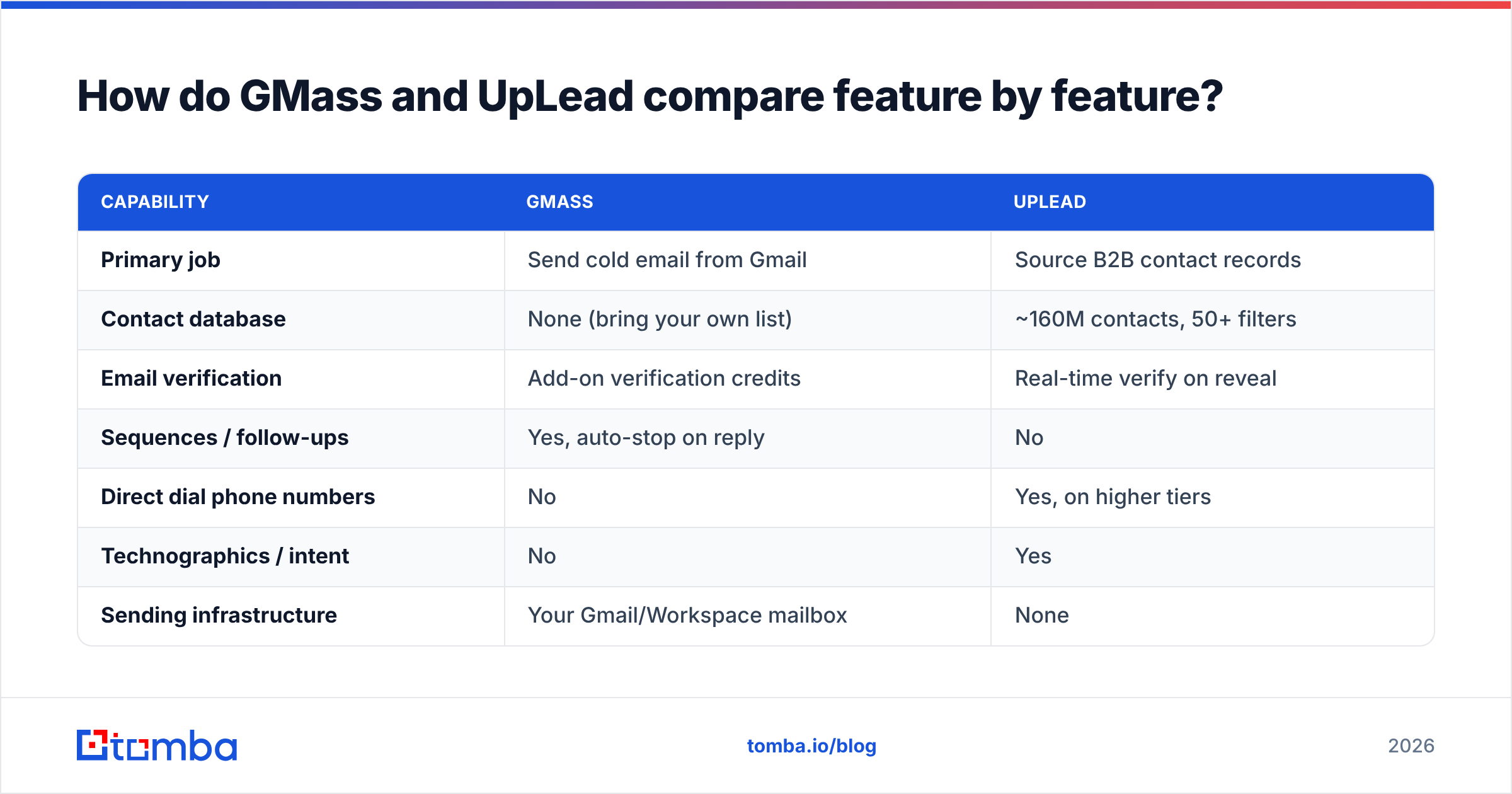
What does each one cost in 2026?#
Published list pricing moves, so treat these as a planning baseline and confirm on each vendor's page before you buy.
| Plan level | GMass | UpLead |
|---|---|---|
| Free option | Limited trial sends | Trial with a handful of credits |
| Entry paid | ~$25/mo per user (Standard) | ~$99/mo (Essentials, ~170 credits) |
| Mid tier | ~$35/mo per user (Premium) | ~$199/mo (Plus, ~400 credits) |
| Top tier | ~$55/mo per user (Professional) | Custom (Professional) |
| Billing unit | Per seat, unlimited-ish sends | Per credit revealed |
| Annual discount | Yes | Yes |
| Overage behavior | N/A | Buy more credits |
Two things fall out of this table.
First, GMass is cheap for what it does. There is not much on the market that gives you real mail-merge sequencing inside Gmail for the price of two coffees a week.
Second, UpLead is priced like a database, not like a tool. At roughly $0.50 to $0.58 per revealed contact on the entry tier, a 2,000-contact quarter costs you over $1,000. That is normal for the category, but it is worth checking against per-search pricing from a dedicated email finder before you commit to a year.
Is GMass good enough as a standalone cold email platform?#
For a lot of teams, yes, with three caveats.
It scales sideways, not up. Growth means more mailboxes, more domains, more warmup, more seats. Tools built on dedicated sending infrastructure absorb volume more gracefully. GMass makes you build the infrastructure yourself.
Reporting is send-centric. You get opens, clicks, replies, and bounce data. What you do not get is pipeline attribution, so most GMass users end up piping results into a CRM manually or through Zapier.
Deliverability is your responsibility. Since the Google and Yahoo bulk sender requirements landed in 2024, you need authenticated sending (SPF, DKIM, DMARC), one-click unsubscribe, and a spam complaint rate under 0.3%. GMass will not stop you from torching a domain. Run an SPF checker and audit your email deliverability setup before your first real campaign, not after your first blocklisting.
That last point deserves emphasis, because it is exactly where the GMass-plus-cheap-list combination goes wrong.

Is UpLead's data accurate enough to trust?#
UpLead's headline pitch is a 95% accuracy guarantee backed by real-time verification at the moment you reveal a contact, and credits refunded on bounces. In practice, reviewers on G2 consistently rate the email quality well, with the usual asterisks: coverage skews toward US mid-market and enterprise, EMEA and APAC data thins out, and small-company records go stale fastest.
That is not an UpLead-specific problem. Every database is a snapshot of a workforce that reshuffles roughly 20% of its job titles a year. The practical implication is the same everywhere: verify at send time, not at purchase time. A record you bought in January and mail in April is not the record you paid for.
If you export from UpLead into a spreadsheet and let it sit, run it through an email verifier before it goes anywhere near GMass. Catch-all domains deserve extra attention, because standard SMTP checks return "accept" for everything on them. A dedicated catch-all verifier is the only way to separate a real mailbox from a domain that swallows anything.
Do you need both, or is there a cheaper stack?#
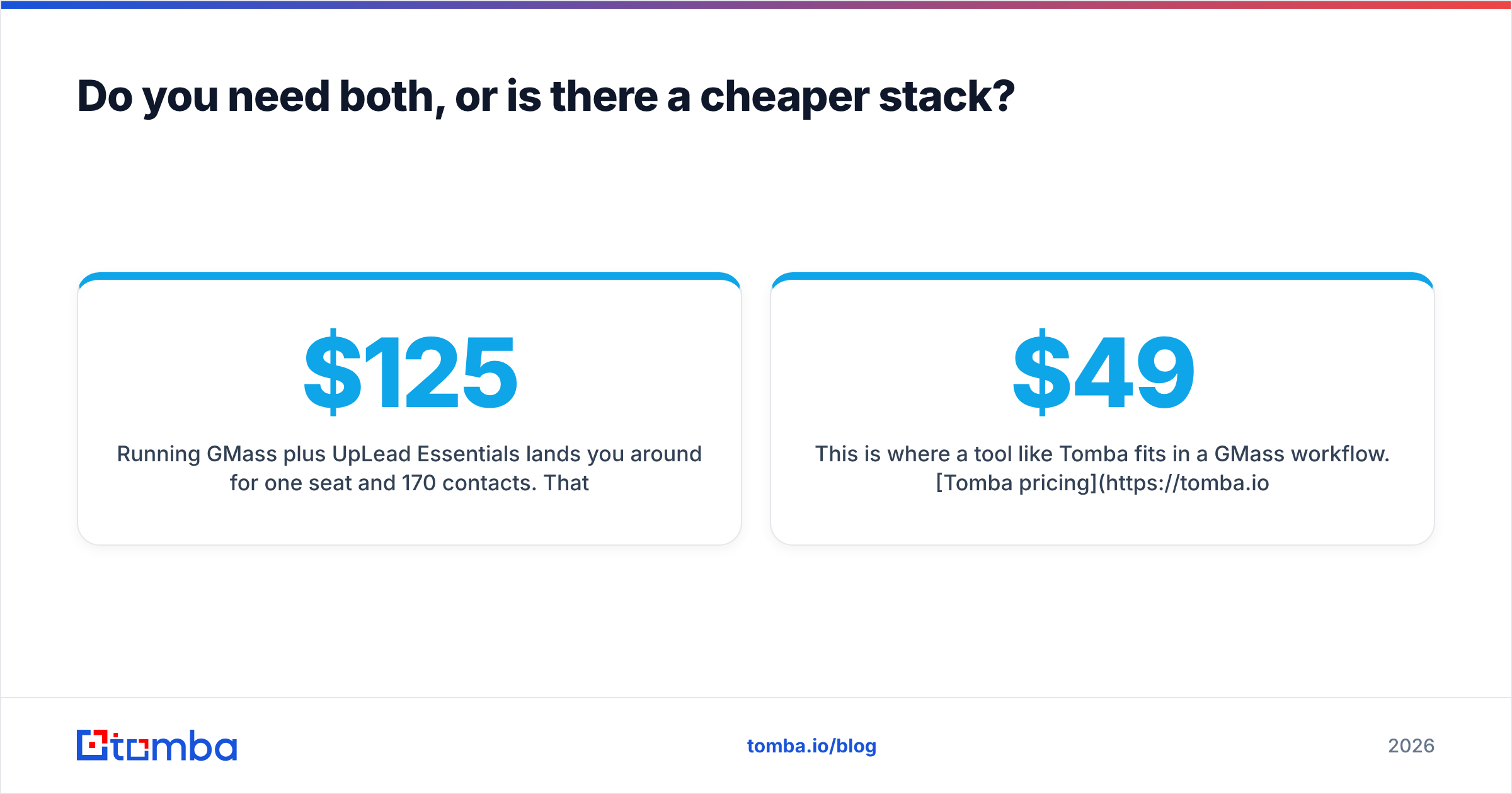
Running GMass plus UpLead Essentials lands you around $125 per user per month for one seat and 170 contacts. That works if you are doing tight, low-volume, high-ACV outbound.
It stops working the moment your list needs are lumpy. Prospecting demand is rarely smooth: you need 800 records for a Q1 campaign and 90 for a Q2 follow-on. Credit-based database pricing punishes that pattern, because unused credits usually expire and overages cost more per unit than the plan.
The alternative stack most teams land on:
- Sending layer: GMass, or an ESP-backed sequencer if you need more than 2,000 sends a day.
- Discovery layer: a domain-first email finder rather than a full database subscription. If you already know the accounts you want, domain search returns the people at those companies without paying for a directory you will never fully use.
- Hygiene layer: bulk verification on every list before every campaign, not once at purchase.
- Enrichment layer: fill in titles, company size, and LinkedIn profiles on records you already own through data enrichment instead of re-buying them.
This is where a tool like Tomba fits in a GMass workflow. Tomba pricing runs $49/month for Starter, $99/month for Growth, and $249/month for Pro, with a free tier of 25 searches to test coverage on your actual target accounts. Paired with GMass at roughly $25 to $35 per seat, the full stack lands under what a mid-tier database subscription costs on its own, and the search-based unit economics do not punish lumpy demand the way credit packs do.
To be fair to UpLead: if your motion genuinely requires discovering companies you have never heard of, filtered by technographics and intent, a database is the right instrument and an email finder is not a substitute. Buy the database. Just do not buy it to solve a problem you could solve with a domain lookup.
Other data providers worth benchmarking in the same evaluation include BookYourData, which sells pay-as-you-go B2B lists with no subscription commitment, plus the usual suspects on the enrichment side. Get three quotes on the same 500 target accounts and compare match rate, not claimed database size.
Which should you pick for your situation?#
Pick GMass if: you send from Gmail, your lists come from somewhere else already, you value simplicity over dashboards, and your daily volume fits inside Workspace limits. Agencies running client campaigns from separate Workspace accounts get particularly good value here.
Pick UpLead if: your bottleneck is genuinely "who do we contact," you sell into US mid-market, you need direct dials alongside emails, and your CRM is HubSpot or Salesforce so native sync earns its keep.
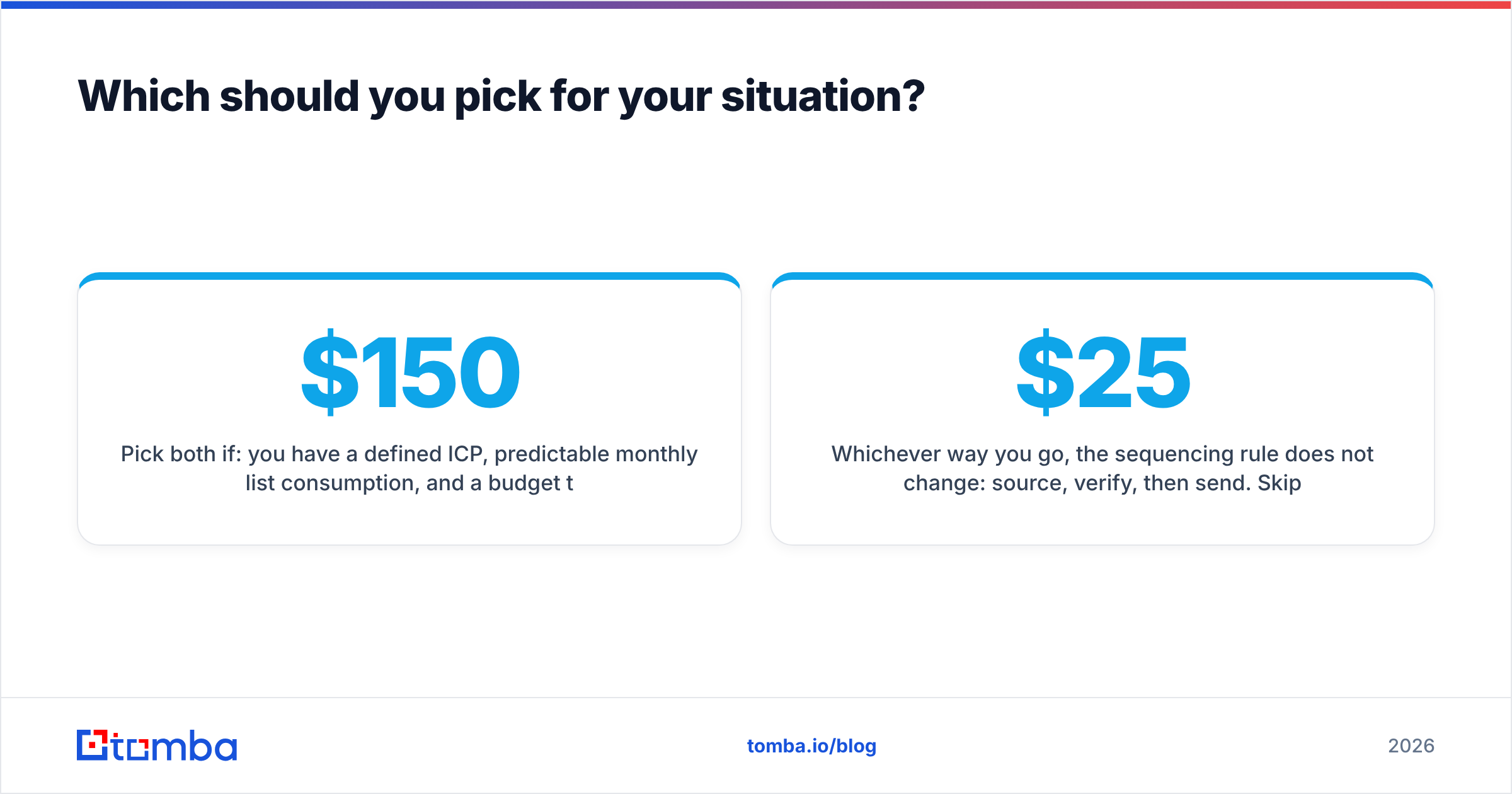
Pick both if: you have a defined ICP, predictable monthly list consumption, and a budget that does not blink at $150 to $250 per rep per month.
Pick GMass plus a dedicated finder and verifier if: your target accounts are known, your list needs fluctuate, and you would rather pay for lookups than for access to a directory. This is the most common configuration for teams under 20 reps, and it is usually the cheapest per delivered, verified contact.
Whichever way you go, the sequencing rule does not change: source, verify, then send. Skipping the middle step is what turns a $25/month sending tool into a burned domain and a quarter of lost pipeline.
How do you test this without wasting a month?#
Run a 50-account bake-off. Pick 50 companies you actually want to sell to. Pull contacts from each candidate source, then compare on four numbers: match rate (how many of the 50 returned a usable contact), verification pass rate, bounce rate after send, and cost per delivered contact. Do not compare on database size claims, because nobody audits them.
Most teams find the ranking flips once cost per delivered contact replaces cost per credit.
Start with the data layer. Before you commit to a database subscription, run your real target list through the Tomba Email Finder on the free tier and see what match rate you get on the accounts that matter to you. Twenty-five searches is enough to know whether you need a full directory or just a good lookup, and that answer will save you more than any GMass versus UpLead feature debate.
Related guides#
Ready to find emails that actually work?
Join 150,000+ professionals who stopped guessing and started sending. Free credits on signup — no credit card required.
Get the Tomba newsletter
Practical outbound tactics and product updates — once every two weeks.
About the author