GMB Scraper Alternatives: 9 Safer Local Data Tools
Google Maps scrapers break, get blocked, and hand you phone numbers with no decision-maker email attached. Here are nine GMB scraper alternatives that survive 2026 — ranked by data quality, cost, and legal risk.
TL;DR
- Raw GMB scrapers give you business names, addresses, and switchboard numbers — almost never the owner's or marketing director's email, which is the field that actually drives replies.
- Google's Places API is the only officially sanctioned path, but it caps you at ~$32 per 1,000 detail calls and deliberately withholds email addresses.
- The strongest 2026 stack is a two-step pipeline: pull business + domain data from a Maps source, then run those domains through an email finder like Tomba's domain search to get named, verified contacts.
- Prebuilt scrapers (Apify actors, Outscraper, PhantomBuster) are cheap and fast but carry block risk, ToS exposure, and 20-40% stale records on older listings.
- Skip any tool that sells "verified owner emails" scraped from GMB — GMB doesn't expose them, so the vendor is guessing at patterns without verification.
Why are people looking for GMB scraper alternatives in 2026?#
Because the thing they scraped turned out not to be the thing they needed.
A Google My Business (now Google Business Profile) listing is a storefront record. It carries a name, a category, an address, a phone number, opening hours, a review count, and — if the owner filled it in — a website URL. That is genuinely useful for local SEO audits, franchise mapping, and territory planning. It is close to useless for cold outbound, because the one field every SDR wants — a named human's email address — is not in the listing. Google never publishes it.
So teams scrape 20,000 dentists in Texas, end up with 20,000 front-desk phone numbers and 12,000 websites, and then discover the real work hasn't started yet.
The second reason is operational. Google has tightened rate limiting, rotated its DOM structure more aggressively, and expanded CAPTCHA challenges on Maps result pages. Scrapers that ran unattended in 2023 now need residential proxy rotation, headless browser fingerprint spoofing, and a maintenance budget. Anti-scraping enforcement is also a live legal question — the hiQ v. LinkedIn line of cases narrowed but did not eliminate exposure, and Google's Terms of Service explicitly prohibit automated extraction.
The third reason is data decay. Local business data rots faster than almost any other B2B dataset. Restaurants close. Clinics rebrand. Agencies move. A GMB dump from six months ago is not a list, it's an archaeology project.
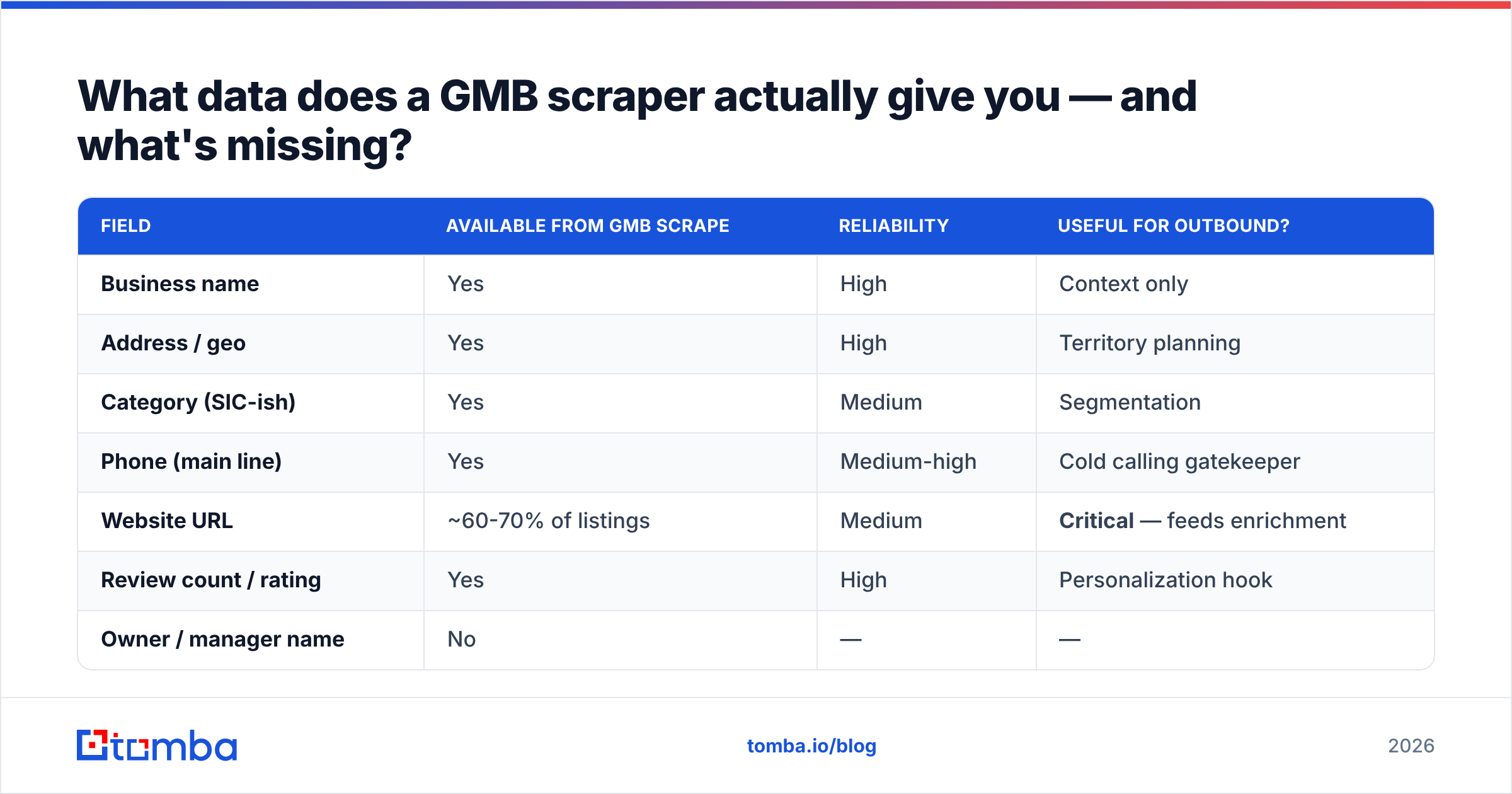
What data does a GMB scraper actually give you — and what's missing?#
Here's the honest field inventory, because most "Google Maps scraper" landing pages blur this line.
| Field | Available from GMB scrape | Reliability | Useful for outbound? |
|---|---|---|---|
| Business name | Yes | High | Context only |
| Address / geo | Yes | High | Territory planning |
| Category (SIC-ish) | Yes | Medium | Segmentation |
| Phone (main line) | Yes | Medium-high | Cold calling gatekeeper |
| Website URL | ~60-70% of listings | Medium | Critical — feeds enrichment |
| Review count / rating | Yes | High | Personalization hook |
| Owner / manager name | No | — | — |
| Decision-maker email | No | — | — |
| Company headcount | No | — | — |
| Tech stack | No | — | — |
Look at the bottom four rows. Everything that makes an outbound email land is absent. That's not a flaw in any particular scraper — it's a property of the data source. Google Business Profile is designed for consumers finding a business, not for vendors finding the person who runs it.
Which means the correct question isn't "what's the best GMB scraper." It's "what's the shortest path from a local business list to a verified, named inbox."
Which GMB scraper alternatives are worth using in 2026?#
Nine options, grouped by what job they actually do. Some are direct scraper replacements; some are the enrichment layer that makes scraped data usable. You will likely need one from each group.
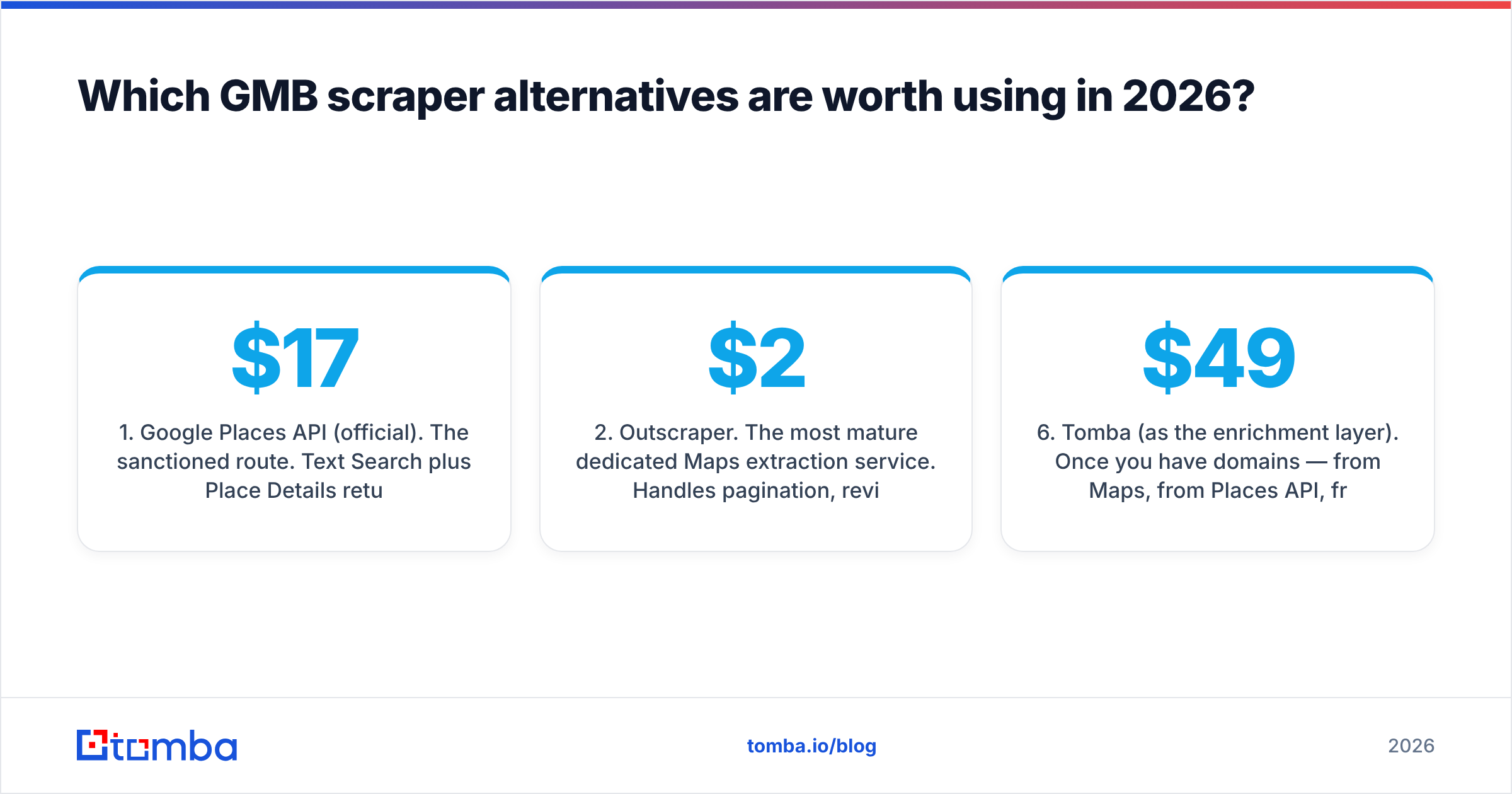
1. Google Places API (official). The sanctioned route. Text Search plus Place Details returns structured, current data with no block risk and no ToS gray area. Pricing runs roughly $17 per 1,000 Text Search calls and $17-32 per 1,000 Details calls depending on the field mask you request — narrow your field mask aggressively or the bill escalates fast. No email addresses, ever. Best for: teams that need defensible, compliant local data and can absorb the cost.
2. Outscraper. The most mature dedicated Maps extraction service. Handles pagination, reviews, and photos; offers a Places-compatible API and bulk CSV export. Pay-as-you-go pricing starts around $2-3 per 1,000 records. Best for: volume extraction where you accept the ToS risk and want someone else maintaining the parsers.
3. Apify Google Maps Scraper actors. A marketplace of community and official actors running on Apify's compute platform. Flexible, scriptable, and genuinely good at deep review scraping. Costs are compute-based, so a large crawl can surprise you. Best for: engineering-adjacent teams who want to customize extraction logic.
4. PhantomBuster. Point-and-click automation with a Maps phantom among its library. Easiest onboarding of the scraper group, weakest at scale — the browser-automation model hits limits faster than API-based competitors. Best for: small lists, non-technical operators.
5. BookYourData. A different model entirely: a prebuilt, licensed B2B contact database with local business coverage, sold pay-as-you-go with a stated accuracy guarantee. You're buying compiled and maintained records rather than scraping live pages, which sidesteps the block-risk problem completely. Best for: teams who want contact-level data immediately without operating a crawler.
6. Tomba (as the enrichment layer). Once you have domains — from Maps, from Places API, from anywhere — Tomba turns them into named, verified contacts. Domain search returns every discoverable email on a company domain with role labels and confidence scores; the email verifier filters the dead ones before they touch your sequence. Pricing is Free (25 searches/mo), Starter $49/mo, Growth $99/mo, Pro $249/mo. Best for: converting a local business list into a sendable list.
7. Local SEO platforms (BrightLocal, Whitespark). If your actual goal is auditing GMB listings rather than prospecting them, these do the job natively — citation tracking, rank grids, listing health. Best for: agencies selling local SEO services.
8. SerpAPI / DataForSEO. SERP-layer APIs that return Maps pack results as structured JSON without you running a browser. Cheaper than Places for some query shapes, and they absorb the anti-bot maintenance. Best for: developers building a pipeline who want a stable JSON contract.
9. Manual + Chrome extension hybrid. For lists under 500, a targeted manual pass with a browser extension that surfaces emails on the company site as you visit it beats any automated pipeline on quality. Slow, but the reply rates justify it for high-ACV local verticals.
How do the main GMB scraper alternatives compare on cost and risk?#
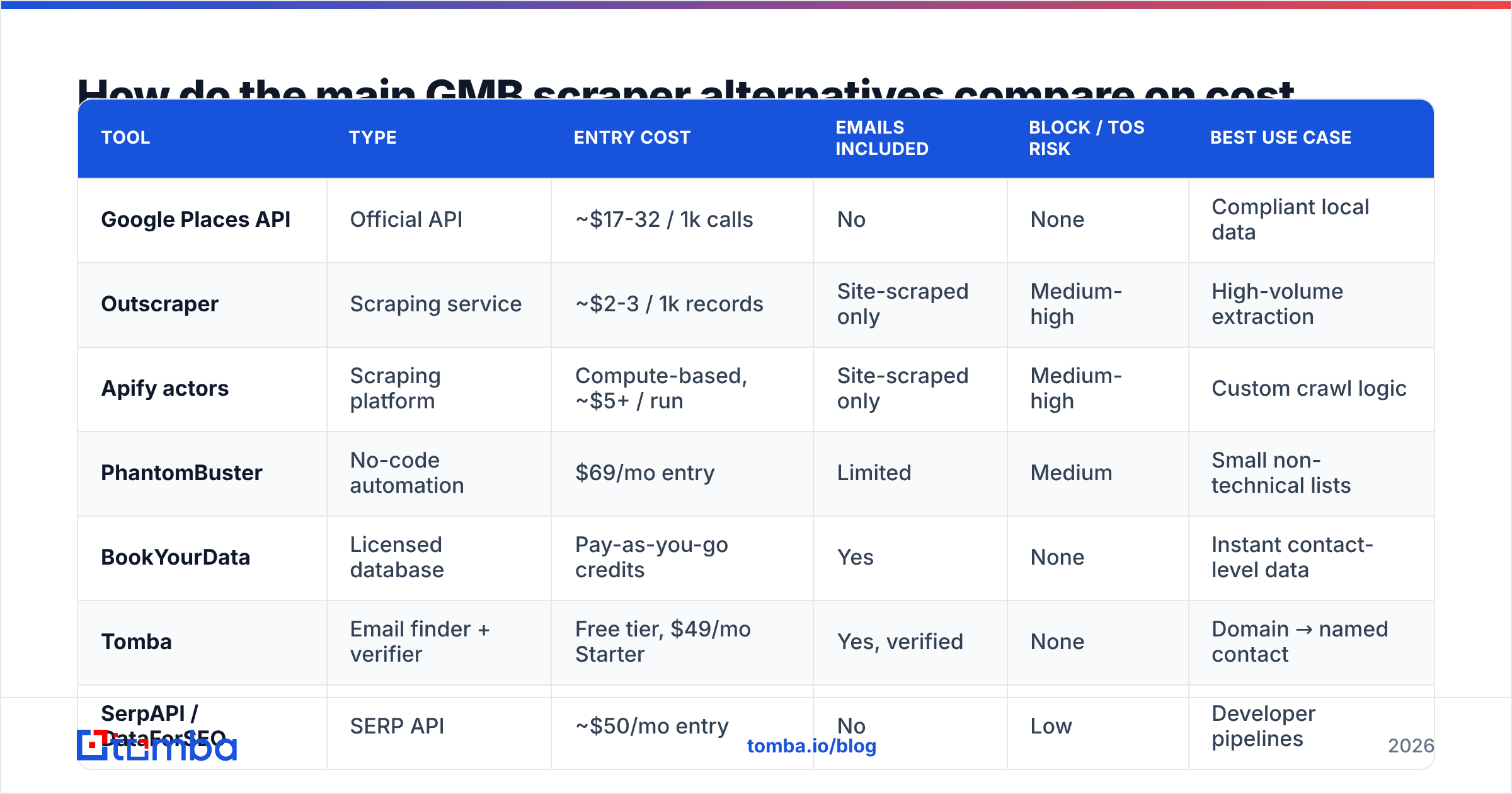
| Tool | Type | Entry cost | Emails included | Block / ToS risk | Best use case |
|---|---|---|---|---|---|
| Google Places API | Official API | ~$17-32 / 1k calls | No | None | Compliant local data |
| Outscraper | Scraping service | ~$2-3 / 1k records | Site-scraped only | Medium-high | High-volume extraction |
| Apify actors | Scraping platform | Compute-based, ~$5+ / run | Site-scraped only | Medium-high | Custom crawl logic |
| PhantomBuster | No-code automation | $69/mo entry | Limited | Medium | Small non-technical lists |
| BookYourData | Licensed database | Pay-as-you-go credits | Yes | None | Instant contact-level data |
| Tomba | Email finder + verifier | Free tier, $49/mo Starter | Yes, verified | None | Domain → named contact |
| SerpAPI / DataForSEO | SERP API | ~$50/mo entry | No | Low | Developer pipelines |
| BrightLocal | Local SEO suite | ~$39/mo | No | None | Listing audits |
Two things jump out of that table.
First, the cheap options are cheap because they externalize risk onto you. A $2-per-1,000 scrape is a great unit cost right up until your IP range is blocked or someone's legal team asks where the data came from.
Second, no scraper column says "yes" under emails without a caveat. The best a Maps scraper can do is follow the website URL and regex whatever's on the contact page — which finds info@ and contact@ inboxes, not the owner. Generic inboxes are where cold email goes to die.
What does a compliant local-lead pipeline actually look like?#
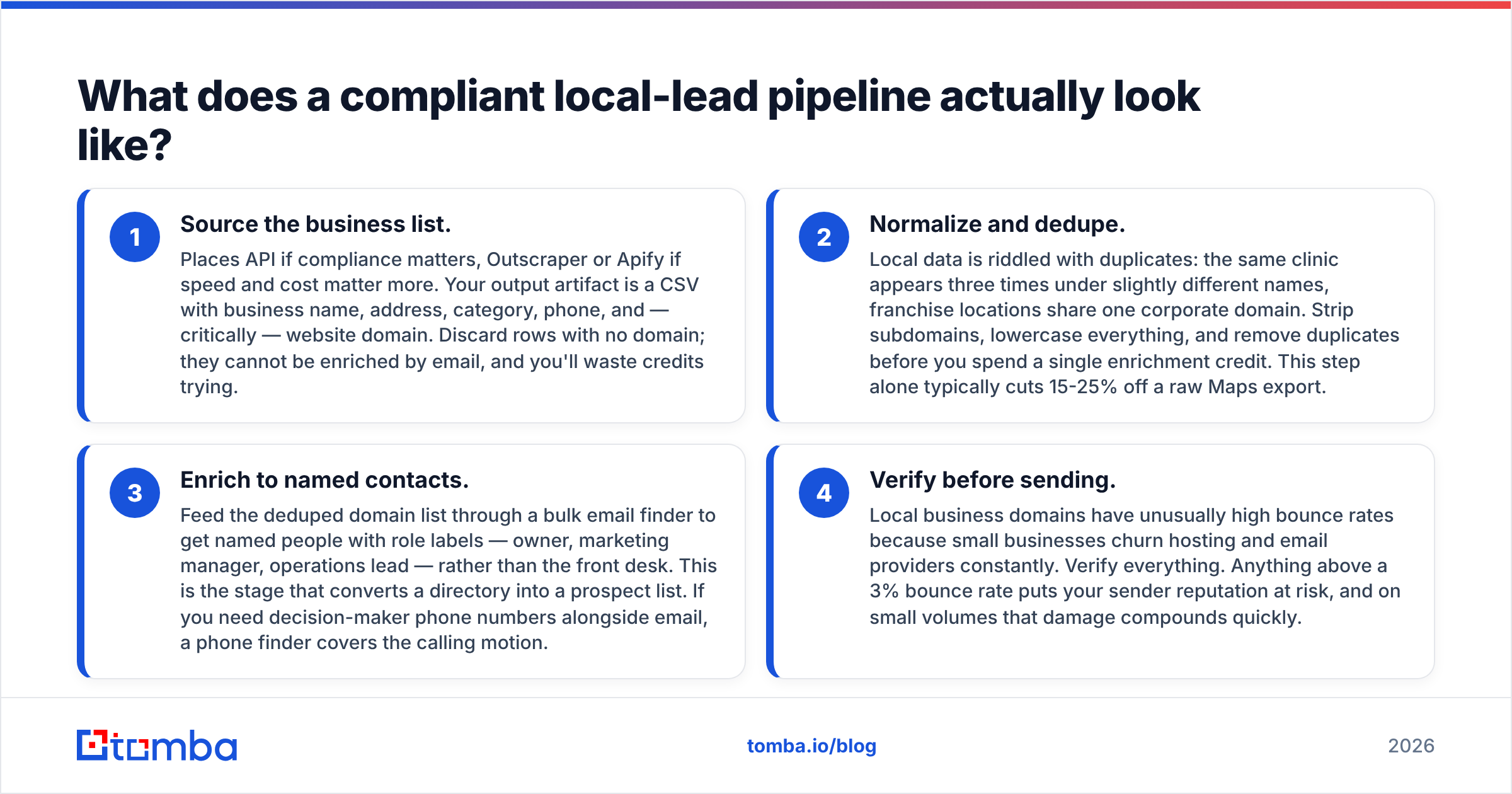
Four stages. Each one hands a clean artifact to the next.
Source the business list. Places API if compliance matters, Outscraper or Apify if speed and cost matter more. Your output artifact is a CSV with business name, address, category, phone, and — critically — website domain. Discard rows with no domain; they cannot be enriched by email, and you'll waste credits trying.
Normalize and dedupe. Local data is riddled with duplicates: the same clinic appears three times under slightly different names, franchise locations share one corporate domain. Strip subdomains, lowercase everything, and remove duplicates before you spend a single enrichment credit. This step alone typically cuts 15-25% off a raw Maps export.
Enrich to named contacts. Feed the deduped domain list through a bulk email finder to get named people with role labels — owner, marketing manager, operations lead — rather than the front desk. This is the stage that converts a directory into a prospect list. If you need decision-maker phone numbers alongside email, a phone finder covers the calling motion.
Verify before sending. Local business domains have unusually high bounce rates because small businesses churn hosting and email providers constantly. Verify everything. Anything above a 3% bounce rate puts your sender reputation at risk, and on small volumes that damage compounds quickly.
The pipeline is boring on purpose. The teams that get results from local outbound aren't the ones with the cleverest scraper — they're the ones who refuse to send to unverified generic inboxes.

Is scraping Google Maps legal?#
Short answer: it violates Google's Terms of Service, and whether it violates the law depends on jurisdiction and what you do next.
Three distinct questions get muddled together, so separate them:
- Contract. Google's ToS prohibits automated access to Maps outside the official APIs. Breaching it is a contract issue between you and Google — the practical enforcement is IP blocking and account termination, not a lawsuit.
- Computer-misuse statutes. US courts, following hiQ Labs v. LinkedIn and the Supreme Court's Van Buren decision, have generally held that scraping publicly accessible data isn't unauthorized access under the CFAA. That narrows criminal exposure but doesn't eliminate civil claims.
- Data protection. This is the one people underestimate. Under GDPR, a business owner's name and direct email are personal data. Scraping them and cold-emailing without a lawful basis is a compliance problem regardless of how you sourced them. Sole traders and partnerships get more protection than incorporated entities in most EU member states.
Practical guidance: use official APIs or licensed databases where you can, keep provenance records for every field, honor opt-outs immediately, and never resell scraped personal data. If you're operating in the EU or UK, run your process past counsel before you scale it — the cost of that conversation is far below the cost of a complaint.
How do you get owner emails when GMB doesn't publish them?#
You infer the domain, then find the person. Three approaches, in descending order of reliability.
Domain search on the business website. The Maps listing gives you sunrisedental.com. A domain search returns the emails discoverable on that domain with names and job titles attached, sourced from public web pages, and each result carries a confidence score. For local businesses with any web presence beyond a one-page brochure site, this works more often than people expect — About pages, team pages, and press mentions all leak contacts.
Pattern generation plus verification. When domain search returns nothing, you know the owner's name from the website but not the email. Generate the plausible formats with an email permutator, then verify each one to find which resolves. This is slower and lower-yield, but it recovers contacts nothing else finds.
Catch-all handling. Many small businesses run catch-all domains, where the mail server accepts everything and verification returns "unknown" rather than valid or invalid. Don't discard these — run them through a catch-all verifier that uses additional signals, and segment them into a separate, lower-volume sending pool so a bad batch can't take your main domain down.
One thing to avoid entirely: vendors advertising "verified GMB owner emails" as a scraped product. GMB does not expose owner emails. Anyone selling them at scale is running pattern generation without verification and shipping you guesses labeled as facts. Check whether the vendor documents where their data comes from — if they won't say, assume the worst.
Which alternative should you pick?#
Match the tool to the job rather than looking for one product that does everything.
- You need compliant local business data, budget is fine. Google Places API. Narrow your field mask, cache aggressively, and accept that you'll enrich emails separately.
- You need 50,000 records fast and cheap. Outscraper or an Apify actor, followed by a hard dedupe pass. Budget for parser breakage.
- You need contacts today, not a pipeline. A licensed database like BookYourData gets you contact-level records without building or maintaining anything.
- You already have domains and need people. An email finder plus verifier. This is the highest-ROI step in the whole chain and the one teams most often skip.
- You're auditing listings, not prospecting them. BrightLocal or Whitespark. Prospecting tools will frustrate you here.
For most B2B teams targeting local businesses, the winning combination is a cheap, compliant source for the business layer and a dedicated enrichment layer for the human layer. The scraper debate consumes most of the attention and delivers the smaller share of the value.
Ready to turn a list of local domains into named, verified contacts? Run your Maps export through the Tomba Email Finder — search by domain, company, or person's name, get confidence-scored results with role labels, and verify before a single email leaves your sequencer. Start free with 25 searches a month, or check Tomba pricing if you're enriching at volume. Your scraper found the business. This finds the person who answers.
Related guides#
Ready to find emails that actually work?
Join 150,000+ professionals who stopped guessing and started sending. Free credits on signup — no credit card required.
Get the Tomba newsletter
Practical outbound tactics and product updates — once every two weeks.
About the author