Go To Market Sales Plan Template: A Practical 2026 Framework
Most GTM plans die in a slide deck. This template turns your go-to-market sales plan into segment math, channel assignments, and a first-90-days rollout you can actually run.
TL;DR
- A go-to-market sales plan is not a strategy deck. It is a one-page contract that answers: who we sell to, how we reach them, who owns each motion, what we expect it to produce, and when we cut it.
- The four sections that matter: segment math, channel assignment, coverage and quota model, and 90-day rollout. Everything else is commentary.
- Most plans fail on inputs, not intent. If your target account list is stale or your contact data bounces, no amount of messaging work saves the number.
- Build the plan around a falsifiable assumption per channel ("outbound to 400 ops leaders at 50-250 headcount SaaS will book 24 meetings in 90 days"), then instrument it.
- Copy the template below, fill in the blanks in a working session, and review it every 30 days. A plan you never revisit is a document, not a plan.
What is a go-to-market sales plan, exactly?#
A go-to-market sales plan is the operating document that connects a product to a specific set of buyers through a specific set of motions, with named owners and measurable checkpoints.
Think of it like a flight plan. The pilot does not write "fly to Denver and land safely." They file altitude, heading, fuel load, alternates, and the decision points where they divert. A GTM plan works the same way: the destination is revenue, but the plan is the headings and the divert criteria.
The confusion is that "go-to-market strategy" and "go-to-market sales plan" get used interchangeably. They are not the same thing:
- Go-to-market strategy — the positioning, pricing, and packaging decision. Who is this for and why would they switch? Owned by product marketing.
- Go-to-market sales plan — the execution layer. Which accounts, which channels, which reps, which quotas, which quarter. Owned by sales leadership and RevOps.
- Sales playbook — the tactical how. Call scripts, email sequences, objection handling, demo flow. Downstream of the plan.
- Territory and comp plan — the incentive layer. Who gets paid for what. Must be derived from the GTM plan, not written in parallel by finance.
- Enablement calendar — the training that makes the plan executable. Usually the missing piece when a plan "fails."
If you cannot point to which of those five documents a given decision lives in, you will re-litigate that decision every quarter.

Why do most GTM sales plans fail before the first call?#
Because they start with a revenue target and reverse-engineer activity from it, instead of starting with the addressable universe and building up.
Here is the failure pattern. Leadership sets $4M new ARR. Someone divides by average contract value to get deals needed. Divide by win rate to get opportunities. Divide by opportunity-per-meeting to get meetings. Divide by meetings-per-touch to get "we need 180,000 touches this year." Then everyone discovers in month four that the segment only contains 6,000 companies and you have burned the list twice.
Top-down math is fine as a sanity check. It is a terrible foundation. Build bottom-up first:
- Count the universe. How many companies actually match your ICP? Not "SMB SaaS" — 50-250 employees, US and Canada, using a CRM, with a named RevOps or Sales Ops function. That's a countable number.
- Count the reachable universe. Of those, how many can you actually get a verified contact for? This is where plans quietly break. A 40,000-account TAM with 55% contact coverage is a 22,000-account working universe.
- Count the addressable-this-year universe. Of the reachable set, how many can your current headcount touch at your current cadence with reasonable frequency? Usually a fraction.
- Then compare that to the revenue target. If the gap is more than about 30%, you have a segment problem or a headcount problem — not a motivation problem.
The second failure mode is data decay. Gartner has long put B2B contact data decay at roughly 30% per year, which means a list you built in January is materially different by Q4. If your plan assumes a static account list, it is already wrong.
What goes in the go to market sales plan template?#
Six blocks. Keep each to a page or less. If a block runs longer, you are writing a strategy doc, not a plan.
Block 1 — Segment definition. Firmographic filters, technographic signals, and explicit exclusions. Write the exclusions down; "no companies under 20 employees, no agencies, no public sector" prevents more wasted quarters than any inclusion criterion.
Block 2 — Buying committee map. Economic buyer, champion, technical evaluator, blocker. Job titles, not personas with names like "Ops Olivia." You need titles because that is what you filter on when you build lists.
Block 3 — Channel assignment. Each segment gets a primary and secondary motion. A segment with three motions has no motion.
Block 4 — Coverage model. Reps per segment, accounts per rep, touches per account per quarter, and the resulting capacity ceiling.
Block 5 — Metrics and decision gates. For each channel: the leading indicator, the lagging indicator, the 30/60/90 threshold, and what happens if you miss it.
Block 6 — Rollout timeline. Week-by-week for the first 90 days. Vague timelines are how plans become shelfware.
The segment × channel grid#
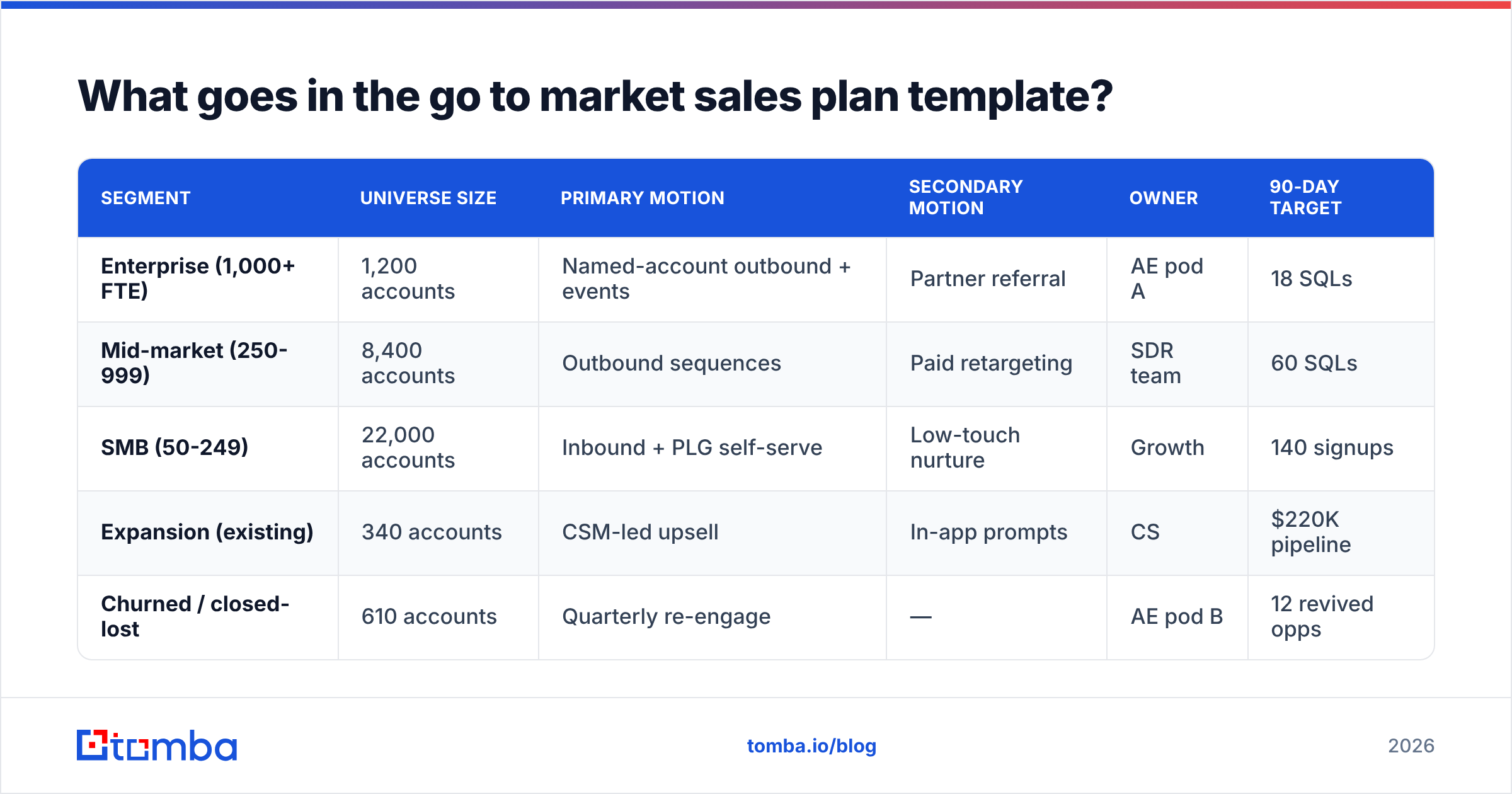
Fill this in for your own segments. The point is forcing a single primary motion per segment.
| Segment | Universe size | Primary motion | Secondary motion | Owner | 90-day target |
|---|---|---|---|---|---|
| Enterprise (1,000+ FTE) | 1,200 accounts | Named-account outbound + events | Partner referral | AE pod A | 18 SQLs |
| Mid-market (250-999) | 8,400 accounts | Outbound sequences | Paid retargeting | SDR team | 60 SQLs |
| SMB (50-249) | 22,000 accounts | Inbound + PLG self-serve | Low-touch nurture | Growth | 140 signups |
| Expansion (existing) | 340 accounts | CSM-led upsell | In-app prompts | CS | $220K pipeline |
| Churned / closed-lost | 610 accounts | Quarterly re-engage | — | AE pod B | 12 revived opps |
Notice that the SMB row has no SDR line. That is deliberate. If the ACV cannot support a human touch at your cost per meeting, the plan should say so rather than quietly assigning it to a rep who will fail against it.
How do you size the segments without guessing?#
Start with a source of truth for company counts, then apply your filters in order from cheapest to most expensive.
Cheap filters first: country, headcount band, industry code. These come from any B2B database or public dataset and cost nothing to apply. Expensive filters last: tech stack detection, funding stage, hiring signals, intent. Those cost credits or research time, so you only want to run them on the survivors of the cheap filters.
Then measure contact coverage before you commit to a number. This is the step teams skip. Take a random sample of 200 accounts from your filtered set, run them through a domain search to pull role-based contacts, and measure three things:
- Domain hit rate — what percentage of accounts returned at least one contact at a target title.
- Title match rate — of the contacts returned, what percentage matched your buying-committee titles rather than generic info@ addresses.
- Deliverable rate — after running the contacts through an email verifier, what percentage came back valid rather than risky or invalid.
Multiply those three and you get your true working universe. A 40,000-account segment at 78% domain hit, 61% title match, and 92% deliverable is 17,500 truly workable accounts — a very different plan than the one built on 40,000.
Sample first, then scale. Running 200 accounts costs almost nothing and prevents a quarter of building a plan on a number that does not exist.
Which channels belong in the plan for 2026?#
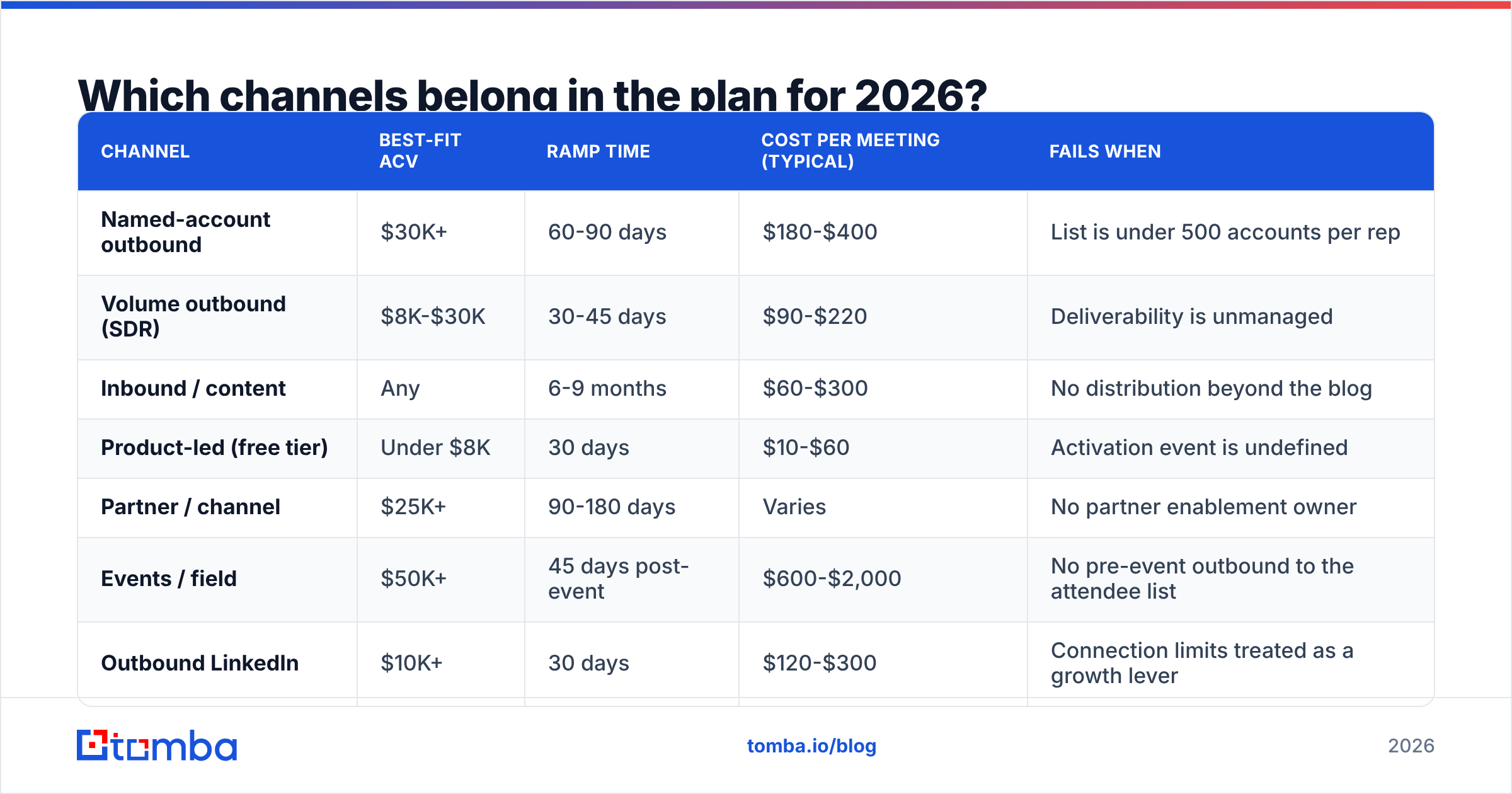
Assign by ACV and buying-committee size, not by what worked at your last company.
| Channel | Best-fit ACV | Ramp time | Cost per meeting (typical) | Fails when |
|---|---|---|---|---|
| Named-account outbound | $30K+ | 60-90 days | $180-$400 | List is under 500 accounts per rep |
| Volume outbound (SDR) | $8K-$30K | 30-45 days | $90-$220 | Deliverability is unmanaged |
| Inbound / content | Any | 6-9 months | $60-$300 | No distribution beyond the blog |
| Product-led (free tier) | Under $8K | 30 days | $10-$60 | Activation event is undefined |
| Partner / channel | $25K+ | 90-180 days | Varies | No partner enablement owner |
| Events / field | $50K+ | 45 days post-event | $600-$2,000 | No pre-event outbound to the attendee list |
| Outbound LinkedIn | $10K+ | 30 days | $120-$300 | Connection limits treated as a growth lever |
Two rules for filling this in honestly. First, ramp time is not negotiable — if you launch a partner motion in month one and hold it to a month-two pipeline number, you will kill a channel that was working. Second, cost per meeting must include tooling and data, not just rep salary. Teams routinely report $90 cost-per-meeting numbers that exclude the $3,000/mo data stack.
If you are combining outbound with LinkedIn, the practical constraint is contact quality on both sides. A LinkedIn finder that resolves profiles to verified work emails lets you run a single sequence across both channels instead of maintaining two disconnected lists.
How do you build the coverage and quota model?#
Capacity ceiling first, quota second. Reverse that order and you get quotas nobody hits.
The arithmetic:
- Touches per rep per day. Be realistic — 60-80 meaningful touches per day for an SDR, well under half that for an AE doing named accounts.
- Touches per account per sequence. A serious multichannel sequence is 12-18 touches over 4-6 weeks.
- Accounts per rep per quarter. Daily touches × working days ÷ touches per sequence. An SDR at 70 touches/day over 60 working days at 14 touches per account covers about 300 accounts per quarter.
- Meetings per account. Your historical rate. If you do not have one, use 4-7% for cold outbound to a well-targeted list and revise after 30 days.
- Capacity ceiling. Accounts covered × meeting rate = meetings. That is your ceiling. Quota goes at 80-85% of the ceiling, not 110%.
A three-SDR team at 300 accounts each per quarter and a 5.5% meeting rate produces roughly 49 meetings per quarter. If your plan needs 90, you have three options: hire, improve the meeting rate, or raise the ACV so fewer meetings suffice. Pretending is not an option, though it remains the most popular one.
Where the meeting rate is genuinely improvable: list precision and deliverability. Bad contact data drags both. A sequence sent to a list with 12% invalid addresses generates bounces that damage sender reputation, which suppresses inbox placement for the valid 88% too. That is a compounding tax on the whole plan.

What does the first 90 days of rollout look like?#
Weeks, not months. Here is the structure that survives contact with a real team.
Weeks 1-2 — Foundations. Finalize segment definitions and exclusions. Build the account list for segment one only (not all segments — you will learn things that change the others). Run the 200-account coverage sample. Set up tracking so every channel has an attributable source field from day one. Do not launch anything yet.
Weeks 3-4 — Instrumented pilot. Launch the primary motion for your largest segment only. One sequence, one ICP, one owner. Volume small enough that you can read every reply — 150-250 accounts. Warm up any new sending domains properly; the email warmup calculator will tell you how long your ramp actually needs to be, and it is usually longer than people want to hear.
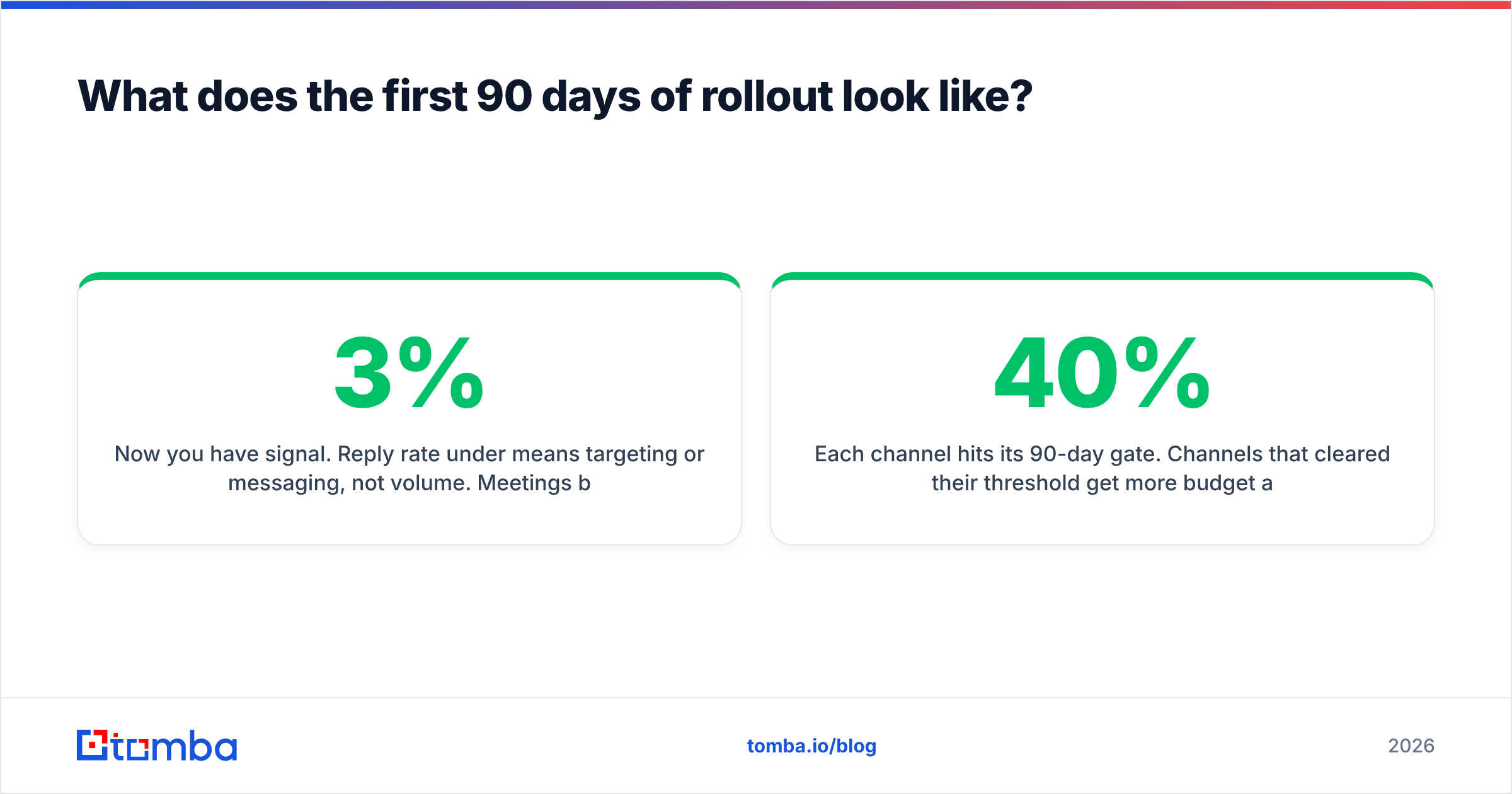
Weeks 5-8 — Read and adjust. Now you have signal. Reply rate under 3% means targeting or messaging, not volume. Meetings booked but no second calls means you are reaching the wrong level of the buying committee. Fix the diagnosed problem, then scale volume — in that order. This is also when you launch segment two.
Weeks 9-12 — Scale or cut. Each channel hits its 90-day gate. Channels that cleared their threshold get more budget and headcount. Channels that missed by more than 40% get cut, not "given another quarter." Channels within 40% get one more 30-day cycle with a specific, written hypothesis about what changes.
The discipline that makes this work is writing the decision gate before you launch. "We will cut this channel if it produces fewer than 15 SQLs by day 90" written in week one is a decision. The same sentence written in week eleven is a negotiation.
How do you keep the plan alive after the first quarter?#
Three habits, none of which require a new tool.
Monthly list refresh. With contact data decaying around 30% annually, roughly 2.5% of your list goes stale every month. Re-verify the accounts you plan to touch next month rather than the whole database — you only pay for what you will actually use. Bulk verify before each cycle takes minutes and protects deliverability across every downstream sequence.
Monthly channel review, quarterly plan review. Channels get reviewed monthly against their gates. The plan itself — segments, coverage, quotas — gets reviewed quarterly. Mixing those cadences means you either react too slowly to a dying channel or thrash the whole plan over one bad month.
A written "what we learned" line per segment. One sentence per segment per month. "Mid-market replies 3x better when the first touch references their hiring page." Over four quarters this becomes the most valuable document your team owns, and it costs ten minutes a month.
Which tools should back the plan?#
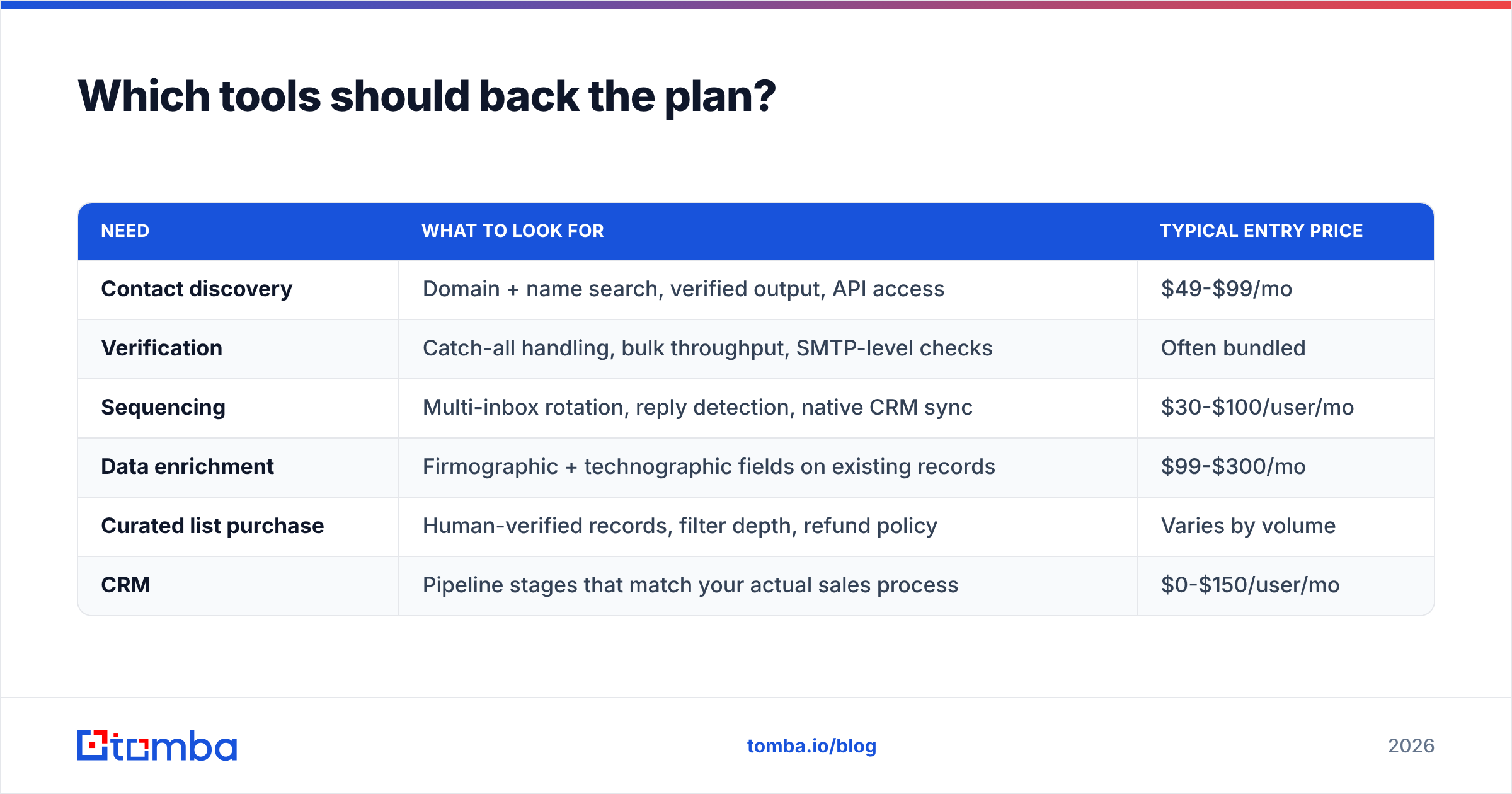
Match the stack to the motions in your grid, not to a vendor category list. A plan with a heavy named-account motion needs depth per account — org charts, direct contacts, phone numbers. A plan with heavy volume outbound needs breadth and verification throughput.
| Need | What to look for | Typical entry price |
|---|---|---|
| Contact discovery | Domain + name search, verified output, API access | $49-$99/mo |
| Verification | Catch-all handling, bulk throughput, SMTP-level checks | Often bundled |
| Sequencing | Multi-inbox rotation, reply detection, native CRM sync | $30-$100/user/mo |
| Data enrichment | Firmographic + technographic fields on existing records | $99-$300/mo |
| Curated list purchase | Human-verified records, filter depth, refund policy | Varies by volume |
| CRM | Pipeline stages that match your actual sales process | $0-$150/user/mo |
For the discovery and verification rows, Tomba pricing starts with a free tier at 25 searches/month for testing your coverage assumptions, then Starter at $49/mo, Growth at $99/mo, and Pro at $249/mo as volume scales. BookYourData is a strong option when you would rather buy a pre-built, human-verified list for a specific segment than assemble one yourself — pairing a purchased list with your own verification step is a legitimate pattern, particularly for a segment you are testing for the first time.
For sequencing and CRM, check current feature parity on G2 before committing to an annual contract; that category changes fast enough that a 2024 comparison is not usable in 2026. And whatever CRM you land on, make sure your pipeline stages reflect buyer actions rather than internal optimism — "demo completed" is a fact, "verbal commit" is a feeling.
The one-page template, condensed#
Copy this into a doc and fill it in with your team in a 90-minute working session:
- Segment: [firmographic + technographic filters + explicit exclusions]
- Universe: [total accounts] → [reachable after coverage sample] → [addressable this quarter]
- Buying committee: [economic buyer title] / [champion title] / [blocker title]
- Primary motion: [channel] owned by [name]
- Secondary motion: [channel] owned by [name]
- Coverage: [reps] × [accounts/rep/quarter] = [capacity]
- Expected output: [capacity] × [meeting rate] = [meetings] → [opps] → [$]
- Leading indicator: [metric, checked weekly]
- 90-day gate: [threshold]. If missed by 40%+, we [cut / restructure].
- Assumption most likely to be wrong: [one sentence]
That last line is the most valuable one in the template. Every GTM plan rests on an assumption that nobody has tested. Naming it makes it testable.
Start with the input that breaks first#
Every element of the plan above depends on one thing: whether you can actually reach the accounts you targeted. Segment math, coverage models, and quota logic are all downstream of contact data that either resolves or does not.
Run the coverage sample before you commit the plan to a number. Pull a 200-account slice of your top segment through the Tomba Email Finder, check your domain hit rate and title match rate against the assumptions in your model, and adjust the plan to the number you measured rather than the number you hoped for. The free tier covers a test of that size, and finding out in week one beats finding out in month four.
Related guides#
Ready to find emails that actually work?
Join 150,000+ professionals who stopped guessing and started sending. Free credits on signup — no credit card required.
Get the Tomba newsletter
Practical outbound tactics and product updates — once every two weeks.
About the author