Go4database vs SignalHire (2026): Which B2B Data Tool Wins?
Go4database sells static prebuilt lists. SignalHire sells real-time contact reveals. They solve different problems — and one of them is far riskier for your domain. Here's the honest breakdown.
TL;DR
- Go4database sells prebuilt, downloadable B2B contact lists by industry, geography, and job title. You pay once, get a CSV, and own it forever. Freshness is the open question.
- SignalHire is a real-time contact-reveal tool: a browser extension plus API that pulls emails and phone numbers for a specific person you're already looking at on LinkedIn or a company site.
- These are not the same product category. One is bulk static data; the other is on-demand enrichment. Comparing them on price per record is misleading.
- If you send cold email, the deciding factor is bounce risk, not record count. Any static list needs re-verification before it touches your sending domain.
- A third path — verify-first tools like Tomba, Findymail, or Prospeo — gives you domain-level search plus live verification, which is usually the cheaper long-run answer for outbound teams.
What are Go4database and SignalHire, actually?#
Go4database is a list vendor. You browse or request a segment ("US healthcare CFOs", "UK SaaS founders"), they quote you a price, and you receive a spreadsheet. The pitch is volume and speed: 10,000 contacts in your inbox the same day, no per-credit metering, no seat licenses. Vendors in this category — Go4database, BookYourData, InfoUSA, and dozens of regional resellers — compete on segment breadth and cost per thousand records.
SignalHire is a contact-reveal engine. It runs as a Chrome extension over LinkedIn, GitHub, and company pages, plus a web app and API. You point at a person, spend a credit, and get back the email and (often) a mobile number. The database behind it is contributed and aggregated, and results are checked at request time rather than shipped as a frozen file.
The mental model that matters: Go4database is buying a phone book. SignalHire is calling directory assistance. The phone book is cheaper per name and useless the moment people move. Directory assistance costs more per lookup but tells you what's true today.
That difference cascades into everything else — pricing structure, compliance exposure, deliverability, and how your reps actually spend their mornings.

How do Go4database and SignalHire compare head-to-head?#
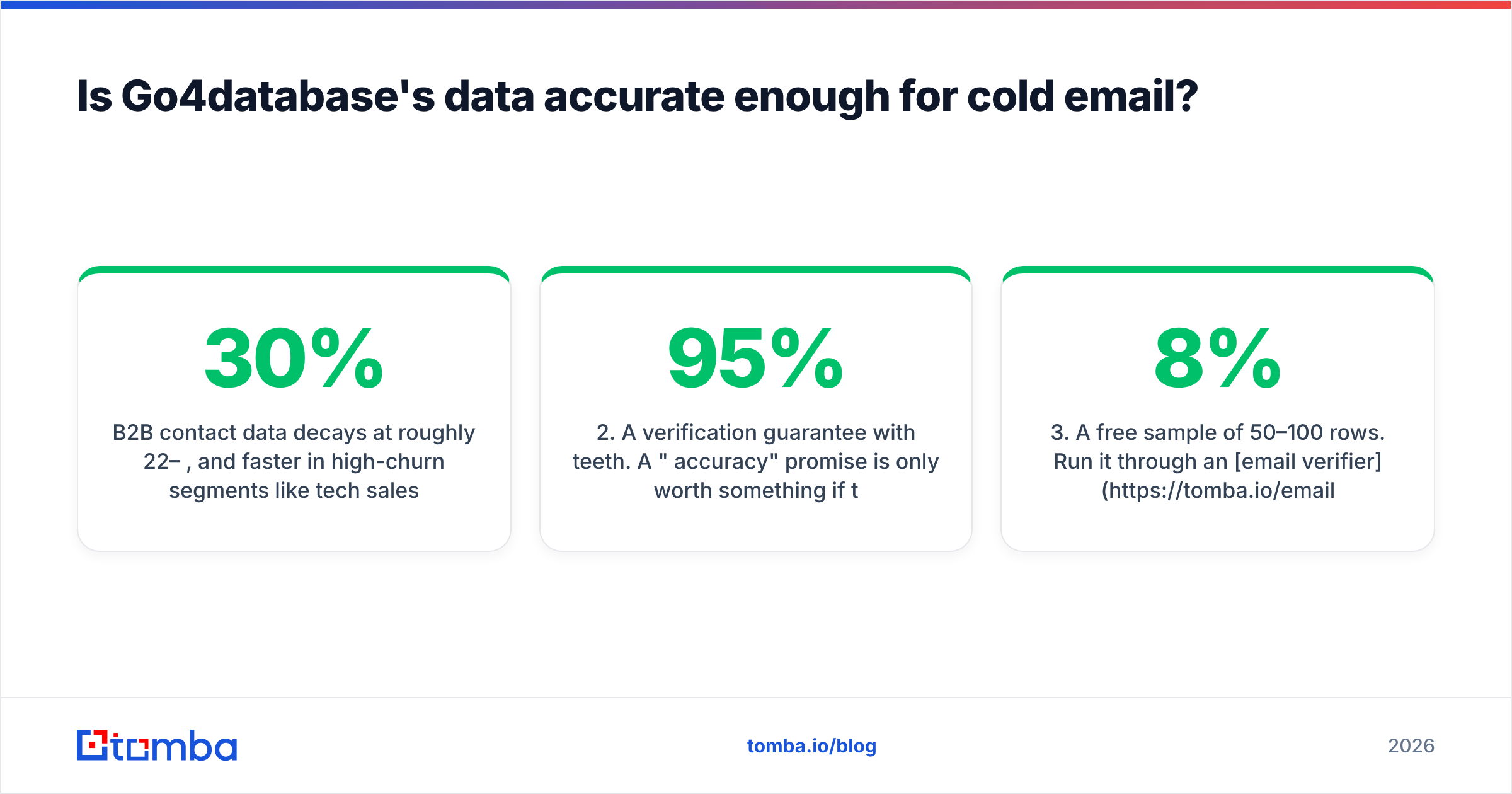
| Dimension | Go4database | SignalHire | Verify-first tools (e.g. Tomba) |
|---|---|---|---|
| Model | One-time list purchase (CSV/XLSX) | Credit-based real-time reveal | Subscription, search + verify |
| Primary interface | Sales rep / order form | Chrome extension, web app, API | Web app, API, extension, Sheets/Excel |
| Data freshness | Frozen at export date | Checked at reveal time | Checked at search + verify time |
| Phone numbers | Often bundled in list | Yes — a core selling point | Yes, via phone finder |
| Entry price | Quote-based, typically $200–$1,000+ per list | ~$49/mo entry tier (credit packs) | Free tier (25 searches), then $49/mo |
| Free tier | No — sample file on request | Limited free credits | Yes, 25 searches/mo |
| Bulk workflow | Native (that's the product) | Possible, credit-hungry | Native via bulk email finder |
| Best for | Direct mail, TAM sizing, ABM account seeding | 1:1 prospecting, recruiting, phone outreach | Cold email at scale with low bounce |
| Biggest risk | Stale records, unknown provenance | Credit burn on wrong-fit prospects | Coverage gaps on tiny/private companies |
Two things jump out.
First, the price comparison is a trap. Go4database looks dramatically cheaper if you divide dollars by rows. But you don't own 10,000 usable contacts — you own 10,000 rows, of which some unknowable share are people who left the company, addresses that were deprecated, or catch-all domains that will silently swallow your mail. The real cost is dollars divided by deliverable, in-role contacts, and nobody knows that number until you verify.
Second, SignalHire's credit model penalizes bad targeting. Every reveal costs the same whether the prospect was perfect or a wild guess. That's fine for a recruiter working a 40-person shortlist. It gets expensive fast for an SDR team that wants 3,000 new contacts a month.
Is Go4database's data accurate enough for cold email?#
Here's the uncomfortable part: no static list is accurate enough for cold email without a verification pass. That's not a knock on Go4database specifically — it's physics.
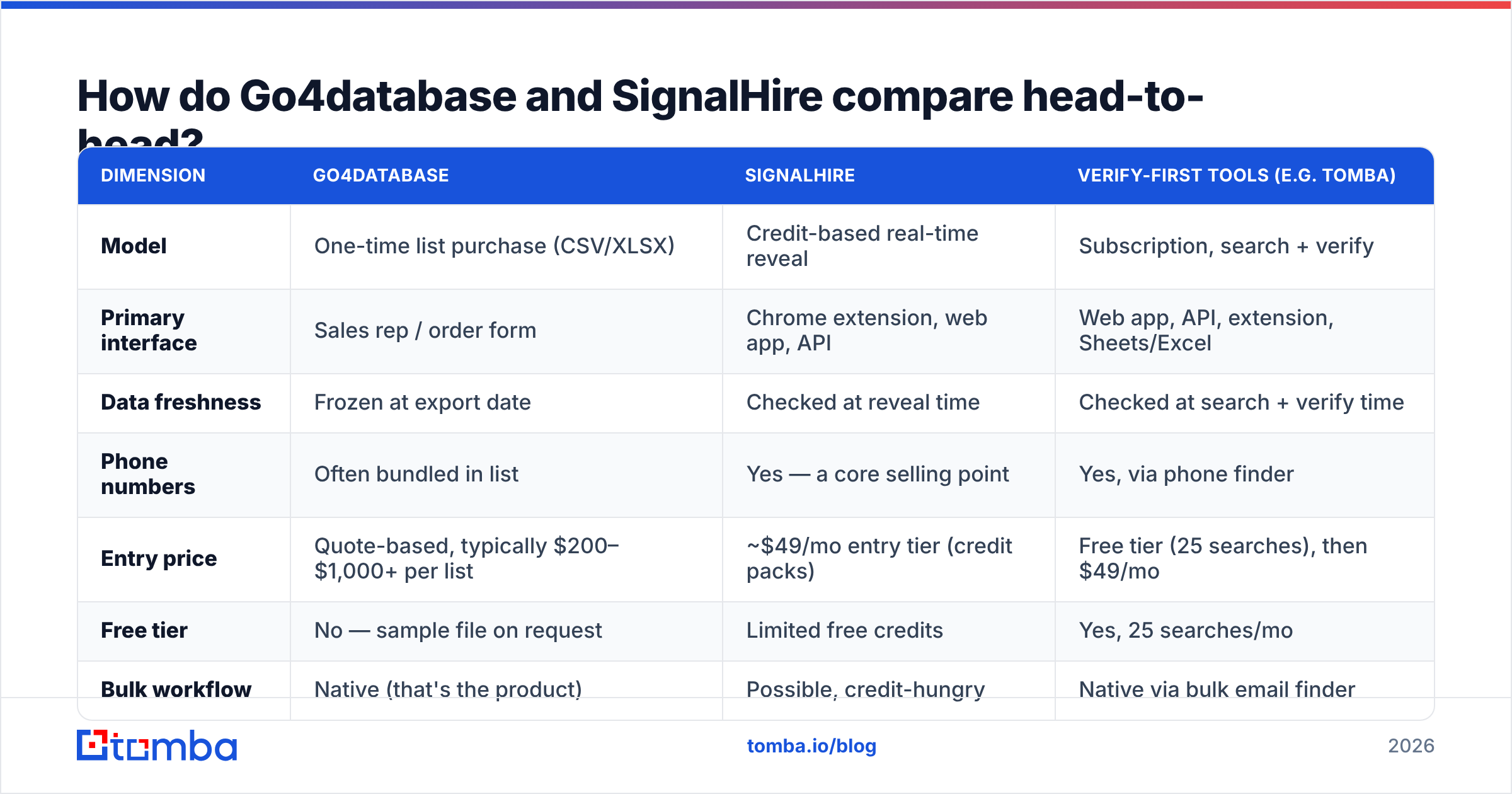
B2B contact data decays at roughly 22–30% per year, and faster in high-churn segments like tech sales and startups. A list exported in January is measurably worse in June. If the vendor built the segment eight months before you bought it, you're inheriting that decay.
What to demand from any list vendor, Go4database included:
- Export date, not "last updated." "Database refreshed monthly" is a marketing claim about the database, not about your file. Ask when your segment was last re-validated.
- A verification guarantee with teeth. A "95% accuracy" promise is only worth something if there's a documented credit-back process for bounces above the threshold.
- A free sample of 50–100 rows. Run it through an email verifier before you pay for the full file. If the sample bounces at 8%+, the full list will too.
- Provenance and compliance basis. Where did these records come from? Under GDPR, legitimate interest requires you to document the source. "We bought it from an aggregator" is a weak answer if a DPA ever asks.
- Catch-all handling. Many B2B domains accept all mail then discard it. A raw list can't tell you which. A catch-all verifier can.
- Deduplication against your CRM. Buying 10,000 records and discovering 2,400 are already in HubSpot is a common and avoidable waste.
Do that sample test and the decision usually makes itself. If the sample comes back clean, a list buy is legitimately cost-effective for broad plays like direct mail, conference targeting, or sizing a total addressable market. If it comes back at double-digit bounce, walk away — no discount makes that worth your domain reputation.
To be fair to the category: reputable list vendors exist and serve real needs. BookYourData, for instance, publishes an accuracy guarantee and lets you build segments interactively before paying, which is a materially better buying experience than emailing a rep for a quote. The category isn't the problem — opacity is.
Is SignalHire worth the credits?#
SignalHire earns its place when the person matters more than the volume.
Recruiters are its natural home. You've found the exact backend engineer you want; you need her mobile number today; one credit is trivially worth it. Same for enterprise AEs working 50 named accounts, or founders doing high-touch outreach to 100 dream customers.
Where it strains is scale. Credit-metered reveals mean your data cost grows linearly with your prospecting volume, and it grows before you know whether the prospect qualifies. Teams that run wide top-of-funnel motions tend to burn through packs and start rationing lookups — which is exactly the wrong incentive.
Its phone coverage is a genuine differentiator. If your motion is cold calling rather than email-first, that changes the math in SignalHire's favor. Mobile numbers are structurally harder to source than work emails, and tools that do it well command a premium for good reason. Check the G2 reviews for your specific region before committing — phone coverage varies enormously between North America, EMEA, and APAC.
One practical note: SignalHire's browser extension workflow assumes a human in the loop, clicking through profiles. That's a feature for quality and a bottleneck for throughput. If you want 2,000 contacts by Friday, you'll be fighting the interface.
What's the third option most teams end up choosing?#
Neither pure list-buying nor pure per-profile reveals fits a standard outbound team. Most land on a search-and-verify workflow instead.
The pattern looks like this:
- Build an account list first. Pull target companies from your ICP filters, a scraper, or your CRM's closed-lost pile. Accounts, not contacts.
- Run domain search per account. A domain search returns every discoverable email on that company's domain, with the role and confidence score attached. You get the whole org chart's reachable surface in one call instead of paying per person.
- Filter to the roles you actually want. Now you're spending nothing to skip the 14 people who don't matter.
- Verify before export. SMTP-level checks catch dead mailboxes; catch-all detection flags domains where verification can't be conclusive.
- Enrich the survivors. Add phone, LinkedIn, and firmographics only for contacts that passed verification — data enrichment on a clean subset is far cheaper than enriching everything.
- Push to your sequencer. Clean list, known bounce rate, documented provenance.
This is where Tomba fits. Its email finder and domain search work at the account level rather than the profile level, verification is built into the same subscription rather than billed separately, and there's a free tier at 25 searches/month to test coverage on your actual ICP before spending anything. Paid plans run $49/mo (Starter), $99/mo (Growth), and $249/mo (Pro), with Enterprise quoted.
The honest caveat: Tomba, like every finder, has thinner coverage on very small companies, personal-domain founders, and firms with no public web presence. If your ICP is 5-person agencies with Gmail addresses, no domain-based tool will delight you — that's genuinely where a curated list vendor or manual research wins.

Which one should you pick for your use case?#
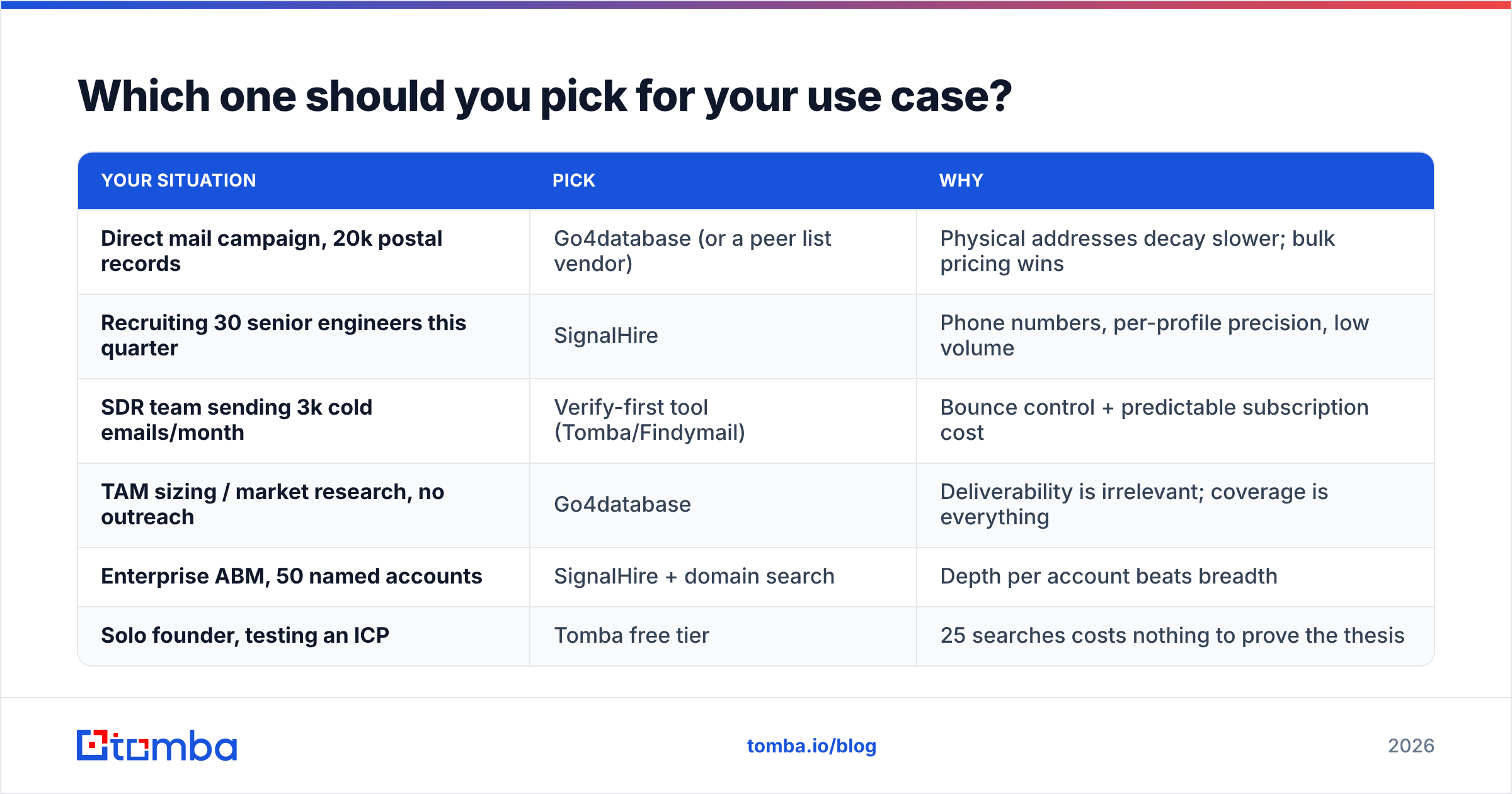
| Your situation | Pick | Why |
|---|---|---|
| Direct mail campaign, 20k postal records | Go4database (or a peer list vendor) | Physical addresses decay slower; bulk pricing wins |
| Recruiting 30 senior engineers this quarter | SignalHire | Phone numbers, per-profile precision, low volume |
| SDR team sending 3k cold emails/month | Verify-first tool (Tomba/Findymail) | Bounce control + predictable subscription cost |
| TAM sizing / market research, no outreach | Go4database | Deliverability is irrelevant; coverage is everything |
| Enterprise ABM, 50 named accounts | SignalHire + domain search | Depth per account beats breadth |
| Solo founder, testing an ICP | Tomba free tier | 25 searches costs nothing to prove the thesis |
A rule that has held up across a lot of outbound programs: match the tool to the cost of being wrong. If a wrong record costs you a stamp, buy the list. If a wrong record costs you a bounce on a domain you've spent a year warming, verify everything first.
What about deliverability risk?#
This is the question that should drive the decision, and it almost never does.
Mailbox providers judge you on complaint rate, spam-trap hits, and bounce rate. Purchased lists are the fastest known route to all three. Recycled spam traps — addresses that were once real, went dormant, then got repurposed — live disproportionately in old B2B files, and hitting one can suppress your sending domain for weeks.
Practical guardrails regardless of which vendor you choose:
- Never load a purchased file straight into your sequencer. Verify first, always, even if the vendor swears it's clean.
- Keep hard bounces under 2%. Above 3% and you're in territory where Google and Microsoft start throttling. Google's bulk sender guidelines spell out the thresholds.
- Segment by confidence. Send to verified-valid first, catch-all domains later from a secondary domain, unknowns never.
- Check your own house. Broken SPF or DKIM will sink a perfectly clean list. Run an SPF checker before your first send, not after your first disaster.
- Watch reply rate, not open rate. Apple Mail Privacy Protection has made open rates close to meaningless for judging list quality since 2021.
The version of this that goes wrong is always the same: someone buys 25,000 records on a Thursday, uploads them Friday morning, and by Monday the domain is burned and the team is buying new ones. The verification step that would have prevented it costs a fraction of the list price.
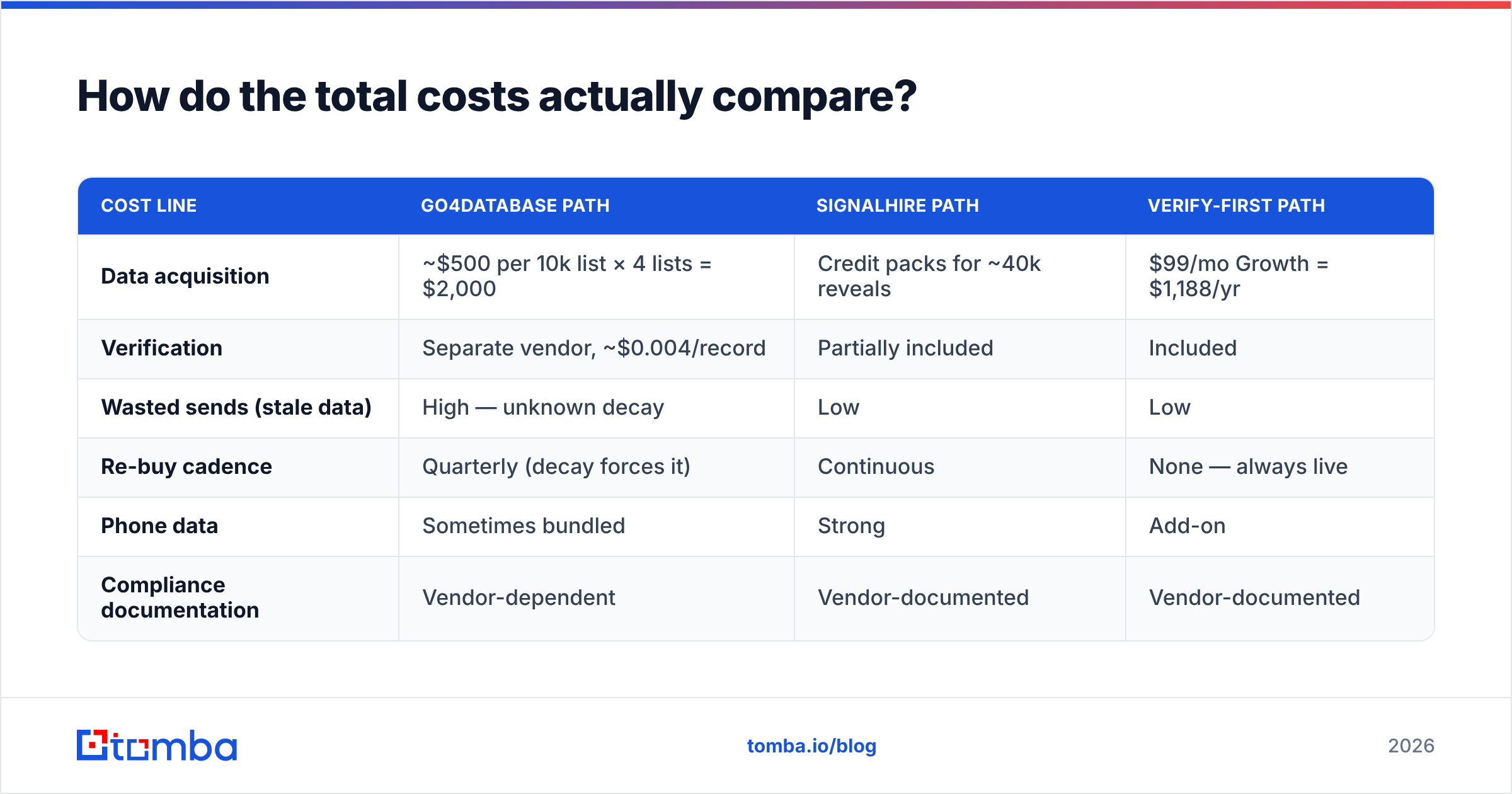
How do the total costs actually compare?#
Model twelve months, not one purchase.
| Cost line | Go4database path | SignalHire path | Verify-first path |
|---|---|---|---|
| Data acquisition | ~$500 per 10k list × 4 lists = $2,000 | Credit packs for ~40k reveals | $99/mo Growth = $1,188/yr |
| Verification | Separate vendor, ~$0.004/record | Partially included | Included |
| Wasted sends (stale data) | High — unknown decay | Low | Low |
| Re-buy cadence | Quarterly (decay forces it) | Continuous | None — always live |
| Phone data | Sometimes bundled | Strong | Add-on |
| Compliance documentation | Vendor-dependent | Vendor-documented | Vendor-documented |
The list path looks cheapest on line one and rarely stays cheapest by line four. The reveal path is predictable but scales linearly with headcount and ambition. The subscription path has the flattest curve once you're past roughly 1,500 contacts a month — which is most functioning outbound teams.
Run your own numbers with your actual volume. The answer flips depending on whether you're sourcing 300 contacts a month or 5,000.
Getting started without burning a domain#
Whichever direction you lean, the first move is the same: test on your real ICP, not on a demo account.
Pick 20 target companies you actually want to sell to. Run them through each option. Count how many reachable, in-role, verified contacts you get from each, and divide by what you paid. That number — cost per usable contact — is the only comparison that survives contact with reality.
If you want to run that test for free, start with the Tomba Email Finder. The free tier gives you 25 searches a month with no card, verification is built in rather than billed separately, and domain search will show you the full reachable surface of each target account in a single query. If coverage on your ICP holds up, Starter at $49/mo covers most solo and small-team outbound; if it doesn't, you'll know in an afternoon and you'll have spent nothing finding out.
Related guides#
Ready to find emails that actually work?
Join 150,000+ professionals who stopped guessing and started sending. Free credits on signup — no credit card required.
Get the Tomba newsletter
Practical outbound tactics and product updates — once every two weeks.
About the author