GoCustomer vs LeadsForge 2026: Which AI Lead Tool Wins?
GoCustomer automates AI outreach. LeadsForge builds lead lists from a chat prompt. They solve different halves of the same problem — here is how they compare on data, workflow, pricing and fit, plus what neither one fixes.
TL;DR
- They are not the same product. GoCustomer is an AI outreach and personalization layer; LeadsForge is a conversational lead-list builder. Comparing them head-to-head only makes sense if you are trying to decide where your next $100/month goes.
- Pick GoCustomer if you already have a list and your bottleneck is writing, sequencing and sending personalized email at volume.
- Pick LeadsForge if your bottleneck is finding the right accounts and contacts without learning a filter-heavy prospecting UI.
- Neither is a data accuracy layer. Both sit on top of aggregated B2B data, and both will happily hand you contacts that bounce. Verification is a separate job.
- The honest answer for most teams: a dedicated data source plus a sending tool beats a single all-in-one that does both jobs at 70%.
What are GoCustomer and LeadsForge?#
Two tools, two different halves of the outbound workflow.
GoCustomer positions itself as an AI sales assistant — the "AI SDR" category. The pitch is that you connect your mailboxes, feed it prospects, and it drafts personalized emails, runs multi-step sequences, handles follow-ups, and routes replies. The differentiator vendors in this category lean on is personalization at scale: instead of one merge field per line, the AI reads company context and writes something that reads like a human wrote it.
LeadsForge attacks the earlier step. Instead of a filter panel with 40 checkboxes, you describe your ICP in plain language — "marketing directors at Series B SaaS companies in the UK with 50-200 employees" — and it returns a list. The value proposition is speed and accessibility: a founder who has never touched a sales database can get a usable list in minutes.
So the real question is not "which is better." It is which half of your outbound machine is currently broken.

How does GoCustomer actually work?#
The workflow follows the AI SDR pattern that most tools in this category now share:
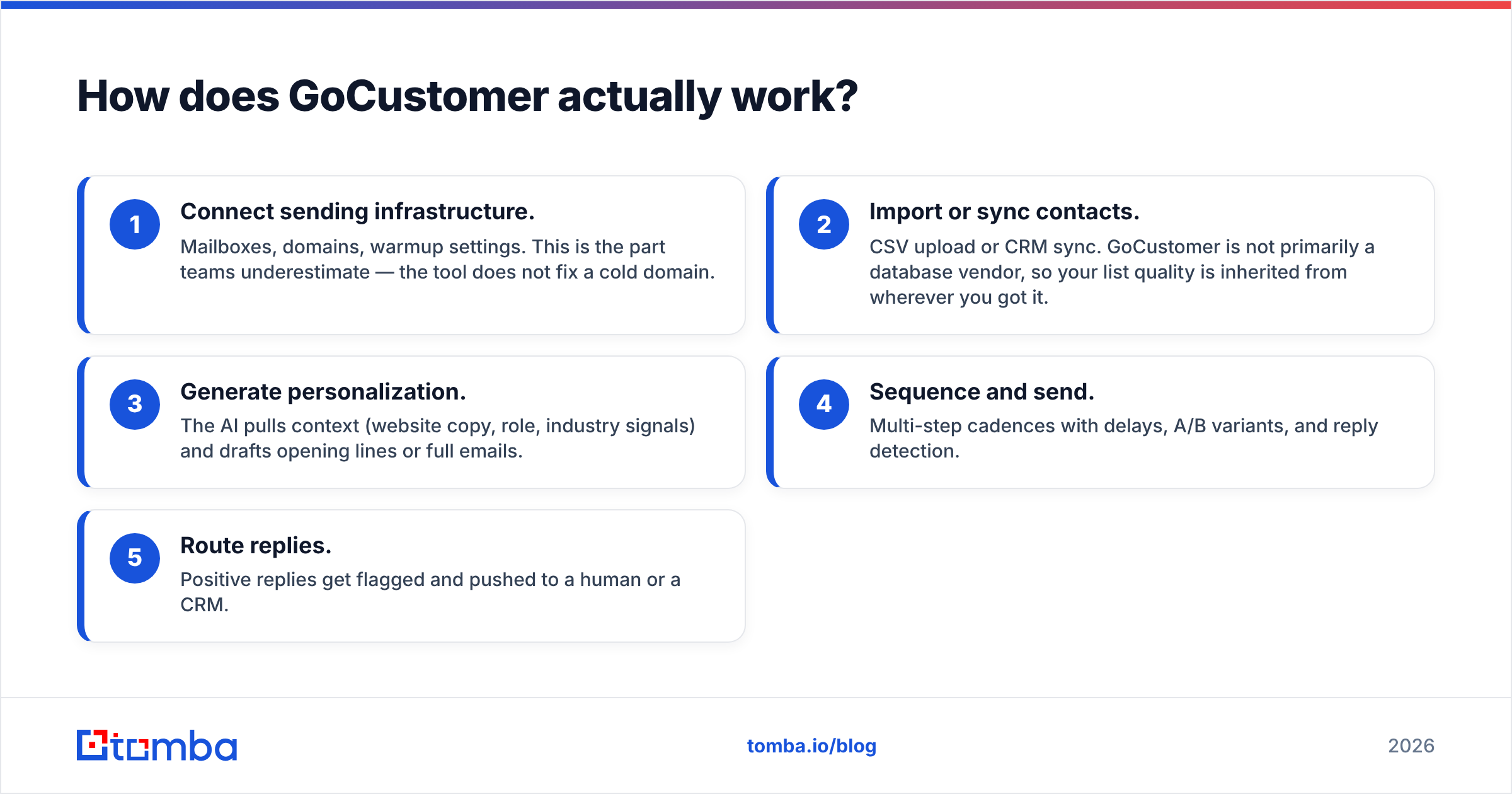
- Connect sending infrastructure. Mailboxes, domains, warmup settings. This is the part teams underestimate — the tool does not fix a cold domain.
- Import or sync contacts. CSV upload or CRM sync. GoCustomer is not primarily a database vendor, so your list quality is inherited from wherever you got it.
- Generate personalization. The AI pulls context (website copy, role, industry signals) and drafts opening lines or full emails.
- Sequence and send. Multi-step cadences with delays, A/B variants, and reply detection.
- Route replies. Positive replies get flagged and pushed to a human or a CRM.
Where this breaks down in practice: garbage in, garbage out at the data layer. An AI that writes a beautiful personalized email to john.smith@company.com — an address that never existed — still produces a hard bounce. And hard bounces are the fastest way to torch sender reputation. AI personalization improves reply rate on delivered mail; it does nothing for the mail that never lands.
How does LeadsForge actually work?#
LeadsForge inverts the traditional prospecting UI. The core loop:
- Describe your ICP in chat. Natural language instead of boolean filters.
- The system translates that into a query against an aggregated B2B contact database.
- You review and refine — "exclude agencies," "only companies that raised in the last 18 months."
- Export to CSV or push into your sending tool.
The upside is genuine: filter-based prospecting tools have a learning curve, and a lot of founders never get past it. Describing an ICP in a sentence is faster than learning someone else's taxonomy.
The trade-off is control. Natural language is lossy. When you say "mid-market fintech," you and the model may disagree about what that means, and you cannot always see the exact filter set that produced the list. Experienced RevOps people tend to want the filter panel back. Newer users do not miss it.
The second trade-off is the same one every list vendor has: coverage and freshness vary wildly by geography and seniority. A list of US VP-level SaaS contacts will look great. The same query for mid-level operations managers in Southeast Asia will not.
GoCustomer vs LeadsForge: how do they compare?#
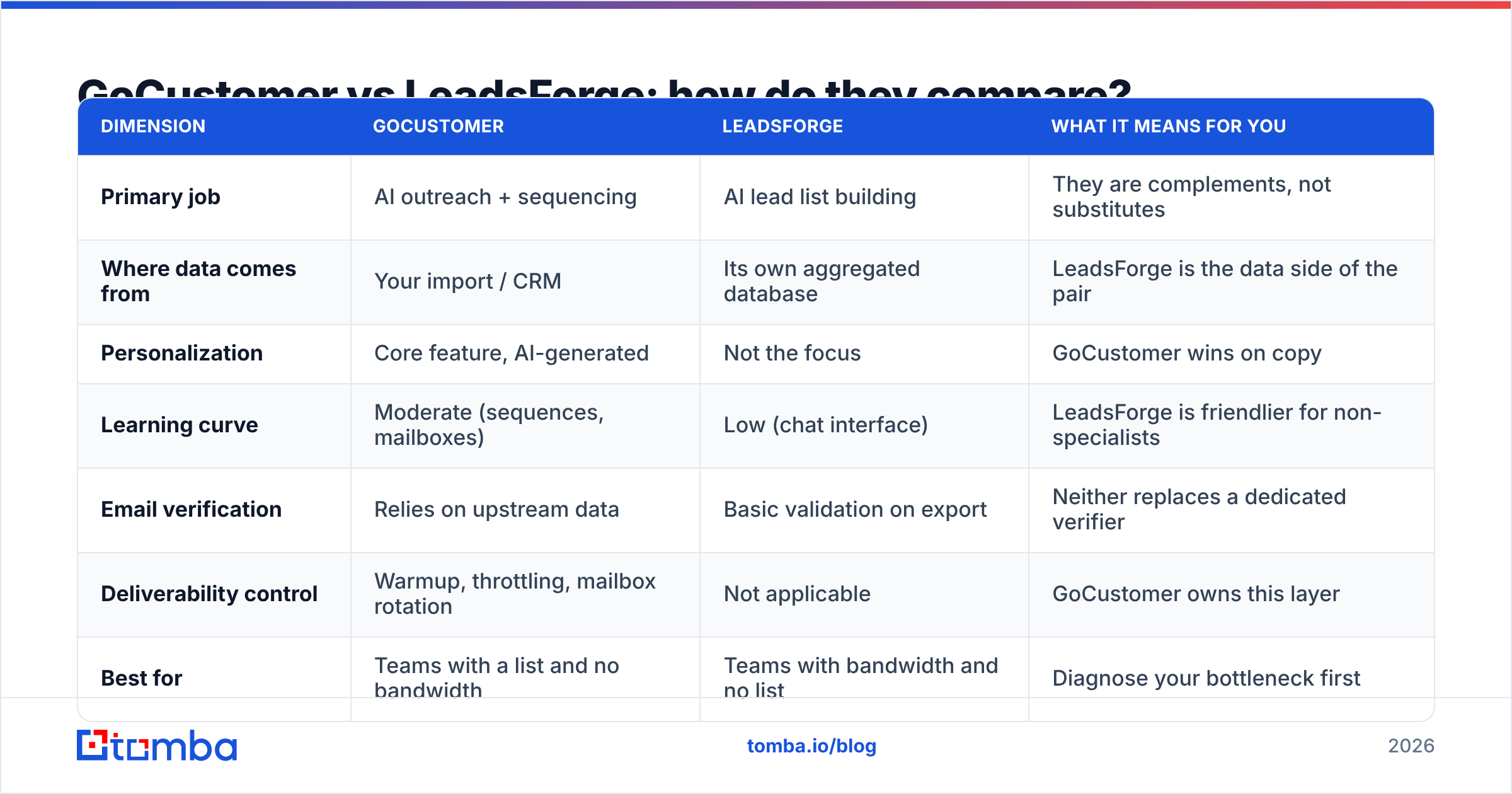
| Dimension | GoCustomer | LeadsForge | What it means for you |
|---|---|---|---|
| Primary job | AI outreach + sequencing | AI lead list building | They are complements, not substitutes |
| Where data comes from | Your import / CRM | Its own aggregated database | LeadsForge is the data side of the pair |
| Personalization | Core feature, AI-generated | Not the focus | GoCustomer wins on copy |
| Learning curve | Moderate (sequences, mailboxes) | Low (chat interface) | LeadsForge is friendlier for non-specialists |
| Email verification | Relies on upstream data | Basic validation on export | Neither replaces a dedicated verifier |
| Deliverability control | Warmup, throttling, mailbox rotation | Not applicable | GoCustomer owns this layer |
| Best for | Teams with a list and no bandwidth | Teams with bandwidth and no list | Diagnose your bottleneck first |
| Typical entry price | Mid-tier SaaS, per-seat or per-send | Credit-based, entry tier available | Verify current pricing on each vendor's page |
| API access | Limited / plan-dependent | Limited / plan-dependent | Neither is an infrastructure-grade API |
A note on pricing: both vendors have changed packaging more than once, and published tiers on category pages go stale within a quarter. Check the live pricing page before you budget. What does not change is the shape of the cost — GoCustomer charges for sending capacity and seats; LeadsForge charges for records or credits. Those two cost curves scale differently, and at volume the record-based one usually grows faster.
Which one has better data accuracy?#
This is the wrong question, and it is the question everyone asks. Here is the more useful framing:
- GoCustomer's accuracy is your accuracy. It sends to whatever you import. If your list came from a scraper, an old CSV, or a free trial export, the bounce rate is baked in before the AI writes a word.
- LeadsForge's accuracy is database accuracy. Aggregated B2B databases decay at roughly 22-30% per year as people change jobs, according to widely cited industry estimates. A record that was correct in January is a coin flip by December.
- "Validated on export" is not verification. Syntax checks and MX-record lookups catch obvious garbage. They do not catch a real, well-formed address that belongs to someone who left the company nine months ago.
- Catch-all domains break both tools. A large share of enterprise domains accept every address at the SMTP layer, so a naive check returns "valid" for anything. You need a catch-all verifier to get a real signal on those.
- Bounce rate is a deliverability input, not a data metric. Once you cross roughly 2-3% hard bounces, mailbox providers start throttling you, and every subsequent campaign underperforms regardless of copy quality.
The practical consequence: whichever tool you buy, run the list through a dedicated email verifier before the first send. It is the cheapest insurance in outbound. A verification pass costs a fraction of a cent per record; a burned domain costs weeks.

What does each one cost, realistically?#
Sticker price is the least interesting part of the cost. Model it this way:
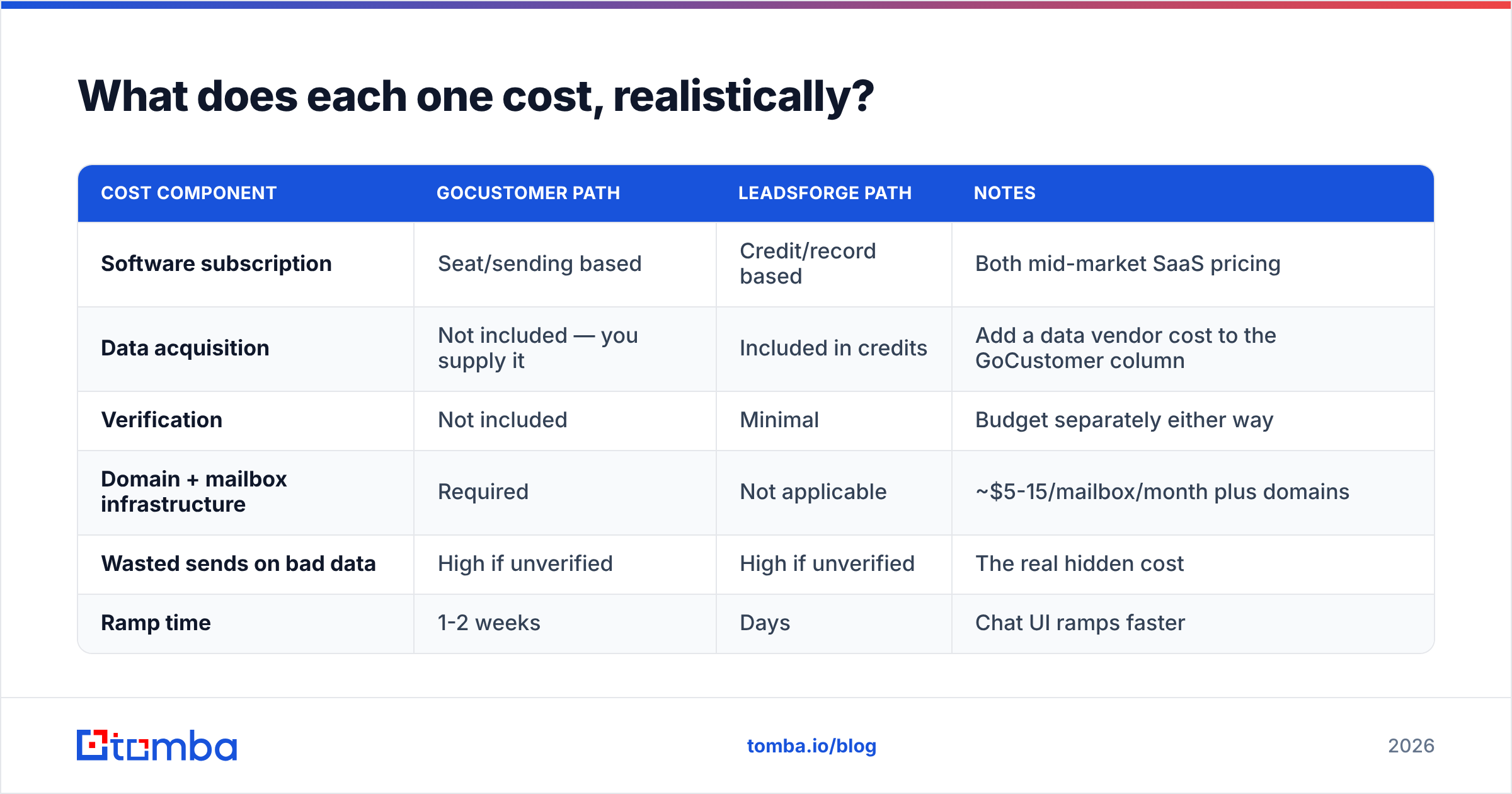
| Cost component | GoCustomer path | LeadsForge path | Notes |
|---|---|---|---|
| Software subscription | Seat/sending based | Credit/record based | Both mid-market SaaS pricing |
| Data acquisition | Not included — you supply it | Included in credits | Add a data vendor cost to the GoCustomer column |
| Verification | Not included | Minimal | Budget separately either way |
| Domain + mailbox infrastructure | Required | Not applicable | ~$5-15/mailbox/month plus domains |
| Wasted sends on bad data | High if unverified | High if unverified | The real hidden cost |
| Ramp time | 1-2 weeks | Days | Chat UI ramps faster |
If you go the GoCustomer route, you still need a contact source. That is where a pay-for-what-you-use finder matters: Tomba pricing starts with a free tier at 25 searches per month, Starter at $49/mo, Growth at $99/mo, and Pro at $249/mo — so you can bolt a data layer onto an outreach tool without committing to a second full-price platform.
If you go the LeadsForge route, you still need something to send with. Budget for a sequencer plus mailbox infrastructure on top.
Neither vendor is expensive on its own. The stack is what costs money.
Who should choose which?#
Four scenarios, four answers:
- Solo founder, no list, no outbound experience. LeadsForge. The chat interface removes the single biggest source of abandonment — not knowing which filters to use. Add a cheap verification step and a basic sequencer.
- Two-person sales team with a CRM full of stale contacts. GoCustomer, but only after you run data enrichment on the CRM. Re-sending to a decayed database with better copy is optimizing the wrong variable.
- Agency running outbound for multiple clients. Neither as a single solution. You want a data API you can script against, plus a sending platform with client-level separation. A bulk email finder feeding a dedicated sequencer is more flexible than either all-in-one.
- RevOps team at a 50+ person company. Neither, probably. At that size you want your data pipeline in your own warehouse, hydrated by an email finder API, and sending handled by whatever your CRM already integrates with. AI SDR tools tend to become shadow systems that RevOps cannot audit.
What do both tools leave on the table?#
Three gaps show up consistently in reviews of tools in both categories on G2 and comparable review sites:
Verification depth. Both do enough validation to look responsible and not enough to protect a domain. Catch-all domains, role accounts (info@, sales@), and recently-departed employees slip through. A dedicated free email checker run on a sample of any list is a five-minute sanity test worth doing before you buy either product.
Data provenance. When a record is wrong, you usually cannot tell where it came from. Vendors that publish their data sources make it easier to reason about coverage gaps — you know whether a miss is a sourcing problem or a decay problem.
Portability. AI SDR platforms want to own the whole workflow, which means your personalization logic, your sequences, and your reply history live inside a vendor you may leave in a year. Tools that expose a clean API and CSV round-trip are lower-risk. If you have ever migrated off an all-in-one, you know the tax.
What are the alternatives worth a look?#
If neither fits, the field is wide:
- Apollo — the default all-in-one. Huge database, sequencing included, but data quality complaints scale with list size. See Apollo alternatives if you have already hit that wall.
- BookYourData — a solid choice when you want a purchased, pre-verified list with a clear accuracy guarantee rather than a self-serve search UI. Different buying model, genuinely good coverage in several verticals.
- Instantly / Smartlead — pure sending infrastructure with strong warmup. Pair with any data source. Compare against Instantly alternatives before committing.
- A finder + verifier + sequencer stack — the unglamorous option that most high-volume teams end up on, because each layer can be swapped independently when it underperforms.
How should you actually decide?#
Run this test before you buy anything.
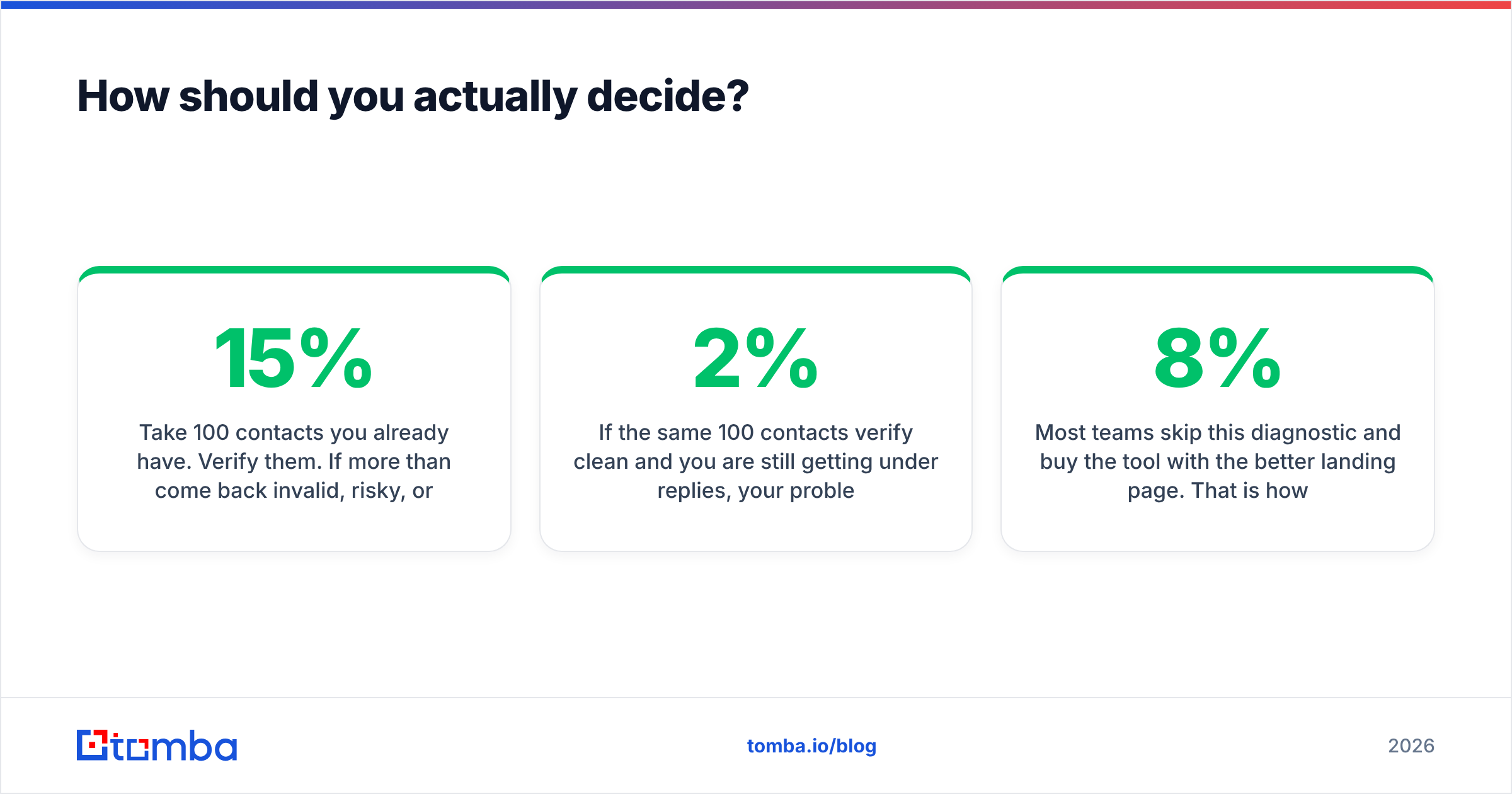
Take 100 contacts you already have. Verify them. If more than 15% come back invalid, risky, or catch-all-unknown, your problem is data, not copy — and buying an AI writer will not move your reply rate. Fix the list first.
If the same 100 contacts verify clean and you are still getting under 2% replies, your problem is messaging and sequencing — which is exactly what GoCustomer is built for.
If you cannot assemble 100 relevant contacts in the first place, your problem is sourcing, and LeadsForge (or a domain search workflow) is the right spend.
Most teams skip this diagnostic and buy the tool with the better landing page. That is how you end up paying for three overlapping platforms and still bouncing at 8%.
The bottom line#
GoCustomer and LeadsForge are not really competitors — they are adjacent purchases that solve opposite ends of the same pipeline. GoCustomer wins if your copy and cadence are the constraint. LeadsForge wins if your list is the constraint and you want the fastest path from "who should I target" to "here is a CSV."
What neither solves is the accuracy layer sitting underneath both. Before you send a single email out of either platform, get your contact data right at the source. Start with the Tomba Email Finder — find verified professional addresses by name, domain, or company, with a free tier at 25 searches per month so you can pressure-test the data quality against your own ICP before you spend anything. Clean input makes both of these tools look better than they are; dirty input makes neither of them work.
Related guides#
Ready to find emails that actually work?
Join 150,000+ professionals who stopped guessing and started sending. Free credits on signup — no credit card required.
Get the Tomba newsletter
Practical outbound tactics and product updates — once every two weeks.
About the author