GoDaddy Email Deliverability: Why Emails Land in Spam (2026)
GoDaddy email lands in spam more often than it should — usually for reasons you can fix in a week. Here's what actually drives GoDaddy deliverability, and when it's time to move.

TL;DR
- GoDaddy email deliverability problems are usually caused by three things: shared outbound IP pools, incomplete DNS authentication, and low-quality recipient lists — not by GoDaddy being "bad email."
- GoDaddy's Professional Email and Microsoft 365 plans send from shared infrastructure. Your sender reputation is partly inherited from strangers, and you cannot see or control it.
- Since the 2024 Gmail/Yahoo bulk-sender rules and Microsoft's 2025 high-volume sender enforcement, SPF + DKIM + DMARC alignment is table stakes. A domain without a DMARC record is being filtered harder every year.
- Relay limits (historically a few hundred messages per day on entry plans) make GoDaddy a poor fit for outbound sales sequences, regardless of reputation.
- The fastest wins: fix DNS records, stop sending to unverified addresses, warm the domain, and move bulk sending to a dedicated ESP while keeping GoDaddy for one-to-one mail.
What is GoDaddy email deliverability, exactly?#
Deliverability is not "did the message leave my outbox." It's "did it land in the primary inbox of a real human." Those are two very different questions, and GoDaddy — like every host — only controls part of the answer.
Think of it like posting a letter from a shared mailroom in a large office building. Your envelope is perfect, your address is correct, but the mailroom's van has been pulled over three times this month because someone else in the building keeps shipping junk. The postal service starts inspecting everything from that van. That's a shared IP pool.
GoDaddy sells email under a few different products, and they behave differently:
- Professional Email — GoDaddy's own hosted mailbox product, typically on
secureserver.netMX records, aimed at small businesses who bought a domain and wanted a matching mailbox. - Microsoft 365 from GoDaddy — a resold Microsoft tenant. The underlying sending infrastructure is Microsoft's, but billing, DNS defaults, and some admin controls sit with GoDaddy.
- Website hosting PHP mail / SMTP relay — contact forms and scripts sending through GoDaddy's relay. This is where most catastrophic deliverability stories start.
- GoDaddy Digital Marketing / email campaigns — a light bulk-email product that runs on separate campaign infrastructure.
Most people googling "godaddy email deliverability" are on product 1 or 3, sending mail that never arrives, and assuming the problem is a setting somewhere. Usually it isn't a setting. It's the architecture plus the list.
Why do GoDaddy emails land in spam?#
Five causes account for the overwhelming majority of cases.
1. Shared outbound IPs with no visibility. On entry-level hosted email, you share sending IPs with thousands of other small businesses. If a handful of them get compromised or run sloppy campaigns, the pool's reputation drops and your legitimate invoice email pays for it. You have no dashboard showing which IP sent your last message, and no way to request a different one.
2. Incomplete or conflicting DNS authentication. GoDaddy auto-provisions an SPF record when you add email. Then you add a marketing tool, a CRM, and a helpdesk — each wanting its own include: — and you end up with either two SPF records (an automatic fail) or more than 10 DNS lookups (also a fail). DKIM is frequently left unconfigured on Professional Email. DMARC is missing entirely on a large share of small-business domains.
3. No domain warmup. A domain that sent 4 emails a month for two years suddenly sends 300 in a Tuesday afternoon. Every filter on the planet treats that as a compromise signal.
4. Sending to addresses that don't exist. Bounce rate is the single loudest negative signal you can generate. Above roughly 3–5% hard bounces, mailbox providers stop giving you the benefit of the doubt. Scraped lists and guessed patterns (firstname@company.com) produce exactly this.
5. Content and infrastructure mismatch. A message signed by secureserver.net but branded as a large enterprise, containing three link shorteners and a tracking pixel from a domain with no history, reads as phishing to a filter — because it structurally resembles phishing.

Note the ordering here. People spend days rewriting subject lines when their DMARC record is missing and 12% of their list is invalid. Fix the plumbing before you redecorate.
How does GoDaddy email compare to Google Workspace and Microsoft 365?#
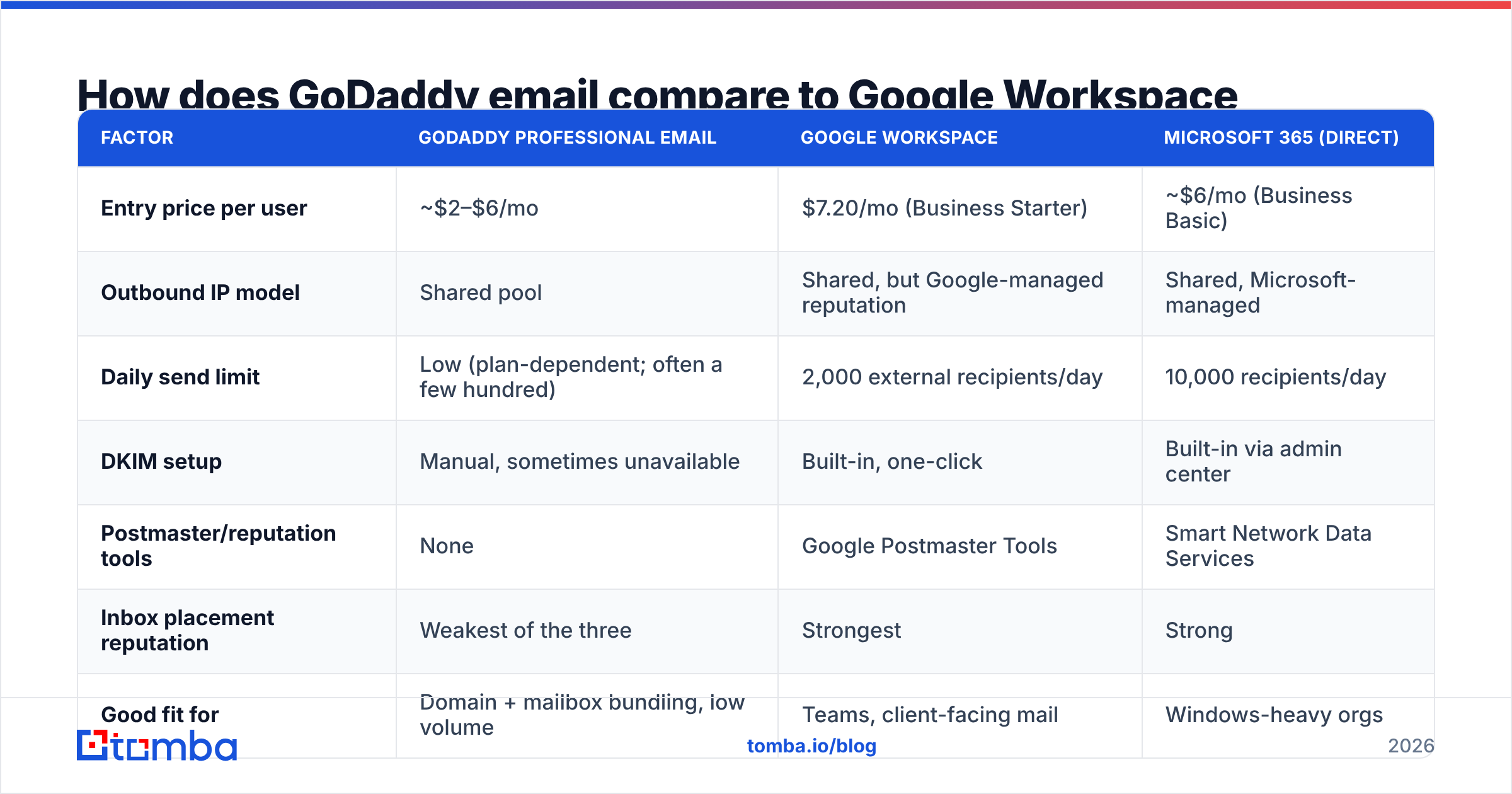
Here is the honest comparison, with the caveat that GoDaddy plan names and limits change — verify current terms on godaddy.com before you commit.
| Factor | GoDaddy Professional Email | Google Workspace | Microsoft 365 (direct) |
|---|---|---|---|
| Entry price per user | ~$2–$6/mo | $7.20/mo (Business Starter) | ~$6/mo (Business Basic) |
| Outbound IP model | Shared pool | Shared, but Google-managed reputation | Shared, Microsoft-managed |
| Daily send limit | Low (plan-dependent; often a few hundred) | 2,000 external recipients/day | 10,000 recipients/day |
| DKIM setup | Manual, sometimes unavailable | Built-in, one-click | Built-in via admin center |
| Postmaster/reputation tools | None | Google Postmaster Tools | Smart Network Data Services |
| Inbox placement reputation | Weakest of the three | Strongest | Strong |
| Good fit for | Domain + mailbox bundling, low volume | Teams, client-facing mail | Windows-heavy orgs |
| Good fit for cold outbound | No | No (use a dedicated ESP + separate domain) | No |
The pattern is clear: GoDaddy competes on bundling and price, not on deliverability tooling. If your business runs on email replies, the $4/month you save costs you far more in silently filtered messages. The lack of anything equivalent to Google Postmaster Tools is the sharpest gap — you cannot diagnose what you cannot measure.
What DNS records does GoDaddy email need in 2026?#
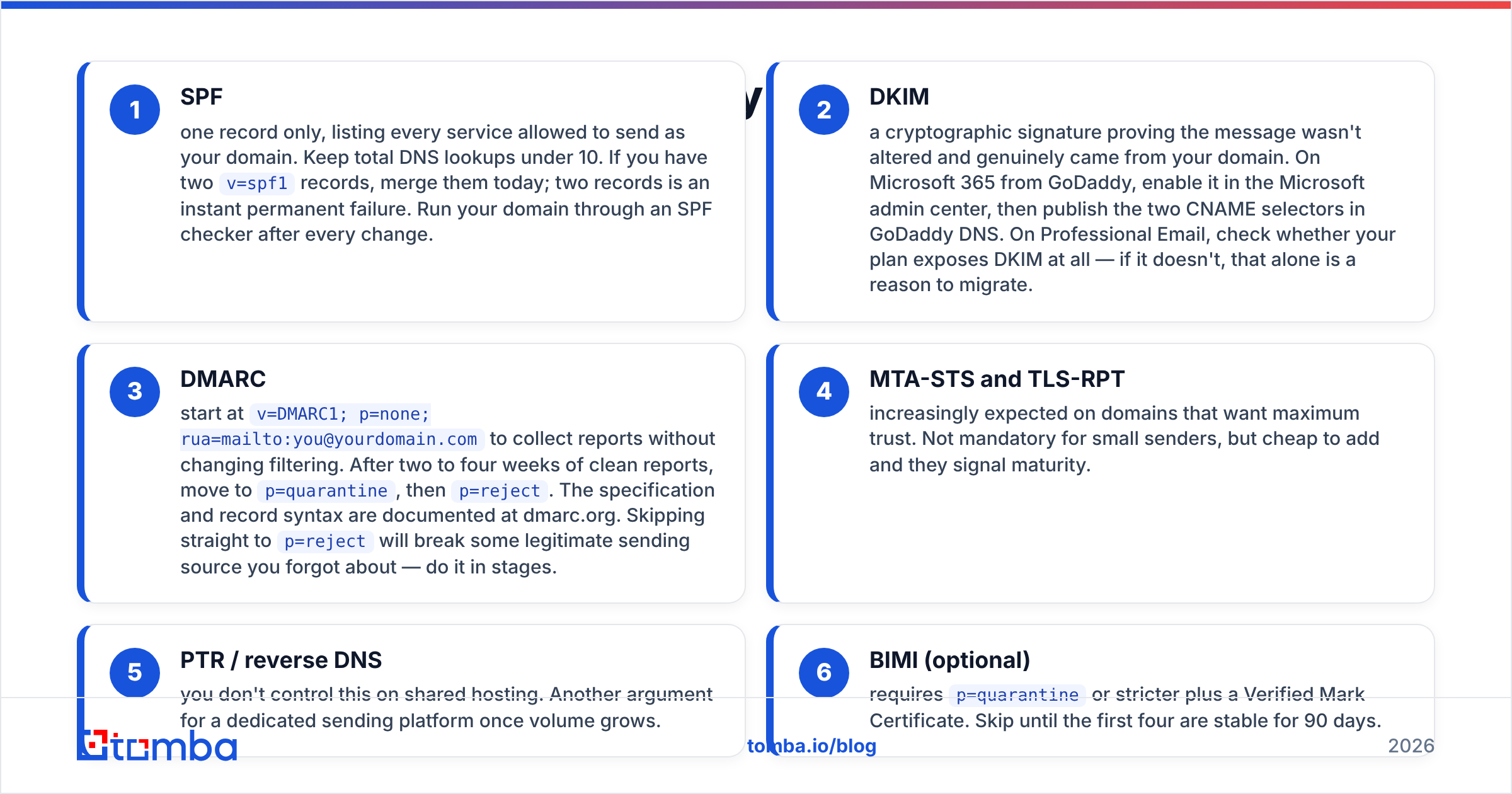
Set all four. In this order. Every one of them lives in GoDaddy's DNS manager under your domain.
- SPF — one record only, listing every service allowed to send as your domain. Keep total DNS lookups under 10. If you have two
v=spf1records, merge them today; two records is an instant permanent failure. Run your domain through an SPF checker after every change. - DKIM — a cryptographic signature proving the message wasn't altered and genuinely came from your domain. On Microsoft 365 from GoDaddy, enable it in the Microsoft admin center, then publish the two CNAME selectors in GoDaddy DNS. On Professional Email, check whether your plan exposes DKIM at all — if it doesn't, that alone is a reason to migrate.
- DMARC — start at
v=DMARC1; p=none; rua=mailto:you@yourdomain.comto collect reports without changing filtering. After two to four weeks of clean reports, move top=quarantine, thenp=reject. The specification and record syntax are documented at dmarc.org. Skipping straight top=rejectwill break some legitimate sending source you forgot about — do it in stages. - MTA-STS and TLS-RPT — increasingly expected on domains that want maximum trust. Not mandatory for small senders, but cheap to add and they signal maturity.
- PTR / reverse DNS — you don't control this on shared hosting. Another argument for a dedicated sending platform once volume grows.
- BIMI (optional) — requires
p=quarantineor stricter plus a Verified Mark Certificate. Skip until the first four are stable for 90 days.
After you publish records, wait for TTL expiry before testing. GoDaddy's default TTL of one hour means your "it didn't work" test at minute five is meaningless.
How do you fix GoDaddy deliverability in one week?#
A concrete seven-day sequence that works for a typical small-business domain:
- Day 1 — Audit. Check SPF, DKIM, DMARC. Confirm you have exactly one SPF record. Run your domain and sending IP through a blacklist checker — if you're on Spamhaus or SpamCop, nothing else matters until you delist.
- Day 2 — Publish records. Fix SPF, enable DKIM, publish
p=noneDMARC with a reporting address. - Day 3 — Clean the list. Remove every address you cannot prove exists. Run the remaining list through an email verifier and delete anything that comes back invalid or risky. This single step usually moves inbox placement more than every content tweak combined.
- Day 4 — Fix the from-line. Use a real human name and a monitored reply-to address. Remove
noreply@. Add a plain-text footer with your physical address and a working unsubscribe link. - Day 5 — Audit content. Strip link shorteners. Host images on your own domain. Keep the HTML-to-text ratio sane. Test with a spam checker before you send anything at volume.
- Day 6 — Warm up. Send 20–30 messages to engaged contacts who will reply. Double roughly every two days. Do not jump from 30 to 500.
- Day 7 — Measure and iterate. Read your first DMARC aggregate reports. Look for sending sources you didn't authorize — that's often a forgotten form plugin or a marketing tool nobody told IT about.
If replies are still not arriving after this, the problem is no longer configuration. It's either the shared IP pool or your offer.
Is GoDaddy email good enough for cold outbound?#
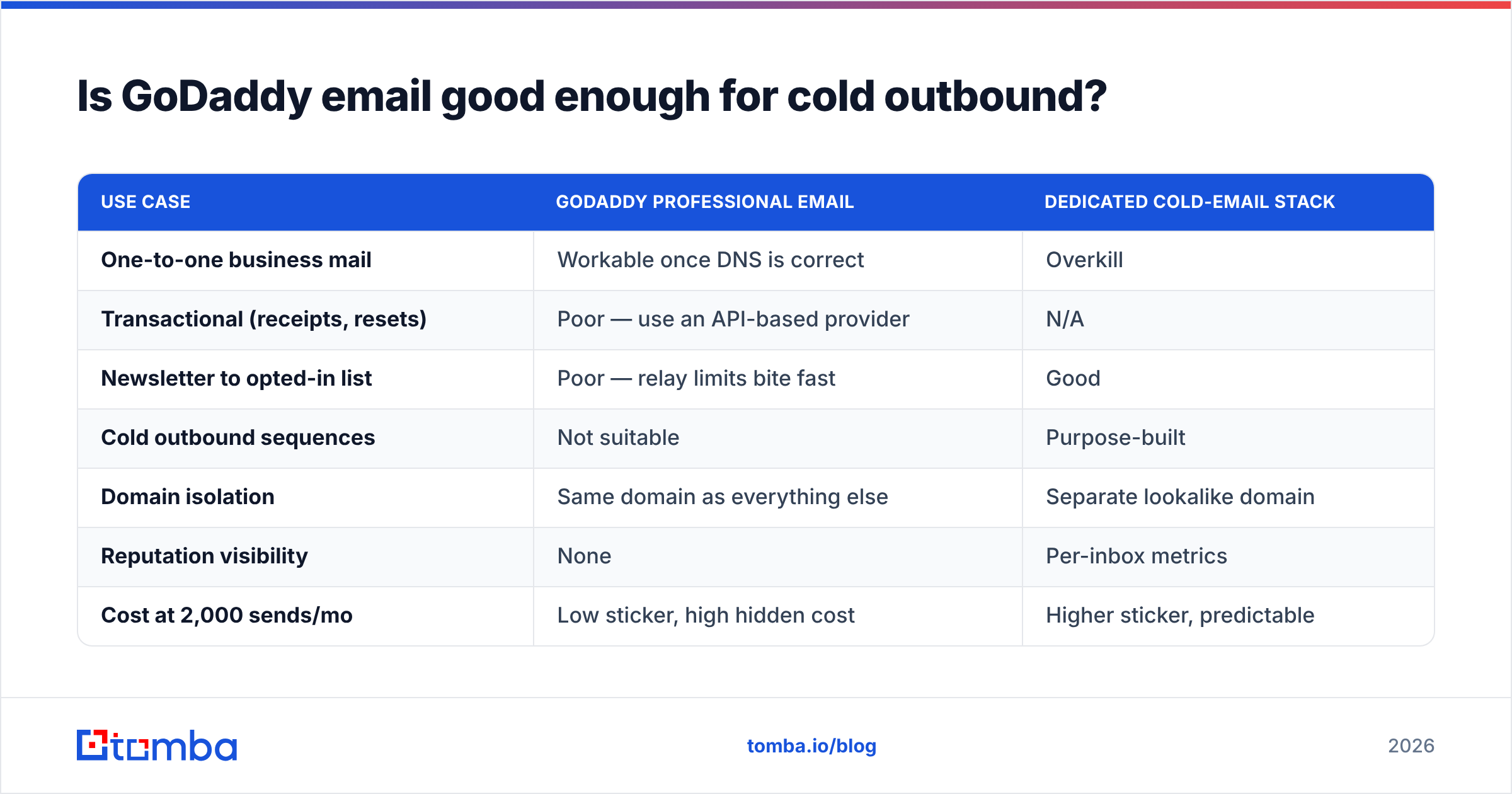
No — and neither is Google Workspace or Microsoft 365 on your primary domain. That's not a knock on GoDaddy specifically. Sending cold sequences from the same domain and mailbox that carries your invoices, contracts, and customer support is an unforced risk. One bad campaign and your billing emails stop arriving.
| Use case | GoDaddy Professional Email | Dedicated cold-email stack |
|---|---|---|
| One-to-one business mail | Workable once DNS is correct | Overkill |
| Transactional (receipts, resets) | Poor — use an API-based provider | N/A |
| Newsletter to opted-in list | Poor — relay limits bite fast | Good |
| Cold outbound sequences | Not suitable | Purpose-built |
| Domain isolation | Same domain as everything else | Separate lookalike domain |
| Reputation visibility | None | Per-inbox metrics |
| Cost at 2,000 sends/mo | Low sticker, high hidden cost | Higher sticker, predictable |
The standard architecture in 2026 looks like this: primary domain on Google Workspace or Microsoft 365 for real business mail; one or two lookalike domains (getyourcompany.com, yourcompany.co) on a sending platform for outbound; a verification layer in front of every list; and DMARC at p=reject on the primary domain so nobody can spoof it while you're not looking.
GoDaddy fits the first slot adequately if you have DKIM available and your volume is low. It does not fit the second slot at all.
How much does list quality actually matter?#
More than everything else on this page combined.
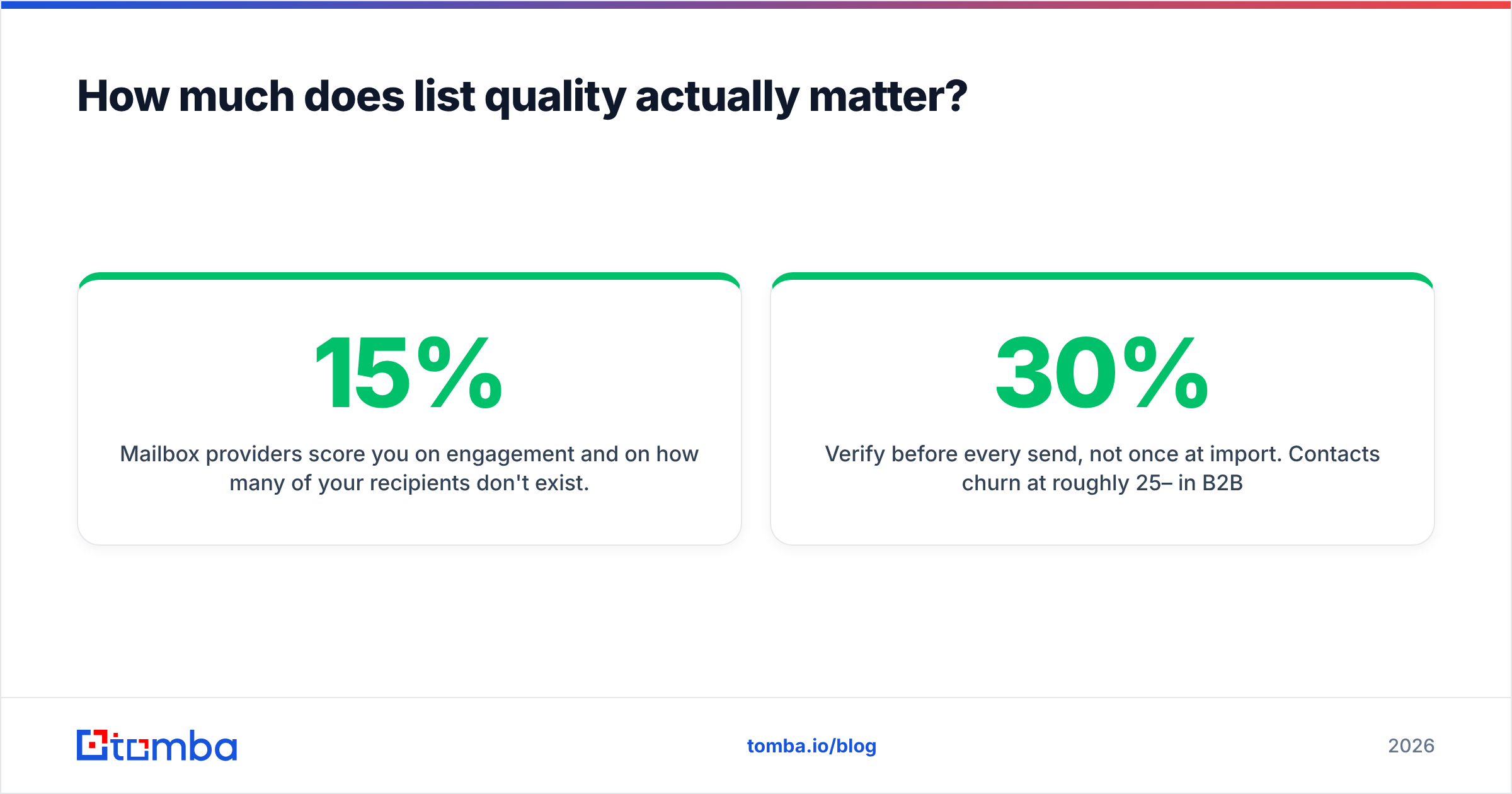
Mailbox providers score you on engagement and on how many of your recipients don't exist. A 15% bounce rate tells Gmail you bought a list. A 0.4% spam complaint rate — one complaint per 250 sends — puts you over Google's published threshold and into the folder. You can have flawless SPF, DKIM, and DMARC and still be filtered because your data is garbage.
This is where a lot of GoDaddy users go wrong in a specific way: they use a free email permutator, generate first.last@domain.com for 400 prospects, and send. Roughly a third of those addresses don't exist. The bounce wave that follows torches a domain that had a clean history for years.
The fix is boring and effective:
- Find, don't guess. Use a verified source for the address instead of a pattern generator. An email finder that returns a confidence score and the sources it found the address on is worth more than any subject-line trick.
- Verify before every send, not once at import. Contacts churn at roughly 25–30% per year in B2B.
- Handle catch-all domains deliberately. Catch-all servers accept everything, so standard SMTP checks return "valid" for addresses that don't exist. Segment them and send to them separately, at lower volume.
- Suppress hard bounces permanently. Never re-attempt an address that hard bounced. Ever.
- Watch complaint rate, not just open rate. Opens are increasingly unreliable after privacy-proxy prefetching; complaints are not.
For deeper background on the underlying mechanics, the email deliverability glossary entry covers the terminology you'll see in DMARC reports and postmaster dashboards.
When should you migrate off GoDaddy email?#
Migrate when any of these are true:
- Your plan does not expose DKIM configuration.
- You've hit relay limits more than once.
- You're sending anything resembling marketing or outbound from a hosted mailbox.
- You need reputation visibility — postmaster data, per-IP metrics, bounce webhooks.
- Deliverability is directly tied to revenue (recruiting, agencies, sales-led SaaS).
Stay if you're a low-volume business sending under 100 one-to-one messages a day, your DNS is clean, and your replies arrive. There's no prize for over-engineering a five-person company's mailbox.
The migration itself is not dramatic: export mailboxes, provision the new tenant, update MX records, keep the old mailboxes live for a two-week overlap, then republish SPF and DKIM for the new sender. Budget a weekend and expect one forgotten form plugin to break.
Where should you start?#
Start with data, because it's the input to everything else. Correct DNS records on a list full of dead addresses still gets filtered — the bounces override the authentication.
Build your prospect and contact lists with the Tomba Email Finder: search by domain, name, or company, get a confidence score and the public sources behind each address, and push only verified contacts into whatever you send from — GoDaddy, Google Workspace, or a dedicated outbound stack. The free tier covers 25 searches a month so you can test accuracy on your own market before paying, and paid plans start at $49/mo with bulk processing and API access when you're ready to scale. Check the full Tomba pricing if you need volume.
Fix the list, then fix the records, then worry about the subject line. In that order.
Related guides#
Ready to find emails that actually work?
Join 150,000+ professionals who stopped guessing and started sending. Free credits on signup — no credit card required.
Get the Tomba newsletter
Practical outbound tactics and product updates — once every two weeks.
About the author