GoHighLevel vs Pipedrive: Which CRM Fits Your Sales Team?
One is an all-in-one agency platform sold per account. The other is a focused sales CRM sold per seat. Here is how GoHighLevel and Pipedrive actually differ on pricing, pipelines, automation, and the data you feed them.
GoHighLevel vs Pipedrive comes down to one question. Are you running campaigns for clients, or closing your own deals? GoHighLevel is a marketing suite with a CRM inside it. Pipedrive is a sales CRM, first and last. This guide compares both on price, pipelines, automation, and the data you feed them.
TL;DR
- GoHighLevel vs Pipedrive in one line: GoHighLevel is a marketing platform with a CRM attached. Pipedrive is a CRM with marketing bolted on. That gap predicts almost every difference below.
- The pricing models do not match. GoHighLevel charges per account, from $97/mo, with unlimited users. Pipedrive charges per seat, from about $14/user/mo. Small teams pay less on Pipedrive. Large ones often pay less on GoHighLevel.
- Pipedrive wins on sales work — pipeline design, forecasting, activity habits, reporting depth, and a bigger app store.
- GoHighLevel wins on breadth — funnels, SMS, calling, review requests, booking, courses, and white-label sub-accounts you can resell.
- Neither fixes your data problem. Both are containers. Load bad contacts and both will mail nobody, with lovely dashboards.
What are GoHighLevel and Pipedrive, exactly?#
GoHighLevel was built for marketing agencies. They were tired of stitching ClickFunnels, Twilio, Mailchimp, and Calendly together for every client. GoHighLevel bundles funnels, landing pages, email and SMS, a dialer, booking, reputation management, memberships, and a contact database into one login. You can then white-label the whole thing and resell it under your own brand as sub-accounts.
Pipedrive started from the other end. Salespeople built it because they wanted a visual deal board that made the next step obvious. Everything orbits the pipeline: stages, deal rot alerts, activity reminders, weighted forecasts. Marketing features exist — Campaigns, web forms, a chatbot — but they are add-ons to a sales core.
So GoHighLevel vs Pipedrive is rarely a fair fight between equals. It is a question about your business model:
- Do you sell your own product to your own prospects? You want a sales CRM. Pipedrive leads.
- Do you run campaigns for clients? You want a multi-tenant marketing stack. GoHighLevel leads.
- Do you need per-rep accountability and a forecast you trust? Pipedrive's reporting is built for that. GoHighLevel's is not.
- Do you want to bill software to clients as recurring revenue? Only GoHighLevel resells under your own brand.
- Do you have more than 10 sales seats? Per-seat math starts to favor GoHighLevel's flat price.
GoHighLevel vs Pipedrive: how do they compare feature by feature?#
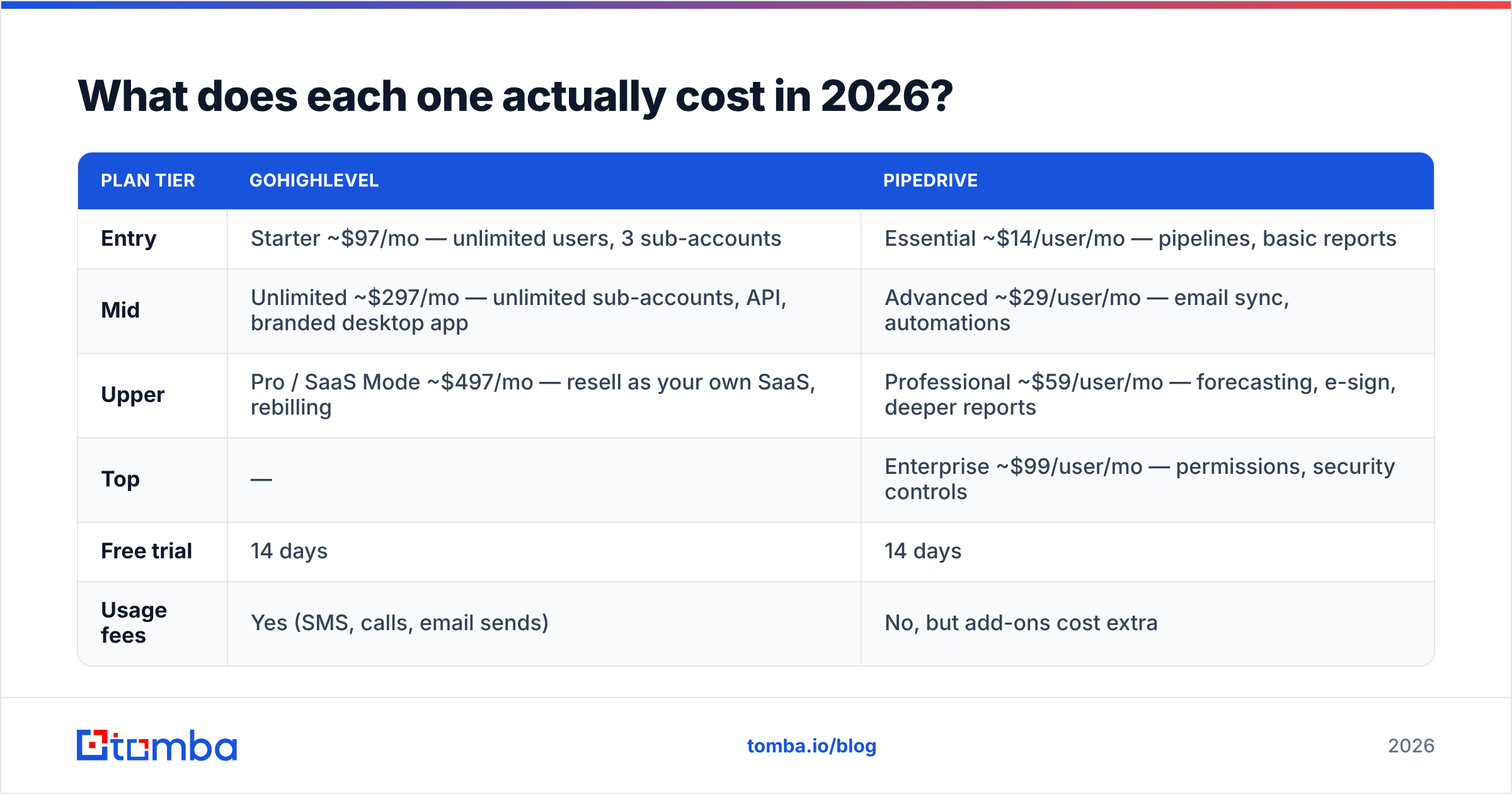
| Feature | GoHighLevel | Pipedrive |
|---|---|---|
| Core identity | All-in-one marketing + CRM for agencies | Sales-first CRM for closing deals |
| Pricing model | Per account, unlimited users | Per user, per month |
| Entry price | ~$97/mo (Starter) | ~$14/user/mo (Essential, annual) |
| Visual pipeline | Yes, basic drag-and-drop | Yes, best-in-class with rot alerts |
| Email marketing | Native, included | Campaigns add-on or third-party |
| SMS + voice | Native (Twilio-backed, usage billed) | Via marketplace apps |
| Funnels + landing pages | Native builder included | Not native |
| Appointment booking | Native calendars per user | Native scheduler (higher tiers) |
| White-label / sub-accounts | Yes, core selling point | No |
| Sales forecasting | Limited | Revenue forecast reports, weighted |
| Marketplace apps | ~40+ integrations plus Zapier | 400+ apps in marketplace |
| Learning curve | Steep — many modules | Gentle — usable day one |
| Best for | Agencies, local services, resellers | B2B sales teams, SMB to mid-market |
The table hides one detail worth stating plainly. GoHighLevel bills usage on top of the subscription — SMS, calls, and emails sent through its own providers. Your monthly cost moves with volume. Pipedrive's cost is boringly steady: seats times price, plus any add-ons.
GoHighLevel vs Pipedrive pricing: what does each one cost in 2026?#
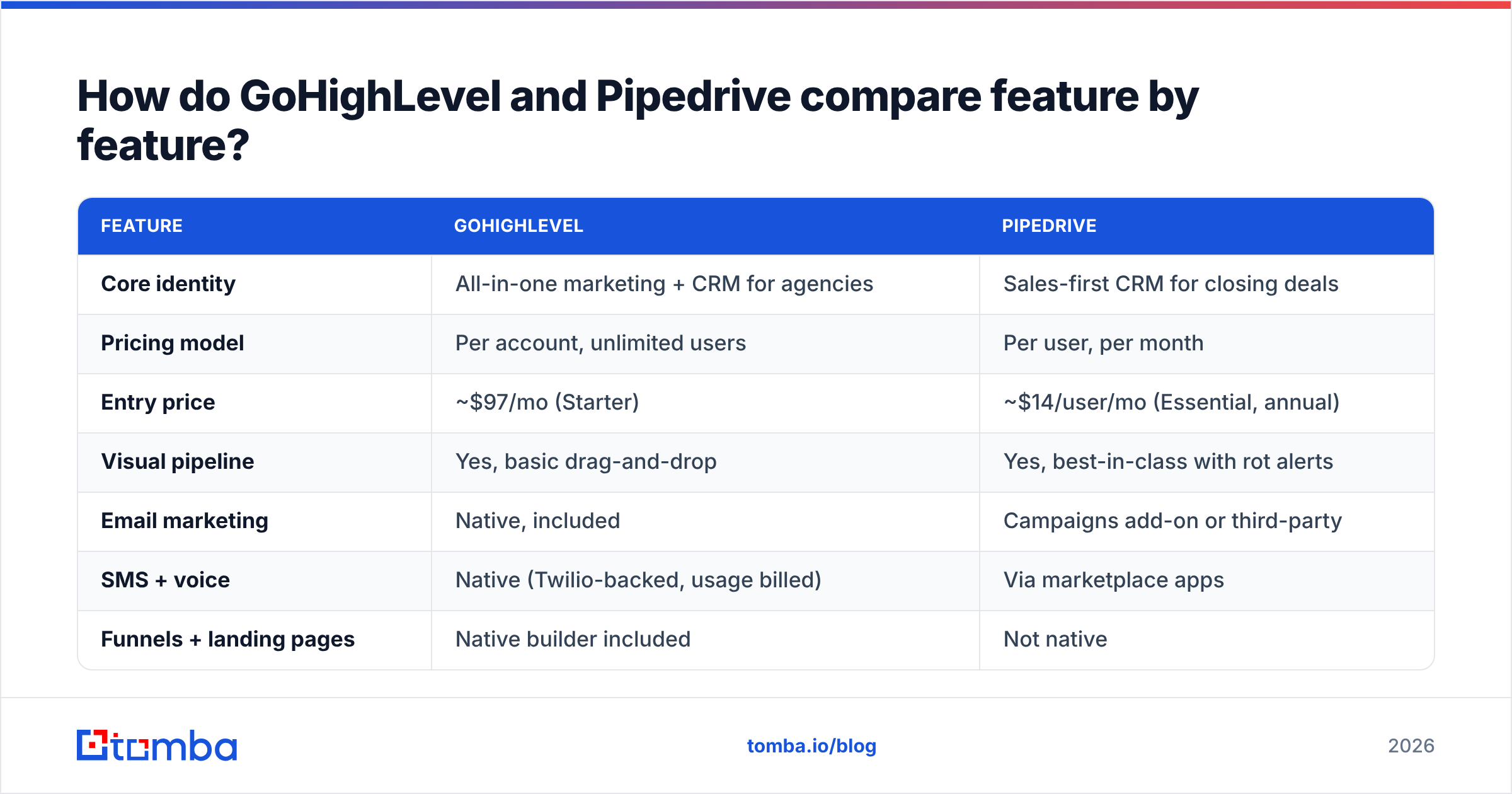
Published prices move. Treat these as directional and check each vendor's page before you sign.
| Plan tier | GoHighLevel | Pipedrive |
|---|---|---|
| Entry | Starter ~$97/mo — unlimited users, 3 sub-accounts | Essential ~$14/user/mo — pipelines, basic reports |
| Mid | Unlimited ~$297/mo — unlimited sub-accounts, API, branded desktop app | Advanced ~$29/user/mo — email sync, automations |
| Upper | Pro / SaaS Mode ~$497/mo — resell as your own SaaS, rebilling | Professional ~$59/user/mo — forecasting, e-sign, deeper reports |
| Top | — | Enterprise ~$99/user/mo — permissions, security controls |
| Free trial | 14 days | 14 days |
| Usage fees | Yes (SMS, calls, email sends) | No, but add-ons cost extra |
Run the math on your real headcount. Three reps on Pipedrive Advanced costs about $87/mo. That is cheaper than GoHighLevel's floor. Fifteen reps on Pipedrive Professional runs about $885/mo, which makes GoHighLevel's $297 Unlimited plan look like a rounding error. In most GoHighLevel vs Pipedrive math, the crossover sits between 8 and 12 users.
The trap: cheap seats do not mean cheap results. A CRM your reps ignore costs you the pipeline, not the subscription.

GoHighLevel vs Pipedrive: which one runs a sales pipeline better?#
On raw pipeline work this is a short debate. Pipedrive wins, and it is not close.
Pipedrive's deal board follows one idea. A rep should never open the CRM and wonder what to do next. Deals show rot alerts when they sit too long. Every deal asks you to book the next step. You can require custom fields per stage. Reports slice conversion by stage, by rep, and by source. The revenue forecast weights open deals by probability, with no spreadsheet needed.
GoHighLevel has Opportunities — a working kanban with stages, values, and a filter bar. It does the job. It does not coach you. There is no real stage-conversion analysis, no rot logic, and no weighted forecast you would show a board. If pipeline management means "show me where deals are," GoHighLevel is fine. If it means "show me which stage leaks 40% of deals," you will outgrow it.
One more gap bites teams later: activity habits. Pipedrive assumes every deal has a booked next step, and its reports expose reps who leave deals bare. GoHighLevel assumes automation will chase the lead. Those are two theories of selling. Automation suits volume plays. Human follow-up suits considered purchases. Pick the one that matches your average deal size.
Which one is better for marketing automation and client work?#
Flip the question and the answer flips too. For client marketing, GoHighLevel wins by a wide margin — with one caveat about depth.
Inside one GoHighLevel account you can build a landing page and capture a lead. You can fire an SMS within 30 seconds, drop a ringless voicemail, and book the prospect into a calendar. You can run a nurture sequence, ask for a Google review after the job, and host a course later. Doing the same around Pipedrive means Pipedrive plus Unbounce plus Twilio plus a scheduler plus a review tool. That is four more vendors, four bills, and four integrations that can break.
The caveat: each GoHighLevel module is good, not great. The page builder is not Webflow. The email builder is not Klaviyo. Automation branching works, but it gets messy past a few dozen steps. You trade peak quality for one login. For agencies, that trade usually pays.
Pipedrive's Campaigns add-on handles newsletters and simple drip sequences well enough. Its automation builder shines on internal work: move a deal, assign an owner, create an activity, ping Slack. It is not trying to be your marketing department, and it prices accordingly.
For a deeper look at how triggers differ across tools, our overview of sales automation covers the words both vendors use loosely.
GoHighLevel vs Pipedrive: how do they handle contact data?#
Most comparisons stop here. Most projects fail here. Both platforms will store a contact with a guessed email and no phone. Neither will tell you the record is worthless.
Start with how records are born and cleaned:
- Record creation — GoHighLevel creates contacts from forms, funnels, calls, and imports. Pipedrive creates people and organizations from forms, email sync, and imports, and can link people to organizations for you. Pipedrive's model is cleaner for B2B. GoHighLevel's flat contact model is simpler for local-services leads.
- Deduplication — Pipedrive detects and merges duplicates natively. GoHighLevel dedupes on email or phone at import. So one person with two addresses becomes two contacts. Run a remove duplicates pass before you import into either.
The next three steps decide whether those records are worth storing at all.
- Enrichment — Neither ships serious B2B enrichment. Pipedrive offers limited prospecting through Smart Data and marketplace apps. GoHighLevel expects you to bring your own list. Both leave firmographics, job titles, and verified contact points to you.
- Verification — Neither checks deliverability before you send. GoHighLevel makes it easy to blast an unverified list over shared infrastructure and burn your reputation. Run lists through an email verifier first. At volume, this is not optional.
- Outbound sourcing — Neither is a prospecting database. For net-new contacts at target accounts, you source them elsewhere and push them in by API, CSV, or Zapier.
Most teams land on the same workflow. Source and verify contacts outside the CRM, then sync clean records in. A domain search against a target account returns the people and the email pattern. Verification confirms which addresses accept mail. Only then does the record earn a place in your pipeline.
Which integrates better with the rest of your stack?#
Pipedrive. Its marketplace lists 400+ apps. Its API is well documented and widely supported. Almost every sales tool on G2 ships a Pipedrive connector by default.
GoHighLevel's native list is short — about 40 direct connections. The pitch is that you should not need integrations. In practice you will, so you reach for Zapier or webhooks. That works, but every Zap is a small piece of infrastructure someone has to own.
If you already run a modern GTM stack — a warehouse, an enrichment layer, a sequencer, a call recorder — Pipedrive slots in. If you are replacing six tools with one, GoHighLevel's short list is a feature, not a bug.
To push verified contacts into either platform automatically, the Tomba API works both ways: find and verify on the way in, then enrich on a schedule.
Is GoHighLevel better than Pipedrive for agencies?#
Yes, for one reason: SaaS Mode. On the Pro tier you resell sub-accounts under your own brand, set your own prices, and bill clients through your Stripe. A software cost becomes a revenue line. Pipedrive has no equal here. You can be a partner, but you cannot sell it as your own product.
The second reason is snapshots. Build a full campaign once — funnels, automations, calendars, pipelines. Save it as a snapshot. Deploy it to a new client account in a minute. For an agency onboarding two clients a month, that is a real margin lever.
Where agencies get burned: deliverability. Dozens of client accounts share sending infrastructure, so one bad list can hurt its neighbors. Warm domains slowly, authenticate every sending domain, and watch sender reputation per sub-account rather than in aggregate.

GoHighLevel vs Pipedrive: who should pick which?#
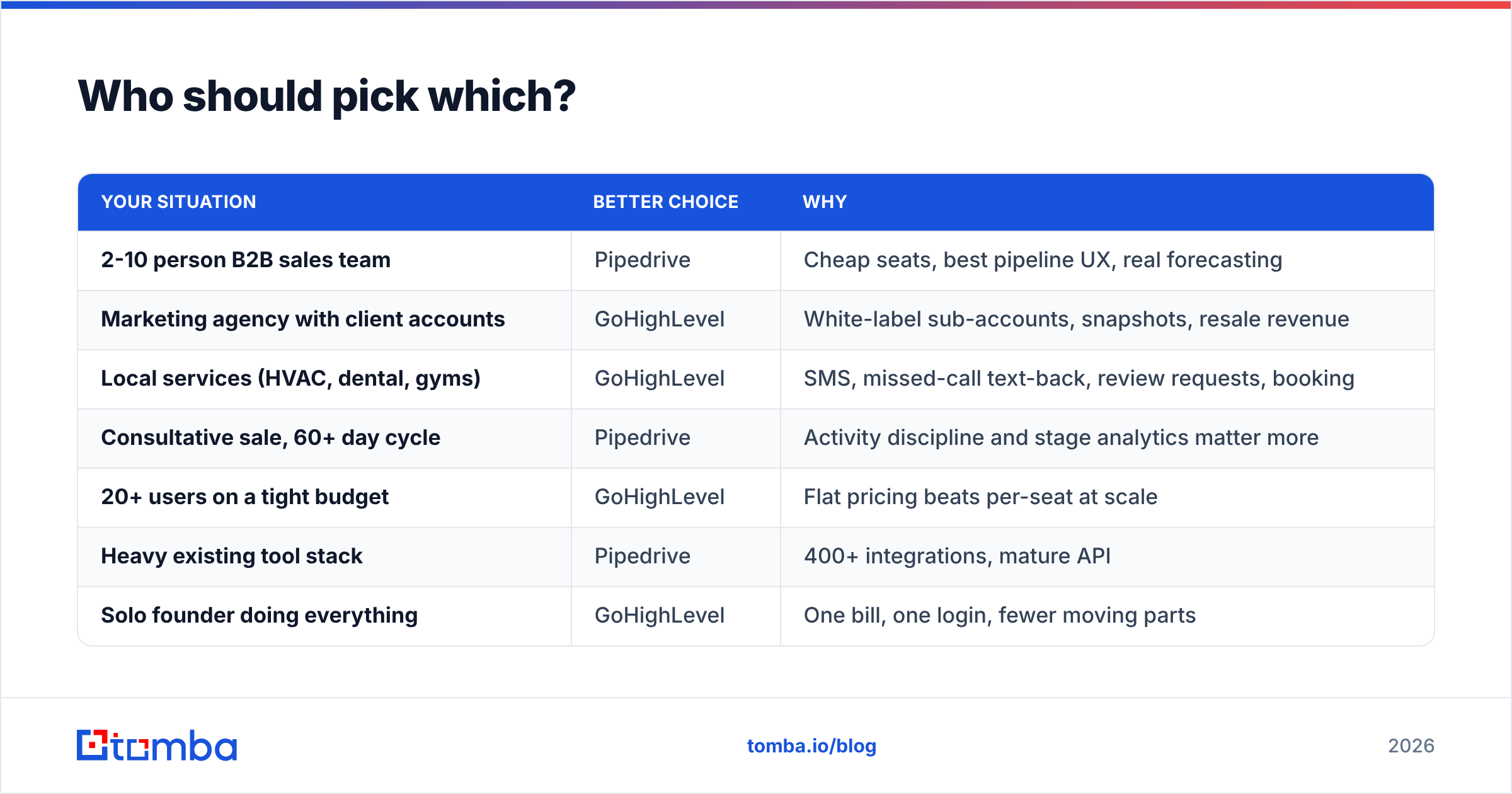
| Your situation | Better choice | Why |
|---|---|---|
| 2-10 person B2B sales team | Pipedrive | Cheap seats, best pipeline UX, real forecasting |
| Marketing agency with client accounts | GoHighLevel | White-label sub-accounts, snapshots, resale revenue |
| Local services (HVAC, dental, gyms) | GoHighLevel | SMS, missed-call text-back, review requests, booking |
| Consultative sale, 60+ day cycle | Pipedrive | Activity discipline and stage analytics matter more |
| 20+ users on a tight budget | GoHighLevel | Flat pricing beats per-seat at scale |
| Heavy existing tool stack | Pipedrive | 400+ integrations, mature API |
| Solo founder doing everything | GoHighLevel | One bill, one login, fewer moving parts |
| Team that needs board-grade reporting | Pipedrive | Weighted forecast, conversion reports out of the box |
A hybrid is more common than vendors admit. Agencies run GoHighLevel for client delivery and Pipedrive for their own new-business pipeline. Two subscriptions, and zero confusion about which system owns what.
What should you check before you commit?#
Before you sign either contract, run this GoHighLevel vs Pipedrive checklist:
- Export your current data first. Count how many records have a valid email, a valid phone, and a job title. That number, not the feature list, decides your month-one results.
- Run both 14-day trials with the same 50 real contacts. Demos hide the friction that shows up on real data.
- Price it at 18 months, not month one. Model headcount growth against per-seat and flat pricing.
- Test the exit. Ask each vendor how you get your data out. GoHighLevel exports are often partial across modules. Pipedrive exports cleanly.
- Check who owns automation. If nobody will build and maintain workflows, GoHighLevel's biggest edge is theoretical.
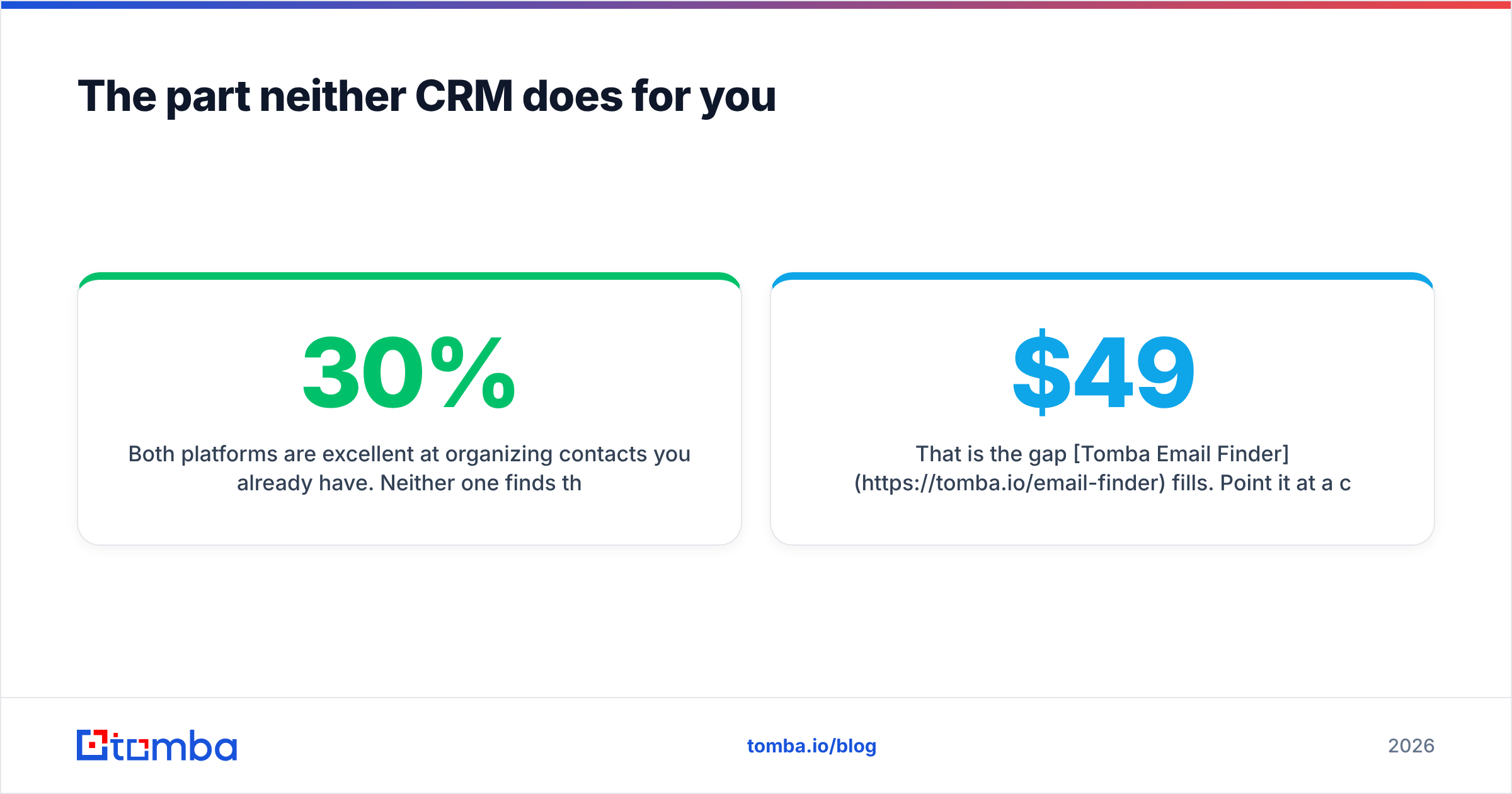
The part neither CRM does for you#
Both platforms organize the contacts you already have. Neither one finds them. You still need verified, current email addresses and direct phone numbers for the people you want to reach. CRM records also decay by roughly 25-30% a year as people change jobs.
That is the gap Tomba Email Finder fills. Point it at a company domain and get the people and their verified work emails. Then push clean records into GoHighLevel or Pipedrive by API, Zapier, or CSV. Verification runs before the record lands, so your CRM starts clean instead of getting cleaned later. The free tier gives you 25 searches a month. Paid plans start at $49/mo, with Growth at $99/mo and Pro at $249/mo — see Tomba pricing for the full breakdown.
Whichever way the GoHighLevel vs Pipedrive call goes, pick the CRM that matches your business model. Then feed it data worth storing.
Related guides#
Ready to find emails that actually work?
Join 150,000+ professionals who stopped guessing and started sending. Free credits on signup — no credit card required.
Get the Tomba newsletter
Practical outbound tactics and product updates — once every two weeks.
About the author