Good Email Closing Lines: 40 Sign-Offs That Get Replies
Your last sentence decides whether a prospect replies or archives. Here are 40 tested email closing lines, the four patterns behind them, and the closers that quietly kill your reply rate.
TL;DR
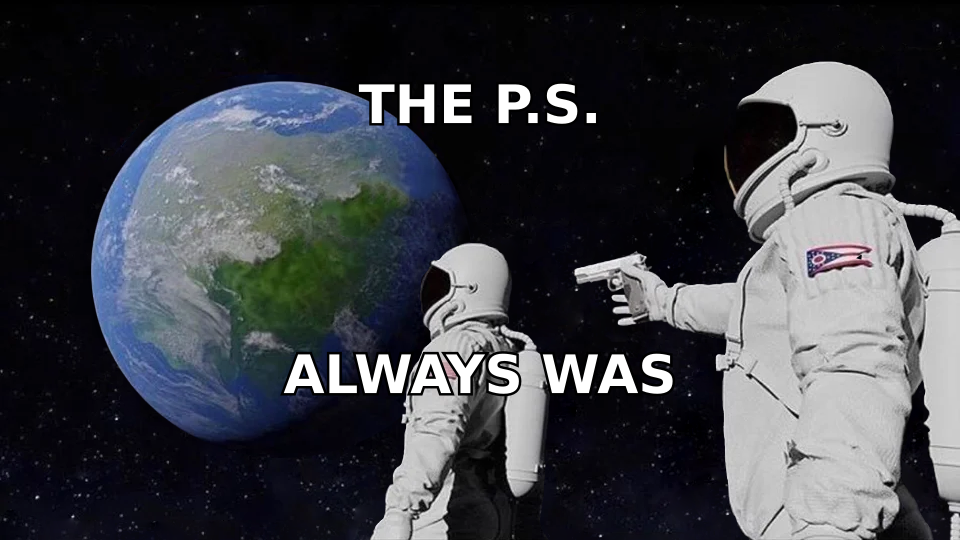
- The closing line is the only sentence in a cold email that has a job: make replying easier than ignoring. Everything before it is context.
- Interest-based closers ("Worth a look?") beat calendar-based closers ("Do you have 30 minutes Thursday?") in most first-touch scenarios, because the cost of answering is one word instead of one calendar slot.
- Four patterns cover almost every good email closing line: the single question, the low-commitment ask, the permission close, and the referral redirect.
- Sign-offs ("Best," "Cheers,") are not closing lines. They matter far less than people think — your last sentence does the work.
- Closing lines only convert if the email reaches a real inbox. A verified address and a clean sending domain are prerequisites, not afterthoughts.
What Counts as a Good Email Closing Line?#
A good email closing line is the final sentence before your sign-off that tells the reader exactly what to do next and makes that action feel cheap.
That is the whole definition. Not "memorable." Not "polite." Cheap. Every closing line has an implied price tag — the mental and calendar cost of complying with it. "Can we hop on a 30-minute call next Tuesday at 2pm?" costs the reader 30 minutes plus a scheduling decision plus the risk of a bad meeting. "Is this something your team owns, or should I ask someone else?" costs about four seconds.
Think of it like a shop counter. If you put a $200 item next to the register, most people walk past. Put a $2 item there and half of them pick it up. Your closing line is the impulse buy, not the flagship product. You are not selling the deal in the last sentence — you are selling the reply.
Three properties separate closers that work from closers that don't:
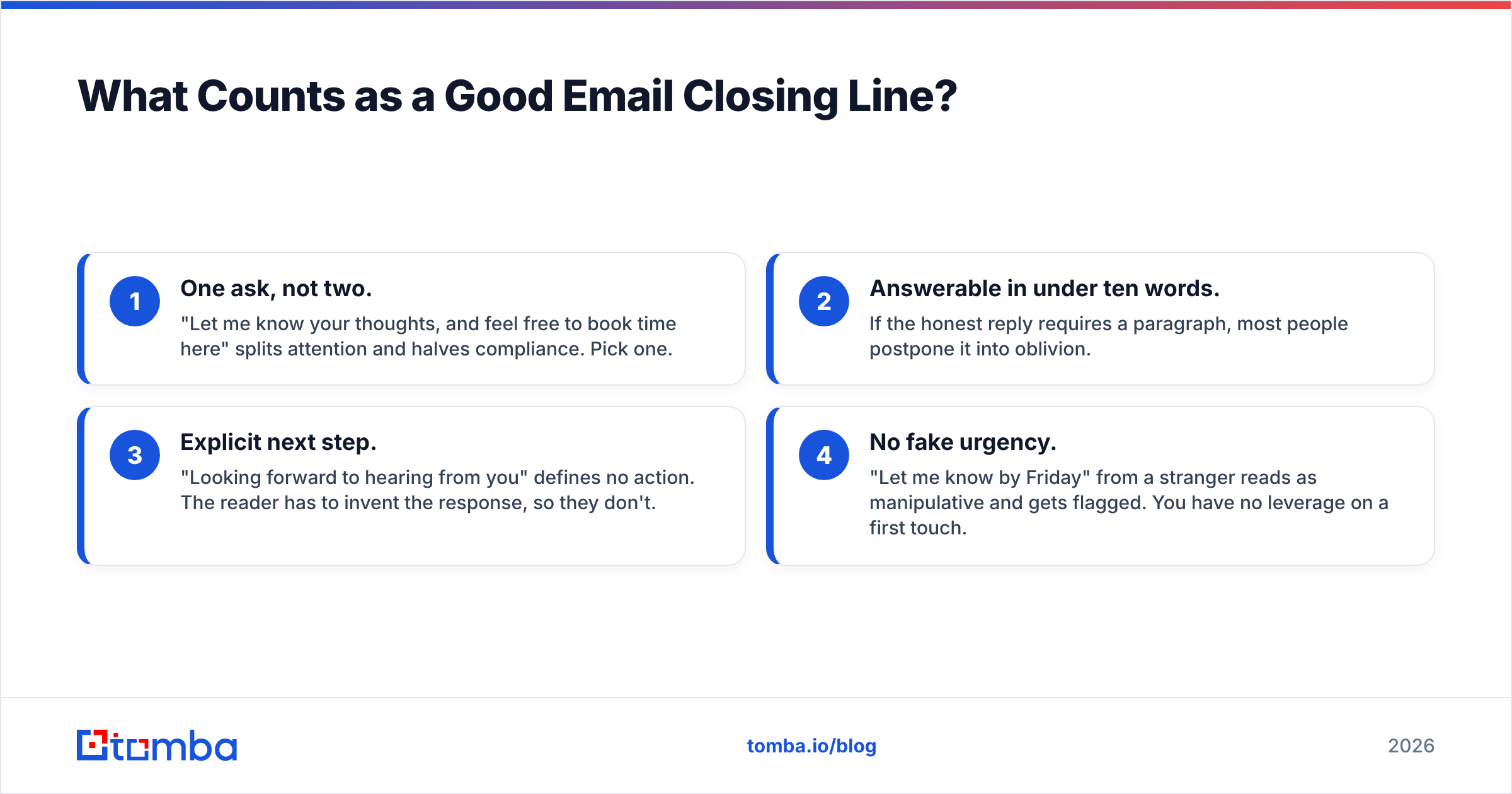
- One ask, not two. "Let me know your thoughts, and feel free to book time here" splits attention and halves compliance. Pick one.
- Answerable in under ten words. If the honest reply requires a paragraph, most people postpone it into oblivion.
- Explicit next step. "Looking forward to hearing from you" defines no action. The reader has to invent the response, so they don't.
- No fake urgency. "Let me know by Friday" from a stranger reads as manipulative and gets flagged. You have no leverage on a first touch.
Which Closing Line Patterns Actually Work?#
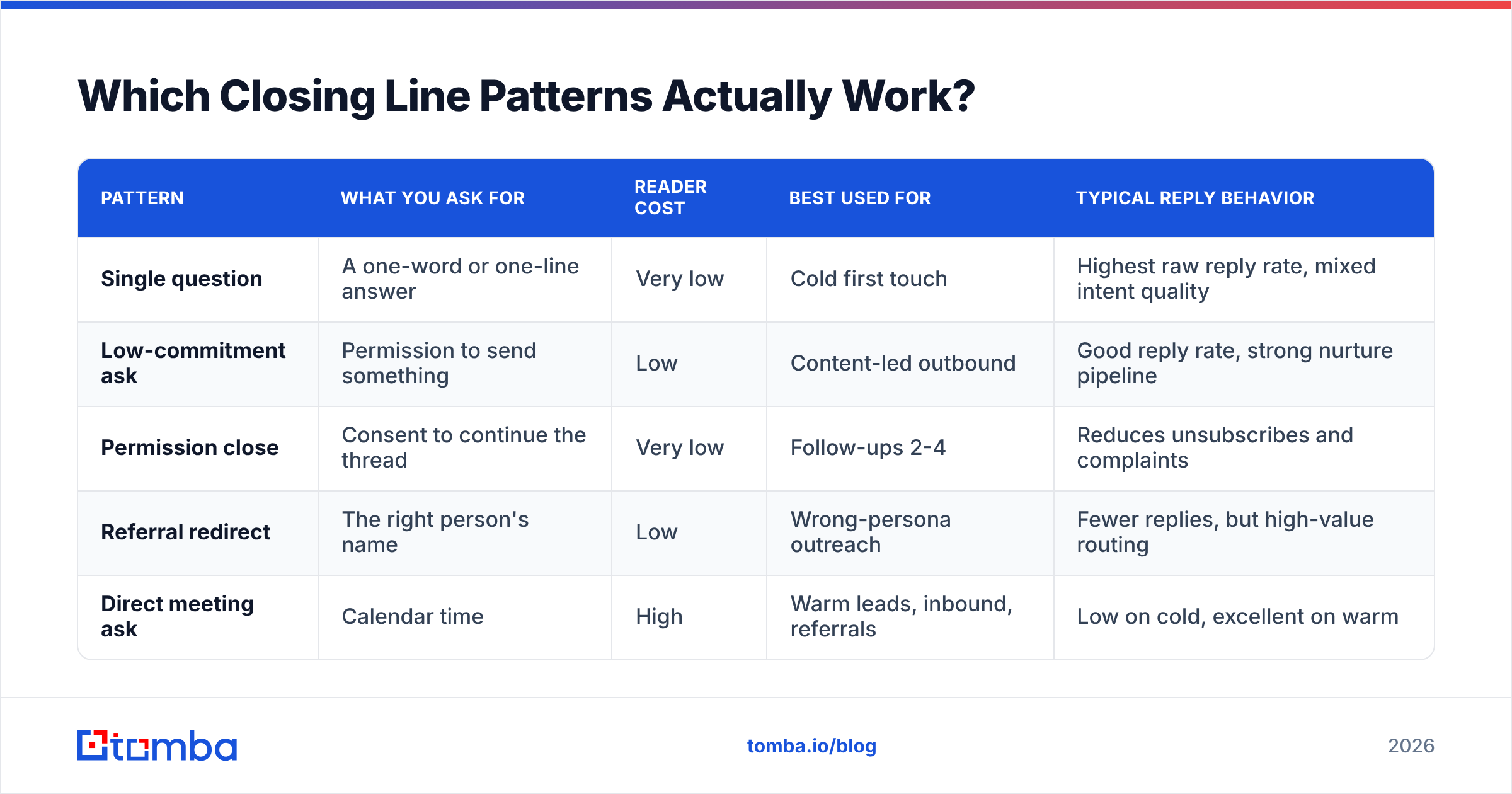
Almost every effective closer is a variation of four patterns. Learn the patterns and you can generate lines forever instead of copying a list.
| Pattern | What you ask for | Reader cost | Best used for | Typical reply behavior |
|---|---|---|---|---|
| Single question | A one-word or one-line answer | Very low | Cold first touch | Highest raw reply rate, mixed intent quality |
| Low-commitment ask | Permission to send something | Low | Content-led outbound | Good reply rate, strong nurture pipeline |
| Permission close | Consent to continue the thread | Very low | Follow-ups 2-4 | Reduces unsubscribes and complaints |
| Referral redirect | The right person's name | Low | Wrong-persona outreach | Fewer replies, but high-value routing |
| Direct meeting ask | Calendar time | High | Warm leads, inbound, referrals | Low on cold, excellent on warm |
1. The single question#
You ask one closed or narrow question tied to the problem you raised. The reply is short by design.
- "Is inbound routing still handled manually on your side?"
- "Worth a look, or is this already solved?"
- "Are you the right person for supplier onboarding?"
- "Does this land anywhere near a real priority for Q4?"
- "Still using a manual process for this, or did you move off it?"
- "Curious — did the migration ship, or is it still in flight?"
The mechanism is simple: questions create an open loop, and open loops are uncomfortable. A statement ("Happy to share more") closes the loop for the reader and lets them move on.
2. The low-commitment ask#
Instead of a meeting, ask permission to send a small artifact. The yes is cheap and it creates a second, warmer touch.
- "Want me to send the two-page breakdown?"
- "Should I send the teardown we did for a similar team?"
- "Happy to send the numbers — want them?"
- "Can I send a 90-second video walking through it?"
- "Want the benchmark data, or is that noise for you right now?"
This pattern works best when the artifact is genuinely specific. "Want our whitepaper?" is a $200 ask disguised as a $2 one, because everyone knows what happens after they download a whitepaper.
3. The permission close#
Best used on follow-ups. You ask whether to keep going, which paradoxically keeps the thread alive.
- "Should I keep this on your radar, or drop it?"
- "Want me to circle back after your fiscal year turns?"
- "Fair to assume this isn't a priority? I'll close the loop."
- "Last note from me unless you'd like me to follow up."
- "If timing is wrong, just say 'later' and I'll check back in Q1."
The "break-up" variant — "I'll assume this isn't a fit and stop reaching out" — still works, but it has been overused since roughly 2019. Use it once per sequence, never twice.
4. The referral redirect#
You are frequently emailing the wrong person. Make it easy for them to route you.
- "If this sits with someone else, who should I talk to?"
- "Wrong person? Point me to the right one and I'll stop bothering you."
- "Who owns deliverability over there these days?"
- "Should I be talking to your ops lead instead?"
Referral closers produce fewer total replies than single questions, but the replies carry an internal introduction, which converts far better downstream. HubSpot's sales research has long noted that internally referred outreach outperforms cold entry points by a wide margin — HubSpot's sales resources cover the mechanics in depth.
What Are 40 Good Email Closing Lines by Scenario?#
Here they are grouped by situation. Adapt the wording — verbatim copies of famous lines get pattern-matched by experienced buyers.
Cold outreach, first touch
- "Worth a conversation, or is this already handled?"
- "Is this on your roadmap, or nowhere near it?"
- "Open to a quick look at the numbers?"
- "Are you the right person for this, or should I ask elsewhere?"
- "Is manual data entry still eating your team's mornings?"
- "Should I send the one-pager, or is this a no?"
- "Any interest in seeing how the other three handled it?"
- "Is this a 'not now' or a 'never'?"
- "Reply with a '1' if you want the breakdown."
- "Bad timing, or bad idea? Either answer is useful."
Follow-up emails
- "Bumping this once in case it got buried."
- "Still worth exploring, or should I close the file?"
- "Should I follow up after the quarter closes?"
- "One-word reply is fine: yes, no, or later."
- "Happy to stop here if it's not relevant — just say the word."
- "Did this land with the right person?"
- "Want me to send the version with your numbers plugged in?"
- "Last one from me on this thread."
After a meeting or demo
- "Anything I should send before you take this internally?"
- "What's the next hurdle on your side?"
- "Should I loop in your security team directly?"
- "Want the pricing summary formatted for your finance lead?"
- "Who else needs to see this before it moves?"
- "Is next Thursday still realistic for a decision, or has that shifted?"
Networking and warm intros
- "Would love your read on this if you have a minute."
- "No ask here — just thought you'd find it interesting."
- "Happy to return the favor anytime."
- "If there's a better time to reconnect, name it."
- "Anyone in your network I should be talking to?"
- "Let me know if you'd rather I stop sending these."
Customer service and account management
- "Does that fully resolve it, or is something still off?"
- "Reply here and it comes straight back to me — no ticket queue."
- "Anything else broken while I have this open?"
- "I'll keep this ticket open for 48 hours in case something resurfaces."
Recruiting and hiring outreach
- "Not looking? Totally fine — want me to check back in six months?"
- "Worth 15 minutes, or is your current role too good to leave?"
- "Should I send the comp band up front?"
- "Know anyone who'd be a better fit than you?"
Link and partnership outreach
- "Want me to send the draft before you commit to anything?"
- "If this isn't a fit, who handles partnerships on your side?"
If you want machine help drafting variants of these, our cold email AI writer and subject line generator handle the top and bottom of the email respectively — though you should always rewrite the output in your own voice before sending.
Which Closing Lines Should You Stop Using?#
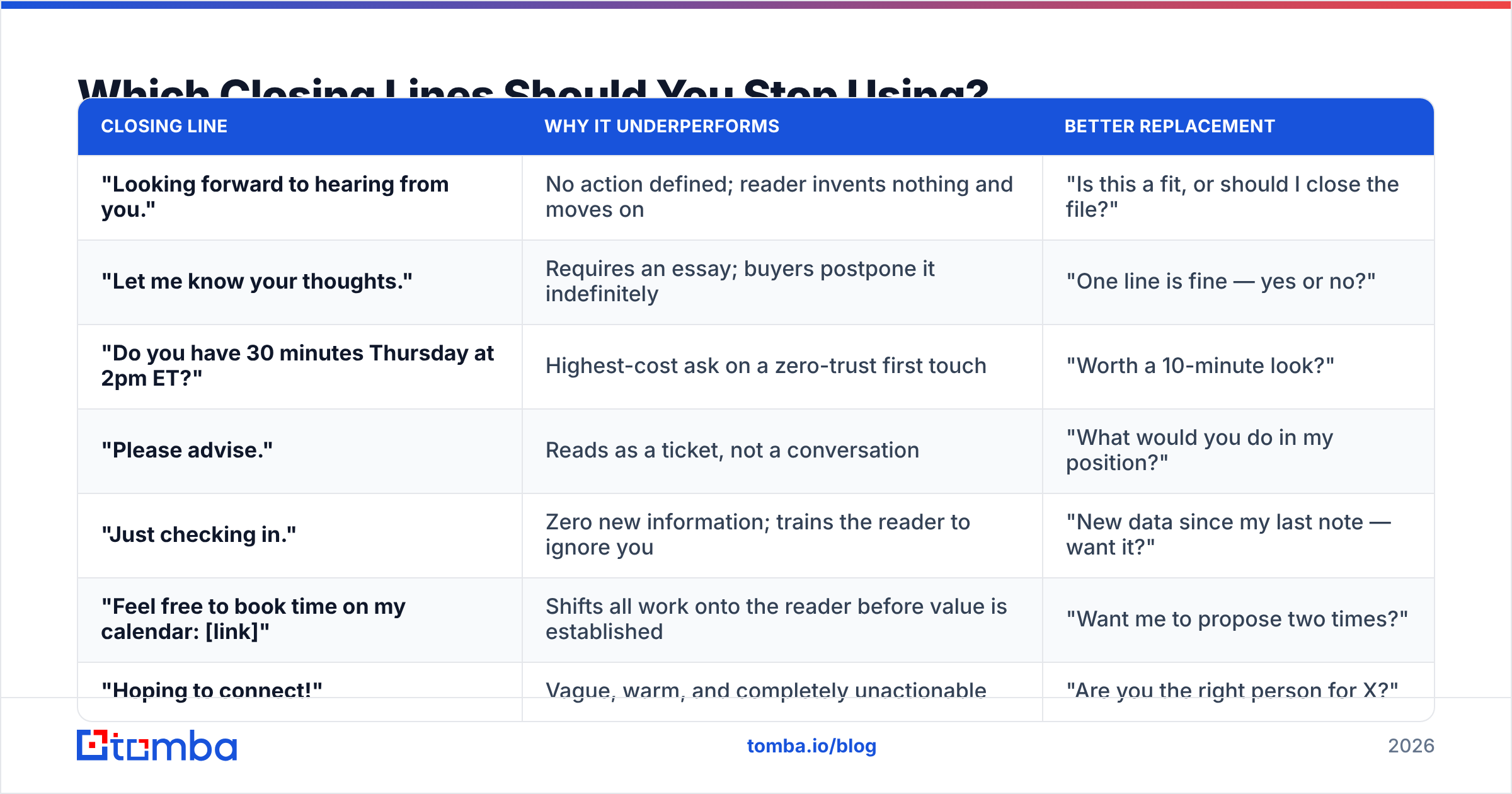
Some closers are actively negative — they either define no action, signal automation, or ask for too much too early.
| Closing line | Why it underperforms | Better replacement |
|---|---|---|
| "Looking forward to hearing from you." | No action defined; reader invents nothing and moves on | "Is this a fit, or should I close the file?" |
| "Let me know your thoughts." | Requires an essay; buyers postpone it indefinitely | "One line is fine — yes or no?" |
| "Do you have 30 minutes Thursday at 2pm ET?" | Highest-cost ask on a zero-trust first touch | "Worth a 10-minute look?" |
| "Please advise." | Reads as a ticket, not a conversation | "What would you do in my position?" |
| "Just checking in." | Zero new information; trains the reader to ignore you | "New data since my last note — want it?" |
| "Feel free to book time on my calendar: [link]" | Shifts all work onto the reader before value is established | "Want me to propose two times?" |
| "Hoping to connect!" | Vague, warm, and completely unactionable | "Are you the right person for X?" |
| "I'll follow up next week regardless." | Removes the reader's agency; increases spam complaints | "Should I check back next week?" |
The pattern behind all eight failures: they either cost too much or define no action at all. There is no middle ground where "Looking forward to hearing from you" suddenly performs.
Do Sign-Offs Like "Best" or "Cheers" Actually Matter?#
Barely — and far less than the volume of blog posts on the subject suggests.
The sign-off is the two words between your closing line and your name. It carries almost no persuasive weight compared to the sentence above it. What it can do is create friction if it clashes with context: "Cheers," to a general counsel at a bank reads slightly off; "Warm regards," to a startup founder reads stiff.
Practical guidance:
- "Best," — safe everywhere, invisible, never wrong. Default to it.
- "Thanks," — use only when you actually asked for something. Otherwise it reads pre-emptively grateful.
- "Cheers," — fine for startups, agencies, and most of the UK/Australia. Avoid in conservative enterprise verticals.
- "Regards," / "Kind regards," — standard in EMEA and enterprise; reads formal-but-fine in the US.
- "Talk soon," — only after a real conversation has happened. On a cold email it presumes a relationship you don't have.
- Avoid entirely: "Sincerely," (letter-formal, dated), "Yours truly," (same), "Sent from my iPhone" as a fake-casual signal (transparently manufactured), and any sign-off with an emoji on a first touch.
One thing that does matter more than the sign-off: your signature block. Keep it to name, title, company, and one link. Multi-image signatures with social icons, banners, and legal disclaimers add weight and image-to-text imbalance that some spam filters treat as a negative signal. If you need a clean one, the email signature generator produces lightweight HTML.
How Do You Test Which Closing Lines Work for You?#
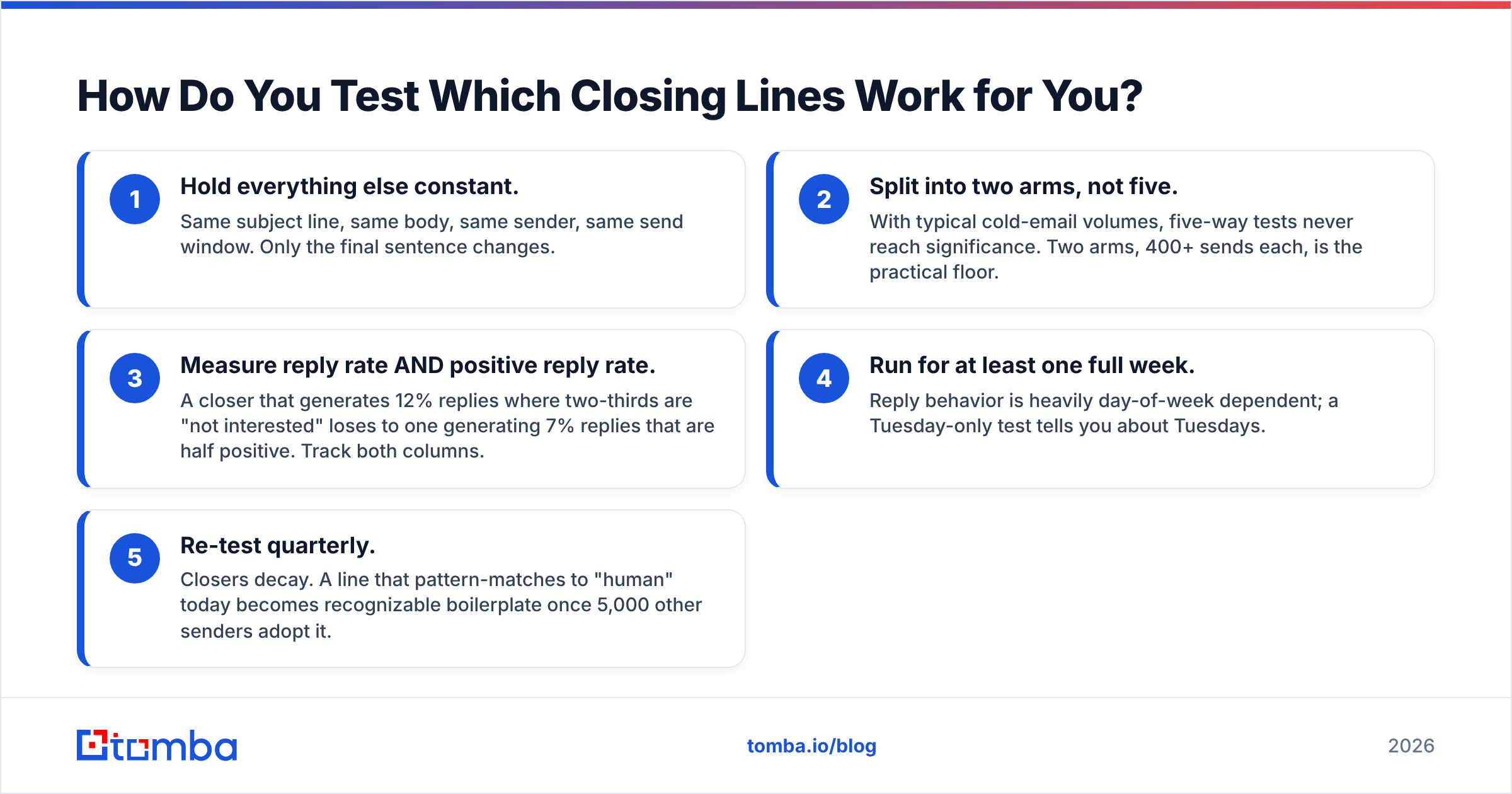
Test the closer in isolation, because it is the single highest-leverage variable you can change without rewriting the email.
A clean testing protocol:
- Hold everything else constant. Same subject line, same body, same sender, same send window. Only the final sentence changes.
- Split into two arms, not five. With typical cold-email volumes, five-way tests never reach significance. Two arms, 400+ sends each, is the practical floor.
- Measure reply rate AND positive reply rate. A closer that generates 12% replies where two-thirds are "not interested" loses to one generating 7% replies that are half positive. Track both columns.
- Run for at least one full week. Reply behavior is heavily day-of-week dependent; a Tuesday-only test tells you about Tuesdays.
- Re-test quarterly. Closers decay. A line that pattern-matches to "human" today becomes recognizable boilerplate once 5,000 other senders adopt it.
For benchmarking your results, G2's sales engagement category aggregates reported performance data across tools and can give you a rough sense of whether your reply rate is normal for your segment. Wikipedia's overview of A/B testing is a solid refresher on significance if your team is new to structured experiments.
One caution: attribution gets murky fast. If your closing-line test coincides with a domain reputation dip, you will misread a deliverability problem as a copy problem. Check your sender reputation before concluding that a closer failed.
Does Any of This Matter If Your Email Doesn't Land?#
No. This is the part most closing-line articles skip.
A perfectly engineered final sentence produces zero replies if the message hits a dead address, a spam trap, or a filtered folder. The sequence of dependencies runs: valid address → delivered → opened → read → closing line does its job. Optimizing step five while steps one and two leak is a waste of effort.
The two failure points worth auditing before you A/B test copy:
Bad addresses. Bounce rates above roughly 3-5% damage your domain reputation with major mailbox providers, which then suppresses delivery for the addresses that were valid. Guessed patterns like firstname.lastname@company.com are right often enough to feel productive and wrong often enough to be expensive. Running your list through an email verifier before a send is the cheapest insurance in outbound. Catch-all domains need their own handling — a catch-all verifier distinguishes "accepts everything" from "actually deliverable."
Wrong-person targeting. Half of all "my closing line doesn't work" complaints are actually "I emailed someone who has no authority over this problem." A referral-redirect closer patches this reactively, but sourcing the right contact from the start is better. Pulling verified contacts by role via domain search beats spraying a generic info@ address and hoping it forwards.
Once both are handled, the closing line becomes the variable that actually moves the number — which is exactly the position you want to be in.
What's the Fastest Way to Apply This?#
Pick one closer per sequence stage and stop improvising:
- Email 1: single question tied to the specific problem you named
- Email 2: low-commitment ask (offer the artifact)
- Email 3: referral redirect (find the right owner)
- Email 4: permission close (keep the door open, name a date)
That four-line architecture will outperform a randomly chosen closer on every touch, and it gives you a stable structure to test against.
Then fix the plumbing underneath it. Good closing lines are a multiplier on delivered, well-targeted email — and a multiplier applied to zero is still zero. If your list is built from guessed patterns or a scraped export you never validated, start there: the Tomba Email Finder sources verified professional addresses by name, domain, or company, with a free tier at 25 searches per month and paid plans starting at $49/mo on Tomba pricing. Get the address right, get the person right, and then let your last sentence do the one job it has.
Related guides#
Ready to find emails that actually work?
Join 150,000+ professionals who stopped guessing and started sending. Free credits on signup — no credit card required.
Get the Tomba newsletter
Practical outbound tactics and product updates — once every two weeks.
About the author