Google DMARC Requirements in 2026: The Complete Sender Guide
Google now enforces SPF, DKIM, DMARC, one-click unsubscribe and a 0.3% spam-rate ceiling. Here is exactly what each rule means, how it is measured, and how to pass it.
TL;DR
- Google requires SPF and DKIM for every bulk sender, a DMARC record on your From domain, and DMARC alignment on at least one of SPF or DKIM.
p=nonesatisfies the letter of the policy — it does not protect you. - The 0.3% spam-complaint ceiling in Google Postmaster Tools is the rule that actually gets people blocked. Stay under 0.1% as your working target.
- "Bulk sender" means roughly 5,000+ messages to Gmail addresses in any 24-hour window, counted per From domain — including subdomains you forgot about.
- One-click unsubscribe (RFC 8058:
List-UnsubscribeplusList-Unsubscribe-Post) is mandatory for marketing mail and must process within two days. - The fastest way to fail all of this is sending to unverified addresses. Bounce rate and complaint rate are downstream of list hygiene, not of your DNS.
What are Google's DMARC requirements, exactly?#
Google's bulk sender rules landed in February 2024 and have been tightened by enforcement — not by new text — ever since. The requirement itself is short: if you send to Gmail addresses at volume, the domain in your visible From header must publish a DMARC record in DNS, and the message must pass DMARC alignment.
That is three separate things, and people conflate them constantly:
- SPF exists and passes. A TXT record at your domain lists the IPs and services allowed to send on your behalf. The check runs against the envelope sender (Return-Path), not the From header.
- DKIM exists and passes. Your sending platform signs each message with a private key; the public key sits in DNS at
selector._domainkey.yourdomain.com. Google wants 1024-bit minimum, 2048-bit preferred. - DMARC exists and aligns. A TXT record at
_dmarc.yourdomain.com. Alignment means the domain that passed SPF or DKIM matches the domain in the From header. One of the two is enough.
Miss any of those and Gmail either rejects with a 5.7.26 error or routes you to spam, depending on volume and history.

Who counts as a "bulk sender" under Google's rules?#
Google's threshold is approximately 5,000 messages to Gmail recipients in a 24-hour period. Three details trip people up:
- It is per domain, not per account. All your Google Workspace users, your marketing platform, your transactional provider and your cold outreach sequencer roll up into one count if they share a From domain.
- Once bulk, always bulk. Cross the threshold once and Google treats you as a bulk sender permanently. Dropping back to 2,000/day does not reset the flag.
- Subdomains inherit. A DMARC record on the organizational domain applies to subdomains unless you override it with the
sp=tag. This is what breaks companies who send marketing frommail.company.comand never audited it.
Even at 500 messages a day the same signals are evaluated — Google is simply more forgiving. Treating the bulk rules as a baseline rather than a threshold is the correct posture.
What does each Google requirement actually check?#
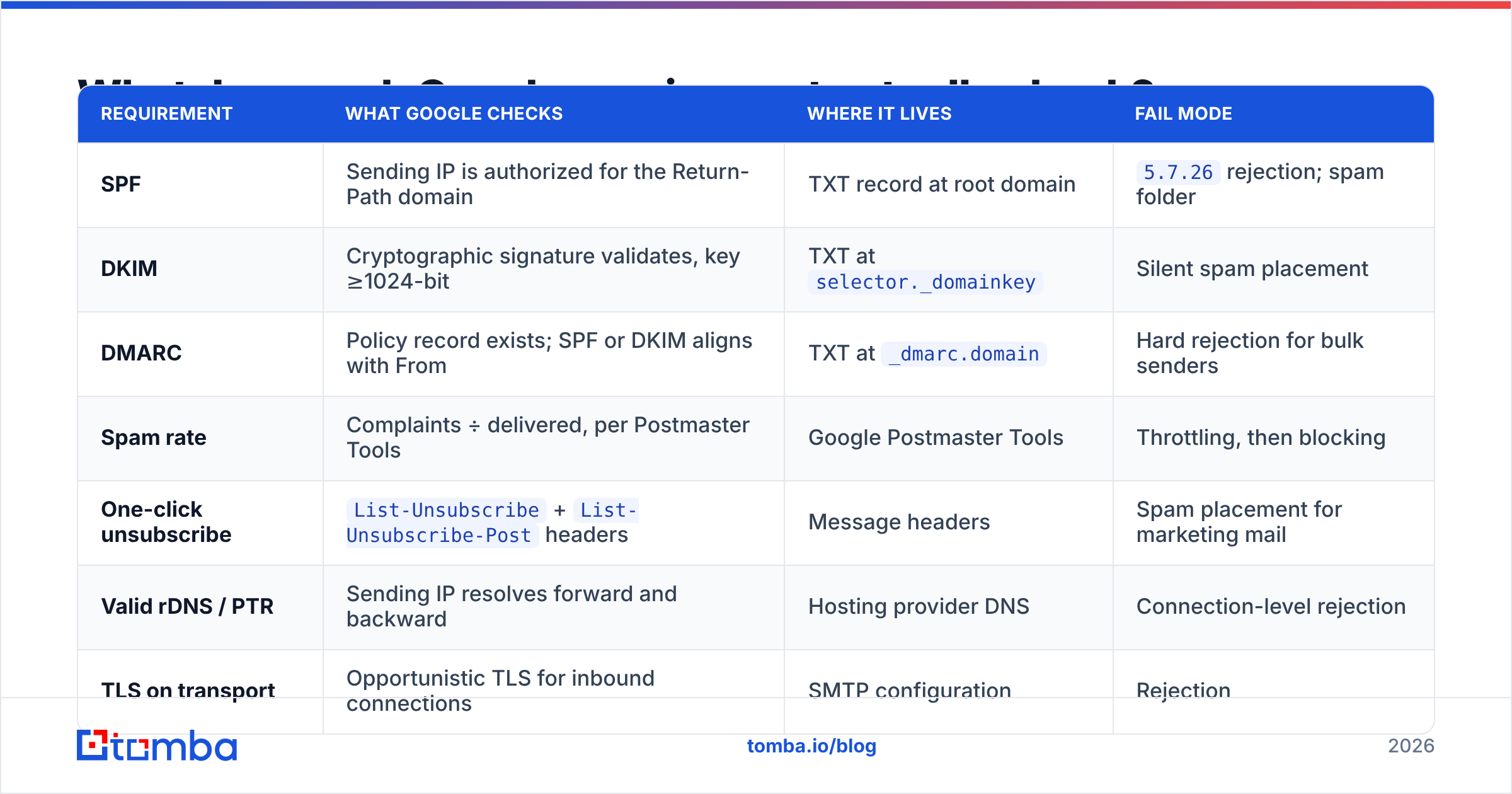
| Requirement | What Google checks | Where it lives | Fail mode |
|---|---|---|---|
| SPF | Sending IP is authorized for the Return-Path domain | TXT record at root domain | 5.7.26 rejection; spam folder |
| DKIM | Cryptographic signature validates, key ≥1024-bit | TXT at selector._domainkey |
Silent spam placement |
| DMARC | Policy record exists; SPF or DKIM aligns with From | TXT at _dmarc.domain |
Hard rejection for bulk senders |
| Spam rate | Complaints ÷ delivered, per Postmaster Tools | Google Postmaster Tools | Throttling, then blocking |
| One-click unsubscribe | List-Unsubscribe + List-Unsubscribe-Post headers |
Message headers | Spam placement for marketing mail |
| Valid rDNS / PTR | Sending IP resolves forward and backward | Hosting provider DNS | Connection-level rejection |
| TLS on transport | Opportunistic TLS for inbound connections | SMTP configuration | Rejection |
| Message format | Valid RFC 5322 formatting, no From spoofing of gmail.com | Composing system | Rejection |
The two rows people underestimate are spam rate and one-click unsubscribe. DNS is a one-afternoon fix. Complaint rate is an ongoing operational discipline.
What DMARC policy should you actually publish?#
Google requires a DMARC record. It does not require an enforcing one. That gap is where most domains sit, and it is a bad place to stay.
Start here on day one:
v=DMARC1; p=none; rua=mailto:dmarc@yourdomain.com; fo=1p=none tells receivers to take no action but still send you aggregate reports. Those reports are the point — they tell you every service sending as your domain, including the ones nobody documented. Read them for two to four weeks.
Then move to quarantine with a partial rollout:
v=DMARC1; p=quarantine; pct=25; rua=mailto:dmarc@yourdomain.comRaise pct to 50, then 100 as reports stay clean. Finally:
v=DMARC1; p=reject; rua=mailto:dmarc@yourdomain.com; sp=reject; adkim=s; aspf=sThe four DMARC tags worth understanding:
p=— the policy for the organizational domain.none,quarantine, orreject.sp=— the subdomain policy. Omit it and subdomains inheritp=. Set it explicitly so a forgotten marketing subdomain does not become a spoofing vector.adkim=/aspf=— alignment strictness.r(relaxed, the default) allows subdomain matches;s(strict) requires an exact match. Start relaxed.pct=— the percentage of failing mail the policy applies to. Your rollout dial. Note thatpctis ignored underp=none.
Skipping straight to p=reject without reading reports first is the single most common way to silently kill your own invoice emails.
How is the 0.3% spam rate measured, and why does 0.1% matter?#
Google measures spam rate as user-reported complaints divided by messages delivered to the inbox — not messages sent. The denominator excludes anything that already landed in spam, which is why the number can spike as your placement degrades. It is a feedback loop, not a static gauge.
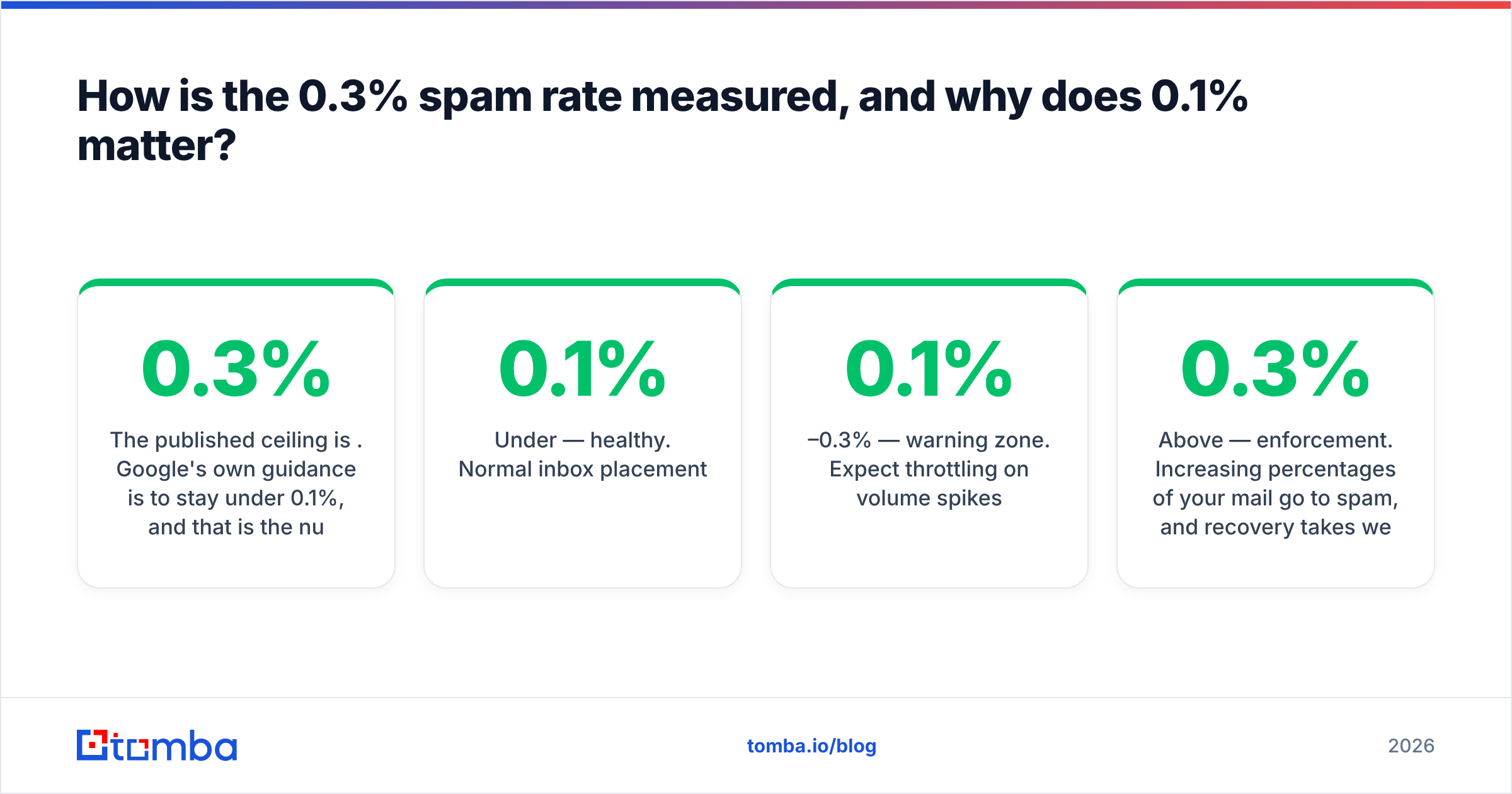
The published ceiling is 0.3%. Google's own guidance is to stay under 0.1%, and that is the number to run your program against. In practice:
- Under 0.1% — healthy. Normal inbox placement.
- 0.1%–0.3% — warning zone. Expect throttling on volume spikes.
- Above 0.3% — enforcement. Increasing percentages of your mail go to spam, and recovery takes weeks of clean sending, not hours.
You cannot see this number without Google Postmaster Tools. Verify your domain there before you touch anything else — otherwise you are tuning blind.
The mechanical levers that move complaint rate, in order of impact: send only to people who have a reason to hear from you, make unsubscribing trivial, keep frequency predictable, and remove invalid addresses before they bounce. Bounces are not complaints, but high bounce rates and high complaint rates come from the same root cause — a list nobody cleaned.
How do Google's rules compare to Yahoo and Microsoft?#
The three major consumer inbox providers converged, but not identically.
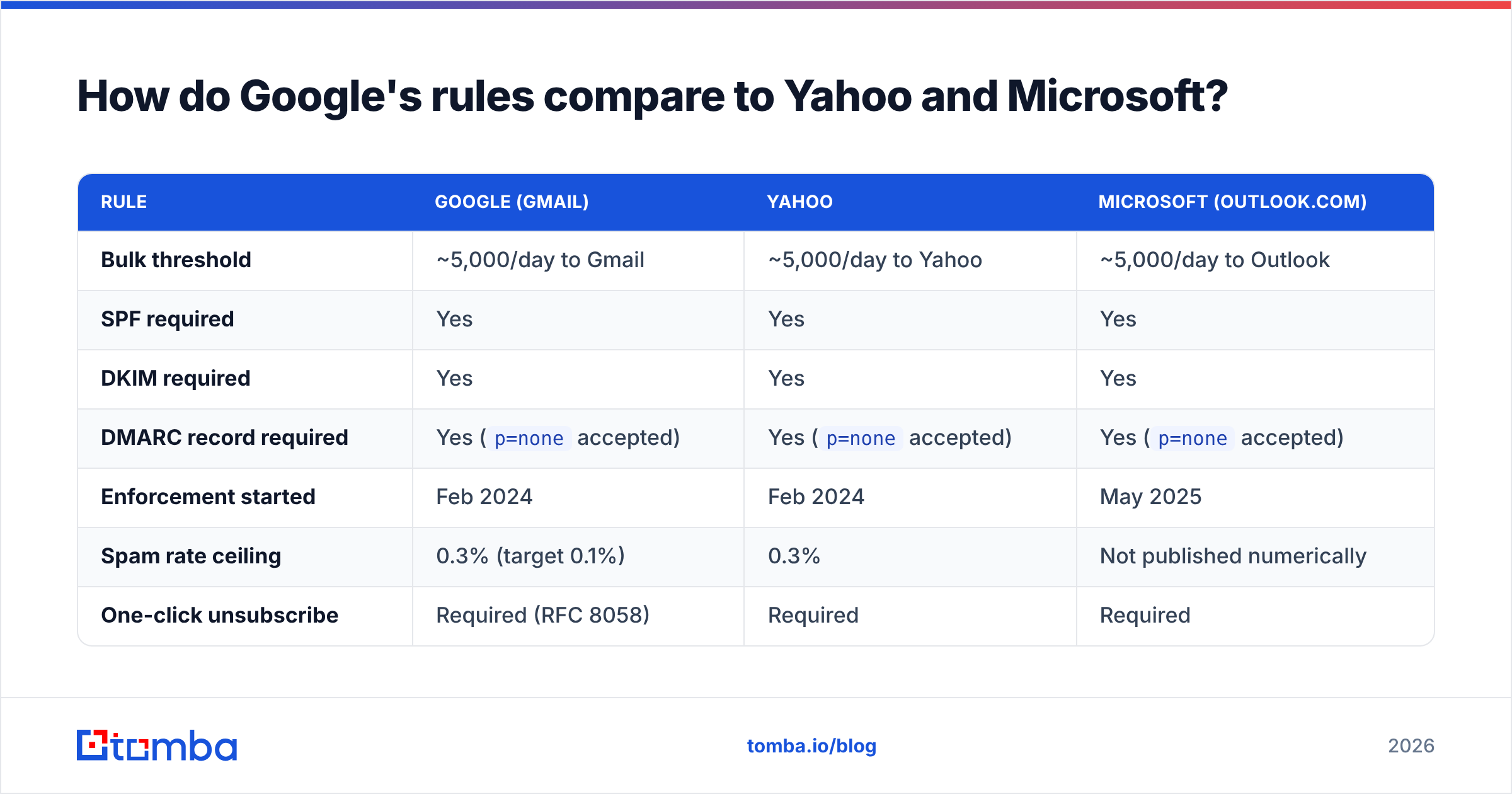
| Rule | Google (Gmail) | Yahoo | Microsoft (Outlook.com) |
|---|---|---|---|
| Bulk threshold | ~5,000/day to Gmail | ~5,000/day to Yahoo | ~5,000/day to Outlook |
| SPF required | Yes | Yes | Yes |
| DKIM required | Yes | Yes | Yes |
| DMARC record required | Yes (p=none accepted) |
Yes (p=none accepted) |
Yes (p=none accepted) |
| Enforcement started | Feb 2024 | Feb 2024 | May 2025 |
| Spam rate ceiling | 0.3% (target 0.1%) | 0.3% | Not published numerically |
| One-click unsubscribe | Required (RFC 8058) | Required | Required |
| Public reputation dashboard | Postmaster Tools | Limited | SNDS / JMRP |
Practical read: build to Google's spec and you clear all three. Google is the strictest on measurement and the most transparent about it, which makes Postmaster Tools your canonical scoreboard even for non-Gmail traffic.

What breaks most often in real setups?#
Six failure patterns account for the overwhelming majority of 5.7.26 rejections:
- Multiple SPF records. Only one
v=spf1TXT record per domain is valid. Two records is a permanent error, not a merge. Consolidate into one. - Exceeding 10 SPF DNS lookups. Every
include:costs a lookup, and nested includes count. Marketing platform plus CRM plus helpdesk plus ESP will blow past 10. Flatten or drop unused includes. - DKIM configured but not aligned. Your ESP signs with
d=esp-provider.cominstead of your domain. SPF passes, DKIM passes, DMARC fails — because neither aligns with your From header. Configure a custom signing domain. - Missing
sp=on the DMARC record. Subdomains silently inherit a policy nobody intended, or fall outside coverage entirely. List-UnsubscribewithoutList-Unsubscribe-Post. RFC 8058 one-click needs both headers plus an endpoint that accepts a POST. Amailto:alone does not satisfy it.- Sending to addresses that were never verified. Bounces spike, reputation drops, and no DNS record saves you. Run every list through an email verifier before the first send.
Cloudflare maintains a solid technical breakdown of how DMARC works if you want the protocol-level detail behind these failures.
How do you get compliant in one working session?#
A realistic sequence, roughly two hours of work plus a waiting period:
Step 1 — Inventory your senders. List every system that sends mail as your domain: Workspace, ESP, CRM, billing, support desk, outbound sequencer, product notifications. You cannot authorize what you have not enumerated.
Step 2 — Publish or fix SPF. One record, under 10 lookups, ending in ~all (softfail) while you validate, then -all. Verify with an SPF checker before moving on.
Step 3 — Enable DKIM everywhere, with your domain in d=. Every platform in your inventory needs its own selector. 2048-bit keys where the provider supports them.
Step 4 — Publish p=none with a rua= address. Point it at a mailbox or a report parser. Wait two to four weeks and read what arrives.
Step 5 — Add one-click unsubscribe to all marketing streams. Both headers, a working POST endpoint, and processing within two days. Transactional mail is exempt but adding it costs nothing.
Step 6 — Verify in Postmaster Tools. Confirm the domain, then watch spam rate and domain reputation daily for the first month.
Step 7 — Clean the list, then escalate the policy. Remove invalid and risky addresses first, so your reputation is stable before you tighten to quarantine and then reject.
The ordering matters. Escalating to p=reject before step 1 is complete is how legitimate mail from a forgotten subsystem starts disappearing.
Where does list quality fit into DMARC compliance?#
Directly in the middle of it. DMARC, SPF and DKIM prove who sent the message. They say nothing about whether the recipient wanted it, and Gmail's filtering weighs engagement far more heavily than authentication once authentication passes.
A perfectly authenticated domain sending to a scraped list will still get filtered. The reverse — imperfect DNS but genuinely wanted mail — often lands fine right up until the bulk threshold. Authentication is the entry ticket; reputation is the actual game.
Concretely, that means:
- Verify before you send. Invalid addresses drive hard bounces, which correlate with spam placement. Catch-all domains need catch-all verification rather than a standard SMTP check, because a standard check will accept everything.
- Source addresses deliberately. Pattern-guessed addresses bounce at multiples of confirmed ones. Using a real email finder with source attribution beats a permutation generator every time.
- Segment by engagement. Suppress recipients who have not opened in 180 days. Their non-engagement is a negative signal, and their complaint risk is disproportionately high.
- Warm new domains and IPs. Ramp volume over two to four weeks. A cold domain sending 5,000 messages on day one looks exactly like a spammer, authenticated or not.
Google's own bulk sender guidelines are worth reading in full — they are more specific than most third-party summaries, and they change.
Do these rules apply to cold outbound?#
Yes, and more strictly in practice. Cold email is the highest-complaint category of legitimate B2B mail, which means the 0.3% ceiling binds far earlier than it does for opt-in newsletters.
If you run outbound sequences:
- Authenticate every sending domain and subdomain independently.
- Keep per-domain volume low — 30 to 50 messages a day per mailbox is a common working ceiling.
- Verify every address before it enters a sequence, not after the bounce report.
- Honor unsubscribes immediately, even though transactional exemptions might technically apply.
- Monitor each sending domain separately in Postmaster Tools. Aggregate numbers hide the one domain that is burning.
The teams that survive Google's enforcement are not the ones with cleverest DNS. They are the ones whose lists are accurate and whose recipients do not hit the spam button.
Start with a list that will not sink your reputation#
Every DMARC record in the world will not save a domain sending to addresses that do not exist. Get the authentication right — then get the data right.
Tomba's Email Finder returns verified professional addresses with source attribution and a confidence score, so bounces stay low and your complaint rate stays under Google's ceiling. The free tier covers 25 searches a month; paid plans start at $49/mo on Starter, $99/mo on Growth, and $249/mo on Pro — see Tomba pricing for the full breakdown. Verify a list before your next send and watch what happens to your Postmaster Tools reputation graph.
Related guides#
Ready to find emails that actually work?
Join 150,000+ professionals who stopped guessing and started sending. Free credits on signup — no credit card required.
Get the Tomba newsletter
Practical outbound tactics and product updates — once every two weeks.
About the author