Google Dorks Email Search: The 2026 Prospecting Guide
Google dorks still surface emails no database has — if you know the operators. Here are the exact search strings that work in 2026, where they break, and when to stop dorking and use an API.
TL;DR
- Google dorks are advanced search operators (
site:,filetype:,intext:,inurl:) that force Google to return pages matching exact patterns — including pages that leak email addresses. - They still work in 2026, but Google's rate limiting is aggressive: expect a CAPTCHA after roughly 30–80 rapid queries from one IP, and no reliable way to paginate past ~300 results.
- Dorks are best for discovery (finding the format a company uses, finding a leaked staff directory PDF) and terrible for scale (building a 5,000-contact list).
- Anything you pull from a dork is unverified by definition. Run it through an email verifier before it touches a sending tool, or you will burn your domain.
- The honest workflow: dork to learn the pattern and find edge-case contacts, then use an email finder API for volume.
What is a Google dorks email search?#
A Google dork is a search query built from Google's advanced operators instead of plain keywords. Think of it like the difference between wandering a library asking "do you have anything about marketing?" versus handing the librarian a call number. Plain search asks Google to guess what you mean. A dork tells it exactly which shelf, which shape of document, and which words must appear on the page.
For email search specifically, you're exploiting a simple fact: a huge amount of contact data sits in public HTML that nobody thinks of as a database. Conference speaker pages. University staff directories. Government contractor PDFs. Press release boilerplate. GitHub commit metadata. Old WHOIS caches. None of that is behind a login, and Google has indexed all of it.
The operators that matter for contact discovery:
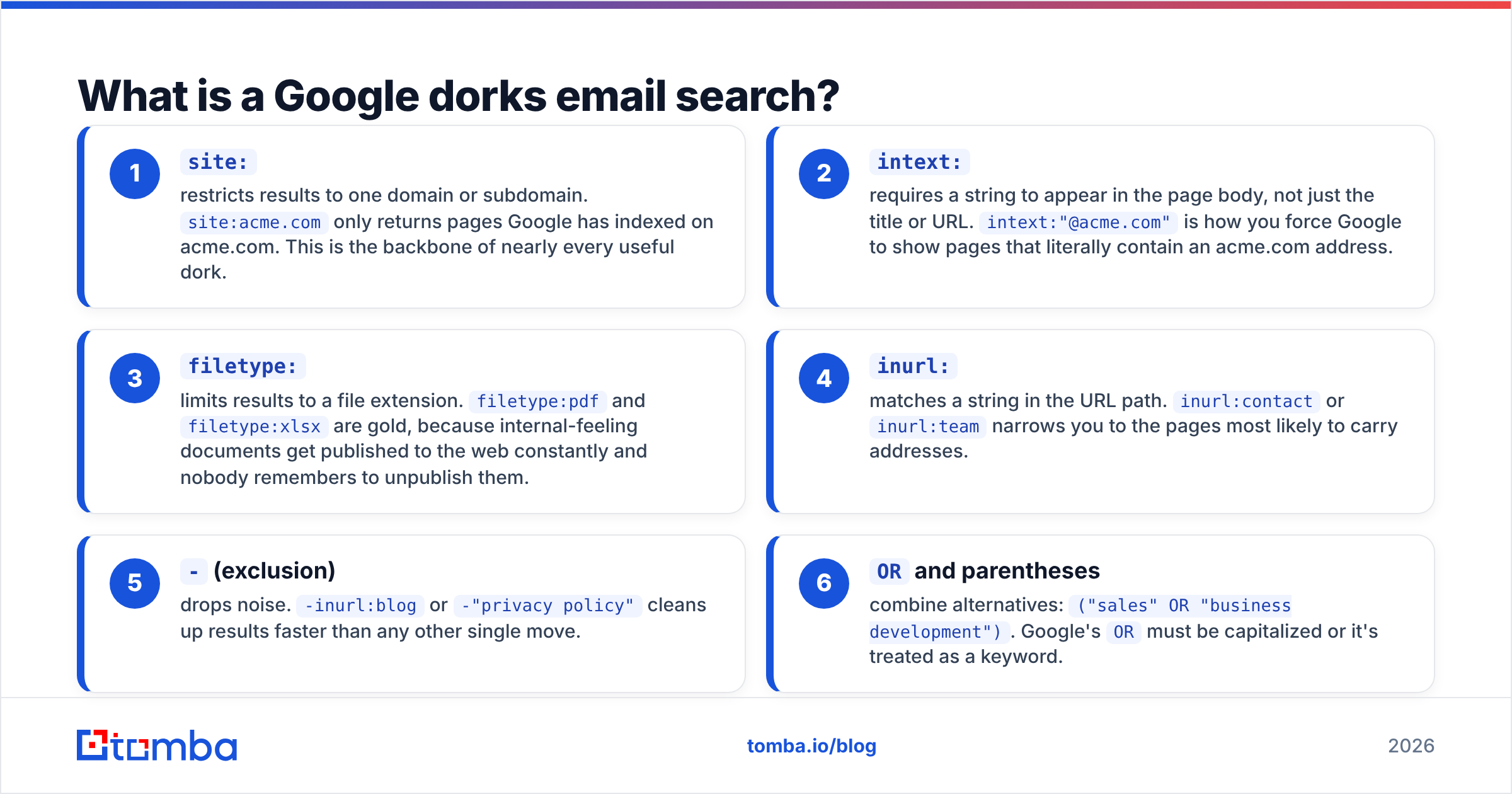
site:— restricts results to one domain or subdomain.site:acme.comonly returns pages Google has indexed on acme.com. This is the backbone of nearly every useful dork.intext:— requires a string to appear in the page body, not just the title or URL.intext:"@acme.com"is how you force Google to show pages that literally contain an acme.com address.filetype:— limits results to a file extension.filetype:pdfandfiletype:xlsxare gold, because internal-feeling documents get published to the web constantly and nobody remembers to unpublish them.inurl:— matches a string in the URL path.inurl:contactorinurl:teamnarrows you to the pages most likely to carry addresses.-(exclusion) — drops noise.-inurl:blogor-"privacy policy"cleans up results faster than any other single move.ORand parentheses — combine alternatives:("sales" OR "business development"). Google'sORmust be capitalized or it's treated as a keyword.
Stack those and you get queries that behave less like search and more like a crude query language over the open web.
Which google dorks email search strings actually work in 2026?#
Here are the patterns that still return usable results. Swap acme.com and Acme for your target.
Find any address on a domain
site:acme.com intext:"@acme.com"Find addresses without touching the site itself — often better, because the leaks live elsewhere:
"@acme.com" -site:acme.comHunt documents
site:acme.com filetype:pdf intext:"@acme.com"
"Acme" filetype:xlsx intext:"@acme.com"
filetype:csv intext:"@acme.com"
Target a role rather than a person
"@acme.com" ("VP of Sales" OR "Head of Growth" OR "CRO")Target a person whose format you're guessing
"Jane Doe" "@acme.com"
"Jane Doe" acme.com email -linkedin.com
Mine adjacent platforms
site:github.com "@acme.com"
site:docs.google.com intext:"@acme.com"
site:scholar.google.com "@acme.edu"
site:*.gov filetype:pdf intext:"@acme.com"
Break obfuscation — plenty of sites write addresses as jane [at] acme [dot] com to dodge scrapers, and Google indexes that literal text:
site:acme.com ("at acme dot com" OR "[at] acme" OR "(at) acme")Wait — that's not right. Use the placeholder:
The single highest-value use isn't finding one address. It's finding one confirmed address so you can infer the company's format. If site:acme.com intext:"@acme.com" surfaces j.doe@acme.com in a press release footer, you now know the pattern is first-initial.last, and every other name on the org chart becomes derivable. A company email pattern checker does that inference for you, but the dork is how you get the seed when the domain is obscure enough that no database has it.
Is a google dorks email search better than an email finder tool?#
No — but it's better at a specific job, and worse at almost everything else. The comparison that matters:
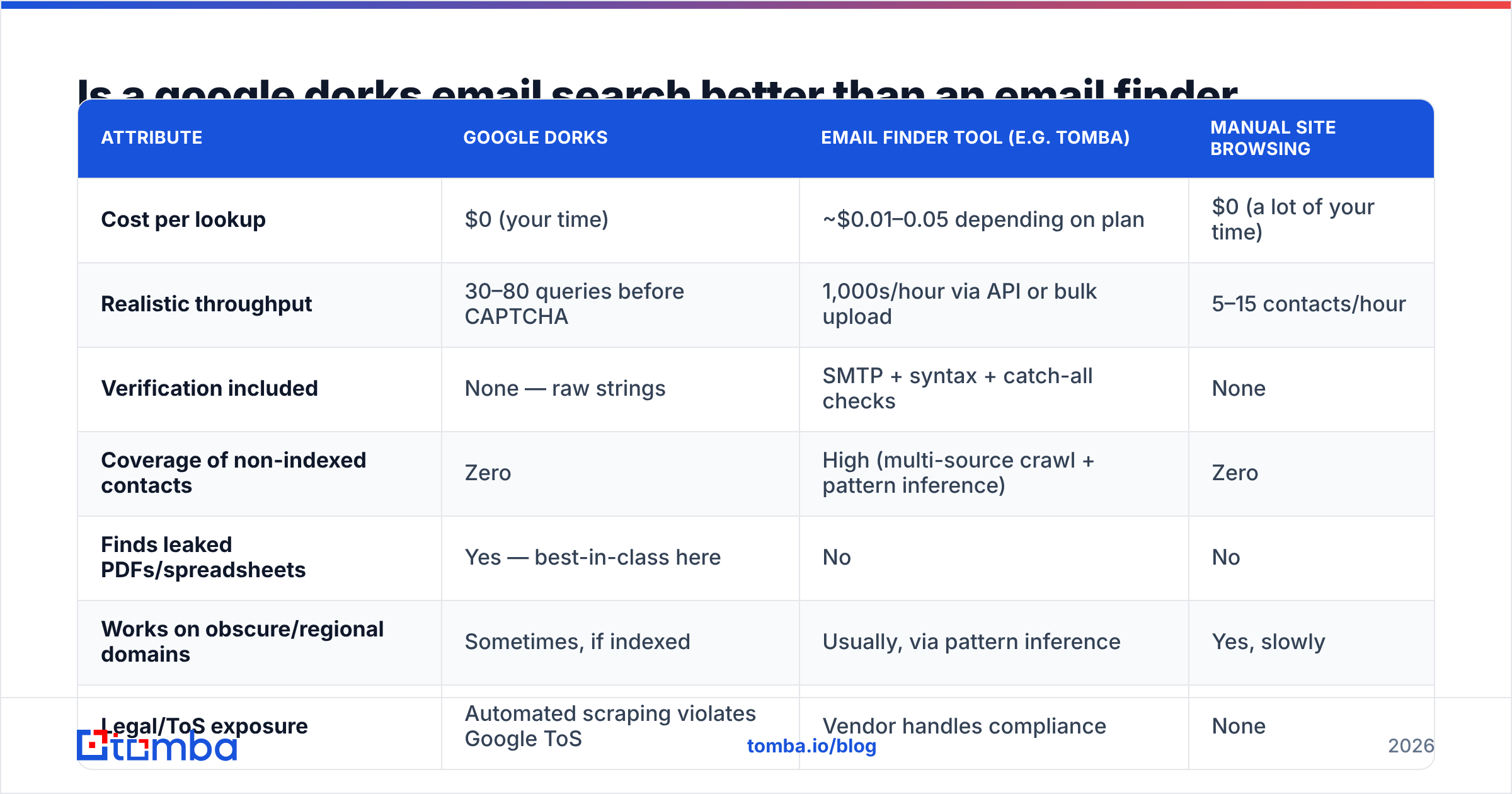
| Attribute | Google dorks | Email finder tool (e.g. Tomba) | Manual site browsing |
|---|---|---|---|
| Cost per lookup | $0 (your time) | ~$0.01–0.05 depending on plan | $0 (a lot of your time) |
| Realistic throughput | 30–80 queries before CAPTCHA | 1,000s/hour via API or bulk upload | 5–15 contacts/hour |
| Verification included | None — raw strings | SMTP + syntax + catch-all checks | None |
| Coverage of non-indexed contacts | Zero | High (multi-source crawl + pattern inference) | Zero |
| Finds leaked PDFs/spreadsheets | Yes — best-in-class here | No | No |
| Works on obscure/regional domains | Sometimes, if indexed | Usually, via pattern inference | Yes, slowly |
| Legal/ToS exposure | Automated scraping violates Google ToS | Vendor handles compliance | None |
| Output format | Copy-paste from SERP | CSV, API JSON, CRM push | Manual notes |
| Repeatable next quarter | No — index shifts | Yes | No |
Read that table honestly and the split is obvious. Dorks win on long-tail and leaked documents — the family-run manufacturer in Bavaria whose only web presence is a PDF price list, the academic whose address appears in a conference program and nowhere else. Purpose-built tools win on volume, verification, and repeatability.
The failure mode I see most often is a founder who spends a Saturday building a 200-line dork spreadsheet, extracts 340 addresses, sends to all of them, and gets a 22% bounce rate. That single campaign puts their domain reputation in a hole that takes six weeks of warmup to climb out of. The dorks weren't wrong. Skipping verification was.

How do you avoid getting blocked and burned?#
Three separate problems: Google blocking you, your data being wrong, and your domain paying for it.
Google's rate limits. Google has never published exact thresholds, and they shift. Practical guidance from people who do this daily:
- Space queries 8–15 seconds apart if you're doing them by hand. Faster than that reads as automation.
- Don't run dorks through a VPN exit node shared with thousands of other users — you inherit their reputation and hit CAPTCHAs immediately.
- Google caps you around 300 results per query regardless of the reported hit count. If a dork claims 12,000 results, you still only get ~30 pages. Narrow the query instead of paginating.
- Automating dorks with a headless browser violates Google's Terms of Service. If you need programmatic access, use a paid SERP API or a licensed data provider — not a scraper you wrote on a Sunday.
- Bing, DuckDuckGo, and Yandex support overlapping operator sets with different indexes. When Google returns nothing for a European domain, Bing frequently does.
Data quality. Everything a dork returns is a string that looks like an email. It may be:
- A role address (
info@,sales@) that routes to a shared inbox nobody reads - An employee who left in 2021
- A honeypot address planted specifically to catch scrapers — these exist, and hitting one gets you listed on Spamhaus faster than anything else
- A typo in the source document
- A catch-all domain that accepts everything and bounces nothing, which makes standard verification useless
That last one deserves attention. Roughly one in five B2B domains runs catch-all, meaning the mail server accepts any address at the domain — asdfgh@acme.com included. Standard SMTP verification returns "valid" for all of them. You need a dedicated catch-all verifier that uses behavioral signals rather than a single handshake, or you'll ship a list that's technically valid and practically dead.
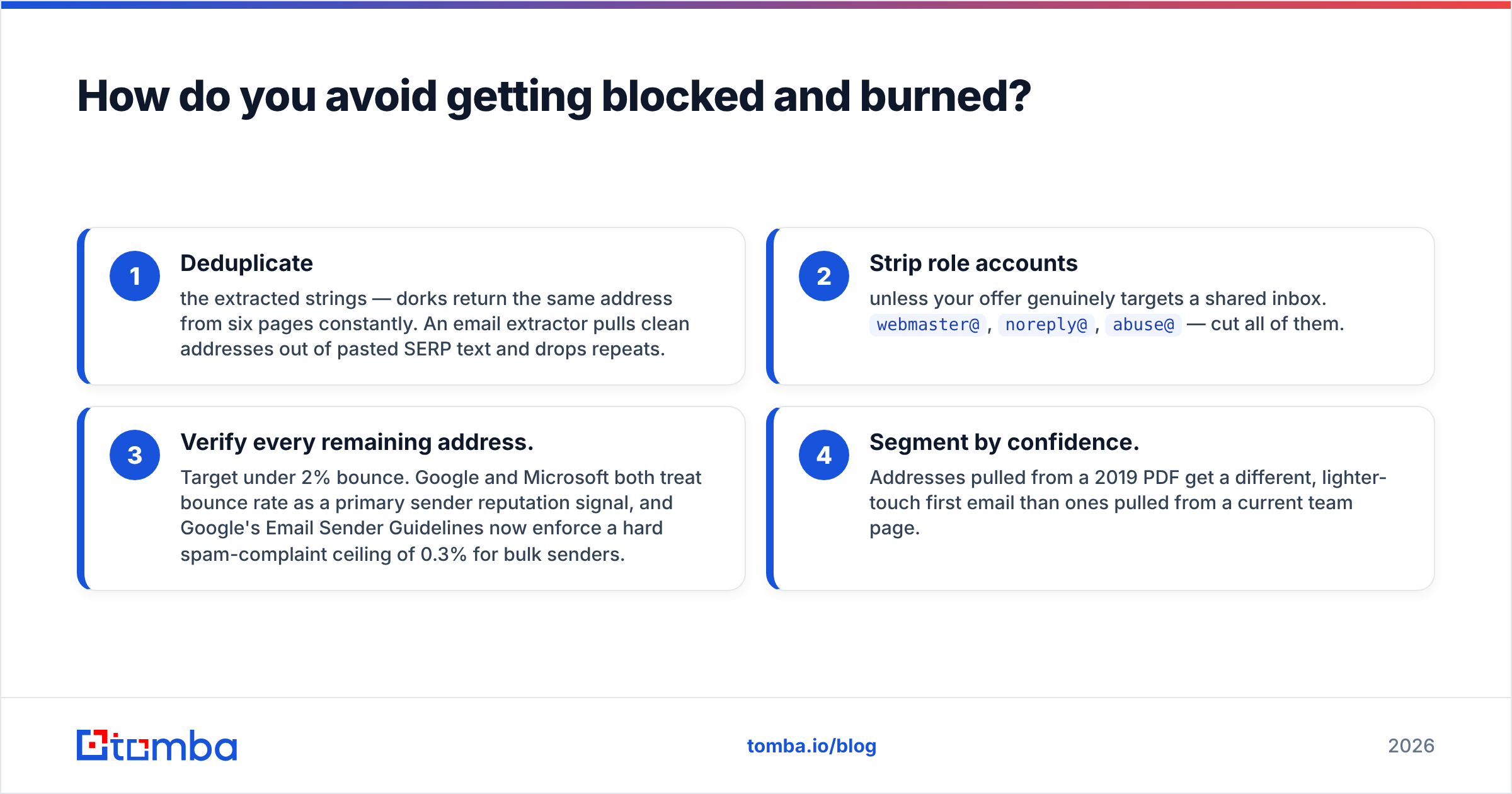
Domain protection. Before any dork-sourced list goes into a sequence:
- Deduplicate the extracted strings — dorks return the same address from six pages constantly. An email extractor pulls clean addresses out of pasted SERP text and drops repeats.
- Strip role accounts unless your offer genuinely targets a shared inbox.
webmaster@,noreply@,abuse@— cut all of them. - Verify every remaining address. Target under 2% bounce. Google and Microsoft both treat bounce rate as a primary sender reputation signal, and Google's Email Sender Guidelines now enforce a hard spam-complaint ceiling of 0.3% for bulk senders.
- Segment by confidence. Addresses pulled from a 2019 PDF get a different, lighter-touch first email than ones pulled from a current team page.
What's the realistic workflow that combines both?#
Use dorks where they're genuinely irreplaceable and an API where volume matters. A version that works:
Step 1 — Pattern discovery via dork. For each target domain, run site:target.com intext:"@target.com" plus "@target.com" -site:target.com. You need exactly one confirmed address. Two minutes per domain, worst case.
Step 2 — Pattern application at scale. Feed the confirmed format plus your list of target names into a bulk email finder. This is the step that used to eat entire days. One CSV upload replaces it.
Step 3 — Document sweep for the hard accounts. For the 10–15% of targets where step 1 and 2 both come up empty, run the filetype dorks. site:target.com filetype:pdf intext:"@" and the xlsx/csv variants. This is where dorks earn their keep — annual reports, tender submissions, and conference programs are full of direct addresses that no crawler-based database has indexed.
Step 4 — Verify everything. Non-negotiable, both sources.
Step 5 — Enrich before you write. An address alone gives you nothing to personalize with. Contact enrichment attaches title, seniority, location, and company data so your first line isn't "I saw you work at Acme."
For teams doing this monthly, the time math is stark. Two hundred domains at four minutes each of pure dorking is thirteen hours. The same 200 domains through a domain search endpoint is a single script run and about ninety seconds of attention, with dorks reserved for the ~25 domains that come back thin.
What are the legal and ethical limits?#
Publicly indexed data is publicly indexed, but "I found it on Google" is not a legal defense for how you use it.
GDPR (EU/UK). A work email tied to an identifiable person is personal data. You can process it under legitimate interest for B2B outreach, but you owe a privacy notice, an opt-out in every message, and honest record-keeping about where the data came from. "Google dork on 14 March" is a lawful and auditable answer. Vague sourcing is not. The ICO's direct marketing guidance is the practical reference here.
CAN-SPAM (US). Cold B2B email is legal. You need accurate headers, a real physical address, and a working unsubscribe honored within 10 business days. Note that CAN-SPAM explicitly prohibits harvesting addresses via automated means from websites — a detail that makes automated dork scraping meaningfully riskier than manual lookup or licensed data.
Where the line actually sits. Reading a public team page, a conference program, or an indexed PDF is fine. Using dorks to surface exposed credential files, misconfigured admin panels, or internal documents that were clearly never meant to be public is a different activity with a different name, and it isn't prospecting. The operator syntax is identical; the intent isn't. Stay on the contact-discovery side of that line.
Honeypots and traps. Some organizations seed addresses into pages specifically to detect harvesting. They're indistinguishable from real addresses until you mail them, at which point you're on a blocklist. Verification catches some of these; buying data from a vendor that filters them catches more. This is a concrete, unglamorous reason that free dorking has a real cost.
When should you stop dorking?#
Stop when any of these is true:
- You're running the same query shape more than 20 times a week. That's an API's job.
- Your bounce rate on dork-sourced lists exceeds 3%. Your extraction is picking up stale data faster than verification can filter it.
- You're spending more than 15 minutes per contact. At typical fully-loaded SDR cost, that contact just cost more than a month of a data subscription.
- You've hit a CAPTCHA twice in one session. Google has your number; the ROI curve has already flattened.
Keep dorking when: you're working a market with genuinely thin database coverage (regional SMBs, academia, public sector, non-English domains), you need one specific person and standard tools returned nothing, or you're auditing your own company's exposure — which, incidentally, is a good thing to do quarterly.
The bottom line#
Google dorks are a scalpel, not a conveyor belt. They find the contacts that databases miss, they cost nothing but attention, and they'll teach you more about how a company structures its email than any tool's confidence score. They will also rate-limit you, hand you stale data with no warning label, and quietly destroy your sending domain if you skip verification.
Run the dorks for discovery. Run the API for everything past the first ten contacts.
If you want the second half of that workflow handled, the Tomba Email Finder does pattern inference, multi-source lookup, and SMTP verification in one call — and the free tier gives you 25 searches a month to test it against a domain you've already dorked, so you can check the output yourself before paying anything. Paid plans start at $49/mo on Starter and $99/mo on Growth; full Tomba pricing is public if you want to run the cost-per-contact math against your own numbers.
Related guides#
Ready to find emails that actually work?
Join 150,000+ professionals who stopped guessing and started sending. Free credits on signup — no credit card required.
Get the Tomba newsletter
Practical outbound tactics and product updates — once every two weeks.
About the author