Google Email Checker Tool: How to Verify Gmail Addresses in 2026
Gmail and Google Workspace addresses break most verification logic. Here is how a Google email checker tool actually works, where the accuracy claims fall apart, and which option fits your list size.
TL;DR
- A Google email checker tool tells you whether an address hosted on Gmail or Google Workspace can actually receive mail — which is a different problem from checking any other mail host, because Google deliberately hides mailbox-level answers at the SMTP layer.
- Free consumer
@gmail.comaddresses are the hardest to verify. Any vendor claiming 99% certainty on a raw SMTP ping against Gmail is describing a test Google stopped answering honestly years ago. - Google Workspace domains (custom domains with Google MX records) are usually verifiable, but a large share are configured as catch-all, which needs a separate check.
- Syntax quirks matter: Gmail ignores dots, accepts
+tags, and enforces a 6–30 character local part. A checker that flagsj.o.h.n@gmail.comas invalid is wrong. - For most B2B teams the practical stack is: pattern-aware finder → verifier with Google-specific logic → catch-all handling. Tomba covers all three from $49/mo, with a free tier at 25 searches/mo.
What is a Google email checker tool?#
A Google email checker tool is a validator that determines whether an email address routed through Google's mail infrastructure is real, deliverable, and safe to send to. "Routed through Google" covers two very different populations:
- Consumer Gmail — anything ending in
@gmail.comor@googlemail.com. Personal accounts, free, roughly two billion of them. - Google Workspace — a company domain like
@acme.comwhose MX records point ataspmx.l.google.comand friends. Same infrastructure, business ownership, and the population that matters for B2B outbound.
The check itself is a stack of tests, not one test. A competent tool runs them in order and stops when it has a confident answer:
- Syntax validation — RFC-compliant structure, plus Google's own extra rules on local-part length and allowed characters.
- Domain and MX lookup — does the domain resolve, and does it actually hand mail to Google?
- Disposable and role detection — is it a throwaway domain, or
info@/support@/billing@? - SMTP conversation — connect to the receiving server and ask, at
RCPT TO, whether the mailbox exists. This is the step Google neutralized. The SMTP protocol permits a server to accept everything and bounce later, and that is exactly what Gmail does. - Catch-all detection — does the domain accept mail for every address, real or not?
- Reputation and history signals — has this exact address been seen bouncing, complaining, or sitting on a spam trap list before?
The last two are where good tools separate from cheap ones. A free email checker gives you steps 1–3 instantly and for nothing. Steps 4–6 are what you pay for.
Why is checking a Gmail address harder than other domains?#
Because Google refuses to leak mailbox existence over SMTP, and it refuses on purpose.
Most mail hosts, when a sender tries to deliver to a nonexistent mailbox, reject at the RCPT TO command with a 550 error. That single response is the backbone of every classic email verifier. Google largely does not do this for gmail.com. It accepts the recipient, closes the connection cleanly, and then either delivers or generates an asynchronous bounce — after your message has already gone out. Google made this choice to stop spammers from harvesting valid addresses through brute-force dictionary probing. The side effect is that legitimate verification vendors lost their primary signal too.
What replaces it:
- Historical bounce data. If a vendor has seen this address bounce across its network in the last N months, it knows something SMTP won't tell it. Network size directly determines how good this is.
- Rate-limited probing from distributed IPs. Slower, more expensive, and easy to get throttled or blocked. Gmail aggressively rate-limits repeat probers.
- Behavioral and account-age signals. Whether the address appears in public professional profiles, mailing list archives, or company data with a consistent pattern.
- Statistical modeling. Some vendors score Gmail addresses probabilistically and label the result "risky" or "unknown" rather than pretending to know.
That last option is the honest one. When a tool returns "unknown" or "accept-all" on a free Gmail address, it isn't failing — it's telling you the truth about what is knowable. Vendors that always return a hard valid/invalid verdict on @gmail.com are guessing and rounding to a confident-sounding label.

How do Gmail dots, aliases, and length rules affect validation?#
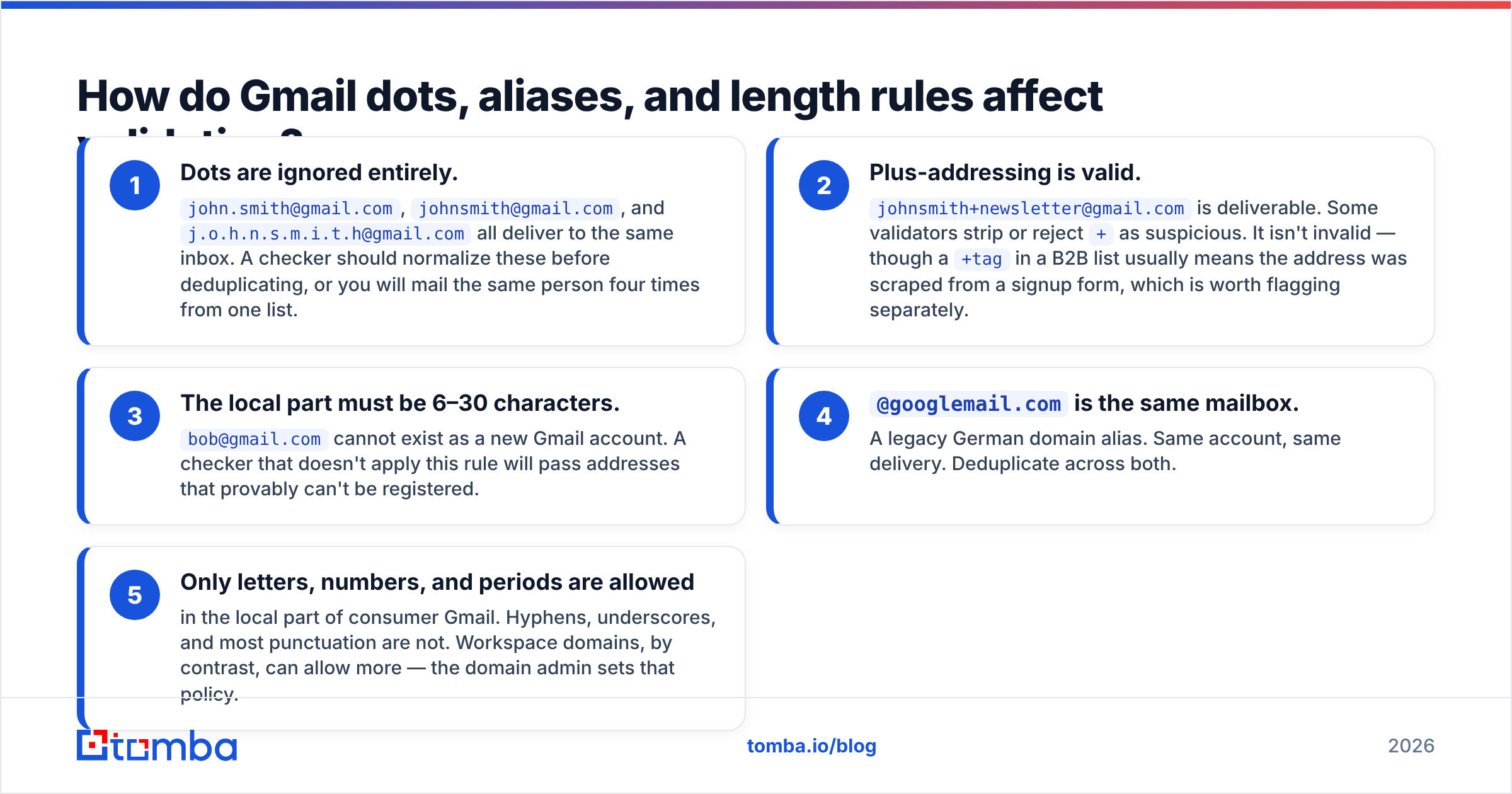
Google's address rules are non-standard in ways that break naive validators. If you build or buy a checker, confirm it handles all five of these:
- Dots are ignored entirely.
john.smith@gmail.com,johnsmith@gmail.com, andj.o.h.n.s.m.i.t.h@gmail.comall deliver to the same inbox. A checker should normalize these before deduplicating, or you will mail the same person four times from one list. - Plus-addressing is valid.
johnsmith+newsletter@gmail.comis deliverable. Some validators strip or reject+as suspicious. It isn't invalid — though a+tagin a B2B list usually means the address was scraped from a signup form, which is worth flagging separately. - The local part must be 6–30 characters.
bob@gmail.comcannot exist as a new Gmail account. A checker that doesn't apply this rule will pass addresses that provably can't be registered. @googlemail.comis the same mailbox. A legacy German domain alias. Same account, same delivery. Deduplicate across both.- Only letters, numbers, and periods are allowed in the local part of consumer Gmail. Hyphens, underscores, and most punctuation are not. Workspace domains, by contrast, can allow more — the domain admin sets that policy.
Two lists that look 8,000 rows long can shrink to 6,100 unique mailboxes once Gmail normalization runs. Run a deduplicate pass after normalization, not before, or you'll keep the duplicates you were trying to remove.
Is checking Google Workspace addresses different from Gmail?#
Yes, and this is the more useful half for B2B. A Workspace domain is a normal corporate domain that happens to use Google as its mail host. You verify it like any other business domain — with one large caveat.
Google Workspace makes catch-all configuration trivial. An admin sets a routing rule so every address at the domain is accepted, valid or not. Roughly a fifth to a third of Workspace domains in typical B2B datasets behave this way, depending on the industry. Against a catch-all domain, SMTP verification returns "accepted" for asdfjkl@company.com, which means the result is worthless on its own.
Handling catch-all properly requires a separate layer: pattern confidence (does first.last@ match the dominant format at this company?), source corroboration (has this exact address appeared in public records?), and historical delivery. That's what a dedicated catch-all verifier does, and it's the single biggest accuracy differentiator between verification vendors on Workspace domains. Google publishes its routing and MX setup documentation at workspace.google.com, which is worth skimming if you're debugging why a domain behaves the way it does.
Which Google email checker tool should you use in 2026?#
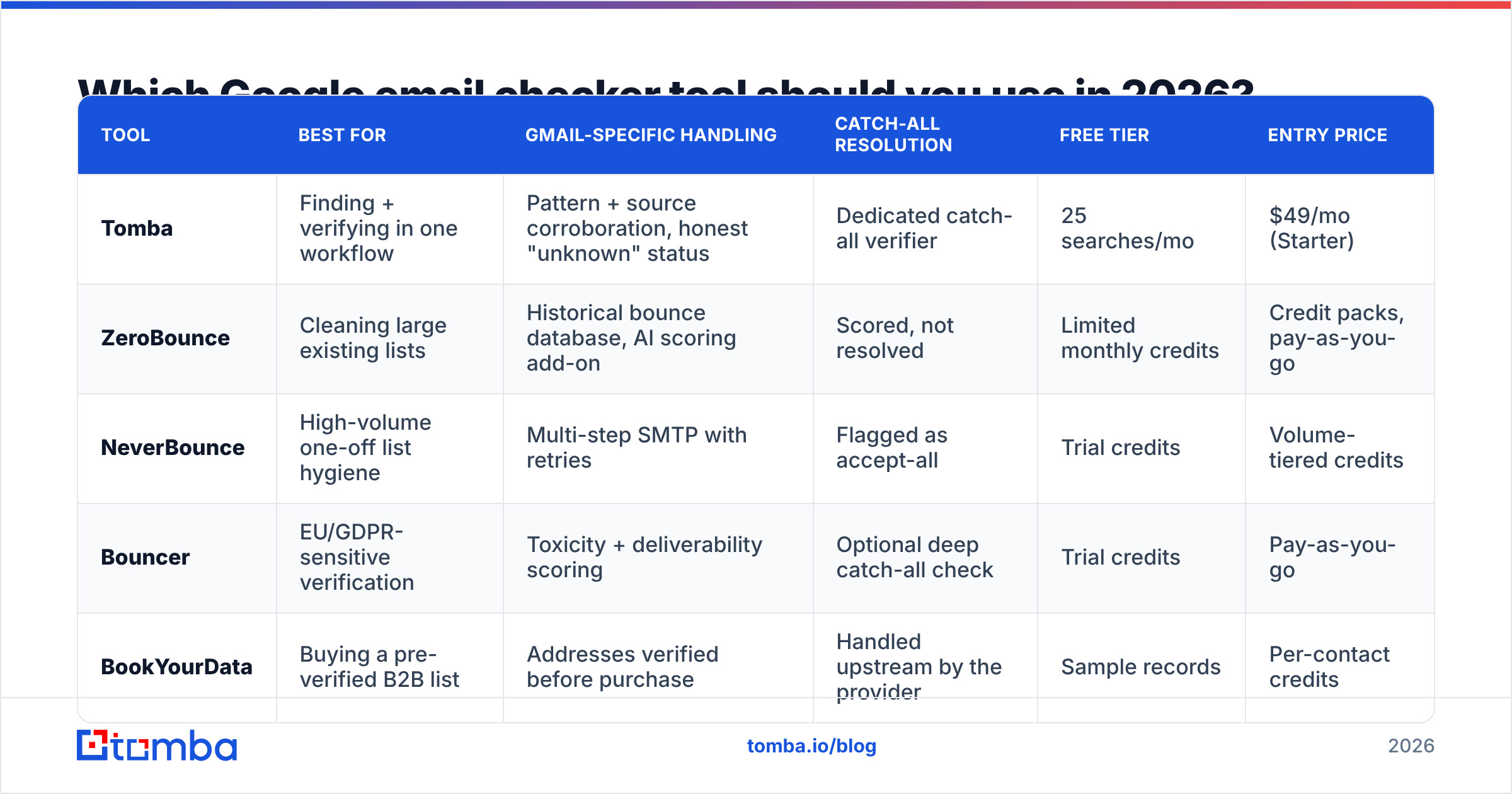
There is no single winner, because the right choice depends on whether you're verifying a purchased list, enriching a CRM, or finding addresses in the first place. Here is how the main options compare on the attributes that actually change outcomes.
| Tool | Best for | Gmail-specific handling | Catch-all resolution | Free tier | Entry price |
|---|---|---|---|---|---|
| Tomba | Finding + verifying in one workflow | Pattern + source corroboration, honest "unknown" status | Dedicated catch-all verifier | 25 searches/mo | $49/mo (Starter) |
| ZeroBounce | Cleaning large existing lists | Historical bounce database, AI scoring add-on | Scored, not resolved | Limited monthly credits | Credit packs, pay-as-you-go |
| NeverBounce | High-volume one-off list hygiene | Multi-step SMTP with retries | Flagged as accept-all | Trial credits | Volume-tiered credits |
| Bouncer | EU/GDPR-sensitive verification | Toxicity + deliverability scoring | Optional deep catch-all check | Trial credits | Pay-as-you-go |
| BookYourData | Buying a pre-verified B2B list | Addresses verified before purchase | Handled upstream by the provider | Sample records | Per-contact credits |

Three things this table should make obvious:
Dedicated verifiers and finders solve different halves. ZeroBounce, NeverBounce, and Bouncer clean lists you already have. They do not find addresses. If your problem is "I have 400 target companies and no contacts," a verifier is the wrong purchase — you need an email finder first and verification second.
BookYourData sits in a third category. It sells pre-verified contact records rather than verifying yours, which is a genuinely different buying motion. If you'd rather buy a clean list than build and clean one, that's a reasonable path, and the verification burden shifts to the provider.
Pricing models are not comparable line-for-line. Credit packs look cheaper until you count the re-verification you do every quarter. Subscription tools look expensive until you use the API daily. Check Tomba pricing against your monthly volume rather than against a headline number: Free (25 searches/mo), Starter $49/mo, Growth $99/mo, Pro $249/mo, Enterprise custom.
How accurate are Google email checkers, really?#
Treat every published accuracy number as a marketing artifact until you test it on your own data. The reason is structural: accuracy depends entirely on the composition of the test list.
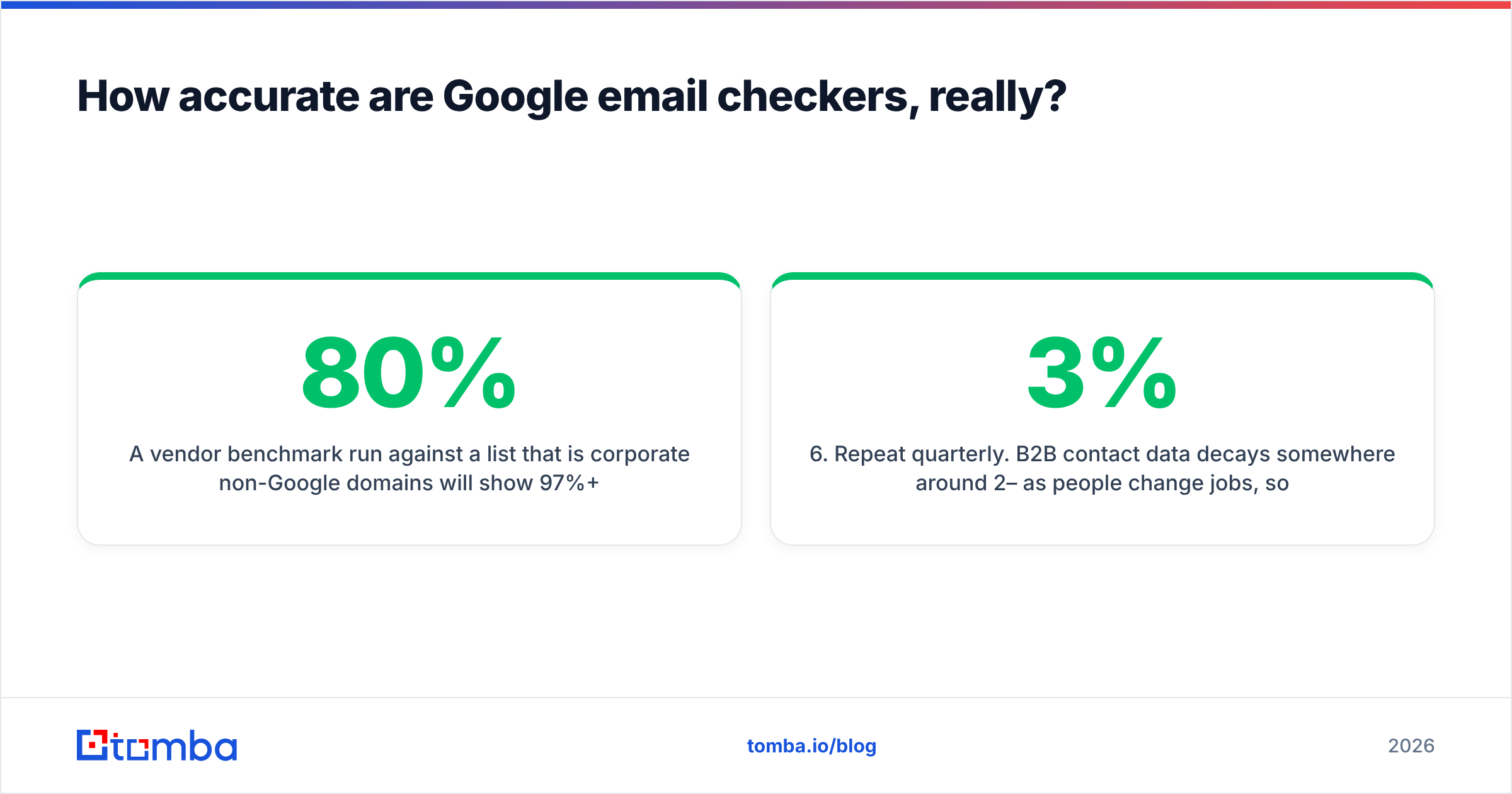
A vendor benchmark run against a list that is 80% corporate non-Google domains will show 97%+ accuracy. The same engine against a list that is 60% free Gmail will show something closer to 70–80% decidable results, with the rest returning unknown or risky. Neither number is a lie. They measure different lists.
Run your own test this way:
- Take 500 addresses you know the outcome for. Past campaign sends where you have real bounce data. Not a synthetic list.
- Keep the Google split visible. Tag each row as consumer Gmail, Workspace, or other. Score the three groups separately.
- Run the same file through two or three tools on their free tiers or trial credits.
- Compare on three numbers, not one: false-valid rate (the expensive error — these bounce), false-invalid rate (the silent error — you discard good leads), and unknown rate.
- Weight false-valid heaviest. A bounce damages sender reputation; a false-invalid only costs you one lead.
- Repeat quarterly. B2B contact data decays somewhere around 2–3% per month as people change jobs, so a tool that won last year isn't automatically winning now.
If a vendor won't let you run this test on real data before you commit, that itself is information. Independent review aggregators like G2's email verification category are useful for spotting patterns in complaints — particularly around unknown-result billing, which is where most disputes originate.
What do verification statuses actually mean?#
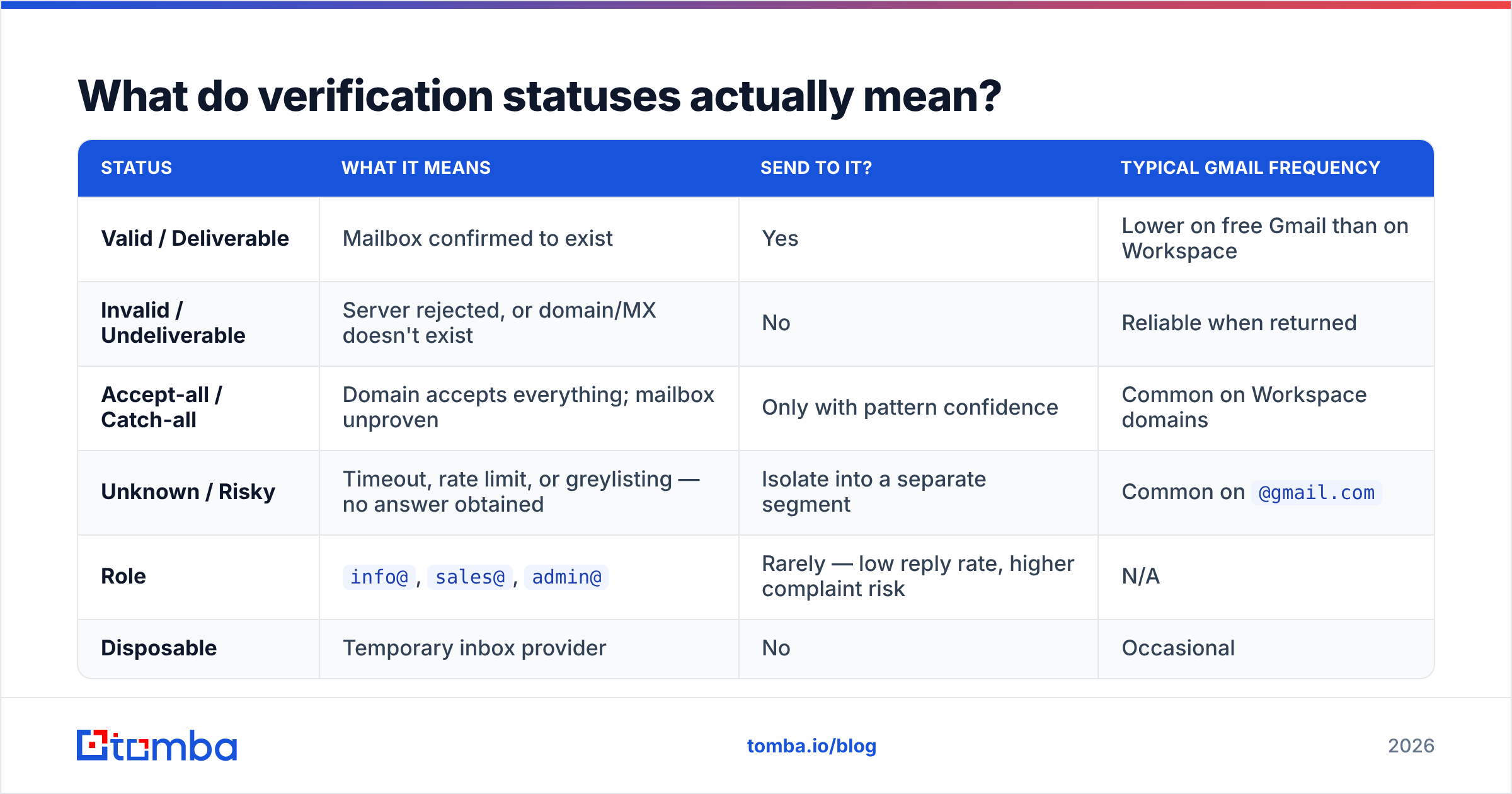
Vendors use different labels for the same underlying states, which makes cross-tool comparison harder than it should be. This is the practical translation:
| Status | What it means | Send to it? | Typical Gmail frequency |
|---|---|---|---|
| Valid / Deliverable | Mailbox confirmed to exist | Yes | Lower on free Gmail than on Workspace |
| Invalid / Undeliverable | Server rejected, or domain/MX doesn't exist | No | Reliable when returned |
| Accept-all / Catch-all | Domain accepts everything; mailbox unproven | Only with pattern confidence | Common on Workspace domains |
| Unknown / Risky | Timeout, rate limit, or greylisting — no answer obtained | Isolate into a separate segment | Common on @gmail.com |
| Role | info@, sales@, admin@ |
Rarely — low reply rate, higher complaint risk | N/A |
| Disposable | Temporary inbox provider | No | Occasional |
The operational rule: send to Valid, discard Invalid, Disposable, and most Role, and segment Accept-all and Unknown into a low-volume warm-up sequence sent from a secondary domain. Never blend unknowns into your main sending domain's daily volume. That's how a 3% bounce rate becomes a 9% one and your email deliverability starts sliding.
How do you check Gmail addresses in bulk without wrecking your sender reputation?#
Bulk is where most teams do damage. Four rules:
Verify before import, not after. Once bad addresses are in your CRM and sequencer, someone will eventually mail them. Clean at the front door. A bulk email verifier that processes CSVs is the least-effort version of this.
Never verify by sending. Some teams "test" a list by blasting it and watching bounces. That is verification by self-harm. Mailbox providers score you on the attempt, not on your intent, and Google is among the strictest scorers.
Re-verify on a schedule, not once. A list verified in January is measurably worse by June. Quarterly re-verification of anything you still actively mail is the standard cadence.
Automate it at the source. If leads arrive from forms, imports, or scrapers, wire verification into the pipeline with the Tomba API so nothing lands unverified. Manual CSV cycles get skipped the week everyone is busy, which is the week the bad data gets in.
What should you actually buy?#
Match the tool to the problem, not to the loudest accuracy claim:
- You have a list and it's bouncing. Buy a dedicated verifier with a strong historical bounce database and run a real test on 500 known addresses first.
- You need contacts you don't have yet. Buy a finder that verifies as it finds. Two separate subscriptions to solve one workflow is money and latency you don't need.
- Your targets are mostly Workspace domains. Catch-all handling is your deciding feature. Test it specifically — send each vendor 50 addresses from known catch-all domains and see who resolves versus who shrugs.
- You want to skip list-building entirely. A pre-verified database provider is a legitimate shortcut, provided you check how recently the records were re-verified.
- Your volume is under a few hundred a month. Start on a free tier. Do not sign an annual contract to solve a problem you haven't measured yet.
Ready to stop guessing on Gmail?#
If your workflow is find-then-verify — the normal B2B case — running two vendors is friction you don't need. The Tomba Email Finder locates addresses by domain, name, or company and returns a confidence-scored result with verification already applied, including Google-specific handling for dots, aliases, and Workspace catch-alls. Start on the free tier at 25 searches per month, test it against 500 addresses where you already know the answer, and only upgrade to Starter at $49/mo once the numbers hold up on your own data. That's the only benchmark that counts.
Related guides#
Ready to find emails that actually work?
Join 150,000+ professionals who stopped guessing and started sending. Free credits on signup — no credit card required.
Get the Tomba newsletter
Practical outbound tactics and product updates — once every two weeks.
About the author