Google Email Search by Name: How to Find Anyone in 2026
Google can find email addresses by name — but only if you know the operators, the limits, and when to stop searching and use a real finder tool instead.
TL;DR
- Google email search by name works, but the realistic hit rate on B2B contacts is roughly 10-25% — and it's heavily skewed toward people who publish (authors, founders, academics, open-source maintainers).
- The operators that actually move the needle are
site:,intext:,filetype:,"@domain.com", and quoted name variants. Everything else is noise. - Google indexes what's public. It does not index the inboxes, CRMs, or contact pages behind logins — which is where most B2B emails live.
- Manual searching costs about 3-8 minutes per contact once you include verification. An email finder API costs seconds.
- The right workflow is hybrid: Google for the hard, high-value 20 contacts; a finder tool plus verification for the other 480.
What is Google email search by name?#
Google email search by name is the practice of using search operators to surface a person's email address from publicly indexed pages — conference speaker bios, PDF whitepapers, GitHub commits, press releases, academic papers, mailto: links, and contact pages.
It is not a database lookup. Google has no "email field." You are pattern-matching against text that happens to contain an address, and hoping that text was crawled, indexed, and not obfuscated.
Think of it like looking for a friend's phone number by flipping through every newspaper in a library. If they ran a classified ad, you'll find it. If they never did, no amount of flipping helps. That's the core limitation, and it explains every result you'll get.
Here's what determines whether Google finds a given person:
- Do they publish? Authors, researchers, and open-source contributors leak addresses constantly. A regional sales manager at a manufacturing firm almost never does.
- Is the page crawlable? Contact forms, gated PDFs, and LinkedIn profiles behind auth are invisible to Googlebot.
- Is the address obfuscated?
name [at] company [dot] comand image-rendered addresses defeat text search. - Is the page still live? Google's index decays. Cached bios from 2019 list emails that bounce in 2026.
- Is the name distinctive? "Sarah Chen, VP Marketing" returns thousands of irrelevant hits. "Anouk Vermeulen-Draaisma" returns three.
Which Google operators actually find email addresses?#
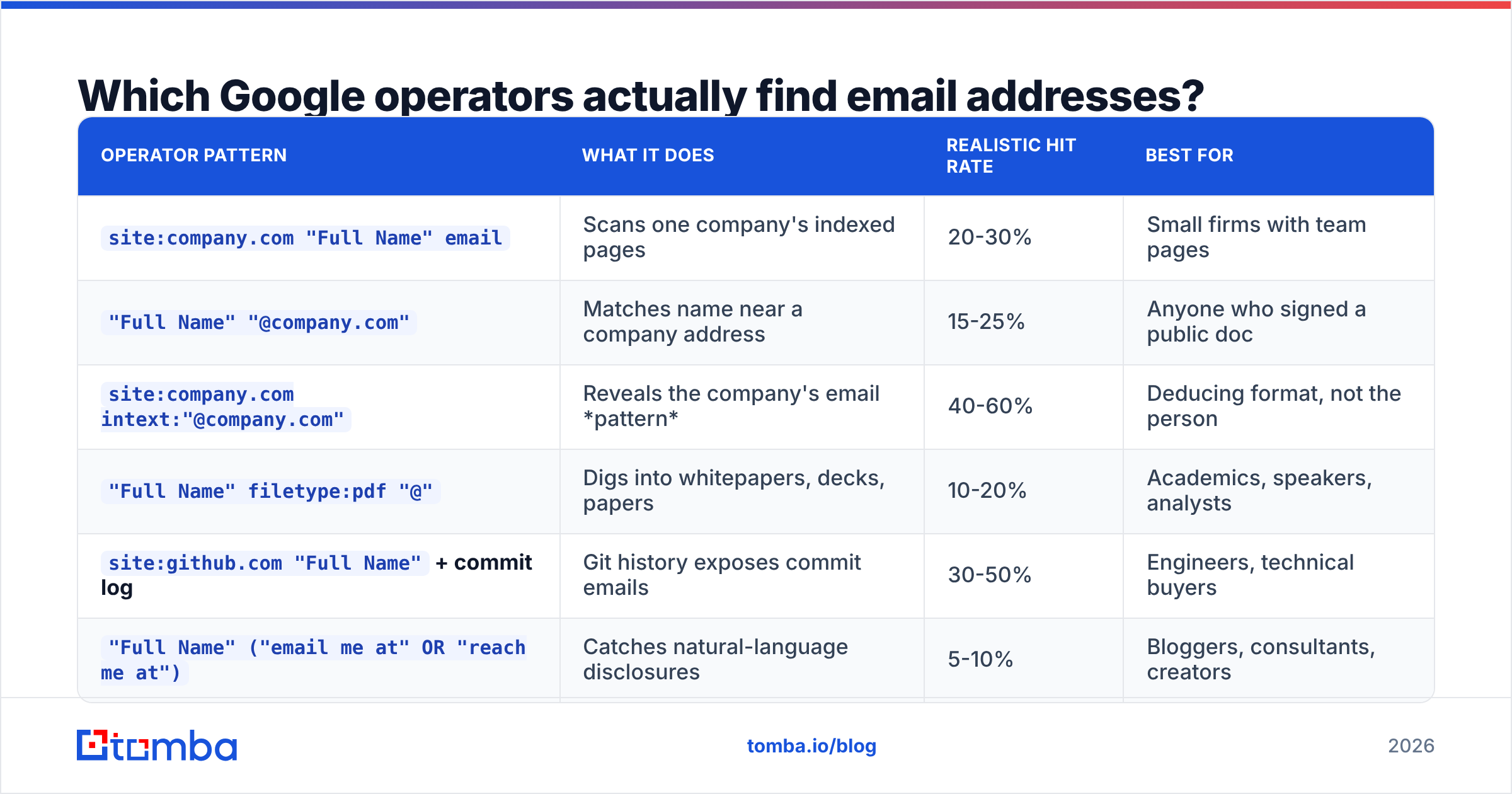
Most listicles dump 40 operators on you. Six of them do 90% of the work. Here's the honest ranking, with the query patterns you should copy.
| Operator pattern | What it does | Realistic hit rate | Best for |
|---|---|---|---|
site:company.com "Full Name" email |
Scans one company's indexed pages | 20-30% | Small firms with team pages |
"Full Name" "@company.com" |
Matches name near a company address | 15-25% | Anyone who signed a public doc |
site:company.com intext:"@company.com" |
Reveals the company's email pattern | 40-60% | Deducing format, not the person |
"Full Name" filetype:pdf "@" |
Digs into whitepapers, decks, papers | 10-20% | Academics, speakers, analysts |
site:github.com "Full Name" + commit log |
Git history exposes commit emails | 30-50% | Engineers, technical buyers |
"Full Name" ("email me at" OR "reach me at") |
Catches natural-language disclosures | 5-10% | Bloggers, consultants, creators |
The third row is the sleeper. You often can't find the person's address, but you can find any address at that domain — press@, jsmith@, j.doe@ — which tells you the company's format. From there, "Sarah Chen" at a first.last@ company is sarah.chen@company.com with high confidence. That's a deduction, not a discovery, and it must be verified before you send. Our company email pattern checker automates exactly this step.
A few operator notes that save time:
- Quote the full name. Unquoted, Google treats it as two loose tokens and drowns you.
- Search name variants. "Robert Klein," "Rob Klein," "Bob Klein," "R. Klein." Three of the four will return nothing; one might not.
- Add a disambiguator, not a job title.
"Sarah Chen" "Datadog"beats"Sarah Chen" "VP Marketing"— companies are indexed consistently, titles are not. - Use
-aggressively.-linkedin.com -zoominfo.com -rocketreach.costrips the scraper-aggregator pages that clog page one and never show the address anyway.
Does Google email search by name still work in 2026?#
Less well than it did five years ago, and the decline is structural.
Three forces are compressing the yield. First, GDPR and CCPA pushed European and Californian companies to strip staff emails from public pages and replace them with forms — the EU's official GDPR text treats a work email as personal data, and most legal teams took the cautious route. Second, scraping defenses got good: Cloudflare challenges, JavaScript-rendered contact blocks, and image-based addresses are now default in most CMS templates. Third, Google's own SERP changed — AI Overviews and aggressive spam filtering surface fewer raw, ugly, text-dense pages, which are exactly the pages that used to leak addresses.
What still works reliably:
- Academic and research domains.
.eduand.ac.uksites publish faculty emails as a matter of policy. - Git commit history.
git logmetadata is public by design on open repos. - Regulatory and legal filings. SEC filings, trademark records, and domain WHOIS remnants still surface contacts.
- Conference and event sites. Speaker bios and CFP submissions frequently include a direct address.
- Self-employed consultants and creators. They want to be reachable.
What has essentially stopped working: finding a mid-level employee at a mid-size private company. That person's email exists in the company's mail server and nowhere else Google can reach.
How does manual Google search compare to an email finder tool?#
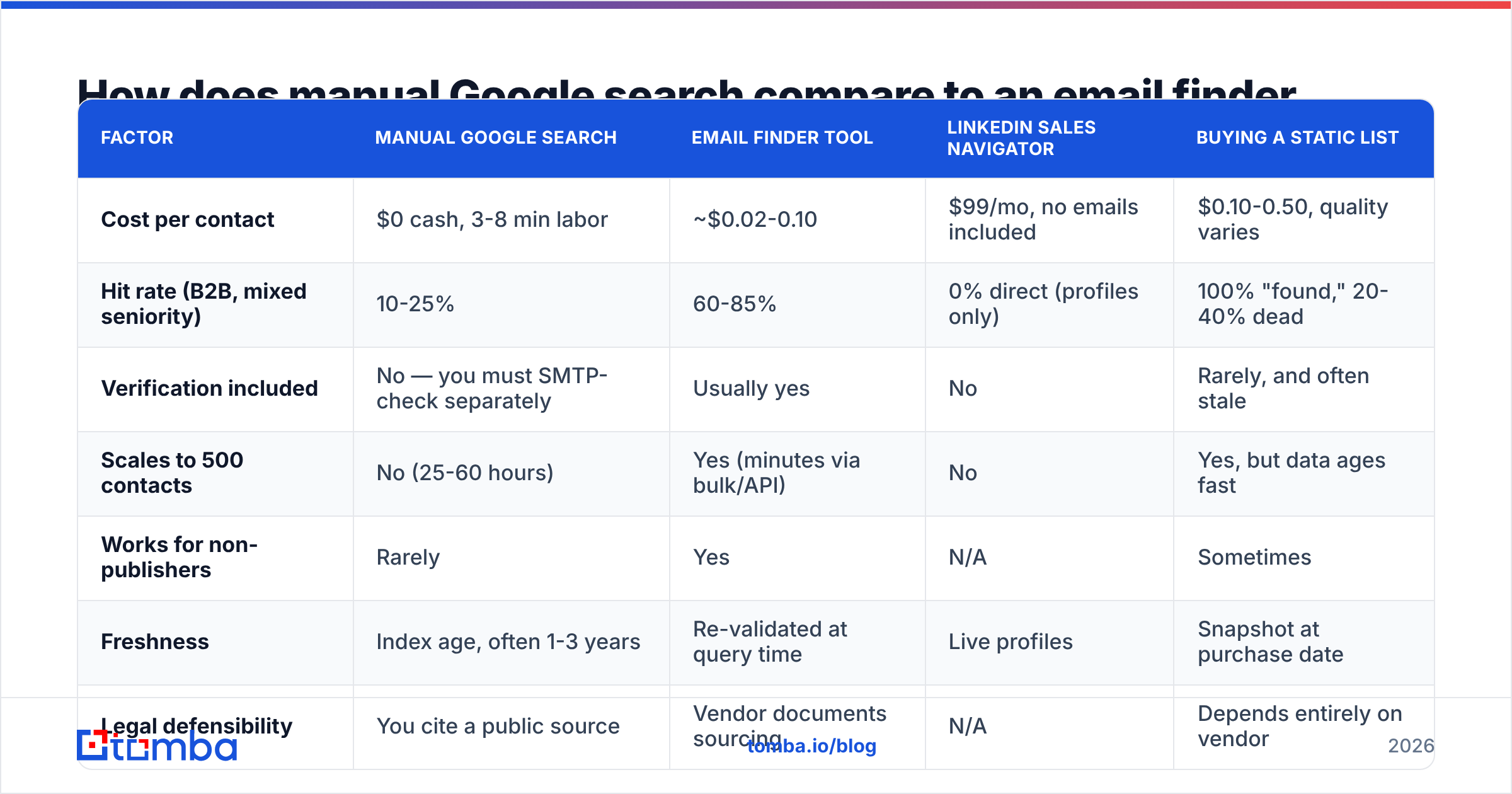
This is the decision most people are actually trying to make. Here's the comparison with real numbers rather than vibes.
| Factor | Manual Google search | Email finder tool | LinkedIn Sales Navigator | Buying a static list |
|---|---|---|---|---|
| Cost per contact | $0 cash, 3-8 min labor | ~$0.02-0.10 | $99/mo, no emails included | $0.10-0.50, quality varies |
| Hit rate (B2B, mixed seniority) | 10-25% | 60-85% | 0% direct (profiles only) | 100% "found," 20-40% dead |
| Verification included | No — you must SMTP-check separately | Usually yes | No | Rarely, and often stale |
| Scales to 500 contacts | No (25-60 hours) | Yes (minutes via bulk/API) | No | Yes, but data ages fast |
| Works for non-publishers | Rarely | Yes | N/A | Sometimes |
| Freshness | Index age, often 1-3 years | Re-validated at query time | Live profiles | Snapshot at purchase date |
| Legal defensibility | You cite a public source | Vendor documents sourcing | N/A | Depends entirely on vendor |
The honest read: Google wins on cost and on provenance. When you find an address on a company's own speaker page, you know exactly where it came from and can say so in your first line — "saw your talk at SaaStr, the slide on churn cohorts stuck with me." That's a genuinely better opener than anything a database gives you.
Tools win on everything else. At 500 prospects, manual search is 25-60 hours of work that produces maybe 75 usable addresses. A bulk email finder run produces 350-400 verified addresses in under ten minutes. There is no version of the math where manual search wins at volume.

The accuracy gap is also worth naming precisely. Google gives you a string of text that looked like an email on a page of unknown age. A finder tool gives you a string that was checked against the receiving mail server. Those are not the same asset, and the difference shows up in your bounce rate — which is the number that decides whether your domain keeps landing in inboxes at all.
What are the free tools worth using alongside Google?#
Google is step one, not the whole workflow. A few free utilities close the gap between "I found a string" and "I can safely send to this."
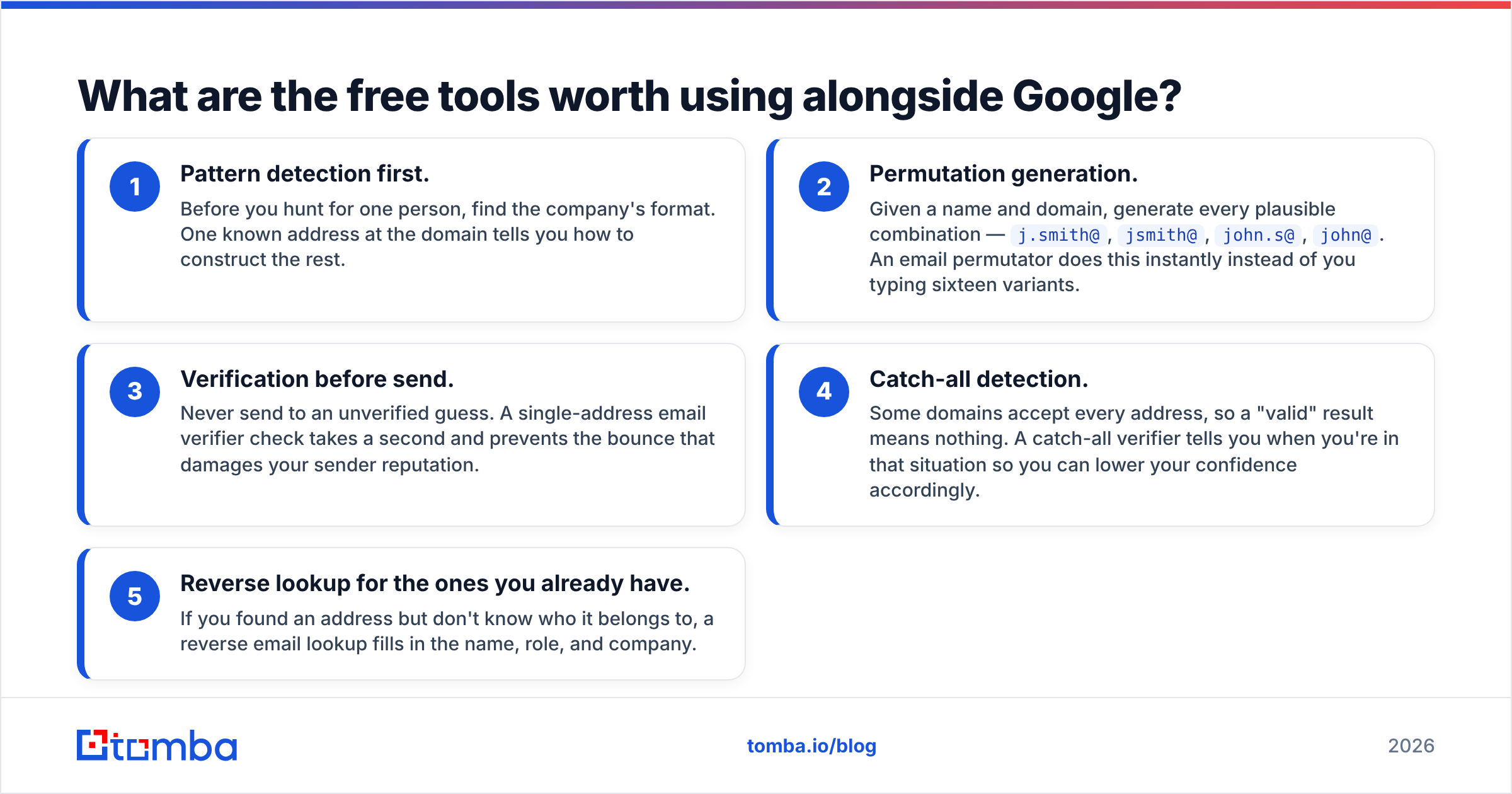
- Pattern detection first. Before you hunt for one person, find the company's format. One known address at the domain tells you how to construct the rest.
- Permutation generation. Given a name and domain, generate every plausible combination —
j.smith@,jsmith@,john.s@,john@. An email permutator does this instantly instead of you typing sixteen variants. - Verification before send. Never send to an unverified guess. A single-address email verifier check takes a second and prevents the bounce that damages your sender reputation.
- Catch-all detection. Some domains accept every address, so a "valid" result means nothing. A catch-all verifier tells you when you're in that situation so you can lower your confidence accordingly.
- Reverse lookup for the ones you already have. If you found an address but don't know who it belongs to, a reverse email lookup fills in the name, role, and company.
That five-step chain is the difference between prospecting and guessing. Skipping step three is the single most common and most expensive mistake — Google's own sender guidelines put a hard spam-complaint threshold on bulk senders, and a bounce-heavy list is the fastest route to tripping it.
Is Google email search by name legal?#
Finding a publicly published business email is legal in most jurisdictions. What you do next is where the rules bite.
Under GDPR, a work email is personal data, and you need a lawful basis to process it — legitimate interest is the standard one for B2B outreach, but it requires that your message be relevant to the person's professional role and that you honor opt-outs immediately. CAN-SPAM in the US is looser: you must not use deceptive headers or subject lines, you must include a physical address, and you must offer a working unsubscribe. Canada's CASL is the strictest of the three and generally requires consent or a documented existing business relationship.
Practical guardrails that keep you out of trouble regardless of jurisdiction:
- Only contact people whose role makes your message plausibly relevant.
- Keep a record of where each address came from — a URL in your CRM field is enough.
- Honor unsubscribes on the first request, permanently, across every sequence.
- Don't scrape addresses from personal social profiles and treat them as business contacts.
- Skip anything that required circumventing a login or a paywall to obtain.
None of this is legal advice, and the risk profile differs by country. But sourcing from a vendor that documents its data sources is materially easier to defend than an unattributed spreadsheet someone on the team assembled from search results.
When should you stop searching and use a tool?#
Use this as a working rule: if you've spent more than four minutes on one contact, the expected value of continuing has gone negative.
Stay with Google when:
- You're targeting fewer than 25 people total.
- The prospects are authors, academics, or open-source maintainers.
- You need the context as much as the address — a talk, a paper, a commit — because that context is your opener.
- The company is tiny and has a real team page.
Switch to a finder tool when:
- You need more than 50 contacts.
- Your targets are mid-level employees at private companies.
- You're building a repeatable, weekly-run outbound motion.
- Bounce rate is already above 3% and you need verified data, not guesses.
Use both when — and this is most real teams — you run a tool across the whole list, then manually research the 20 accounts that matter most. The tool gives you coverage; the manual work gives you the personalization that actually earns replies. If you're comparing options, our breakdown of Apollo alternatives covers how the major platforms differ on exactly this coverage-versus-depth tradeoff, and peers like BookYourData take a database-first approach that suits teams who prefer buying curated lists over running lookups.
What does a realistic hybrid workflow look like?#
Here's the sequence that produces the best output per hour spent:
- Segment the list. Split prospects into Tier A (20-30 named accounts you'd take a meeting with tomorrow) and Tier B (everyone else).
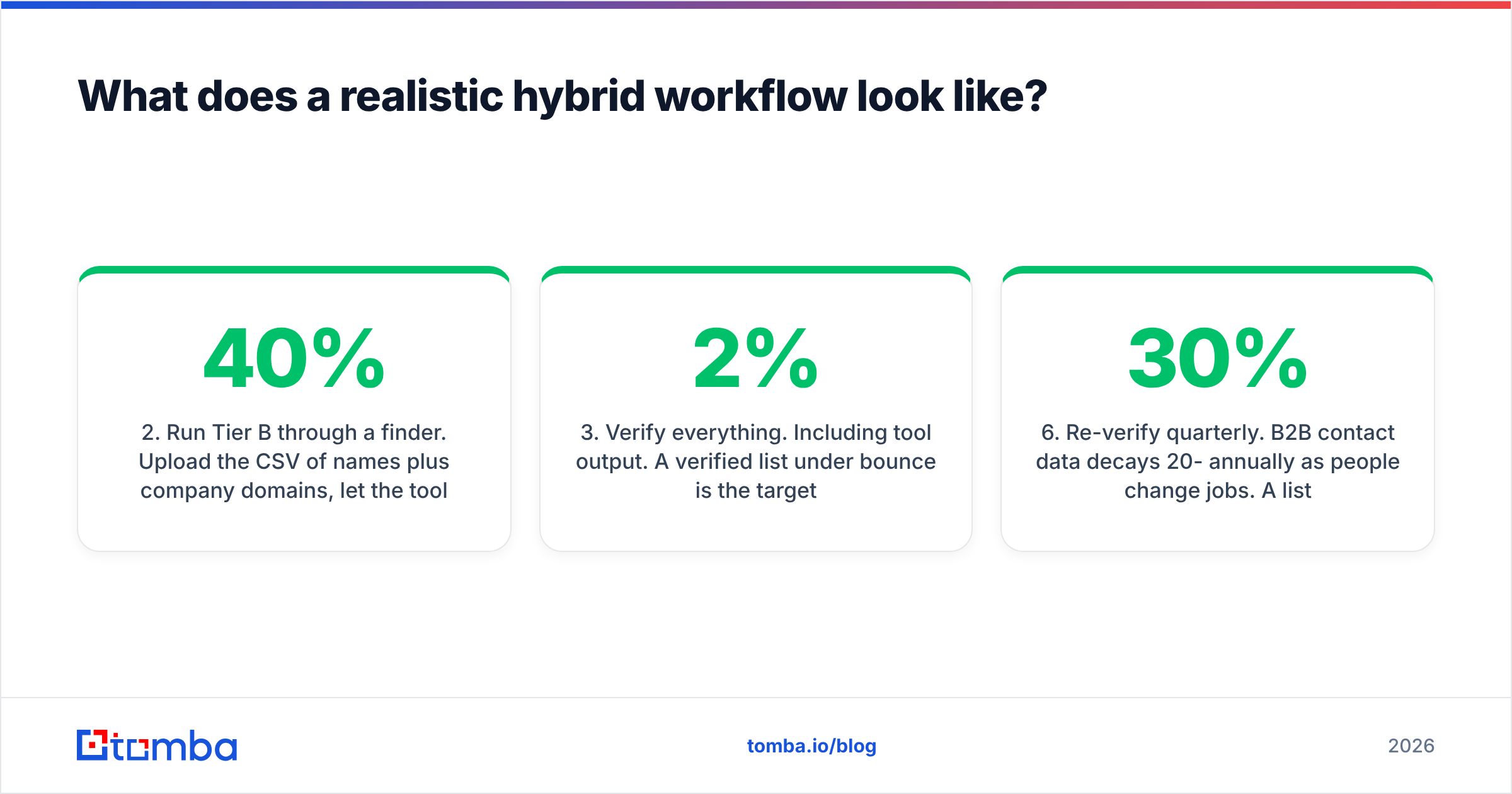
- Run Tier B through a finder. Upload the CSV of names plus company domains, let the tool resolve what it can, and accept that 15-40% won't resolve. Move on.
- Verify everything. Including tool output. A verified list under 2% bounce is the target.
- Hand-research Tier A in Google. Spend the ten minutes per person. Find the podcast appearance, the conference deck, the GitHub issue they filed. Use it in line one.
- Enrich the survivors. Attach role, company size, tech stack, and funding stage so your sequencing logic has something to branch on. Data enrichment turns a bare email into a segmentable record.
- Re-verify quarterly. B2B contact data decays 20-30% annually as people change jobs. A list you built in January is measurably worse in July.
The teams that struggle are the ones that apply Tier A effort to a Tier B list — twelve hours of Google operators for a hundred contacts they were going to send the same template to anyway. Match the effort to the account value.
Where should you start?#
Start with the free path, because it costs nothing but an hour: pick five target prospects, run the six operators from the table above, and count your hits. If you land two or three, your market is Google-findable and manual search is viable for your volume. If you land zero, you've learned something valuable — your buyers don't publish, and no amount of operator cleverness will change that.
For everything past that first hour, the Tomba Email Finder does in eight seconds what the operator chain does in eight minutes: takes a name and a domain, returns a verified professional address with a confidence score and the source it came from. The free tier gives you 25 searches a month to test it against contacts you already know the answer for — the only benchmark that matters. Paid plans start at $49/mo on Starter and scale to $99/mo on Growth; full Tomba pricing is public, and the Tomba API covers you if you'd rather wire lookups directly into your own stack. Keep Google for the twenty accounts worth a personal touch, and stop spending your afternoons on the other four hundred.
Related guides#
Ready to find emails that actually work?
Join 150,000+ professionals who stopped guessing and started sending. Free credits on signup — no credit card required.
Get the Tomba newsletter
Practical outbound tactics and product updates — once every two weeks.
About the author