Google Maps Data Extractor Pricing, Reviews, Pros and Cons
Google Maps scrapers look cheap until you count the bounces. Here is what the main extractors actually charge per record, what reviewers complain about, and where the data breaks down.
TL;DR
- Google Maps data extractor pricing lands in three shapes: pay-per-record (roughly $1–$5 per 1,000 places), flat monthly SaaS ($29–$159/mo for most Chrome extensions and lightweight tools), and platform credits (Apify, Bright Data) where your real bill depends on compute, not rows.
- The scrape itself is cheap. Making the output usable is not — expect 40–70% of listings to have no email at all, and a meaningful share of the emails you do get to be
info@catch-alls. - Reviews on G2 and Capterra are consistently positive about speed and coverage, and consistently negative about email accuracy, credit burn on failed runs, and support response times.
- Google Maps is excellent for local B2B (dentists, contractors, restaurants, gyms) and close to useless for enterprise SaaS or anything without a storefront.
- The workflow that actually converts: extract company name + domain from Maps, then run a proper email finder and verifier on the domains before a single send.
What is a Google Maps data extractor?#
A Google Maps data extractor is a tool that runs a search query against Google Maps — "plumbers in Austin", "dental clinics in Manchester" — and returns the results as structured rows instead of a scrollable list. A typical export gives you business name, category, address, phone, website URL, rating, review count, hours, and sometimes a scraped email pulled from the linked website.
Think of it like a fishing net versus a fishing rod. Google's own Places API is the rod: precise, permitted, metered, and slow to build with. An extractor is the net: you drag a geographic area and pull up everything in it, including things you did not ask for.
That distinction matters for two reasons. First, cost — the Places API bills per request with its own quota structure, while third-party extractors bill per row or per compute unit. Second, terms — Google's Maps Platform terms restrict bulk storage and redistribution of Places content. Most extractors operate on public HTML rather than the licensed API, which is a legal grey zone that varies by jurisdiction. If you are in a regulated industry or building a resale product, get counsel before you scale.
For prospecting teams, the practical framing is simpler: a Maps extractor is a firmographic seed list generator. It tells you which companies exist in a geography and vertical. It does not reliably tell you who works there or how to reach them.
How does Google Maps data extractor pricing actually work?#
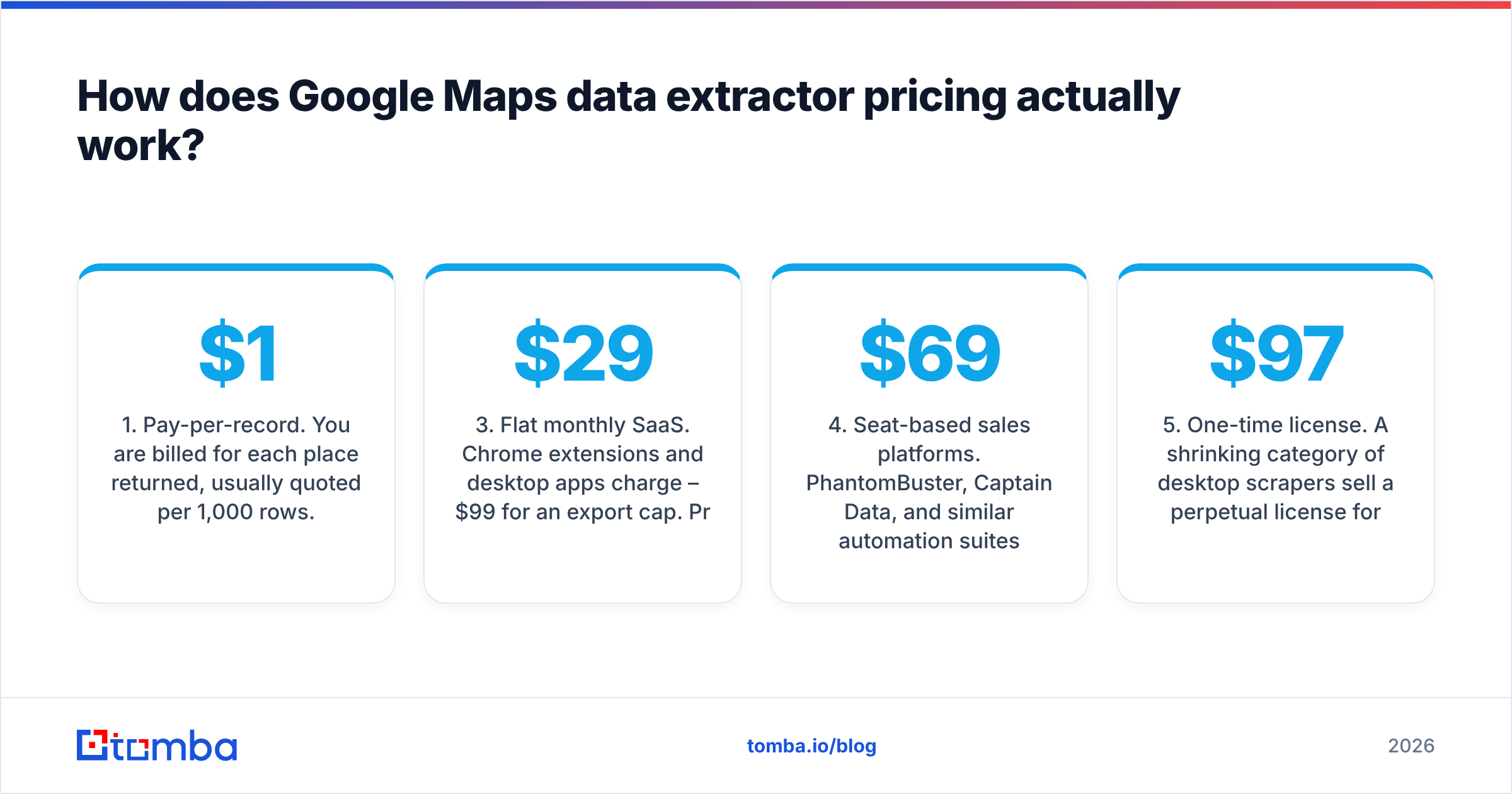
Vendors advertise very different numbers because they meter very different things. Five models cover almost the whole market:
- Pay-per-record. You are billed for each place returned, usually quoted per 1,000 rows. Outscraper and most API-first services work this way, often in the $1–$5 per 1,000 range with volume discounts. Cheapest at low volume, and you only pay for what you keep.
- Compute credits. Apify and Bright Data meter actor runtime, proxy bandwidth, and residential IP usage on top of a monthly platform fee. Your effective cost per row swings wildly — a clean query is pennies, a query that hits heavy rate-limiting can cost 5x more for the same output.
- Flat monthly SaaS. Chrome extensions and desktop apps charge $29–$99/mo for an export cap. Predictable, but caps are usually per month and do not roll over, so a bursty prospecting month wastes budget while a heavy month hits a wall.
- Seat-based sales platforms. PhantomBuster, Captain Data, and similar automation suites bundle Maps scraping into a broader platform starting around $69/mo, priced on execution time and seats rather than rows.
- One-time license. A shrinking category of desktop scrapers sell a perpetual license for $97–$299. No recurring cost, but you inherit the maintenance risk — when Google changes its DOM, you wait for the developer to ship a patch.
The trap in all five: none of them price on usable records. You pay for rows returned, not rows you can email. If 55% of your export has no email and another 15% is a shared info@ inbox, your true cost per contactable lead is roughly three times the sticker price.

What do Google Maps extractors cost in 2026?#
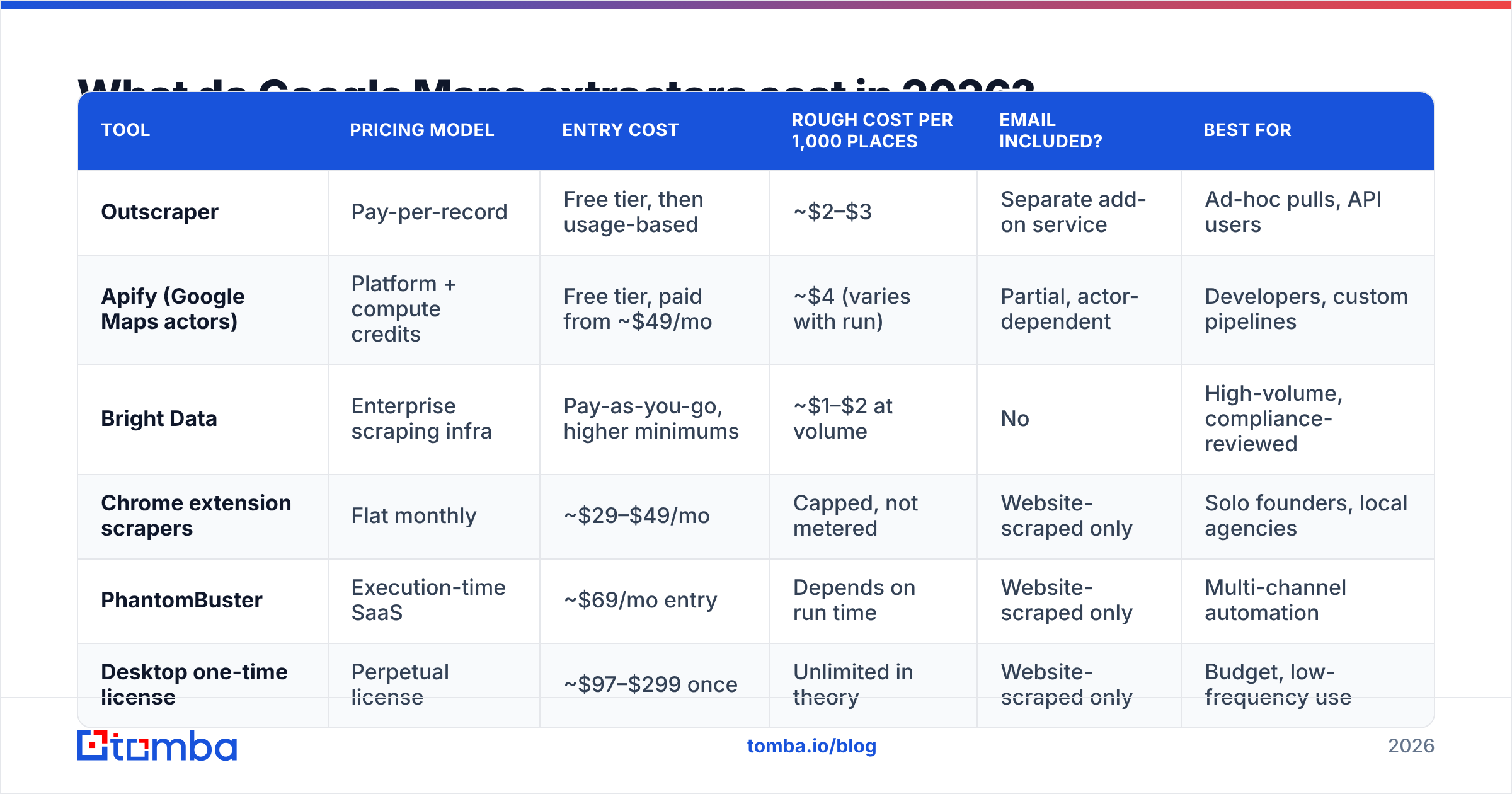
Prices below reflect publicly listed tiers at the time of writing. Vendors reshuffle tiers frequently — always confirm on the vendor's own pricing page before you commit annually.
| Tool | Pricing model | Entry cost | Rough cost per 1,000 places | Email included? | Best for |
|---|---|---|---|---|---|
| Outscraper | Pay-per-record | Free tier, then usage-based | ~$2–$3 | Separate add-on service | Ad-hoc pulls, API users |
| Apify (Google Maps actors) | Platform + compute credits | Free tier, paid from ~$49/mo | ~$4 (varies with run) | Partial, actor-dependent | Developers, custom pipelines |
| Bright Data | Enterprise scraping infra | Pay-as-you-go, higher minimums | ~$1–$2 at volume | No | High-volume, compliance-reviewed |
| Chrome extension scrapers | Flat monthly | ~$29–$49/mo | Capped, not metered | Website-scraped only | Solo founders, local agencies |
| PhantomBuster | Execution-time SaaS | ~$69/mo entry | Depends on run time | Website-scraped only | Multi-channel automation |
| Desktop one-time license | Perpetual license | ~$97–$299 once | Unlimited in theory | Website-scraped only | Budget, low-frequency use |
Two line items get left off every comparison chart:
- Proxy and retry cost. Anything running at scale needs residential proxies. On credit-based platforms that is bundled and invisible until the invoice; on self-hosted tools it is a separate $50–$300/mo.
- Verification cost. Whatever you scrape has to be validated before it touches your sending domain. Budget for an email verifier as a line item, not an afterthought. Ten thousand raw rows at $3 is $30; verifying and enriching the subset that actually has a domain is where the meaningful spend sits.
What do real reviews say about Google Maps extractors?#
Read enough listings on G2 and Capterra and the same four themes surface regardless of vendor.
What reviewers praise:
- Speed of first result. Nearly every review mentions getting a usable CSV within ten minutes of signup. For a category with this much technical complexity underneath, the onboarding is genuinely good.
- Geographic coverage. Coverage of local businesses in secondary and tertiary markets beats every traditional B2B database, because Google Maps is where those businesses actually maintain a presence.
- Phone number quality. Maps phone numbers are self-published by the business and are the single most accurate field in the export. Cold callers rate this category far higher than cold emailers do.
What reviewers complain about:
- Email fields are thin and stale. The most common one-star theme by a wide margin. Extractors find emails by crawling the linked website, so you get whatever is on the contact page — often a role account, sometimes an agency's address, sometimes a form and nothing else.
- Credits burn on failed runs. On compute-metered platforms, a run that hits rate limits and returns 200 rows instead of 2,000 can still consume the credits. Reviewers describe this as the biggest gap between expected and actual cost.
- Duplicates across overlapping queries. Run "restaurants in Brooklyn" and "restaurants in Williamsburg" and you will pay twice for the same rows. Deduplication is on you; a remove duplicates pass before import is a five-minute habit worth building.
- Support latency. Small teams, async support, and a scraping category where breakage is routine. Multi-day response times are the norm, not the exception.
The pattern is consistent: reviewers who use these tools as a company discovery layer are happy. Reviewers who expected a finished contact database are not.
What are the pros and cons of scraping Google Maps for leads?#
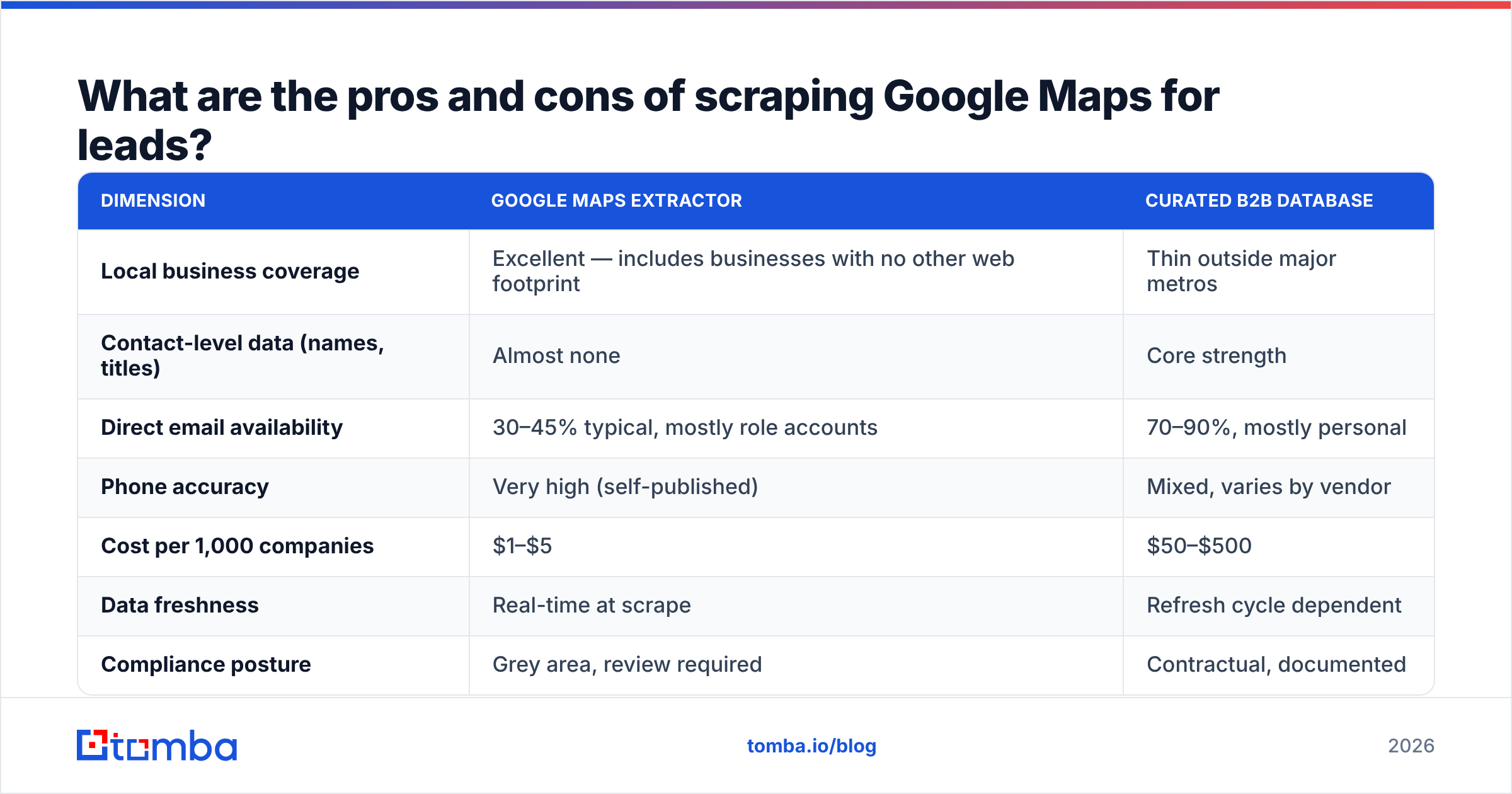
| Dimension | Google Maps extractor | Curated B2B database |
|---|---|---|
| Local business coverage | Excellent — includes businesses with no other web footprint | Thin outside major metros |
| Contact-level data (names, titles) | Almost none | Core strength |
| Direct email availability | 30–45% typical, mostly role accounts | 70–90%, mostly personal |
| Phone accuracy | Very high (self-published) | Mixed, varies by vendor |
| Cost per 1,000 companies | $1–$5 | $50–$500 |
| Data freshness | Real-time at scrape | Refresh cycle dependent |
| Compliance posture | Grey area, review required | Contractual, documented |
| Best fit | Local services, field sales, franchise expansion | SaaS, enterprise, role-targeted outbound |
If you sell to independent restaurants, clinics, gyms, auto shops, or trades, no purchased database will match Maps coverage — those businesses are not in Clearbit or ZoomInfo, but they are all in Maps. If you sell to a VP of Engineering at a Series B startup, a Maps extractor is the wrong tool entirely and no amount of enrichment will fix it.
There is also a middle path worth knowing: vendors like BookYourData sell pre-built, pay-as-you-go B2B lists filtered by industry and geography. That is a legitimate alternative when you want contact-level data without running infrastructure, and it sits in a different lane than scraping — you are buying curation and compliance documentation rather than raw discovery.
Is Google Maps data accurate enough for cold email?#
Not on its own. Here is the honest sequence of what happens to 1,000 scraped Maps rows:
- ~1,000 rows returned, of which roughly 850 have a website URL
- ~400 return an email from the website crawl
- ~280 of those are
info@,contact@,hello@, or a form-handler address - ~120 are named-person addresses
- After verification, expect 15–25% of the total email set to be invalid, parked, or catch-all
So a $3 scrape produces roughly 100 confidently deliverable addresses, and most of them are shared inboxes with low reply rates. Send to the unverified set and you are looking at a double-digit bounce rate, which is the fastest way to damage sender reputation on a new domain.

The fix is not a better scraper. It is a second stage.
How do you turn Maps data into a list you can actually email?#
Treat the extractor as step one of four. Each step has a distinct job and a distinct tool.
- Extract companies, not contacts. Configure your Maps run to prioritize name, website, category, and phone. Skip the built-in email scraping if it costs extra — you will replace it in step three anyway. Deduplicate on domain, not business name.
- Normalize domains. Strip tracking parameters, resolve redirects, drop aggregator URLs (Yelp, Facebook pages, directory listings). A row whose "website" is a Facebook page has no domain to work with and should be routed to a call list instead.
- Find real contacts by domain. Run the cleaned domain list through a domain search to pull the named people and email patterns at each company, rather than whatever address happened to sit on the contact page. This is the step that turns
info@mikesplumbing.comintomike@mikesplumbing.comwith a role attached. - Verify before you send. Push everything through a bulk verify pass, quarantine catch-all domains for a separate low-volume sequence, and only load the confirmed-deliverable set into your sequencer.
Teams that skip steps three and four are the ones writing the one-star reviews about email accuracy. The extractor did its job; it was never designed to do the other three.
Which pricing model should you pick?#
Match the model to your volume pattern, not to the lowest advertised number.
- Under 5,000 rows a month, occasional bursts: pay-per-record. You will spend $10–$30 and owe nothing in quiet months.
- Steady 20,000+ rows a month, one vertical: flat monthly SaaS or a one-time license. Predictable, and the cap stops runaway spend.
- Custom fields, scheduled runs, or piping into a warehouse: credit-based platforms. Pay the complexity tax deliberately, and set hard spend limits before your first scheduled run.
- Contact-level targeting is the real requirement: stop shopping for scrapers. You need a finder and verifier stack, and Tomba pricing starts free at 25 searches/mo, then $49/mo Starter, $99/mo Growth, and $249/mo Pro — which is the same budget range as a mid-tier scraper but produces addresses you can actually send to.
A useful sanity check before you buy anything: take twenty businesses from your target vertical, look them up manually, and count how many publish a named-person email. If the answer is under five, no extractor on this list will change your economics — your bottleneck is contact discovery, not company discovery.
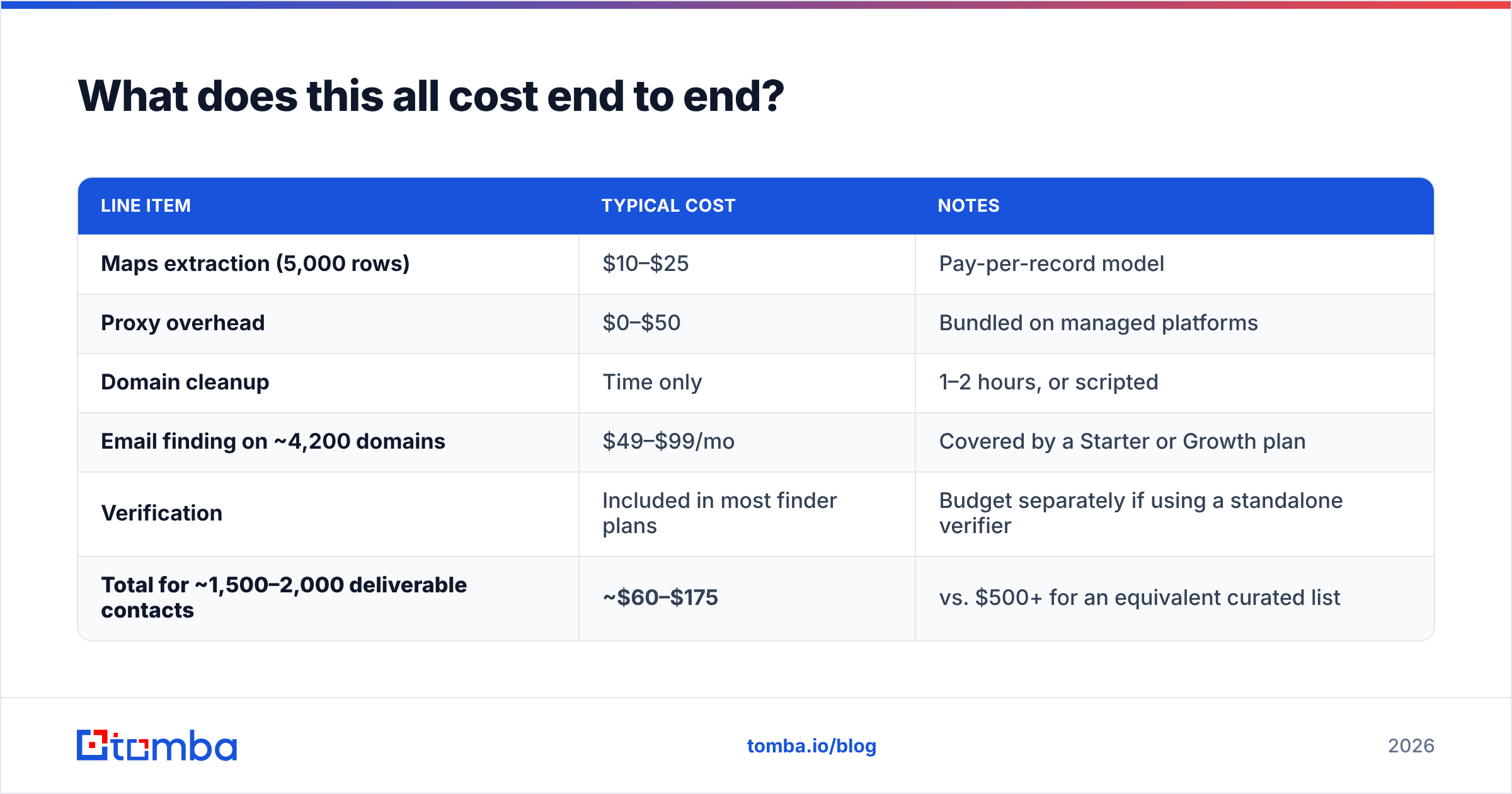
What does this all cost end to end?#
For a realistic local-B2B campaign of 5,000 target businesses:
| Line item | Typical cost | Notes |
|---|---|---|
| Maps extraction (5,000 rows) | $10–$25 | Pay-per-record model |
| Proxy overhead | $0–$50 | Bundled on managed platforms |
| Domain cleanup | Time only | 1–2 hours, or scripted |
| Email finding on ~4,200 domains | $49–$99/mo | Covered by a Starter or Growth plan |
| Verification | Included in most finder plans | Budget separately if using a standalone verifier |
| Total for ~1,500–2,000 deliverable contacts | ~$60–$175 | vs. $500+ for an equivalent curated list |
That is the honest math. The scrape is 15% of the bill and 100% of the marketing. The other 85% is what makes the list send-worthy.
Where should you start?#
If your ICP has a storefront, a Google Maps extractor is a legitimately good first move — cheap, fast, and better coverage of small local businesses than anything you can buy. Just budget for the second stage from day one, and stop measuring cost per row. Measure cost per verified, named, deliverable contact.
Once you have your domain list, the Tomba Email Finder is built for exactly that handoff: feed it the domains your Maps export produced, get back named contacts with confidence scores and verification built in, and export straight into your sequencer. Start on the free tier with 25 searches, run it against a sample of your scrape, and compare the deliverable count to what your extractor gave you before committing to either.
Related guides#
Ready to find emails that actually work?
Join 150,000+ professionals who stopped guessing and started sending. Free credits on signup — no credit card required.
Get the Tomba newsletter
Practical outbound tactics and product updates — once every two weeks.
About the author