Google Maps Email Scraper: How It Works and What Works in 2026
Google Maps scrapers pull business names, phones, and websites — but almost never verified emails. Here is what actually works, what breaks, and how to build a compliant local-lead pipeline in 2026.
TL;DR
- A Google Maps email scraper does not scrape emails from Google Maps. Google Maps listings do not contain email fields — scrapers pull the business website, then a second crawler harvests whatever addresses sit on that site.
- Expect roughly 20-40% of local listings to yield any email at all, and most of what you get will be generic (info@, contact@, hello@) rather than a named decision-maker.
- Scraping Google Maps directly violates Google's Terms of Service. Scraping the destination website is a separate legal question, and GDPR/CAN-SPAM still apply to whatever you collect.
- The workflow that actually performs: scrape Maps for domains → run domain search to get named contacts → verify before sending. Skip the middle step and your bounce rate will bury your sender reputation.
- Budget realistically. Maps scrapers cost $30-100/mo, enrichment adds $49-99/mo, and the combined pipeline is still cheaper than buying a stale local-business list.
If you sell to restaurants, dentists, gyms, contractors, or any business with a physical storefront, Google Maps looks like the perfect lead database. It is comprehensive, current, and free to browse. So the obvious move is to point a scraper at it, export 5,000 rows, and start emailing.
That plan breaks in a specific and predictable place. This guide covers where, why, and what to do instead.
What is a Google Maps email scraper?#
A Google Maps email scraper is a two-stage tool. Stage one queries Google Maps (usually through the Places API or by driving a headless browser across the results grid) and extracts the structured listing data: business name, category, address, phone number, star rating, review count, opening hours, and website URL. Stage two takes each website URL, crawls a handful of pages — homepage, /contact, /about, /team — and regex-matches anything shaped like an email address.
The name is misleading on purpose. Nothing in a Google Maps listing contains an email. Google removed business email fields from public listings years ago, and the Places API has never exposed them. Every "Google Maps email extractor" on the market is really a domain harvester bolted to a site crawler.
Here is what that means concretely for a list of 1,000 scraped listings:
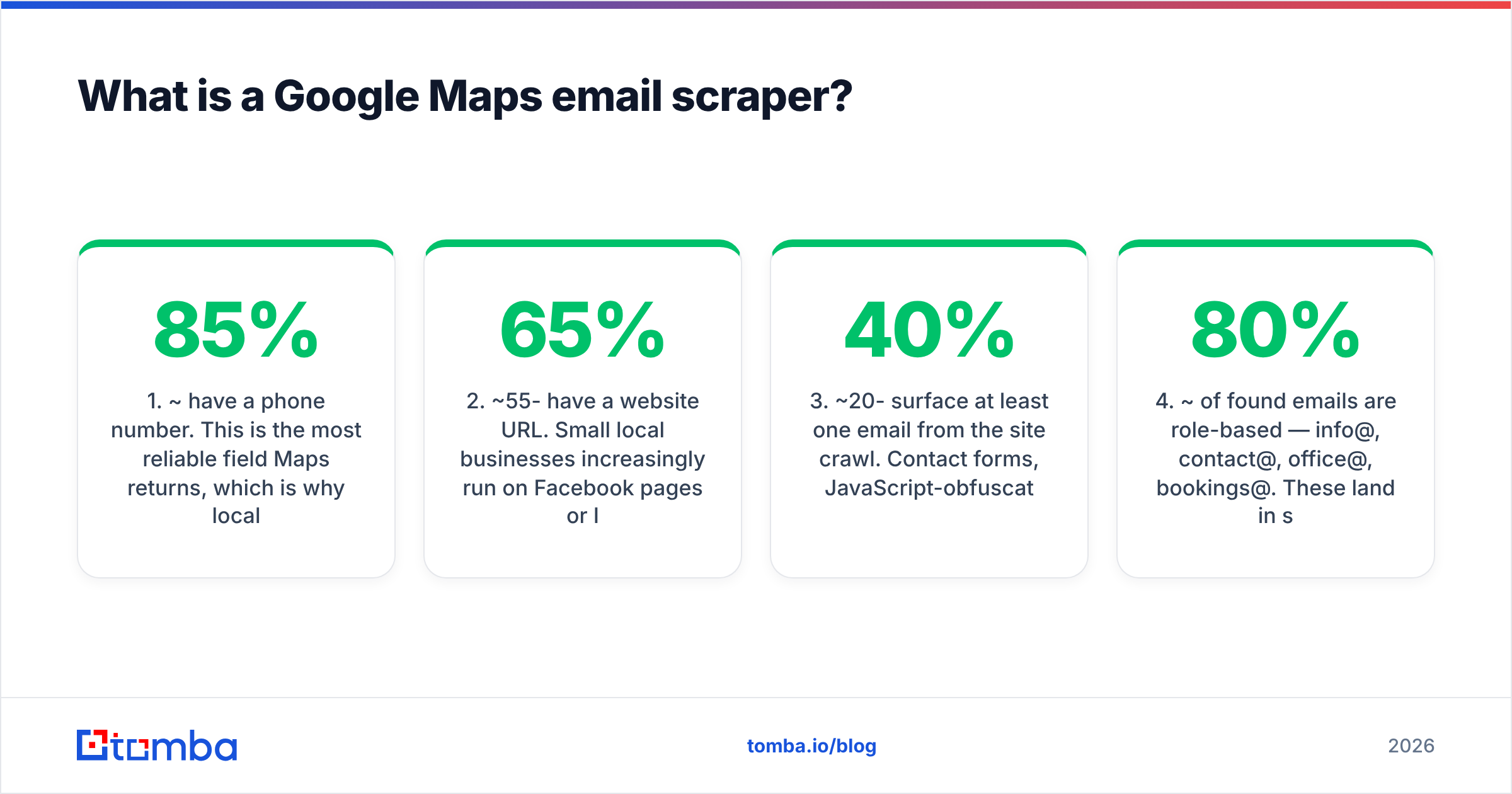
- ~85% have a phone number. This is the most reliable field Maps returns, which is why local-lead workflows often lean toward calling.
- ~55-65% have a website URL. Small local businesses increasingly run on Facebook pages or Instagram only, with no owned domain to crawl.
- ~20-40% surface at least one email from the site crawl. Contact forms, JavaScript-obfuscated addresses, and image-embedded emails all defeat regex extraction.
- ~80% of found emails are role-based — info@, contact@, office@, bookings@. These land in shared inboxes with low open rates and often trip spam filters on cold outreach.
- ~5-10% are already dead by the time you send. Businesses close, domains lapse, staff turn over.
Run the math and a 1,000-row Maps scrape produces maybe 60-100 usable, named, deliverable contacts. That is a real number, not a bad one — but it is not the 1,000 you thought you bought.
Why does the email column come back empty?#
Four independent failure modes stack on top of each other.
The listing has no website. Roughly a third of local businesses in most metros operate without one. A barbershop with 200 reviews and a Facebook page is invisible to any email extractor.
The site hides the address behind a form. Modern site builders — Squarespace, Wix, Webflow templates — default to contact forms rather than mailto links. There is no string for the regex to catch.
The address is obfuscated. JavaScript-rendered addresses, name [at] domain [dot] com text, emails baked into a header image, or Cloudflare's email-protection wrapper. A basic crawler misses all four; a headless-browser crawler catches maybe two.
The address is generic. You find info@restaurant.com, which is technically an email and practically a wall. The owner reads it once a week between vendor invoices and spam.
The fourth is the one that quietly kills campaigns. Role-based addresses have measurably worse engagement than named ones, and mailbox providers weight them heavily when scoring unknown senders. Blasting 800 info@ addresses is the fastest way to torch a fresh sending domain.
Is scraping Google Maps legal in 2026?#
Short answer: scraping Google Maps directly breaches Google's Terms of Service, and what you do with the harvested data is governed separately by privacy law. Neither is a criminal matter in most jurisdictions, but both carry real consequences.
Google's Maps Platform Terms of Service explicitly prohibit scraping, caching Places data beyond 30 days, and building competing databases from the content. Enforcement usually means IP blocking and API key revocation rather than lawsuits — but if your business depends on that pipeline, a revoked key is an outage.
The legality of crawling a business's own public website is a different question, and courts have generally been friendlier to it. The 2022 hiQ Labs v. LinkedIn ruling in the U.S. Ninth Circuit held that scraping publicly accessible data does not violate the Computer Fraud and Abuse Act. That is not a blanket permission slip — it addresses one statute in one jurisdiction — but it is the closest thing to precedent.
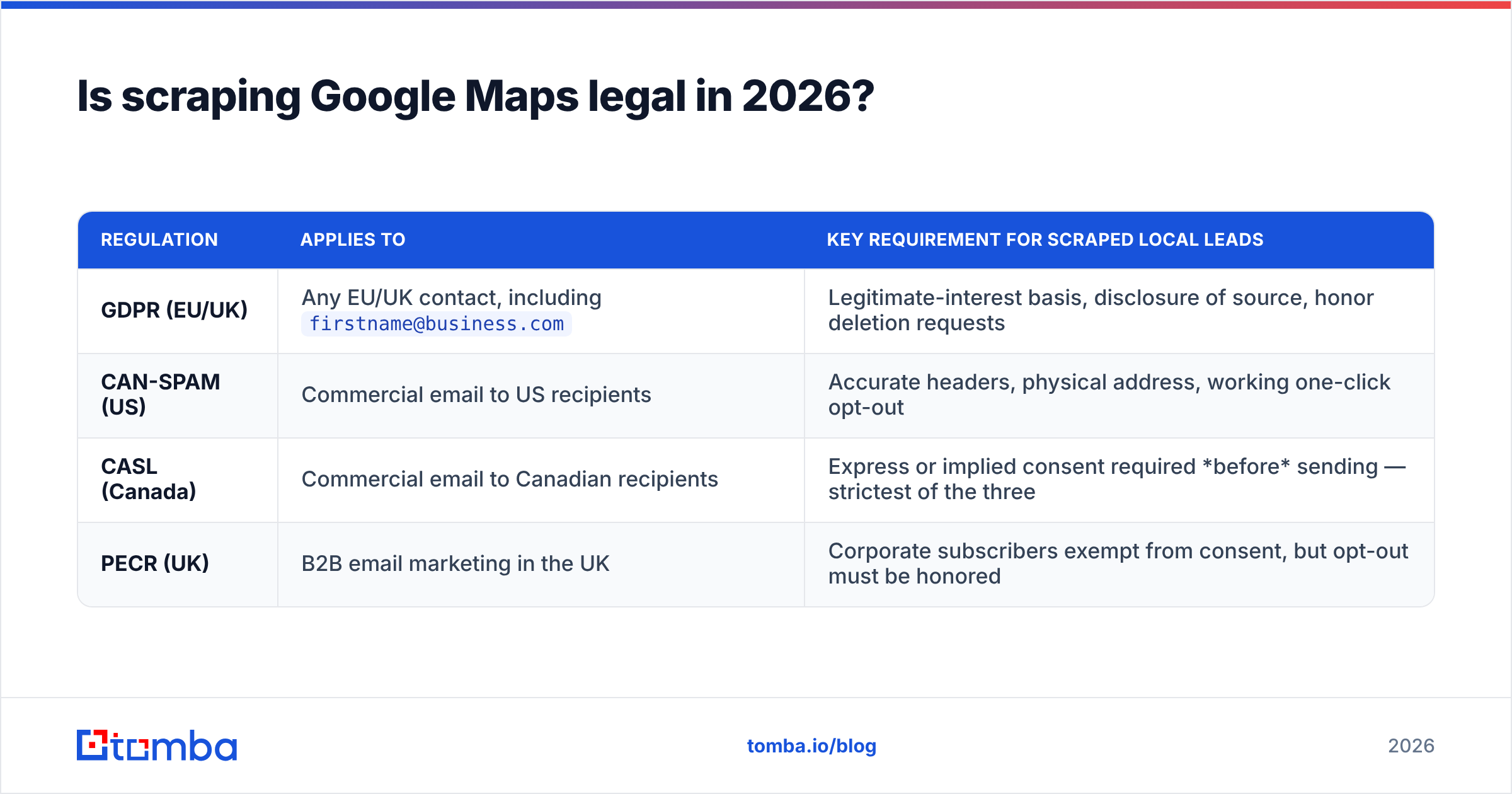
What genuinely constrains you is the outreach layer:
| Regulation | Applies to | Key requirement for scraped local leads |
|---|---|---|
| GDPR (EU/UK) | Any EU/UK contact, including firstname@business.com |
Legitimate-interest basis, disclosure of source, honor deletion requests |
| CAN-SPAM (US) | Commercial email to US recipients | Accurate headers, physical address, working one-click opt-out |
| CASL (Canada) | Commercial email to Canadian recipients | Express or implied consent required before sending — strictest of the three |
| PECR (UK) | B2B email marketing in the UK | Corporate subscribers exempt from consent, but opt-out must be honored |
Named business addresses are personal data under GDPR even when the domain is corporate. Generic info@ addresses generally are not. That is the one respect in which role-based emails are easier — small consolation.
How do the main Google Maps scraping tools compare?#
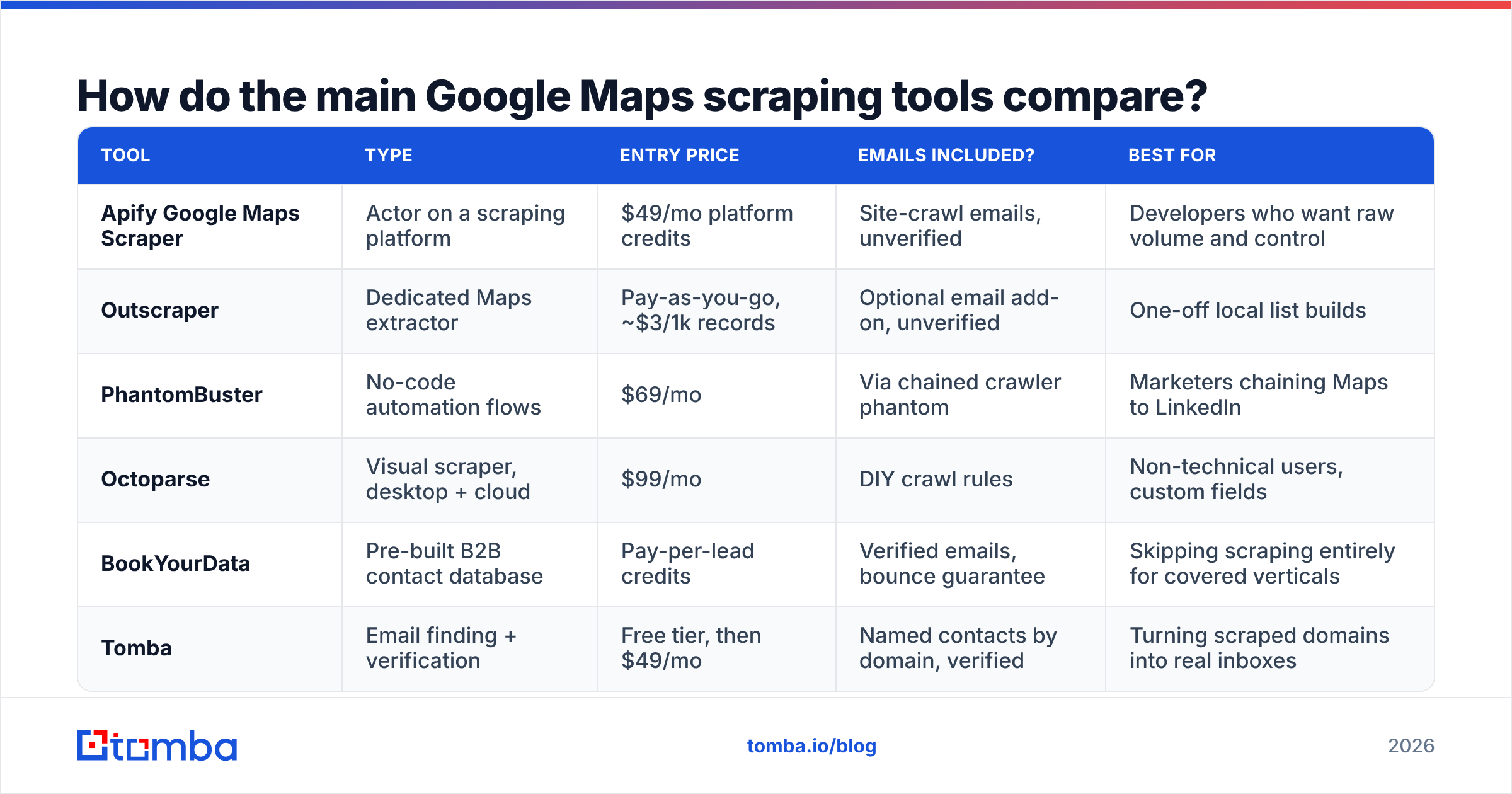
Most tools in this space split into three groups: pure Maps extractors, general-purpose scraping platforms with a Maps template, and enrichment platforms that start from a domain rather than a map pin.
| Tool | Type | Entry price | Emails included? | Best for |
|---|---|---|---|---|
| Apify Google Maps Scraper | Actor on a scraping platform | $49/mo platform credits | Site-crawl emails, unverified | Developers who want raw volume and control |
| Outscraper | Dedicated Maps extractor | Pay-as-you-go, ~$3/1k records | Optional email add-on, unverified | One-off local list builds |
| PhantomBuster | No-code automation flows | $69/mo | Via chained crawler phantom | Marketers chaining Maps to LinkedIn |
| Octoparse | Visual scraper, desktop + cloud | $99/mo | DIY crawl rules | Non-technical users, custom fields |
| BookYourData | Pre-built B2B contact database | Pay-per-lead credits | Verified emails, bounce guarantee | Skipping scraping entirely for covered verticals |
| Tomba | Email finding + verification | Free tier, then $49/mo | Named contacts by domain, verified | Turning scraped domains into real inboxes |
The pattern here matters more than any single row. The Maps tools are good at what they do — pulling structured listing data at volume. They are weak exactly where you need strength: getting a named, deliverable address for the person who signs contracts. BookYourData sidesteps the problem entirely if your target vertical is already in their database, which is a legitimately faster path when it fits. Tomba sits at the other joint: you bring a domain, it returns the people.
Trying to make one tool do both jobs is why most Maps-based campaigns underperform.
What does the workflow that actually works look like?#
Treat the Maps scrape as a domain-discovery step, not a contact-discovery step. Then layer enrichment on top.
Step 1 — Scrape for structure, not emails. Pull business name, category, city, phone, website, review count. Ignore the email column entirely; it is noise. Filter aggressively at this stage: a scrape of "dentists in Austin" with 4.0+ stars and 50+ reviews is a far better list than every dentist in Texas.
Step 2 — Normalize the domains. Strip www, drop tracking parameters, remove aggregator URLs (Yelp, Facebook, DoorDash links masquerading as websites), and deduplicate. Multi-location businesses will collapse into one domain here, which is what you want. A remove duplicates pass takes seconds and saves credits.
Step 3 — Run domain search on the survivors. Feed each clean domain into a domain search to get the named people behind it, along with their job titles and the company's email pattern. This is the step that converts info@brightsmiledental.com into sarah.chen@brightsmiledental.com — practice manager, the person who actually evaluates your software.
Step 4 — Verify everything before it enters your sequencer. Scraped and inferred addresses both need an SMTP-level check. Run the full list through an email verifier, drop anything not marked deliverable, and route catch-all domains to a separate, lower-volume sequence. Local businesses skew heavily toward catch-all configurations, so a catch-all verifier is not optional here.
Step 5 — Split channels by data quality. Named + verified goes to email. Phone-only listings go to a call list — you already have the number, and local businesses answer phones more reliably than they answer cold email. Role-based-only leads go to a low-volume, high-relevance sequence or get dropped.
Step 6 — Cap volume per domain. One contact per business. Emailing three people at a 6-person dental practice on the same day is the definition of a spam complaint.
How much does the full pipeline cost?#
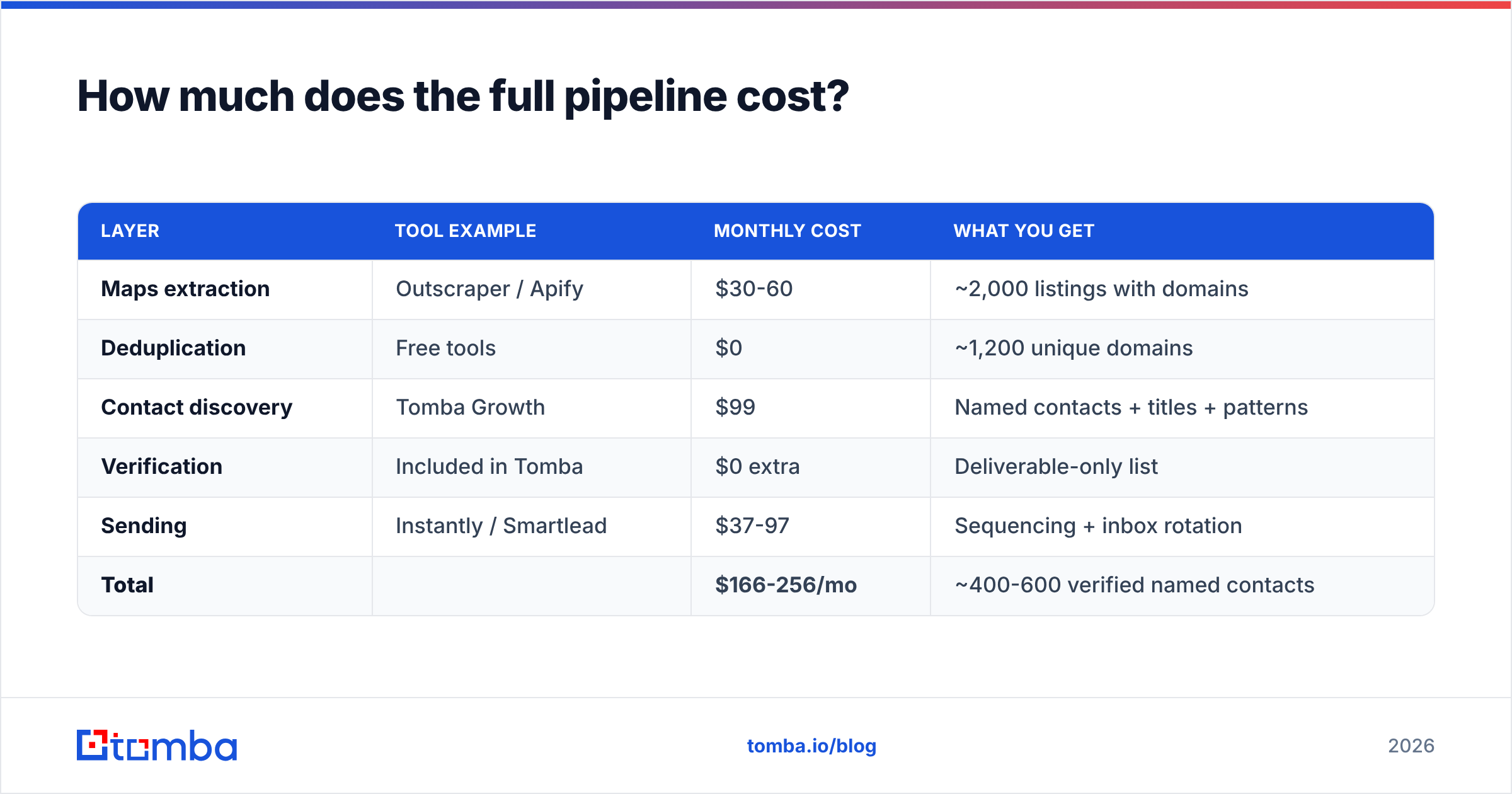
A realistic monthly budget for a team building 2,000 local leads per month:
| Layer | Tool example | Monthly cost | What you get |
|---|---|---|---|
| Maps extraction | Outscraper / Apify | $30-60 | ~2,000 listings with domains |
| Deduplication | Free tools | $0 | ~1,200 unique domains |
| Contact discovery | Tomba Growth | $99 | Named contacts + titles + patterns |
| Verification | Included in Tomba | $0 extra | Deliverable-only list |
| Sending | Instantly / Smartlead | $37-97 | Sequencing + inbox rotation |
| Total | $166-256/mo | ~400-600 verified named contacts |
That works out to roughly $0.35-0.60 per verified, named, local-business contact. Compare that against a purchased local-business list at $0.15-0.30 per row where 40% bounces, and the scraped-plus-enriched path wins on both cost-per-usable-lead and freshness.
If your volume is lower, Tomba pricing starts free at 25 searches per month and moves to $49/mo on Starter, which comfortably covers a few hundred domains. Scale to Growth at $99/mo when your monthly domain count crosses roughly 800.
What about the API route?#
If you are running this monthly, wire it rather than clicking it.
The Google Places API gives you listing data legitimately, within quota, without ToS risk from browser automation — you just cannot cache it beyond 30 days or rebuild a competing database with it. Pull the domains, then hand them to an email finder API that returns contacts and verification status in one call. A nightly job that ingests new listings in your target metros, enriches them, verifies, and pushes deliverable contacts into your CRM removes the entire manual export-import cycle.
For a lighter-weight version, the Google Sheets add-on turns a pasted column of scraped domains into enriched contacts without any code, and the HubSpot integration drops verified records straight into your pipeline with source attribution intact.
Two things to get right in any automated build. First, rate-limit the Maps side hard — aggressive querying is what triggers blocks, not volume over time. Second, log the verification status on every record and re-verify anything older than 90 days. Local business contacts decay faster than enterprise ones because staff turnover in small businesses is higher.
When should you skip scraping entirely?#
Three situations where the Maps route is the wrong tool:
- Your ICP is not location-bound. If you sell to SaaS companies or agencies, Maps adds nothing — those businesses are better found through firmographic filters in a B2B database.
- You need decision-maker titles, not just any contact. Maps has no concept of job roles. If you must reach the VP of Operations specifically, start from company data, not map pins.
- Your target vertical is already well-covered by a contact provider. If BookYourData or a similar provider already has verified contacts for "US dental practices, 5-50 employees," buying that list costs less than building it and arrives pre-verified.
Scraping wins when your ICP is genuinely geographic and long-tail — the independent gyms in three specific metros, the HVAC contractors in a service radius, the restaurants that opened in the last six months. Nobody maintains a good list of those, so you have to build it.
The bottom line#
A Google Maps email scraper is a domain harvester with an optimistic name. It is genuinely useful for what it does — finding every business of a given type in a given place, with phone numbers attached. It is not a source of verified, named email contacts, and no amount of tuning the crawl rules will change that, because the data simply is not on the page.
Build the pipeline in two halves. Let the Maps tool find the businesses. Let an enrichment layer find the people. Verify before anything enters your sequencer, split your channels by data quality, and cap yourself at one contact per business.
Ready to turn a column of scraped domains into contacts you can actually email? Drop them into the Tomba Email Finder — it returns named contacts with job titles, confidence scores, and built-in verification, so what reaches your sequencer is a deliverable list rather than a hopeful one. Start on the free tier with 25 searches to test your first scrape batch before committing to a plan.
Related guides#
Ready to find emails that actually work?
Join 150,000+ professionals who stopped guessing and started sending. Free credits on signup — no credit card required.
Get the Tomba newsletter
Practical outbound tactics and product updates — once every two weeks.
About the author