Google Workspace Cold Email: The 2026 Setup Guide
Google Workspace can run cold email at scale — but only if you build the domain, DNS, and sending limits correctly. Here's the full 2026 setup, limits, and cost math.
TL;DR
- Google Workspace is still the most reliable infrastructure for cold email in 2026 — but only on secondary domains, never your primary company domain.
- The real ceiling is not the 2,000/day API limit. It's roughly 30-50 cold sends per inbox per day before reputation degrades.
- Budget about $7/mo per Workspace user (Business Starter), plus domains at ~$12/yr each. A 500-send/day setup costs roughly $85-$110/mo in infrastructure alone.
- Google's bulk-sender rules (spam complaints under 0.10%, one-click unsubscribe, authenticated domains) apply to you even at low volume. Enforcement tightened again in 2025.
- Bounce rate is the single fastest way to kill a new Workspace tenant. Verify every address before the first send.
What is Google Workspace cold email, and why does it still work?#
Google Workspace cold email means sending outbound prospecting mail from Gmail-backed inboxes on a domain you control, rather than from a bulk ESP like Mailchimp or SendGrid.
The distinction matters because of how receiving servers score you. A message from a Workspace inbox arrives with Google's sending IPs, Google's reputation history, and a real person-to-person envelope. A message from a shared marketing ESP arrives with a shared IP pool and a footprint that inbox providers have been trained to filter into Promotions or Spam.
Think of it like arriving at a private event. A bulk ESP is the courier van that drops off 400 identical envelopes at the door. Workspace is you walking in wearing a badge the venue already recognises. Same message, radically different treatment.
That advantage is real but conditional. Google gives you the badge; it also revokes it fast if your complaint rate climbs or your bounces spike. Workspace is not a loophole around deliverability discipline — it's a higher-quality starting position that still demands correct setup.
What are the real Google Workspace sending limits in 2026?#
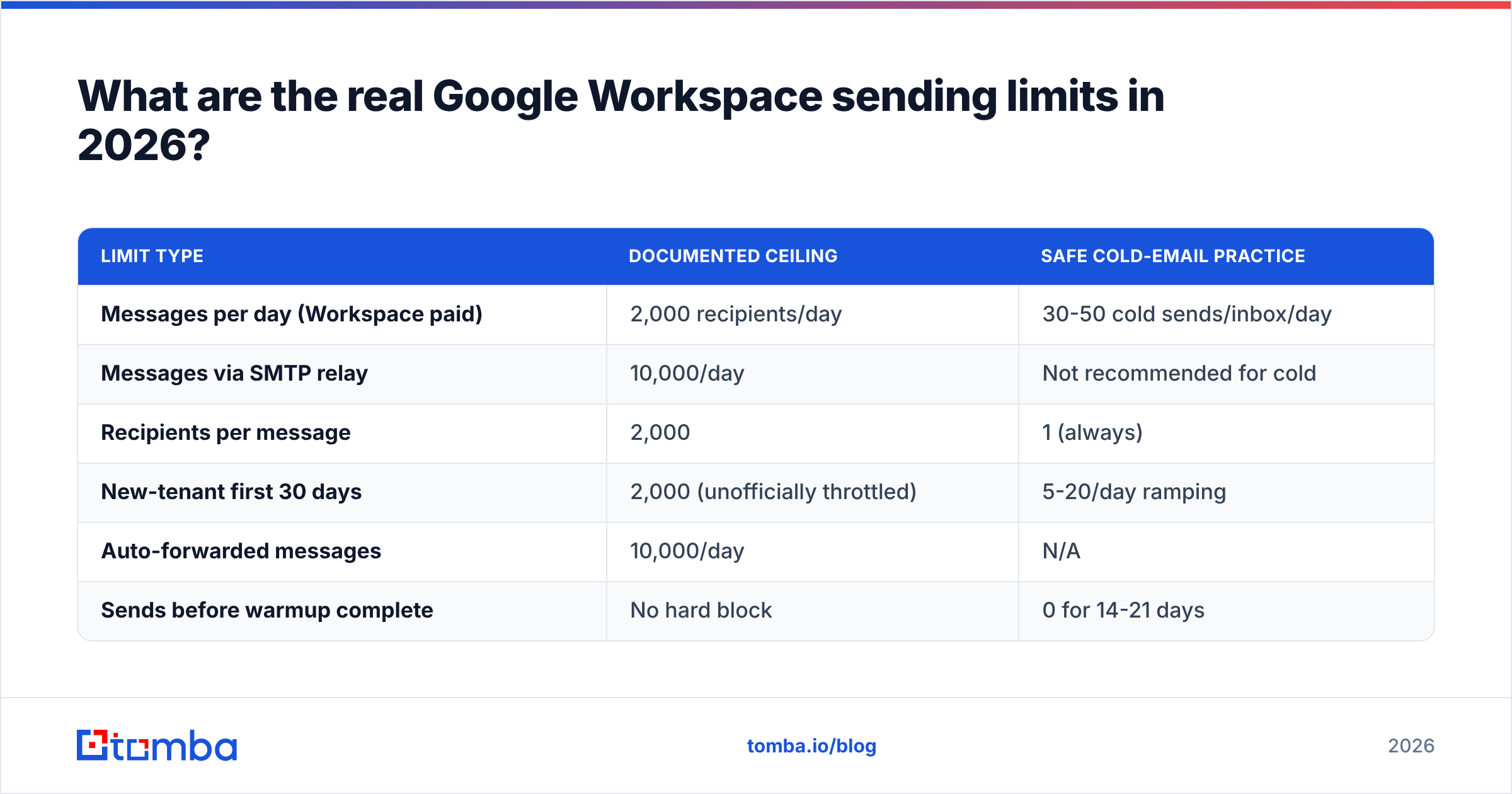
The published numbers and the safe numbers are two different things. Google documents a hard cap; deliverability practice imposes a much lower soft cap.
| Limit type | Documented ceiling | Safe cold-email practice |
|---|---|---|
| Messages per day (Workspace paid) | 2,000 recipients/day | 30-50 cold sends/inbox/day |
| Messages via SMTP relay | 10,000/day | Not recommended for cold |
| Recipients per message | 2,000 | 1 (always) |
| New-tenant first 30 days | 2,000 (unofficially throttled) | 5-20/day ramping |
| Auto-forwarded messages | 10,000/day | N/A |
| Sends before warmup complete | No hard block | 0 for 14-21 days |
The gap between column two and column three is where most campaigns die. Sending 500 messages from a fresh inbox because the documentation says 2,000 is allowed is the outbound equivalent of redlining a new engine on the drive home from the dealership. Google's own bulk sender guidelines codify the complaint threshold (keep it below 0.10%, never above 0.30%), and receiving providers apply similar logic to inbound volume from unfamiliar domains.
A practical model: one inbox handles 40 first-touch emails per day. Three inboxes per domain. So a domain sustainably produces about 120 sends daily, and a 500/day operation needs roughly 4-5 secondary domains and 12-15 Workspace seats.
How do you set up Google Workspace for cold email correctly?#
Six steps, in this order. Skipping or reordering them is the most common cause of a burned domain.
Buy secondary domains, never send from the primary. If yourcompany.com is where invoices, contracts, and support tickets flow, keep cold traffic off it entirely. Register close variants — getyourcompany.com, yourcompany.co, tryyourcompany.com — and accept that these are consumables. A burned secondary costs $12. A burned primary costs your whole revenue channel.
Set up redirects and a real landing page. Each secondary domain should 301-redirect to your primary or serve a minimal page. Domains that resolve to nothing look disposable to spam filters and to prospects who check.
Configure SPF, DKIM, and DMARC before creating a single inbox. SPF authorises Google's servers, DKIM signs the message, DMARC tells receivers what to do on failure. Start DMARC at
p=nonewith a reporting address, then move top=quarantineafter two weeks of clean reports. Validate the record with an SPF checker rather than eyeballing the TXT string — a single extrainclude:breaks the 10-lookup limit silently.Create 2-3 inboxes per domain, each with a real human identity. Full name, headshot, job title, and a signature. Generic addresses (info@, sales@, hello@) get filtered harder and reply worse.
Warm up for 14-21 days before the first campaign. Ramp from 5 sends/day to 40 gradually. Use a warmup network to generate opens, replies, and inbox moves. Run the numbers through a warmup calculator so the ramp is a plan, not a guess.
Verify the list, then connect the sending tool. Sequencer choice matters far less than list hygiene at this stage.
Each step compounds. Correct DNS with an unverified list still fails. A verified list on unauthenticated domains still fails.
Why does list quality matter more than infrastructure?#
Because bounce rate is the metric Google reacts to fastest, and it's entirely determined by your data — not your DNS.
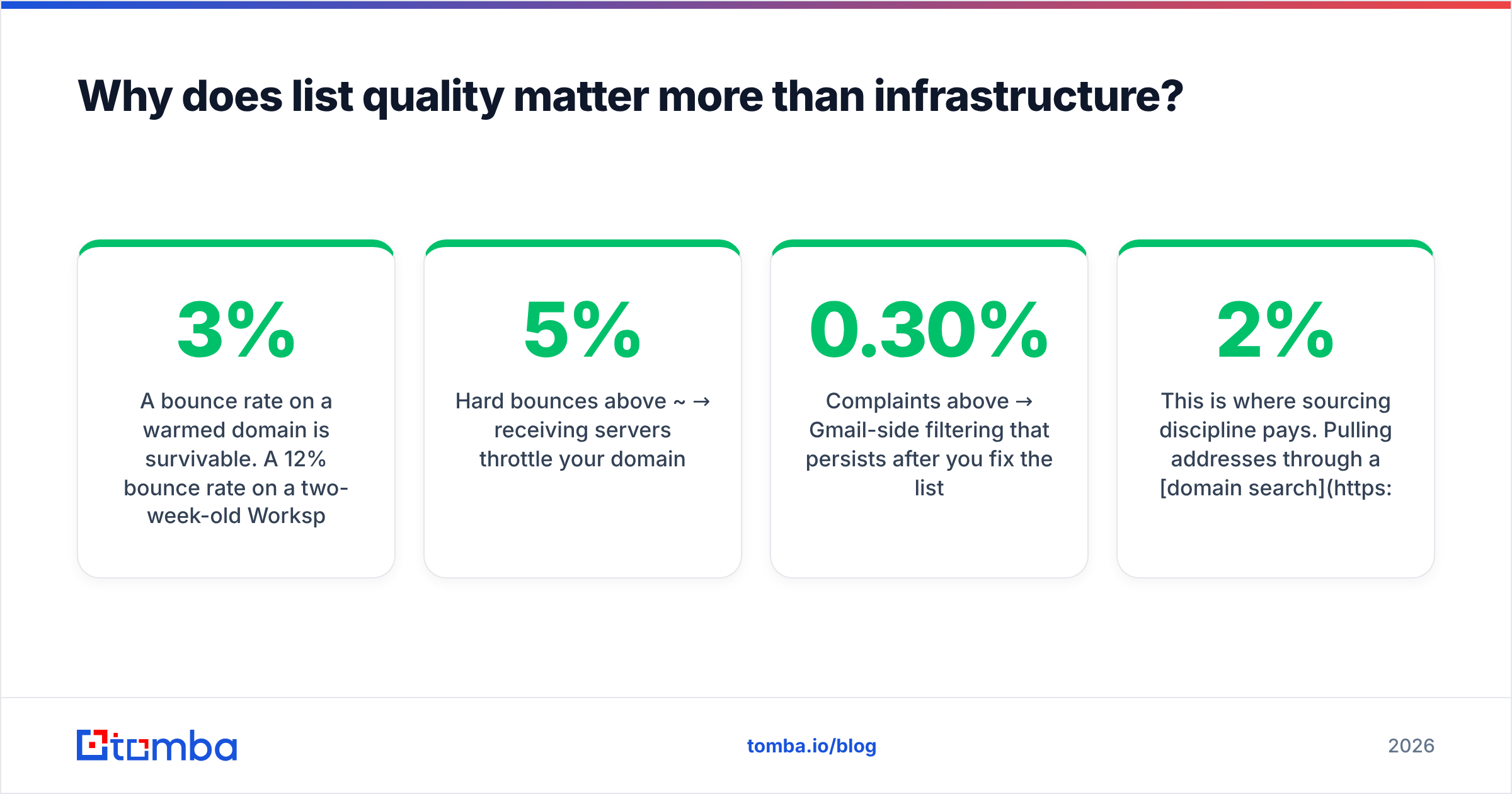
A 3% bounce rate on a warmed domain is survivable. A 12% bounce rate on a two-week-old Workspace tenant gets your sends deprioritised within days, and no amount of correct SPF fixes it. Google reads high bounce volume from a new domain as the signature of a scraped list, because it usually is.
The failure chain looks like this:
- Scraped or guessed addresses → invalid mailboxes → hard bounces
- Hard bounces above ~5% → receiving servers throttle your domain
- Throttling → lower inbox placement → fewer replies → more spam complaints from the mail that does land
- Complaints above 0.30% → Gmail-side filtering that persists after you fix the list
Breaking the chain at step one is cheap. Breaking it at step four means burning the domain and starting the 21-day warmup again.
This is where sourcing discipline pays. Pulling addresses through a domain search that returns pattern-confirmed results, then running the output through an email verifier before import, typically keeps bounce rates under 2%. Catch-all domains need separate handling — a standard SMTP check returns "accept all" and tells you nothing, so route those through a catch-all verifier instead of guessing.

Is Google Workspace better than Microsoft 365 or a dedicated ESP?#
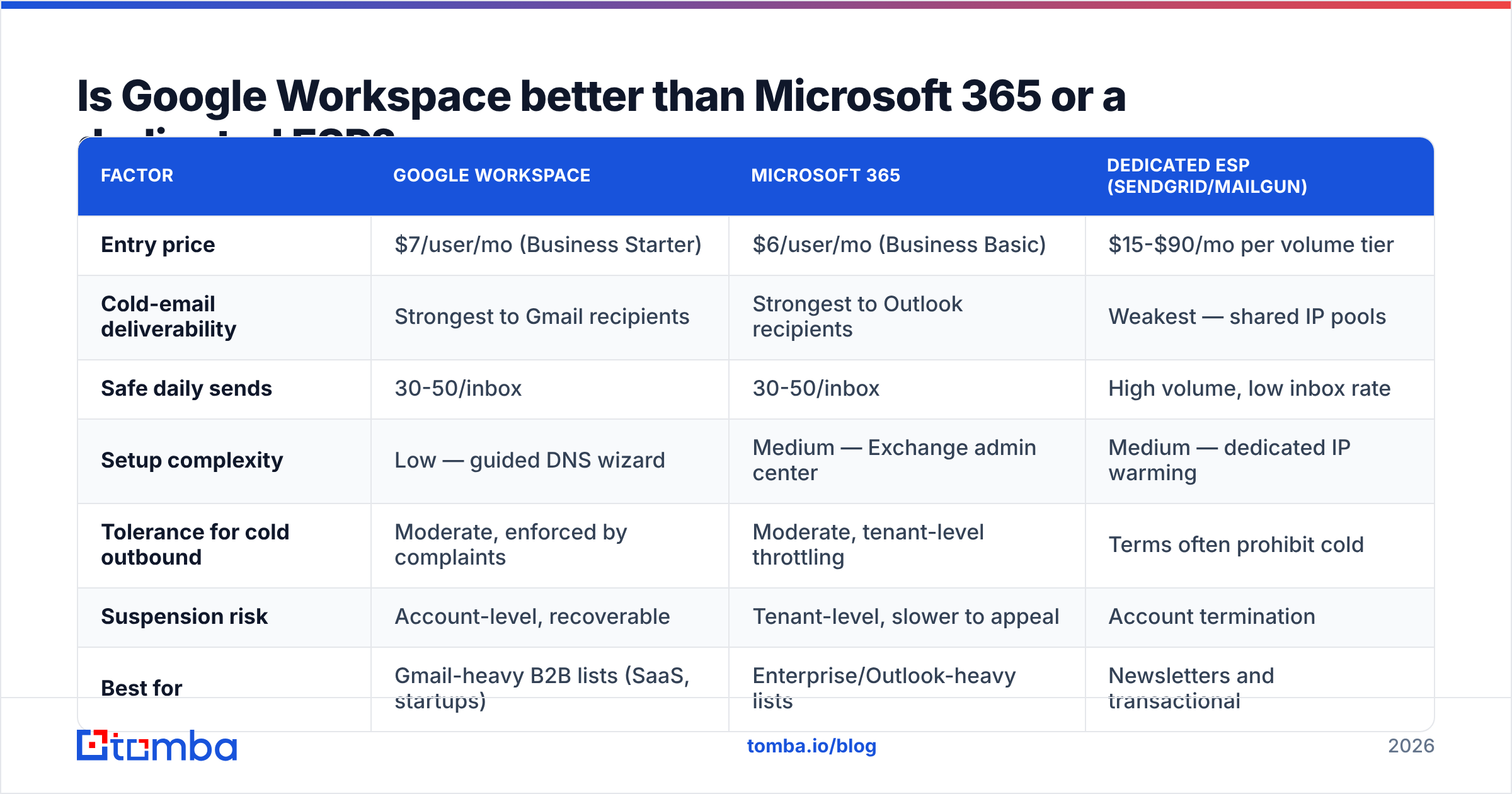
For cold outbound, Workspace wins on deliverability and loses on cost per seat. Here's the honest comparison.
| Factor | Google Workspace | Microsoft 365 | Dedicated ESP (SendGrid/Mailgun) |
|---|---|---|---|
| Entry price | $7/user/mo (Business Starter) | $6/user/mo (Business Basic) | $15-$90/mo per volume tier |
| Cold-email deliverability | Strongest to Gmail recipients | Strongest to Outlook recipients | Weakest — shared IP pools |
| Safe daily sends | 30-50/inbox | 30-50/inbox | High volume, low inbox rate |
| Setup complexity | Low — guided DNS wizard | Medium — Exchange admin center | Medium — dedicated IP warming |
| Tolerance for cold outbound | Moderate, enforced by complaints | Moderate, tenant-level throttling | Terms often prohibit cold |
| Suspension risk | Account-level, recoverable | Tenant-level, slower to appeal | Account termination |
| Best for | Gmail-heavy B2B lists (SaaS, startups) | Enterprise/Outlook-heavy lists | Newsletters and transactional |
The nuance most guides miss: your recipients' provider should drive the choice. Selling to venture-backed SaaS companies? Their teams run Gmail, and Workspace-to-Workspace delivery is measurably better. Selling to manufacturing, finance, or government? Those inboxes are Microsoft, and a mixed fleet of Workspace and 365 inboxes outperforms either alone.
Dedicated ESPs belong in a different category entirely. SendGrid's own documentation is built around opt-in mail, and most bulk providers' acceptable-use policies prohibit unsolicited outreach. Using them for cold email means operating against the terms you agreed to, which is a poor foundation for a revenue channel. Peer reviews on G2 consistently reflect this split — inbox-based infrastructure for outbound, ESPs for marketing.
What does a Google Workspace cold email stack actually cost?#
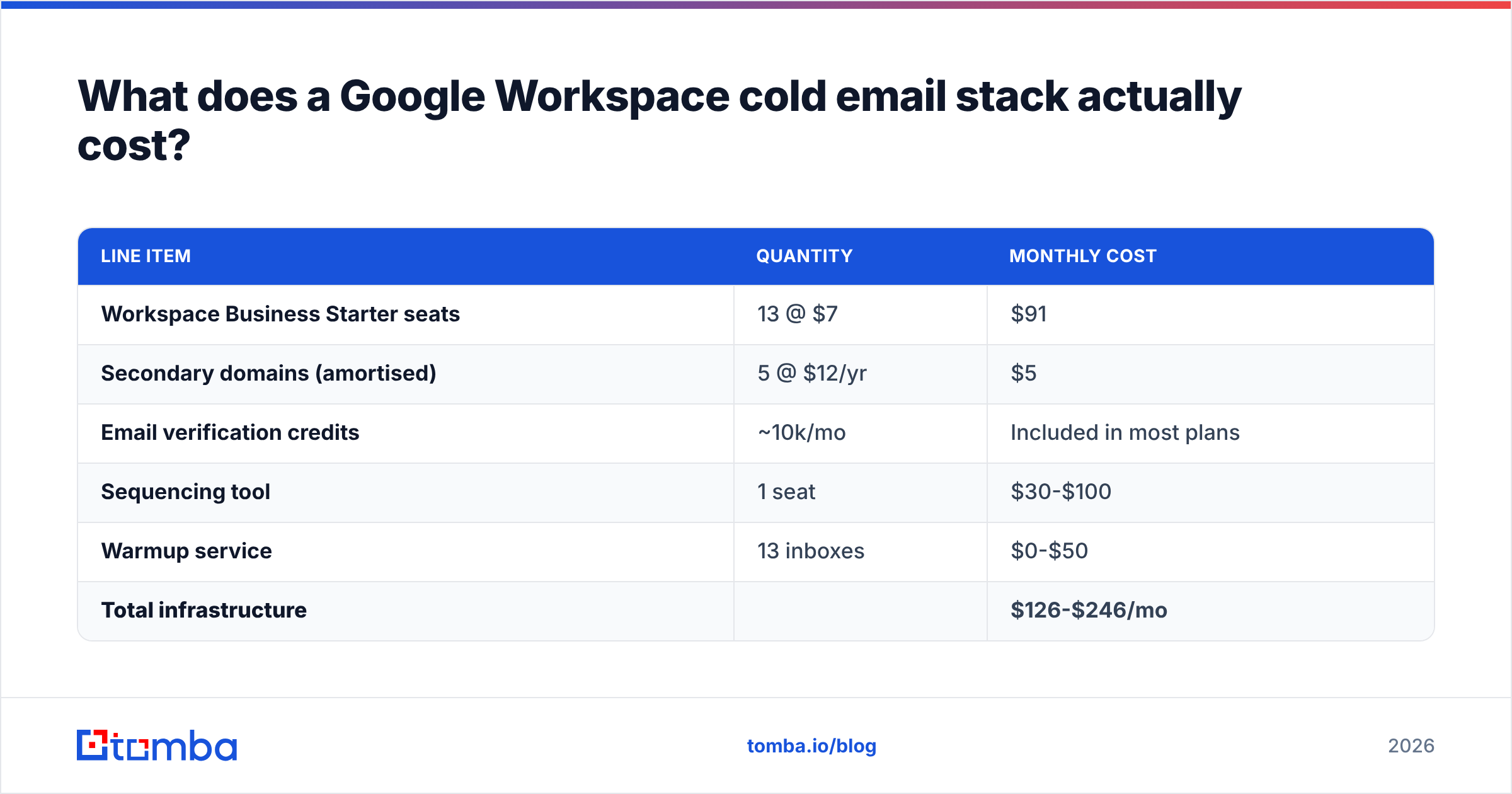
Assume a target of 500 first-touch emails per day — a realistic single-SDR or small-team volume.
| Line item | Quantity | Monthly cost |
|---|---|---|
| Workspace Business Starter seats | 13 @ $7 | $91 |
| Secondary domains (amortised) | 5 @ $12/yr | $5 |
| Email verification credits | ~10k/mo | Included in most plans |
| Sequencing tool | 1 seat | $30-$100 |
| Warmup service | 13 inboxes | $0-$50 |
| Total infrastructure | $126-$246/mo |
Two things fall out of that table. First, seats dominate the bill — every extra 40 daily sends costs $7/month forever. Second, data cost is comparatively trivial, which makes underinvesting in verification an unusually bad trade. Spending $91/mo on seats and then feeding them an unverified list is buying a good camera and shooting through a dirty lens.
For data sourcing, Tomba pricing starts free at 25 searches/month, with Starter at $49/mo and Growth at $99/mo covering the finding and verification volume most 500/day operations need. Peers in the space — including BookYourData, which sells pre-verified B2B lists with a bounce guarantee — solve the same problem from a database angle rather than a real-time lookup angle. Both approaches work; pick based on whether your ICP is well-covered by an existing database or requires domain-by-domain discovery.
What kills Google Workspace cold email accounts?#
Five failure modes, in rough order of frequency:
- Volume ramping too fast. New tenant, 300 sends on day three. Google's abuse systems flag the pattern before any human reads your copy.
- Unverified lists. Bounce rate above 5% on a young domain is a near-automatic throttle.
- Identical copy across all inboxes. Sending the same string of text from 13 addresses to 500 recipients creates a content fingerprint. Spin the opening line and the CTA at minimum.
- Missing unsubscribe. Google's bulk-sender requirements expect a one-click opt-out. Even below the 5,000/day threshold, offering an exit reduces complaints — and complaints are the metric that actually gets you filtered.
- Link and image bloat. Tracking pixels, multiple links, and HTML signatures in a first-touch email look like marketing mail. Plain text with one link performs better and filters less.
None of these are exotic. They're the same discipline that governs any email deliverability program, applied to infrastructure that Google watches closely because it's frequently abused.
How do you monitor whether it's working?#
Track four numbers weekly, not daily. Daily noise on small volumes leads to overcorrection.
- Bounce rate — target under 2%, act above 4%. Rising bounces mean list decay; re-verify.
- Reply rate — target 4-8% on a well-targeted list. Under 1% usually indicates targeting failure, not deliverability failure.
- Spam complaint rate — must stay under 0.10%. Google Postmaster Tools reports this per domain once you're authenticated.
- Inbox placement — run a seed test monthly across Gmail, Outlook, and one corporate domain. Placement drift precedes reply-rate collapse by about two weeks.
Register every sending domain in Google Postmaster Tools during setup, not after something breaks. The historical reputation graph is the only view you get into how Gmail actually scores you, and it only backfills from the day you add the domain.
If reply rate holds but placement drops, the problem is infrastructure — rotate to fresh inboxes and re-warm. If placement holds but replies drop, the problem is targeting or copy, and adding domains won't fix it. Diagnosing which one you have saves weeks.
Getting started#
Google Workspace remains the strongest foundation for cold outbound in 2026, provided you treat secondary domains as consumables, cap each inbox around 40 daily sends, and authenticate everything before the first message leaves. The infrastructure side is well-documented and mechanical. The part that separates campaigns that book meetings from campaigns that burn domains is the list you feed into it.
Start there. The Tomba Email Finder returns pattern-confirmed professional addresses by domain, name, or company, with verification built into the same workflow — so the addresses hitting your freshly warmed Workspace inboxes are ones that actually resolve. The free tier covers 25 searches a month if you want to test bounce rates on a small batch before committing budget to seats.
Related guides#
Ready to find emails that actually work?
Join 150,000+ professionals who stopped guessing and started sending. Free credits on signup — no credit card required.
Get the Tomba newsletter
Practical outbound tactics and product updates — once every two weeks.
About the author