Google X-Ray Search: How to Find B2B Leads on Google
Google x-ray search still surfaces prospect profiles that platform search hides — if you know the operators and where the technique quietly breaks. Here is what works in 2026, what decayed, and how to turn a results page into contactable leads.

TL;DR
- Google x-ray search means using
site:plus other operators to search inside a platform (LinkedIn, GitHub, Crunchbase) from Google, bypassing that platform's own search filters and result caps. - It still works in 2026, but on a smaller index than in 2019: LinkedIn now blocks most member profiles from crawlers, so public-facing pages, company pages, and non-LinkedIn sources return far better yields.
- X-ray is a discovery tool, not a contact tool. It gives you names, titles, and URLs — never a verified email or phone number.
- The realistic workflow is: x-ray to build a raw list → deduplicate → enrich to email → verify before sending. Skipping the last two steps is how people burn a sending domain.
- For anything above ~200 prospects, a paid finder plus a domain search beats manual x-raying on cost-per-usable-contact, even though x-ray itself is free.
What is Google x-ray search?#
Google x-ray search is the practice of using search operators — chiefly site: — to look through a website's public pages from outside, instead of using that site's own search box.
Think of it like reading a library's card catalog from the street through the window. The librarian (LinkedIn search, Crunchbase filters) decides what you're allowed to see, how many results you get, and whether you need a paid card. Google, meanwhile, has already photographed every page the library left facing the window. X-ray search is just reading those photographs in an order you choose.
The canonical example:
site:linkedin.com/in "head of revenue operations" "Series B" -intitle:"profiles"That string tells Google: only return pages under the linkedin.com/in path, containing both of those phrases, and drop directory pages. No LinkedIn login. No commercial-use limit. No Sales Navigator seat.
The term comes from technical recruiting, where sourcers used it through the 2010s to find candidate profiles without paying for LinkedIn Recruiter. B2B sales teams adopted it wholesale. The technique itself is neither new nor secret — Google documents most of these operators publicly — but the combinations are where the leverage is.
How does Google x-ray search actually work?#
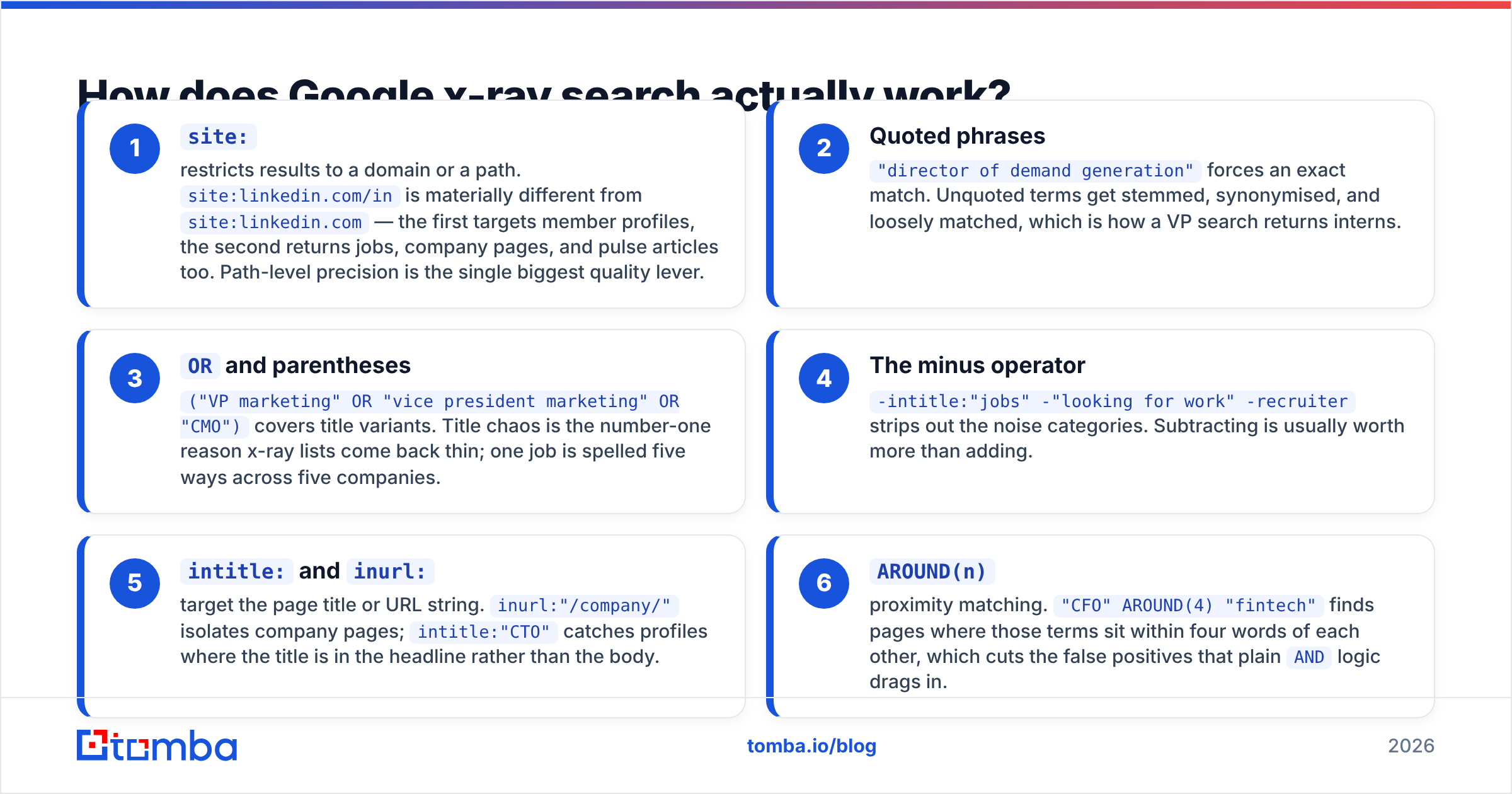
Every x-ray string is built from the same small set of parts. Learn these six and you can write any string you'll ever need:
site:— restricts results to a domain or a path.site:linkedin.com/inis materially different fromsite:linkedin.com— the first targets member profiles, the second returns jobs, company pages, and pulse articles too. Path-level precision is the single biggest quality lever.- Quoted phrases —
"director of demand generation"forces an exact match. Unquoted terms get stemmed, synonymised, and loosely matched, which is how a VP search returns interns. ORand parentheses —("VP marketing" OR "vice president marketing" OR "CMO")covers title variants. Title chaos is the number-one reason x-ray lists come back thin; one job is spelled five ways across five companies.- The minus operator —
-intitle:"jobs" -"looking for work" -recruiterstrips out the noise categories. Subtracting is usually worth more than adding. intitle:andinurl:— target the page title or URL string.inurl:"/company/"isolates company pages;intitle:"CTO"catches profiles where the title is in the headline rather than the body.AROUND(n)— proximity matching."CFO" AROUND(4) "fintech"finds pages where those terms sit within four words of each other, which cuts the false positives that plainANDlogic drags in.
Stack them and you get something usable:
site:linkedin.com/in ("head of partnerships" OR "director of partnerships")
("SaaS" OR "B2B software") "San Francisco Bay Area"
-intitle:"jobs" -"open to work"
Which platforms are worth x-raying in 2026?#
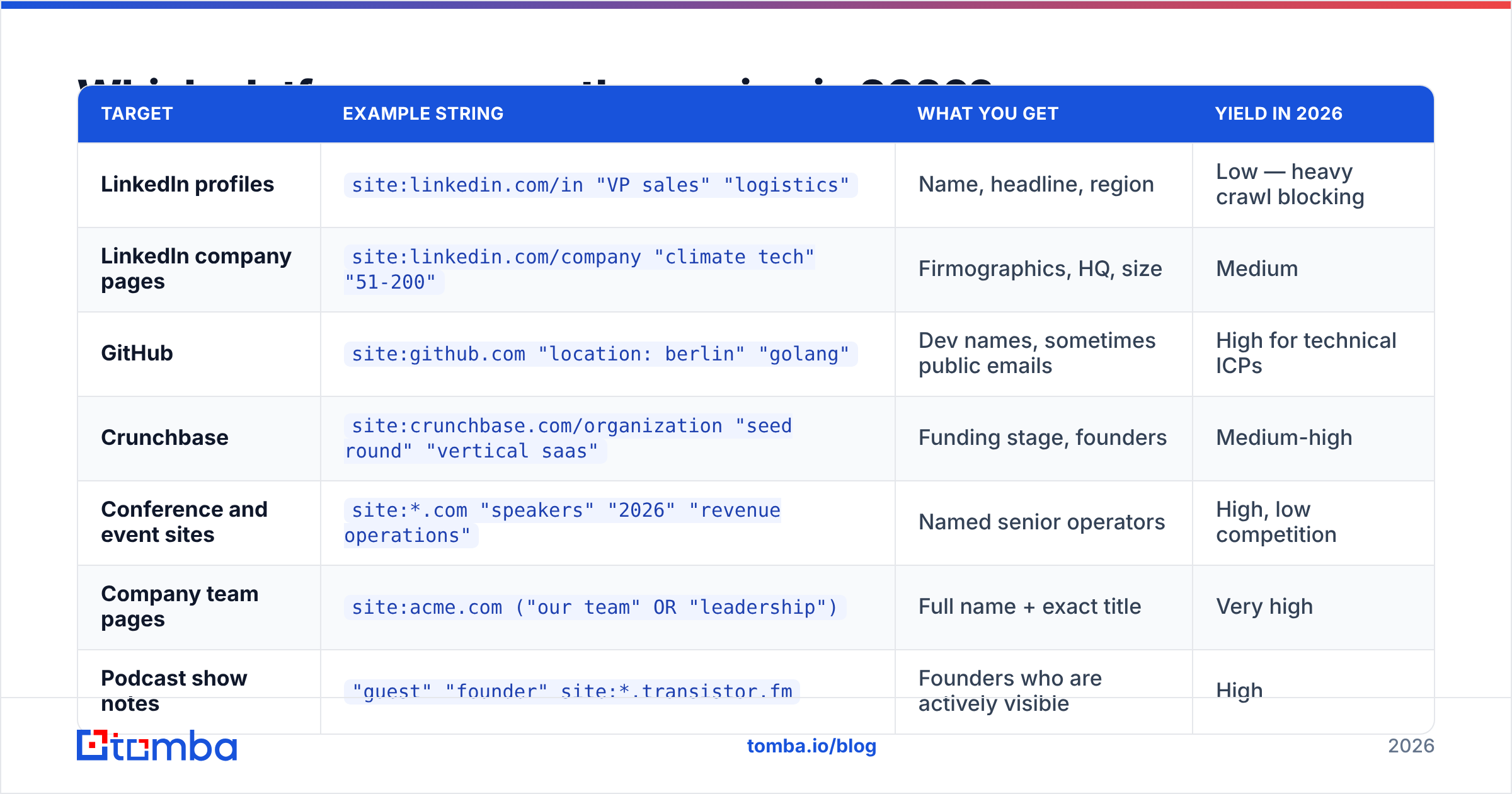
LinkedIn gets all the attention and delivers the least. Since the crawler restrictions tightened, a large share of member profiles return either nothing or a stale cached title. The sites below are indexed generously and are where experienced sourcers actually spend their operators.
| Target | Example string | What you get | Yield in 2026 |
|---|---|---|---|
| LinkedIn profiles | site:linkedin.com/in "VP sales" "logistics" |
Name, headline, region | Low — heavy crawl blocking |
| LinkedIn company pages | site:linkedin.com/company "climate tech" "51-200" |
Firmographics, HQ, size | Medium |
| GitHub | site:github.com "location: berlin" "golang" |
Dev names, sometimes public emails | High for technical ICPs |
| Crunchbase | site:crunchbase.com/organization "seed round" "vertical saas" |
Funding stage, founders | Medium-high |
| Conference and event sites | site:*.com "speakers" "2026" "revenue operations" |
Named senior operators | High, low competition |
| Company team pages | site:acme.com ("our team" OR "leadership") |
Full name + exact title | Very high |
| Podcast show notes | "guest" "founder" site:*.transistor.fm |
Founders who are actively visible | High |
That last row is the one most teams miss. Anyone who agreed to appear on a podcast has publicly volunteered their name, company, and a 40-minute explanation of their current priorities. That is a better prospecting signal than a job title on a profile page.
For company team pages specifically, x-ray is a fine way to find the page — but pulling every address off it is faster with a domain search than with copy-paste.
Is Google x-ray better than a paid prospecting tool?#
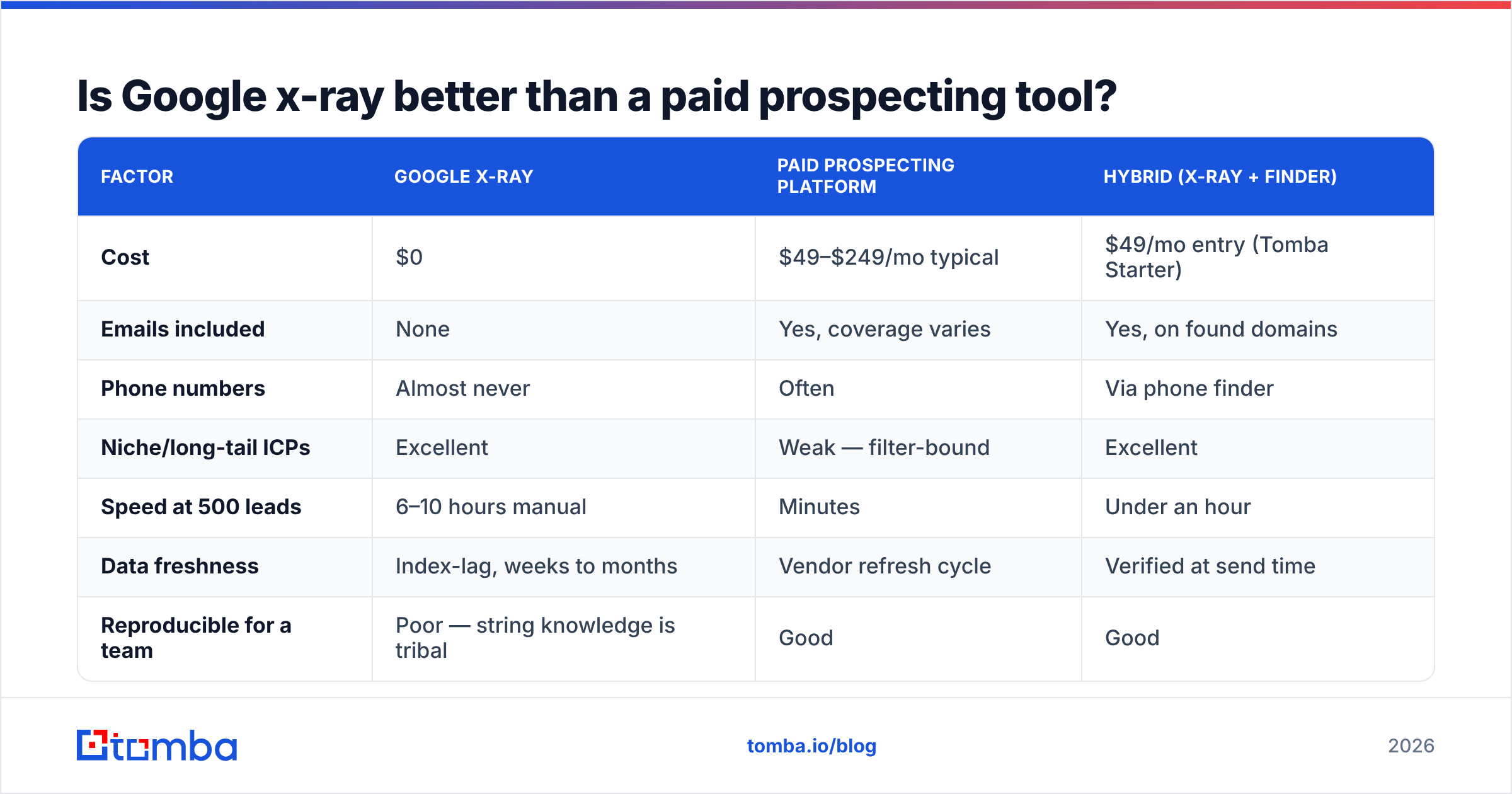
Not better — different job. X-ray is a free discovery layer with no contact data attached. Prospecting platforms are a paid contact layer with weaker discovery. The honest comparison:
| Factor | Google x-ray | Paid prospecting platform | Hybrid (x-ray + finder) |
|---|---|---|---|
| Cost | $0 | $49–$249/mo typical | $49/mo entry (Tomba Starter) |
| Emails included | None | Yes, coverage varies | Yes, on found domains |
| Phone numbers | Almost never | Often | Via phone finder |
| Niche/long-tail ICPs | Excellent | Weak — filter-bound | Excellent |
| Speed at 500 leads | 6–10 hours manual | Minutes | Under an hour |
| Data freshness | Index-lag, weeks to months | Vendor refresh cycle | Verified at send time |
| Reproducible for a team | Poor — string knowledge is tribal | Good | Good |
| Compliance paper trail | None | Vendor-provided | Vendor-provided |
The economics flip at volume. For 20 hand-picked accounts, x-ray wins outright — you'll find people no database has categorised correctly. For 800 contacts a month, the human hours spent writing and cleaning strings cost more than a Tomba plan, and you still end up needing email data you don't have.
Most competent teams run both. They x-ray to find who exists in a category no filter describes well, then push that list through an email finder to make it actionable. Buyer reviews on G2 reflect the same split: nobody rates a scraping technique, they rate what happens after it.
Why do x-ray results decay so fast?#
Four failure modes, in order of how often they bite:
The index is not the platform. Google shows you what it crawled, which may be from six weeks ago or six months ago. A profile that says "Director of Growth at Acme" in the SERP may belong to someone who left in March. X-ray has no concept of "current."
Robots directives keep tightening. Platforms have a direct commercial interest in making their member data invisible to Google and visible only behind their own login. LinkedIn's user agreement is explicit about automated access. A string that worked last quarter can silently return 12 results instead of 400 with no error message — you just get fewer, and unless you're tracking counts you never notice.
Operators are deprecated without warning. + for exact match is gone. link: is gone. AROUND(n) is undocumented and could go the same way. There's no changelog for search operators.
Manual result-page scraping doesn't scale. Google caps practical pagination well before 1,000 results, deduplicates aggressively, and throttles anything that looks automated. You will collect the first 200 and convince yourself that's the market.
None of this makes x-ray useless. It makes x-ray a first-pass sourcing method whose output must be treated as a hypothesis, not a record.
How do you turn x-ray results into contactable leads?#
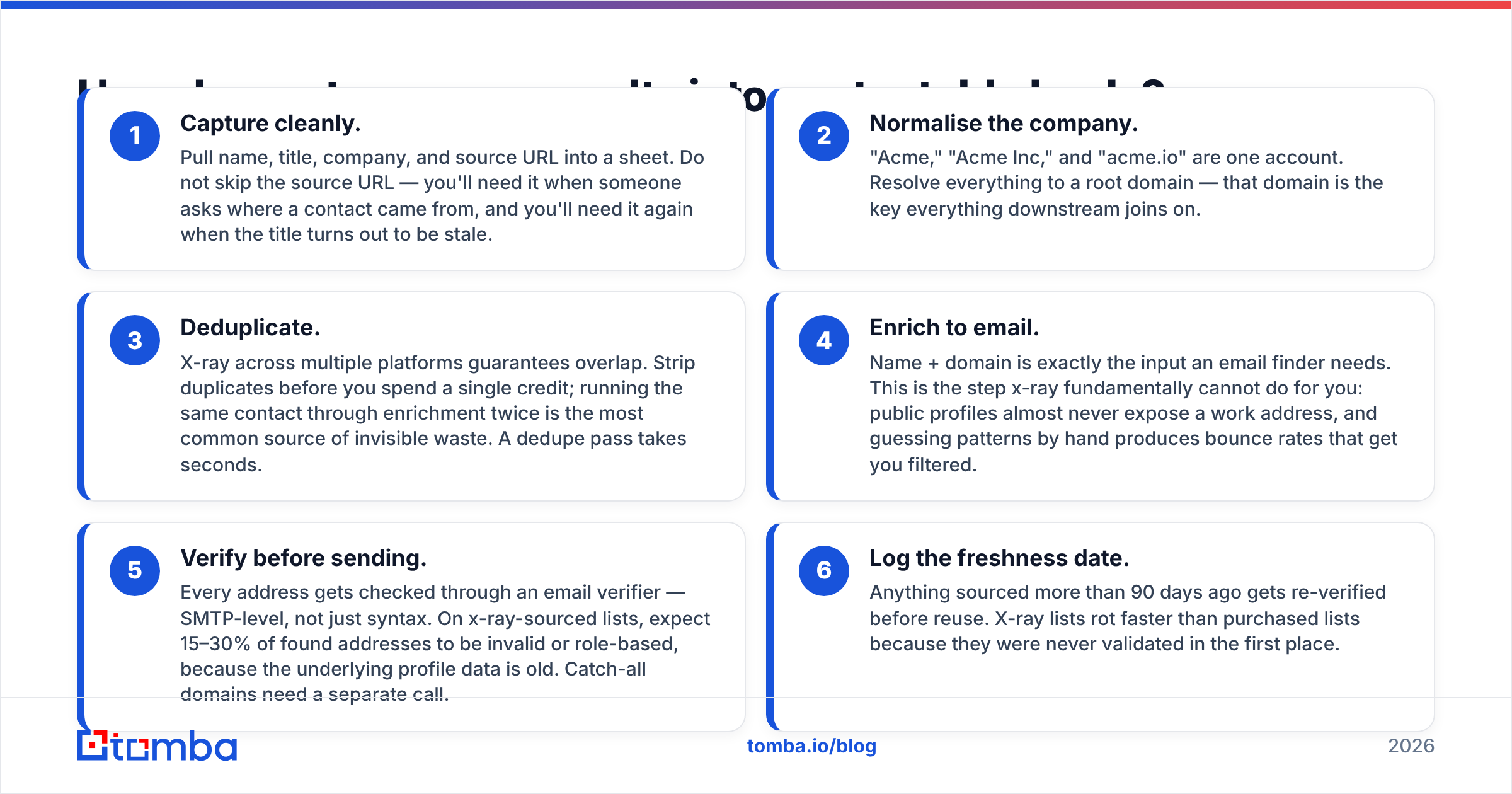
This is the part that separates a technique from a pipeline. A results page is not a lead list. Here's the sequence that actually converts:
- Capture cleanly. Pull name, title, company, and source URL into a sheet. Do not skip the source URL — you'll need it when someone asks where a contact came from, and you'll need it again when the title turns out to be stale.
- Normalise the company. "Acme," "Acme Inc," and "acme.io" are one account. Resolve everything to a root domain — that domain is the key everything downstream joins on.
- Deduplicate. X-ray across multiple platforms guarantees overlap. Strip duplicates before you spend a single credit; running the same contact through enrichment twice is the most common source of invisible waste. A dedupe pass takes seconds.
- Enrich to email. Name + domain is exactly the input an email finder needs. This is the step x-ray fundamentally cannot do for you: public profiles almost never expose a work address, and guessing patterns by hand produces bounce rates that get you filtered.
- Verify before sending. Every address gets checked through an email verifier — SMTP-level, not just syntax. On x-ray-sourced lists, expect 15–30% of found addresses to be invalid or role-based, because the underlying profile data is old. Catch-all domains need a separate call.
- Log the freshness date. Anything sourced more than 90 days ago gets re-verified before reuse. X-ray lists rot faster than purchased lists because they were never validated in the first place.

Steps 4 and 5 are where most of the ROI sits, and they're also the two most commonly skipped. A 1,000-contact x-ray list sent unverified will typically produce a bounce rate above 10%, which is enough for mailbox providers to start throttling your domain. The free hours you saved on sourcing get spent on domain recovery.
Is Google x-ray search legal and safe?#
Reading public search results is not the risky part. The risk sits in three specific places, and it's worth being precise rather than reassuring:
- Platform terms vs. law are different things. Viewing a Google SERP is not a terms violation. Running automated scripts against LinkedIn, or scraping profiles at volume, is a different activity that its user agreement addresses directly. Manual x-ray sits comfortably; automated x-ray at scale does not.
- GDPR applies to the output, not the method. Once you store a named EU individual's title and employer, you're processing personal data and need a lawful basis, a retention policy, and a way to honour deletion requests. "I found it on Google" is not a lawful basis on its own — legitimate interest is, if you document it.
- Deliverability is its own risk. Unverified sourcing hurts sender reputation, and sender reputation is much harder to rebuild than a prospect list. Treat email deliverability as the real constraint on how aggressive your sourcing can be.
The practical rule: x-ray manually, store the source and date for everything, verify before contact, and honour opt-outs immediately. That posture survives scrutiny.
When should you skip x-ray entirely?#
Skip it when any of these are true:
- Your ICP is well-covered by standard filters. If "VP of Engineering, 200–1000 employees, US, SaaS" describes your buyer, a database returns that in one query with contact data attached. Writing operators for it is a hobby, not a strategy.
- You need phone numbers. X-ray effectively never surfaces direct dials. That's a data-vendor problem.
- You're sourcing more than a few hundred contacts a month. The manual-hours math stops working. One SDR spending eight hours a week on strings costs more than most annual tool contracts.
- You need a repeatable process across a team. X-ray skill is tribal knowledge that leaves when the person leaves.
- You're targeting a category where profiles are thin — trades, healthcare, local services. Those buyers aren't on LinkedIn writing headlines; they're on company sites and association directories, where a domain-first approach wins.
Use x-ray where it's genuinely best: narrow, weird, or emerging categories that no filter has caught up with yet. "Companies who just hired their first RevOps person," "founders who spoke about pricing on a podcast this year," "engineering leads maintaining a specific open-source library." Databases don't have those segments. Google, indirectly, does.
The workflow that actually ships#
Run x-ray as your discovery layer for the accounts filters can't describe. Keep the strings in a shared doc so they don't die with one rep. Cap the manual portion at an hour a day — past that, the cost curve turns against you.
Then hand the boring half to software. Take the names and domains your strings produced, run them through the Tomba Email Finder to get work addresses, verify the results before a single send, and enrich anything that came back thin. The free tier covers 25 searches a month if you just want to test your x-ray list against real data first; Starter is $49/mo when the volume justifies it. If your x-ray work is LinkedIn-heavy, the LinkedIn finder turns profile URLs into verified addresses directly — which is exactly the gap Google was never going to close for you.
X-ray finds the person. Verified contact data is what lets you actually reach them.
Related guides#
Ready to find emails that actually work?
Join 150,000+ professionals who stopped guessing and started sending. Free credits on signup — no credit card required.
Get the Tomba newsletter
Practical outbound tactics and product updates — once every two weeks.
About the author