Hard Bouncing: What Causes It and How to Stop It in 2026
Hard bouncing is the fastest way to burn a sending domain you spent months warming. Here is what triggers it, the bounce rate mailbox providers actually tolerate, and the pre-send workflow that keeps you under it.
TL;DR
- A hard bounce is a permanent rejection: the address does not exist, the domain does not resolve, or the server has blocked you outright. Retrying does nothing.
- Gmail, Outlook, and Yahoo read hard bounce rate as a proxy for "does this sender know who they are mailing." Above roughly 2%, throttling starts. Above 5%, you are effectively in the spam folder.
- Most hard bouncing traces back to four things: stale lists, guessed email patterns, scraped data, and typo'd form submissions.
- The fix is almost entirely pre-send. Verification before the campaign costs cents per address; recovering a burned domain costs weeks.
- Catch-all domains are the hard part — they accept everything at SMTP time and bounce later. Handle them separately or exclude them.
What is hard bouncing?#
Hard bouncing is when a receiving mail server permanently refuses your message and tells your sending server not to try again. In SMTP terms, you get a 5xx response code — a permanent failure — instead of a 4xx, which means "busy, try later."
Think of it like posting a letter to an address that was demolished. The postal service is not going to hold it and re-attempt tomorrow. It sends it straight back stamped "no such address," and if you keep sending to demolished buildings, the sorting office starts wondering whether anything you mail is worth handling.
That last part is what makes hard bouncing expensive. The individual failed message is irrelevant — you were never going to reach that person anyway. The damage is reputational. Every mailbox provider tracks the ratio of your attempted sends to permanent failures, and that ratio is one of the cheapest, hardest-to-fake signals they have about list quality. You can fake engagement. You cannot fake knowing that an address exists.
The common 5xx reasons you will see in bounce logs:
- 550 5.1.1 — User unknown. The mailbox does not exist on that domain. Most common by far.
- 550 5.1.2 — Domain not found. The domain has no MX record, expired, or was never real.
- 550 5.7.1 — Blocked by policy. The recipient server refuses mail from your IP, domain, or content signature. Technically a block, counted as a hard bounce by most ESPs.
- 552 / 554 — Rejected. Catch-all rejection reasons ranging from content filtering to reputation blocks.
Two of those four are data problems you can solve before pressing send. The other two are reputation problems, and they are frequently caused by the first two.
What is the difference between a hard bounce and a soft bounce?#
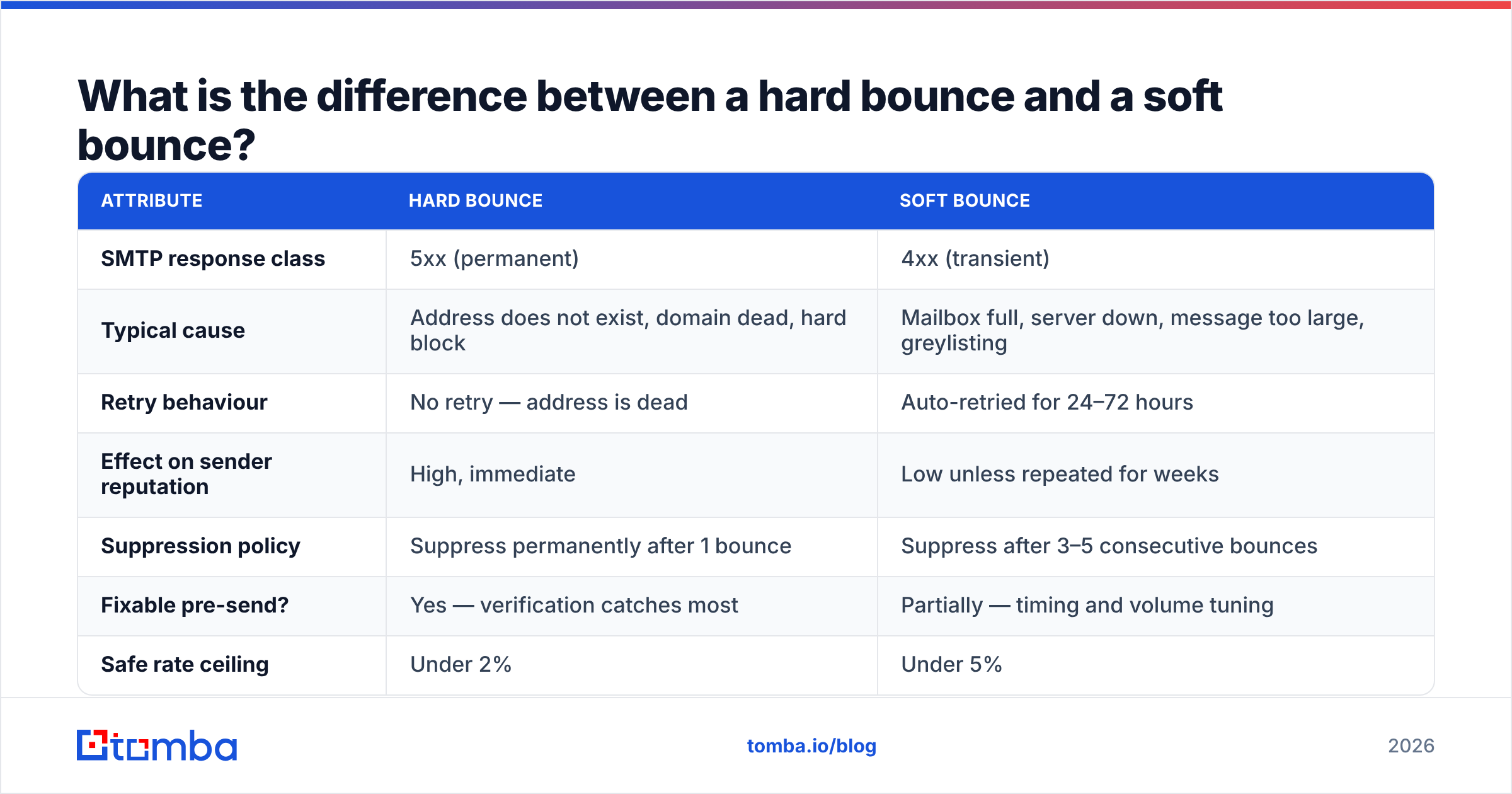
Soft bounces are temporary. Hard bounces are permanent. That sounds simple until you look at how ESPs actually treat them, because the operational consequences diverge sharply.
| Attribute | Hard bounce | Soft bounce |
|---|---|---|
| SMTP response class | 5xx (permanent) | 4xx (transient) |
| Typical cause | Address does not exist, domain dead, hard block | Mailbox full, server down, message too large, greylisting |
| Retry behaviour | No retry — address is dead | Auto-retried for 24–72 hours |
| Effect on sender reputation | High, immediate | Low unless repeated for weeks |
| Suppression policy | Suppress permanently after 1 bounce | Suppress after 3–5 consecutive bounces |
| Fixable pre-send? | Yes — verification catches most | Partially — timing and volume tuning |
| Safe rate ceiling | Under 2% | Under 5% |
The practical rule: one hard bounce means that address is dead forever, so suppress it immediately and never re-import it. One soft bounce means nothing; five in a row over ten days means the mailbox is abandoned and should be treated as dead.
Where teams get this wrong is re-importing. Someone exports a list from the CRM, cleans it in a spreadsheet, re-uploads it, and quietly resurrects 400 addresses the ESP suppressed six months ago. The suppression list is not a nuisance. It is institutional memory.

What causes hard bouncing in the first place?#
Five sources cover almost everything you will see in a bounce report:
- List decay. B2B contact data goes stale at roughly 22–30% per year because people change jobs, companies get acquired, and domains get consolidated. A list that was 98% deliverable in January can be 80% deliverable by December without anyone touching it.
- Pattern guessing without validation. Generating
first.last@company.comfor every prospect works maybe 60–70% of the time depending on the industry. The other 30% are invented addresses that hard bounce on contact. Using an email permutator to build candidates is fine; shipping those candidates to a campaign without verifying them is not. - Scraped and purchased data of unknown provenance. Not all purchased data is bad — reputable providers like BookYourData sell verified, opt-compliant B2B records and stand behind accuracy. The problem is the long tail of resold, recycled lists where nobody can tell you when the data was collected or how.
- Form typos and role churn.
gmial.com,yahoo.co,@company.con. Web forms without inline validation quietly poison your database at a steady trickle. - Spam traps and recycled addresses. A recycled trap is a real address abandoned by its owner and repurposed by the provider. It hard bounces for a while, then starts silently accepting mail specifically to catch senders who ignore bounces. This is why continuing to mail hard-bounced addresses is one of the fastest routes to a blocklist.
The pattern across all five: hard bouncing is not a sending problem. It is a data problem that only becomes visible at send time.
What hard bounce rate is acceptable in 2026?#
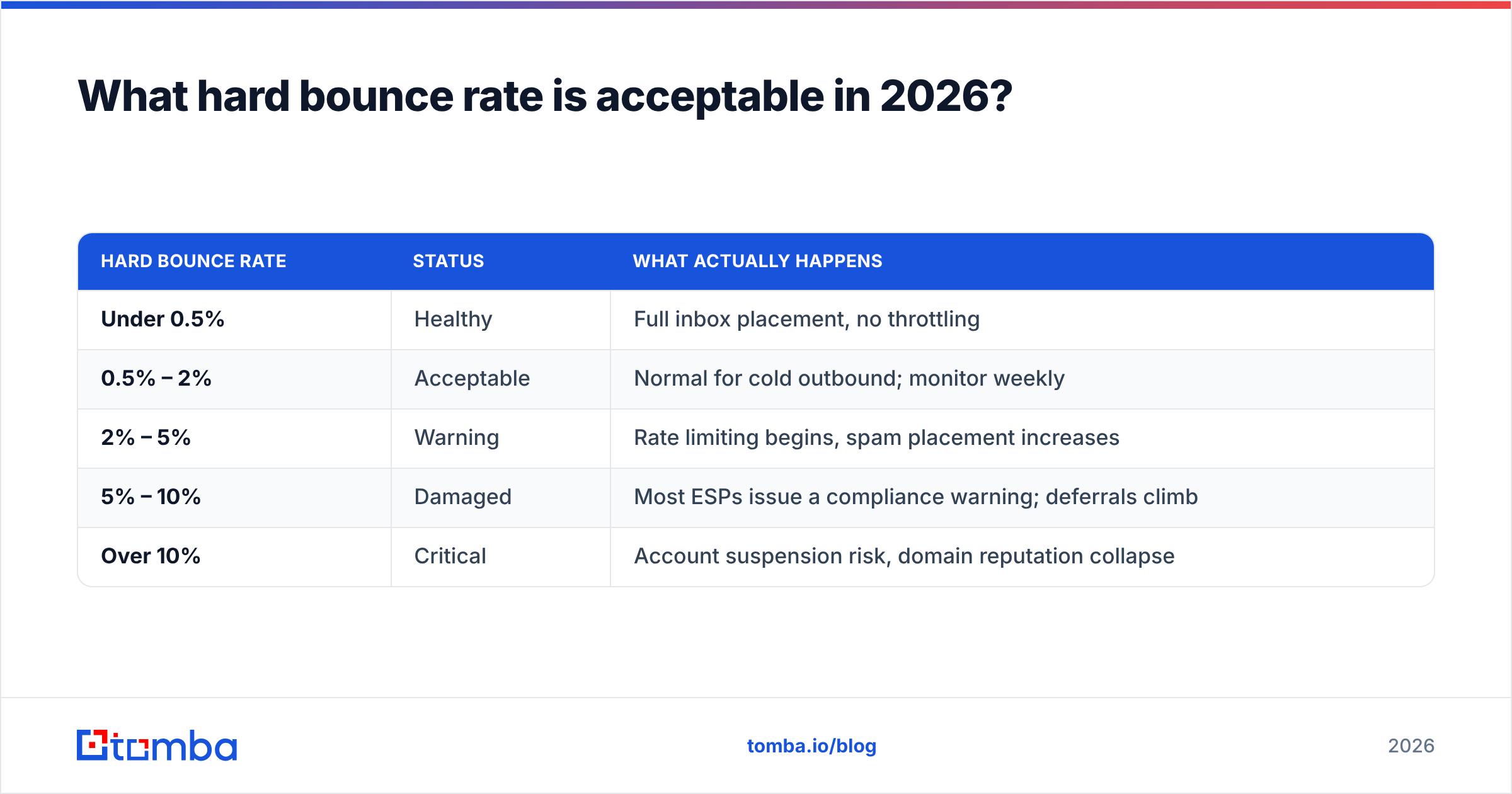
Mailbox providers do not publish exact thresholds, but the operating bands used across the deliverability industry have been stable for several years, and the 2024 bulk-sender requirements from Google and Yahoo tightened enforcement rather than the numbers themselves.
| Hard bounce rate | Status | What actually happens |
|---|---|---|
| Under 0.5% | Healthy | Full inbox placement, no throttling |
| 0.5% – 2% | Acceptable | Normal for cold outbound; monitor weekly |
| 2% – 5% | Warning | Rate limiting begins, spam placement increases |
| 5% – 10% | Damaged | Most ESPs issue a compliance warning; deferrals climb |
| Over 10% | Critical | Account suspension risk, domain reputation collapse |
Note the asymmetry: reputation falls fast and recovers slowly. A single 12% bounce campaign can take four to six weeks of clean, low-volume sending to unwind. That is the real cost of skipping verification — not the bounced messages, but the weeks of degraded placement for every subsequent campaign from the same domain.
If you are running cold outbound specifically, treat 2% as your hard ceiling and 1% as your target. Warm, opted-in newsletter lists should sit well under 0.5%; if yours does not, you have an acquisition-side problem, not a sending problem.
You can watch the aggregate signal directly in Google Postmaster Tools, which exposes domain reputation, spam rate, and delivery errors for Gmail traffic. It will not show you per-address bounces, but it will tell you when your reputation is sliding before your reply rate does.
How do you stop hard bouncing before you send?#
The workflow that keeps bounce rates under 1% is boring and repeatable:
- Verify at capture. Run inline validation on every form. Catch
gmial.comat the point of entry rather than six months later in a bounce log. A free email checker handles one-off manual checks; the API handles the form. - Verify at import. Any list entering the CRM — purchased, scraped, event badge scan, conference list — gets verified before it touches a sequence. No exceptions, including "small" lists.
- Verify again before each send if the list is over 90 days old. Decay is continuous. A list verified in March is not a verified list in July.
- Segment catch-all domains separately. These accept every address at SMTP time, so verification returns "unknown" rather than valid or invalid. A catch-all verifier uses secondary signals to score them, but the conservative play on a fragile domain is to hold catch-alls back and send them from a separate, non-critical sending identity.
- Suppress hard bounces immediately and permanently. One 5xx response, one suppression. Never re-import. Never "give it another try in six months."
- Monitor the bounce rate per campaign, not per month. Monthly averages hide the single bad list that torched a week of reputation.
For teams pulling contacts at scale, verification and finding should be one step rather than two. Tools that return a confidence score with the address — rather than just an address — let you set a threshold and drop everything below it before the data reaches your sequencer. Running a bulk email finder that verifies inline is meaningfully cheaper than finding cheaply and cleaning expensively.

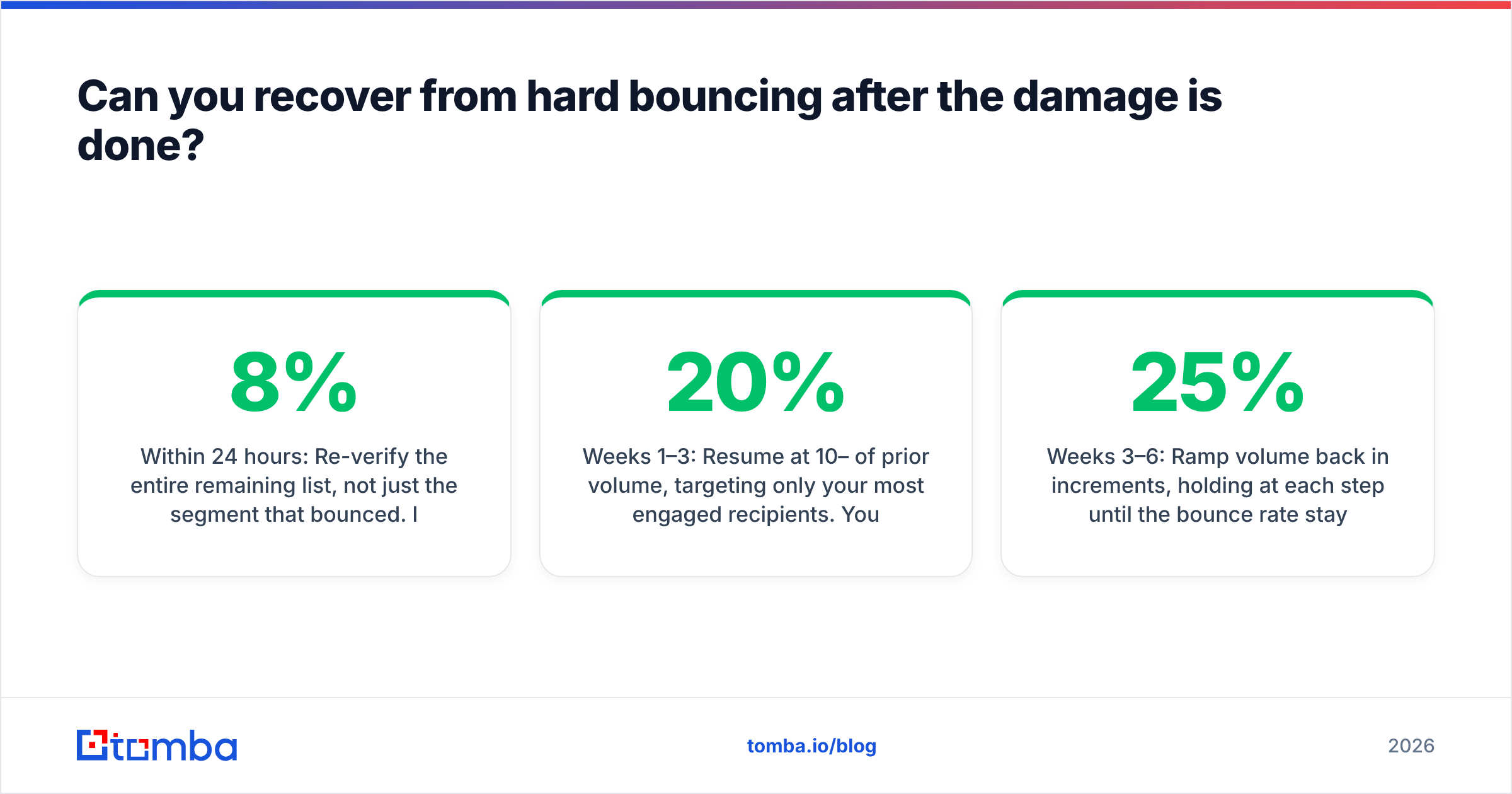
Can you recover from hard bouncing after the damage is done?#
Yes, but the recovery is slower than most people expect, and there is no shortcut that skips the waiting.
Immediately: Pause all campaigns from the affected domain. Do not "send a smaller version" — every additional send with a damaged reputation deepens the hole. Export the full bounce log and suppress every 5xx address across every tool, not just the ESP that reported it.
Within 24 hours: Re-verify the entire remaining list, not just the segment that bounced. If 8% of one segment was dead, the neighbouring segments from the same source are probably 5–8% dead too. Check your authentication while you are there — a missing or broken SPF record makes every other reputation signal worse. Run an SPF checker and confirm DKIM and DMARC are aligned.
Weeks 1–3: Resume at 10–20% of prior volume, targeting only your most engaged recipients. You are rebuilding a positive engagement signal to offset the negative bounce signal. Watch sender reputation daily in Postmaster Tools.
Weeks 3–6: Ramp volume back in 25% increments, holding at each step until the bounce rate stays under 0.5% for a full week.
If the damage included a blocklist entry rather than just a reputation dip, check your sending IP and domain against the major lists — Spamhaus publishes lookup and delisting procedures — and follow the delisting process before resuming. Delisting without fixing the underlying data problem gets you relisted within a cycle.
The honest summary: recovery works, but the elapsed time is four to six weeks of reduced output. Verification would have cost you an afternoon.
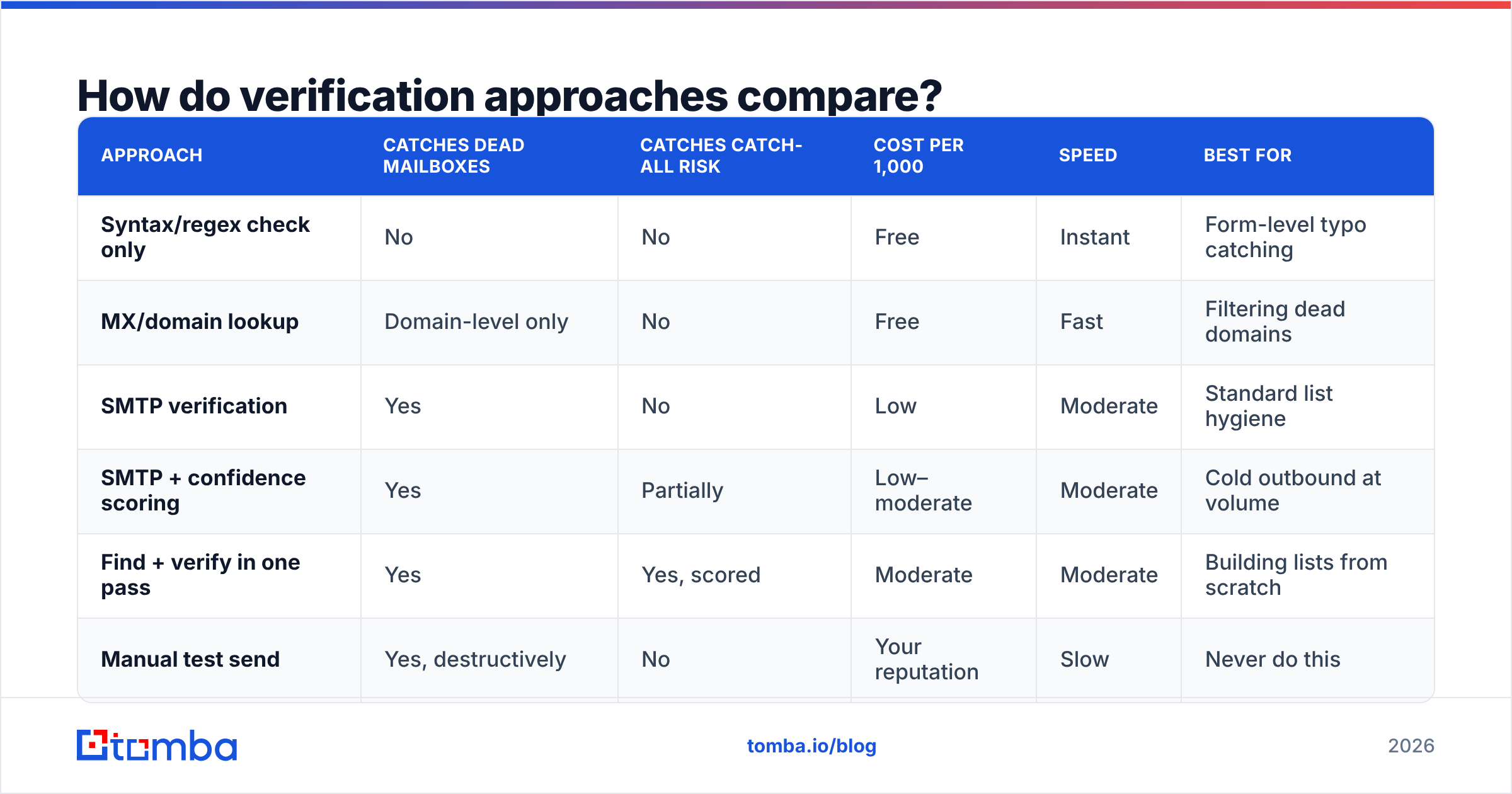
How do verification approaches compare?#
Not every method of avoiding hard bouncing costs the same or catches the same failures.
| Approach | Catches dead mailboxes | Catches catch-all risk | Cost per 1,000 | Speed | Best for |
|---|---|---|---|---|---|
| Syntax/regex check only | No | No | Free | Instant | Form-level typo catching |
| MX/domain lookup | Domain-level only | No | Free | Fast | Filtering dead domains |
| SMTP verification | Yes | No | Low | Moderate | Standard list hygiene |
| SMTP + confidence scoring | Yes | Partially | Low–moderate | Moderate | Cold outbound at volume |
| Find + verify in one pass | Yes | Yes, scored | Moderate | Moderate | Building lists from scratch |
| Manual test send | Yes, destructively | No | Your reputation | Slow | Never do this |
The last row is not a joke. "Just send it and see what bounces" is still a common approach, and it is the single most expensive way to discover your data is bad, because the discovery method is the damage.
Where Tomba fits: the email verifier runs SMTP-level checks with a confidence score attached, and the email finder returns verification status with the address rather than as a separate step. Pricing starts with a free tier at 25 searches per month, then $49/mo for Starter, $99/mo for Growth, and $249/mo for Pro — full breakdown on the Tomba pricing page. Compare that against a six-week reputation recovery and the arithmetic is not close.
What should you check this week?#
Run these four checks against your current setup. Each takes under an hour.
- Pull last quarter's bounce rate by campaign. Not the average — the distribution. Find the outliers and trace them back to the data source that produced them.
- Audit your suppression hygiene. Export your ESP suppression list and your CRM's active contact list, and look for overlap. Any overlap is a re-import waiting to happen.
- Date-stamp your data sources. Every list in your CRM should have an acquisition date and a last-verified date. If you cannot answer "when was this verified," treat it as unverified.
- Check your catch-all exposure. What percentage of your active list sits on catch-all domains? If it is over 20%, your reported bounce rate is understating your real deliverability risk.
Hard bouncing is one of the few deliverability problems with a genuinely complete solution. Spam filtering is probabilistic and content-dependent. Engagement is behavioural and slow to move. But a dead mailbox is a knowable fact, checkable before you send, for a fraction of a cent.
Stop guessing at addresses and stop discovering dead ones the expensive way. Run your next list through the Tomba Email Finder — it returns verified, confidence-scored addresses in one pass, so the list that reaches your sequencer is the list that actually delivers. The free tier gives you 25 searches to test it against contacts you already know are good, which is the fastest way to see whether the scoring holds up before you trust it with a real campaign.
Related guides#
Ready to find emails that actually work?
Join 150,000+ professionals who stopped guessing and started sending. Free credits on signup — no credit card required.
Get the Tomba newsletter
Practical outbound tactics and product updates — once every two weeks.
About the author