How Cold Email Works: The Full Mechanics in 2026
Cold email isn't magic and it isn't spam. Here's the actual mechanical chain — from DNS records to reply — and where most campaigns quietly break.
TL;DR — how cold email works, in five links
- Cold email works as a chain of five systems: domain setup, list sourcing, address checks, sending setup, and message fit. Break one link and the whole chain returns zero replies.
- It is legal in the US under CAN-SPAM. It is legal in the EU under GDPR, on a legitimate-interest basis. You must name yourself, write to work roles, and honor opt-outs.
- Copy is not the top cause of failed campaigns. Bounce rate is. Mail an unchecked list and mailbox providers throttle you within 48 hours.
- A fair 2026 benchmark for a tight B2B list: 40-60% open, 3-8% reply, under 2% bounce. Anyone who promises a 30% reply rate is selling you something.
- Budget 30-45 days from buying a domain to sending at full volume. Warmup is not optional.
What is cold email, exactly?#
Cold email is a one-to-one business note. You send it to someone who has not contacted you first. You use a public or lawfully sourced work address. And you have a clear, relevant reason to write.
That short definition does a lot of work. Strip out one clause and you get something else. Drop "one-to-one" and you have a newsletter blast. Drop "clear reason" and you have spam. Drop "lawfully sourced" and you have a list scraped from a breach dump. That list is illegal in most countries. It is also useless, because the data is stale.
Think of it like knocking on the door of a shop you have researched. The other option is stapling flyers to every pole on the street. Same act of handing over a message. Very different outcomes, and very different legal treatment.
The mechanics are simpler than most people expect. Your sending server calls the reader's mail server over SMTP. It shows credentials and DNS records. Then it hands over the message. The receiving server decides in about 200 milliseconds: inbox, spam folder, or nowhere at all. That split-second call is the heart of how cold email works. Every other step tries to sway it.
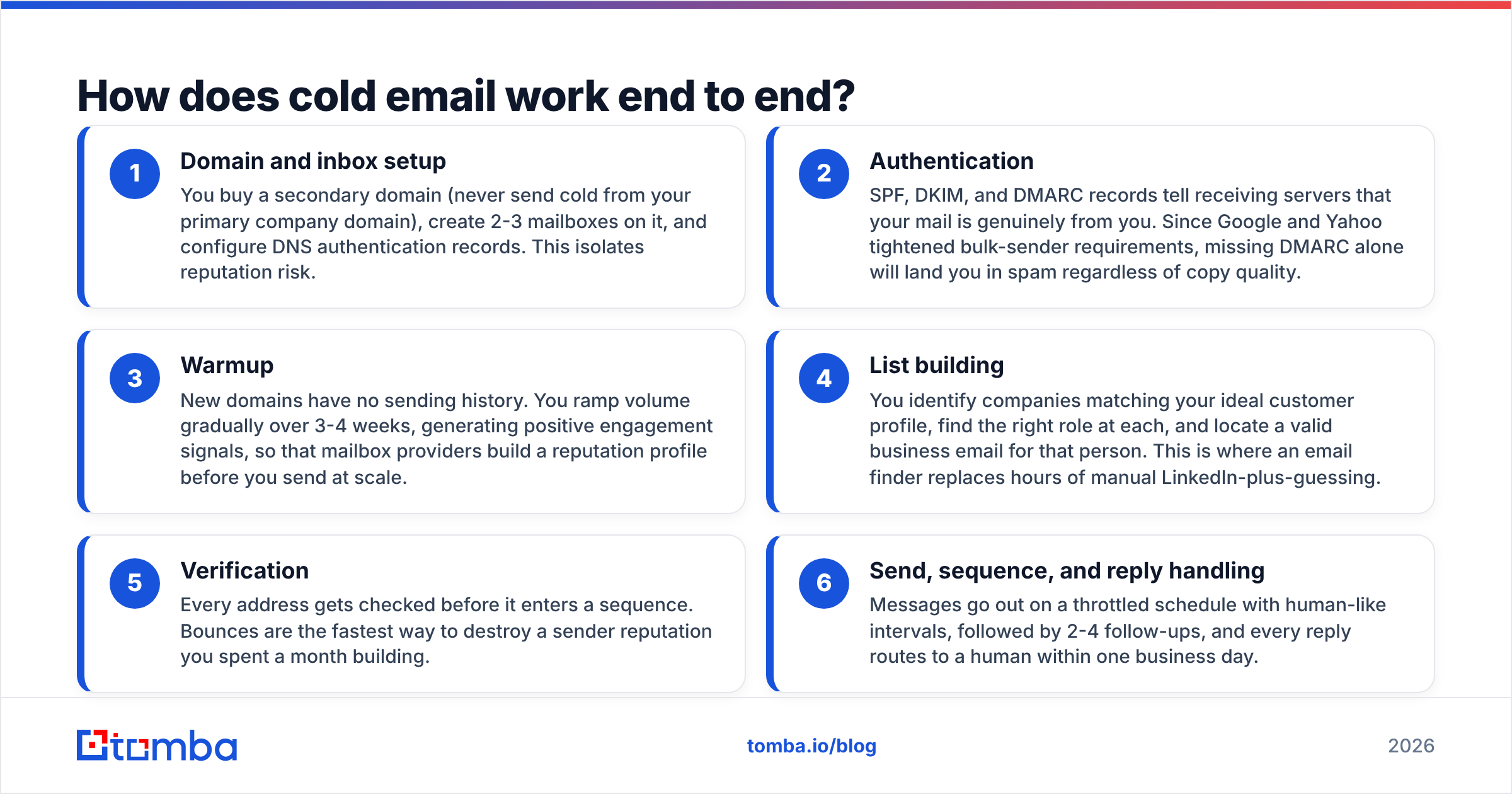
How cold email works, end to end#
Here is the chain, in order. Each stage feeds the next. A break upstream cannot be fixed downstream.
Domain and inbox setup — Buy a second domain. Never send cold mail from your main company domain. Add 2-3 mailboxes on it, then set your DNS records. This keeps risk off your main brand.
Authentication — SPF, DKIM, and DMARC tell the receiving server that the mail is really from you. Google and Yahoo now demand all three from bulk senders. Miss DMARC and you land in spam, no matter how good the copy is.
Warmup — A new domain has no history. Ramp volume slowly over 3-4 weeks. Real opens and replies build a profile before you send at scale.
List building — Find companies that match your ideal buyer. Pick the right role at each one. Then get a valid work address for that person. An email finder does in seconds what takes hours on LinkedIn.
Verification — Check every address before it enters a sequence. Bounces are the fastest way to burn a sender reputation you spent a month building.
Send, sequence, and reply handling — Mail goes out on a slow, human-like schedule. Add 2-4 follow-ups. Route every reply to a person within one business day.
Stages 4 and 5 hold most of the variance you can control. You can write a perfect email. But if 18% of your addresses bounce, Gmail filters you before the copy gets a fair test.
Why does authentication matter more than copy?#
Filters judge you before people do.
SPF is a DNS record. It lists the servers allowed to send mail for your domain. DKIM signs each message, so the reader's server can prove nobody changed it. DMARC ties the two together. It also tells the server what to do when a check fails. Test your setup with a free SPF checker before you send a thing.
Google's bulk sender guidelines treat all three as table stakes now, not as best practice. The effect is blunt. A great email from an unsigned domain loses to a plain email from a signed one. This is the dull part of how cold email works, and the most decisive one.
Sender reputation builds from there. Every send creates signals: opens, replies, deletes, spam clicks, bounces. Providers roll these into a score tied to your domain and your IP. Good sender reputation is slow to earn and quick to lose. That is why serious teams keep cold outreach on separate domains.
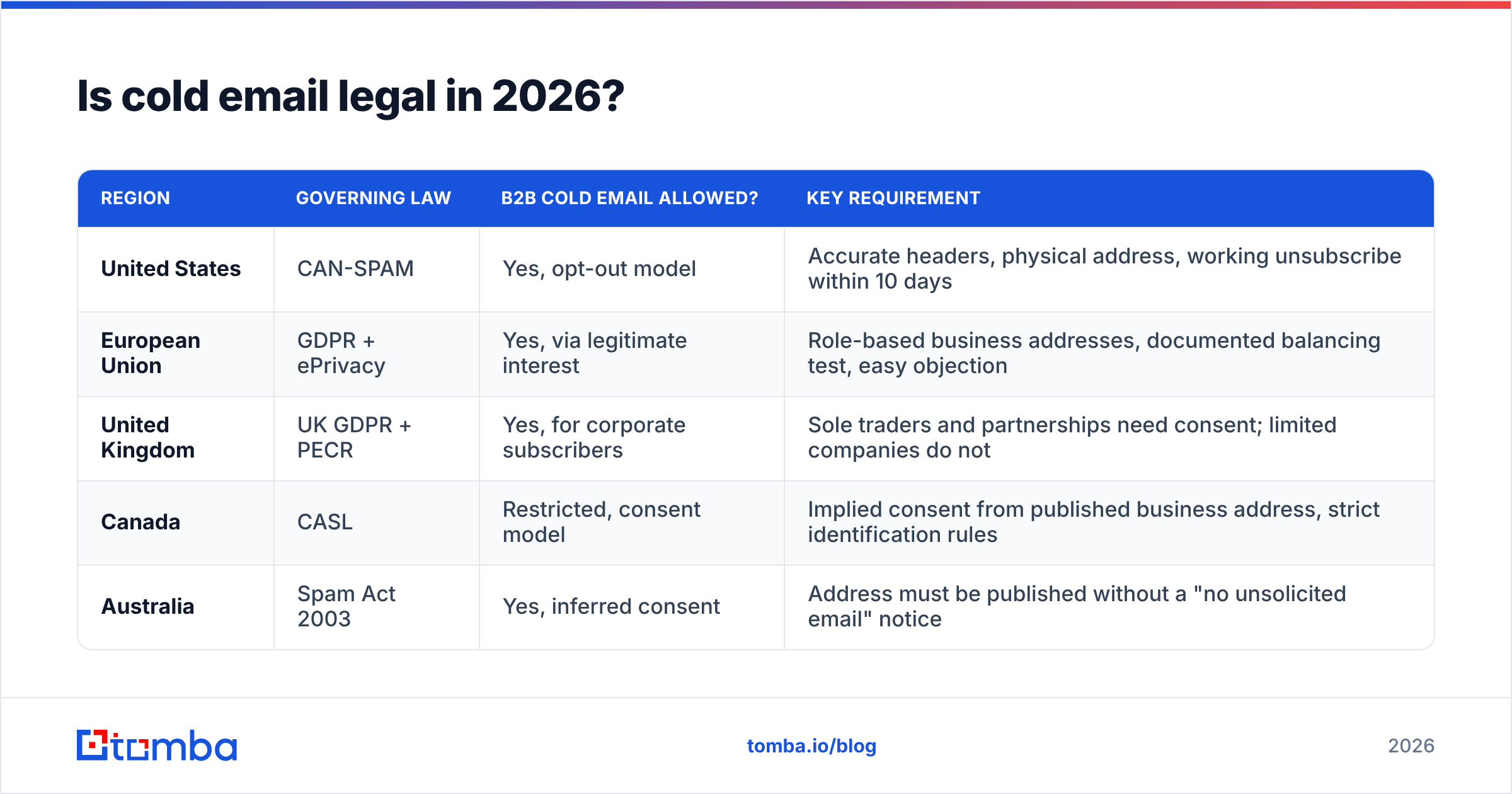
Is cold email legal in 2026?#
Yes, in most big markets, with rules that shift by country.
| Region | Governing law | B2B cold email allowed? | Key requirement |
|---|---|---|---|
| United States | CAN-SPAM | Yes, opt-out model | Accurate headers, physical address, working unsubscribe within 10 days |
| European Union | GDPR + ePrivacy | Yes, via legitimate interest | Role-based business addresses, documented balancing test, easy objection |
| United Kingdom | UK GDPR + PECR | Yes, for corporate subscribers | Sole traders and partnerships need consent; limited companies do not |
| Canada | CASL | Restricted, consent model | Implied consent from published business address, strict identification rules |
| Australia | Spam Act 2003 | Yes, inferred consent | Address must be published without a "no unsolicited email" notice |
Two habits cover most of this. First, write to work roles at companies, not to personal Gmail accounts. Role fit is what backs the legitimate-interest case under GDPR. Second, make opting out easy, and honor it the same day. A one-line "reply STOP and I'll close your file" beats a block of legal footer text. It also meets the rule.
CASL in Canada is the strictest of the group. Read it in full if Canada is a core market. Its consent rules are a different model, not a stricter version of the same one.
How do you find the right email addresses?#
Three paths exist, and they differ a lot on accuracy.
Manual discovery means you find the company, spot the person on LinkedIn, guess the address pattern, and test it. It is free and slow. It lands at about 60-70%, because one sample is a weak basis for a guess.
Purchased static lists are pre-built files sold by the record. Quality swings a lot by vendor. Firms like BookYourData keep checked B2B data with filters for industry, title, and place. That fits when you need volume fast and your buyer profile is broad. Every static list has one flaw: decay. B2B contact data goes stale at about 25-30% a year as people switch jobs.
API lookup finds and checks an address at the moment you ask. You pass a domain and a name. The system reads its index plus live signals, then returns an address with a confidence score. The check happens now, not whenever the file was last refreshed, so decay matters less.
Most mature teams mix the two. They use a bought or built base list for reach. Then they enrich and check only the names they plan to contact.

Which email-finding tools actually hold up?#
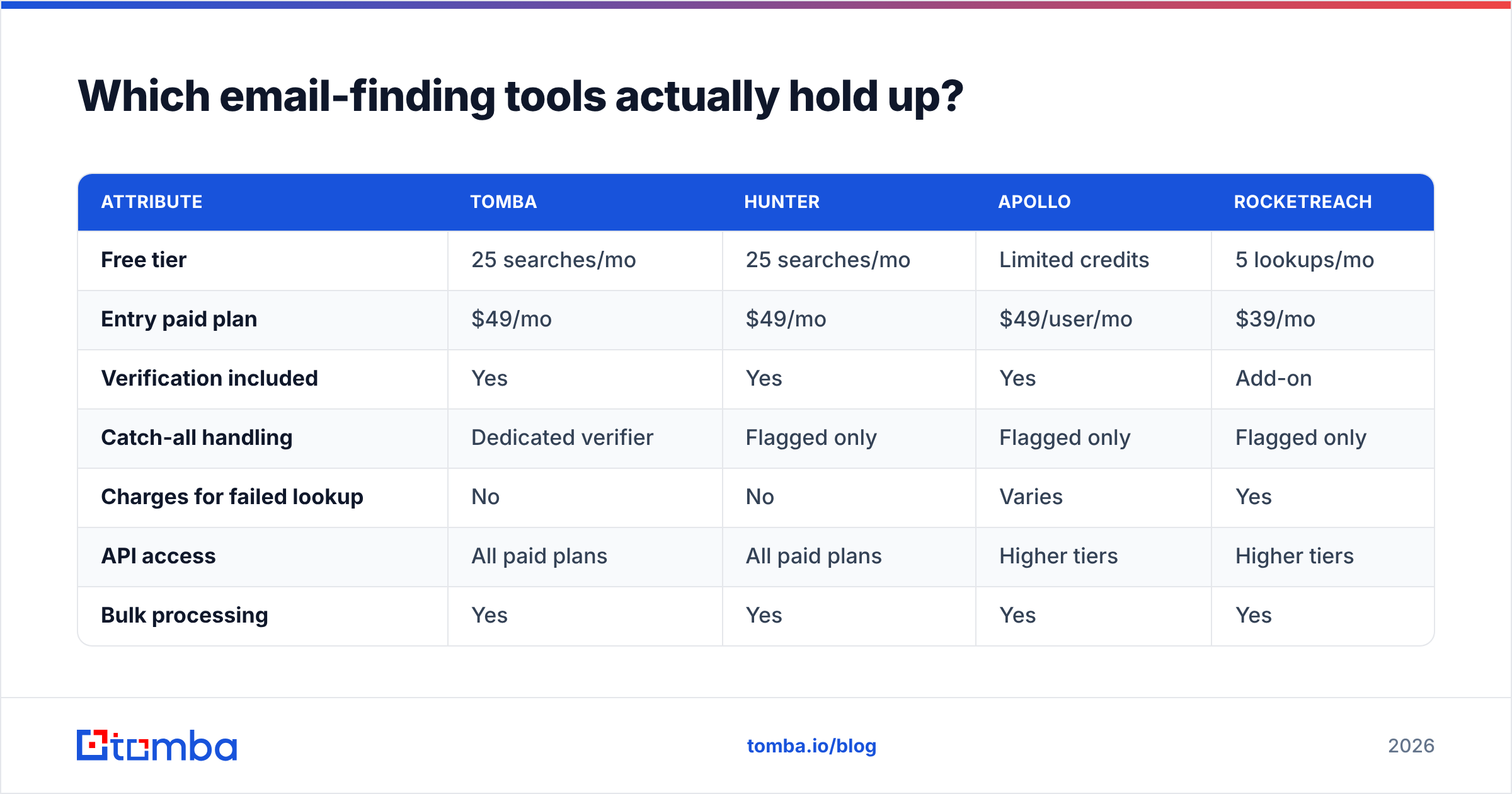
Accuracy claims here are self-reported and rarely line up. What you can compare is structure. How does each tool price? Does it charge for a failed lookup? Is verification bundled or billed on top?
| Attribute | Tomba | Hunter | Apollo | RocketReach |
|---|---|---|---|---|
| Free tier | 25 searches/mo | 25 searches/mo | Limited credits | 5 lookups/mo |
| Entry paid plan | $49/mo | $49/mo | $49/user/mo | $39/mo |
| Verification included | Yes | Yes | Yes | Add-on |
| Catch-all handling | Dedicated verifier | Flagged only | Flagged only | Flagged only |
| Charges for failed lookup | No | No | Varies | Yes |
| API access | All paid plans | All paid plans | Higher tiers | Higher tiers |
| Bulk processing | Yes | Yes | Yes | Yes |

The line to watch is catch-all handling. A catch-all domain accepts mail at any address. So a standard SMTP check returns "valid" for names that do not exist. About 20% of business domains work this way. A tool that only flags catch-alls leaves you guessing. A catch-all verifier tries to resolve them, which changes how much of your list you can use.
Tomba pricing runs Free (25 searches/mo), Starter at $49/mo, Growth at $99/mo, Pro at $249/mo, and Enterprise on quote. For third-party reviews rather than vendor claims, check G2's email-finder listings.
Why do most cold email campaigns fail?#
Six failure points cover almost all of it, roughly in order of how often they show up.
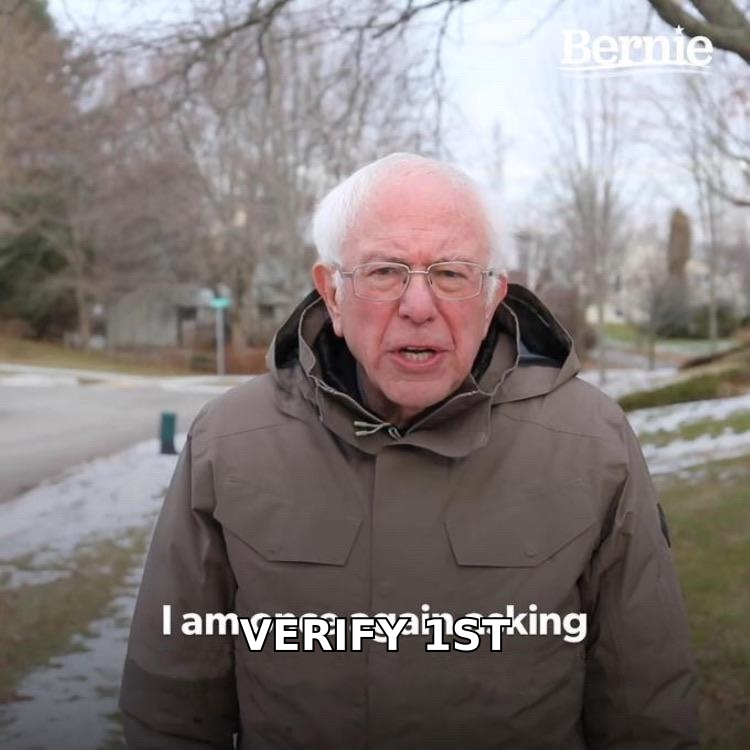
Unverified lists — A bounce rate above 3% triggers throttling. Above 8%, most of your mail goes to spam. Run every address through an email verifier first. No exceptions.
No warmup — Sending 200 emails on day two from a fresh domain is the clearest spam signal there is. Ramp from 10 a day to your target over 3-4 weeks.
Wrong person — A great email to someone with no budget and no stake in the problem gets silence. It does not get a forward.
Company-centric copy — You open with what you do, not with what the reader deals with. The reader gives you one sentence to earn the next.
No follow-up — About half of all replies land after the first message. Two to four follow-ups, 3-5 days apart, is the standard shape.
Volume as strategy — When replies dip, the reflex is to send more. That is almost always the wrong lever. A tighter list is almost always the right one.
Four of the six are list problems, not copy problems. That ratio holds in nearly every campaign post-mortem worth reading. Teams spend weeks testing subject lines while they mail addresses that were correct in 2023.
What results should you actually expect?#
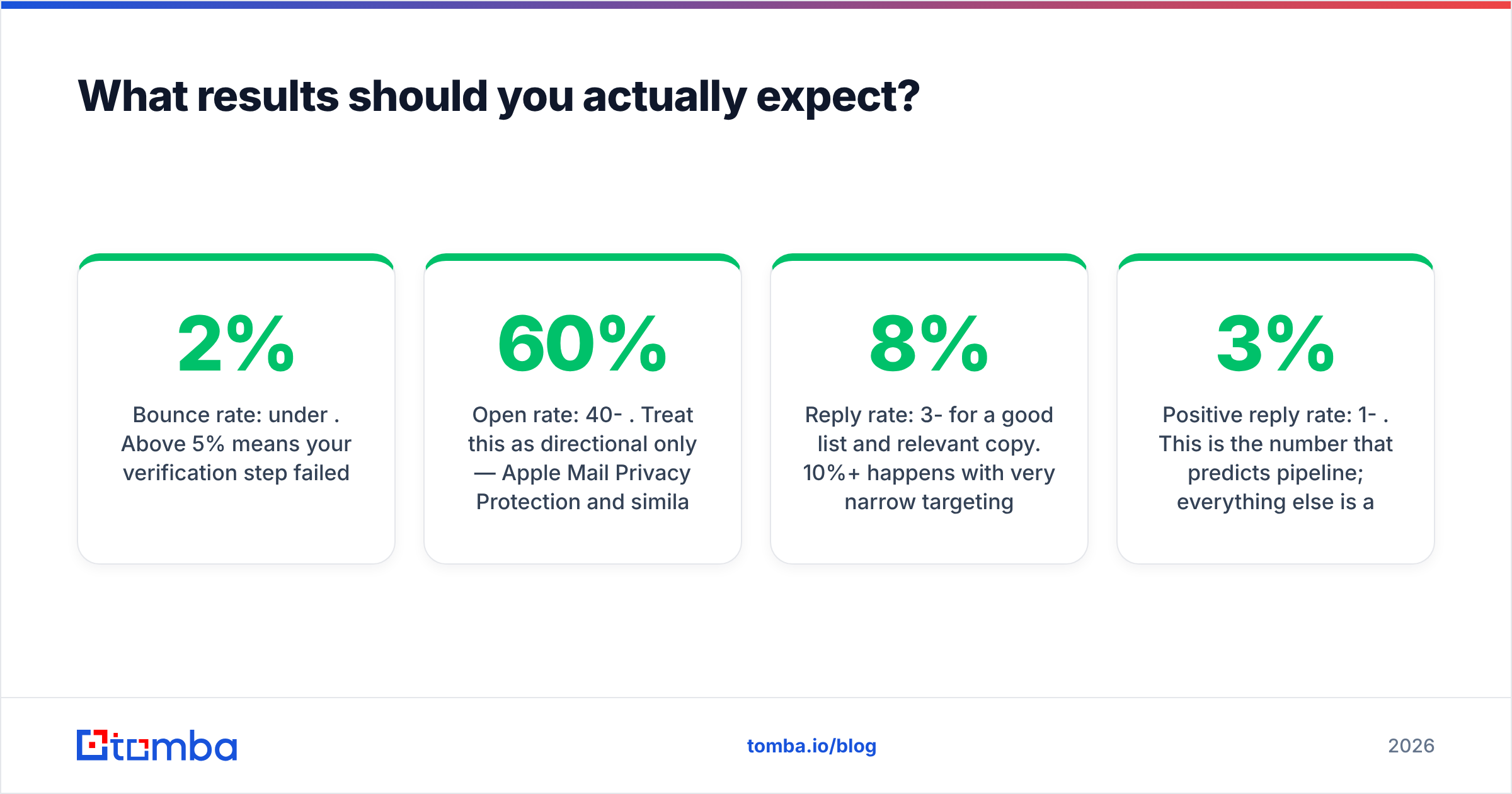
Numbers move with industry and list quality. For a tight B2B campaign in 2026, these ranges hold up:
- Bounce rate: under 2%. Above 5% means your check step failed.
- Open rate: 40-60%. Read it as a hint only, since Apple Mail Privacy Protection inflates opens.
- Reply rate: 3-8% on a good list with relevant copy. 10% or more happens with a narrow target and a strong trigger.
- Positive reply rate: 1-3%. This is the number that predicts pipeline. The rest are proxies.
- Meetings booked: about 1 per 100-150 well-aimed sends for a mid-market offer.
Do the math backward from your pipeline goal, not forward from your send capacity. Say you need 10 meetings a month and you book 1 per 120 sends. Then you need 1,200 correct contacts a month, not 5,000 weak ones. That shift changes what you buy. It changes how you check. It changes how you split time between targeting and copy.
Your response rate tracks list quality far more than writing skill. Fix the inputs first.
How do you build a cold email system that lasts?#
Treat it as plumbing with a service schedule, not as a campaign you launch once.
Set up two or three sending domains, so you can rotate if one degrades. Cap each mailbox at 30-50 sends a day. The days of 200 a day per inbox are gone. Re-check any list older than 60 days before you reuse it. Watch bounce and complaint rates weekly. Pause the moment bounces cross 3%.
On the data side, wire finding and checks straight into wherever your prospects live. The Tomba API handles lookup and checks in code. Native paths into HubSpot and Google Sheets are there if you would rather not write any. HubSpot's own sales research is worth a read next to your own numbers.
Learning how cold email works is not the hard part. Keeping the chain healthy is. Teams that last treat list hygiene as a standing chore, the same as backups or dependency updates. Teams that burn out treat it as a one-time setup, then push volume.
Start with the input that drives everything else. Before you write copy, before you pick a sequencer, get correct addresses for the exact people you want to reach. Tomba Email Finder finds work emails by domain, name, or company. Checks are built in, and the free tier gives you 25 searches a month. Test it on contacts you already know before you commit. Verify first, send second. That order is the whole game.
Related guides#
Ready to find emails that actually work?
Join 150,000+ professionals who stopped guessing and started sending. Free credits on signup — no credit card required.
Get the Tomba newsletter
Practical outbound tactics and product updates — once every two weeks.
About the author