How Do I Find a Company Email Address? 7 Proven Methods
Seven tested ways to find a company email address in 2026 — from free Google operators to domain search tools — plus what each one actually costs you in time and accuracy.
TL;DR
- The fastest reliable path is domain search: enter the company domain, get back every publicly discoverable mailbox with a confidence score. Under 30 seconds, no guessing.
- Free methods still work — Google operators, the site's own
/contactpage, WHOIS, LinkedIn — but they're slow and cap out around 40-60% hit rate on mid-market companies. - Guessing patterns (
first.last@domain.com) is only useful when paired with verification. Unverified guesses are how you burn a sending domain. - Generic inboxes (
info@,sales@) are easy to find and rarely read. Named mailboxes convert 3-5x better. - Always verify before you send. A 3% bounce rate is the line where Google and Microsoft start throttling you.
What does "find a company email address" actually mean?#
There are two very different jobs hiding inside that question, and picking the wrong one wastes hours.
Job one: reach the company. You want the general inbox — support, sales, press, partnerships. These are published on purpose. You'll find them on the contact page, in the site footer, in the privacy policy, or in the WHOIS record. This takes about 90 seconds and costs nothing.
Job two: reach a specific person at the company. You want the VP of Engineering, not info@. That mailbox is almost never published. You have to derive it from the company's email pattern and then confirm the mailbox exists. This is where tools earn their keep.
Most people asking "how do i find a company email address" actually want job two but start with job one, hit a generic inbox, send there, and get nothing. Generic inboxes at companies over ~50 employees are typically routed to a shared queue and triaged by someone with no authority to buy anything.
Here's the practical split:
- Generic company inbox — public, free, near-100% findable, low reply rate. Use for vendor inquiries, press, support.
- Department inbox (
security@,partnerships@) — semi-public, moderate reply rate. Use for compliance or BD. - Named individual mailbox — private, requires derivation + verification, highest reply rate. Use for sales, recruiting, link building.
- Personal address (Gmail, Outlook) — usually off-limits for B2B outreach under GDPR/CAN-SPAM norms. Skip it.
- Catch-all domain — accepts everything, verifies nothing. Needs special handling (more on this below).
How do I find a company email address for free?#
Start here before you pay for anything. These four methods cover a surprising amount of ground.
Method 1 — The contact page and footer. Obvious, but skipped constantly. Check /contact, /about, /press, /legal, and the footer. Many companies also publish addresses in their PDF media kits, which Google indexes but people never open.
Method 2 — Google search operators. These still work in 2026, though results are thinner than they were five years ago:
site:company.com "@company.com"
site:company.com "email" OR "contact"
"@company.com" "VP of Marketing"
site:linkedin.com/in "company name" "head of sales"
The last one doesn't return an email — it returns the name you need to derive one.
Method 3 — WHOIS lookup. Registrar records sometimes expose an admin address. Privacy proxies have killed most of these, but smaller companies and older domains still leak. Free to check.
Method 4 — Social profiles and personal sites. X/Twitter bios, GitHub commit histories (git log on a public repo exposes committer emails), personal portfolios, conference speaker pages, and podcast show notes are all underused. GitHub in particular is a goldmine for engineering contacts.

The free stack works. It just doesn't scale. Ten prospects is an afternoon. A hundred prospects is a week you don't have.
[Screenshot placeholder: Google SERP showing a site: operator query returning indexed contact-page results with visible @domain addresses]
Which method is most accurate?#
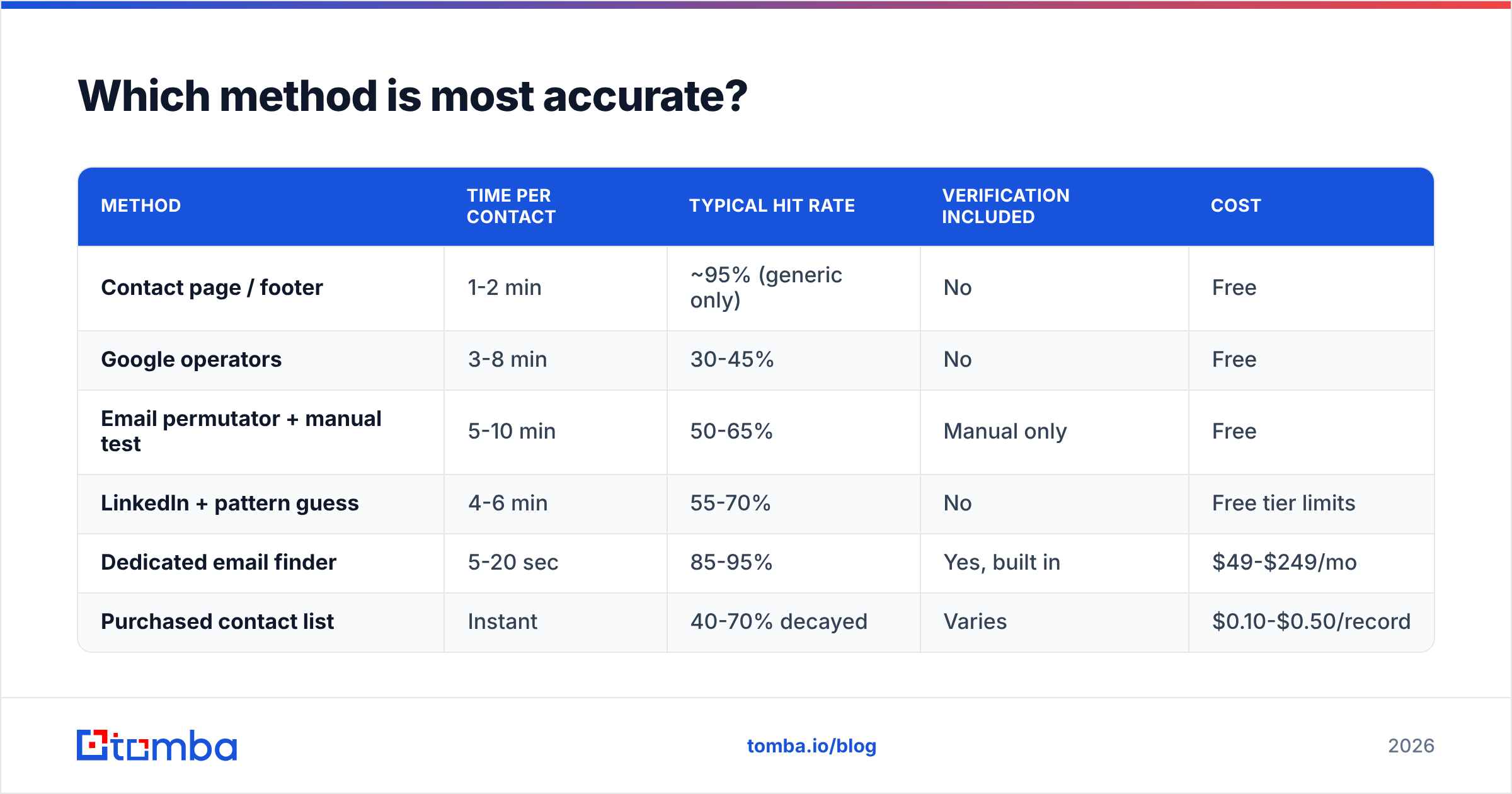
Accuracy varies more than vendors admit. Here's how the main approaches compare on the things that actually matter.
| Method | Time per contact | Typical hit rate | Verification included | Cost |
|---|---|---|---|---|
| Contact page / footer | 1-2 min | ~95% (generic only) | No | Free |
| Google operators | 3-8 min | 30-45% | No | Free |
| Email permutator + manual test | 5-10 min | 50-65% | Manual only | Free |
| LinkedIn + pattern guess | 4-6 min | 55-70% | No | Free tier limits |
| Dedicated email finder | 5-20 sec | 85-95% | Yes, built in | $49-$249/mo |
| Purchased contact list | Instant | 40-70% decayed | Varies | $0.10-$0.50/record |
The gap between "free and slow" and "paid and fast" isn't just speed — it's the verification step. A free method gives you a candidate string. A dedicated tool gives you a candidate string plus an SMTP-level confirmation that the mailbox exists, which is the difference between a delivered email and a bounce that damages your sender reputation.

Two accuracy caveats worth internalizing:
- Hit rate and accuracy are different numbers. A tool that returns an address for 95% of queries but is right 70% of the time is worse than one that returns 75% and is right 97%. Always ask for both.
- Data decays at roughly 2-2.5% per month. That's ~25-30% of a B2B list going stale annually through job changes alone. A list you bought in January is meaningfully wrong by autumn.
How does an email finder actually work?#
Under the hood, every credible email finder runs the same four-stage pipeline. Understanding it tells you when to trust the output.
- Pattern detection. The tool crawls public sources for known addresses at the domain and infers the dominant format —
first.last@,flast@,first@,f.last@. Most companies use exactly one. Some large enterprises run two or three after acquisitions. - Candidate generation. It applies that pattern to the name you supplied, producing one primary candidate and several fallbacks ranked by pattern frequency.
- SMTP validation. It opens a connection to the receiving mail server and asks whether the mailbox exists — without sending anything. This is where the confidence score comes from.
- Source attribution. Good tools show you where the address was seen: a press release, a GitHub commit, a conference page. Sources you can inspect beat a bare confidence percentage.
That fourth stage is the honesty test. If a vendor won't tell you where an address came from, you're being handed a guess with a decimal point on it. Tomba publishes its data sources for exactly this reason, and so do the better players in this space.
[Screenshot placeholder: Tomba domain search results panel showing detected email pattern, confidence scores, and source URLs for each address]
What tools should I compare in 2026?#
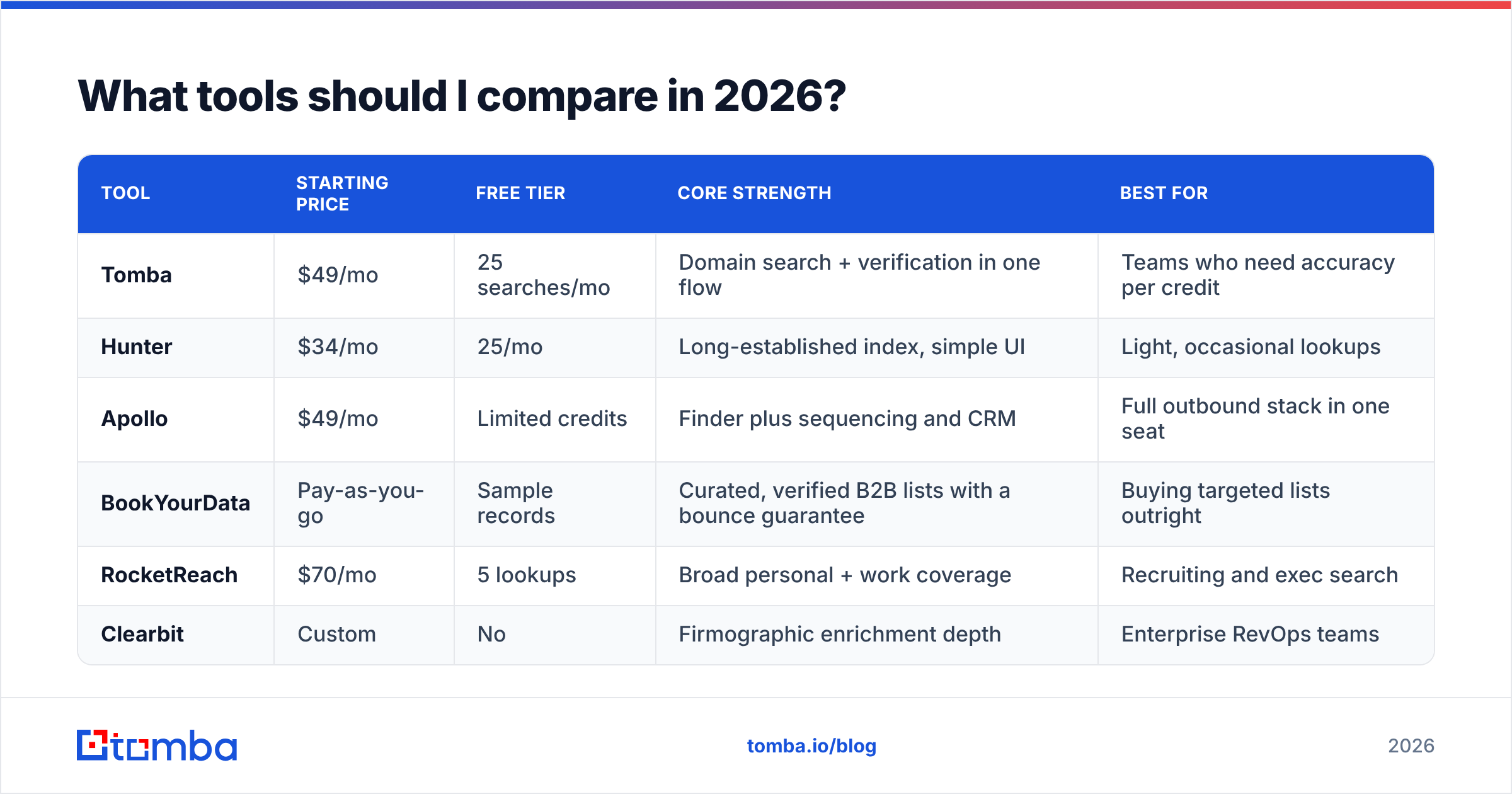
The market splits into three groups: pure email finders, all-in-one sales platforms with a finder bolted on, and static B2B databases. They solve different problems at different prices.
| Tool | Starting price | Free tier | Core strength | Best for |
|---|---|---|---|---|
| Tomba | $49/mo | 25 searches/mo | Domain search + verification in one flow | Teams who need accuracy per credit |
| Hunter | $34/mo | 25/mo | Long-established index, simple UI | Light, occasional lookups |
| Apollo | $49/mo | Limited credits | Finder plus sequencing and CRM | Full outbound stack in one seat |
| BookYourData | Pay-as-you-go | Sample records | Curated, verified B2B lists with a bounce guarantee | Buying targeted lists outright |
| RocketReach | $70/mo | 5 lookups | Broad personal + work coverage | Recruiting and exec search |
| Clearbit | Custom | No | Firmographic enrichment depth | Enterprise RevOps teams |

A few honest notes on that table. BookYourData is a genuinely different model — you buy verified records rather than running lookups, which is cheaper if you know your ICP precisely and more expensive if you're still exploring. Apollo bundles more than a finder, so comparing its price to a pure finder's is apples to oranges; check G2's category grids if you want per-feature scoring from actual users. And Clearbit is priced for companies with a RevOps function, not for a two-person sales team.
If you're currently on one of these and the credit math stopped working, the Apollo alternative and RocketReach alternative breakdowns compare the swap in detail.

How do I find emails at scale without wrecking deliverability?#
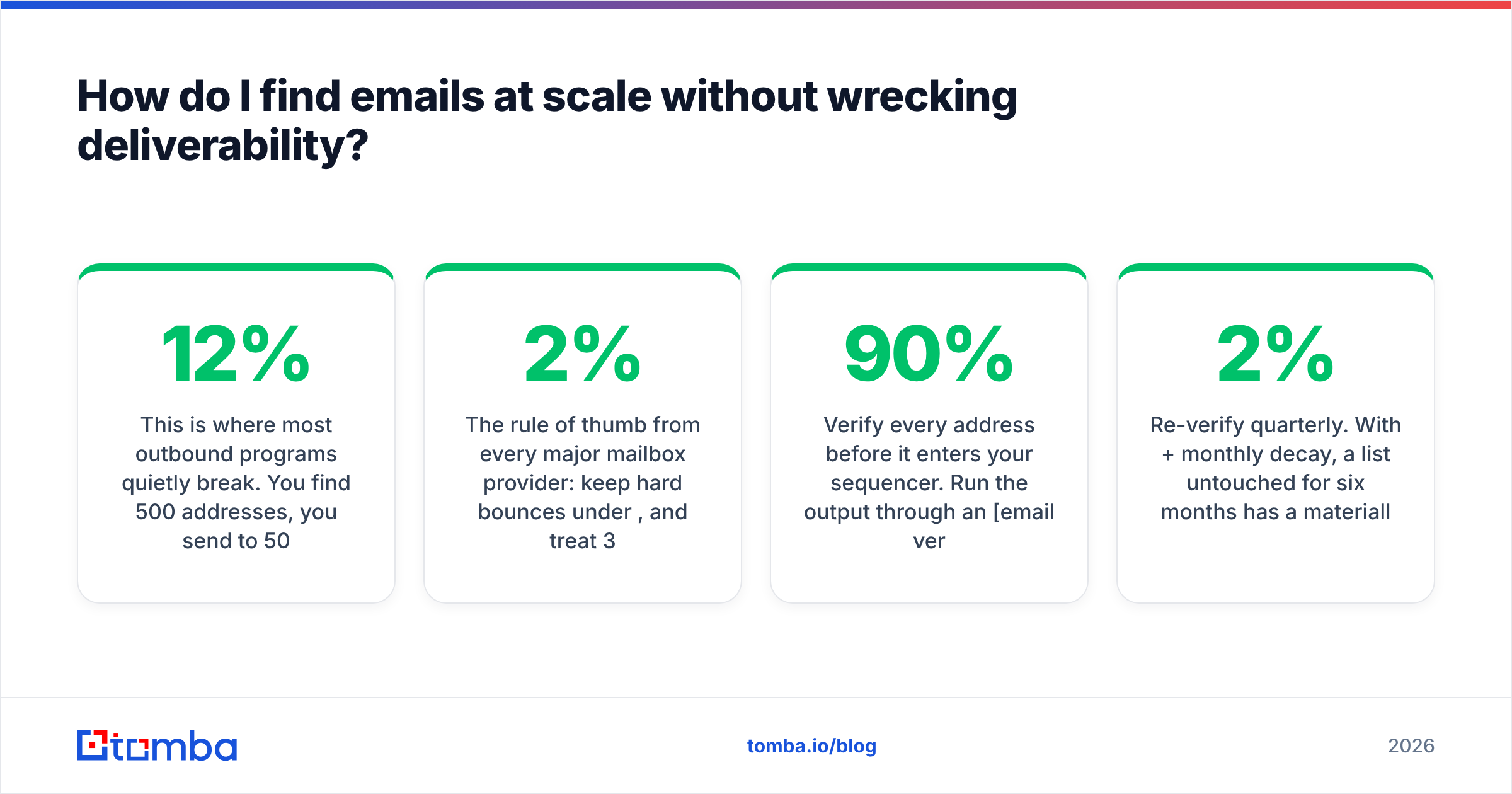
This is where most outbound programs quietly break. You find 500 addresses, you send to 500 addresses, and 60 bounce. That 12% bounce rate tells Gmail and Microsoft that you're not a legitimate sender, and your next campaign lands in spam regardless of how good the copy is.
The rule of thumb from every major mailbox provider: keep hard bounces under 2%, and treat 3% as the emergency line. Google's own Postmaster Tools documentation is the authoritative reference on what its filters weigh — read it once, properly.
A workflow that survives contact with reality:
- Enrich in bulk, not one at a time. Upload your CSV of names and domains to a bulk email finder instead of doing 500 single lookups. Same credits, a fraction of the time.
- Verify every address before it enters your sequencer. Run the output through an email verifier and drop anything below your confidence threshold. Most teams cut at 90%.
- Handle catch-alls separately. A catch-all domain accepts mail to any address, so standard SMTP validation can't distinguish real from fake. Segment these into their own list, run them through a catch-all verifier, and send to survivors at lower volume with tighter monitoring.
- Re-verify quarterly. With 2%+ monthly decay, a list untouched for six months has a materially worse bounce profile than the day you built it.
- Wire it into the CRM. Manual CSV shuttling is where data goes stale. A HubSpot integration or an API call at record-creation time keeps enrichment continuous instead of episodic.
For engineering teams, the email finder API removes the UI entirely — enrich on form submit, on CRM record create, or inside your data pipeline.
Is it legal to find and email company addresses?#
Short answer: yes for business addresses in a B2B context, with conditions that vary by jurisdiction.
Under GDPR, a work email at a company is still personal data, but "legitimate interest" is a recognized lawful basis for B2B outreach if the message is relevant to the recipient's professional role and you honor opt-outs immediately. Under CAN-SPAM in the US, cold B2B email is legal provided you include a real physical address, don't use deceptive subject lines or headers, and process unsubscribes within 10 business days.
What is not defensible anywhere: scraping personal Gmail addresses for commercial outreach, ignoring unsubscribe requests, or buying a list with no documented provenance. Ask any vendor where their data comes from before you sign — and if the answer is vague, that's your answer.
Practical compliance checklist:
- Target work addresses at business domains only
- Keep a suppression list and honor opt-outs within 24 hours, not 10 days
- Include a physical business address in every send
- Document your data source per record
- Don't email EU consumers or ex-employees whose addresses you kept
What's the fastest workflow end to end?#
Here's the sequence that takes a company name to a verified, sequenced contact in under five minutes.
- Identify the company domain. If you only have a company name, resolve it first — a company website finder does this in one step.
- Run a domain search. Feed the domain into domain search to see every discoverable mailbox plus the detected pattern. This alone often finds your target.
- If the person isn't listed, use the name. Feed first name, last name, and domain into the email finder for a pattern-derived, SMTP-checked address.
- Verify. Anything under your confidence threshold gets dropped or routed to a catch-all workflow.
- Enrich. Add title, seniority, and company data via contact enrichment so your personalization has something to work with.
- Push to CRM and sequence. Not to a spreadsheet — spreadsheets are where leads go to age.
Steps 2-5 are one continuous flow inside a single tool. The reason that matters isn't elegance; it's that every handoff between tools is a place where records get dropped, duplicated, or stale-dated.
Which approach should you pick?#
Match the method to the volume, and stop overthinking it.
- Under 10 contacts per month: free methods only. Contact page, Google operators, LinkedIn. Don't pay for a subscription you'll use twice.
- 10-100 per month: a free tier plus manual verification. Tomba's free tier covers 25 searches per month; that's a real allowance, not a demo.
- 100-1,000 per month: a paid finder with bulk upload and built-in verification. At this volume the time saved pays the subscription in the first week.
- 1,000+ per month or programmatic: API-driven enrichment wired into your CRM or data pipeline, with quarterly re-verification jobs.
Check Tomba pricing against your actual monthly lookup count before committing — Starter is $49/mo, Growth $99/mo, and Pro $249/mo, and most teams overbuy by one tier because they estimate from their best month rather than their median one.
Ready to stop guessing at email patterns? Start with the Tomba Email Finder — enter a name and a domain, get a verified, source-attributed address with a confidence score in seconds. The free tier gives you 25 searches a month with no card required, which is enough to test it against contacts whose addresses you already know. That's the only benchmark that matters: does it get your prospects right?
Related guides#
Ready to find emails that actually work?
Join 150,000+ professionals who stopped guessing and started sending. Free credits on signup — no credit card required.
Get the Tomba newsletter
Practical outbound tactics and product updates — once every two weeks.
About the author