How Do I Get a Valid Email Address? 7 Methods That Work
Guessing an email address and hoping it lands is how bounce rates hit 12%. Here are seven methods to get a valid email address in 2026 — plus how to confirm it exists before you hit send.
TL;DR
- A "valid" email address means three things at once: correct syntax, a live mail server on the domain, and an actual mailbox that accepts mail. Most tools only check the first two.
- The fastest reliable path is domain search → email finder → verification. That sequence takes under 30 seconds per contact and catches roughly 95% of bad addresses before you send.
- Free methods (pattern guessing, site scraping, LinkedIn digging) work at small volume but degrade fast past ~20 contacts.
- Never send to an unverified list. A 5% bounce rate is where inbox providers start throttling you; 10% is where domains get blocked.
- Tomba's free tier gives 25 searches/month, and paid plans start at $49/mo — enough to test the workflow before committing.
What does "valid email address" actually mean?#
Think of an email address like a street address for a package. The format has to be right (street, number, city), the street has to exist, and someone has to actually live at that number. Three separate checks — and most people only do the first.
Technically, validity breaks into layers:
- Syntax validity — the string matches RFC 5322 rules.
jane.doe@acme.compasses;jane doe@acmefails. This is trivial to check and almost useless on its own. - Domain validity — the domain resolves and has MX records pointing at a real mail server.
@acme.comworks;@acmee.com(a typo) usually doesn't. - Mailbox existence — an SMTP handshake confirms the server accepts mail for that specific local part. This is where most fake addresses die.
- Deliverability signals — is it a role account (
info@,sales@), a disposable address, a spam trap, or a catch-all domain that accepts everything? All of these are "valid" by the strict definition and still terrible to email.
That fourth layer is what separates a usable B2B contact from a number that inflates your list size and tanks your sender reputation.
How do I get a valid email address? The 7 methods ranked#
Here's every practical route, roughly ordered from most reliable to least. Pick based on volume and budget.
1. Use a dedicated email finder. You supply a name plus a company domain; the tool returns the address plus a confidence score. This is the highest-yield method for B2B — a good email finder resolves 60-80% of first-name + domain queries and tells you when it can't.
2. Run a domain search. Instead of one person, you pull every publicly discoverable address on a company domain. Useful when you know the account but not the individual. Domain search also reveals the company's email pattern, which makes every subsequent guess on that domain far more accurate.
3. Check the company website directly. Team pages, press kits, /contact, author bylines, and PDF whitepapers leak addresses constantly. Slow but free, and the address came straight from the source.
4. Look at the person's public footprint. GitHub commit history, conference speaker bios, Twitter/X bios, personal sites, and academic papers. Developers in particular expose their work email in git log output more often than they realize.
5. Derive the pattern, then verify. Most companies use one of six formats: first.last@, flast@, first@, firstl@, f.last@, lastf@. Find one known address at the company, infer the pattern, apply it, then verify. An email permutator generates the candidate list for you.
6. Ask a human. A LinkedIn message, a mutual contact, or the company's front-desk line. Low volume, near-100% accuracy, and it warms the contact before your first email.
7. Buy a list. Fastest by volume, riskiest by quality. Vendors vary wildly — some maintain genuinely fresh data with re-verification cycles, others resell scraped dumps from 2019. Only consider providers that publish their refresh cadence and offer replacement credits for bounces.
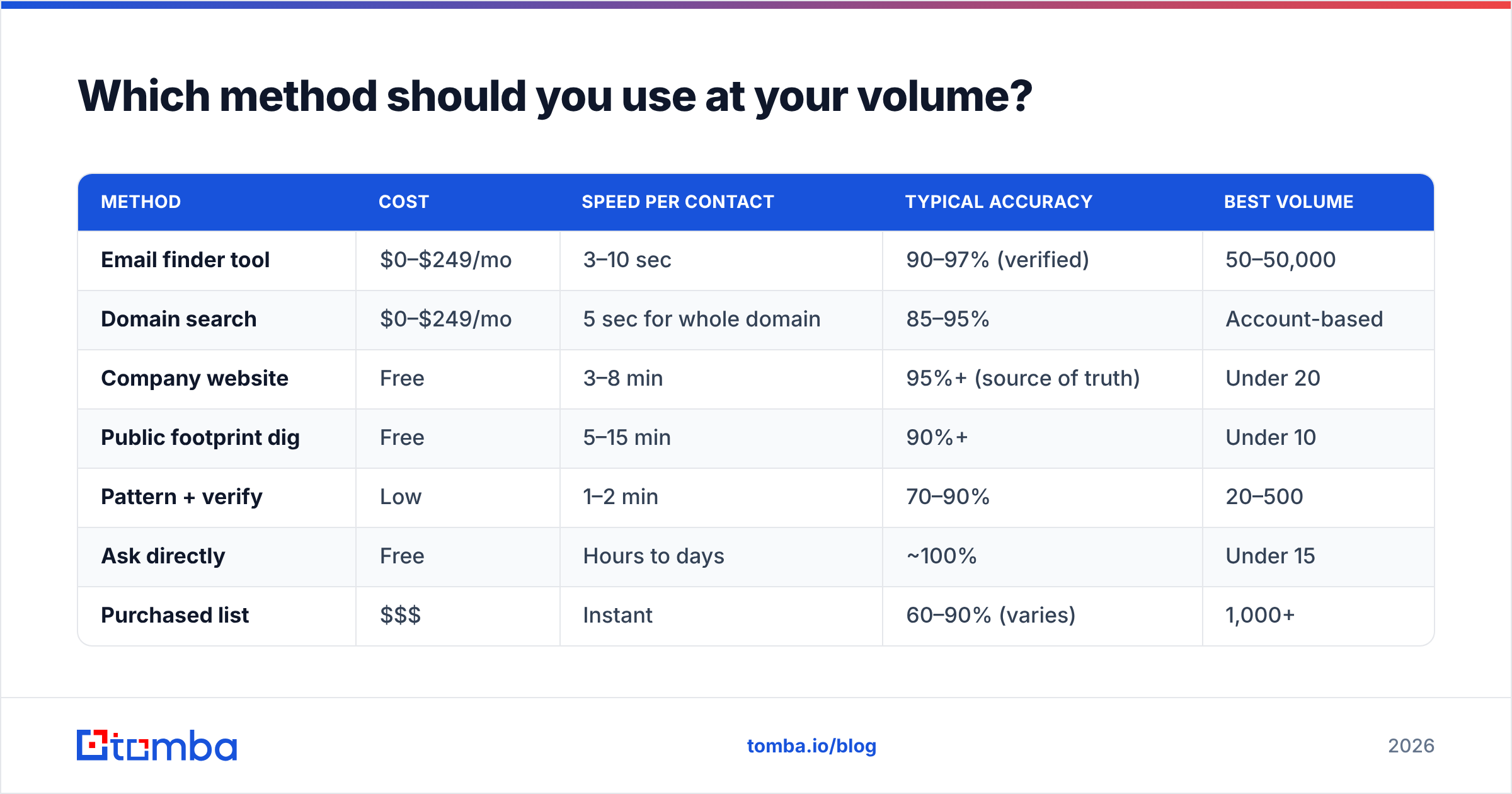
Which method should you use at your volume?#
| Method | Cost | Speed per contact | Typical accuracy | Best volume |
|---|---|---|---|---|
| Email finder tool | $0–$249/mo | 3–10 sec | 90–97% (verified) | 50–50,000 |
| Domain search | $0–$249/mo | 5 sec for whole domain | 85–95% | Account-based |
| Company website | Free | 3–8 min | 95%+ (source of truth) | Under 20 |
| Public footprint dig | Free | 5–15 min | 90%+ | Under 10 |
| Pattern + verify | Low | 1–2 min | 70–90% | 20–500 |
| Ask directly | Free | Hours to days | ~100% | Under 15 |
| Purchased list | $$$ | Instant | 60–90% (varies) | 1,000+ |
The pattern here is boring but real: free methods are more accurate per contact and completely fall apart at volume. Anything past 20 contacts, tooling wins on time alone.

How do you verify an email address before sending?#
Finding is half the job. Verification is the half that protects your domain.
A proper email verifier runs this sequence:
- Syntax parse — reject malformed strings instantly, no network call needed.
- DNS + MX lookup — confirm the domain exists and has a mail exchanger. Kills typo domains and dead companies.
- Disposable/role detection — flag
@mailinator.comthrowaways andinfo@/support@role accounts that route to shared inboxes. - SMTP handshake — connect to the mail server and issue a
RCPT TOcommand without sending. A250response means the mailbox exists;550means it doesn't. - Catch-all detection — some servers accept every address at the domain, so the handshake always returns
250. These need separate handling.
That last one trips up more people than anything else. Roughly 15-20% of B2B domains are catch-all, and a naive verifier will mark every address on them as "valid" — including the ones that will hard bounce. A catch-all verifier uses additional signals (historical sends, pattern confidence, secondary sources) to score those addresses instead of blindly passing them.
For a one-off check with no account, a free email checker handles syntax and MX in a couple of seconds.
What free tools can get you a valid email address?#
You can go surprisingly far without paying:
- Free tiers on finder tools. Tomba's free plan gives 25 searches per month. Hunter offers a similar starter allowance. For occasional lookups, that's often enough.
- Google search operators.
site:acme.com "@acme.com"surfaces addresses indexed on the company's own pages. Addfiletype:pdfto catch whitepapers and press releases. - Browser extensions. An email finder extension pulls addresses while you browse LinkedIn or company sites, without tab-switching.
- Email pattern checkers. Feed in a domain, get back the dominant format. Free, and it makes manual guessing far less random.
- WHOIS lookups. Increasingly gated by privacy protection, but smaller companies and older domains still expose a registrant email.
The honest limit: free methods cost time, and time is the expensive input. Ten minutes to dig out one address is fine for a strategic account and completely unworkable for a 300-contact campaign.
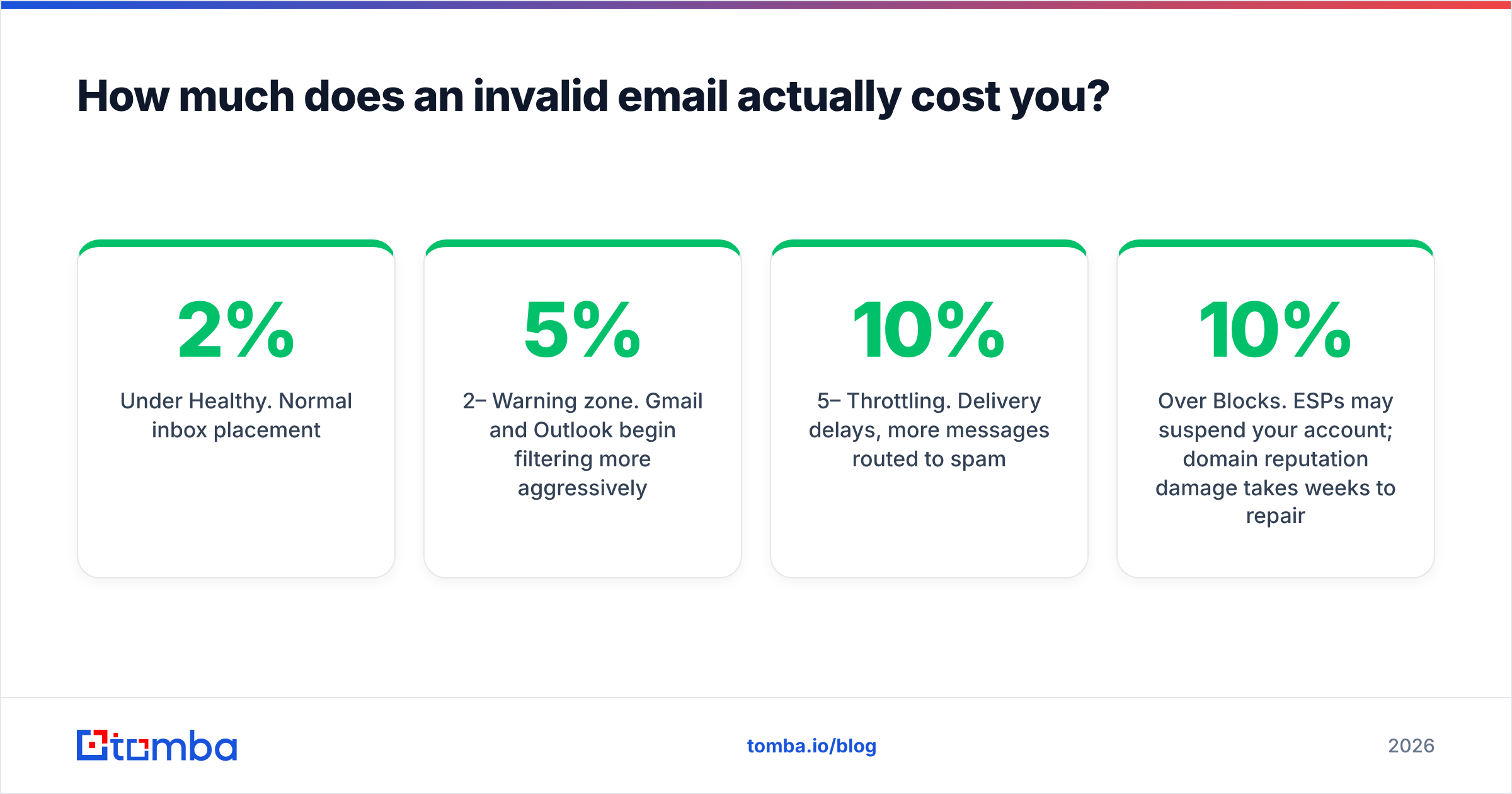
How much does an invalid email actually cost you?#
More than the wasted send. Inbox providers treat bounce rate as a primary reputation signal.
| Bounce rate | What happens |
|---|---|
| Under 2% | Healthy. Normal inbox placement. |
| 2–5% | Warning zone. Gmail and Outlook begin filtering more aggressively. |
| 5–10% | Throttling. Delivery delays, more messages routed to spam. |
| Over 10% | Blocks. ESPs may suspend your account; domain reputation damage takes weeks to repair. |
Google's bulk sender guidelines make the expectations explicit, and Microsoft enforces similar thresholds. Once your email deliverability drops, every future campaign underperforms — including the ones sent to perfectly good addresses.
There's a second cost people miss: CRM pollution. Bad addresses create duplicate records, break automation triggers, and corrupt attribution data. Cleaning that up later costs more than verifying upfront.
What's the fastest end-to-end workflow?#
Here's the sequence that holds up at any volume:
- Start with the domain, not the person. Run domain search on the target company. You get the email pattern plus any already-known contacts in one call.
- Resolve specific people by name. Feed first name + last name + domain into the email finder. Note the confidence score — anything under 80 gets extra scrutiny.
- Verify every result. Even high-confidence finds. Verification is cheap; a bounce is not.
- Segment by risk. Verified-valid goes into the main sequence. Catch-all and medium-confidence addresses go into a smaller, slower-warmed segment so a cluster of bounces can't damage your primary domain.
- Re-verify quarterly. B2B data decays at roughly 22-30% per year, according to research summarized by vendors like HubSpot. A list verified in January is measurably worse by July.
- Automate at volume. Past a few hundred contacts, run it through the Tomba API, a bulk email finder, or a Google Sheets add-on rather than clicking through a UI.

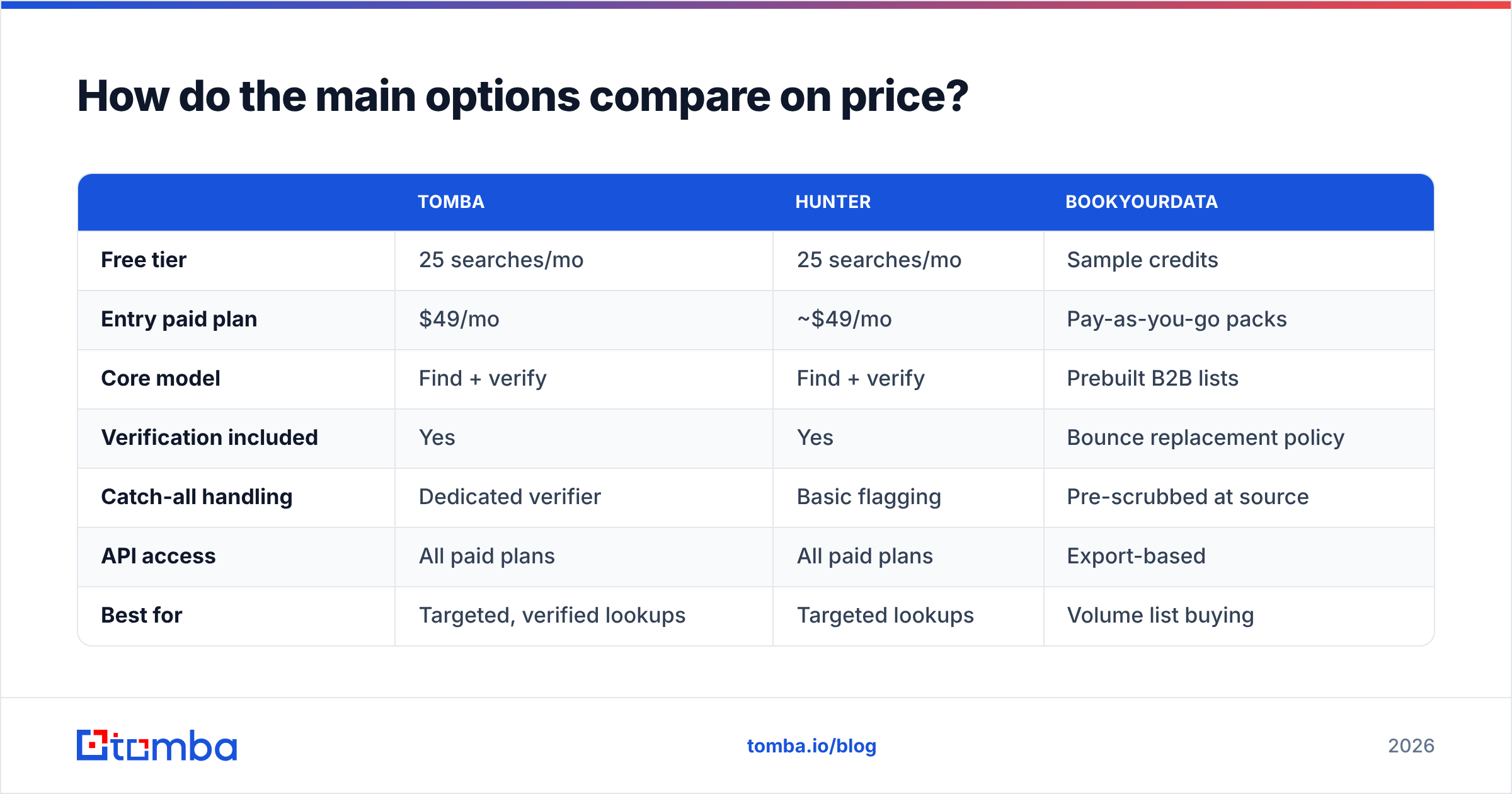
How do the main options compare on price?#
| Tomba | Hunter | BookYourData | |
|---|---|---|---|
| Free tier | 25 searches/mo | 25 searches/mo | Sample credits |
| Entry paid plan | $49/mo | ~$49/mo | Pay-as-you-go packs |
| Core model | Find + verify | Find + verify | Prebuilt B2B lists |
| Verification included | Yes | Yes | Bounce replacement policy |
| Catch-all handling | Dedicated verifier | Basic flagging | Pre-scrubbed at source |
| API access | All paid plans | All paid plans | Export-based |
| Best for | Targeted, verified lookups | Targeted lookups | Volume list buying |
The split is simple. If you know who you want to reach, a finder-plus-verifier stack gets you there with the least waste. If you want a large ready-made list matching firmographic filters, a list vendor like BookYourData is built for exactly that job and does it well — just budget verification time on top, as you would with any bulk source.
Full Tomba pricing runs Free (25 searches), Starter $49/mo, Growth $99/mo, Pro $249/mo, and Enterprise custom.
What mistakes should you avoid?#
- Emailing a list you didn't verify. The single most common cause of deliverability collapse. Verification costs fractions of a cent per address.
- Trusting syntax checkers. A regex validator confirms the string looks like an email. It says nothing about whether the mailbox exists.
- Defaulting to role accounts.
info@andsales@land in shared inboxes with terrible response rates. Find the individual. - Ignoring catch-all warnings. "Accepted by the server" is not "delivered to a human." Treat catch-all addresses as a separate, lower-confidence tier.
- Skipping warmup on a new domain. Even a perfectly verified list will bounce and filter if you blast 500 emails from a two-day-old domain. Ramp with an email warmup calculator.
- Letting data go stale. Set a recurring re-verification job. Contacts change jobs; domains get retired.
Frequently asked questions#
Can I verify an email without sending anything? Yes. SMTP verification opens a connection and asks the server whether the mailbox exists, then disconnects before transmitting a message. The recipient sees nothing.
Is it legal to find someone's business email? Finding publicly available business contact data is generally legal in the US and, under GDPR, permissible for B2B outreach on legitimate-interest grounds — provided you disclose your source, offer opt-out, and keep the message relevant to the person's professional role. Consumer addresses are a different and much stricter matter. Check your jurisdiction.
Why does a verifier return "unknown"? Usually a catch-all domain, a greylisting server that defers unfamiliar connections, or a firewall blocking SMTP probes. "Unknown" means undetermined, not invalid — score it and segment it rather than deleting it.
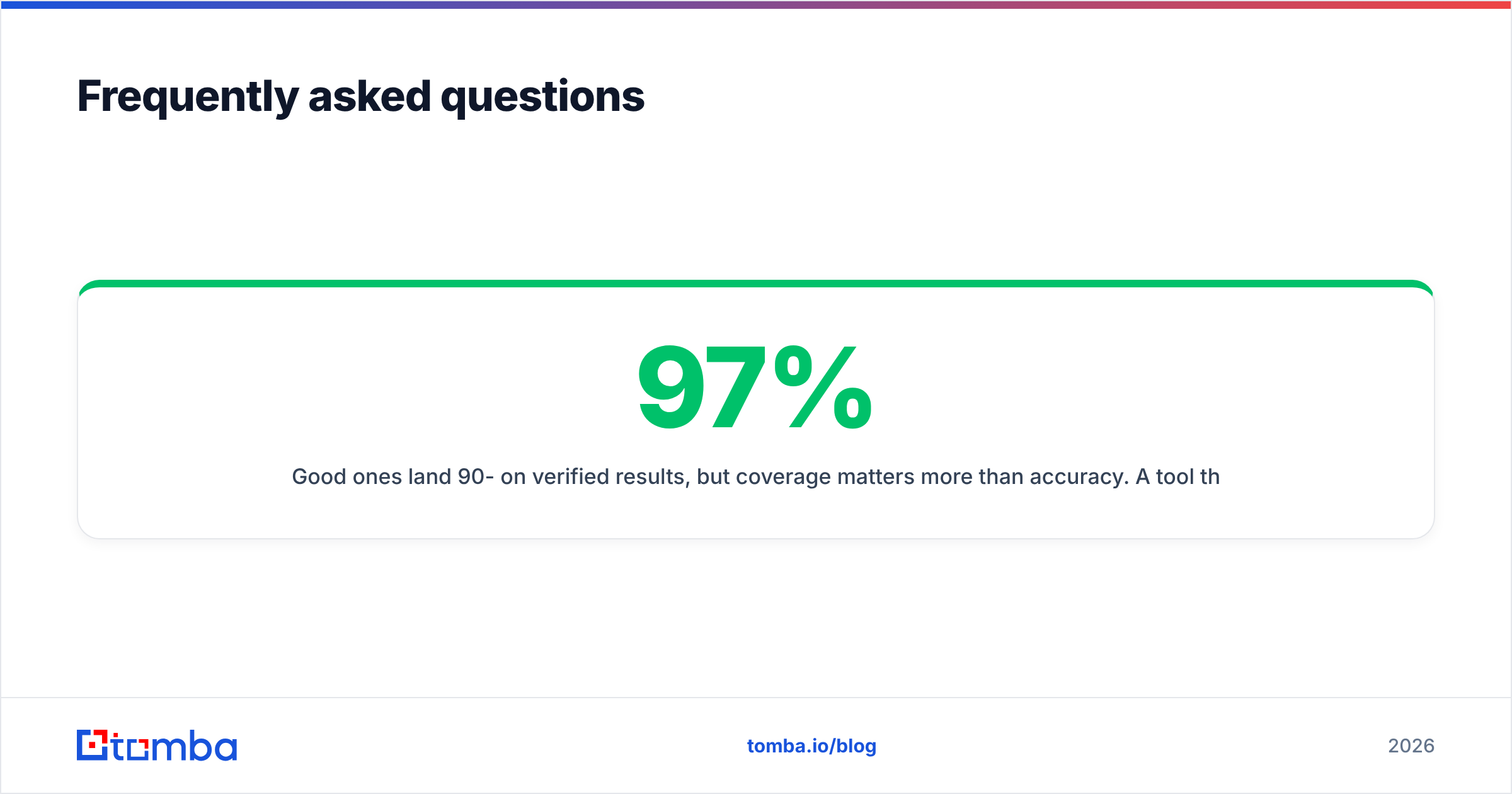
How accurate are email finders really? Good ones land 90-97% on verified results, but coverage matters more than accuracy. A tool that returns an address for 50% of your queries at 97% accuracy is less useful than one returning 80% at 93%. Test both metrics on your own target accounts before committing.
Do I need a separate verifier if my finder already verifies? Not usually — but check whether the built-in verification includes catch-all analysis and role-account detection, or just MX plus syntax. The gap between those two is where bounces come from.
Ready to stop guessing?#
Guessing an email address is a coin flip you pay for with your domain reputation. The workflow that actually works is unglamorous: find with a real data source, verify before you send, re-verify on a schedule.
Start with the Tomba Email Finder. Enter a name and a company domain, get a verified address with a confidence score in a few seconds. The free tier includes 25 searches a month — enough to test it against contacts you already know and see how the accuracy holds up on your accounts before you spend anything.
Related guides#
Ready to find emails that actually work?
Join 150,000+ professionals who stopped guessing and started sending. Free credits on signup — no credit card required.
Get the Tomba newsletter
Practical outbound tactics and product updates — once every two weeks.
About the author