How Do I Validate My Email Address? A 2026 Field Guide
Syntax checks, MX lookups, SMTP pings, catch-all handling — here is exactly how email validation works in 2026, what each method can and cannot prove, and which one you actually need.
TL;DR
- "Valid" means four different things: correct syntax, a real domain, a mailbox that accepts mail, and a person who still works there. Most free checkers only prove the first two.
- The fastest reliable answer is an API call that runs syntax → DNS/MX → SMTP handshake → risk scoring in one request, returning a status plus a confidence score.
- Catch-all domains (roughly 15-20% of B2B domains) accept every address at the SMTP layer, so they need pattern evidence, not a ping.
- Never validate by sending a test email to a cold list. That is how you burn a sending domain before your first real campaign.
- Budget rule of thumb: validate once at capture, re-validate anything older than 90 days, and hard-bounce-suppress forever.
What does "validate my email address" actually mean?#
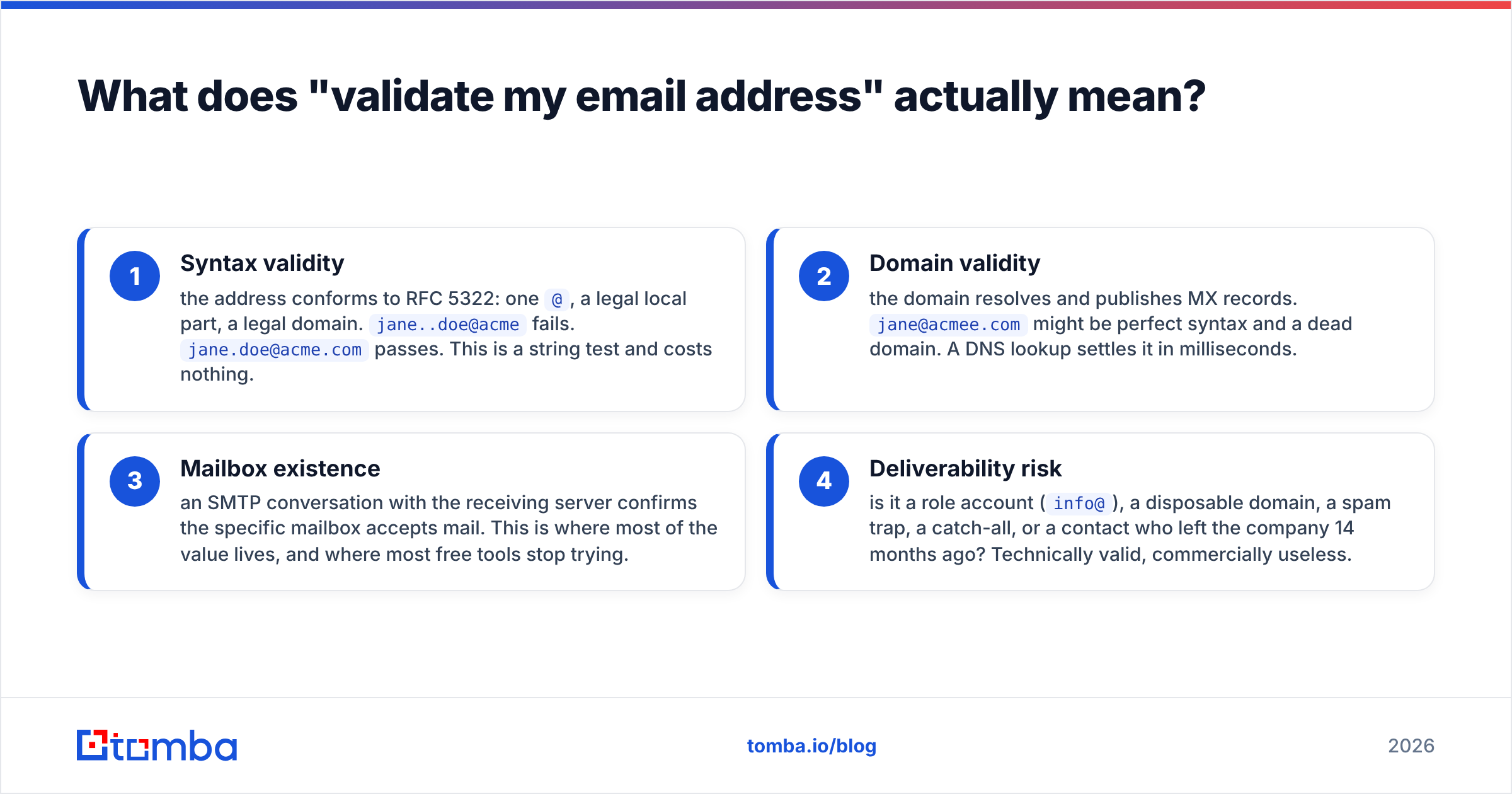
It means proving that mail sent to a string will land in a human's inbox — and there are four separate claims hidden inside that sentence.
- Syntax validity — the address conforms to RFC 5322: one
@, a legal local part, a legal domain.jane..doe@acmefails.jane.doe@acme.compasses. This is a string test and costs nothing. - Domain validity — the domain resolves and publishes MX records.
jane@acmee.commight be perfect syntax and a dead domain. A DNS lookup settles it in milliseconds. - Mailbox existence — an SMTP conversation with the receiving server confirms the specific mailbox accepts mail. This is where most of the value lives, and where most free tools stop trying.
- Deliverability risk — is it a role account (
info@), a disposable domain, a spam trap, a catch-all, or a contact who left the company 14 months ago? Technically valid, commercially useless.
A checker that returns a green tick after step 1 is not validating. It is spellchecking. When someone asks "how do i validate my email address," the honest answer is: pick the depth you actually need, because each layer costs more time and hits more edge cases.
What are the five methods, ranked by effort?#
Here is the practical ladder, from a five-second manual check to production-grade infrastructure.
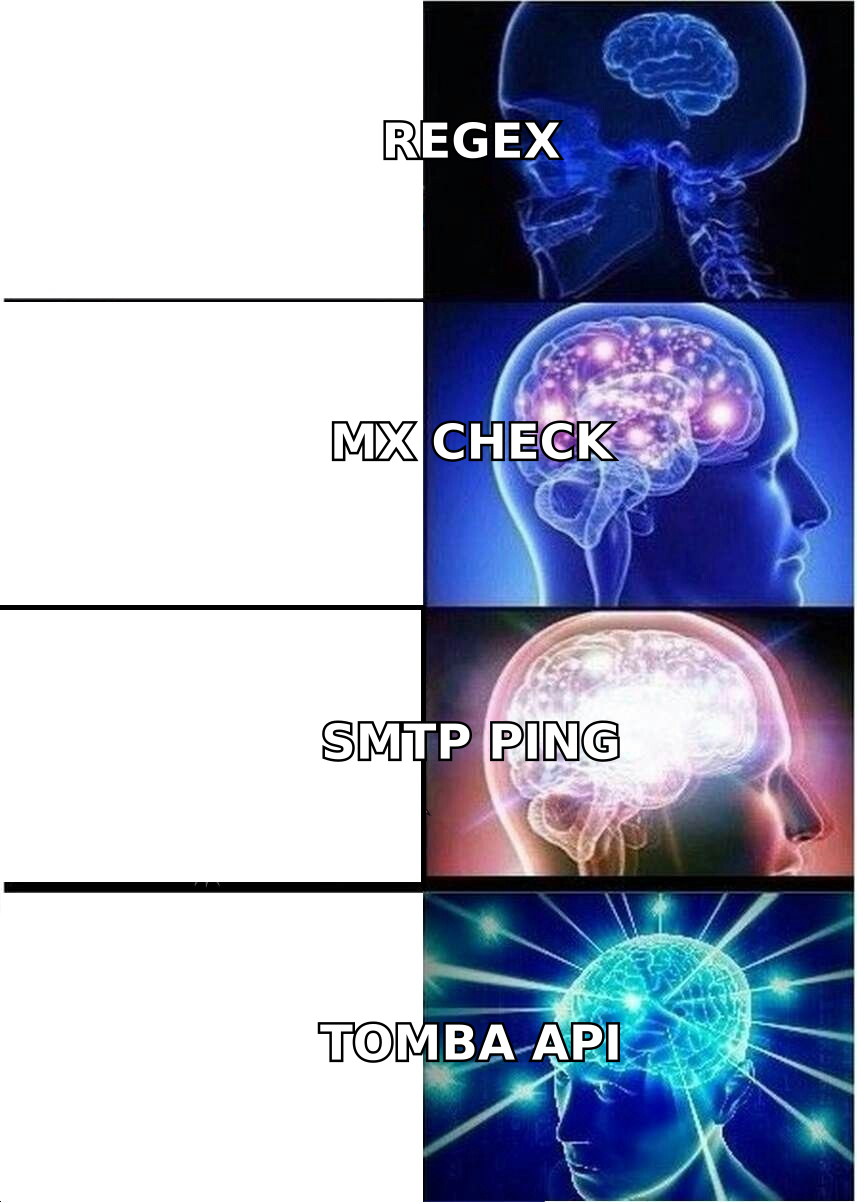
1. Manual syntax + domain eyeball (5 seconds, free). Read the address. Does the domain exist? Open it in a browser. Catches typos like gmial.com and @company.co when the real domain is .com. Weak, but free and instant.
2. Free web checker (10 seconds, free). Paste one address into a browser tool like a free email checker and get syntax + MX + a basic SMTP result. Good for a single address before you send an important intro email. Not built for volume.
3. Command-line MX and SMTP probe (2 minutes, free, technical). Run dig MX acme.com to confirm mail records, then open a manual SMTP session with telnet or swaks and issue HELO, MAIL FROM, RCPT TO. The server's response code tells you whether the mailbox exists. A 250 is acceptance, 550 is rejection, 450 is a soft defer. Free, but your IP gets throttled fast and most providers now greylist unknown senders.
4. Bulk list validation (minutes, paid per credit). Upload a CSV, get statuses back for every row. This is the right tool before a campaign. Use a bulk verify run whenever a list has been sitting untouched for a quarter or came from an external source.
5. API validation at capture (milliseconds, paid, permanent fix). Wire an email verification API into your signup form, CRM import, and enrichment job. Bad addresses never enter the database. This is the only method that stops the problem instead of cleaning up after it.
Most teams should run method 5 for new data and method 4 quarterly on everything else.
How do the validation methods compare?#
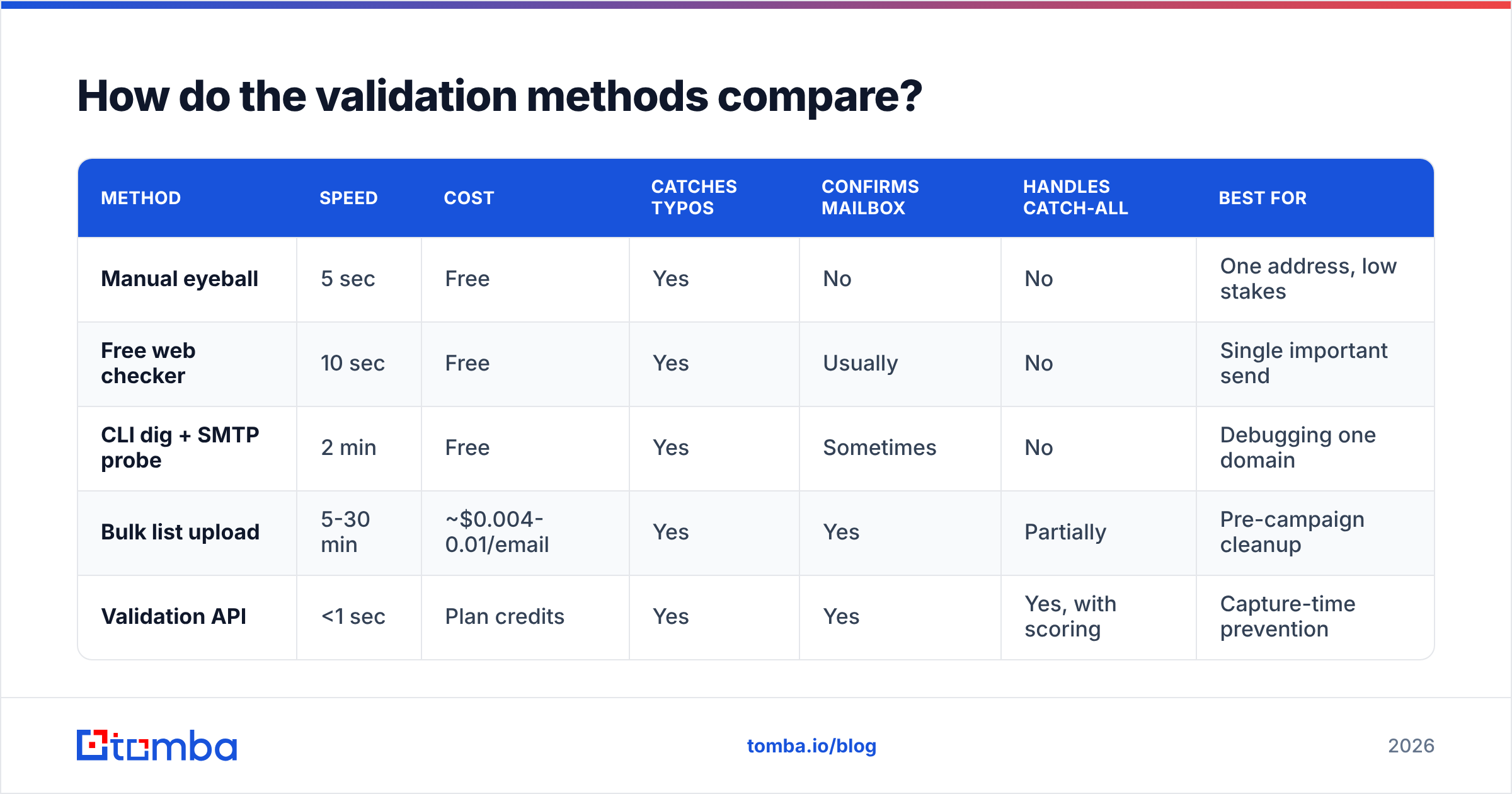
| Method | Speed | Cost | Catches typos | Confirms mailbox | Handles catch-all | Best for |
|---|---|---|---|---|---|---|
| Manual eyeball | 5 sec | Free | Yes | No | No | One address, low stakes |
| Free web checker | 10 sec | Free | Yes | Usually | No | Single important send |
| CLI dig + SMTP probe | 2 min | Free | Yes | Sometimes | No | Debugging one domain |
| Bulk list upload | 5-30 min | ~$0.004-0.01/email | Yes | Yes | Partially | Pre-campaign cleanup |
| Validation API | <1 sec | Plan credits | Yes | Yes | Yes, with scoring | Capture-time prevention |
The column that separates serious tools from toys is the last one. Anything can run a regex. Very little handles a domain that says "yes" to every address you try.
Why do catch-all domains break most validators?#
Because a catch-all server answers 250 OK to every RCPT TO, including asdkjhasd@company.com. The SMTP layer has no information left to give you.
Roughly one in five B2B domains is configured this way — often deliberately, to avoid leaking which mailboxes exist. Google Workspace and Microsoft 365 both make it a checkbox. When a validator hits one, it has three honest options:
- Return "unknown" or "accept-all" and let you decide. Correct but unhelpful.
- Refuse to charge you for a result it cannot prove. Ethical, still unhelpful.
- Score it using evidence outside SMTP: does the domain's known email pattern (
first.last@,flast@,first@) match this address? Has this exact address appeared in crawled sources? Is the person's name and title confirmed at that company?
The third path is the only one that produces a usable decision. Tomba's catch-all verifier takes that route — pattern matching plus source corroboration — and returns a confidence score rather than a binary that would be a coin flip. If you are working a list where most domains are catch-all (common in enterprise and financial services), a tool that just says "unknown" on 20% of your rows is handing the problem back to you.
Practical rule: treat a high-confidence catch-all as sendable, but put it in a smaller, well-warmed sending pool and watch the bounce rate for the first 200 sends.

Which statuses should you actually act on?#
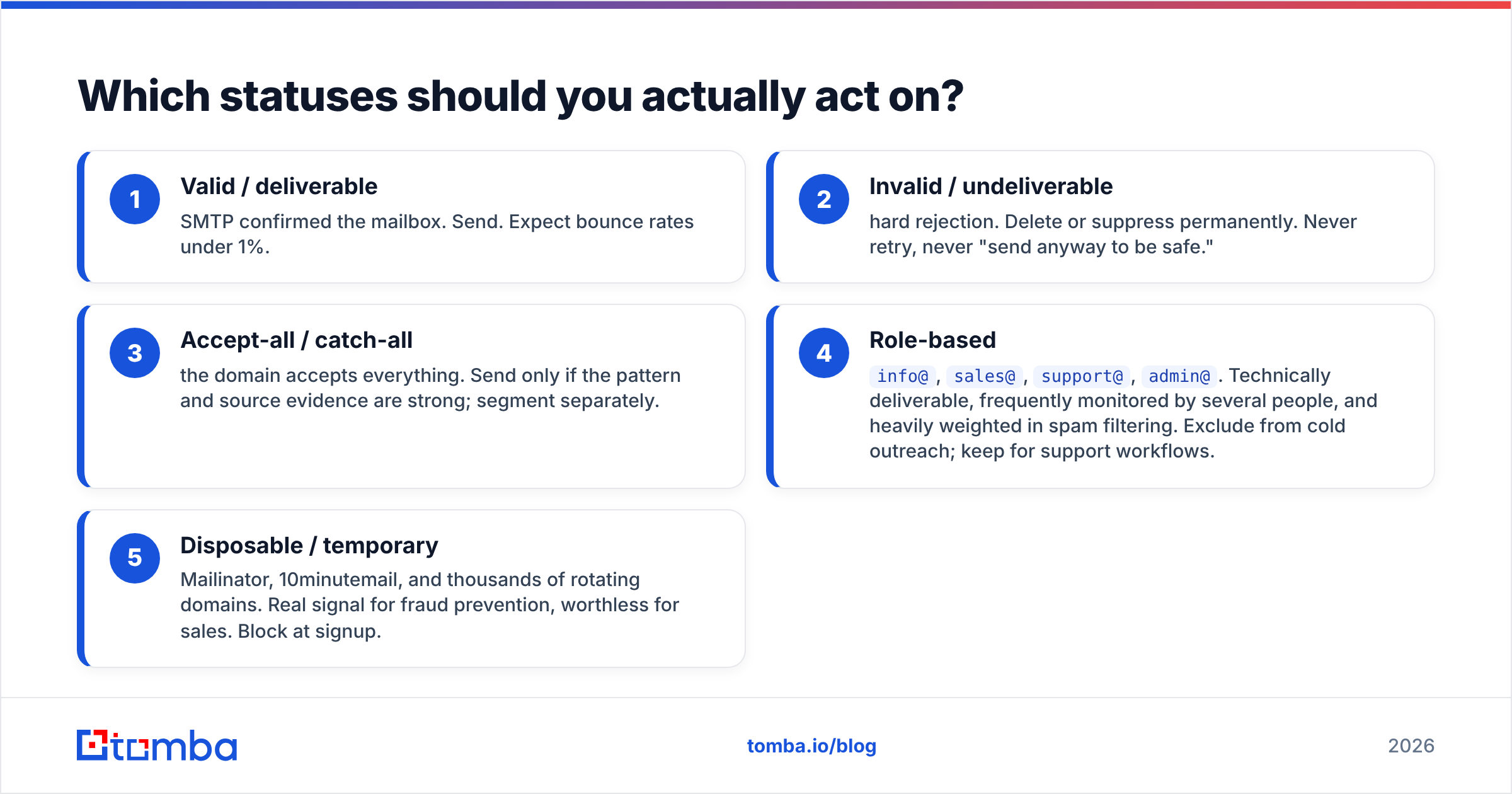
Validators return different vocabularies, but they collapse into five buckets. Here is what each one means and what to do.
- Valid / deliverable — SMTP confirmed the mailbox. Send. Expect bounce rates under 1%.
- Invalid / undeliverable — hard rejection. Delete or suppress permanently. Never retry, never "send anyway to be safe."
- Accept-all / catch-all — the domain accepts everything. Send only if the pattern and source evidence are strong; segment separately.
- Role-based —
info@,sales@,support@,admin@. Technically deliverable, frequently monitored by several people, and heavily weighted in spam filtering. Exclude from cold outreach; keep for support workflows. - Disposable / temporary — Mailinator, 10minutemail, and thousands of rotating domains. Real signal for fraud prevention, worthless for sales. Block at signup.
A sixth category deserves its own line: stale but valid. The mailbox works, the person left. Validation cannot detect this, which is why contact enrichment and periodic re-checks matter more than one perfect cleanup. B2B data decays at roughly 2-2.5% per month, according to widely cited industry benchmarks — that is a quarter of your database each year.
How does this affect deliverability and sender reputation?#
Directly and asymmetrically: validation is cheap, and a damaged sending domain is expensive.
Mailbox providers treat bounce rate as a core reputation input. Google's bulk sender guidelines set an explicit spam-complaint threshold and expect senders to keep invalid recipients out of their streams. Once you cross into throttling or filtering, recovery takes weeks of reduced volume and careful warming — assuming you diagnose it fast enough.
The math is unforgiving. A 10,000-address list with 12% invalid addresses produces 1,200 bounces. Most ESPs start flagging accounts above 2-3%. One unvalidated send can move you from "good sender" to "under review," and every legitimate prospect on that same list gets filtered along with the junk.
Keep three habits:
- Validate at capture, not before campaigns. The cheapest bad address is the one that never entered the CRM.
- Re-validate anything older than 90 days before it goes into a sequence.
- Monitor your own domain health alongside list health. A clean list on a misconfigured domain still lands in spam — check your SPF record and DKIM alignment before blaming the data. Broader context on email deliverability is worth an hour of reading if you own a sending program.
Should you validate by sending a test email?#
No — not to a cold list, and here is the one exception.
Sending to unverified addresses is the single fastest way to torch a new domain. Every hard bounce is a negative reputation signal recorded by the receiving provider, and cold domains have no positive history to absorb the damage. The "just send it and see" approach works only for warm, opted-in lists on an established domain with a low volume.
The exception: a single, individually important address — a champion at a target account, a partner contact — where you have already run a validator and got an "accept-all" result. A short, genuinely relevant one-to-one email is a reasonable final test. That is one message, not a batch of 5,000.
For everything else, validate first. The credit cost of checking 5,000 addresses is a rounding error next to the cost of a burnt domain and a three-week rebuild.
Which tool should you use for validating email addresses?#
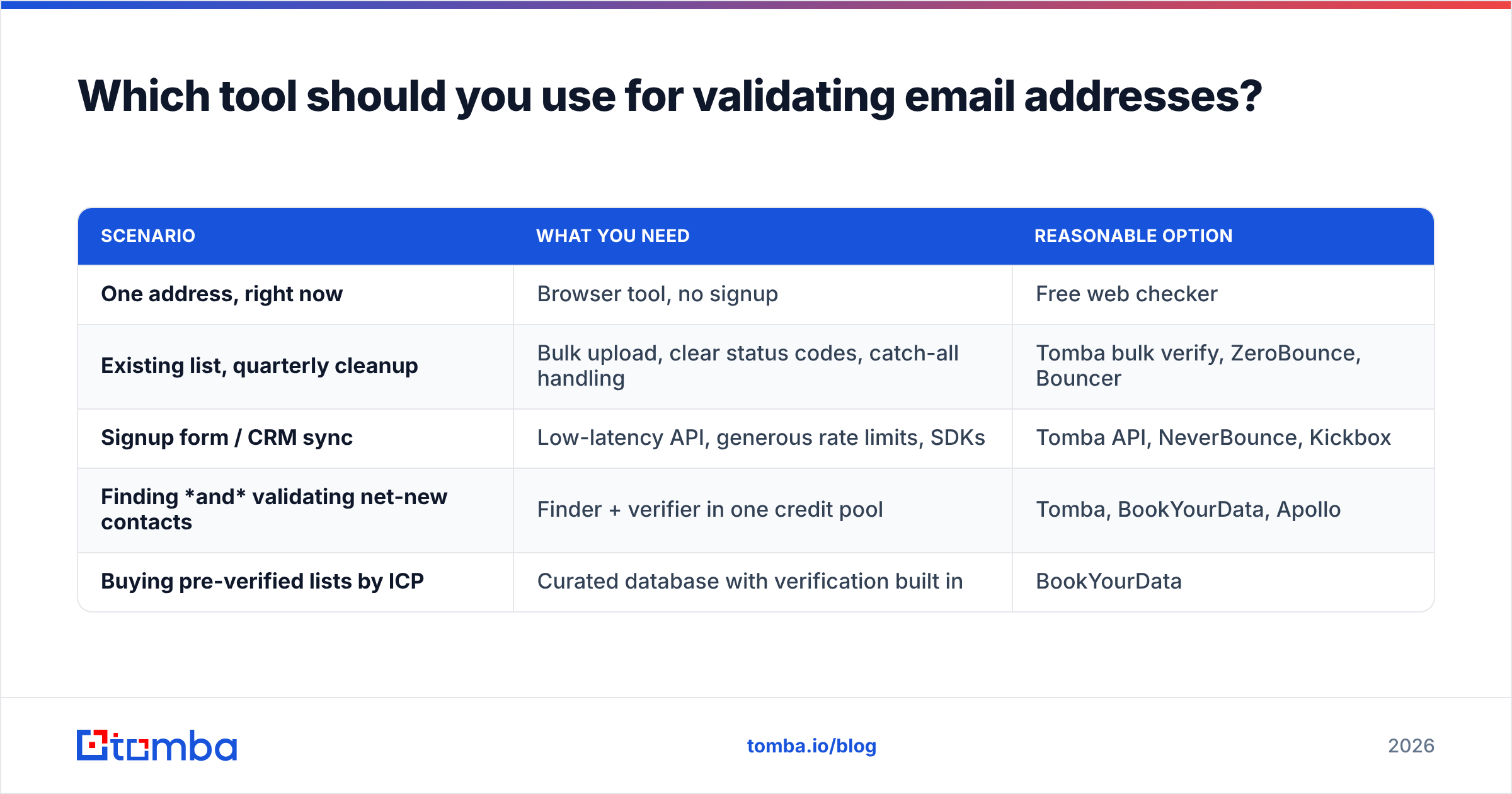
Depends on volume and where the addresses come from. Three honest shapes:
| Scenario | What you need | Reasonable option |
|---|---|---|
| One address, right now | Browser tool, no signup | Free web checker |
| Existing list, quarterly cleanup | Bulk upload, clear status codes, catch-all handling | Tomba bulk verify, ZeroBounce, Bouncer |
| Signup form / CRM sync | Low-latency API, generous rate limits, SDKs | Tomba API, NeverBounce, Kickbox |
| Finding and validating net-new contacts | Finder + verifier in one credit pool | Tomba, BookYourData, Apollo |
| Buying pre-verified lists by ICP | Curated database with verification built in | BookYourData |
That last row matters more than it looks. If you are building a prospect list from scratch, running a separate finder and a separate verifier means two vendors, two credit systems, and a handoff where data quality quietly degrades. BookYourData is a solid choice when you want the list assembled and verified for you; Tomba fits better when you want to run the finding and verifying yourself against domains you have already chosen.
Tomba pricing starts with a free tier at 25 searches per month, then Starter at $49/mo, Growth at $99/mo, and Pro at $249/mo, with Enterprise custom — verification and finding draw from the same credit pool, so you are not budgeting two line items. Compare against alternatives on G2 rather than taking any vendor's own comparison page at face value, including this one.
What does a good validation workflow look like end to end?#
Five steps, run in this order, and the whole thing takes an afternoon to build once:
- Block at the form. Client-side syntax check, plus an API call on blur that rejects disposable domains and obvious typos. Suggest corrections (
gmail.comforgmial.com) instead of just erroring. - Validate on import. Every CSV upload, every CRM sync, every scraped list goes through bulk validation before it touches a sequence. No exceptions for "trusted" sources.
- Segment by status. Valid goes to the main pool. Accept-all goes to a smaller, monitored pool. Role-based and invalid never enter outbound.
- Suppress permanently. Hard bounces go to a suppression list that survives CRM migrations and tool changes. Re-sending to a known-dead address is a self-inflicted wound.
- Re-check on a schedule. Quarterly for the active database, monthly for anything in an active sequence. If you are also sourcing net-new contacts, a domain search against target companies surfaces current mailboxes and patterns at the same time.
Step 1 is the highest-leverage and the most often skipped. Every address you stop at the form is one you never have to clean, segment, or suppress later.
Get validated addresses without the cleanup cycle#
If you are validating a list you already have, run it through bulk verification and suppress the invalids — that is a one-afternoon fix. If the deeper problem is that your list was never clean to begin with, start further upstream: the Tomba Email Finder returns addresses that have already passed syntax, MX, SMTP, and catch-all scoring before they reach you, with a confidence score attached to each one. Free tier is 25 searches a month, no card required, which is enough to test the accuracy against a sample of contacts you can independently confirm. Do that before you commit — with data tools, the only benchmark that counts is the one you run yourself.
Related guides#
Ready to find emails that actually work?
Join 150,000+ professionals who stopped guessing and started sending. Free credits on signup — no credit card required.
Get the Tomba newsletter
Practical outbound tactics and product updates — once every two weeks.
About the author