How Long Does Email Warm Up Take? A Realistic 2026 Timeline
Most warm-up guides say 14 days. Real inbox data says otherwise. Here's the honest timeline by domain age, sending volume, and provider — plus how to tell when you're actually ready to send.
TL;DR
- A new domain on a new mailbox needs 4 to 8 weeks before it can safely carry 50+ cold emails per day. The "14-day warm-up" figure floating around most tool marketing pages is the floor, not the average.
- An aged domain with a fresh mailbox warms in roughly 2 to 3 weeks. A rehabilitated domain that already got burned takes 6 to 12 weeks, and sometimes never fully recovers.
- Warm-up duration is driven by four variables: domain age, target daily volume, mailbox provider mix (Google vs Microsoft), and the quality of the list you send to afterward.
- Microsoft/Outlook domains consistently take 1.5 to 2x longer to warm than Google Workspace domains. Plan separate ramps.
- Warm-up buys you reputation headroom. Bad data spends it in a week. Verify every address before the first real campaign.
What does "email warm-up" actually mean?#
Email warm-up is the process of gradually increasing send volume from a new mailbox or domain so that receiving providers build a positive reputation record for it, instead of treating a sudden burst of outbound as spam.
The mental model that helps: a new sending domain is like a new credit applicant. No history means no trust, not bad trust. You don't fix that by asking for a $50,000 limit on day one. You fix it by making small, consistent, repaid transactions until the issuer has enough data to extend more. Mailbox providers work the same way — they need a track record of your mail being opened, replied to, and not marked as junk before they'll route volume to the primary inbox.
Technically, warm-up is a reputation-accumulation process across three layers:
- Domain reputation — tied to your sending domain (yourcompany.com or a look-alike like getyourcompany.com). This is the layer that takes the longest and matters the most.
- IP reputation — on shared infrastructure like Google Workspace or Microsoft 365, you inherit a pool IP, so this layer is mostly out of your hands. On a dedicated IP (SendGrid, Amazon SES, self-hosted), you warm the IP separately and it adds weeks.
- Mailbox-level engagement history — per-inbox signals: replies, moves out of spam, adds to contacts. This is the fastest layer to build and the fastest to lose.
Your sender reputation is the composite score providers assign across those layers. Warm-up is simply the deliberate construction of that score before you have anything at stake.

How long does email warm up take, realistically?#
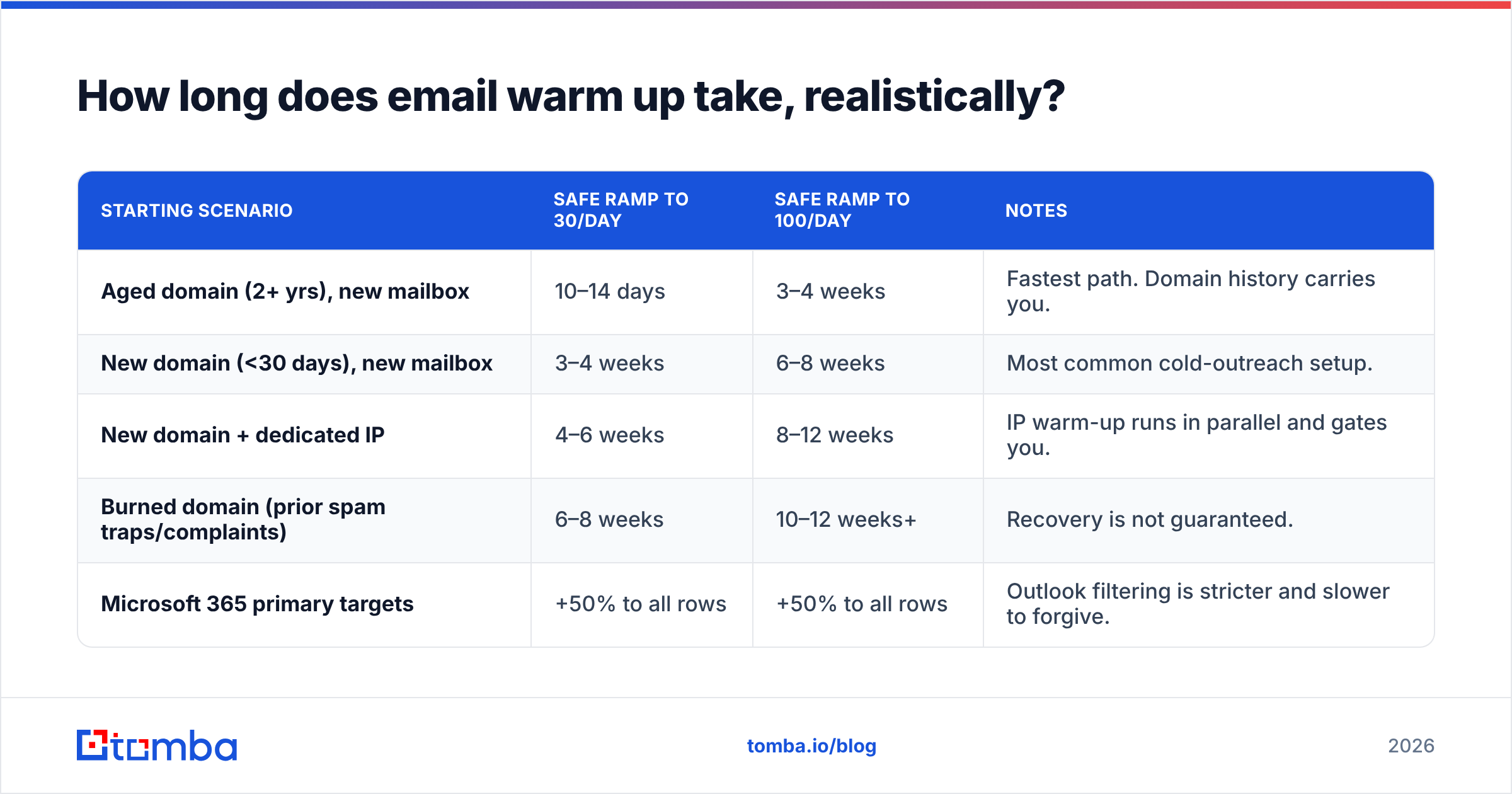
Here's the honest answer nobody selling warm-up software wants to lead with: it depends on where you're starting from, and the range is 2 weeks to 3 months.
| Starting scenario | Safe ramp to 30/day | Safe ramp to 100/day | Notes |
|---|---|---|---|
| Aged domain (2+ yrs), new mailbox | 10–14 days | 3–4 weeks | Fastest path. Domain history carries you. |
| New domain (<30 days), new mailbox | 3–4 weeks | 6–8 weeks | Most common cold-outreach setup. |
| New domain + dedicated IP | 4–6 weeks | 8–12 weeks | IP warm-up runs in parallel and gates you. |
| Burned domain (prior spam traps/complaints) | 6–8 weeks | 10–12 weeks+ | Recovery is not guaranteed. |
| Microsoft 365 primary targets | +50% to all rows | +50% to all rows | Outlook filtering is stricter and slower to forgive. |
Two clarifications on that table. First, "safe ramp" means you reach that volume with spam-complaint rates under 0.1% and inbox placement above 85% on seed tests — not that you technically pushed the button. Plenty of people hit 100/day on week two and quietly land 40% of it in Junk without ever knowing.
Second, these numbers assume your authentication is correct from day one. If your SPF record, DKIM, and DMARC aren't published and aligned before the first send, you are not warming up — you're accumulating negative signal. Google and Yahoo's bulk sender requirements, in force since February 2024 and tightened since, make DMARC non-optional for anyone sending meaningful volume. Read the current spec directly in Google's sender guidelines.
[Placeholder: screenshot of Google Postmaster Tools domain reputation graph moving from "Low" to "Medium" over a 30-day window]
What actually determines your warm-up timeline?#
Four variables account for nearly all the variance. Rank yourself on each before you pick a date.
- Domain age and history. A domain registered last week has zero trust equity. A domain that's been serving a website and receiving legitimate mail for two years starts with meaningful credit. If you're buying a secondary domain for outreach, buy it 30–60 days before you plan to send and point it at a real, indexed landing page in the meantime.
- Target daily volume per mailbox. The single biggest mistake is treating "warm-up complete" as a binary. Warming to 20/day takes a fraction of the time warming to 150/day takes. Decide the ceiling first, then work backward. Most disciplined teams cap at 30–50 per mailbox and add mailboxes instead of pushing volume.
- Recipient provider mix. If 70% of your list is @outlook.com, @hotmail.com, or Microsoft 365 tenants, add half again to every estimate. Microsoft's filtering stack weighs unknown-sender volume spikes far more aggressively than Gmail's, and it recovers more slowly after a complaint event.
- Content and list quality during the ramp. A perfectly executed 6-week warm-up followed by a campaign to a scraped list with 18% bounces erases the entire gain in about 72 hours. Bounce rate above 3% is the fastest way to undo a month of patient work.
That fourth point is where most warm-up failures actually originate. The ramp wasn't wrong; the list was. Running a bulk verify pass before the first live campaign costs a few dollars and protects weeks of accumulated reputation.
What does a week-by-week warm-up schedule look like?#
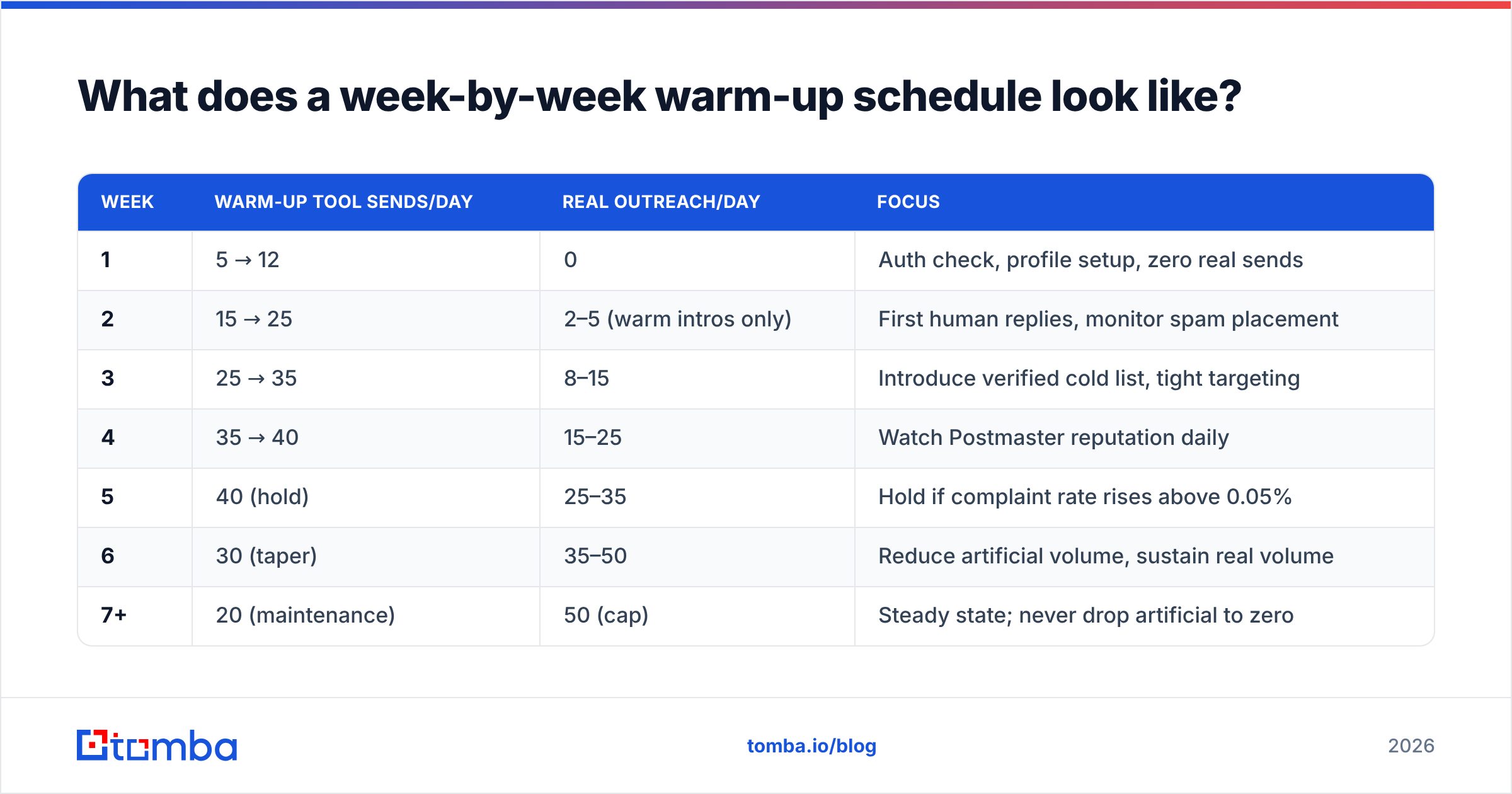
Below is a schedule for the most common case — a new domain, Google Workspace mailbox, targeting 50 sends/day. Adjust proportionally for other scenarios using the multipliers above.
| Week | Warm-up tool sends/day | Real outreach/day | Focus |
|---|---|---|---|
| 1 | 5 → 12 | 0 | Auth check, profile setup, zero real sends |
| 2 | 15 → 25 | 2–5 (warm intros only) | First human replies, monitor spam placement |
| 3 | 25 → 35 | 8–15 | Introduce verified cold list, tight targeting |
| 4 | 35 → 40 | 15–25 | Watch Postmaster reputation daily |
| 5 | 40 (hold) | 25–35 | Hold if complaint rate rises above 0.05% |
| 6 | 30 (taper) | 35–50 | Reduce artificial volume, sustain real volume |
| 7+ | 20 (maintenance) | 50 (cap) | Steady state; never drop artificial to zero |
The last row matters more than people expect. Warm-up is not a phase you exit. If you stop your maintenance sends and your real campaign pauses for two weeks over a holiday, you will come back to degraded placement. Keep a small trickle running permanently.
[Placeholder: screenshot of a warm-up tool dashboard showing the daily ramp curve and reply-rate percentage across weeks 1–6]
If you want a quick starting point rather than building the schedule by hand, Tomba's warmup calculator will generate a day-by-day ramp from your target volume and domain age.
Which warm-up approach fits your situation?#
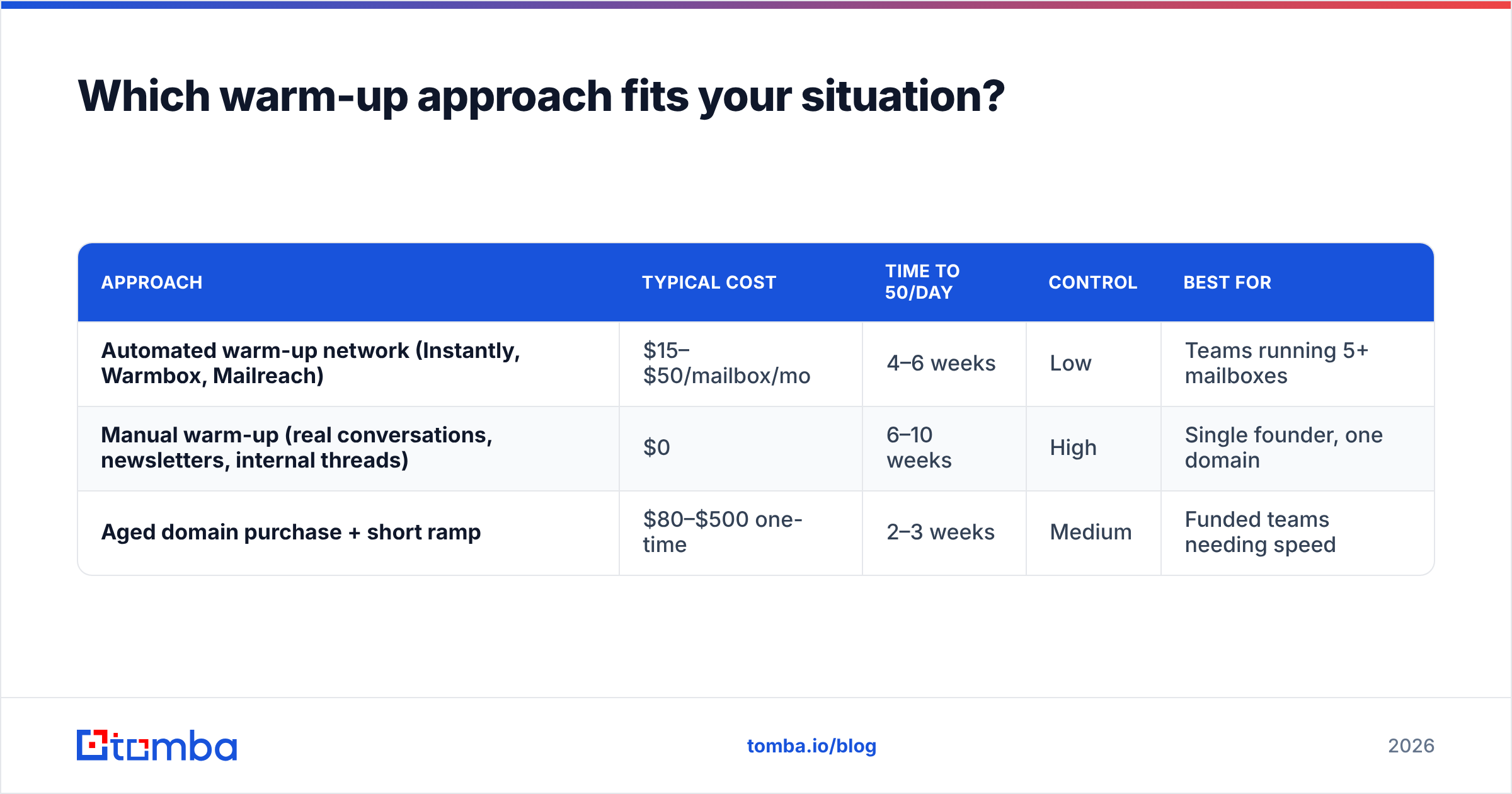
There are three realistic paths, and they trade money against time and control.
| Approach | Typical cost | Time to 50/day | Control | Best for |
|---|---|---|---|---|
| Automated warm-up network (Instantly, Warmbox, Mailreach) | $15–$50/mailbox/mo | 4–6 weeks | Low | Teams running 5+ mailboxes |
| Manual warm-up (real conversations, newsletters, internal threads) | $0 | 6–10 weeks | High | Single founder, one domain |
| Aged domain purchase + short ramp | $80–$500 one-time | 2–3 weeks | Medium | Funded teams needing speed |
A caution on automated networks. They work by exchanging mail with a pool of participating mailboxes that auto-open and auto-reply. Gmail has gotten measurably better at recognizing these patterns — reciprocal send graphs, unnaturally uniform reply latency, engagement with zero downstream behavior. They still help, but treating a green warm-up dashboard as proof of deliverability is a mistake. The dashboard measures the network, not your real recipients.
Independent user reviews on G2's email deliverability category are worth ten minutes before you commit to a vendor; the gap between marketing claims and reported results is wide in this segment.

How do you know warm-up is actually finished?#
Stop using days as your completion signal. Use these five, all of which you can check for free:
- Google Postmaster Tools domain reputation reads "Medium" or "High" and has held there for at least 7 consecutive days at your target volume. "Low" or fluctuating means keep ramping.
- Spam complaint rate below 0.10%, ideally below 0.05%. Google's threshold for intervention is 0.30%, but you want a wide margin.
- Hard bounce rate under 2% across your last 500 sends. Above that, the problem is your data, not your warm-up.
- Reply rate above 3% on real outreach. Engagement is the strongest positive signal you can generate; a campaign nobody answers doesn't build reputation regardless of volume.
- Seed-list inbox placement above 85% across Gmail, Outlook, and at least one corporate Microsoft 365 tenant. Test with a real seed list, not a warm-up tool's internal score.
Check your domain against public blocklists too — a single listing can flatten placement overnight regardless of how careful the ramp was. A free blacklist checker run weekly during warm-up takes thirty seconds and catches problems while they're still cheap to fix.
What kills a warm-up faster than anything else?#
Ranked by how often it happens in practice:
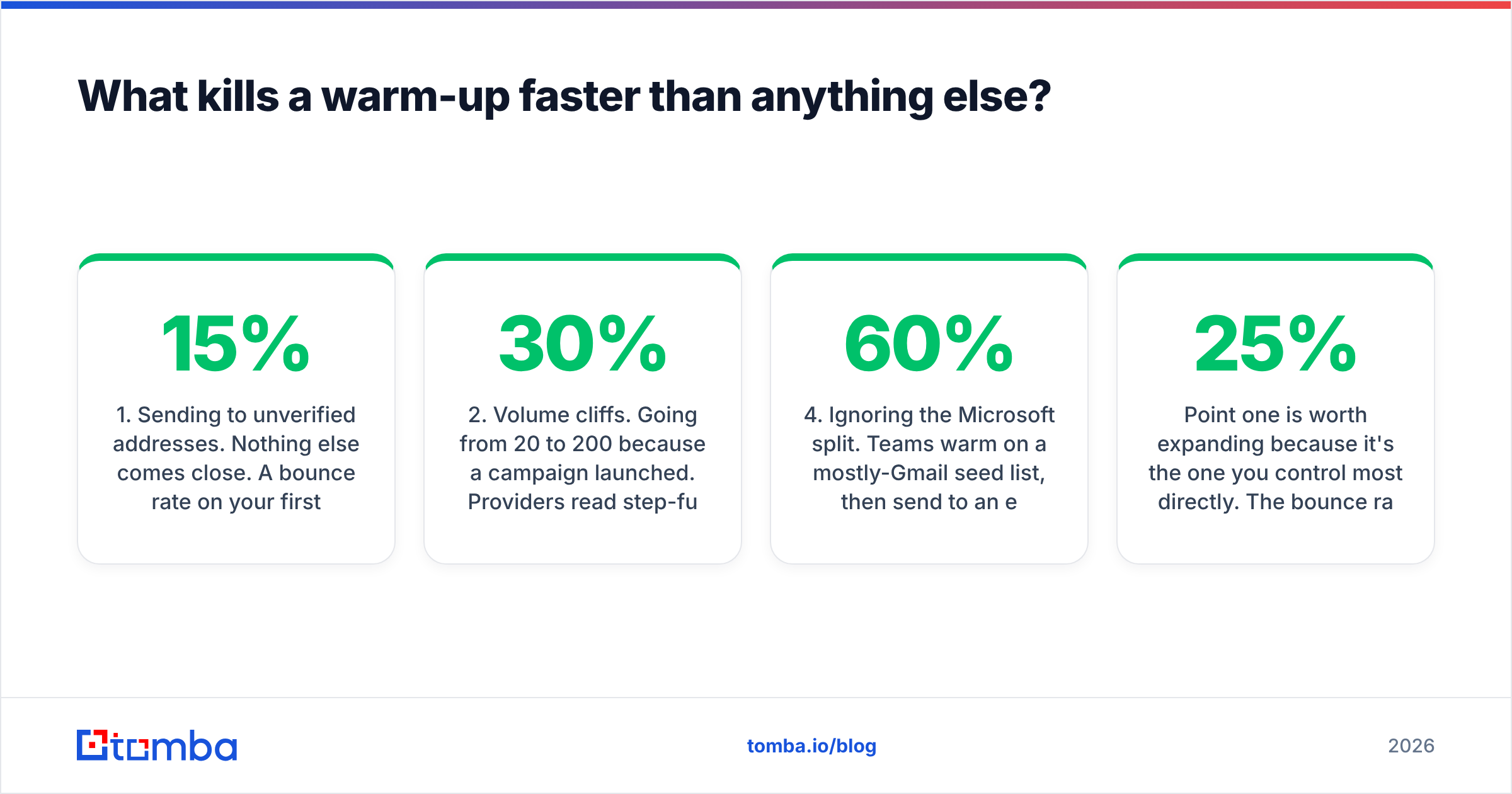
- Sending to unverified addresses. Nothing else comes close. A 15% bounce rate on your first real campaign tells every provider simultaneously that you're working from a purchased or scraped list. Reputation damage is immediate and takes weeks to unwind.
- Volume cliffs. Going from 20/day to 200/day because a campaign launched. Providers read step-function increases as compromise or spam. Ramp increments should stay under 30% week over week.
- Identical message bodies at scale. Providers cluster near-duplicate content. Rotate opening lines and vary structure, not just the merge fields.
- Ignoring the Microsoft split. Teams warm on a mostly-Gmail seed list, then send to an enterprise list that's 60% Microsoft 365, and wonder why placement collapsed.
- Stopping warm-up entirely on "completion." Reputation decays. Maintenance sends are cheap insurance.
- No unsubscribe path on cold mail. Legally debatable, deliverability-wise not debatable at all. A one-line opt-out reduces complaint rates measurably, and complaints are weighted far more heavily than unsubscribes.
Point one is worth expanding because it's the one you control most directly. The bounce rate on your first live campaign is not a function of your warm-up — it's a function of the list you built weeks earlier. If you sourced addresses from a pattern guesser, an old CRM export, or a marketplace dataset, assume 10–25% of them are dead before you touch send.
Running those addresses through an email verifier first turns that into a sub-2% bounce rate. On a 2,000-contact list, that's the difference between a healthy domain and a month of remediation. For catch-all domains — common at enterprise targets, where the server accepts everything and validates nothing — a dedicated catch-all verifier is the only way to separate real mailboxes from accept-all noise.
Does warm-up matter less if you send low volume?#
Partially, and it's the most common exception worth knowing.
If you're sending 10–15 highly personalized emails per day from a well-established domain that already sends and receives normal business mail, formal warm-up is largely unnecessary. Your domain has organic reputation, and 15 sends won't register as a volume anomaly. This is why founder-led outreach from a real company domain often outperforms a fully warmed dedicated outreach domain — the reputation is real rather than manufactured.
The threshold where warm-up becomes mandatory sits around 20–25 cold sends per day from a domain with no prior outbound history. Below that, careful targeting and genuinely personalized copy do more for placement than any warm-up tool. Above it, you need the ramp.
There's also a strategic case for skipping heavy warm-up entirely: send less, to better-qualified people. A list of 200 verified, well-researched contacts with a 12% reply rate outperforms 2,000 sends at 1.5%, and it never puts your domain at risk. Domain search on 40 target accounts gives you a tighter list than any volume play, and it lets you stay under the threshold where deliverability becomes a discipline of its own.
What should you do this week?#
If you're starting from zero, the ordering matters more than the speed:
- Days 1–2: Register or select the domain, publish SPF/DKIM/DMARC, verify with an SPF checker, enroll in Google Postmaster Tools, complete the sending profile and signature.
- Days 3–14: Begin warm-up sends at 5/day, increasing ~20% every two days. Zero real outreach. Build your target list in parallel.
- Days 15–28: Verify the entire list. Start real sends at 5/day, doubling weekly while complaint rate stays under 0.05%.
- Days 29–45: Reach target volume. Taper artificial warm-up to maintenance level. Run a seed-placement test before any significant scale-up.
- Ongoing: Weekly blacklist check, monthly re-verification of any list older than 90 days.
Note that step 2 and your list-building run at the same time. Warm-up is dead time you can't compress — use it to build a list good enough to deserve the reputation you're constructing.
The bottom line#
Budget 4 to 8 weeks for a new domain to reach real cold-outreach volume, 2 to 3 weeks if you're starting from an aged domain, and add 50% if your targets live in Microsoft's ecosystem. Then stop measuring in days and start measuring in Postmaster reputation, complaint rate, and reply rate — those tell you the truth that a calendar can't.
And remember which half of the problem warm-up actually solves. It earns you permission to send. It does nothing about whether the addresses you're sending to exist. The teams that burn a carefully warmed domain almost always did the ramp correctly and the data sourcing carelessly.
Build the list as deliberately as you build the reputation. Tomba Email Finder sources verified professional addresses by domain, name, or company, with real-time verification built into every lookup — so the first campaign off your freshly warmed domain bounces at under 2% instead of 15%. The free tier includes 25 searches a month to test against your own target accounts, and paid plans start at $49/mo; full Tomba pricing is public. Warm the domain properly, then give it data worth sending to.
Related guides#
Ready to find emails that actually work?
Join 150,000+ professionals who stopped guessing and started sending. Free credits on signup — no credit card required.
Get the Tomba newsletter
Practical outbound tactics and product updates — once every two weeks.
About the author