How Long To Wait Before Following Up On An Email in 2026
Waiting three days is a habit, not a strategy. Here is what the reply-timing data actually says, plus a follow-up cadence you can copy for cold outreach, warm leads, and stalled deals.
TL;DR
- For cold outreach, wait 2-3 business days after the first email, then widen the gap: 3, then 5, then 7+ days. Same-day and next-day bumps read as pressure, not persistence.
- For warm replies that went quiet (demo requested, pricing sent, intro made), wait 3-4 business days — these threads have real momentum and a fast nudge is fair.
- After a meeting or a proposal, follow up within 24 hours with a recap. That is not a "follow-up" in the chasing sense; it is closing the loop.
- Most replies land in the first 24-48 hours after send. If you are past 72 hours with no open and no reply, the problem is usually deliverability or a bad address — not your timing.
- Three to five touches captures the overwhelming majority of replies you will ever get from a sequence. Beyond seven, you are mostly generating unsubscribes.
Why does follow-up timing matter more than follow-up copy?#
Because timing decides whether your message is seen at all, and copy only matters after that.
A follow-up sent 12 hours after the original lands in an inbox that still contains the original. The recipient sees two of your emails stacked, hasn't acted on either, and now associates your name with pressure. A follow-up sent 21 days later lands in an inbox where the original has been archived, forgotten, or auto-filed — you are effectively cold-emailing the same person twice, minus the novelty.
The window between those two failure modes is where follow-ups work. It is wider than most reps think and narrower than most managers allow.
There is a second reason timing beats copy: you can test it cheaply. Rewriting a sequence takes an afternoon and produces noisy results. Shifting a delay from 2 days to 4 days is a one-field change in any sending tool and produces a clean A/B. Most teams have never run that test and are using whatever number their sequencing tool shipped as a default.
How long should you actually wait before following up on an email?#
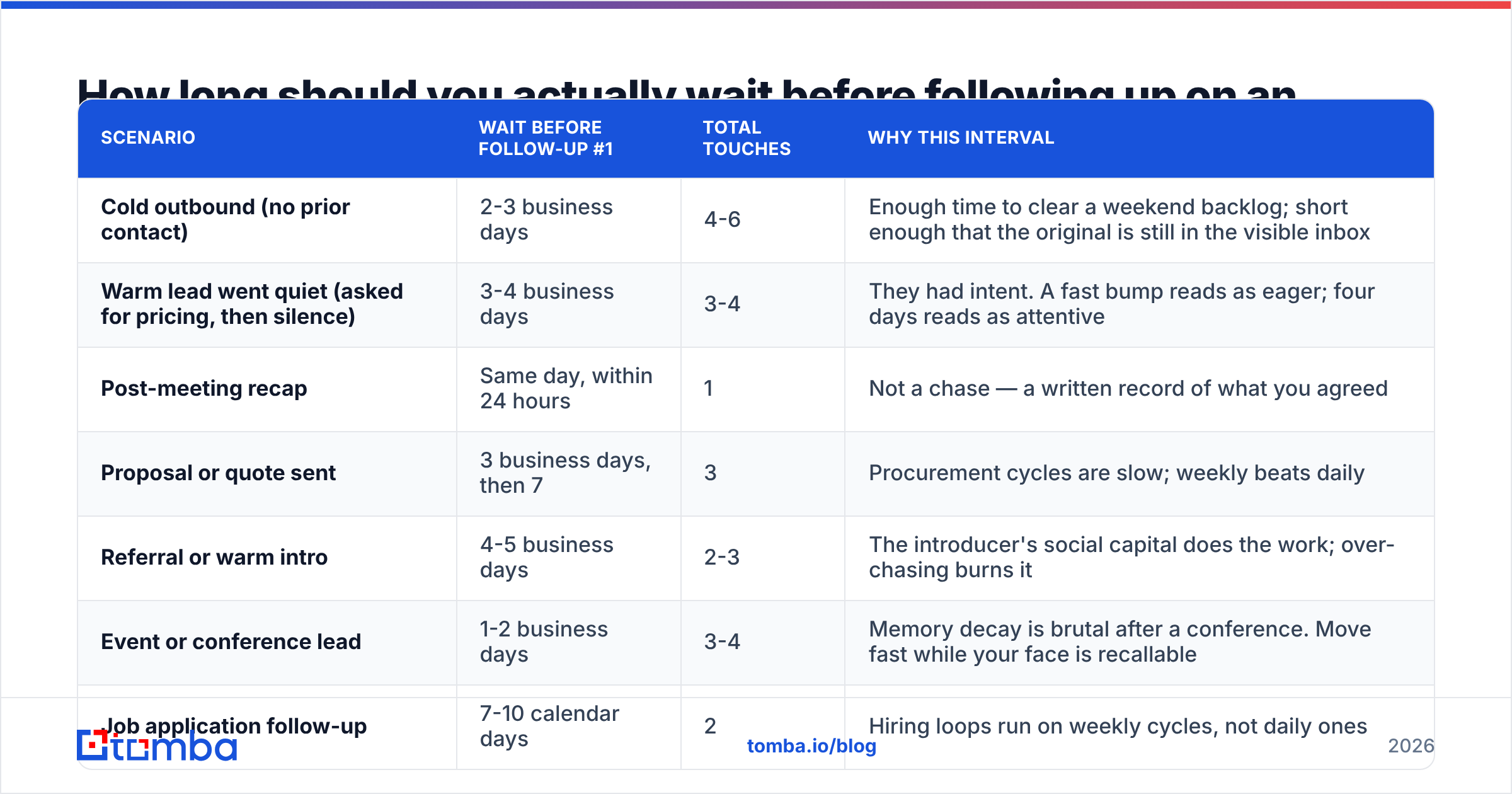
The honest answer is that it depends on the relationship temperature and what you asked for. Here is the framework I use, broken by scenario.
| Scenario | Wait before follow-up #1 | Total touches | Why this interval |
|---|---|---|---|
| Cold outbound (no prior contact) | 2-3 business days | 4-6 | Enough time to clear a weekend backlog; short enough that the original is still in the visible inbox |
| Warm lead went quiet (asked for pricing, then silence) | 3-4 business days | 3-4 | They had intent. A fast bump reads as eager; four days reads as attentive |
| Post-meeting recap | Same day, within 24 hours | 1 | Not a chase — a written record of what you agreed |
| Proposal or quote sent | 3 business days, then 7 | 3 | Procurement cycles are slow; weekly beats daily |
| Referral or warm intro | 4-5 business days | 2-3 | The introducer's social capital does the work; over-chasing burns it |
| Event or conference lead | 1-2 business days | 3-4 | Memory decay is brutal after a conference. Move fast while your face is recallable |
| Job application follow-up | 7-10 calendar days | 2 | Hiring loops run on weekly cycles, not daily ones |
A few notes on how to read that table.
Business days, not calendar days. A Friday send followed up on Sunday is a follow-up nobody saw. Every interval above assumes you skip weekends. If your sequencing tool counts calendar days, subtract accordingly.
The interval should widen, not stay flat. A cadence of 3-3-3-3 days feels mechanical to the recipient because it is. A cadence of 3-4-7-10 mirrors how a persistent human actually behaves: keen at first, then respectfully backing off. The widening gap also spreads your sends across different days of the week, which quietly increases the odds one lands on a day the prospect is actually processing email.
Never follow up in under 24 hours on cold outreach. There is no scenario where a same-day bump on a cold email improves your outcome. It signals automation, it stacks in the inbox, and it is the single fastest way to get marked as spam.
What does the reply-window data actually say?#
Most replies to a cold email arrive fast — then the curve falls off a cliff.
Across the outbound teams I have audited, the pattern is consistent enough to plan around:
- Roughly half of all replies to a given email arrive within the first 24 hours. People who are going to answer usually answer while the message is still near the top of the inbox.
- Another quarter arrive in hours 24-72. This is the "saw it, flagged it, came back to it" cohort.
- The remaining quarter trickle in over the following two weeks, and a meaningful chunk of those are triggered by your follow-up, not the original.
- Almost nothing arrives after day 21 unless the prospect's situation changed — new budget, new role, new problem.
The practical implication: if you are 72 hours out with no reply, waiting longer will not help. Send the follow-up. But if you are 12 hours out, waiting is free — a large share of your replies have not arrived yet, and bumping now just annoys the people who were already going to answer you tomorrow.
The second practical implication is uncomfortable. If an email got no reply and no open across three days, timing is not your problem. Your problem is one of: the address was wrong, the message went to spam, or the domain has a reputation issue. Chasing a bad address with four more follow-ups compounds the damage — bounces hurt your sender reputation, and every extra send to a dead mailbox makes the next campaign worse. Run the list through an email verifier before you build the cadence, not after it underperforms.
How many follow-ups should a sequence contain?#
Between three and five for most B2B use cases. Here is how the touches typically pay out.
- Touch 1 (the original). Carries the most replies in absolute terms because it reaches the largest audience — nobody has opted out yet.
- Touch 2 (day 2-3). Usually the highest-value follow-up. It catches everyone who was travelling, in back-to-back meetings, or triaging on Monday morning. Many teams see touch 2 contribute nearly as many replies as touch 1.
- Touch 3 (day 6-8). Meaningfully positive. This is where a new angle — a different pain point, a case study, a relevant news item — earns its keep.
- Touch 4 (day 13-15). Diminishing but still net-positive for most lists. Keep it short.
- Touch 5 (day 21-25, the breakup). Small reply volume, but the replies skew high-intent and high-clarity: "not now, ask me in Q3" is a genuinely useful answer.
- Touch 6+. For most B2B lists, this is where marginal replies stop justifying the unsubscribes, spam complaints, and brand damage. Exceptions exist for very high-ACV enterprise pursuit, where a quarterly re-engagement touch is normal.
The rule of thumb: stop adding touches when the incremental reply rate drops below your unsubscribe rate for that step. Every sequencing tool reports both numbers per step. Most teams never look.
Does the day of week or time of day change how long to wait?#
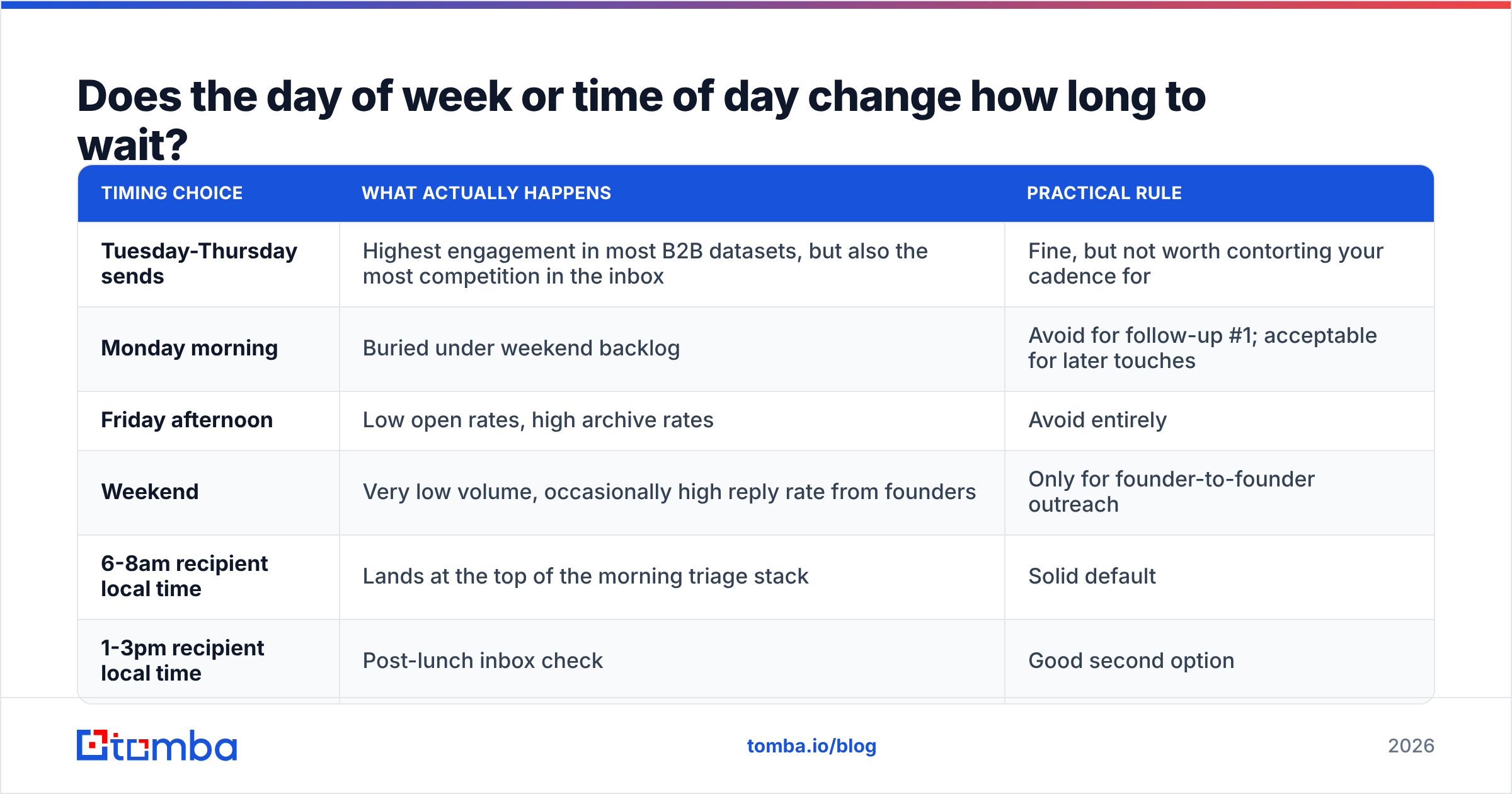
Yes, but less than the internet claims — and the effect is mostly about avoiding bad windows rather than finding a magic one.
| Timing choice | What actually happens | Practical rule |
|---|---|---|
| Tuesday-Thursday sends | Highest engagement in most B2B datasets, but also the most competition in the inbox | Fine, but not worth contorting your cadence for |
| Monday morning | Buried under weekend backlog | Avoid for follow-up #1; acceptable for later touches |
| Friday afternoon | Low open rates, high archive rates | Avoid entirely |
| Weekend | Very low volume, occasionally high reply rate from founders | Only for founder-to-founder outreach |
| 6-8am recipient local time | Lands at the top of the morning triage stack | Solid default |
| 1-3pm recipient local time | Post-lunch inbox check | Good second option |
The bigger point: send in the recipient's timezone, not yours. A follow-up sent at 9am your time to a prospect eight hours ahead arrives at 5pm, when they are shutting down. Timezone alignment moves the needle more than picking Tuesday over Wednesday. HubSpot's ongoing email marketing benchmarks reach a similar conclusion — day-of-week effects are real but small relative to list quality and relevance.
What should each follow-up actually say?#
Timing gets the email seen. Content decides whether it gets answered. A few rules that hold across scenarios:
Reply in the same thread for touches 2 and 3. It gives the recipient one-click access to the original context and keeps your footprint in their inbox to a single conversation rather than five separate messages.
Break the thread for touch 4 or 5. By then the thread is long and visibly one-sided. A fresh subject line with a genuinely new angle performs better than another "bumping this up."
Never send a follow-up whose entire content is "just checking in." It adds no information, so it gives the recipient nothing new to react to. Each touch should carry one new thing: a different use case, a customer result, a relevant piece of news about their company, or a smaller ask.
Shrink the ask as you go. If touch 1 asked for a 30-minute call, touch 4 should ask whether this is even the right person to talk to. A yes/no question is far easier to answer than a calendar negotiation, and "wrong person, talk to Dana" is a great outcome.
Make the breakup email genuinely final. "I'll assume the timing isn't right and close the loop here" works because it is true and because it removes the obligation. Do not send a breakup email and then continue emailing — that trains people to ignore everything you say.
If you want a starting point for the copy itself, the cold email templates library covers the standard follow-up shapes, and the subject line tester will flag lines likely to trip spam filters before you queue the send.
How does deliverability change your follow-up timing?#
It changes the ceiling on how aggressive you can be.
Every follow-up is an additional send from your domain to an address that has not engaged. Mailbox providers notice engagement ratios. A sequence with seven touches to a cold, unverified list generates six unengaged sends per prospect — a signal that pushes you toward the spam folder for everyone, including the prospects who would have replied.
This creates a counterintuitive rule: the worse your list quality, the fewer follow-ups you can afford. Teams with a verified, tightly-targeted list can run five or six touches safely. Teams blasting a scraped list should run two or three, because each additional touch multiplies the reputation damage.
A quick pre-send checklist that protects the whole cadence:
- Verify every address before the first send, not after bounces come in. Bounce rate above 3% is a red flag to every major provider.
- Check your authentication records. An SPF checker run takes 30 seconds and catches the single most common cause of silent spam-foldering.
- Warm the sending domain if it is new. Volume ramps, not cold starts.
- Cap daily volume per mailbox — 30-50 cold sends per mailbox per day is a defensible ceiling for most setups.
- Watch the reply rate per step, and pause any step that falls below your unsubscribe rate.
Google's own sender guidelines spell out the thresholds that matter for bulk senders, and they are worth reading once in full if you send at any volume. Broader context on email deliverability is the difference between a cadence that works and one that quietly stops being delivered halfway through.
How should you follow up when the contact went dark entirely?#
Three moves, in order of escalation.
Move 1: change the channel. If four emails produced nothing, a fifth will not break the pattern. A LinkedIn message, a phone call, or a comment on something they published resets the context. Multi-channel sequences consistently outperform email-only ones for exactly this reason — you are not fighting for space in the same crowded inbox.
Move 2: change the person. If your champion stopped replying, they may have left, been reassigned, or lost the budget fight. Find a peer or a manager in the same org and start fresh. A domain search surfaces the other reachable people at the account in one query, which is faster than guessing formats or paying for a full contact export.
Move 3: change the timeline. Some deals are dead this quarter and alive next quarter. Put the contact into a 90-day re-engagement list with a genuine trigger — a funding round, a new hire in the relevant function, a product launch. A re-engagement email tied to a real event outperforms a scheduled "circling back" by a wide margin, because it gives the recipient a reason the timing changed.
What is a follow-up cadence you can copy today?#
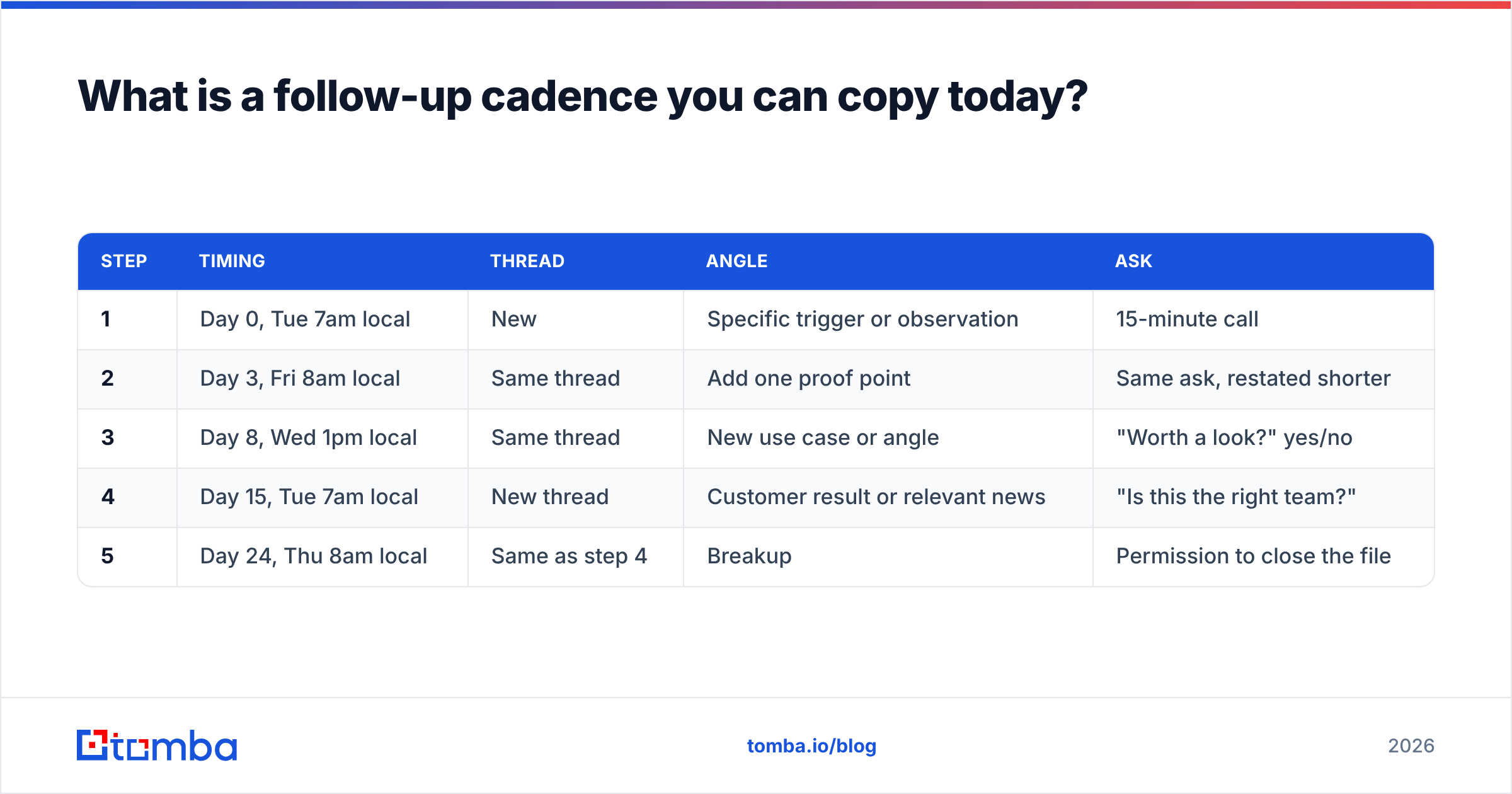
Here is a defensible default for B2B cold outreach. Adjust the intervals up if you sell to enterprise, down if you sell to founders and small teams.
| Step | Timing | Thread | Angle | Ask |
|---|---|---|---|---|
| 1 | Day 0, Tue 7am local | New | Specific trigger or observation | 15-minute call |
| 2 | Day 3, Fri 8am local | Same thread | Add one proof point | Same ask, restated shorter |
| 3 | Day 8, Wed 1pm local | Same thread | New use case or angle | "Worth a look?" yes/no |
| 4 | Day 15, Tue 7am local | New thread | Customer result or relevant news | "Is this the right team?" |
| 5 | Day 24, Thu 8am local | Same as step 4 | Breakup | Permission to close the file |
Total: five touches over roughly 3.5 weeks, with intervals widening from 3 to 5 to 7 to 9 days. That shape does two things at once — it keeps you visible during the window when replies are still likely, and it backs off before you become a nuisance.
If you want a comparison point, the sequencing defaults inside Instantly and similar tools tend to be tighter than this, closer to 2-2-3-3. That works for high-volume, low-ACV outbound. For considered B2B purchases, the wider shape does better on reply quality even when raw reply rate is similar.
Where do most teams get follow-up timing wrong?#
Four failure patterns, in rough order of frequency.
Following up too fast on cold, too slow on warm. Reps bump a cold prospect after 24 hours, then let a prospect who asked for pricing sit for a week because "they'll come back to me." Invert that. Warm intent decays fast; cold prospects need breathing room.
Treating the sequence as fire-and-forget. If a prospect replies "not now," the remaining four steps should stop. Nothing damages credibility faster than an automated bump arriving after a human conversation.
Running the same cadence for every segment. A 200-person company and a 20,000-person company have completely different internal clocks. Enterprise buyers need longer intervals and more touches; SMB founders need fewer, faster ones.
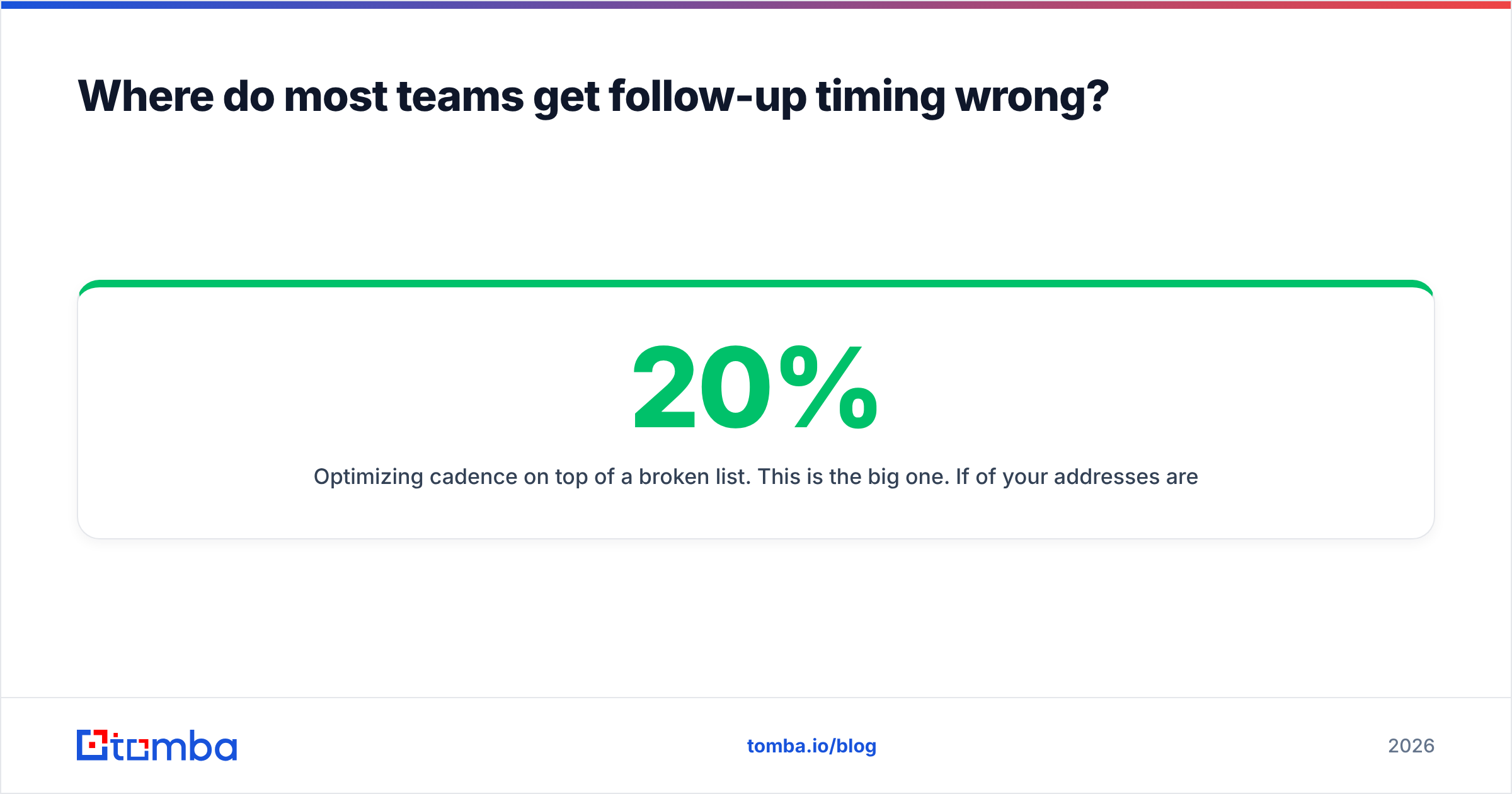
Optimizing cadence on top of a broken list. This is the big one. If 20% of your addresses are invalid, no interval fixes it. Verify first, then tune timing — otherwise you are A/B testing the delay on emails nobody receives. Running the list through a bulk email finder and verifier before the campaign starts is the cheapest performance gain available in outbound, and it costs nothing to test at small volume. You can compare Tomba plans — the free tier gives you 25 searches a month, Starter is $49/mo, and Growth is $99/mo — against whatever you are paying now.
Get the timing right on addresses that actually exist#
Follow-up cadence only pays off when the emails land. Before you tune a single interval, make sure every address in your list resolves to a real, reachable person — that one step usually moves reply rate more than any timing experiment.
Start with the Tomba Email Finder: find verified professional addresses by name, domain, or company, check them against live SMTP data, and export a clean list straight into your sequencing tool. Free tier included, no card required — build the cadence on a list you can trust.
Related guides#
Ready to find emails that actually work?
Join 150,000+ professionals who stopped guessing and started sending. Free credits on signup — no credit card required.
Get the Tomba newsletter
Practical outbound tactics and product updates — once every two weeks.
About the author