How Long To Wait Before Sending A Reminder Email in 2026
Reminder emails work — but only on the right clock. Here are the exact wait windows for cold outreach, invoices, meetings, proposals, and job applications, plus the data behind each.
TL;DR
- Cold outreach: wait 3 business days before reminder #1, then 4, then 7. Anything under 48 hours reads as desperate and gets flagged.
- Invoices: send the reminder 1–3 days after the due date, not before. A pre-due "friendly nudge" trains clients to ignore you.
- Meetings and calls: 24 hours ahead for the confirmation, 1 hour ahead for the day-of ping. That's it.
- Proposals and quotes: 48–72 hours after send, while the numbers are still fresh in their head.
- Job applications: 5–7 business days after applying, 3–5 business days after an interview.
- The wait window matters less than the reason. A reminder with no new information is just pressure — and pressure gets archived.
Why does the wait window matter at all?#
Because a reminder email is a bet on attention, and attention has a half-life.
Think of it like knocking on a neighbor's door. Knock again after five seconds and you're an annoyance. Knock again next Tuesday and they've forgotten you came by. The reminder that works lands in the window where the original message is still recoverable from memory but the urgency has faded enough that a nudge feels helpful instead of pushy.
There's a second, less obvious reason: mailbox providers watch your sending patterns. Firing three emails at the same unengaged address inside 48 hours is a textbook spam signal. Gmail's own bulk sender guidelines tie inbox placement to complaint rates and engagement — and rapid-fire reminders to people who never opened the first message tank both. So timing isn't just etiquette. It's email deliverability.
Third reason, the one nobody talks about: most non-replies aren't rejections. They're triage casualties. Your email arrived during a standup, got mentally bookmarked, and slid off page one. Roughly half the replies teams attribute to "persistence" are really just replies to the message that happened to arrive on a calmer day.
What is the default wait time for a reminder email?#
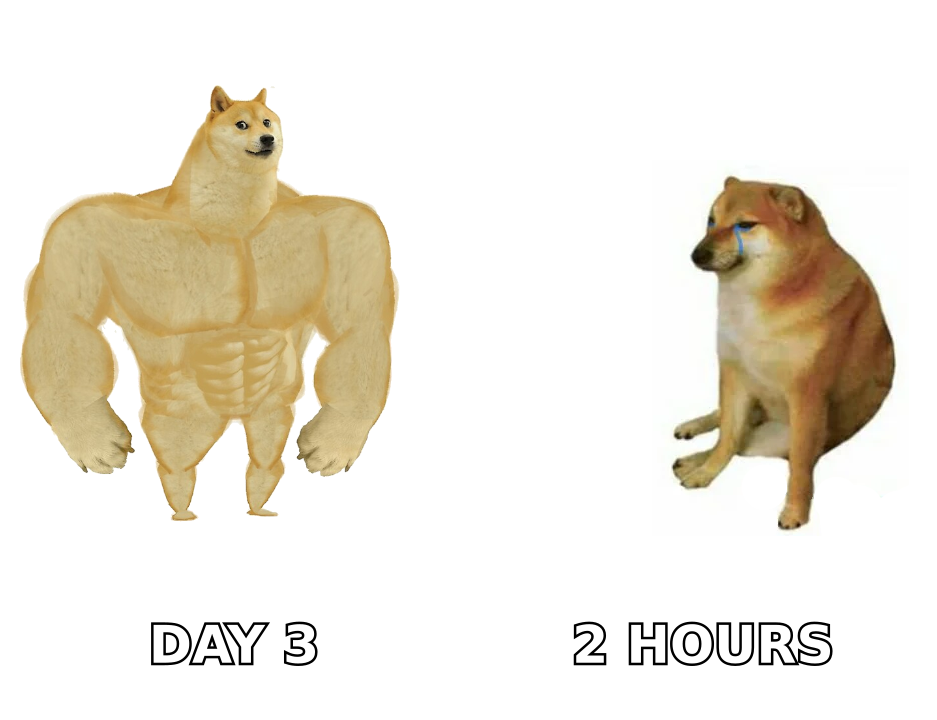
Three business days. If you take one number from this post, take that one.
Three business days is long enough that the recipient has cleared at least one inbox cycle, short enough that your name still means something, and — critically — it skips the weekend problem. Send Tuesday, remind Friday. Send Thursday, remind Tuesday. Never remind on a Monday morning, when the average knowledge worker is already 60 emails underwater.
But "three days" is a default, not a law. The right window scales with three things:
- Stakes. A $200 invoice can wait a week. A $200,000 proposal in a live buying cycle cannot.
- Prior relationship. Cold stranger → longer gaps. Someone who replied last week → shorter gaps are fine.
- Deadline proximity. If there's a real date (event, contract expiry, quarter end), the reminder cadence should compress as the date approaches.
- Channel expectation. A reply to a support ticket has a different clock than a cold pitch. Match the medium's norm.
How long should you wait between cold email follow-ups?#
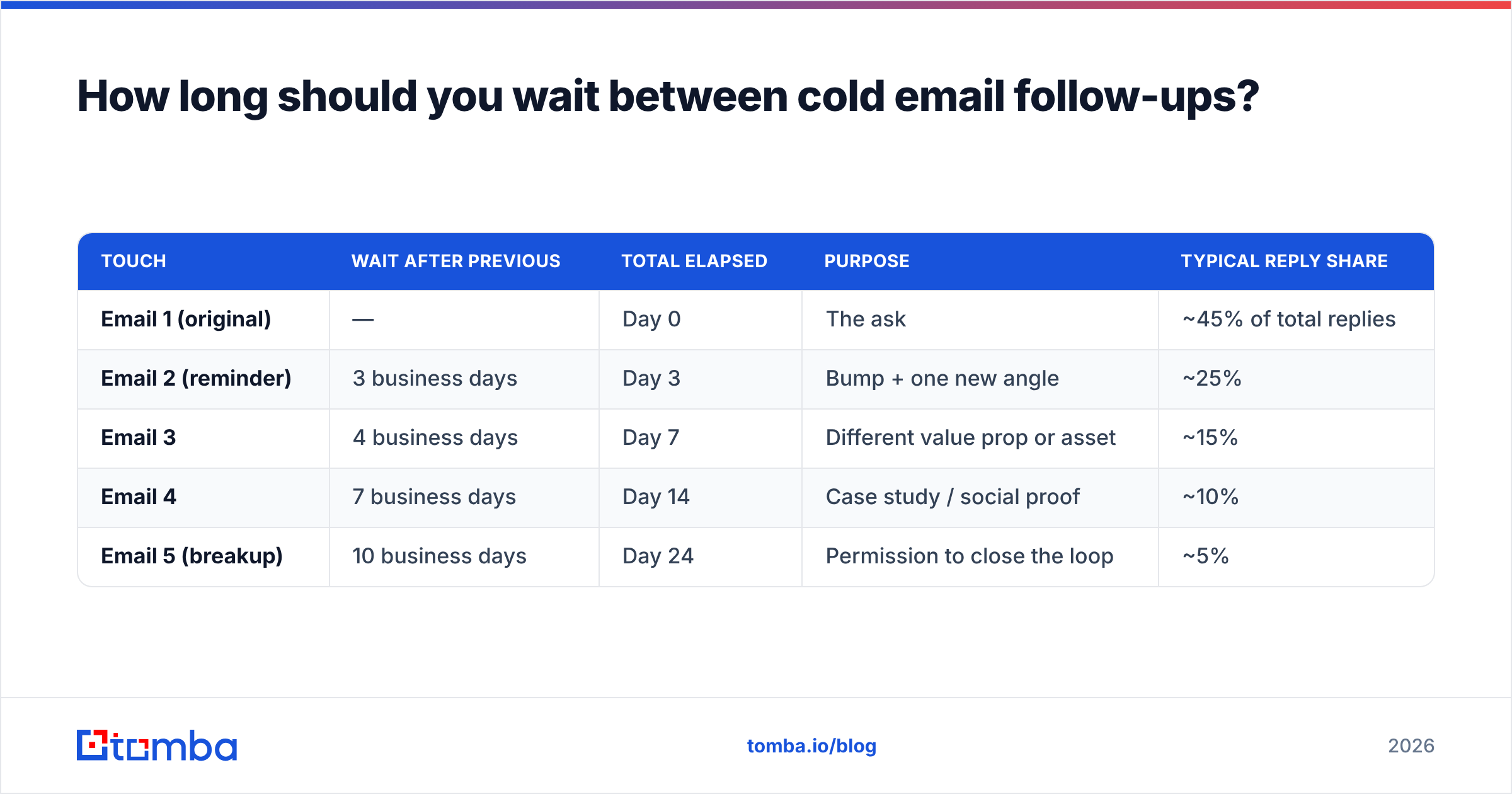
Here's the cadence that holds up across most B2B outbound programs. Days are counted in business days from the previous send, not from the first one.
| Touch | Wait after previous | Total elapsed | Purpose | Typical reply share |
|---|---|---|---|---|
| Email 1 (original) | — | Day 0 | The ask | ~45% of total replies |
| Email 2 (reminder) | 3 business days | Day 3 | Bump + one new angle | ~25% |
| Email 3 | 4 business days | Day 7 | Different value prop or asset | ~15% |
| Email 4 | 7 business days | Day 14 | Case study / social proof | ~10% |
| Email 5 (breakup) | 10 business days | Day 24 | Permission to close the loop | ~5% |
Two things to notice. First, the gaps widen as the sequence goes on — the opposite of what most reps do. Escalating pressure on someone who has ignored four emails is how you earn a spam complaint. Second, the reply curve doesn't fall off a cliff after email 2. Touches 3–5 still carry roughly 30% of the replies, which is why stopping at one reminder leaves real pipeline on the table.
What kills sequences isn't the timing though. It's the content. If reminder #2 says "just bumping this to the top of your inbox," you've spent a touch to communicate nothing.
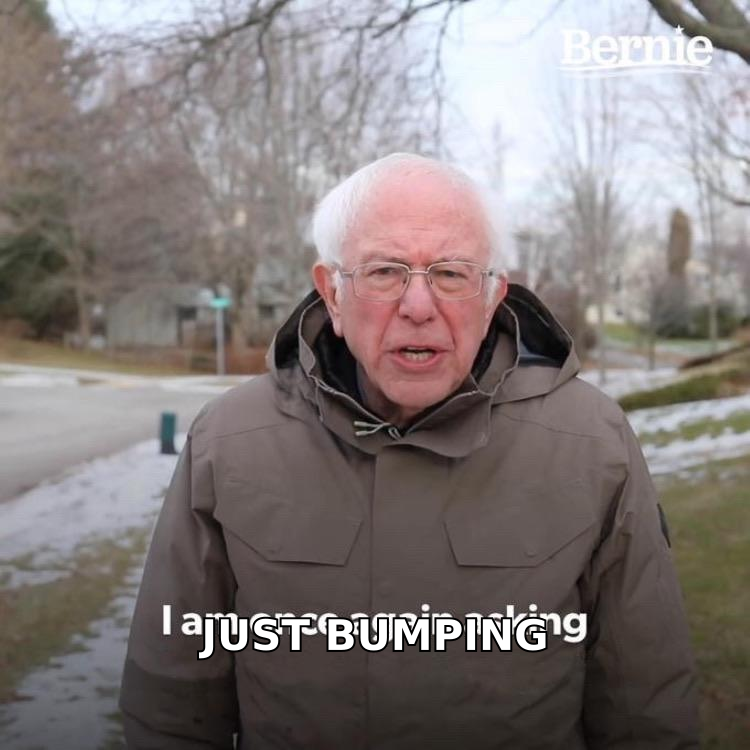
Every reminder needs a reason to exist:
- New information — a relevant funding round, a competitor's move, a product change
- A new asset — a teardown, a benchmark, a two-minute Loom
- A narrower ask — from "30 minutes" down to "worth a reply either way?"
- A different angle — same company, different pain point
- An out — "if this isn't a priority, say so and I'll stop"
Also check the obvious before you blame timing: if your first email bounced or landed in a catch-all void, no cadence saves you. Run the list through an email verifier before the sequence starts, not after it underperforms.
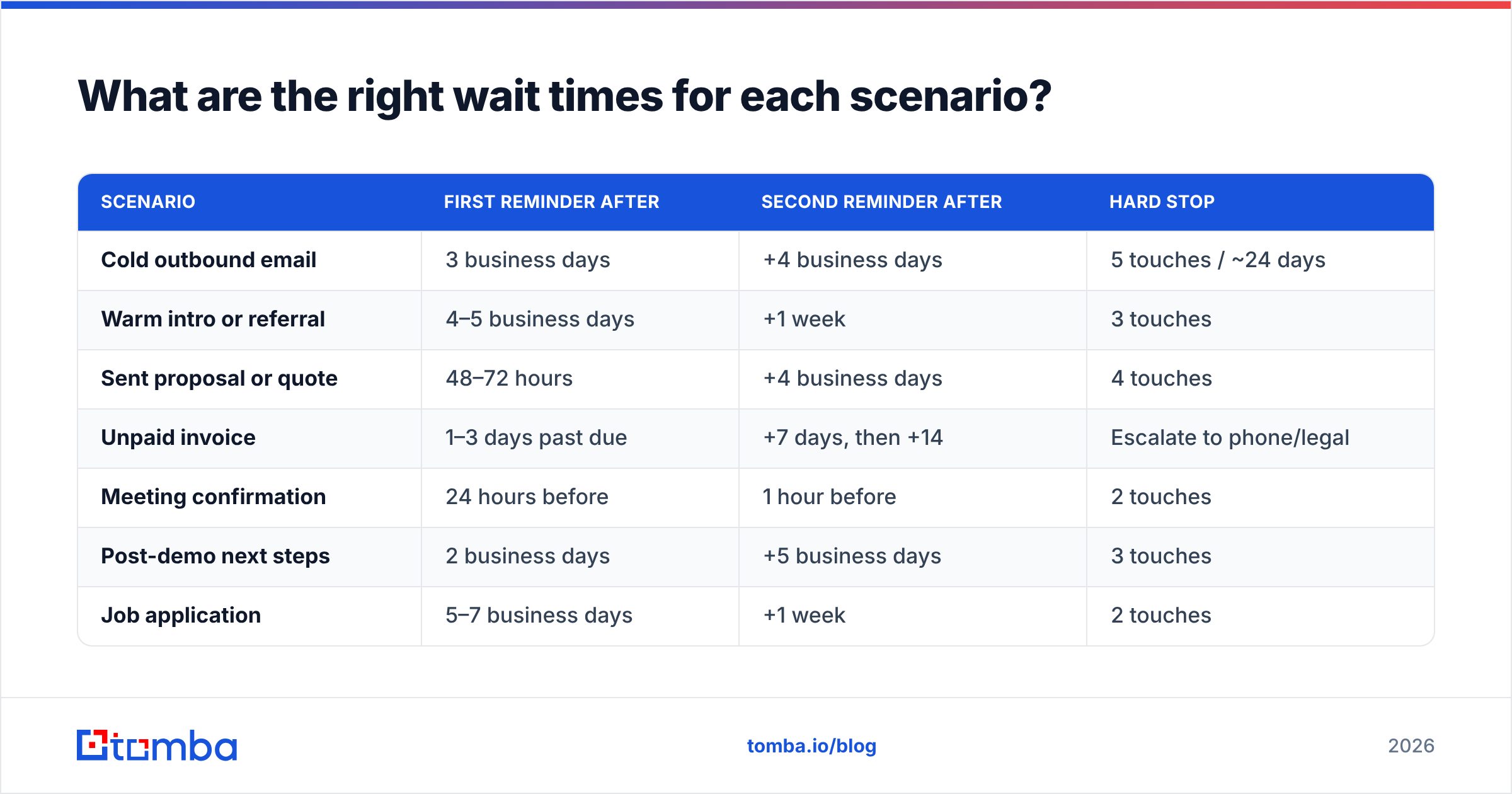
What are the right wait times for each scenario?#
Different contexts, different clocks. This is the table to bookmark.
| Scenario | First reminder after | Second reminder after | Hard stop |
|---|---|---|---|
| Cold outbound email | 3 business days | +4 business days | 5 touches / ~24 days |
| Warm intro or referral | 4–5 business days | +1 week | 3 touches |
| Sent proposal or quote | 48–72 hours | +4 business days | 4 touches |
| Unpaid invoice | 1–3 days past due | +7 days, then +14 | Escalate to phone/legal |
| Meeting confirmation | 24 hours before | 1 hour before | 2 touches |
| Post-demo next steps | 2 business days | +5 business days | 3 touches |
| Job application | 5–7 business days | +1 week | 2 touches |
| Post-interview thank-you follow-up | 3–5 business days | +1 week | 2 touches |
| Event or webinar RSVP | 7 days before | 1 day before | 2 touches |
| Content/PR pitch to a journalist | 3 business days | Don't | 2 touches |
A few notes on the rows people get wrong.
Invoices. Don't send a reminder before the due date. It signals you expect to be stiffed and it desensitizes the client to the message that actually matters — the one on day +2. Most accounts-payable teams run weekly or biweekly payment runs, so a reminder 1–3 days past due lands right before the next run.
Journalists. One reminder. Ever. The second one is why your domain gets muted. This isn't sales; the norms are different and stricter.
Proposals. The 48–72 hour window exists because pricing decays in memory faster than anything else in your pitch. After a week they remember "it was expensive" and nothing else.
Should reminder timing change by day and hour?#
Yes, but less than the folklore suggests.
Day-of-week effects are real but modest — the spread between the best and worst weekday is usually a few percentage points of reply rate, not a doubling. What you should actually control:
- Avoid Monday 8–10am. You're competing with the weekend backlog.
- Avoid Friday after 2pm. Anything that arrives then gets read Monday, inside that same backlog.
- Tuesday through Thursday, mid-morning local time is the safe default. Not because it's magic, but because it's when people are processing mail rather than reacting to it.
- Send in the recipient's timezone, not yours. This single fix does more for reply rates than any subject-line trick.
- Don't send reminders on holidays in the recipient's country. Obvious, routinely ignored by teams running global lists.
One more thing, and it's the one that actually moves the number: change the send time between touches. If email 1 went out at 9am and got buried, email 2 at 9am will get buried the same way. Shift reminder #2 to early afternoon. You're not optimizing for a global best hour — you're sampling different slices of the recipient's day until one lands when they're actually looking.
If you're stress-testing cadence, the email warmup calculator is useful for sanity-checking daily volume before you scale a sequence, since reminder emails multiply your send count fast — a 5-touch sequence to 200 prospects is 1,000 sends, not 200.
How many reminders is too many?#
The honest answer: it depends on whether anyone is listening.
Use engagement as your throttle, not a fixed number:
- Opened but no reply: they saw it. Keep going, up to 4–5 touches, widening the gaps.
- Never opened, any touch: something is wrong upstream — wrong address, spam folder, or wrong person. Two touches max, then stop and fix the data.
- Clicked a link: they're interested and stuck. Compress the next gap to 2 days and change the ask to something smaller.
- Auto-reply / out of office: pause the whole sequence until their return date plus 2 days. Sending into an OOO is a wasted touch.
- Explicit "not now": stop the sequence, set a reminder for the timeframe they named. Restarting a sequence over a stated "no" is how you get blocked.
- Hard bounce or spam complaint: remove permanently, no exceptions.
That "never opened" branch is where most teams bleed. According to HubSpot's sales research, a large share of outbound underperformance traces back to contact data quality rather than messaging — you can't out-cadence a bad address. If a third of your list never opens anything, you don't have a timing problem, you have a list problem. Fixing that starts with sourcing addresses properly through an email finder or pulling verified contacts by domain search instead of guessing at patterns.
What does a well-timed reminder actually look like?#
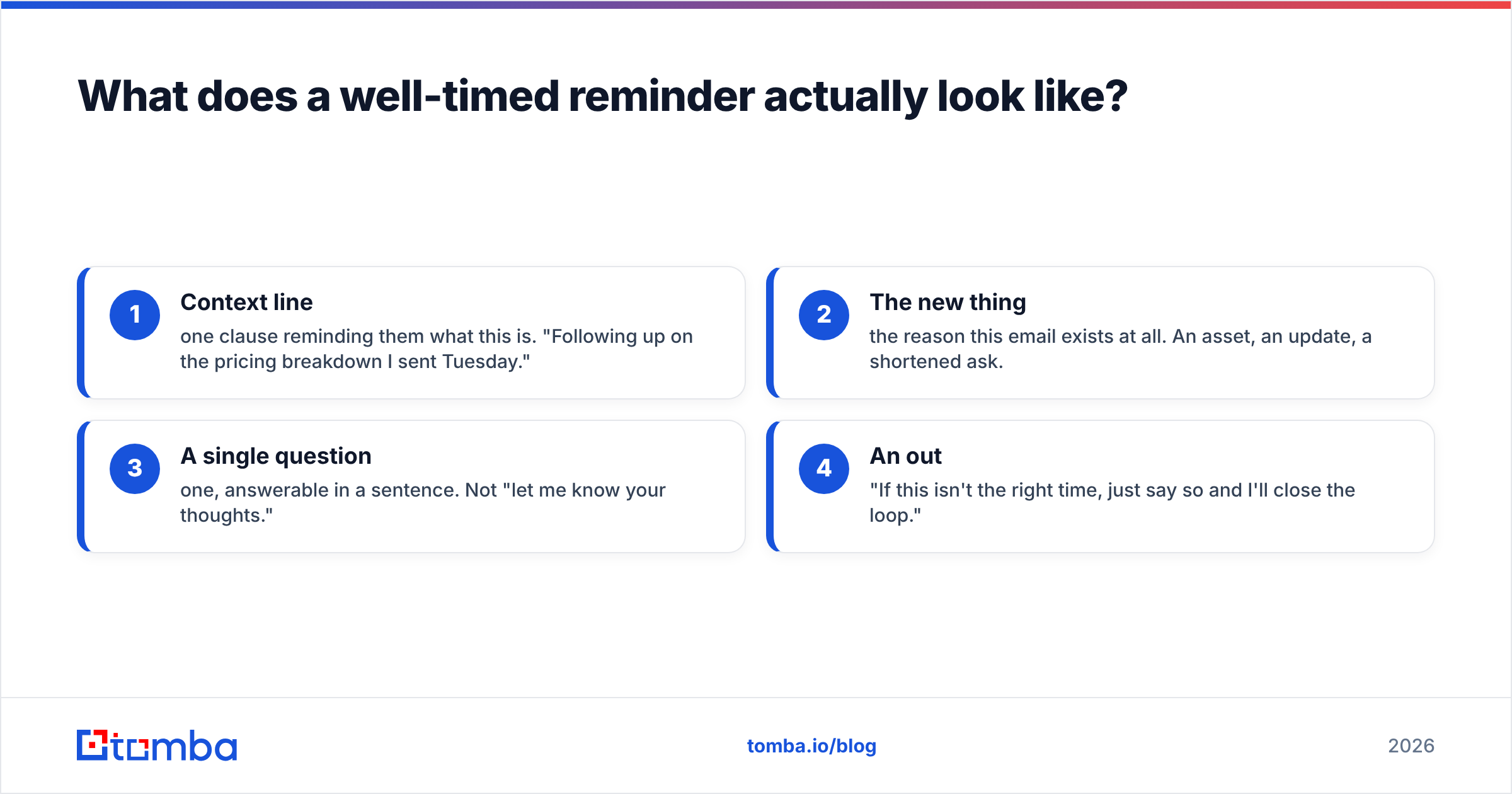
Structure beats length. Four lines, in this order:
- Context line — one clause reminding them what this is. "Following up on the pricing breakdown I sent Tuesday."
- The new thing — the reason this email exists at all. An asset, an update, a shortened ask.
- A single question — one, answerable in a sentence. Not "let me know your thoughts."
- An out — "If this isn't the right time, just say so and I'll close the loop."
Reply in the same thread for touches 2 and 3 so the context travels with the message. Break to a fresh thread with a new subject line for touch 4 — by then the old thread is visually dead in their inbox and a new subject gets a genuine second look.
Keep the reminder shorter than the original. A follow-up that's longer than the email it's chasing signals that you're arguing with yourself. If you want structural starting points, the cold email templates library covers the standard reminder shapes; adapt rather than paste, since generic reminder copy is the fastest route to being ignored.
Two more mechanics worth getting right:
- Subject lines. "Re:" on a thread reply is fine and honest. Faking "Re:" on a first-touch email is not — it's the single fastest way to burn trust when they realize there was no prior thread.
- Signature. Keep it identical across touches. Changing signature blocks mid-sequence looks like a different sender and confuses threading in some clients.
How do you track reminder timing without a spreadsheet?#
At low volume, a calendar reminder and a "waiting on" label work fine — genuinely, don't over-engineer 20 follow-ups a week.
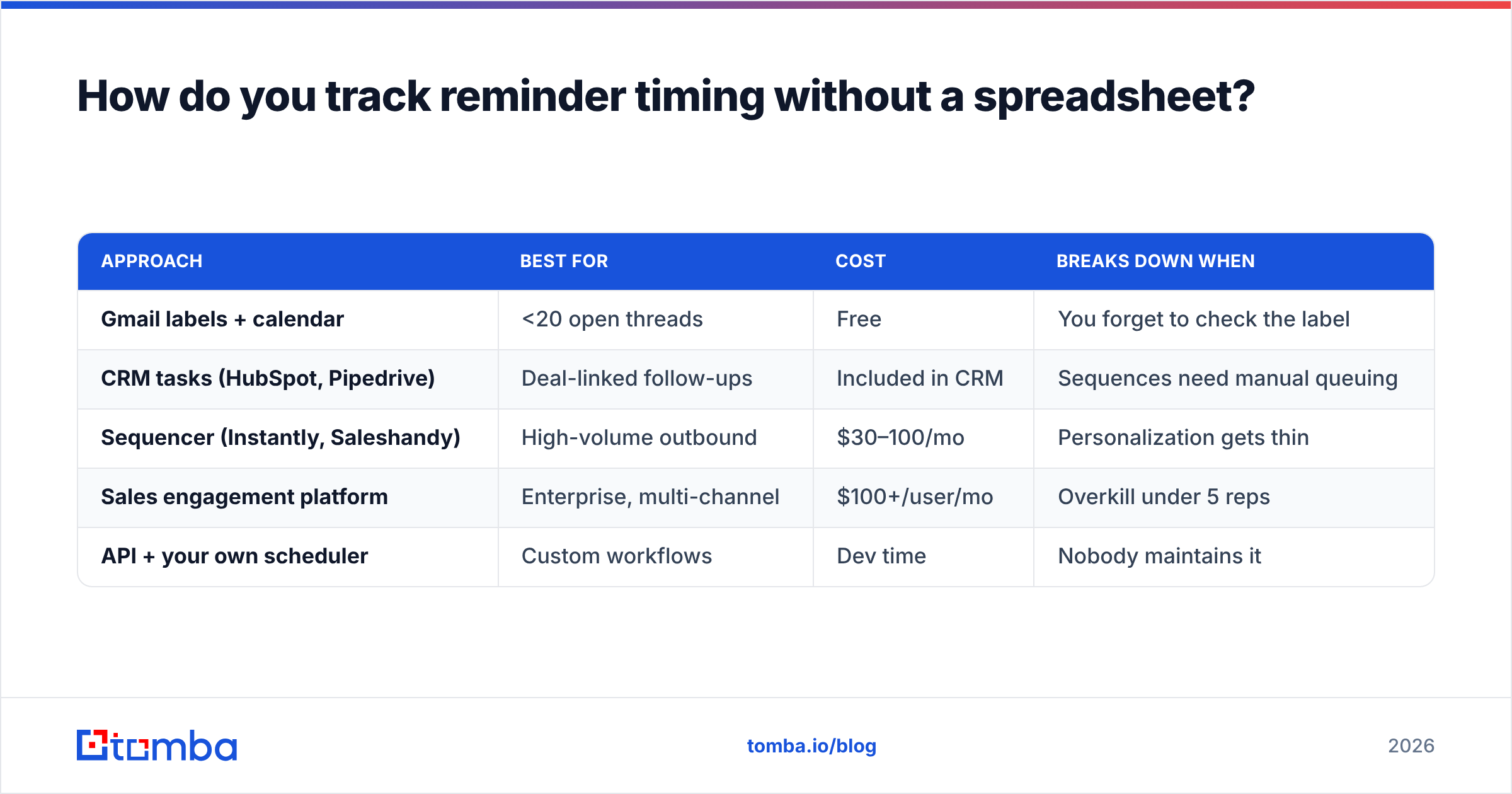
Past roughly 50 open threads, you need something stateful. The options, roughly:
| Approach | Best for | Cost | Breaks down when |
|---|---|---|---|
| Gmail labels + calendar | <20 open threads | Free | You forget to check the label |
| CRM tasks (HubSpot, Pipedrive) | Deal-linked follow-ups | Included in CRM | Sequences need manual queuing |
| Sequencer (Instantly, Saleshandy) | High-volume outbound | $30–100/mo | Personalization gets thin |
| Sales engagement platform | Enterprise, multi-channel | $100+/user/mo | Overkill under 5 reps |
| API + your own scheduler | Custom workflows | Dev time | Nobody maintains it |
Whatever you pick, the non-negotiable is that the tool tracks elapsed time since last touch per contact, not a global sequence day. Contacts enter at different times; a global clock sends reminders to people who received the original email an hour ago.
And whichever route you take, the data layer underneath matters more than the scheduler on top. If you want to see where contact records come from before you build a cadence on them, Tomba documents its data sources publicly — worth reading whichever vendor you end up using, since sourcing methodology is what separates a 95% deliverable list from a 60% one. For a broader vendor comparison, G2's sales engagement category is a reasonable neutral starting point.
What should you do next?#
Pick your default — 3 business days for cold, 48 hours for proposals, day +2 for invoices — then apply the two rules that make the cadence work: widen the gaps as you go, and never send a reminder without a reason.
Before you tune the timing further, though, verify the timing has something to act on. A perfectly paced 5-touch sequence to an address that doesn't exist produces exactly zero replies. Start with the Tomba Email Finder to build a list of real, verified professional addresses — the free tier covers 25 searches a month so you can test the quality against your current list before committing, and paid plans start at $49/mo on the Starter tier. Full Tomba pricing is public if you want to size it against your volume. Get the addresses right first, then the wait window does the work it's supposed to do.
Related guides#
Ready to find emails that actually work?
Join 150,000+ professionals who stopped guessing and started sending. Free credits on signup — no credit card required.
Get the Tomba newsletter
Practical outbound tactics and product updates — once every two weeks.
About the author