How Many Cold Emails Per Day Should You Send in 2026?
Sending 500 cold emails a day from one inbox is the fastest way to burn your domain. Here are the real per-inbox limits, the math behind pipeline targets, and how to scale volume without landing in spam.
TL;DR
- The safe ceiling is 20-50 cold emails per inbox per day on an aged, warmed domain — not per campaign, not per company. Volume scales by adding inboxes, not by pushing one inbox harder.
- New domains start at 5-10 sends/day and ramp over 4-8 weeks. Skipping the ramp is the single most common reason cold email programs die in month two.
- Google and Microsoft both enforce complaint-rate thresholds (0.3% is the hard line at Gmail). Your daily number matters far less than your bounce rate and complaint rate.
- Work backwards from pipeline: replies needed → positive reply rate → emails needed. Most SMB teams need 150-400 sends/day total, which is 5-12 inboxes.
- Bounces are what actually kills you. Verifying your list before send does more for deliverability than any daily-limit tweak.
What is the real answer to "how many cold emails per day"?#
Twenty to fifty per inbox, per day, on a warmed domain that's at least 12 weeks old. That's the number experienced outbound teams converge on, and it hasn't moved much despite every tool promising you can do more.
The confusion comes from mixing up three different numbers that people all call "daily send volume":
- Provider hard limit — what Google Workspace or Microsoft 365 will technically let you push through SMTP before throttling. Google Workspace is 2,000 messages/day for paid accounts; Microsoft 365 is 10,000 recipients/day. These are ceilings for transactional and internal mail, not permission for cold outreach.
- Safe cold-outreach limit per inbox — 20-50/day. This is a reputation constraint, not a technical one. Nobody at Google publishes it. It comes from what mailboxes with 0% engagement history can absorb before filters flag the sending pattern.
- Total program volume — your daily target across all inboxes and domains. This is the only number tied to pipeline, and the only one worth setting a goal against.
If someone tells you "we send 1,000 cold emails a day," they mean number 3. They are running 20-40 inboxes across a handful of secondary domains. They are not sending 1,000 from sales@yourcompany.com.

Why does per-inbox volume matter more than total volume?#
Because reputation is scored at the domain and IP level, not the campaign level. Mailbox providers build a behavioral profile for each sending identity: how many messages, to how many recipients, how often, with what engagement result.
A brand-new inbox that suddenly emits 200 messages to 200 strangers who have never replied to you looks exactly like a compromised account. Filters don't need to read your copy to make that call — the send pattern alone is enough.
Three signals dominate the scoring:
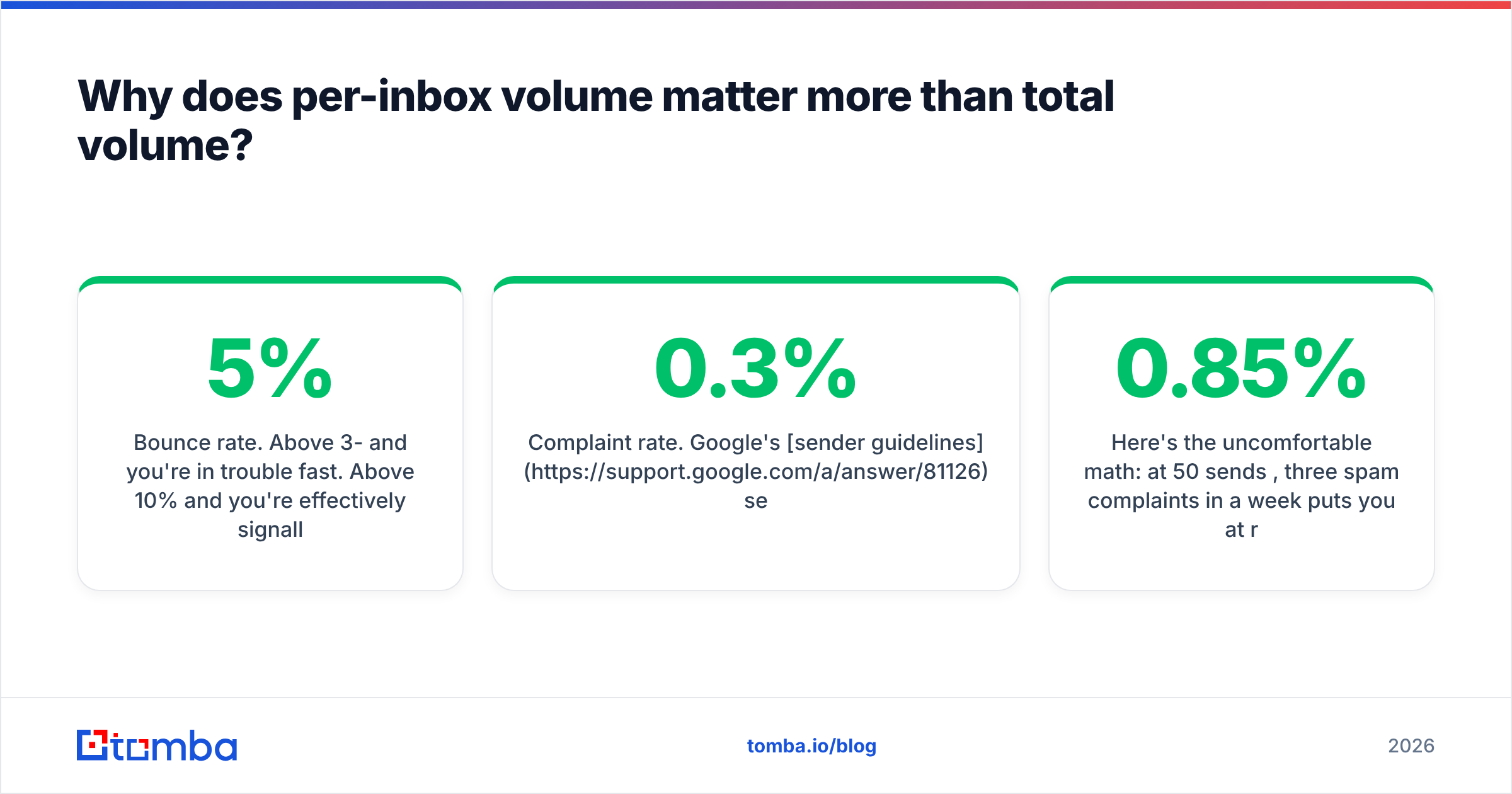
- Bounce rate. Above 3-5% and you're in trouble fast. Above 10% and you're effectively signalling that you bought a scraped list.
- Complaint rate. Google's sender guidelines set 0.3% as the level you must never hit, with 0.1% as the target. Three spam reports per thousand sends is not a large margin.
- Engagement. Replies, opens on a real client, moves out of spam. Zero-engagement sending is the pattern that gets throttled first.
Here's the uncomfortable math: at 50 sends/day, three spam complaints in a week puts you at roughly 0.85% — nearly triple the hard line. Volume amplifies every quality problem you have. It never fixes one.
What are the safe daily limits by inbox type?#
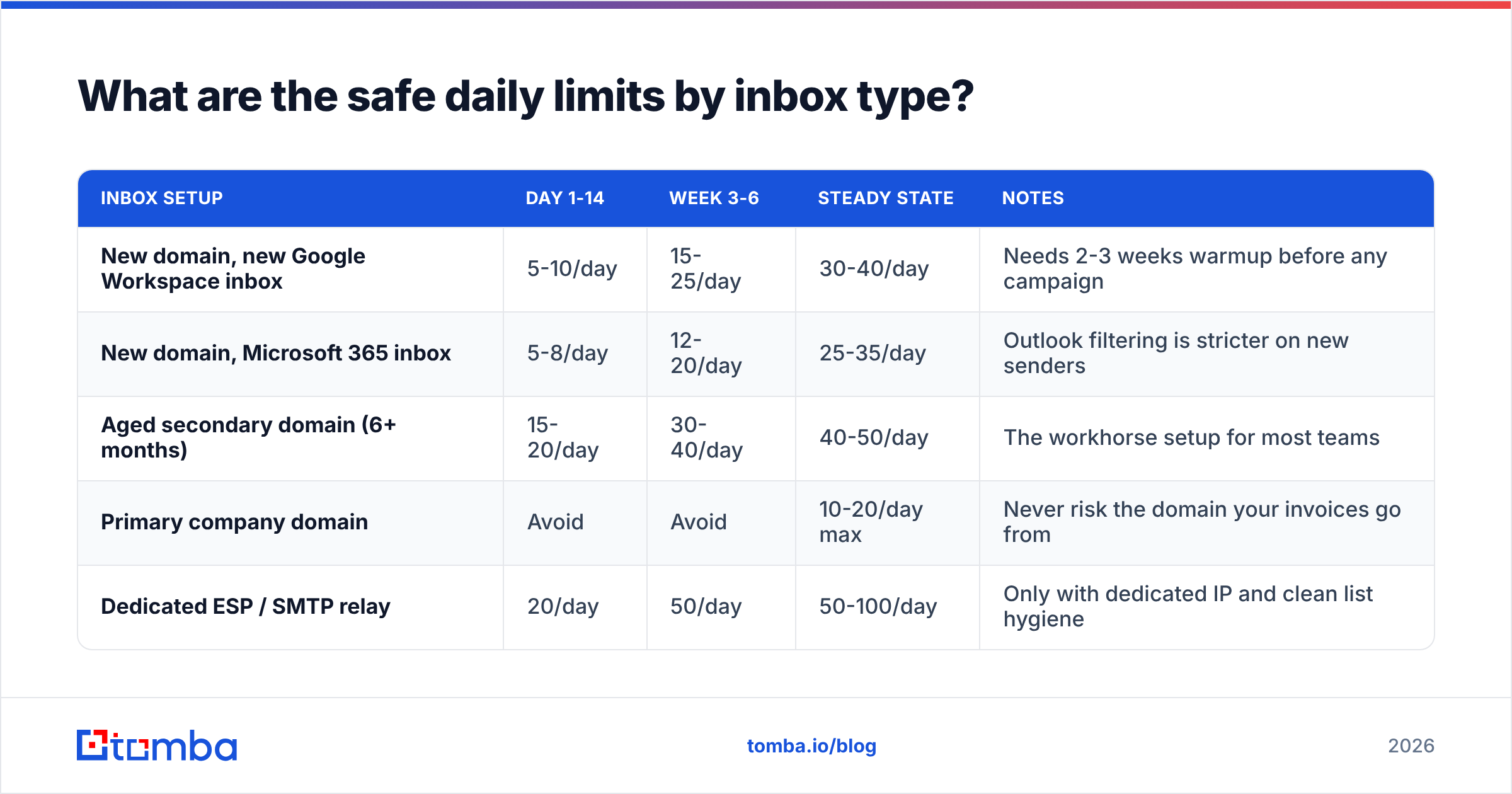
| Inbox setup | Day 1-14 | Week 3-6 | Steady state | Notes |
|---|---|---|---|---|
| New domain, new Google Workspace inbox | 5-10/day | 15-25/day | 30-40/day | Needs 2-3 weeks warmup before any campaign |
| New domain, Microsoft 365 inbox | 5-8/day | 12-20/day | 25-35/day | Outlook filtering is stricter on new senders |
| Aged secondary domain (6+ months) | 15-20/day | 30-40/day | 40-50/day | The workhorse setup for most teams |
| Primary company domain | Avoid | Avoid | 10-20/day max | Never risk the domain your invoices go from |
| Dedicated ESP / SMTP relay | 20/day | 50/day | 50-100/day | Only with dedicated IP and clean list hygiene |
Two rules that override every row in that table:
Never cold email from your primary domain. If yourcompany.com gets blocklisted, your billing emails, your support replies, and your calendar invites go with it. Buy yourcompany-hq.com or getyourcompany.com, point it correctly, and send from there.
Ramp is not optional. Add roughly 5 sends per inbox per day, week over week, until you hit your ceiling. An email warmup calculator will map the curve for your specific start date and target.
How do you calculate your own daily target?#
Work backwards from the meeting count, not forwards from what your tool allows. Five steps:
- Start with pipeline need. You need 8 qualified meetings a month.
- Apply your meeting-from-positive-reply rate. Typically 40-60%. At 50%, you need 16 positive replies.
- Apply positive reply rate. A well-targeted, verified campaign lands 2-5% positive replies. At 3%, you need ~530 contacts reached.
- Add bounce and verification loss. Even with verification, budget 10-15% list shrinkage. Call it 610 sends.
- Divide by working days. 610 / 21 = ~29 sends/day total. That's one inbox — or two, running conservatively.
Notice how modest that is. Teams that "need 500 sends a day" usually have a targeting problem, not a volume problem: a 0.5% reply rate demands six times the volume of a 3% reply rate for the same result. Fixing the list is cheaper than buying 30 more inboxes.
The variable most under your control is step 4. Bounces come from stale or guessed addresses, and they're avoidable. Running your list through an email verifier before the first send typically pulls bounce rates under 2%, which keeps every downstream number honest.
Is sending more cold emails per day ever worth it?#
Sometimes — but only after four conditions are met, and in this order.
- Your reply rate is above 2%. Scaling a 0.4% campaign multiplies waste and complaints. Fix messaging and targeting first.
- Your bounce rate is under 2%. Verified lists only. No catch-all guesses shipped as if they were confirmed.
- Your infrastructure is diversified. Multiple domains, multiple inboxes, no single point of blocklist failure.
- You have reply capacity. A 3% reply rate at 400 sends/day is 12 conversations daily. If nobody answers them within a few hours, extra volume buys nothing.
Once those hold, scale by adding inboxes at their own ramp schedules, not by raising the ceiling on inboxes you already have. Ten inboxes at 30/day is a far safer 300 than three inboxes at 100/day, even though the total is identical.

How does daily volume compare across common outbound setups?#
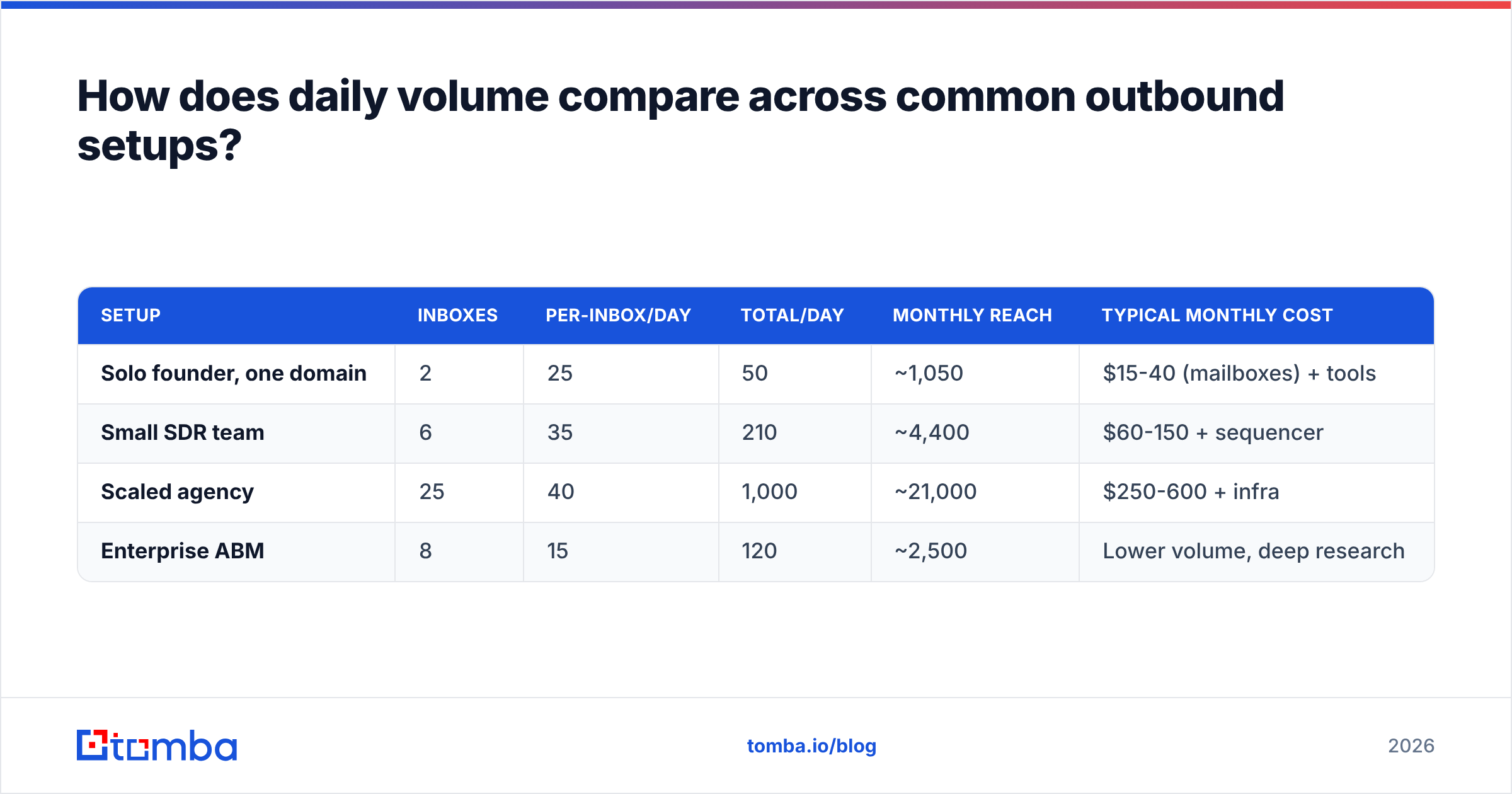
| Setup | Inboxes | Per-inbox/day | Total/day | Monthly reach | Typical monthly cost |
|---|---|---|---|---|---|
| Solo founder, one domain | 2 | 25 | 50 | ~1,050 | $15-40 (mailboxes) + tools |
| Small SDR team | 6 | 35 | 210 | ~4,400 | $60-150 + sequencer |
| Scaled agency | 25 | 40 | 1,000 | ~21,000 | $250-600 + infra |
| Enterprise ABM | 8 | 15 | 120 | ~2,500 | Lower volume, deep research |
The agency row is the one people copy without reading the fine print. Twenty-five inboxes means 25 warmup slots, 25 DNS configs, 25 reputations to monitor, and a list-building operation that can feed 21,000 verified contacts a month without recycling. That's an operations job, not a settings change.
For enterprise ABM, the row inverts entirely: 120 sends/day against 300 named accounts with real research beats 1,000/day of templated spray, and the reply rates aren't close. Volume is a substitute for relevance, and it's a poor one.
What actually breaks deliverability at higher volumes?#
Not the daily number itself. The failure modes are, in order of how often they bite:
- Unverified lists. A 12% bounce rate will torch a domain in under two weeks regardless of whether you sent 20 or 200 a day. Catch-all domains are the sneakiest source — they accept everything at SMTP and bounce later, or route to a black hole that never engages. Run them through a catch-all verifier rather than assuming they're valid.
- Broken authentication. No SPF, no DKIM alignment, no DMARC policy. Since Google and Yahoo tightened bulk-sender requirements, unauthenticated mail is filtered aggressively. Check your record with an SPF checker before you scale anything.
- Identical copy at scale. Sending the same 90-character block to 400 people is a fingerprint. Vary opening lines with real per-prospect detail — not spintax gibberish.
- No ramp. Going 0 → 40/day on day one is the classic self-inflicted wound.
- Ignoring the reply signal. If nobody replies for three weeks, more volume won't help. It's diagnostic feedback, not an argument for a bigger list.
Worth noting: several of these are things your sending tool can't fix for you. G2's outbound category reviews are full of teams blaming a sequencer for what was actually a list-quality problem. The tool sends what you give it.
How do you build a list that supports your daily volume?#
At 200 sends/day you burn roughly 4,200 contacts a month. Sourcing that reliably — verified, deduplicated, matched to ICP — is the real constraint on scale, and it's where most programs quietly stall.
A workable sourcing loop:
- Define the account list first. Firmographics, tech stack, headcount band, trigger events. Accounts before contacts, always.
- Find the contacts by domain. A domain search returns the addresses and role patterns at a given company far faster than hunting person by person.
- Verify before enrichment, not after. Verification is cheap; sending to a dead address costs you reputation you can't buy back.
- Deduplicate across sequences. Hitting the same prospect from two inboxes in one week is the fastest route to a complaint.
- Track deliverability per domain, not per campaign. When one sending domain starts sliding, pull it out and let it rest.
Some teams prefer buying a static list from a provider like BookYourData for a defined vertical push, then verifying it before load-in — a reasonable approach when the ICP is stable and you need volume on a deadline. Others prefer building fresh per campaign so data is never more than a few weeks old. Both work; what doesn't work is loading either one unverified.
If you're sourcing continuously, API access matters more than a UI. A bulk email finder or programmatic pull through the Tomba API lets you refill the top of the funnel on a schedule rather than in a monthly panic. And if budget is the constraint, compare what you actually need against Tomba pricing — the free tier covers 25 searches/month for testing an ICP, Starter runs $49/mo, and Growth at $99/mo covers most single-team volumes.
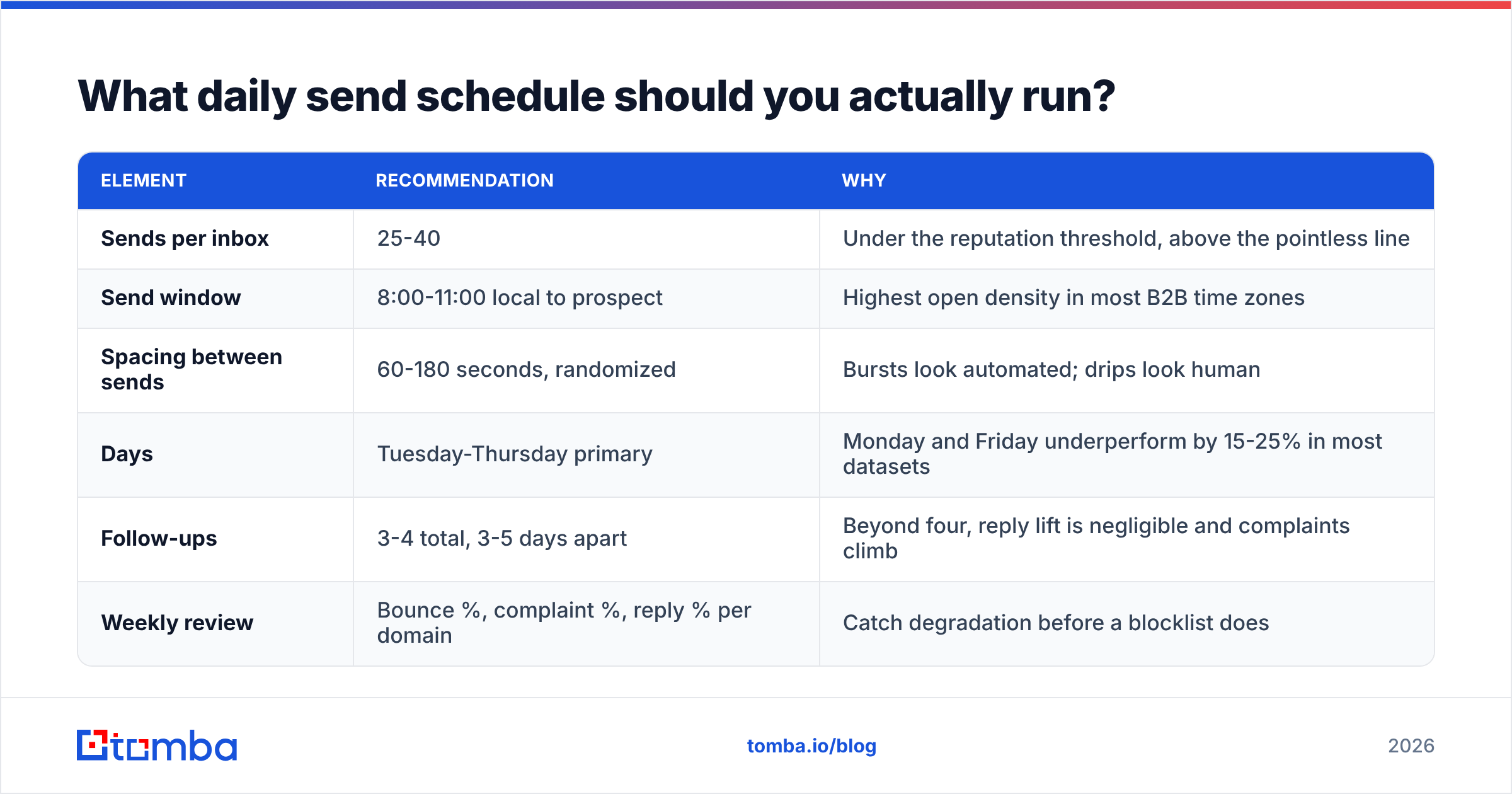
What daily send schedule should you actually run?#
A pattern that holds up across most B2B segments:
| Element | Recommendation | Why |
|---|---|---|
| Sends per inbox | 25-40 | Under the reputation threshold, above the pointless line |
| Send window | 8:00-11:00 local to prospect | Highest open density in most B2B time zones |
| Spacing between sends | 60-180 seconds, randomized | Bursts look automated; drips look human |
| Days | Tuesday-Thursday primary | Monday and Friday underperform by 15-25% in most datasets |
| Follow-ups | 3-4 total, 3-5 days apart | Beyond four, reply lift is negligible and complaints climb |
| Weekly review | Bounce %, complaint %, reply % per domain | Catch degradation before a blocklist does |
Randomized spacing matters more than people expect. Forty messages fired in eight minutes is a machine signature. Forty messages spread across three hours with jitter is indistinguishable from a busy person working through their morning.
On follow-ups: they count against your daily total. If your cap is 35 and you're running four-step sequences, roughly 20 of those slots go to follow-ups at steady state. Plan the new-contact number accordingly — a lot of teams accidentally double their real volume when a sequence matures and wonder why deliverability slipped.
Where do most teams get the daily number wrong?#
Three recurring mistakes:
Treating the provider limit as a target. Google allows 2,000/day. That's an anti-abuse ceiling for a domain doing normal business mail, not a cold-outreach allowance. Using it as a goal is like treating a speed limit as a minimum.
Scaling volume before fixing reply rate. If 1,000 sends produce two meetings, 2,000 sends produce four meetings and a blocklist. The unit economics of bad targeting only get worse with scale, because complaint rate is a percentage and reputation damage is cumulative.
Ignoring the follow-up load. As covered above, mature sequences quietly consume most of your daily budget. Model it up front.
The healthiest framing: your daily send number is an output of your list quality and reply rate, not an input you choose. Improve the numerator — better targeting, verified addresses, sharper first lines — and you need dramatically less volume for the same pipeline. That's the lever worth pulling, and it's available to a two-person team as readily as to a 40-rep org.
Start with a verified list, not a bigger number#
Before you add another inbox or raise a daily cap, fix the input. Use the Tomba Email Finder to source ICP-matched contacts by domain, name, or company, then verify them so your bounce rate stays under 2% and your sending reputation stays intact at whatever volume you settle on. The free tier gives you 25 searches a month to test an ICP before you commit; Starter is $49/mo when you're ready to run daily. Sending fewer, better emails to addresses that actually exist beats sending more to a list that's quietly destroying your domain.
Related guides#
Ready to find emails that actually work?
Join 150,000+ professionals who stopped guessing and started sending. Free credits on signup — no credit card required.
Get the Tomba newsletter
Practical outbound tactics and product updates — once every two weeks.
About the author