How Many Emails Can I Send Per Day in Gmail? 2026 Limits Explained
Free Gmail stops you at 500 recipients a day. Workspace stops you at 2,000 messages. But the number that actually matters for cold outreach is far lower — here's the full breakdown.
TL;DR
- A free
@gmail.comaccount can send to 500 recipients per rolling 24 hours through the web interface, and only 100 recipients per day through an SMTP client. - A paid Google Workspace account can send 2,000 messages per day, with a hard ceiling of 3,000 external recipients and 2,000 unique external recipients in 24 hours.
- Those are technical limits, not safe limits. For cold outreach, the practical number on a warmed inbox is 30-50 emails per day, not 500.
- Limits are enforced on a rolling window. Hit one and Gmail locks sending for up to 24 hours — the account still receives mail, it just refuses to send.
- Bounces count against you twice: they consume your daily quota and they raise the spam-complaint and hard-bounce rates that Google uses to throttle you.
What is Gmail's daily sending limit in 2026?#
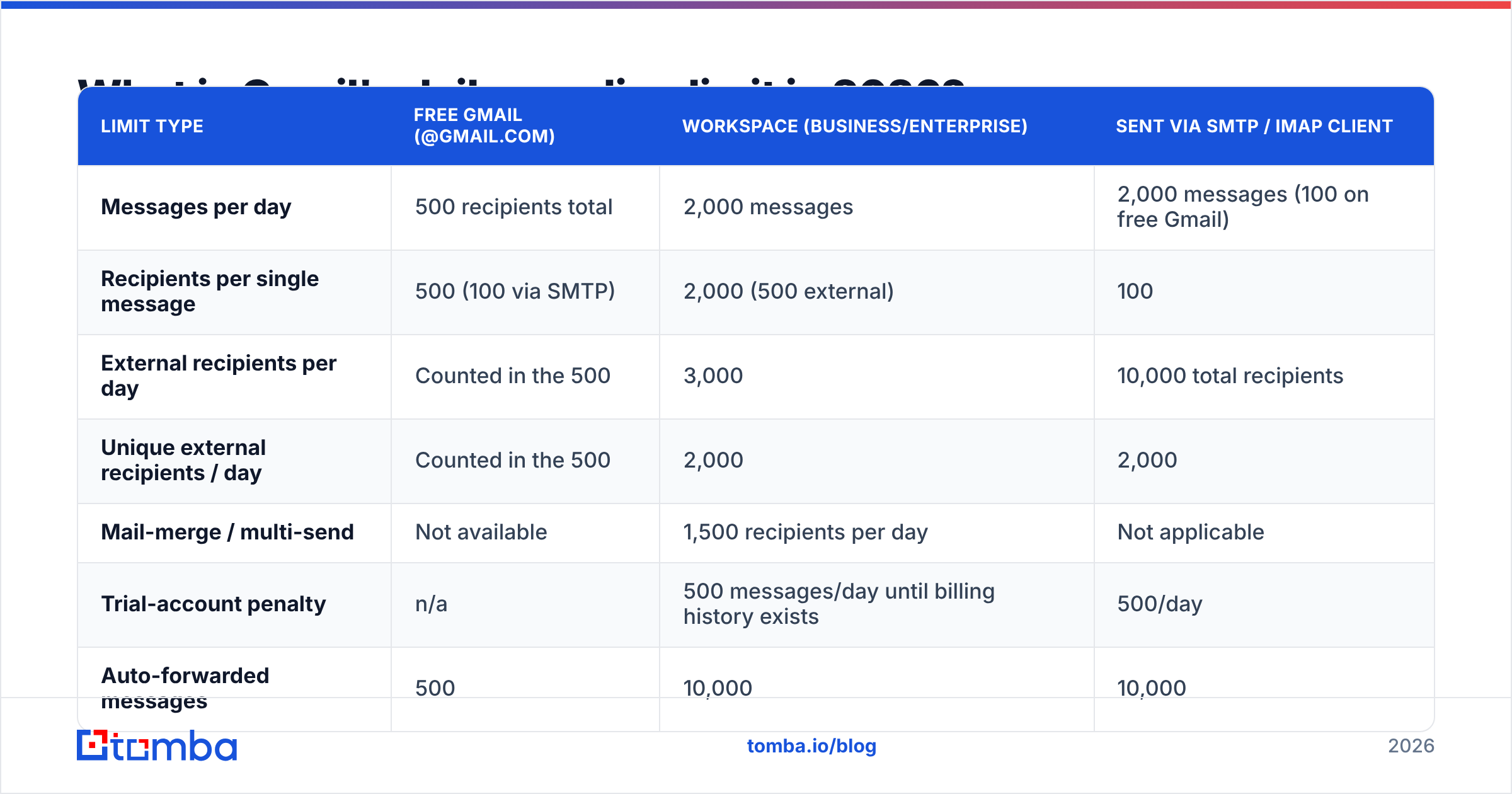
There is no single number. Google enforces at least four different quotas at once — messages, total recipients, external recipients, and unique recipients — and which one bites first depends on how you send.
The short version: 500 recipients per day on free Gmail, 2,000 messages per day on Google Workspace. Everything else is detail on top of those two anchors.
| Limit type | Free Gmail (@gmail.com) | Workspace (Business/Enterprise) | Sent via SMTP / IMAP client |
|---|---|---|---|
| Messages per day | 500 recipients total | 2,000 messages | 2,000 messages (100 on free Gmail) |
| Recipients per single message | 500 (100 via SMTP) | 2,000 (500 external) | 100 |
| External recipients per day | Counted in the 500 | 3,000 | 10,000 total recipients |
| Unique external recipients / day | Counted in the 500 | 2,000 | 2,000 |
| Mail-merge / multi-send | Not available | 1,500 recipients per day | Not applicable |
| Trial-account penalty | n/a | 500 messages/day until billing history exists | 500/day |
| Auto-forwarded messages | 500 | 10,000 | 10,000 |
Two footnotes that catch people out:
New Workspace tenants on a trial, or accounts less than roughly 30 days into a paid subscription, are throttled to 500 messages per day — the same as free Gmail. You pay for Workspace and get the free-tier ceiling until Google trusts the billing relationship. Google documents the full matrix in its Workspace sending limits article, and it does change; check it before you build a sequence around a number.
Also, "500 recipients" is not "500 emails." One message with 50 people in the To: field burns 50 recipients out of your daily 500. Ten of those and you are done for the day after sending ten emails.
Why do free Gmail and Google Workspace limits differ so much?#
Because the quota is a spam-abuse control, not a feature. Google prices sending capacity by how much accountability it has over the sender.
- Identity cost. A free Gmail account costs nothing to create and nothing to abandon. A Workspace seat is tied to a domain, a credit card, and DNS records you had to control. Higher trust, higher ceiling.
- Domain reputation exists. Workspace mail carries your domain's sender reputation, which Google can measure over time via Postmaster Tools. Free Gmail borrows gmail.com's reputation, so Google keeps the blast radius small.
- Authentication is enforceable. On your own domain you can publish SPF, DKIM, and DMARC. On
@gmail.comyou inherit Google's records and cannot prove anything extra about yourself. - Admin controls. A Workspace admin can suspend a compromised account in seconds. Nobody can do that for a free account except Google.
- Billing as a deterrent. Spammers can burn free accounts endlessly. Burning paid seats with a traceable payment method is expensive and identifiable.
That is also why the SMTP path is throttled harder than the web UI: scripted sending through SMTP is the most abused channel, so free Gmail caps it at 100 recipients per day regardless of what the browser lets you do.

What counts as a message versus a recipient?#
Get this wrong and your math is wrong by an order of magnitude.
- Message = one send action. One click of Send.
- Recipient = every unique address in To, Cc, and Bcc, counted separately, on every message.
- Unique recipient = a distinct address across the whole 24-hour window. Emailing the same person six times counts as six recipients but one unique recipient.
- External recipient = anyone outside your Workspace domain. This is the one that constrains outbound teams, because 100% of prospect traffic is external.
For a cold-outreach workflow, one prospect equals one message equals one recipient equals one unique external recipient. All four counters move together, so the binding constraint on Workspace is the 2,000-unique-external-recipients line, not the 2,000-messages line — you will hit them at the same time.
For a newsletter blasted Bcc, the recipient counter races ahead of the message counter and you will trip the cap after a handful of sends.
What happens when you hit the Gmail sending limit?#
You get a bounce-back reading "You have reached a limit for sending mail" or SMTP error 550-5.4.5 Daily user sending limit exceeded. Then:
- Sending is disabled for up to 24 hours on a rolling basis, not until midnight. If you burned the quota at 3pm Tuesday, capacity returns gradually through 3pm Wednesday.
- Receiving still works. Your inbox is fine, replies arrive, nothing is lost.
- Queued messages in a sequencer will retry and often fail again, which some tools log as hard bounces. That pollutes your own reporting.
- Repeat offenses escalate. Trip the cap several days running and Google can suspend the account for 24 hours or longer, and in Workspace the admin console will flag it for review.
Nothing here is permanent, but the second-order damage is real: a sequencer that keeps hammering a locked mailbox looks, from Google's side, exactly like a compromised account.
Are Gmail's limits the real ceiling for cold email?#
No — and this is the part most "Gmail limits" articles skip.
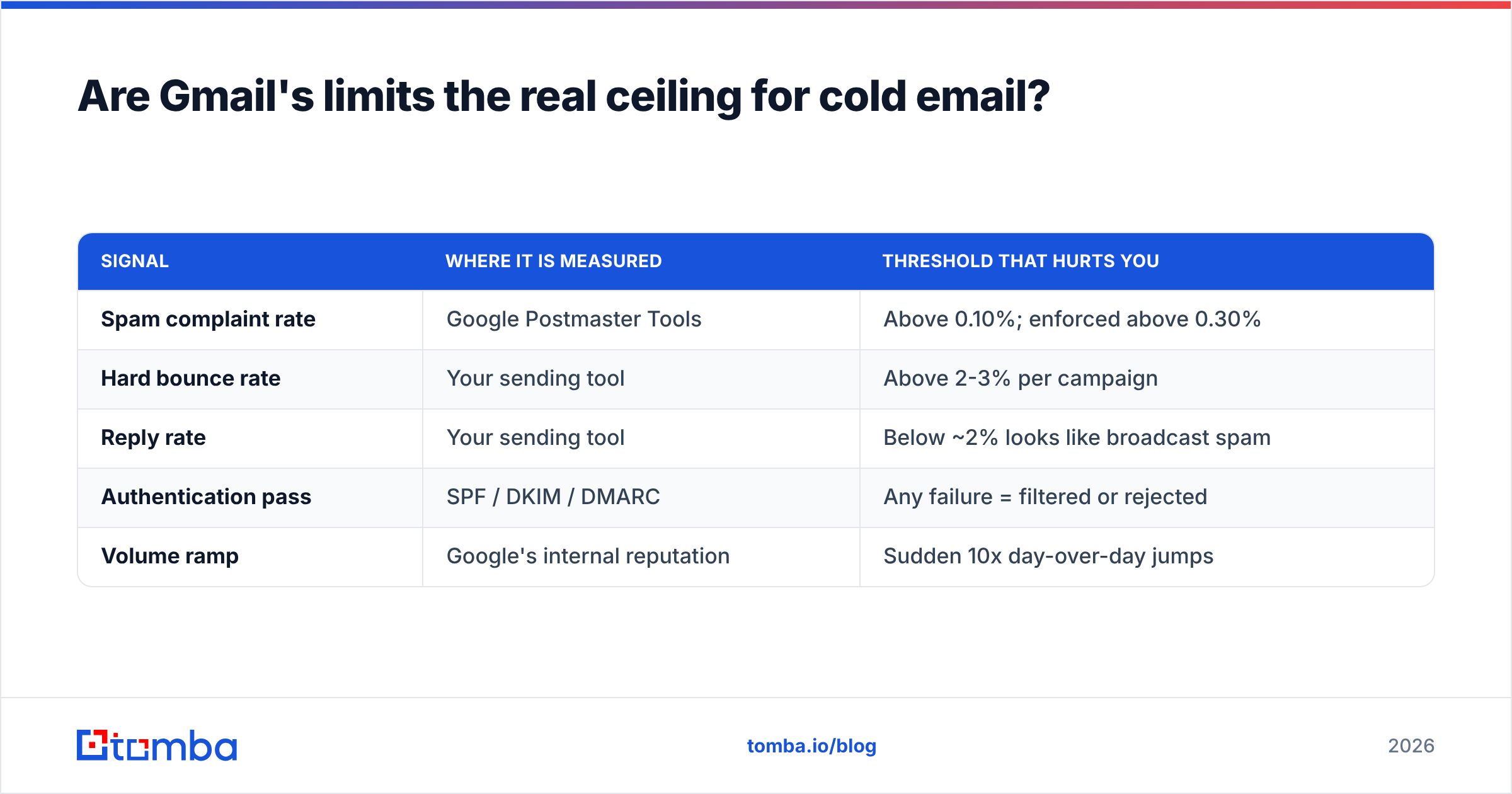
Google's quota tells you when the door slams. It does not tell you when your email deliverability collapses. Those are different numbers, and the deliverability number is much smaller.
Since the 2024 Gmail and Yahoo bulk-sender requirements — documented in Google's Email sender guidelines — anyone sending over roughly 5,000 messages a day to Gmail addresses must have SPF, DKIM, DMARC aligned, one-click unsubscribe on bulk mail, and a spam-complaint rate held below 0.3%, with 0.1% as the target. Under 5,000/day you are not formally "bulk," but the same filters still score you.
Practically, that means:
| Signal | Where it is measured | Threshold that hurts you |
|---|---|---|
| Spam complaint rate | Google Postmaster Tools | Above 0.10%; enforced above 0.30% |
| Hard bounce rate | Your sending tool | Above 2-3% per campaign |
| Reply rate | Your sending tool | Below ~2% looks like broadcast spam |
| Authentication pass | SPF / DKIM / DMARC | Any failure = filtered or rejected |
| Volume ramp | Google's internal reputation | Sudden 10x day-over-day jumps |
A brand-new domain that suddenly pushes 400 cold emails on day one satisfies every Gmail quota and still lands in spam, because the pattern is indistinguishable from a hijacked account. Check your DNS side with a free SPF checker before you send anything at volume — a soft-fail SPF record undoes an otherwise clean ramp.
How many emails should you actually send per day per inbox?#
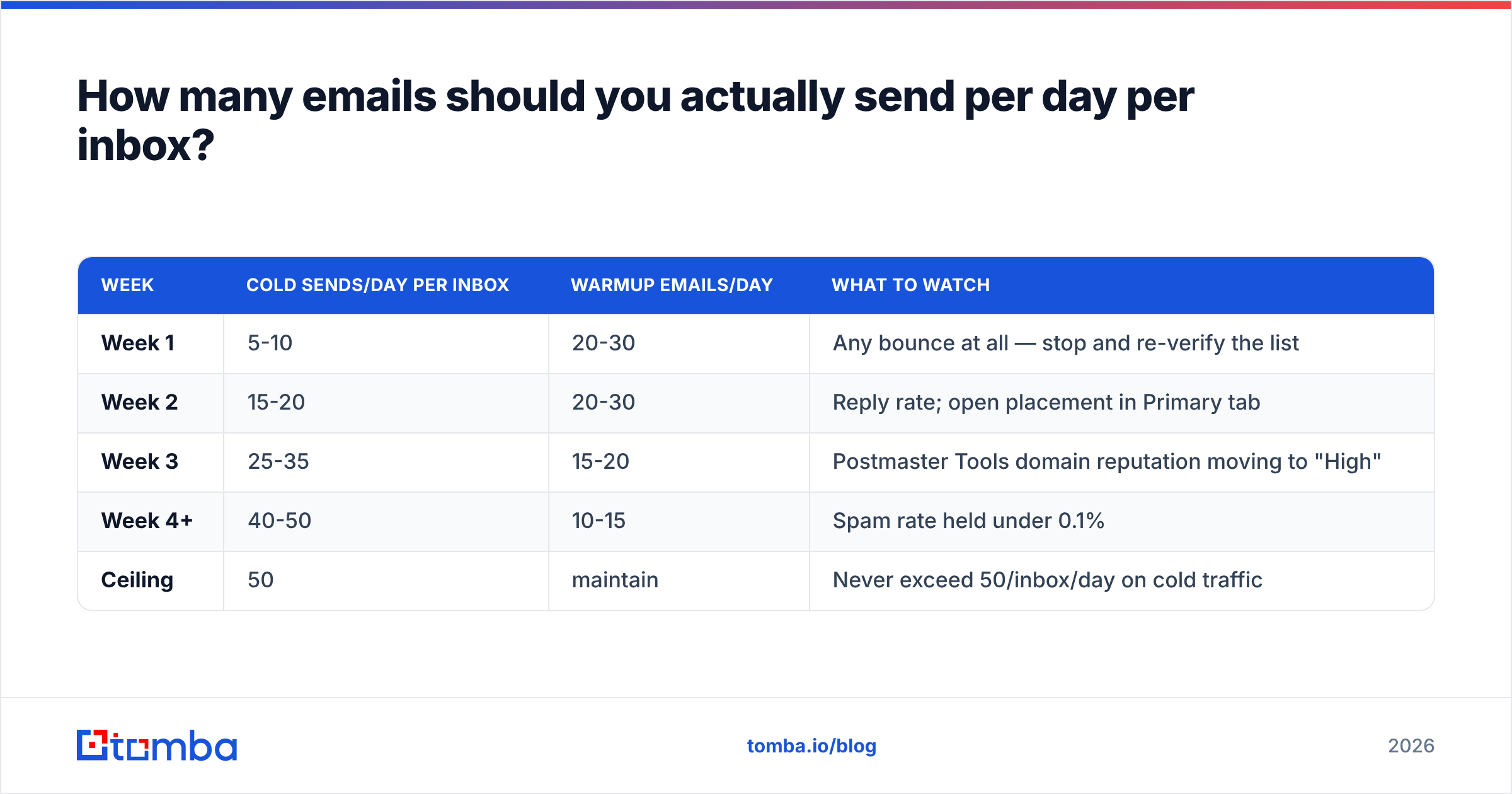
Between 30 and 50 per inbox once warmed. Here is the ramp most outbound teams settle on.
| Week | Cold sends/day per inbox | Warmup emails/day | What to watch |
|---|---|---|---|
| Week 1 | 5-10 | 20-30 | Any bounce at all — stop and re-verify the list |
| Week 2 | 15-20 | 20-30 | Reply rate; open placement in Primary tab |
| Week 3 | 25-35 | 15-20 | Postmaster Tools domain reputation moving to "High" |
| Week 4+ | 40-50 | 10-15 | Spam rate held under 0.1% |
| Ceiling | 50 | maintain | Never exceed 50/inbox/day on cold traffic |
Fifty is a convention, not a Google rule — but it holds up because it keeps you an order of magnitude below the quota, leaves headroom for replies and internal mail, and produces a volume curve that looks human. Model your own ramp with a warmup calculator rather than guessing.
Need 500 cold emails a day? Then you need roughly ten warmed inboxes across two or three sending domains — not one Workspace seat pushed to its 2,000 limit. That is how every serious outbound team operates, and it is also why "how many emails can I send per day in Gmail" is the wrong question once you scale. The right question is how many inboxes you can keep healthy.

How do you raise capacity without wrecking reputation?#
Four legitimate routes, in ascending order of effort:
- Add sending inboxes on secondary domains. Buy
getacme.comandacme-hq.comalongsideacme.com, warm each, and rotate. Your primary domain never carries cold traffic. - Use Google Workspace SMTP relay for transactional or app-generated mail. It routes through Google with a separate, much higher quota (10,000 recipients/day) and keeps app mail out of your human sending budget.
- Move bulk and newsletter mail to a real ESP. Mailchimp, Customer.io, or Postmark exist because Gmail is not a broadcast platform. Google itself says so. Anything list-shaped belongs there, with one-click unsubscribe attached.
- Cut waste from the list before you send. Every invalid address is a wasted unit of quota and a direct hit to bounce rate.
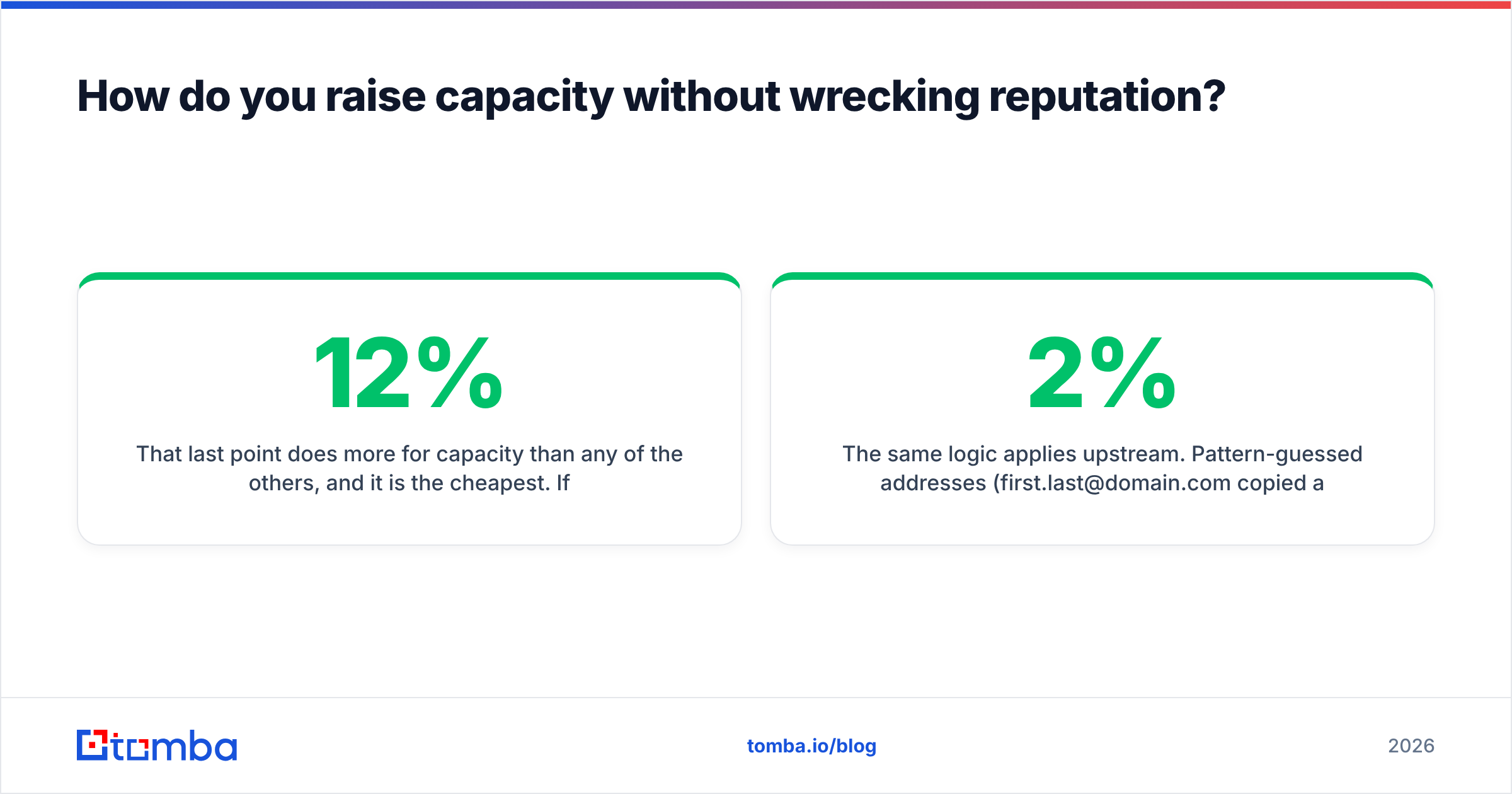
That last point does more for capacity than any of the others, and it is the cheapest. If 12% of a 300-contact list is dead, you have burned 36 sends and manufactured a 12% bounce rate — which is four to six times the level where Gmail starts filtering you. Running the list through an email verifier first turns those 36 wasted sends back into 36 real prospects and keeps the bounce rate near zero.
The same logic applies upstream. Pattern-guessed addresses (first.last@domain.com copied across a spreadsheet) are the single biggest source of bounces in cold outreach. Sourcing addresses with a real email finder that returns a confidence score, then verifying, is a two-step process that reliably lands under a 2% bounce rate. Peers in this space — Hunter, BookYourData, and Tomba among them — all publish accuracy data worth comparing before you commit a list to a sequencer.
What about mail merge, aliases, and delegated accounts?#
Three common workarounds, and how Google actually treats them:
- Gmail multi-send (mail merge). Available on Workspace Individual, Business Standard/Plus, and Enterprise. Caps at 1,500 recipients per day and counts toward your 2,000-message total. It adds an unsubscribe footer automatically — which is correct behavior, but it also visually marks the mail as bulk.
- Aliases (
sales@,hello@). An alias is not a separate mailbox. Mail sent from an alias consumes the underlying account's quota. Adding five aliases gives you zero extra capacity. - Delegated access. Same story — sends made on behalf of an account count against that account's limit, not the delegate's.
- Google Groups as a recipient. Sending to a group of 200 counts as 200 external recipients if the members are external. Groups do not launder your quota.
There is no legitimate configuration trick that multiplies your ceiling inside one account. The only real lever is more accounts, properly warmed.
What should you check before your next send day?#
Run this list once a week. It takes ten minutes and prevents most lockouts.
- Postmaster Tools domain reputation — must read Medium or High. Anything lower, pause cold sending and warm for a week.
- Spam rate — under 0.10%. Above 0.30% you are in enforcement territory.
- Bounce rate on the last 500 sends — under 2%. If not, your list sourcing is the problem, not your copy.
- SPF, DKIM, DMARC — all three passing on a test send to a Gmail address (check the "show original" view).
- Daily volume per inbox — under 50 on cold traffic, no exceptions, regardless of how much Gmail quota is left.
- Blacklist status — a quick pass through a blacklist checker catches shared-IP contamination early.
Answer all six green and the 500 or 2,000 number becomes irrelevant, because you will never approach it.
Start with a list that does not bounce#
Gmail's quota is fixed and public. Your bounce rate is not — it is a direct consequence of where your addresses came from. The teams that never think about sending limits are the ones sending 40 verified emails a day per inbox and getting replies, not the ones trying to squeeze 500 unverified addresses through one mailbox before lunch.
Fix the input first. Tomba Email Finder sources professional addresses by domain, name, or company and returns a confidence score on every result, so you know what you are sending before you spend a unit of quota on it. The free tier covers 25 searches a month, Starter is $49/mo, and Growth is $99/mo — see Tomba pricing for the full breakdown. Pair it with verification, keep each inbox under 50 sends a day, and Gmail's limits stop being a constraint you ever have to think about.
Related guides#
Ready to find emails that actually work?
Join 150,000+ professionals who stopped guessing and started sending. Free credits on signup — no credit card required.
Get the Tomba newsletter
Practical outbound tactics and product updates — once every two weeks.
About the author