How Many Emails Can You Send Before Considered Spam in 2026
There is no magic number, but there are hard limits: provider caps, complaint thresholds, and volume ramps that decide whether your cold email lands or gets filtered. Here are the real numbers for 2026.
TL;DR
- There is no universal number. Mailbox providers judge you on complaint rate, bounce rate, and engagement, not raw volume — but each provider does enforce a hard daily cap.
- The number that actually gets you filtered: 0.3% spam complaints (Google and Yahoo's published threshold). At 0.1% you are safe; above 0.3% you are throttled or blocked.
- Practical ceiling for cold outreach on a warmed Google Workspace mailbox: 30–50 sends/day per mailbox, not the 2,000/day the plan technically allows.
- Bounce rate above 3–5% on a new domain is a faster route to the spam folder than volume ever is. Verify before you send.
- Scale by adding mailboxes and domains, not by pushing one mailbox harder.
What Does "Considered Spam" Actually Mean?#
Two different systems are judging you, and people confuse them constantly.
The first is your sending provider — Google Workspace, Microsoft 365, Amazon SES, SendGrid. They enforce a documented daily send cap. Cross it and you get a hard error ("Daily user sending limit exceeded"), a temporary lockout, or account suspension. This is a plumbing limit.
The second is the receiving mailbox provider — Gmail, Outlook, Yahoo, or a corporate filter like Proofpoint or Mimecast. They have no published send cap for you because they do not care how many you sent. They care about the ratio of people who wanted your email to people who did not. This is a reputation limit, and it is the one that quietly kills campaigns.
Think of it like a bar. The bouncer at the door (your provider) counts how many drinks you can order per hour. The other patrons (recipients) decide whether you get asked to leave. You can stay well under the drink limit and still get thrown out for being obnoxious.
So when someone asks how many emails you can send before considered spam, the honest answer is: you get flagged the moment your complaint or bounce ratios cross a threshold — which can happen at 40 emails or 4,000.
What Are the Hard Sending Limits by Provider in 2026?#
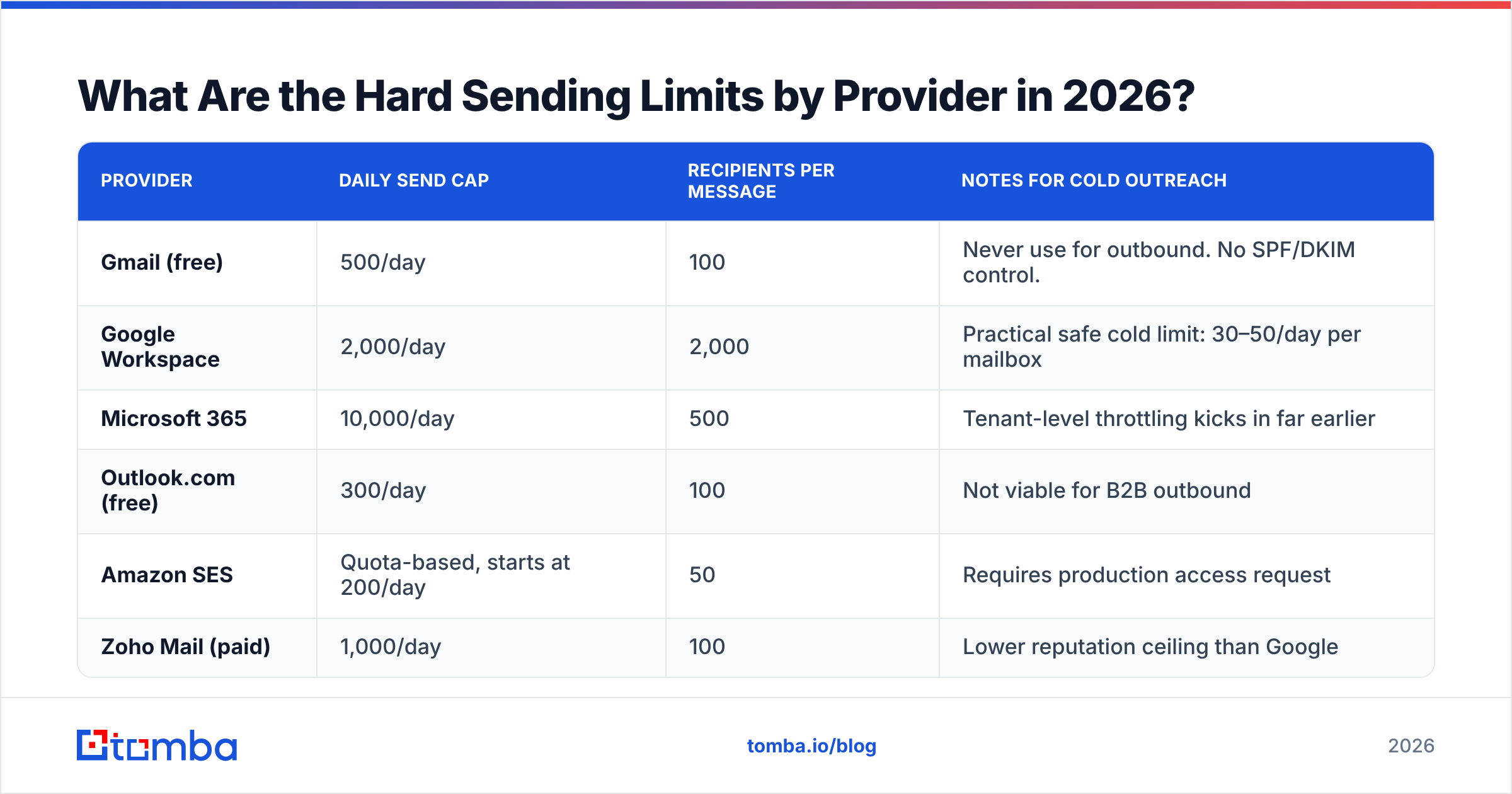
These are the plumbing limits. Treat them as ceilings you should never approach, not targets.
| Provider | Daily send cap | Recipients per message | Notes for cold outreach |
|---|---|---|---|
| Gmail (free) | 500/day | 100 | Never use for outbound. No SPF/DKIM control. |
| Google Workspace | 2,000/day | 2,000 | Practical safe cold limit: 30–50/day per mailbox |
| Microsoft 365 | 10,000/day | 500 | Tenant-level throttling kicks in far earlier |
| Outlook.com (free) | 300/day | 100 | Not viable for B2B outbound |
| Amazon SES | Quota-based, starts at 200/day | 50 | Requires production access request |
| Zoho Mail (paid) | 1,000/day | 100 | Lower reputation ceiling than Google |
The gap between the "cap" column and the "safe" column is where most senders get burned. Google Workspace lets you fire 2,000 messages a day. If those 2,000 are cold, unverified, and templated, you will be in the spam folder before lunch on day three. The cap is an abuse limit, not a recommendation.
Microsoft is the trickiest of the group. The published 10,000/day tenant limit is nearly irrelevant because Microsoft applies undocumented per-mailbox throttling based on account age and behaviour. New M365 tenants sending cold volume commonly get soft-limited within a week.
What Complaint and Bounce Rates Get You Filtered?#
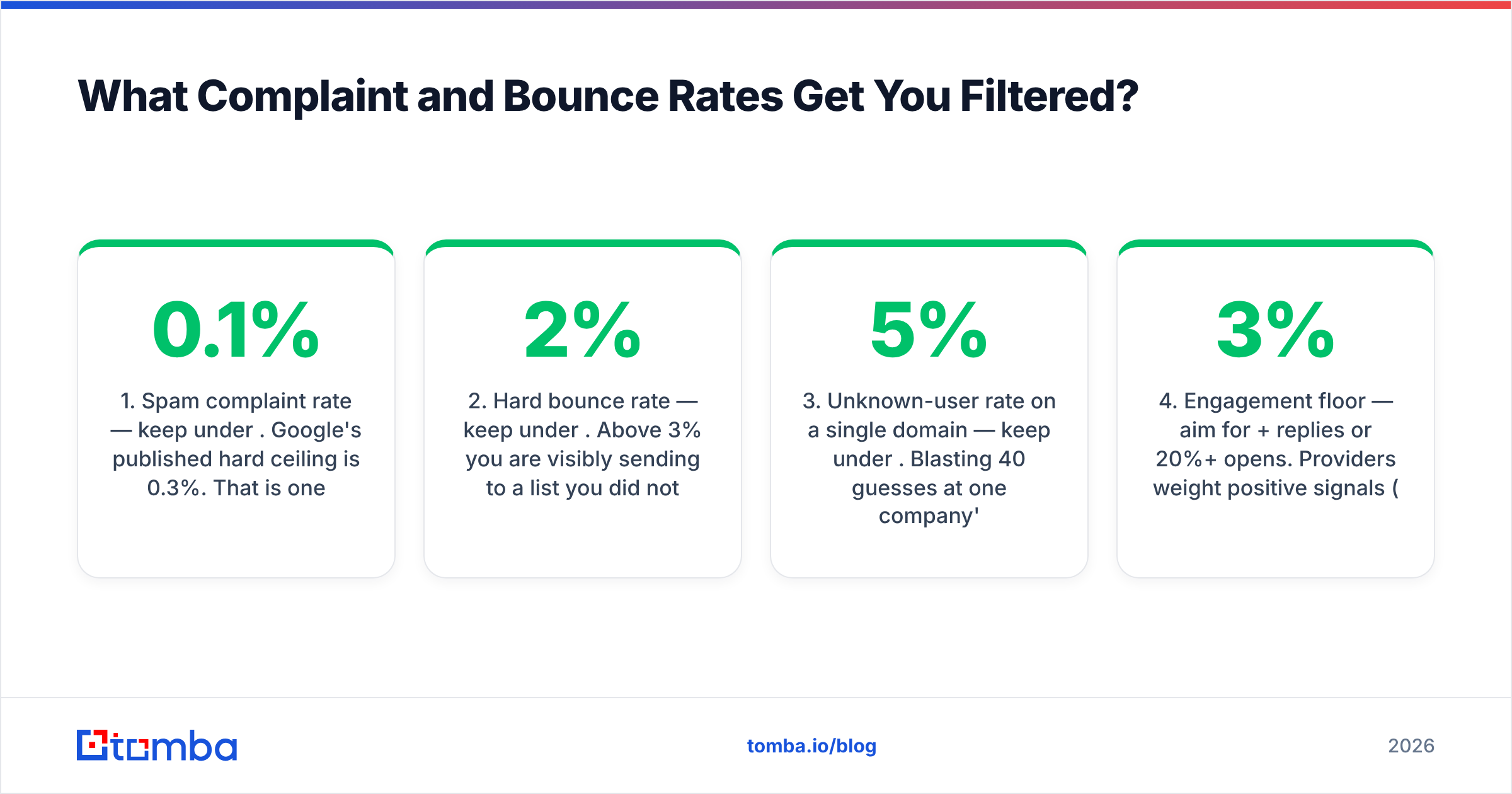
This is where the real answer lives. Google and Yahoo's bulk sender requirements set explicit numbers, and every other major provider follows similar logic even when they do not publish thresholds.
- Spam complaint rate — keep under 0.1%. Google's published hard ceiling is 0.3%. That is one complaint per 333 emails. At 0.1% you have headroom; at 0.3% Gmail begins throttling delivery; sustained above it and you are effectively blocked. Read Google's own sender guidelines rather than a blog's paraphrase of them.
- Hard bounce rate — keep under 2%. Above 3% you are visibly sending to a list you did not clean. Above 5% on a new domain, filters treat you as a list purchaser. This is entirely preventable with an email verifier run before the campaign, not after.
- Unknown-user rate on a single domain — keep under 5%. Blasting 40 guesses at one company's domain in an hour is a classic directory-harvest signal. Corporate filters block the sending IP, not just the message.
- Engagement floor — aim for 3%+ replies or 20%+ opens. Providers weight positive signals (replies, "not spam" clicks, moves to a folder) as heavily as negative ones. Zero engagement across thousands of sends reads as machine traffic.
- Authentication — SPF, DKIM, and DMARC are non-negotiable. Since February 2024, bulk senders to Gmail and Yahoo must have all three. Check yours with an SPF checker before you send anything.
- Content and link hygiene. One tracking-domain redirect chain or a link to a blacklisted domain can override an otherwise clean reputation. Run a spam checker on the template itself.
Notice what is missing from that list: volume. Volume only matters as a multiplier. A 0.4% complaint rate on 100 sends is 0 complaints and invisible. The same rate on 10,000 sends is 40 complaints and a suspension.
How Many Cold Emails Can You Safely Send Per Mailbox?#
Here is the number people actually want, with the caveat attached.
30–50 cold emails per day, per fully warmed mailbox, on a dedicated sending domain. That is the working consensus across serious outbound teams in 2026, and it is deliberately far below any provider cap.
Why so low? Because cold email carries structurally worse engagement than any other mail type. Newsletter senders can push thousands per mailbox because their recipients opted in. You did not get opted in. Your engagement rate will be an order of magnitude lower, so your margin for error on complaints is proportionally thinner.
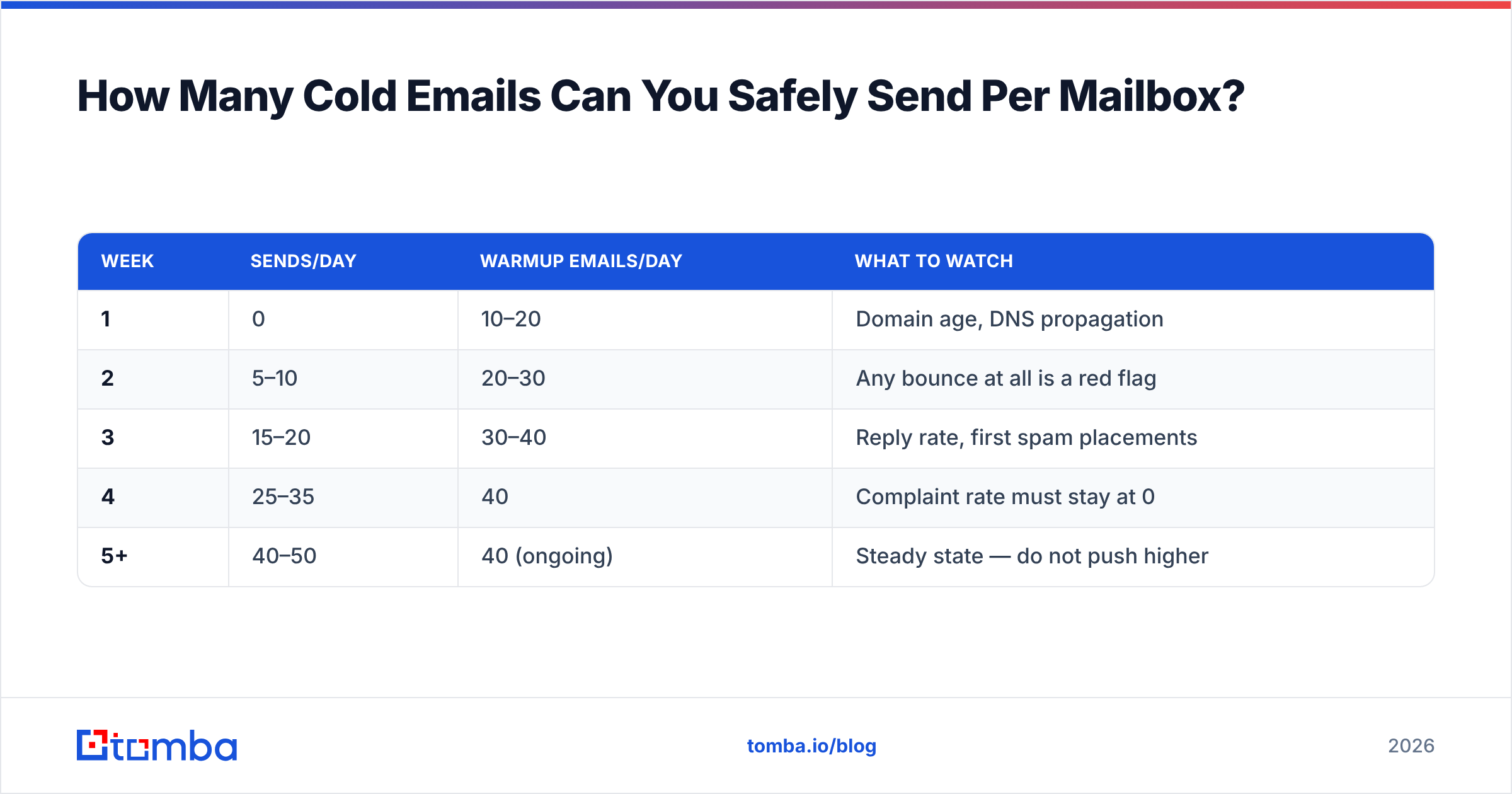
A realistic ramp for a brand-new mailbox looks like this:
| Week | Sends/day | Warmup emails/day | What to watch |
|---|---|---|---|
| 1 | 0 | 10–20 | Domain age, DNS propagation |
| 2 | 5–10 | 20–30 | Any bounce at all is a red flag |
| 3 | 15–20 | 30–40 | Reply rate, first spam placements |
| 4 | 25–35 | 40 | Complaint rate must stay at 0 |
| 5+ | 40–50 | 40 (ongoing) | Steady state — do not push higher |
Skipping this ramp is the single most common cause of a burned domain. A brand-new domain that sends 500 messages on day one has no sending history, so filters have nothing to weigh against the sudden spike. Model your own schedule with a warmup calculator before you commit to a campaign timeline.
How Do You Scale Past 50 Emails a Day?#
Horizontally. You add sending capacity, you never overload a single mailbox.
If you need 500 sends/day, that is roughly 10–12 warmed mailboxes across 3–4 domains, not one mailbox working ten times harder. The math is boring but it is the entire game:
- Buy separate sending domains. Not your primary company domain. Use lookalikes (
getacme.com,acme-hq.com) so a burned domain never touches your corporate mail. - 2–3 mailboxes per domain, maximum. More than that concentrates risk.
- Rotate sends across mailboxes inside your sequencer so no single account spikes.
- Keep warmup running permanently at 30–40/day per mailbox, not just during ramp-up.
- Monitor per-mailbox, not per-campaign. One bad mailbox will drag the domain down and you will not see it in aggregate campaign stats.
The other lever — the one most teams underuse — is sending fewer, better-targeted emails. A 200-contact list where every address is verified and every company genuinely fits your ICP will out-perform a 5,000-contact scrape on every metric that matters, including the ones filters measure. Cutting volume by 90% and raising reply rate by 5x is the same pipeline with a fraction of the deliverability risk.
Which Tools Enforce Volume Limits and Which Don't?#
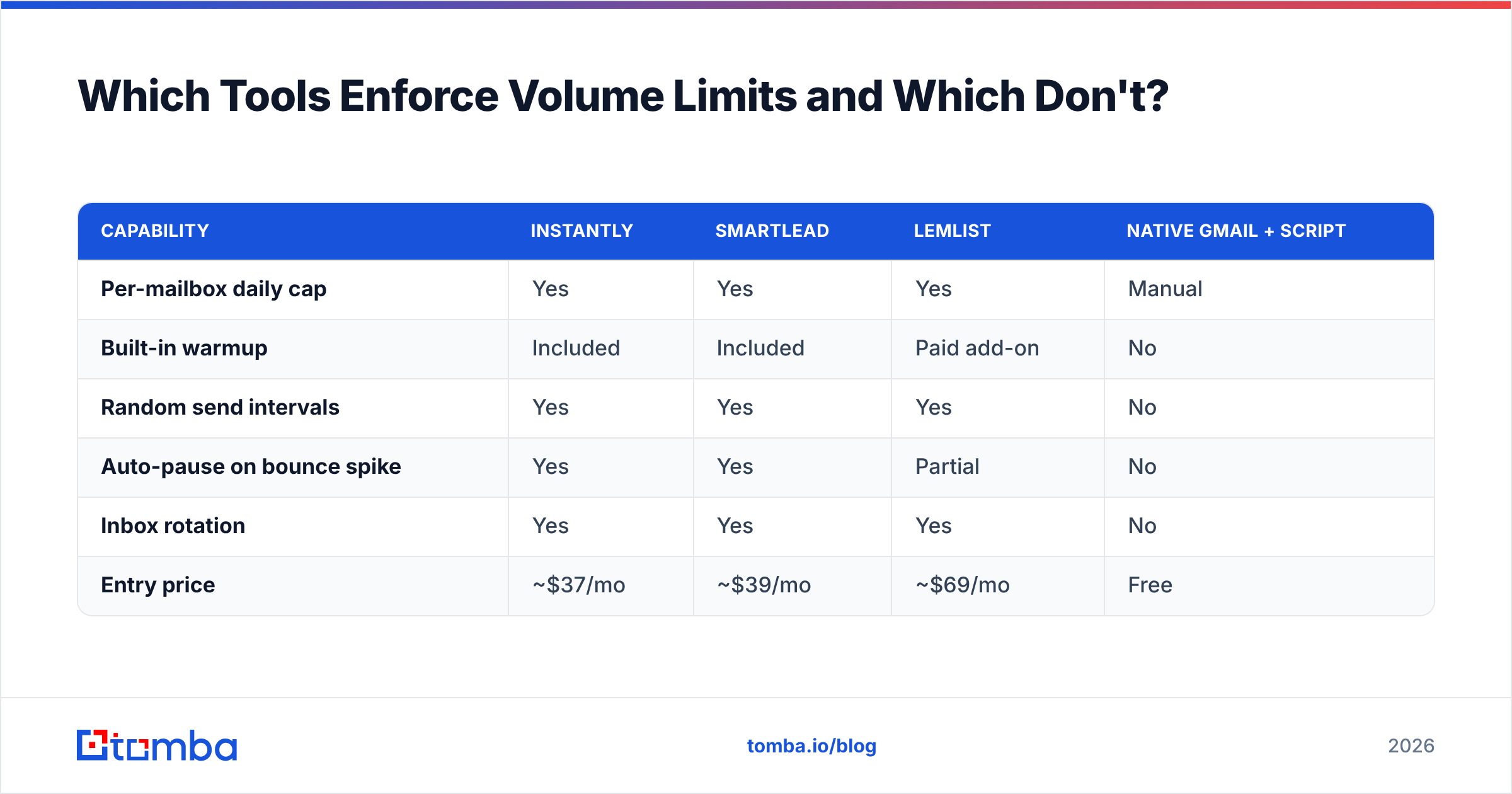
Your sequencer's throttling settings are a safety rail, and they vary a lot. Here is how the common stack pieces compare on the controls that matter for staying under spam thresholds.
| Capability | Instantly | Smartlead | Lemlist | Native Gmail + script |
|---|---|---|---|---|
| Per-mailbox daily cap | Yes | Yes | Yes | Manual |
| Built-in warmup | Included | Included | Paid add-on | No |
| Random send intervals | Yes | Yes | Yes | No |
| Auto-pause on bounce spike | Yes | Yes | Partial | No |
| Inbox rotation | Yes | Yes | Yes | No |
| Entry price | ~$37/mo | ~$39/mo | ~$69/mo | Free |
Notice the last column. Home-rolled scripts on top of the Gmail API are where most self-inflicted spam problems come from — no jitter between sends, no bounce circuit-breaker, no rotation. If you are going to send cold volume, use a sequencer that has these rails, or build them before you send.
Whatever you use for sending, the list quality upstream is a separate problem. Sequencers do not verify addresses; they send whatever you hand them. Independent testing on G2 and vendor benchmarks consistently show a wide spread in email-finder accuracy, and that spread lands directly in your bounce rate.
How Do You Keep Bounce Rate Under the Threshold?#
Bounces are the easiest deliverability problem to solve and the most commonly ignored, because the fix happens before the campaign rather than during it.
Verify every address, every time. Lists decay at roughly 22–30% per year as people change jobs. A list you exported six months ago is not the list you have today. Bulk-run it through a verifier and drop anything not marked deliverable.
Handle catch-all domains deliberately. Catch-all servers accept every address, so a standard verifier returns "unknown" rather than valid or invalid. That is a real chunk of B2B domains. Either exclude them, or use a catch-all verifier that probes deeper before you decide to send.
Stop guessing patterns manually. Generating first.last@company.com and hoping is how you generate unknown-user bounces at scale. Use a domain search to pull the addresses that actually exist on a company's mail server, then verify them.
Suppress across campaigns. Bounced, unsubscribed, and complained addresses must sit in a global suppression list, not a per-campaign one. Re-mailing a previous complainer is the fastest way to a hard block.
Check your domain against blacklists monthly. A single listing on a major RBL will tank delivery even with perfect ratios. Run a blacklist checker on a schedule.
Getting bounce rate from 8% down to 1% typically does more for email deliverability than any subject line rewrite ever will, and it takes an afternoon.
What Should You Monitor After You Start Sending?#
Set these up before campaign one, not after your first blocklist.
- Google Postmaster Tools — the only place you see your actual Gmail-reported spam rate. If your domain sends enough volume to register, this is your source of truth. Free, and covered in Google's documentation.
- Microsoft SNDS — the Outlook/Hotmail equivalent for IP-level reputation.
- Per-mailbox bounce and reply rates in your sequencer, checked weekly.
- Seed-list inbox placement tests — send to a set of test accounts across Gmail, Outlook, and a corporate domain, and check where you actually landed. Open rates lie; placement tests do not.
- Unsubscribe rate — a rising unsubscribe rate is an early warning that complaints are coming next.
The pattern to watch for is not a cliff. Reputation degrades gradually: open rates slide from 45% to 30% to 18% over three weeks while your volume stays flat. That slide is filters progressively downgrading you. Catch it at 30% and you can pull volume back and recover. Catch it at 8% and you are rebuilding the domain.
So What's the Actual Number?#
Assemble the pieces:
- Per mailbox, per day: 30–50 cold emails once fully warmed. Zero on day one.
- Complaint rate: stay under 0.1%, never exceed 0.3%.
- Bounce rate: stay under 2%, never exceed 5%.
- Scaling: add mailboxes and domains, not volume per mailbox.
- The real constraint: list quality, not send count.
The question "how many emails can you send before considered spam" has the same answer as "how fast can you drive before you crash" — it depends entirely on the road, the car, and whether anyone is watching. Send 40 verified, relevant, well-targeted emails a day from a warmed domain and you can do it indefinitely. Send 400 scraped guesses and you will not make it through the week.
Start With a List That Doesn't Bounce#
Volume limits only matter if the addresses are real. Every invalid address you send to is a bounce you did not need, and bounces are what filters weight most heavily on a young domain.
Tomba's Email Finder returns verified professional addresses with a confidence score attached, so you know what you are sending to before you send it — and the built-in verifier and catch-all checks handle the addresses that trip up standard tools. The free tier covers 25 searches a month to test accuracy against your own known contacts; paid plans start at $49/month for Starter, with Growth at $99/month for teams running multiple domains. Full Tomba pricing is public, and the Tomba API plugs verification directly into your sequencer so nothing unverified ever reaches a send queue.
Fix the list first. The volume question gets much easier after that.
Related guides#
Ready to find emails that actually work?
Join 150,000+ professionals who stopped guessing and started sending. Free credits on signup — no credit card required.
Get the Tomba newsletter
Practical outbound tactics and product updates — once every two weeks.
About the author