How Many Emails Can You Send Before Considered Spam Gmail
Gmail's hard cap is 500 or 2,000 messages a day depending on your plan — but you get filtered as spam long before that. Here are the real thresholds, the warm-up ramps, and the numbers Google actually watches.
TL;DR
- The short answer to how many emails can you send before considered spam Gmail: a free account caps you at 500 recipients per rolling 24 hours. Google Workspace raises that to 2,000 per day on the web. Those are hard limits, not spam thresholds.
- You will land in spam long before you hit either cap. Google's filters react to complaint rate, bounce rate, engagement, and authentication — not raw volume.
- The number that actually matters is spam complaint rate below 0.30%, ideally under 0.10%, measured in Google Postmaster Tools.
- Send 5,000+ messages a day to Gmail addresses and you are officially a "bulk sender," which triggers mandatory SPF, DKIM, DMARC, and one-click unsubscribe requirements.
- For cold outreach, the practical safe ceiling is 30–50 emails per inbox per day after a 4–6 week warm-up — regardless of what your plan technically allows.
Most people asking how many emails can you send before considered spam Gmail want a single number. Google gives you two — 500 and 2,000. Neither one decides whether your mail lands in the inbox.
The hard cap is a rate limit. The spam label is a reputation judgment. You can blow past the first without tripping the second. You can also trip the second at 40 emails a day if your list is dirty and your domain is unauthenticated. This post separates the two, gives you the real thresholds for 2026, and shows you the ramp that keeps a new sending domain alive.
What are Gmail's actual sending limits in 2026?#
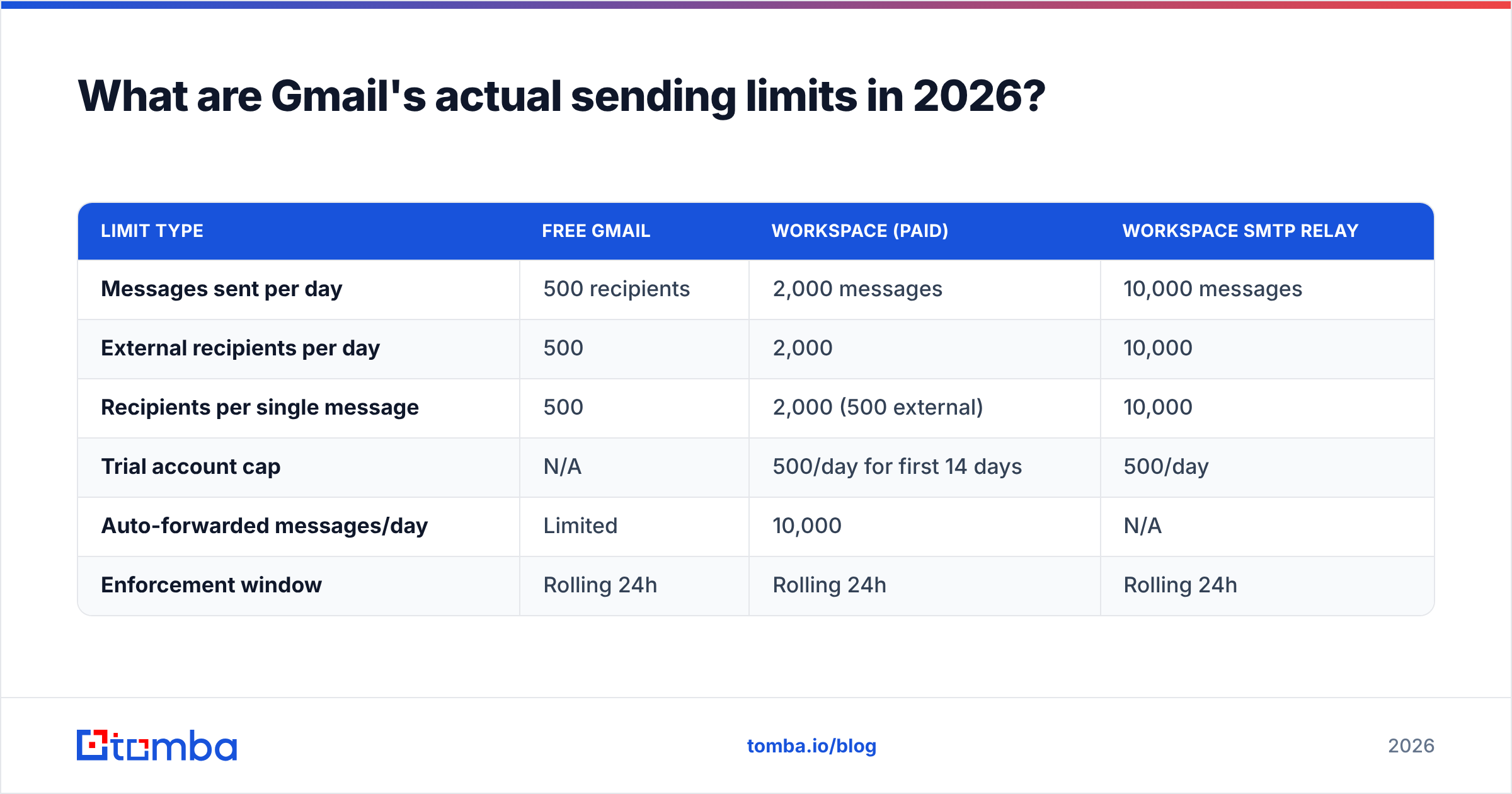
Google publishes two separate limit sets: one for free consumer Gmail, one for Google Workspace. Both run on a rolling 24-hour window, not a calendar day. Burn your quota at 3pm Monday and it frees up gradually through 3pm Tuesday, not at midnight.
| Limit type | Free Gmail | Workspace (paid) | Workspace SMTP relay |
|---|---|---|---|
| Messages sent per day | 500 recipients | 2,000 messages | 10,000 messages |
| External recipients per day | 500 | 2,000 | 10,000 |
| Recipients per single message | 500 | 2,000 (500 external) | 10,000 |
| Trial account cap | N/A | 500/day for first 14 days | 500/day |
| Auto-forwarded messages/day | Limited | 10,000 | N/A |
| Enforcement window | Rolling 24h | Rolling 24h | Rolling 24h |
A few things worth pinning down. A "recipient" counts each address individually — one email to 50 people burns 50 units, not one. Workspace trial accounts and accounts less than a few days old are throttled to 500/day no matter which plan you bought. That catches a lot of teams who spin up a new domain on Friday and try to send 1,500 emails on Monday. And the SMTP relay limit is per-domain, not per-user, so it does not multiply across seats the way people assume.
Google's official Gmail sending limits documentation is the authoritative source and does change. Check it before you build a sending schedule around a number you read in a blog post — including this one.

What happens when you hit the Gmail sending limit?#
Nothing dramatic, and nothing permanent. You get a temporary block — usually a bounce reading "You have reached a limit for sending mail" or a 550 error mentioning unusual activity. Your account stops sending for one to 24 hours, then it recovers on its own.
The block is not a spam flag. Google is not telling other providers you are a spammer. It is a rate limiter, the same way an API returns 429.
Where it becomes a real problem is repetition. Hitting the cap once a quarter is noise. Hitting it three days running, from an account with a 6% bounce rate on a domain with no DMARC record, is a pattern — and patterns are what reputation systems notice. The limit itself is harmless. What you were doing when you hit it usually is not.
"How many emails can you send before considered spam Gmail?" The real answer#
There is no volume number. Gmail's filter has no rule that says "over N emails, flag as spam." It scores each message and each sender against a reputation model, and the inputs are behavioral.
Here are the five signals that decide, ranked by how much damage each one does when it goes wrong:
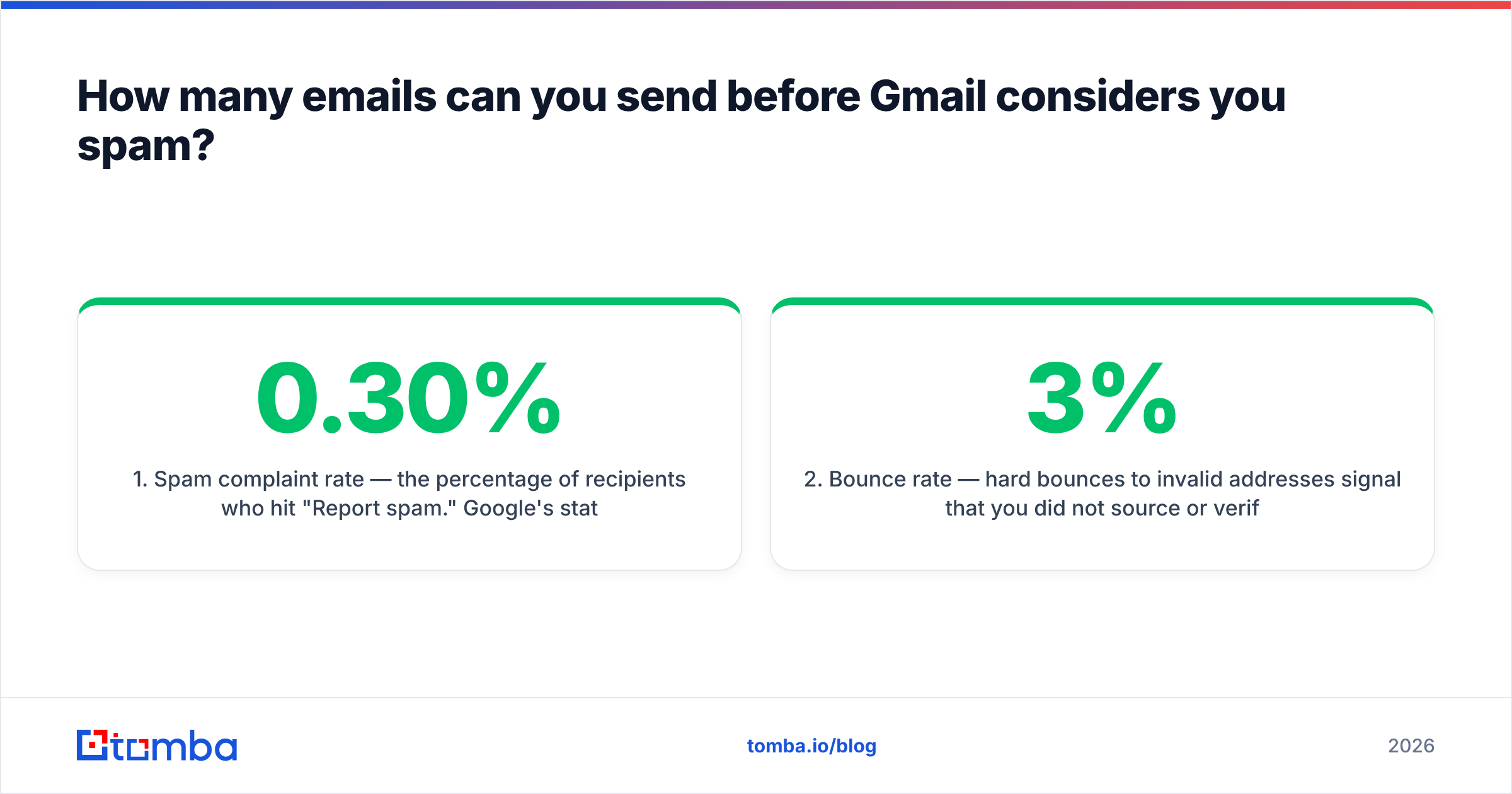
- Spam complaint rate — the percentage of recipients who hit "Report spam." Google's stated threshold for bulk senders is below 0.30%, and their guidance is to aim for under 0.10%. At 0.30% you are already being throttled. Three complaints per thousand emails is enough to break you.
- Bounce rate — hard bounces to invalid addresses signal that you did not source or verify your list. Above roughly 3% you are visibly guessing at addresses; above 5% receiving servers start rejecting your mail outright. This is the single most controllable variable on the list.
Those two are what get people blocked. The next three decide how fast you recover.
- Authentication — SPF, DKIM, and DMARC. Since Google's February 2024 bulk sender rules, missing any of these on a domain sending 5,000+/day to Gmail is a rejection, not a downgrade. Even below that threshold, unauthenticated mail gets scored harder.
- Engagement — opens, replies, "not spam" rescues, and stars are positive. Deletes without reads, ignores, and archive-without-open are negative. A domain that reliably gets replies can send more volume than one that gets silence.
- Ramp shape — how fast your volume grows. Going from 5 emails a day to 400 in a week looks like a compromised account. Going from 5 to 400 over six weeks looks like a growing business.
Notice what is not on that list: total emails sent. A domain sending 1,500 verified, authenticated, replied-to emails a day is in better standing than one sending 60 unverified emails to a scraped list.
Is the 5,000-per-day bulk sender rule a spam threshold?#
It is a compliance threshold, not a spam threshold — but crossing it without preparation reliably produces spam placement.
If you send more than 5,000 messages a day to Gmail addresses, Google classifies you as a bulk sender. That triggers three mandatory requirements: full SPF/DKIM/DMARC authentication on your sending domain, a working one-click unsubscribe header (RFC 8058) on marketing mail, and a spam complaint rate kept under 0.30%. Yahoo adopted effectively identical rules in the same window, so this is now the industry floor rather than a Google quirk.
The count is per-day-to-Gmail, and it is sticky. Once you cross 5,000 in a single day, Google treats you as a bulk sender going forward — you do not get downgraded back after a quiet week. If you run a newsletter and a cold outreach program from the same domain, you can trip this without ever intending to.
Before you go anywhere near that volume, run your sending domain through an SPF checker and confirm your DMARC policy resolves. Google's bulk sender guidelines list the exact record requirements.
How do you warm up a new Gmail or Workspace inbox?#
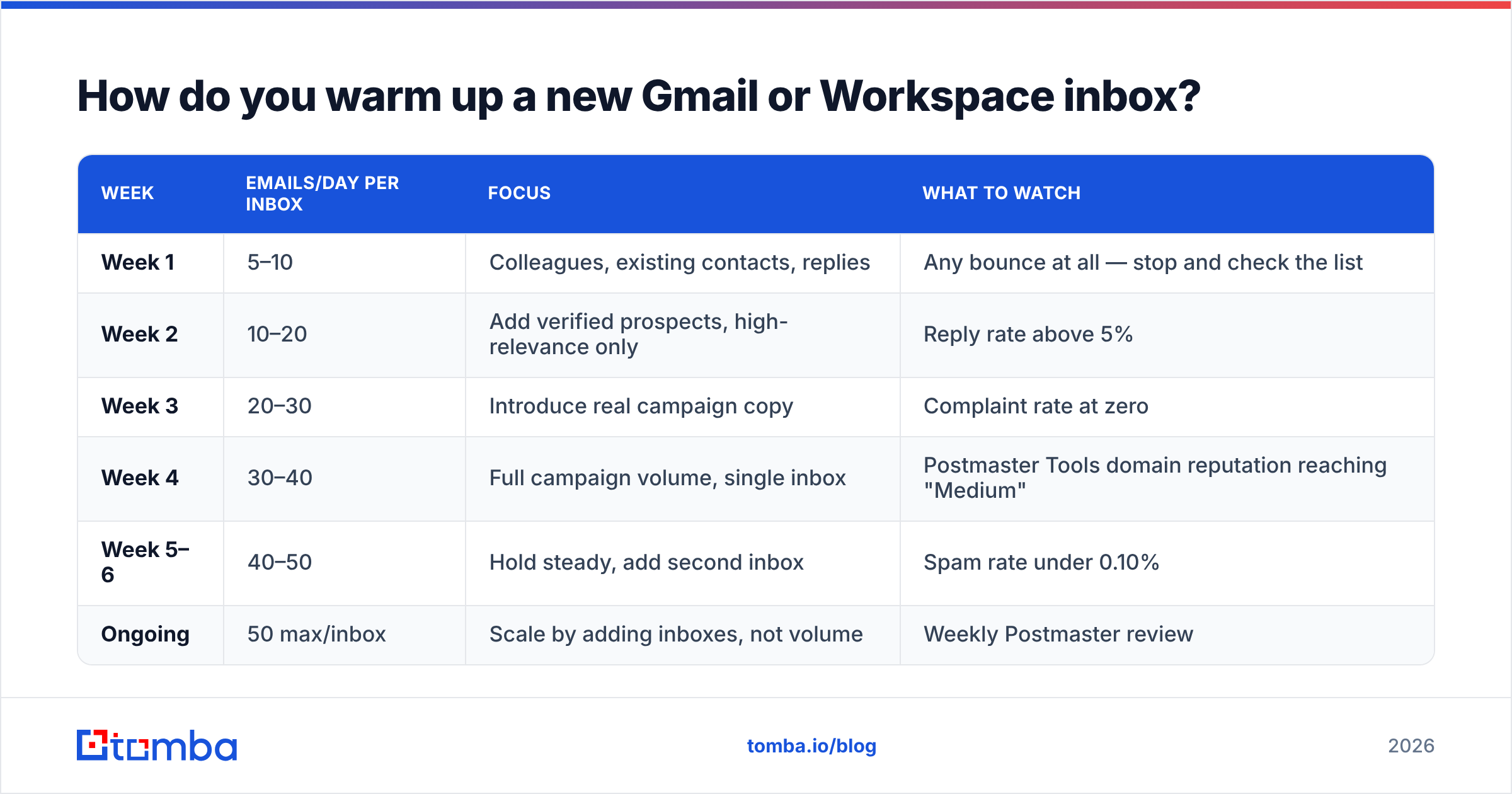
Slowly, and with real replies mixed in. A cold domain has no reputation at all, which Gmail treats as mild suspicion rather than neutrality. The job of warm-up is to build a sending history that looks like a person, not a script.
| Week | Emails/day per inbox | Focus | What to watch |
|---|---|---|---|
| Week 1 | 5–10 | Colleagues, existing contacts, replies | Any bounce at all — stop and check the list |
| Week 2 | 10–20 | Add verified prospects, high-relevance only | Reply rate above 5% |
| Week 3 | 20–30 | Introduce real campaign copy | Complaint rate at zero |
| Week 4 | 30–40 | Full campaign volume, single inbox | Postmaster Tools domain reputation reaching "Medium" |
| Week 5–6 | 40–50 | Hold steady, add second inbox | Spam rate under 0.10% |
| Ongoing | 50 max/inbox | Scale by adding inboxes, not volume | Weekly Postmaster review |
Two rules that people skip. First, warm-up traffic should include genuine two-way conversation. Automated warm-up networks that trade opens between accounts are increasingly detectable, and Google has been discounting them. Second, do not scale a single inbox past ~50/day for cold outreach, even when the technical cap says 2,000. Scale horizontally instead: five inboxes at 40/day is far safer than one inbox at 200/day, because the risk is spread out and one bad campaign does not take down your primary domain.
If you want to model the ramp against a target volume and start date, the email warmup calculator will give you a week-by-week schedule instead of guesswork.
Why does bounce rate matter more than send volume?#
Because bounces are the one signal that proves intent. Everything else is ambiguous — a complaint might be a recipient having a bad day, low engagement might be a bad subject line. But a hard bounce to jsmith@company.com when the real address is john.smith@company.com tells the receiving server exactly one thing: you guessed.

Guessing at addresses with a permutation pattern and firing the whole set is the fastest way to get a domain burned. Ten percent bounce rate on a 200-email campaign is 20 rejections in an hour from a domain with no history. That is not a spam filter decision — that is an outright block at multiple providers simultaneously.
The fix is boring and it works: verify before you send. Run every list through an email verifier and drop anything that comes back invalid or risky. If your list came from a scrape, an export, or a purchase, treat every address as unverified regardless of what the source claimed. For domains that accept everything at the SMTP layer, a catch-all verifier gives you a confidence score instead of a useless "accepted" response.
Getting bounce rate from 8% to under 2% typically does more for inbox placement than any subject-line change, sending-time experiment, or copy rewrite you will run this quarter.
How do you monitor whether Gmail already thinks you're spam?#
Set up Google Postmaster Tools on your sending domain. It is free, it takes a DNS TXT record to verify, and it is the only place you can see what Gmail actually thinks of you rather than inferring it from open rates.
What to check weekly:
- Spam rate — the headline number. Under 0.10% is healthy, 0.10–0.30% is a warning, above 0.30% means you are being actively filtered.
- Domain reputation — High, Medium, Low, or Bad. Anything below High means a meaningful share of your mail is going to the spam folder.
- IP reputation — matters if you send on dedicated IPs; less relevant on shared Workspace infrastructure.
- Authentication pass rates — SPF, DKIM, and DMARC should each sit at or near 100%. Anything lower means a misconfigured sending path somewhere.
- Delivery errors — spikes here usually correlate with a specific campaign or list segment you can isolate and kill.
Postmaster data lags by a day or two and needs a few hundred daily messages to populate, so it will not help a five-email-a-day sender. Once you are past warm-up, it becomes the primary dashboard. Pair it with a blacklist checker run monthly to catch listings that Postmaster does not surface.
What's a safe daily sending plan for cold outreach?#
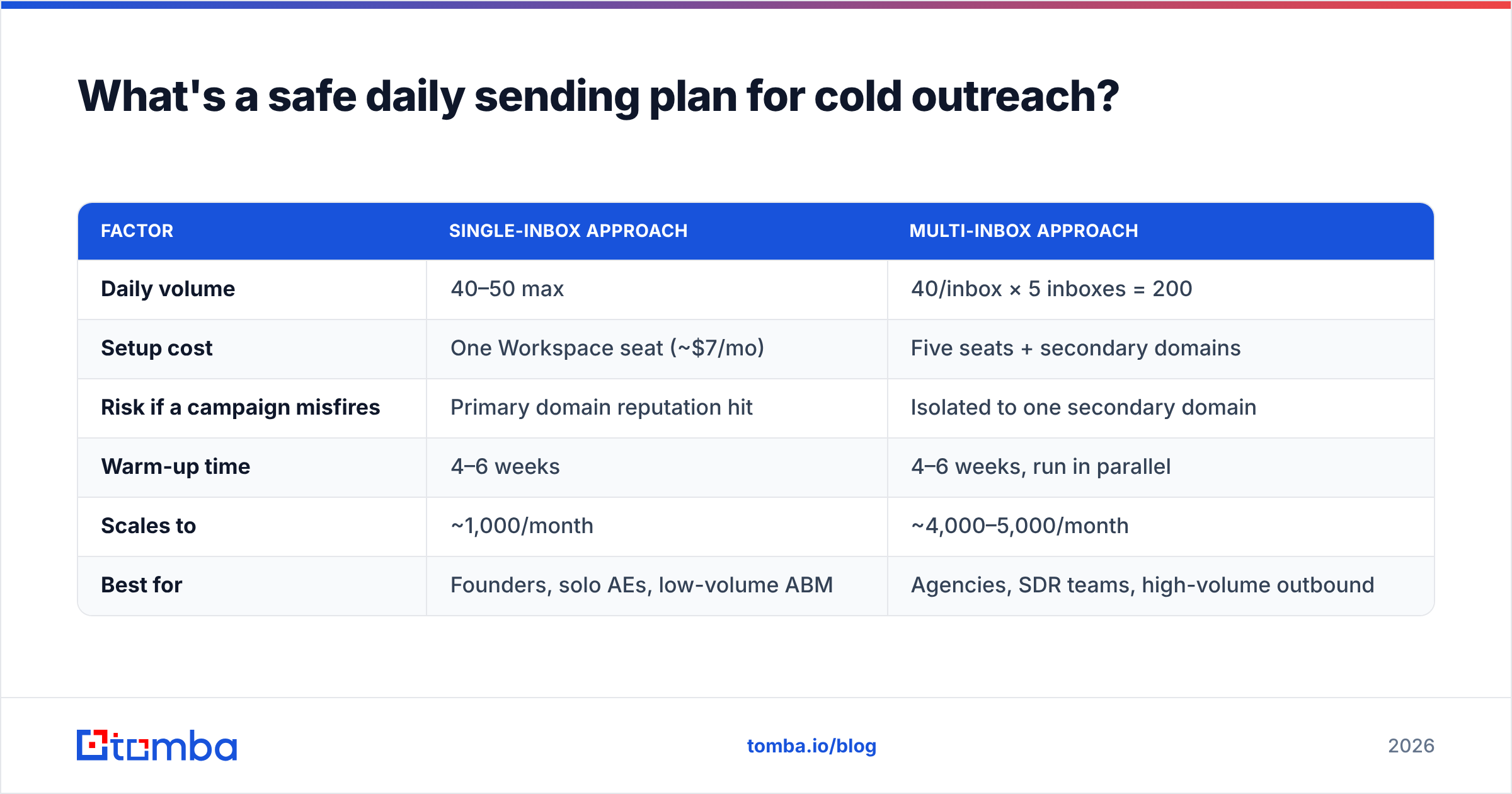
Here is the version that survives contact with a real campaign, comparing the two common approaches:
| Factor | Single-inbox approach | Multi-inbox approach |
|---|---|---|
| Daily volume | 40–50 max | 40/inbox × 5 inboxes = 200 |
| Setup cost | One Workspace seat (~$7/mo) | Five seats + secondary domains |
| Risk if a campaign misfires | Primary domain reputation hit | Isolated to one secondary domain |
| Warm-up time | 4–6 weeks | 4–6 weeks, run in parallel |
| Scales to | ~1,000/month | ~4,000–5,000/month |
| Best for | Founders, solo AEs, low-volume ABM | Agencies, SDR teams, high-volume outbound |
The multi-inbox setup is standard for a reason: it separates your primary domain — the one your invoices and support mail go from — from your outbound experiments. Buy lookalike domains, warm them independently, and never send cold mail from the domain your customers already trust.
Whichever you pick, the discipline is the same. Verify every address before it enters a sequence. Keep bounce rate under 2%. Watch Postmaster weekly. Ramp by adding inboxes rather than pushing any single one harder. And treat the 500/2,000 caps as ceilings you should never approach, not targets to hit.
The short answer#
So, how many emails can you send before considered spam Gmail steps in? You can technically send 500 a day from free Gmail and 2,000 from Workspace. In practice you get treated as spam somewhere between 30 and 50 cold emails a day if your list is unverified, your domain is unauthenticated, and your ramp was steep. Get all three right and you can comfortably send several hundred a day.
Volume is the least important variable in the equation. List quality is the most important one, and it is the only one entirely under your control.
Start there. Use the Tomba Email Finder to source verified professional addresses by domain, name, or company instead of permutating guesses — each result comes back with a confidence score and its source, so you know what you are sending to before it costs you a domain. The free tier includes 25 searches a month, and paid plans start at $49/mo; full Tomba pricing is on the site. Fix the list, and the sending limits stop being the thing you worry about.
Related guides#
Ready to find emails that actually work?
Join 150,000+ professionals who stopped guessing and started sending. Free credits on signup — no credit card required.
Get the Tomba newsletter
Practical outbound tactics and product updates — once every two weeks.
About the author