How Many Emails Is Too Many To Send? Safe Daily Limits
The real cap on cold email volume is not a number your ESP publishes — it is the point where bounce and spam rates flip your domain reputation. Here is how to find yours.
TL;DR
- There is no universal number. The practical ceiling is 20–50 cold emails per inbox per day on a warmed Google Workspace or Microsoft 365 mailbox — scale by adding inboxes, not by raising per-inbox volume.
- Google Workspace caps external recipients at 2,000/day and Microsoft 365 at 10,000/day, but those are abuse limits, not safe limits. You will get filtered long before you hit them.
- Volume rarely kills a domain on its own. Bounce rate above 3% and spam complaints above 0.3% do — and both scale with volume, which is why volume gets blamed.
- A new domain needs 3–5 weeks of warmup before it should see real prospects. Ramp roughly 5 → 10 → 20 → 35 → 50 per week.
- The cheapest way to raise your ceiling is list hygiene: verify every address before send, and your bounce rate stops being the thing that caps you.
What does "too many emails" actually mean?#
Too many is the volume at which your reply rate stops rising and your placement rate starts falling. That is it. It is a per-domain, per-mailbox, per-list-quality number, not an industry constant.
Two teams can send the same 1,000 emails on the same day and get opposite outcomes. Team A sends from six warmed inboxes across two secondary domains, to a list verified 48 hours earlier, with 4% bounces. Team B sends 1,000 from one 3-week-old mailbox on their primary domain to a scraped list with 18% bounces. Team A lands in inbox. Team B lands in spam and takes the company's transactional mail down with it.
So when you ask how many emails is too many to send, the mailbox providers are not counting your sends in isolation. They are scoring your sends against engagement. Gmail's own sender guidelines make this explicit: bulk senders must keep spam complaint rates below 0.3% and authenticate with SPF, DKIM, and DMARC. Nothing in that document caps you at a volume — it caps you at a quality level, and volume is just the multiplier on your quality.
Wait — that syntax is wrong. Here it is properly:
What are the hard sending limits by provider?#
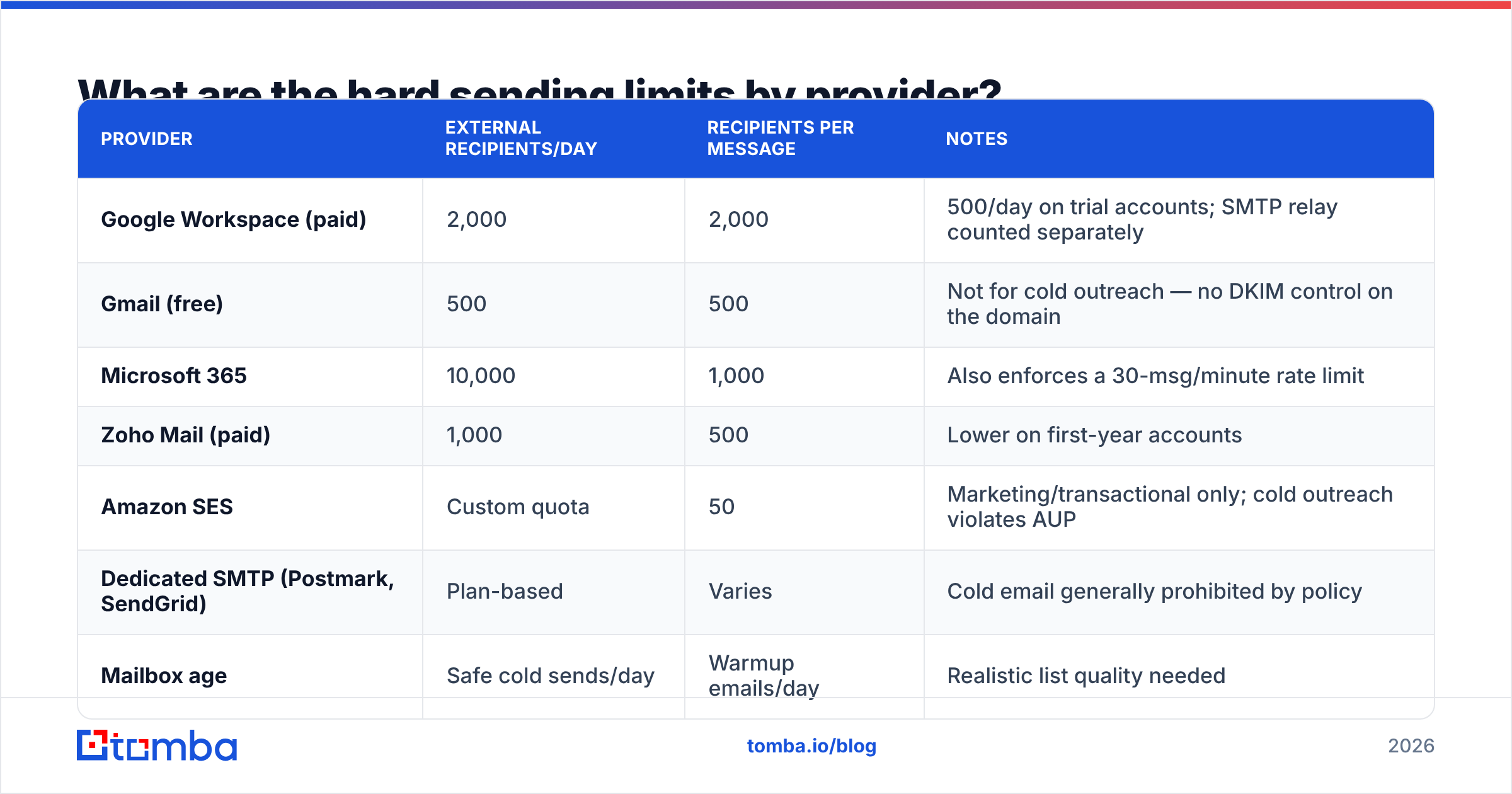
These are the published ceilings. Treat them as the point where your account gets suspended, not the point where your campaign works.
| Provider | External recipients/day | Recipients per message | Notes |
|---|---|---|---|
| Google Workspace (paid) | 2,000 | 2,000 | 500/day on trial accounts; SMTP relay counted separately |
| Gmail (free) | 500 | 500 | Not for cold outreach — no DKIM control on the domain |
| Microsoft 365 | 10,000 | 1,000 | Also enforces a 30-msg/minute rate limit |
| Zoho Mail (paid) | 1,000 | 500 | Lower on first-year accounts |
| Amazon SES | Custom quota | 50 | Marketing/transactional only; cold outreach violates AUP |
| Dedicated SMTP (Postmark, SendGrid) | Plan-based | Varies | Cold email generally prohibited by policy |
Now the number that actually matters — the safe operating range for cold outreach, which sits an order of magnitude below every row above:
| Mailbox age | Safe cold sends/day | Warmup emails/day | Realistic list quality needed |
|---|---|---|---|
| Week 1 | 5 | 10–15 | 100% verified, hand-picked |
| Week 2 | 10 | 20 | 100% verified |
| Week 3 | 20 | 25 | <2% bounce |
| Week 4 | 35 | 30 | <2% bounce |
| Week 5+ | 40–50 | 20–30 (maintenance) | <3% bounce |
Five inboxes at week-5 maturity gets you 200–250 cold emails per day. Twenty inboxes gets you 1,000. That is how every credible outbound team scales: horizontally across mailboxes, never vertically inside one.
Which metrics actually decide your ceiling?#
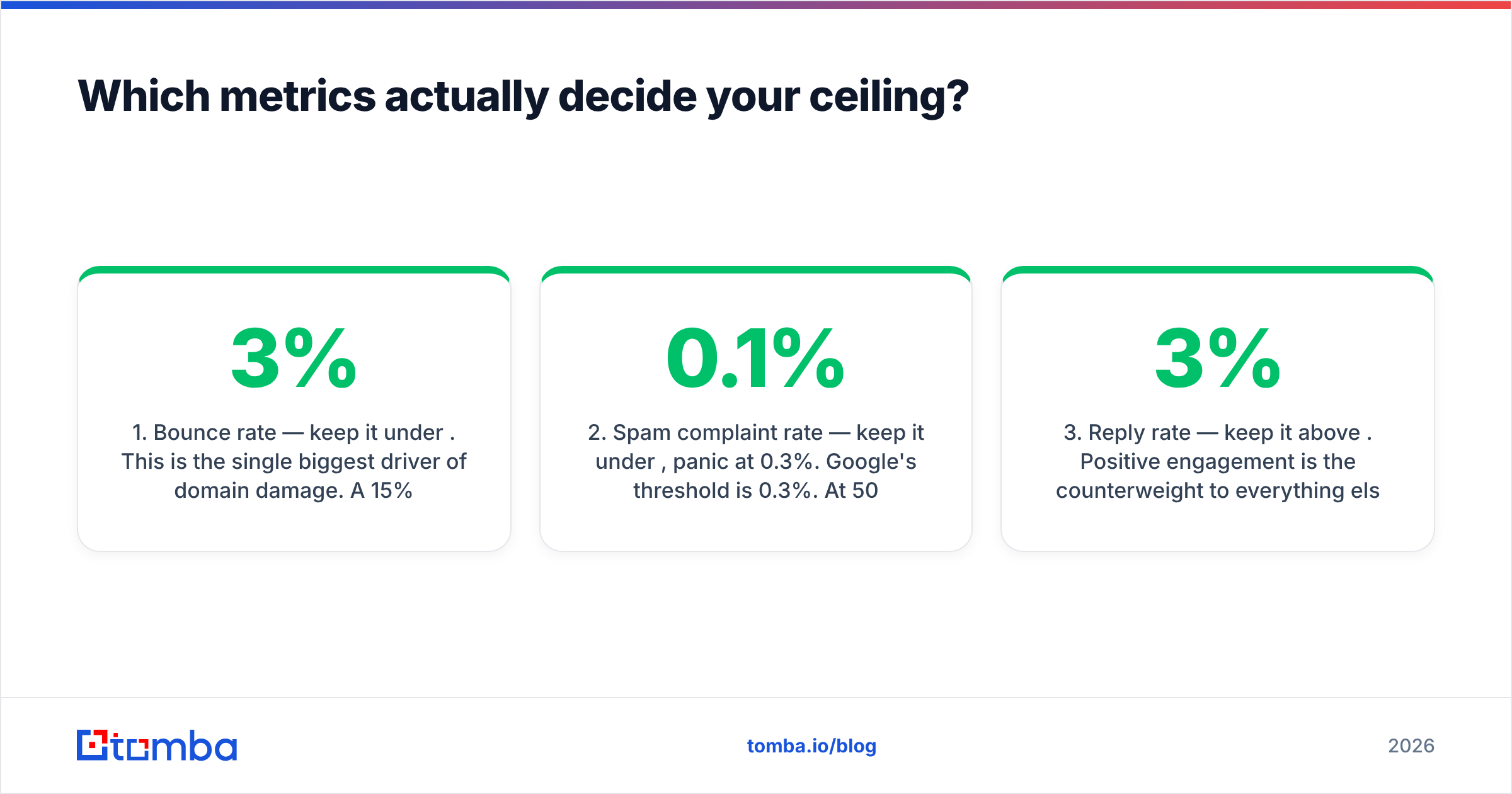
Three numbers set your real cap. Watch them weekly and you will never have to guess at volume again.
- Bounce rate — keep it under 3%. This is the single biggest driver of domain damage. A 15% bounce rate on 100 emails is 15 hard failures a day, and mailbox providers read that as list-buying behavior. Run every address through an email verifier before it enters a sequence. Verified lists routinely land under 2%.
- Spam complaint rate — keep it under 0.1%, panic at 0.3%. Google's threshold is 0.3%. At 50 sends/day, one complaint per week already puts you at 0.4%. Relevance is the only fix; volume just makes bad relevance arrive faster.
- Reply rate — keep it above 3%. Positive engagement is the counterweight to everything else. A campaign pulling 8% replies can survive volume that would sink a 0.5% campaign. If replies fall below 2%, cut volume rather than adding inboxes.
- Sequence depth — cap at 3–4 touches. Each additional follow-up multiplies total sends without multiplying prospects. A 4-step sequence to 250 prospects is 1,000 emails. Count sequence steps in your daily math or you will silently double your volume.
- Sending window — spread over 6–8 hours. Fifty emails fired in three minutes looks like a script. Fifty spread across a workday with randomized intervals looks like a person.
- Domain separation — never send cold from your primary. Buy
getacme.comandacme-hq.comfor outbound and keepacme.comfor transactional and customer mail.
How do you calculate your own safe number?#
Work backwards from the pipeline target, not forwards from your ESP's limit.
Say you need 10 meetings a month. At a 4% reply rate and a 40% reply-to-meeting conversion, that is 625 prospects touched per month. With a 3-step sequence, that is 1,875 emails/month, or roughly 94 emails per working day. At 45 sends per warmed inbox, you need two to three mailboxes — not a 2,000/day blast.
Notice what happened: the required volume dropped out of the funnel math, and the number was small. Most teams that "need" 1,000 sends a day need a better list and better copy, because their reply rate is 0.6% instead of 4%. Fixing reply rate is roughly seven times cheaper than buying seven times the infrastructure.
Here is the audit sequence when you suspect you are over your ceiling:
- Pull last 30 days: total sent, hard bounces, complaints, replies.
- If bounce > 3%, stop and re-verify the entire list. Do not touch volume yet.
- If complaints > 0.2%, cut volume 50% and rewrite the first line of your opener.
- If both are clean and replies are above 3%, add one inbox and re-measure in 14 days.
- Never change two variables in the same 14-day window.
For the mechanics of ramping a fresh mailbox, run the numbers through a warmup calculator before you commit to a schedule — the compounding is easy to get wrong by eye.
Is high volume ever the right strategy?#
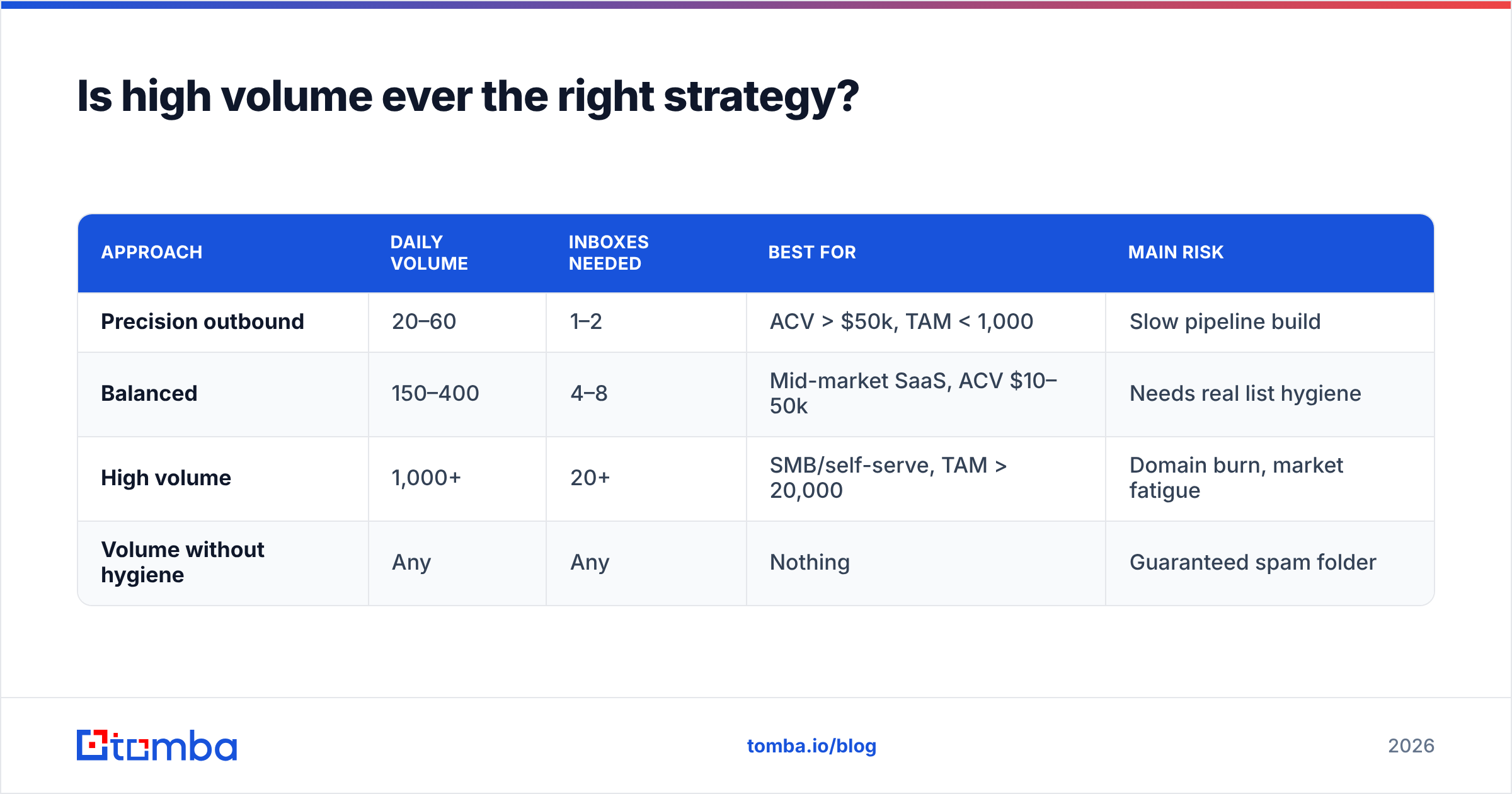
Sometimes, with conditions. High-volume outbound works when your total addressable market is genuinely large (tens of thousands of accounts), your offer is simple enough to qualify in one sentence, and your infrastructure is built for it — meaning many domains, many mailboxes, and automated list hygiene.
It fails when TAM is small. If there are 800 companies in the world that can buy your product, sending 1,000 emails a day means you burn your entire market in a week and have nothing left for a second attempt. Low volume with deep research beats high volume with shallow research in every market under about 5,000 accounts.
The middle path most teams land on: 150–400 sends/day across 4–8 inboxes on 2–3 secondary domains, with a verified list and a 3-touch sequence. That is enough to build predictable pipeline and small enough to keep email deliverability boring.
| Approach | Daily volume | Inboxes needed | Best for | Main risk |
|---|---|---|---|---|
| Precision outbound | 20–60 | 1–2 | ACV > $50k, TAM < 1,000 | Slow pipeline build |
| Balanced | 150–400 | 4–8 | Mid-market SaaS, ACV $10–50k | Needs real list hygiene |
| High volume | 1,000+ | 20+ | SMB/self-serve, TAM > 20,000 | Domain burn, market fatigue |
| Volume without hygiene | Any | Any | Nothing | Guaranteed spam folder |

What happens when you cross the line?#
The damage is progressive, and the early stages are invisible unless you are watching.
Stage 1 — silent filtering. Open rates drop from 45% to 22%. Nothing bounces, nothing errors. Your mail is going to Promotions or Spam. Most teams misread this as "bad subject lines" and rewrite copy, which does nothing.
Stage 2 — provider-specific blocks. Gmail keeps accepting, Outlook starts rejecting with a 550 error referencing a block list. You will see this as a sudden regional or industry-specific drop in engagement.
Stage 3 — blocklist entry. Spamhaus, SORBS, or Barracuda lists your sending IP or domain. Check with a blacklist checker — if you are on one, delisting takes days to weeks and requires the underlying behavior to have stopped first.
Stage 4 — domain reputation collapse. Google Postmaster Tools shows your domain reputation as Low or Bad. This is the expensive one. Recovery takes 4–8 weeks of near-zero volume, and if you were sending from your primary domain, your invoices and password resets are now in spam too.
Set up Google Postmaster Tools on day one of any outbound program. It is free, it takes fifteen minutes, and it is the only direct view you get into how Gmail actually scores you. Pair it with a spam checker run on each new template before it goes live.
How does list quality change the math?#
Enormously — it is the biggest lever you have, and the only one that raises your ceiling without adding cost per send.
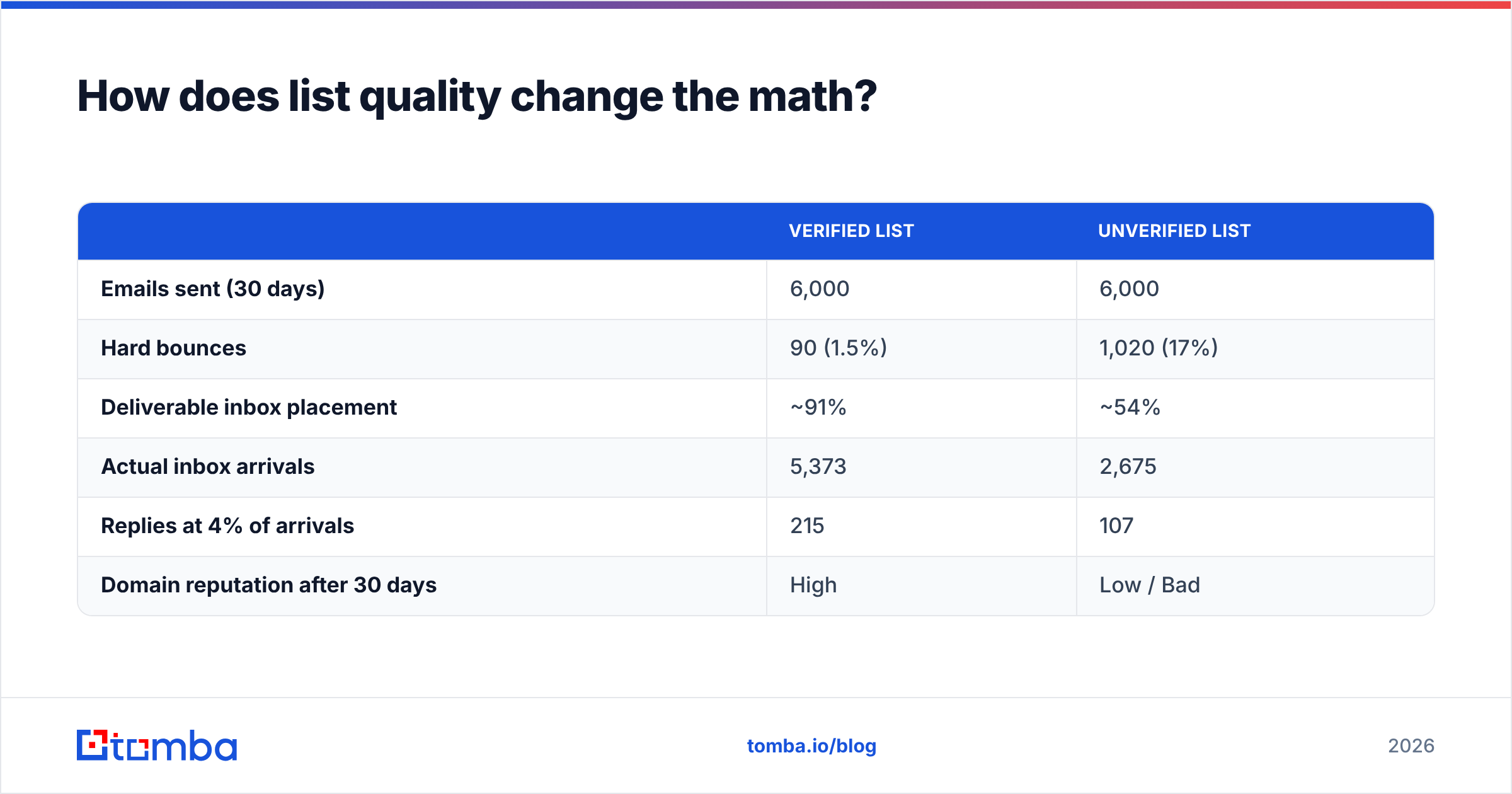
Compare two teams sending 200 emails a day for a month:
| Verified list | Unverified list | |
|---|---|---|
| Emails sent (30 days) | 6,000 | 6,000 |
| Hard bounces | 90 (1.5%) | 1,020 (17%) |
| Deliverable inbox placement | ~91% | ~54% |
| Actual inbox arrivals | 5,373 | 2,675 |
| Replies at 4% of arrivals | 215 | 107 |
| Domain reputation after 30 days | High | Low / Bad |
Same volume, same copy, half the results, and one of the two domains needs a two-month recovery. The unverified team's real problem was never "how many emails is too many to send" — it was that 17% of their sends were never going to arrive at all.
This is why the sequencing matters: build the list with a domain search or bulk email finder, verify before import, then set volume. Teams that set volume first and clean later spend their first quarter recovering. Peers in this space — including data providers like BookYourData, which sells pre-verified B2B lists — have converged on the same conclusion: verification before send is non-negotiable at any volume.
One more thing most teams miss: catch-all domains. Roughly 15–20% of B2B domains accept everything at the SMTP layer, so a standard verifier returns "unknown" and you either guess or drop the contact. A dedicated catch-all verifier resolves a large share of those, which means you keep sendable contacts you would otherwise discard — raising list size without raising risk.
What is the practical checklist before you scale volume?#
Run this before adding a single send to your daily total.
- Authentication done. SPF, DKIM, and DMARC all pass. Check SPF with an SPF checker; a broken record caps you at any volume.
- Secondary domain in use. Primary domain reserved for transactional and customer mail, forever.
- Warmup running. Minimum 3 weeks before the first real prospect, maintenance warmup continuing after.
- List verified within 30 days. Contact data decays about 2.1% per month according to Gartner research on B2B data quality — a six-month-old list is meaningfully worse than a fresh one.
- Sequence capped at 3–4 steps. Multiply prospects by steps to get your true daily volume.
- Postmaster Tools connected. Watch domain reputation weekly, not after something breaks.
- One variable at a time. Change volume or copy or list source — never two in the same window.
Hit all seven and you can raise per-inbox volume 20% every two weeks until reply rate or placement moves. Miss any of them and adding volume just makes the failure arrive sooner.
So what is the actual number?#
40–50 cold emails per warmed inbox per day, spread across a workday, to a list verified in the last 30 days, in a sequence of no more than four touches. Multiply by mailboxes for your total. Everything above that is infrastructure, not permission.
The number that breaks you is not on a provider's documentation page. It is the point where your bounce rate crosses 3% or your complaint rate crosses 0.3% — and both of those are functions of who you are emailing, not how many.
If your list is the weak link (and for most teams it is), start there. Tomba's Email Finder pulls verified professional addresses by domain, name, or company, with confidence scoring on every result, so bounce rate stops being the thing that caps your volume. The free tier gives you 25 searches a month to test list quality against your current source; paid plans start at $49/mo on Starter and $99/mo on Growth — see Tomba pricing for the full breakdown. Clean the list first, then scale the sends. In that order, your ceiling goes up instead of your domain going down.
Related guides#
Ready to find emails that actually work?
Join 150,000+ professionals who stopped guessing and started sending. Free credits on signup — no credit card required.
Get the Tomba newsletter
Practical outbound tactics and product updates — once every two weeks.
About the author