How To Ask For A Meeting Via Email: A 2026 Playbook
Most meeting requests die because they ask for too much, too vaguely, too early. Here is the structure, timing, and follow-up cadence that actually gets a calendar hold from a cold prospect.
TL;DR
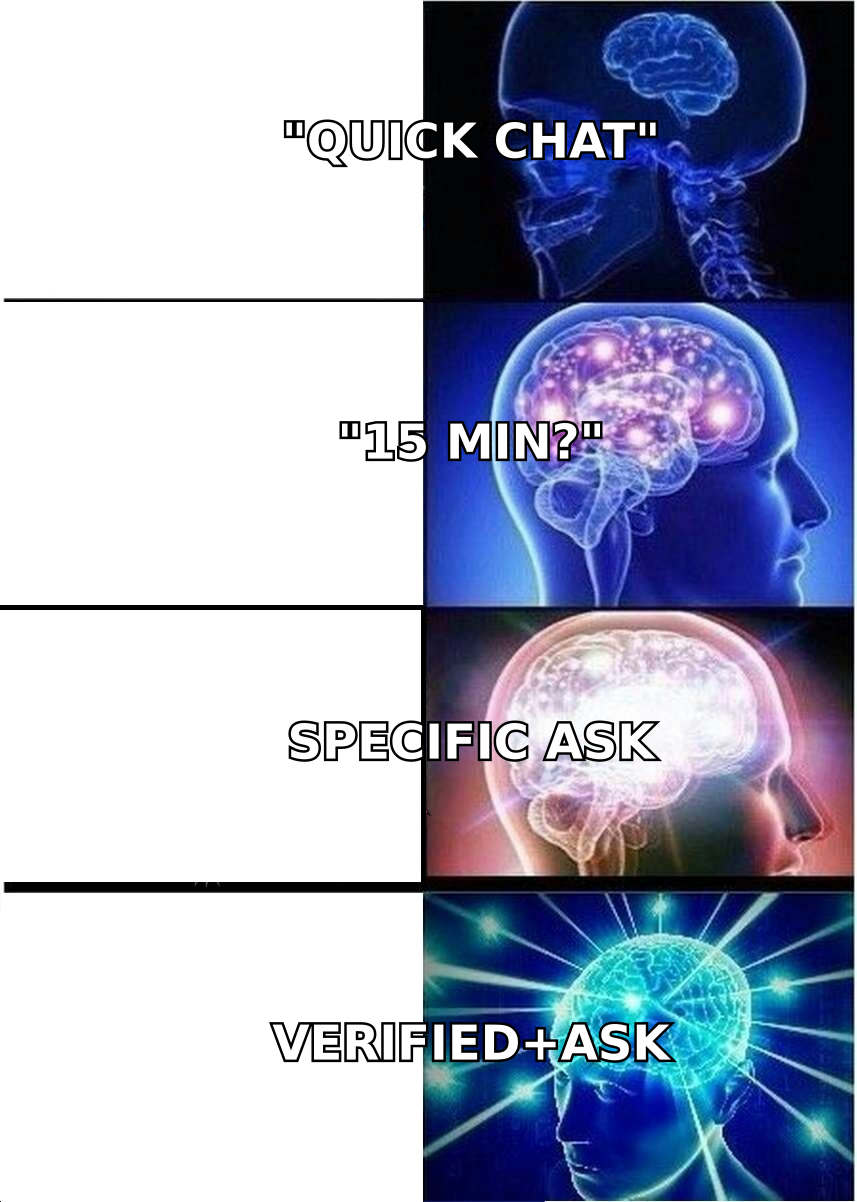
- The meeting request is not the hard part — the four sentences before it are. A vague "got 15 minutes?" fails because it asks the reader to invent a reason for the call.
- Use a five-part structure: relevance trigger, one-line observation, specific value claim, low-friction ask, easy exit. Under 120 words total.
- Ask for a decision, not a slot. "Worth a 15-minute look at how X handles Y?" outperforms "Are you free Tuesday at 2?" on cold sends, and reverses on warm ones.
- Follow-up wins more meetings than the first email. Three to four touches over 12 days, each adding something new, roughly doubles booked calls versus a single send.
- None of this works on a bad address. Verify before you send — a 6% bounce rate on a cold domain wrecks the inbox placement that the rest of the sequence depends on.
Why do most meeting request emails get ignored?#
Because they transfer work to the reader. A message that says "I'd love to connect and explore synergies — do you have 15 minutes this week?" forces the recipient to do three jobs: figure out who you are, guess what the meeting is about, and decide whether the guess is worth 15 minutes of a day that is already full. Most people resolve that by not replying.
The fix is to do all three jobs for them inside the email. Name yourself in a way that is verifiable, state the meeting's agenda in one clause, and make the yes cost as little as possible. When you do that, the reply rate stops depending on how charming your writing is and starts depending on whether the premise is true.
There is a second, quieter reason: the email never landed. Cold outreach that goes to unverified addresses generates bounces, and bounces above roughly 3-5% start suppressing placement for the entire domain. You can write the best meeting request in your category and still see zero replies because your messages are sorting into Promotions or nowhere at all. Treat list hygiene as part of the copy problem, not a separate ops chore. If you're new to the mechanics, the email deliverability primer covers what actually moves placement.
What is the five-part structure of a meeting request email?#
Every meeting request that works has the same skeleton, whether it's 60 words or 120. The parts, in order:
- Relevance trigger — the specific, checkable reason you are writing this person this week. A funding round, a job posting, a product launch, a podcast appearance, a change in their tech stack. Not "I saw your company is growing."
- One-line observation — what the trigger implies about their situation. This is where you demonstrate you understand the job, not just that you can read a news feed.
- Specific value claim — a concrete, bounded thing you can show them. "How three other Series B fintechs cut onboarding drop-off by ~20%" beats "how we help companies like yours."
- Low-friction ask — a single question with a binary answer. One ask, one question mark, end of email.
- Easy exit — an explicit permission to say no. "If this isn't a priority right now, just say 'not now' and I'll close the loop." Counterintuitively, this raises replies because it lowers the perceived cost of engaging.
Cut any part and the email gets weaker in a predictable way. No trigger, and it reads as a blast. No value claim, and the ask is unearned. No exit, and cautious readers stay silent rather than write a rejection.
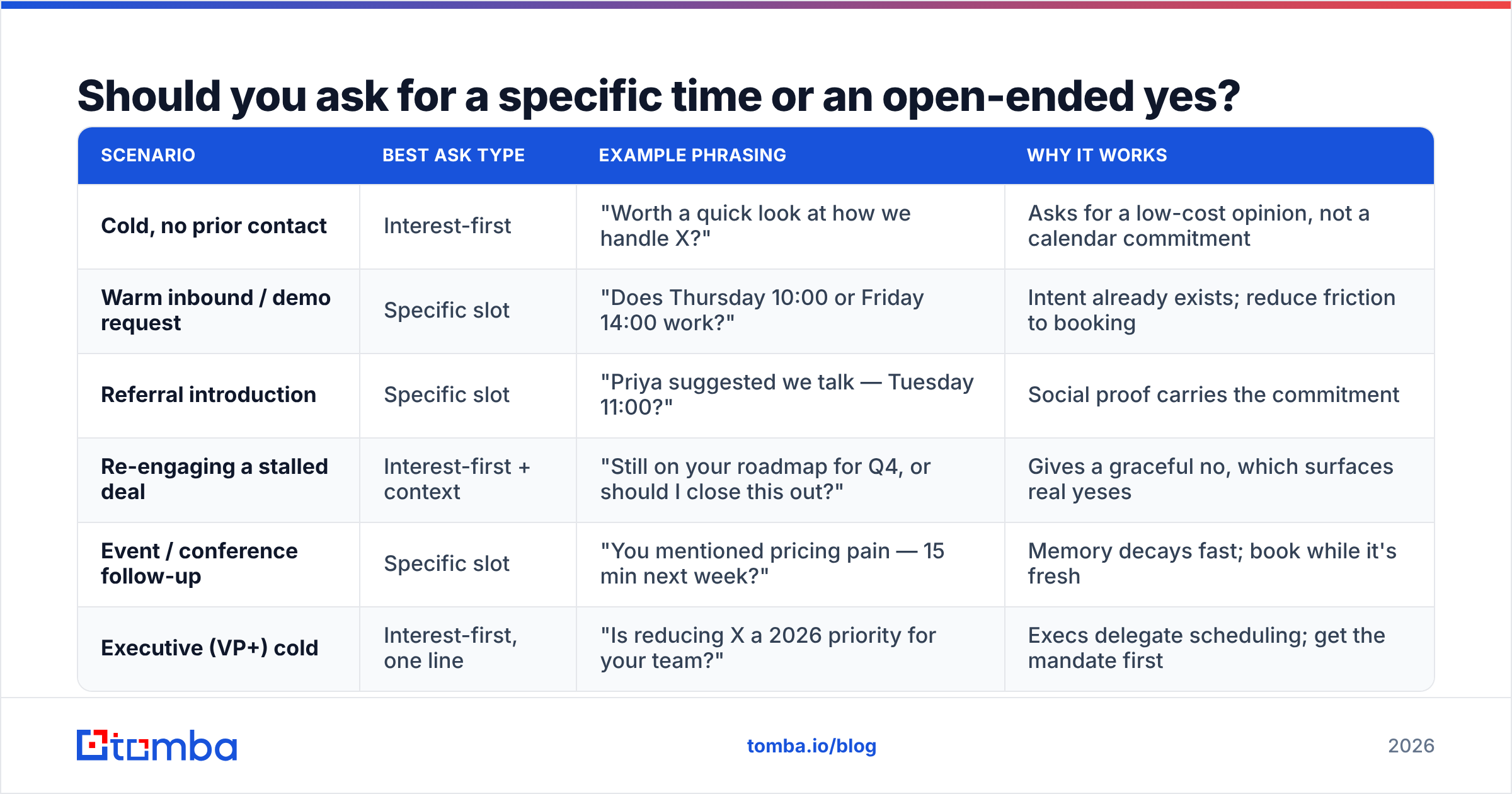
Should you ask for a specific time or an open-ended yes?#
It depends entirely on temperature, and this is the single most misapplied rule in outbound.
| Scenario | Best ask type | Example phrasing | Why it works |
|---|---|---|---|
| Cold, no prior contact | Interest-first | "Worth a quick look at how we handle X?" | Asks for a low-cost opinion, not a calendar commitment |
| Warm inbound / demo request | Specific slot | "Does Thursday 10:00 or Friday 14:00 work?" | Intent already exists; reduce friction to booking |
| Referral introduction | Specific slot | "Priya suggested we talk — Tuesday 11:00?" | Social proof carries the commitment |
| Re-engaging a stalled deal | Interest-first + context | "Still on your roadmap for Q4, or should I close this out?" | Gives a graceful no, which surfaces real yeses |
| Event / conference follow-up | Specific slot | "You mentioned pricing pain — 15 min next week?" | Memory decays fast; book while it's fresh |
| Executive (VP+) cold | Interest-first, one line | "Is reducing X a 2026 priority for your team?" | Execs delegate scheduling; get the mandate first |
The pattern: the colder the contact, the more you should ask for a decision rather than a slot. Cold prospects who receive "Are you free Tuesday at 2pm?" have to evaluate the entire relationship in order to answer a scheduling question. Cold prospects who receive "Is this a problem you're solving this year?" only have to answer about themselves — which people are far more willing to do.
Once they say yes to interest, then send times. The two-step ask feels slower but converts better because each step has a low activation cost. HubSpot's sales email research has repeatedly found that single-question emails outperform multi-question ones, and this is the same effect at the scheduling layer.
What subject line gets a meeting request opened?#
Short, lowercase-ish, and specific to them. Subject lines that read like internal mail get opened; subject lines that read like marketing get filtered.
Patterns that work for meeting requests:
- Question about {specific thing} — "question about your Q3 onboarding change"
- {Their company} + {your relevant noun} — "Acme + SOC 2 timeline"
- {Mutual name} suggested I reach out — highest open rate of any cold pattern, use only when true
- quick question re: {trigger} — works when the trigger is genuinely recent
- {Number} ideas for {their goal} — only if the body actually contains that many ideas
Avoid: "Touching base," "Following up," "Partnership opportunity," "Let's connect," anything with an exclamation mark, and anything longer than about 45 characters (it truncates on mobile). If you want to pressure-test variants before sending, run them through a subject line tester rather than guessing.
One more thing: don't put the word "meeting" in the subject line of a cold email. It announces the ask before you've earned it. Save the word for the last sentence of the body.
What does a good meeting request email actually look like?#
Three templates, mapped to the three most common situations. Adapt the specifics — the structure is the transferable part.
Cold, trigger-based (78 words)
Subject: question about your Lisbon office
Hi Marta,
Saw the Lisbon engineering hub announcement last month — congrats. Most teams that open a second EU office hit the same wall around month four: their SDR data goes stale twice as fast because two systems are writing to the same records.
We fixed that for Kontist and Pleo. I can show you the before/after in about 12 minutes.
Worth a look, or is data hygiene already sorted on your side?
— Sam
Warm follow-up after a content download (61 words)
Subject: the benchmark numbers you downloaded
Hi Tom,
You pulled the outbound benchmark report on Tuesday. The section most people ask about is page 9 — the reply-rate-by-list-quality chart.
Happy to walk through how your current numbers compare. Thursday 10:00 or Friday 14:00, whichever is easier?
If you were just curious and there's no project behind it, no problem at all.
— Sam
Re-engaging a stalled conversation (54 words)
Subject: closing this out?
Hi Dana,
We talked in March about the renewal timeline and then things went quiet — which usually means priorities shifted, and that's fine.
Two options: I close this out and stop emailing, or we take 15 minutes in October when budget season starts. Either answer helps me.
— Sam
Notice what none of them do: no "I hope this email finds you well," no company boilerplate paragraph, no three separate questions, no attachment. Each one asks exactly once and offers a clean way out. If you want more starting points, the cold email templates library has variants by industry and stage.
How many follow-ups should you send before giving up?#
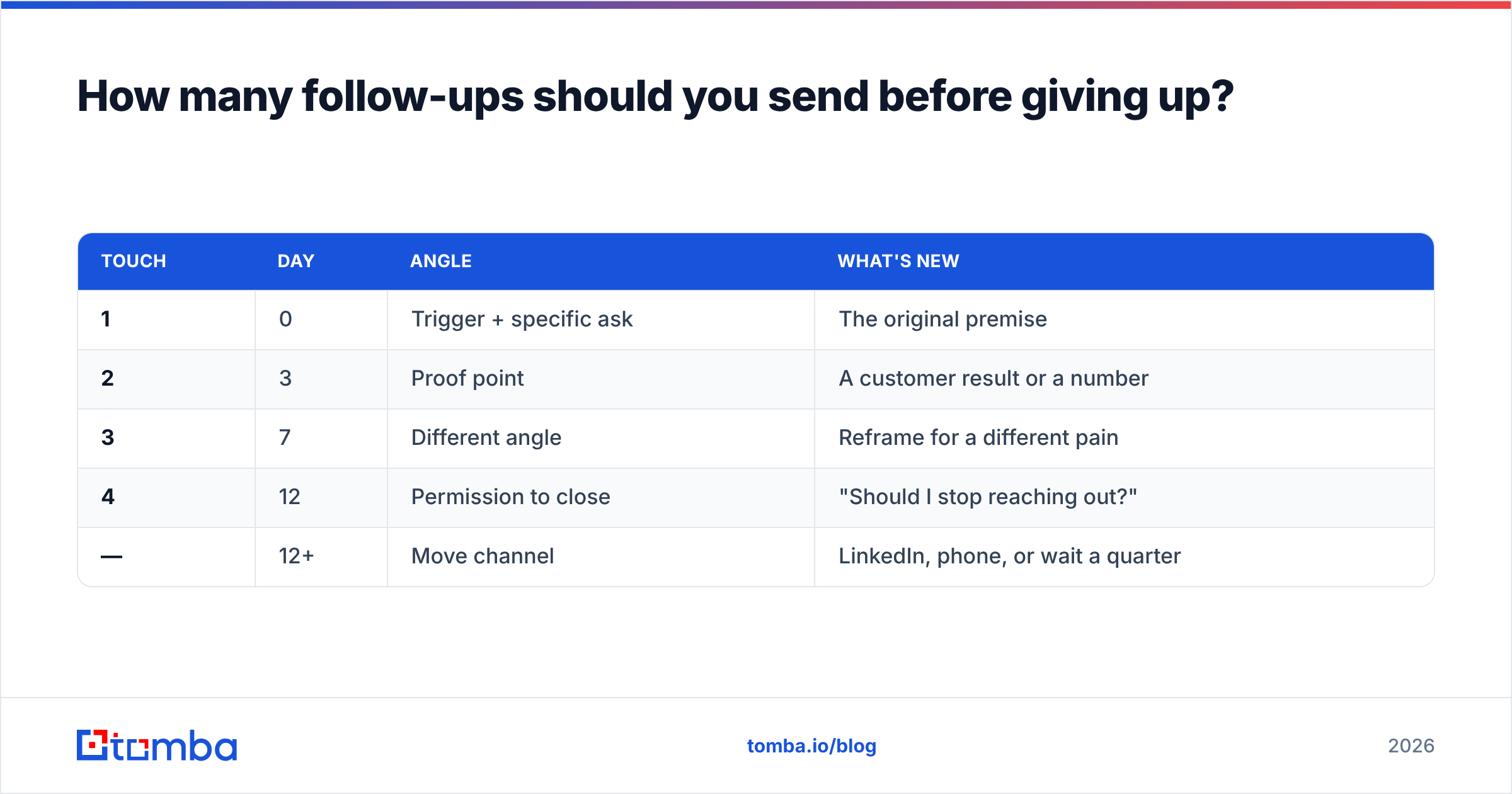
Three to four, spread over about 12 days, each one adding something the previous email didn't have. The single biggest mistake in meeting requests is treating the follow-up as a nudge rather than a new message.
| Touch | Day | Angle | What's new |
|---|---|---|---|
| 1 | 0 | Trigger + specific ask | The original premise |
| 2 | 3 | Proof point | A customer result or a number |
| 3 | 7 | Different angle | Reframe for a different pain |
| 4 | 12 | Permission to close | "Should I stop reaching out?" |
| — | 12+ | Move channel | LinkedIn, phone, or wait a quarter |
"Just bumping this to the top of your inbox" adds nothing and reads as pressure. A follow-up that says "Here's the actual number from the Kontist rollout: onboarding drop-off went from 31% to 24% in six weeks" gives the reader a fresh reason to reconsider.
The fourth touch — the breakup — reliably produces the highest reply rate of the sequence, but a chunk of those replies are polite noes. That's the point. A clean no costs you nothing and clears your pipeline; a silent maybe costs you follow-up capacity for months. Track it against your response rate baseline so you know whether the sequence is working or just generating noise.
Stop after the breakup. Continuing past four touches on a fully cold contact is where spam complaints come from, and complaints do far more damage to your domain than one lost prospect is worth.
How do you make sure the email actually reaches them?#
Three layers, in order of impact.
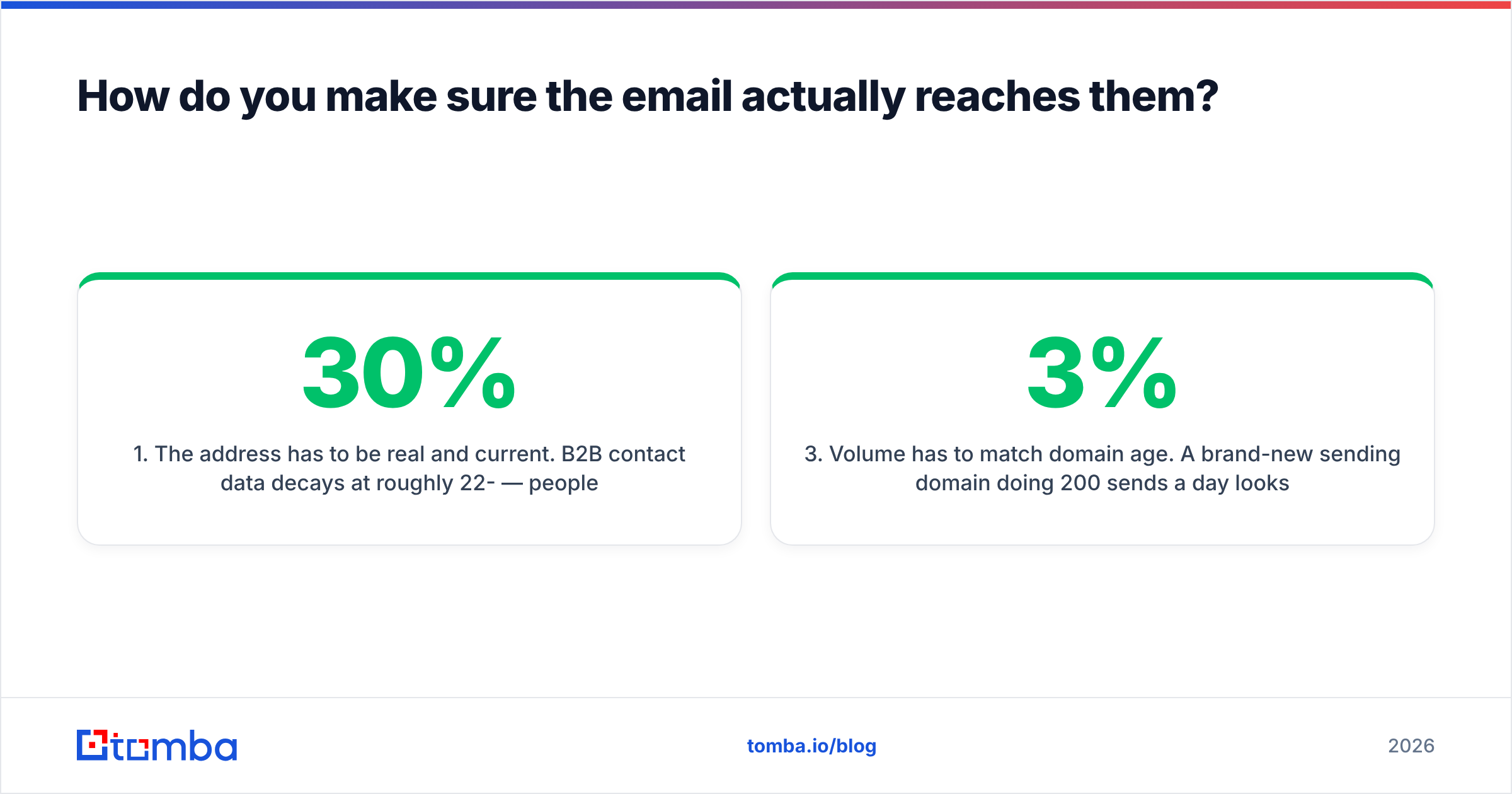
1. The address has to be real and current. B2B contact data decays at roughly 22-30% per year — people change jobs, companies rebrand domains, aliases get retired. An address that was correct in 2024 is a coin flip in 2026. Find the current one with an email finder, then run it through an email verifier before it enters a sequence. If you're working a whole account rather than a single person, domain search returns the pattern plus every known contact at that company.
2. Authentication has to be in place. SPF, DKIM, and DMARC on the sending domain. Google and Yahoo both tightened bulk-sender requirements, and unauthenticated mail now gets filtered aggressively rather than delivered-with-a-warning. Check your records with an SPF checker if you're not sure what's live.
3. Volume has to match domain age. A brand-new sending domain doing 200 sends a day looks exactly like a spam operation to a filter. Ramp over 4-6 weeks. Keep bounce rate under 3% and complaint rate under 0.1%.
You can validate the whole chain cheaply. Send five test messages to seeded inboxes across Gmail, Outlook, and a corporate Microsoft 365 tenant, and check where they land before you scale. G2's sales engagement category is a reasonable place to compare sending platforms if you're picking one, but no platform saves a list that hasn't been verified.
Which tools help you find and verify the right person?#
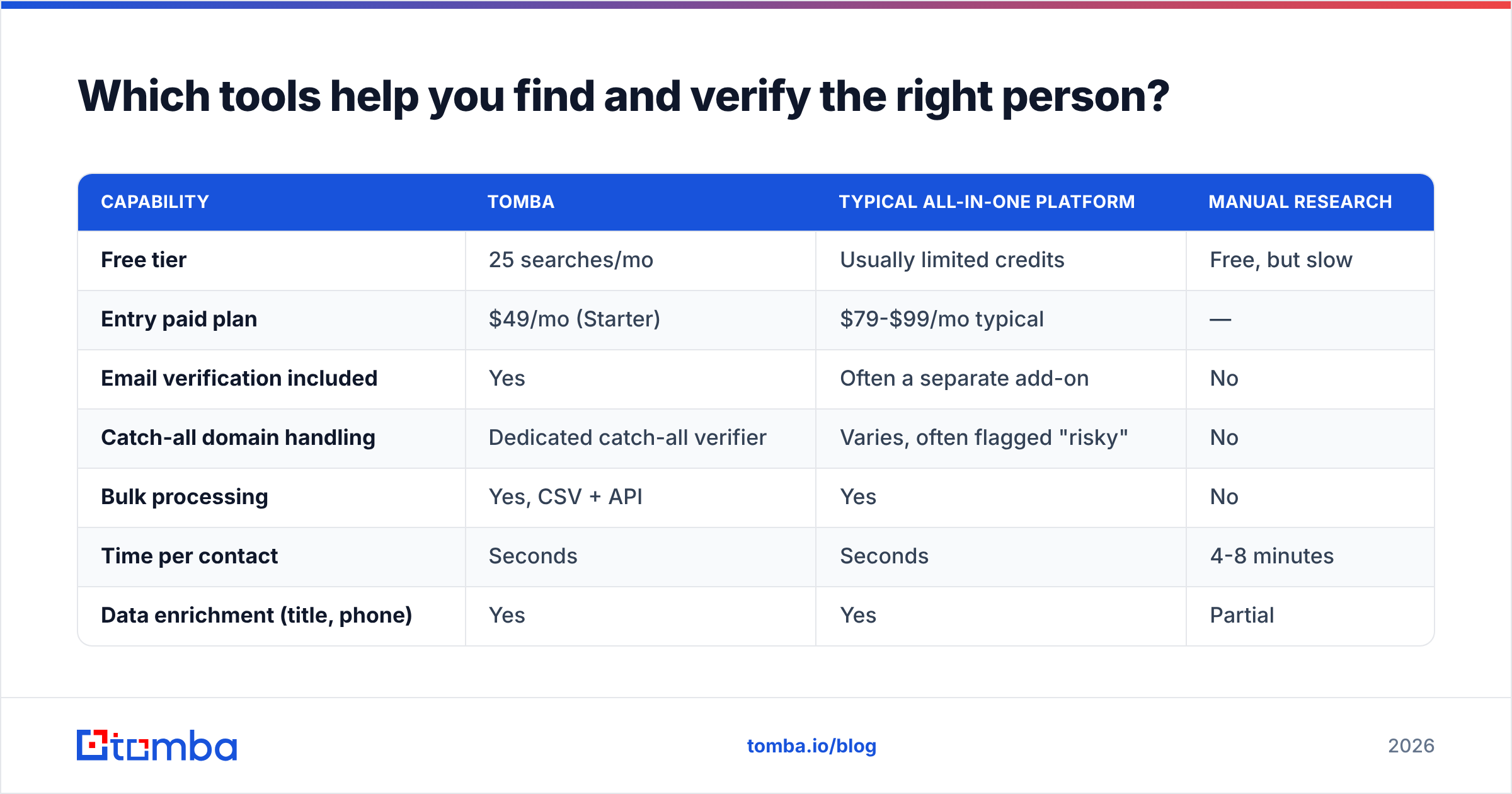
The meeting request is downstream of the contact. If you're emailing a manager who left nine months ago, structure and timing are irrelevant. Here's how the main options compare for the find-and-verify step specifically.
| Capability | Tomba | Typical all-in-one platform | Manual research |
|---|---|---|---|
| Free tier | 25 searches/mo | Usually limited credits | Free, but slow |
| Entry paid plan | $49/mo (Starter) | $79-$99/mo typical | — |
| Email verification included | Yes | Often a separate add-on | No |
| Catch-all domain handling | Dedicated catch-all verifier | Varies, often flagged "risky" | No |
| Bulk processing | Yes, CSV + API | Yes | No |
| Time per contact | Seconds | Seconds | 4-8 minutes |
| Data enrichment (title, phone) | Yes | Yes | Partial |
For a rep working 40-60 accounts a week, the practical difference is verification coupling. Finding an address and verifying it in two different tools means two exports, two imports, and one place where the sync silently breaks. Doing both in one pass — find, verify, push to sequence — removes the step where bad addresses leak into a live campaign.
If your workflow already lives in a CRM, wire it in rather than exporting CSVs. The HubSpot integration and Tomba API both let you enrich records at the point of creation, so the address is verified before anyone writes the meeting request. Full Tomba pricing runs Free (25 searches/mo), Starter $49/mo, Growth $99/mo, Pro $249/mo, and Enterprise.
Worth noting: for pure prepackaged list buying rather than on-demand lookup, providers like BookYourData serve a different need well — you're buying a filtered dataset rather than resolving one person at a time. The two approaches are complementary; most teams end up using both at different stages.
What should you do in the first 48 hours after they say yes?#
Send the calendar invite within 10 minutes of the reply. Not later that day — minutes. Meeting acceptance decays fast, and an unbooked yes is a maybe.
The invite itself should contain:
- A real agenda — three bullets, not "intro call." State what you'll cover and what you'll ask them.
- A duration that matches your ask — if you said 15 minutes, book 15 minutes. Booking 30 after promising 15 is the first small breach of trust in the relationship.
- The video link in the location field, not buried in the description where mobile clients hide it.
- One line of prep — "No prep needed on your side" or "If you can have your current bounce rate handy, that helps."
Then send nothing else until 24 hours before, when a one-line confirmation ("Still good for tomorrow at 10?") reduces no-shows meaningfully. Over-messaging between the yes and the meeting is how a booked call becomes a ghosted one.
Ready to send meeting requests that actually land?#
Everything above depends on one thing being true: the address is correct and the mailbox is live. Structure, timing, and follow-up cadence are all multipliers on a number that starts at zero if you're emailing a dead inbox.
Start with the Tomba Email Finder. Search by name and company or pull every contact at a domain, get the verification status in the same result, and push clean addresses straight into your sequencing tool or CRM. The free tier gives you 25 searches a month to test your list quality before committing — enough to run one real campaign end to end and see whether your reply problem is the copy or the data. In our experience, it's usually the data.
Related guides#
Ready to find emails that actually work?
Join 150,000+ professionals who stopped guessing and started sending. Free credits on signup — no credit card required.
Get the Tomba newsletter
Practical outbound tactics and product updates — once every two weeks.
About the author