How to Ask for a Meeting With a Client (Scripts That Work)
Most meeting requests die because they ask for the wrong thing at the wrong time. Here are the exact scripts, timing rules, and channel choices that get a client to say yes.
TL;DR
- The ask fails at the close, not the opening. "Let me know if you're interested" converts far worse than "Does Tuesday at 10:00 or Thursday at 14:00 work?"
- Ask for a specific, small, time-boxed commitment: 15 minutes, one named outcome, two concrete slots.
- Match the channel to the relationship stage — cold gets email, warm gets email plus LinkedIn, existing clients get a calendar invite with a pre-written agenda.
- Verified contact data matters more than wording. A perfect script sent to a bounced address converts at zero percent.
- Follow up three to four times across 12 days. Most accepted meetings come from touch two or three, not touch one.
Why does asking for a meeting feel so hard?#
Because you are asking a stranger to spend the one thing they cannot get back. A meeting request is not a request for attention — it's a request for a slice of someone's finite week, and every recipient prices it that way before they read your second sentence.
Think of it like asking to borrow someone's car. "Can I borrow your car sometime?" is vague, open-ended, and easy to decline. "Can I borrow your car Saturday morning for two hours to move a couch?" is specific, bounded, and easy to evaluate. Same favor, wildly different yes-rate. Meeting requests follow the identical rule.
The practical implication: every element of a good meeting ask reduces perceived cost or increases perceived payoff. Nothing else in the message matters much.
What actually goes into a meeting request that converts?#
Six components. Miss any one and the reply rate drops measurably.
- A relevance trigger — the reason you are writing now, not last quarter. A funding round, a job change, a new job posting, a product launch, a comment they made publicly. Without this, you are a random interruption.
- A one-sentence value hypothesis — what you think you can do for them, stated as a hypothesis rather than a claim. "I suspect your SDRs are burning an hour a day on manual list building" outperforms "We help teams save time."
- A time box — 15 minutes beats 30, and 30 beats "a quick call." Naming the ceiling removes the fear of an open-ended sales pitch.
- A named outcome — what they walk away with even if they never buy. A benchmark, a teardown, two ideas, a template.
- A binary close — two specific slots, or one slot with an easy alternative. Never "let me know your availability."
- A frictionless exit — "If this isn't a priority, just reply 'not now' and I'll close the loop." Counterintuitively, this raises reply rates because it makes replying cheap.
Most reps have three of the six. The ones with all six book meetings.
Which close should you use — and when?#
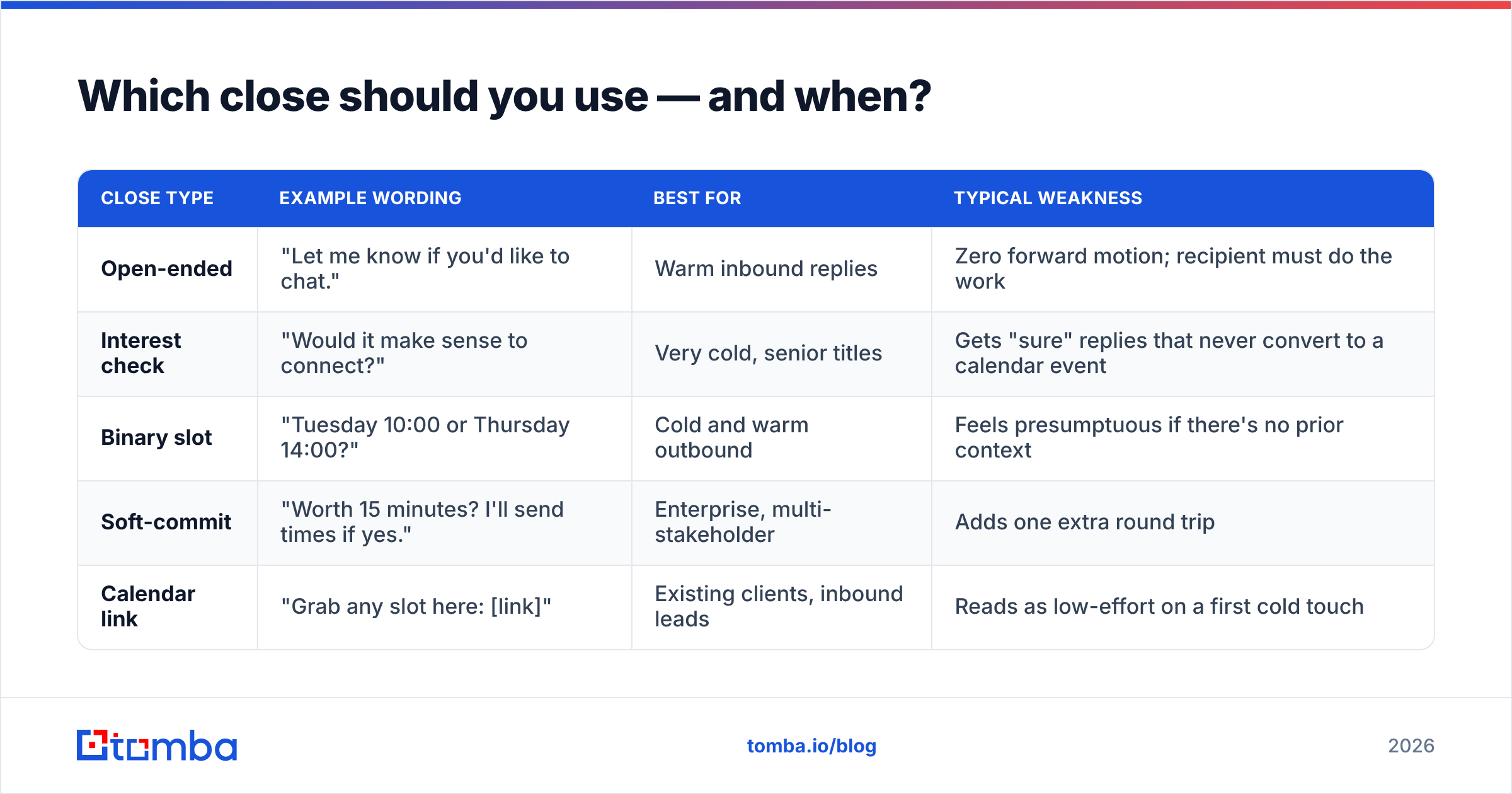
The close is where most requests bleed out. Here's how the four common patterns actually perform in B2B outbound, based on what teams consistently report and what HubSpot's sales research has documented about specificity in CTAs.
| Close type | Example wording | Best for | Typical weakness |
|---|---|---|---|
| Open-ended | "Let me know if you'd like to chat." | Warm inbound replies | Zero forward motion; recipient must do the work |
| Interest check | "Would it make sense to connect?" | Very cold, senior titles | Gets "sure" replies that never convert to a calendar event |
| Binary slot | "Tuesday 10:00 or Thursday 14:00?" | Cold and warm outbound | Feels presumptuous if there's no prior context |
| Soft-commit | "Worth 15 minutes? I'll send times if yes." | Enterprise, multi-stakeholder | Adds one extra round trip |
| Calendar link | "Grab any slot here: [link]" | Existing clients, inbound leads | Reads as low-effort on a first cold touch |
Rule of thumb: cold gets soft-commit or binary, warm gets binary, existing clients get a calendar link or a direct invite. Never lead a first cold touch with a booking link — it asks the recipient to do the scheduling labor for a conversation they haven't agreed to yet.
How do you ask a cold prospect for a meeting?#
Cold means no prior relationship. Your entire job is to earn 15 minutes on the strength of relevance alone.
Script 1 — the trigger-event ask
Subject: your new SDR reqs
Hi Maya,
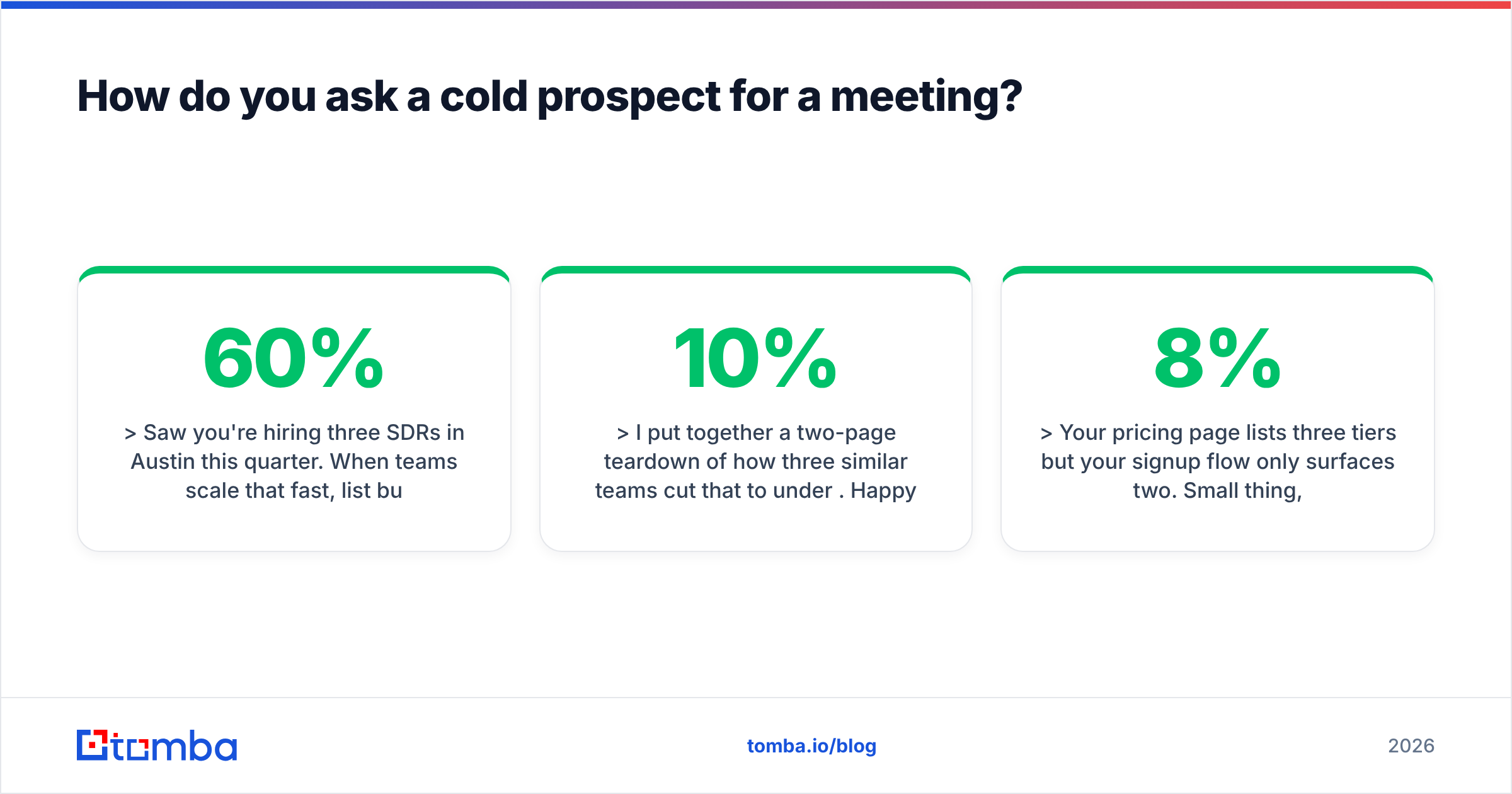
Saw you're hiring three SDRs in Austin this quarter. When teams scale that fast, list building usually eats 40-60% of ramp time before anyone dials.
I put together a two-page teardown of how three similar teams cut that to under 10%. Happy to walk you through it in 15 minutes — Tuesday 10:00 or Thursday 14:00 CT?
If it's not a priority, reply "not now" and I'll stop here.
— Ben
Script 2 — the referral bridge
Hi Daniel,
Priya at Northwind suggested I reach out — she mentioned you own the same reporting headache her team had before we rebuilt their attribution model.
Not pitching anything today. Would 15 minutes next week be useful to compare notes? I'll come with the two things that moved the needle for her.
Wednesday 11:00 or Friday 09:30?
Script 3 — the specific-observation ask
Hi Sofia,
Your pricing page lists three tiers but your signup flow only surfaces two. Small thing, but I've seen that cost teams 5-8% of self-serve conversions.
I mapped out what I'd change. 15 minutes to walk through it — no deck, no demo. Monday 15:00 or Tuesday 09:00?
The pattern across all three: observation first, hypothesis second, small ask third, exit ramp fourth. Notice none of them describe the product.
How is asking an existing client different?#
Existing clients owe you nothing extra, but they do owe you a reason. With a current account, the failure mode flips: instead of being ignored, you get a polite "let's do it next month" that never arrives.
Three adjustments:
- Lead with their outcome, not your agenda. "I want to review your Q3 numbers" is your agenda. "I pulled your Q3 numbers and found two accounts we're underserving" is theirs.
- Send the agenda before the invite. Three bullets, in the email body. Then the calendar invite is a formality, not a negotiation.
- Anchor to a business rhythm. Quarterly business reviews, renewal windows, budget cycles. A meeting attached to a calendar event they already respect is far easier to accept than a floating request.
Script 4 — the client check-in with teeth
Hi Tom,
Renewal is 45 days out and I want to make sure the number we put in front of you reflects what you actually used.
Three things I'd cover in 20 minutes:
- Where your usage landed vs. what you bought
- Two seats that look dormant — cut or reassign?
- The API endpoints your team asked about in June, now live
I've put a hold on Thursday 14:00 — move it if that doesn't work.
Note the calendar hold. With an existing client, you have enough standing to propose rather than request, which removes an entire round trip.
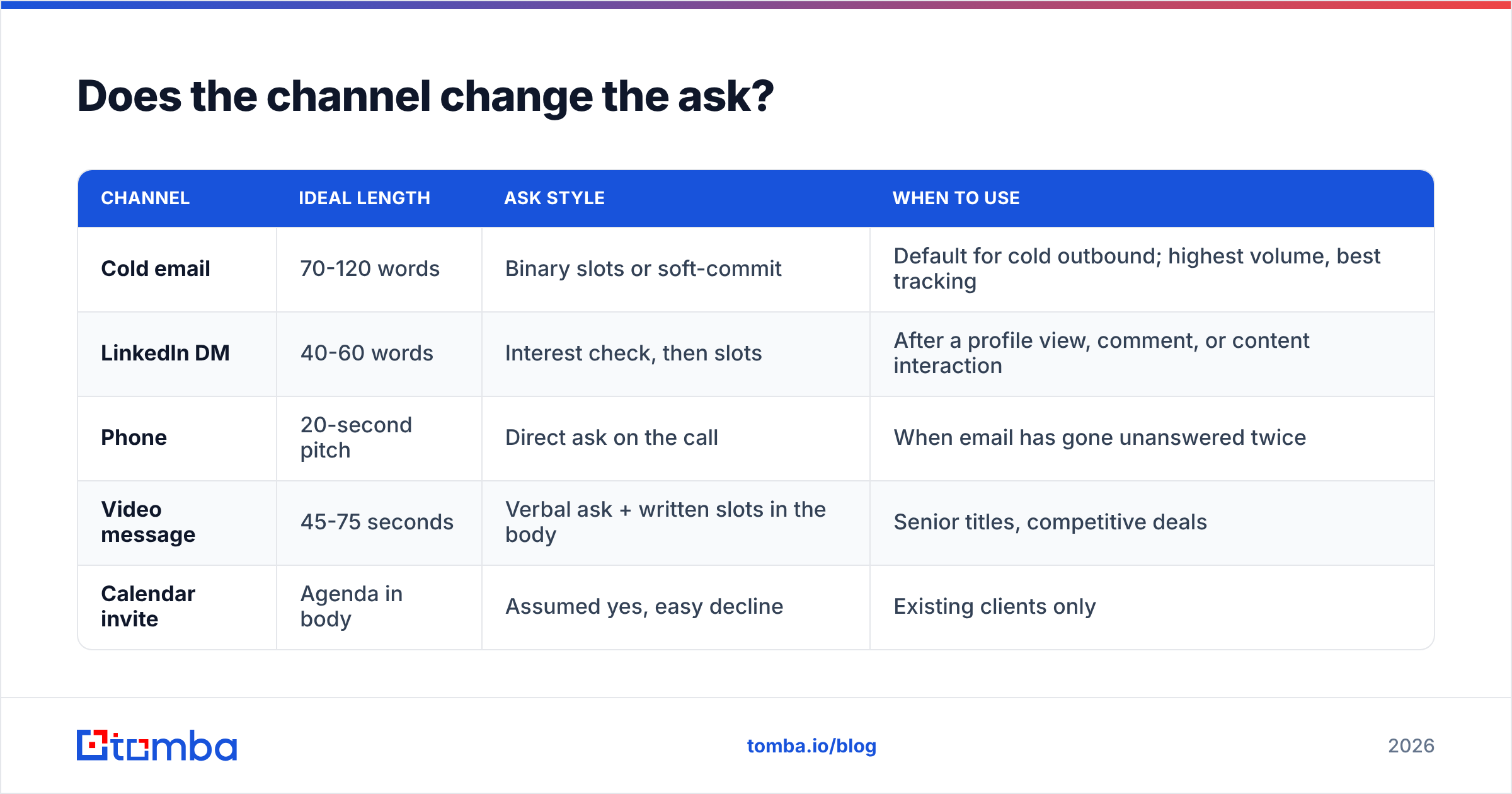
Does the channel change the ask?#
Yes, and mismatching them is a common own-goal. A LinkedIn DM written like a cold email reads as spam; an email written like a DM reads as unserious.
| Channel | Ideal length | Ask style | When to use |
|---|---|---|---|
| Cold email | 70-120 words | Binary slots or soft-commit | Default for cold outbound; highest volume, best tracking |
| LinkedIn DM | 40-60 words | Interest check, then slots | After a profile view, comment, or content interaction |
| Phone | 20-second pitch | Direct ask on the call | When email has gone unanswered twice |
| Video message | 45-75 seconds | Verbal ask + written slots in the body | Senior titles, competitive deals |
| Calendar invite | Agenda in body | Assumed yes, easy decline | Existing clients only |
The sequence that works for most B2B teams: email → LinkedIn connect with context → email follow-up → call → breakup email. Spread over 12-14 business days. Read more on how LinkedIn outreach fits alongside email in a multichannel play.
How many times should you follow up before giving up?#
Three to four touches after the initial send, then stop. The data across most outbound teams points the same direction: touch one gets the smallest share of positive replies, touches two and three carry the load, and returns fall off sharply past touch five.
A follow-up cadence that respects the recipient:
- Day 0 — initial ask. Full context, trigger, binary close.
- Day 3 — add value, don't nag. New information: a relevant case, a benchmark, an article. Re-ask with the same two slots.
- Day 7 — shorten radically. "Still worth 15 minutes, or should I close this out?" Two sentences maximum.
- Day 12 — the permission close. "Assuming this isn't a fit right now — I'll stop reaching out. If timing changes, I'm here." This one reliably produces replies, including yeses.
What kills cadences: repeating the same message with "just bumping this to the top of your inbox." Every touch must add something the previous one did not.
Why does your meeting request never get read?#
Often it has nothing to do with the copy. It's the infrastructure underneath.
Three failure points, in order of how often they bite:
- The address is wrong. Guessed patterns like
first.last@company.comare right maybe 60-70% of the time depending on the industry. The other 30-40% bounce, and bounces above roughly 2% start damaging your sending domain. Run addresses through an email verifier before they enter a sequence. - The domain isn't authenticated. Missing or broken SPF, DKIM, and DMARC records send you straight to spam regardless of what you wrote. Google and Yahoo both tightened bulk-sender requirements, and unauthenticated mail now gets filtered aggressively. Start with an SPF checker and fix records before scaling volume.
- The message trips spam filters. Heavy HTML, tracking pixels on every link, multiple redirects, and words like "free consultation" all raise your score. A plain-text-looking email with one link performs best.
Fix these three and your existing scripts will outperform whatever new copy you were about to write. Copy is a multiplier on deliverability, not a substitute for it.
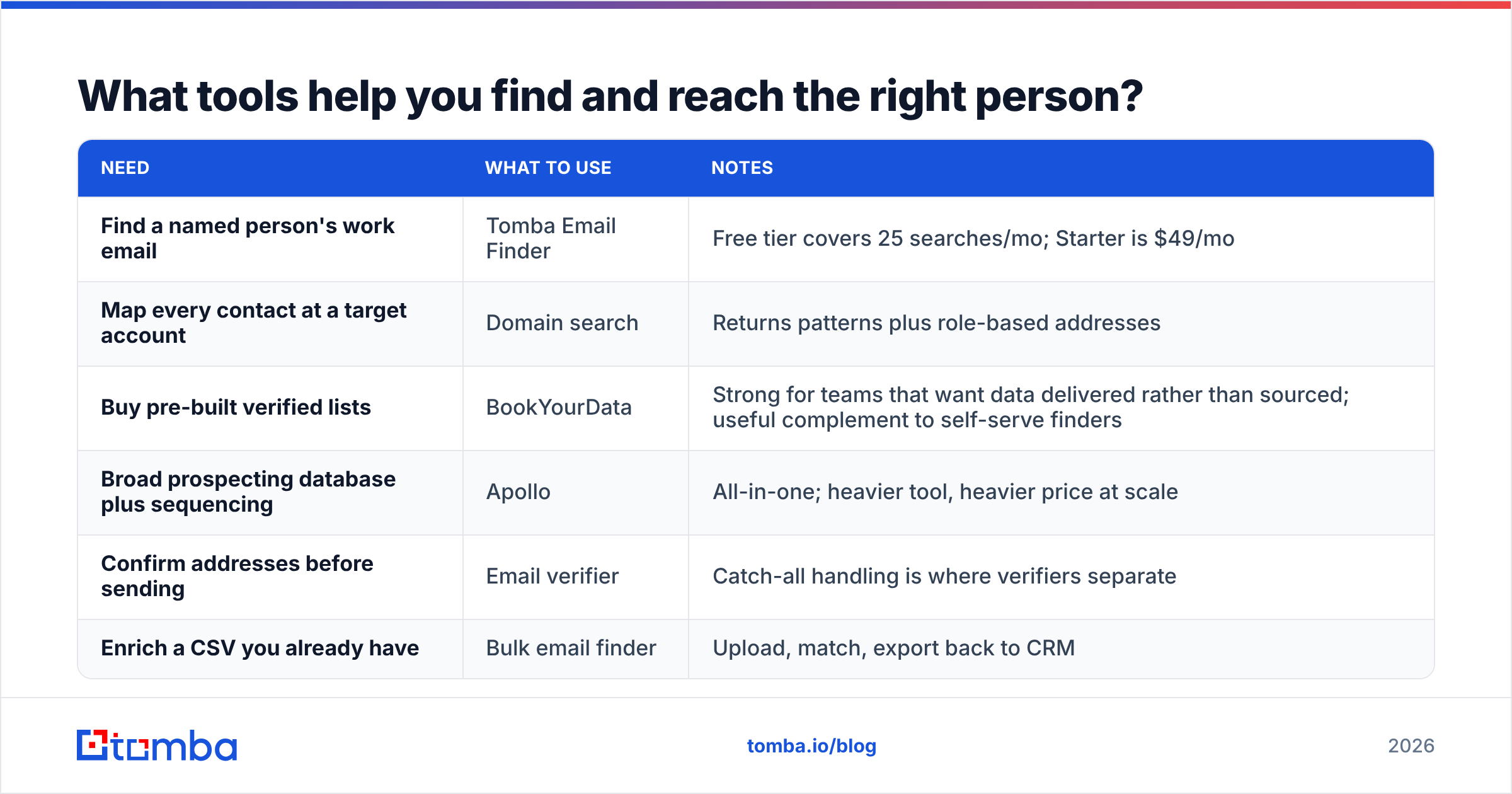
What tools help you find and reach the right person?#
The person you should be asking is often not the person you found. Getting the right name, the right address, and the right context is the unglamorous work that determines whether any script matters.
| Need | What to use | Notes |
|---|---|---|
| Find a named person's work email | Tomba Email Finder | Free tier covers 25 searches/mo; Starter is $49/mo |
| Map every contact at a target account | Domain search | Returns patterns plus role-based addresses |
| Buy pre-built verified lists | BookYourData | Strong for teams that want data delivered rather than sourced; useful complement to self-serve finders |
| Broad prospecting database plus sequencing | Apollo | All-in-one; heavier tool, heavier price at scale |
| Confirm addresses before sending | Email verifier | Catch-all handling is where verifiers separate |
| Enrich a CSV you already have | Bulk email finder | Upload, match, export back to CRM |
On pricing: Tomba runs a free tier at 25 searches per month, Starter at $49/mo, Growth at $99/mo, and Pro at $249/mo, with Enterprise quoted custom — see Tomba pricing for current credit allocations. BookYourData sells verified contact lists on a credit model and is a genuinely good fit if your motion is list-purchase rather than per-prospect lookup. Independent user reviews for all of these sit on G2, which is worth ten minutes before you commit to an annual plan.
What should you never say in a meeting request?#
A short list of phrases that measurably depress reply rates:
- "Just checking in" — signals you have nothing new to say.
- "I'd love to pick your brain" — asks for free consulting from someone who does not know you.
- "Quick call" — undefined, so the recipient assumes 45 minutes.
- "Let me know a time that works for you" — transfers the scheduling work to them.
- "I wanted to reach out because we're the leading provider of..." — about you, not them.
- "Does this resonate?" — vague, and invites a non-answer.
Replace each with something concrete. "Quick call" becomes "15 minutes." "Let me know a time" becomes "Tuesday 10:00 or Thursday 14:00." "Pick your brain" becomes "I'll bring two ideas and you tell me if either is worth pursuing."
How do you measure whether your ask is working?#
Track four numbers, in this order:
- Delivery rate — should be 97%+. Below that, your data or authentication is broken and nothing downstream is interpretable.
- Reply rate — the real signal. 5-10% on well-targeted cold outbound is healthy; below 3% means your targeting or trigger is off.
- Meeting-booked rate from replies — 30-50% of positive replies should convert to a held meeting. Lower means your close creates too much friction after the yes.
- Show rate — 70-85%. Below that, your confirmations and calendar hygiene need work, not your copy.
Diagnose in that order. Rewriting subject lines when your delivery rate is 84% is wasted effort. If you want to sanity-check your baseline expectations, the definition of a healthy response rate varies enormously by segment and seniority.
Putting it together#
Ask small, ask specific, ask now-relevant, and make declining easy. Then send it to an address you know is real, from a domain that's authenticated, and follow up three times with something new each round.
The scripts in this post work, but they work roughly twice as well when the contact data underneath them is clean. That's the part most teams skip.
Start with the data layer. Tomba's Email Finder gets you verified work emails by name and domain, with 25 free searches a month to test against your own target list before you commit — and Starter at $49/mo when you're ready to run real volume. Find the right person first; the meeting ask gets a lot easier after that.
Related guides#
Ready to find emails that actually work?
Join 150,000+ professionals who stopped guessing and started sending. Free credits on signup — no credit card required.
Get the Tomba newsletter
Practical outbound tactics and product updates — once every two weeks.
About the author