How to Ask for a Response in Email: 9 Proven Ways
Most cold emails die because the ask is vague. Here are nine tested ways to ask for a response in email, with scripts, timing rules, and a comparison of which CTA type wins by deal size.
TL;DR
- The single biggest reason your emails get ignored isn't the subject line — it's an ask that costs the reader too much effort to answer.
- Interest-based asks ("worth a look?") beat calendar-based asks ("30 minutes Tuesday?") on first touch, typically by a wide margin. Calendar asks win later, once interest exists.
- One ask per email. Two questions in the same message roughly halves your odds of getting either answered.
- Timing beats phrasing: 3–4 spaced follow-ups recover more replies than any single "perfect" closing line.
- None of this works if the address is wrong. Verify before you write — a bounce is a zero-reply guarantee.
Why do most emails never get a response?#
Because the ask is expensive. Not rude, not badly written — expensive.
Think of your closing line like a checkout page. Every extra field you add is a place where someone abandons the cart. "Are you free Tuesday at 2pm ET or Thursday at 10am ET for a 30-minute intro call?" asks a stranger to check their calendar, evaluate your credibility, commit half an hour, and reply with a decision — four separate cognitive steps before they've decided whether they care.
Compare that to: "Is this something your team deals with?" One step. Yes or no. Even a "no" is a response, and a response is a conversation.
The research on email response rate behavior is consistent on one thing: friction in the ask is a stronger predictor of silence than message length, send time, or personalization depth. HubSpot's own sales email data has repeatedly shown that emails ending in a single, simple interest question outperform meeting-request closes on cold traffic.
So the question "how to ask for a response in email" is really two questions: what do you ask for, and how much does answering cost?
What are the main types of email asks?#
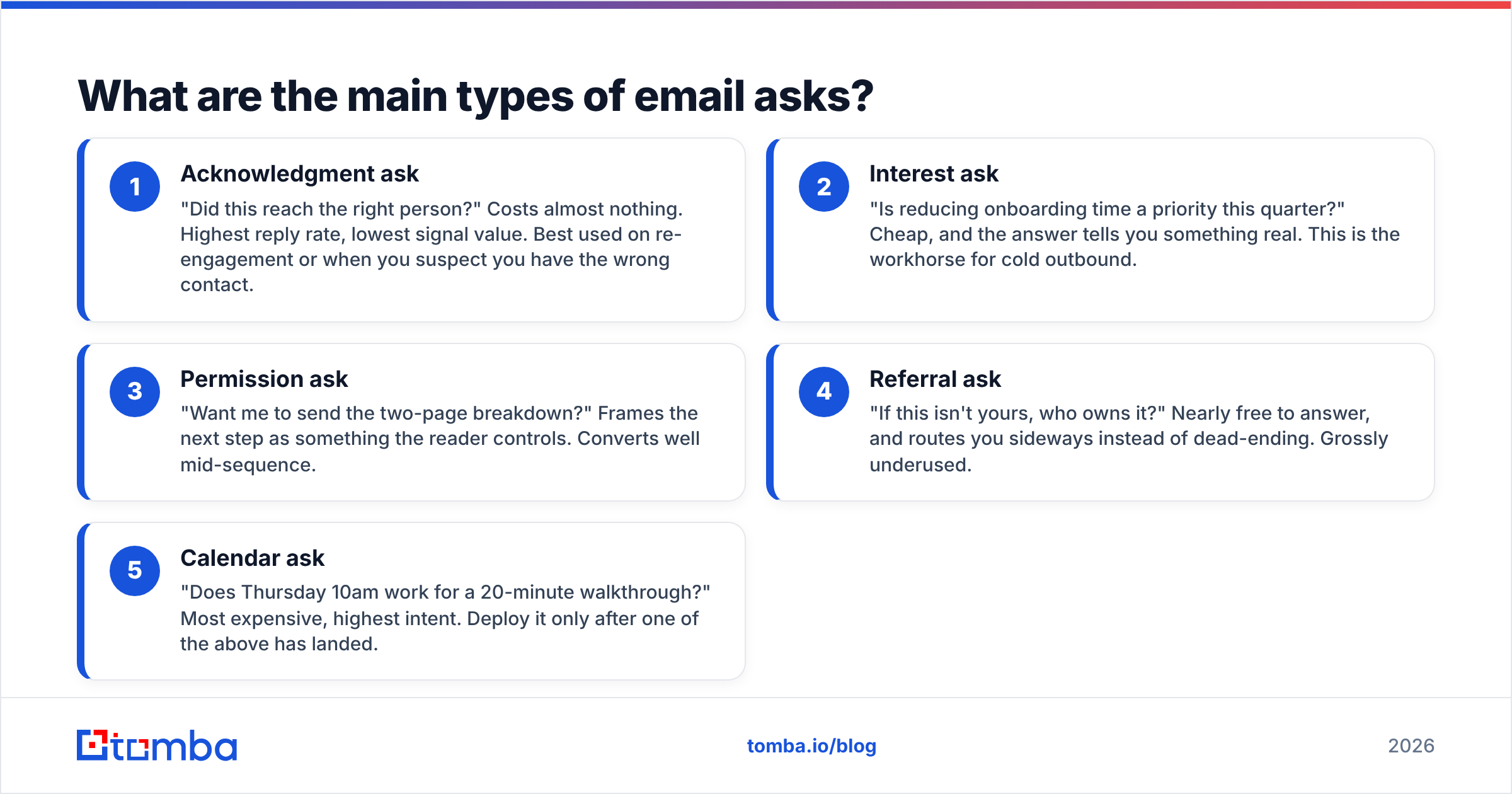
There are five, and they sit on a ladder from cheapest to most expensive for the recipient.
- Acknowledgment ask — "Did this reach the right person?" Costs almost nothing. Highest reply rate, lowest signal value. Best used on re-engagement or when you suspect you have the wrong contact.
- Interest ask — "Is reducing onboarding time a priority this quarter?" Cheap, and the answer tells you something real. This is the workhorse for cold outbound.
- Permission ask — "Want me to send the two-page breakdown?" Frames the next step as something the reader controls. Converts well mid-sequence.
- Referral ask — "If this isn't yours, who owns it?" Nearly free to answer, and routes you sideways instead of dead-ending. Grossly underused.
- Calendar ask — "Does Thursday 10am work for a 20-minute walkthrough?" Most expensive, highest intent. Deploy it only after one of the above has landed.
Most reps default to #5 on email one. That's the mistake. You're asking for a commitment before you've earned the attention that justifies it.
Which type of ask should you use, and when?#
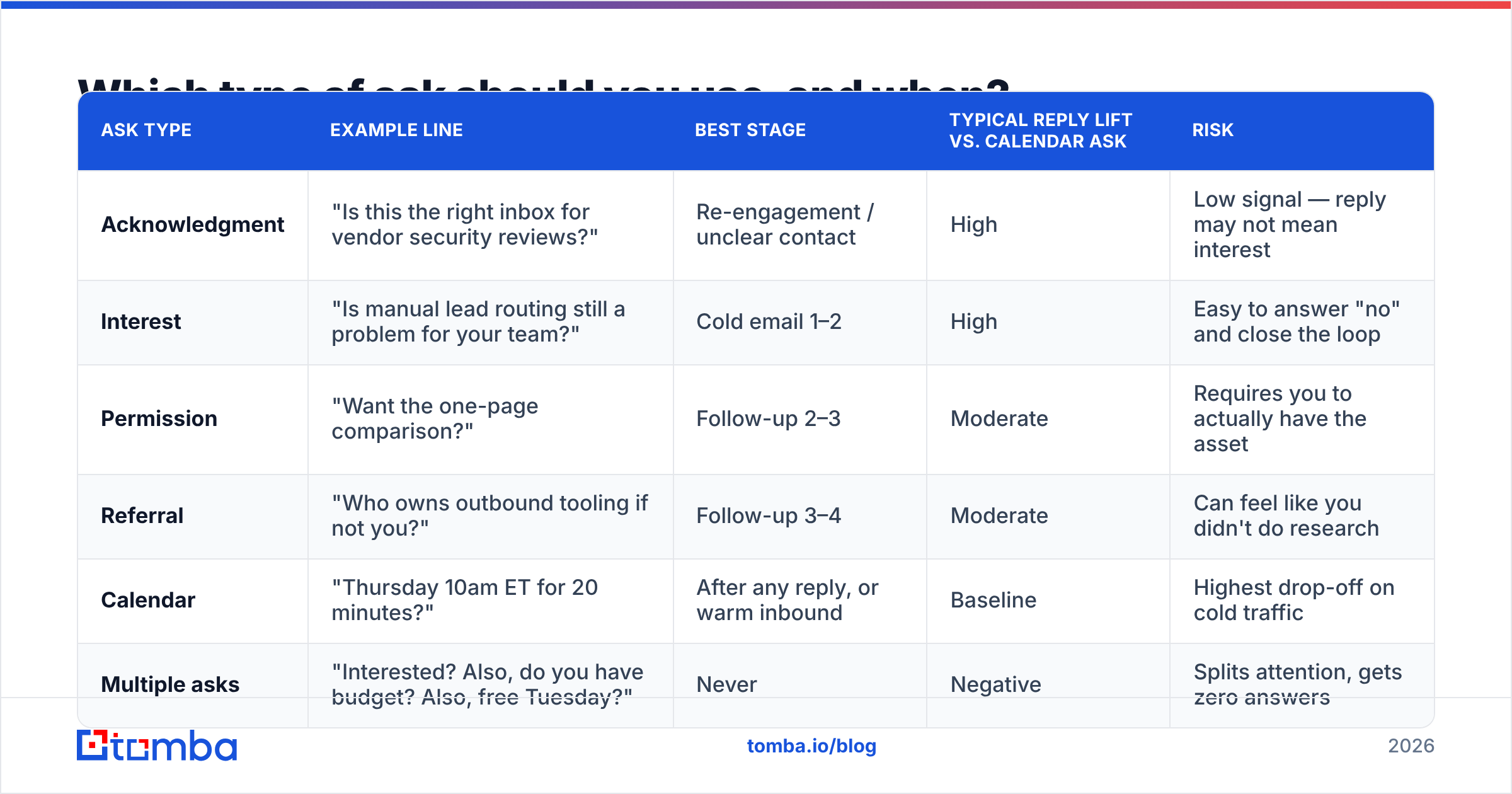
Match the ask to where you are in the relationship and to what the deal is worth. A $50k enterprise motion tolerates more friction than a $200/mo self-serve motion — but only after the first reply.
| Ask type | Example line | Best stage | Typical reply lift vs. calendar ask | Risk |
|---|---|---|---|---|
| Acknowledgment | "Is this the right inbox for vendor security reviews?" | Re-engagement / unclear contact | High | Low signal — reply may not mean interest |
| Interest | "Is manual lead routing still a problem for your team?" | Cold email 1–2 | High | Easy to answer "no" and close the loop |
| Permission | "Want the one-page comparison?" | Follow-up 2–3 | Moderate | Requires you to actually have the asset |
| Referral | "Who owns outbound tooling if not you?" | Follow-up 3–4 | Moderate | Can feel like you didn't do research |
| Calendar | "Thursday 10am ET for 20 minutes?" | After any reply, or warm inbound | Baseline | Highest drop-off on cold traffic |
| Multiple asks | "Interested? Also, do you have budget? Also, free Tuesday?" | Never | Negative | Splits attention, gets zero answers |
The last row is not a joke. Two questions in one email is one of the most reliable ways to get neither answered. The reader defers the decision, the email slides down the inbox, and it never comes back.
How do you write the actual ask? (9 lines that work)#
Here are nine closing lines, each with the mechanic that makes it work. Steal the structure, not the words — copy-pasted lines read as copy-pasted lines.
1. The binary interest close.
"Is [specific problem] something your team is actively working on, or is it parked for now?"
Giving people a legitimate "no" option makes the "yes" easier to say. It also filters your pipeline honestly.
2. The one-word reply.
"If you want the breakdown, just reply 'send it' and I'll fire it over."
You've reduced the cost of replying to typing two words. Response friction approaches zero.
3. The wrong-person out.
"If deliverability isn't yours, happy to be pointed at whoever owns it — no offence taken."
Routes around gatekeeping and gives a graceful exit. People genuinely like forwarding things; it makes them look helpful for ten seconds of effort.
4. The specific-hour close.
"Does 11:15 Thursday work? I'll keep it to 15 minutes."
Use only post-interest. The oddly specific time (11:15, not 11:00) signals you actually have a calendar rather than a form letter.
5. The assumption reversal.
"I'm guessing this isn't a priority right now — if I'm wrong, say the word."
Slight negativity triggers a correction reflex. Use sparingly; it goes stale fast if a prospect sees it twice.
6. The relevance check.
"Worth a look, or off-base?"
Four words. It's an ask about your email, not about their time, which is a much lower bar.
7. The resource offer.
"I put together the numbers for three companies your size. Want them?"
The ask is for permission to give, not to take. Only credible if the resource exists.
8. The deadline that's real.
"We're closing Q1 onboarding slots on the 14th — worth a conversation before then?"
Real deadlines work. Fabricated ones destroy trust the moment they slip, and prospects check.
9. The clean breakup.
"I'll stop here unless I hear back — no hard feelings either way."
The last-email-in-sequence close. It reliably produces replies, some of them yeses, because loss aversion is real.
How many follow-ups before you stop?#
Three to four, spaced across roughly two weeks, then stop. Most replies to cold sequences arrive after the first email — the majority of the total comes from touches two through four combined.
A workable cadence:
- Day 0 — Initial email. Interest ask.
- Day 3 — New angle, not "just bumping this." Permission ask.
- Day 7 — Short proof point (customer, number, screenshot). Interest ask again, different wording.
- Day 14 — Referral ask or breakup close.
Two rules that matter more than the cadence itself:
Never send a bare bump. "Following up on the below" adds no information and trains the reader to ignore your name. Every touch needs a new reason to exist.
Change the ask each time. If email one asked about interest and got nothing, asking about interest again in email two is just louder silence. Move down the ladder — go cheaper, not more demanding.
Does deliverability affect whether people reply?#
Enormously — and it's invisible from your end. An email in a spam folder has a 0% reply rate no matter how good the closing line is, and your analytics will just show "no response."
Three things to check before you blame your copy:
- Authentication. SPF, DKIM, and DMARC all aligned. Run your domain through an SPF checker if you haven't recently — misconfigurations creep in when IT changes providers.
- List hygiene. A bounce rate above roughly 3% starts damaging sender reputation, which quietly degrades inbox placement for every subsequent send. This is why verification isn't optional.
- Spam triggers in the ask itself. "Act now," "limited time," and excessive links in a short email all push you toward Promotions or worse. Test with a spam checker before a big send.
The uncomfortable version: most teams that "fixed their copy" and saw reply rates jump actually fixed a data or authentication problem at the same time and misattributed the win.
What's the fastest way to make sure your ask reaches a real person?#
Get the address right, then get the person right. In that order.
A perfect ask sent to j.smith@company.com when the pattern is jsmith@company.com produces a bounce, a reputation ding, and zero replies. Scale that across 500 prospects and you've spent a week's budget teaching Google that you send to nonexistent mailboxes.
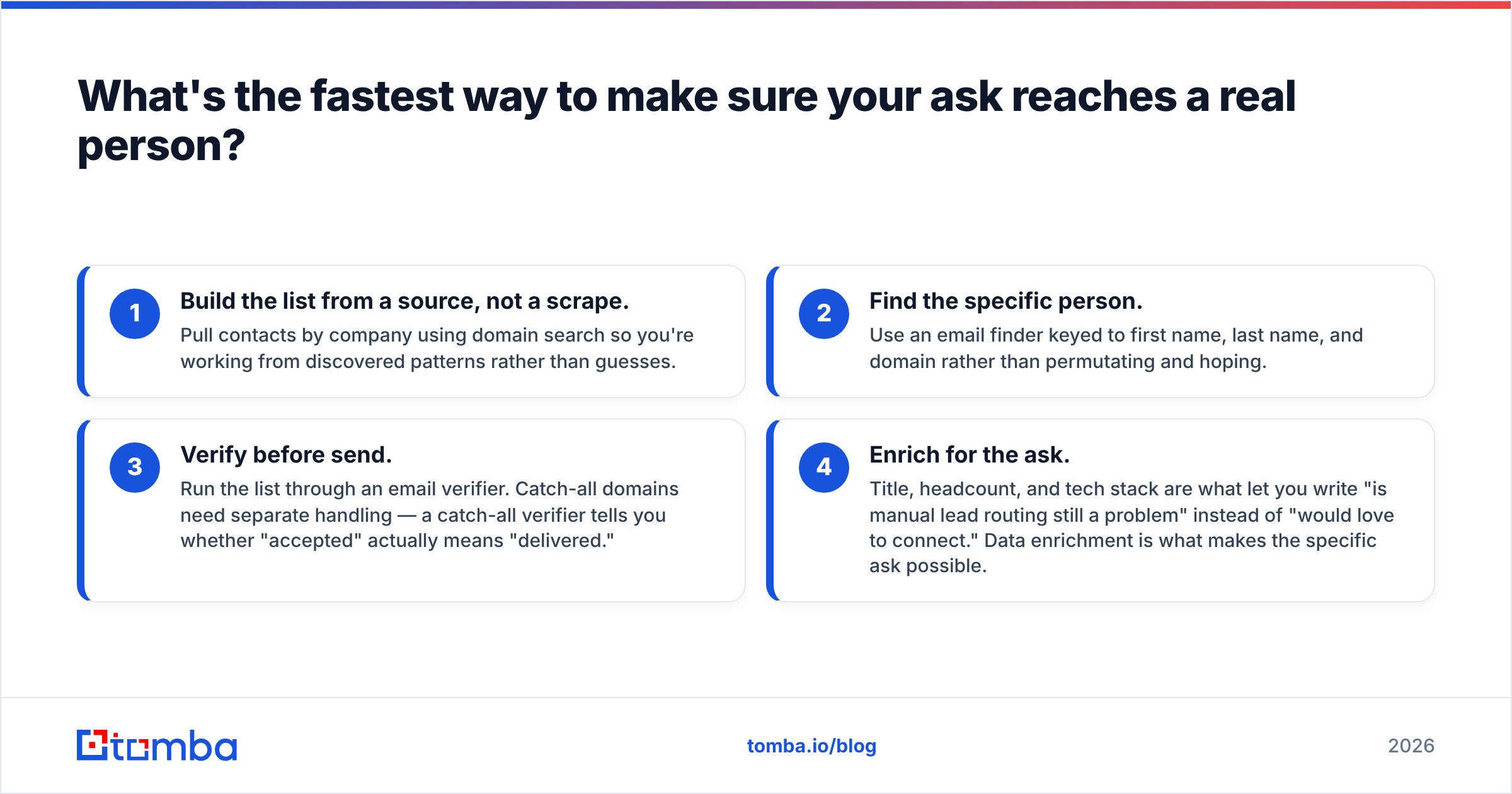
The workflow that avoids this:
- Build the list from a source, not a scrape. Pull contacts by company using domain search so you're working from discovered patterns rather than guesses.
- Find the specific person. Use an email finder keyed to first name, last name, and domain rather than permutating and hoping.
- Verify before send. Run the list through an email verifier. Catch-all domains need separate handling — a catch-all verifier tells you whether "accepted" actually means "delivered."
- Enrich for the ask. Title, headcount, and tech stack are what let you write "is manual lead routing still a problem" instead of "would love to connect." Data enrichment is what makes the specific ask possible.
For teams comparing data vendors on this workflow, tools like BookYourData offer pay-as-you-go verified B2B lists that suit one-off campaigns, while API-first providers make more sense when enrichment runs continuously inside your CRM. Both approaches are legitimate; the wrong move is skipping verification entirely.
What should you never do when asking for a response?#
A short list of things that measurably hurt:
- "Let me know your thoughts." Thoughts on what? This is the most common closing line in B2B email and it asks for nothing specific. Replace it with a question that has an answer.
- "Looking forward to hearing from you." A statement, not an ask. It closes the email without opening a door.
- Guilt. "I've reached out three times" makes the reader defensive and gives them a reason to stay silent permanently.
- Fake urgency. Prospects check. When the deadline you invented passes and you email again, you've proven you'll say untrue things.
- Stacking asks. Covered above, worth repeating: one question per email, always.
- Asking for time before value. The calendar ask on email one is asking a stranger to pay before they've seen the product.
If you want a broader vocabulary for these patterns, G2's sales software category reviews are a decent read on which tools actually enforce single-ask discipline in their sequence builders versus which just let you write whatever.
How do you measure whether your ask is working?#
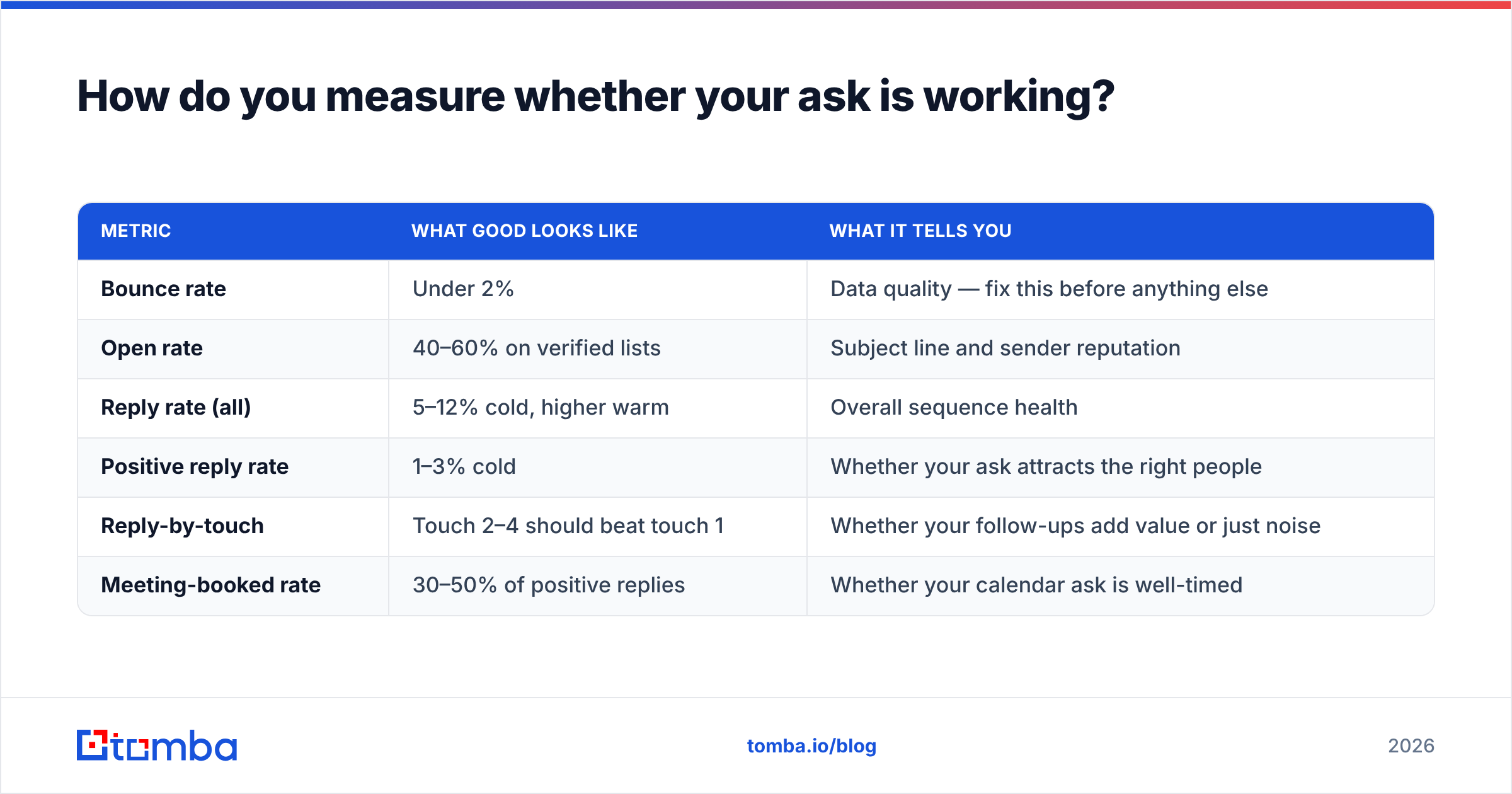
Track reply rate segmented by ask type, not overall. Aggregate reply rate hides everything.
| Metric | What good looks like | What it tells you |
|---|---|---|
| Bounce rate | Under 2% | Data quality — fix this before anything else |
| Open rate | 40–60% on verified lists | Subject line and sender reputation |
| Reply rate (all) | 5–12% cold, higher warm | Overall sequence health |
| Positive reply rate | 1–3% cold | Whether your ask attracts the right people |
| Reply-by-touch | Touch 2–4 should beat touch 1 | Whether your follow-ups add value or just noise |
| Meeting-booked rate | 30–50% of positive replies | Whether your calendar ask is well-timed |
If positive reply rate is low but total reply rate is fine, your ask is too easy — you're getting "no thanks" at volume. If total reply rate is low but bounce rate is also low, the ask is too expensive. Move down the ladder.
Run one variable at a time. Changing the subject line and the closing ask in the same test tells you nothing about either.
Where does this leave you?#
The ask is the cheapest thing in your email to fix and the most consequential. You can rewrite an opening line for a week and gain nothing; swapping a calendar ask for an interest ask on email one often moves reply rate immediately.
But the ceiling on all of it is your data. A well-crafted, perfectly timed, single-question email sent to a stale address is worth exactly zero, and it costs you reputation on the way to being worth zero.
Start with a clean list. Tomba's Email Finder verifies as it finds, so the addresses in your sequence are ones that actually accept mail — with a free tier at 25 searches a month to test the workflow, and paid plans from $49/mo when you're ready to scale. Check Tomba pricing for the tier that matches your send volume. Fix the data, then fix the ask, and you'll stop guessing why nobody replied.
Related guides#
Ready to find emails that actually work?
Join 150,000+ professionals who stopped guessing and started sending. Free credits on signup — no credit card required.
Get the Tomba newsletter
Practical outbound tactics and product updates — once every two weeks.
About the author