How to Build a Lead Generating Website in 2026 (Step by Step)
Most B2B sites collect traffic, not leads. Here is the exact stack, page structure, and capture logic that turns anonymous visitors into contactable pipeline in 2026.
Most B2B sites collect traffic, not leads. This guide covers how to build a lead generating website that turns anonymous visitors into contactable pipeline. You get the page structure, the form rules, and the routing plumbing behind it.
TL;DR
- A lead generating website is not a brochure with a contact form. It is a system: intent-matched pages, one offer per page, short forms, and a path into your CRM within minutes.
- Three levers move conversion rate most: page-to-intent match, offer strength, and form friction. Design polish is a distant fourth.
- Budget roughly 60% of your effort to the pages, 25% to capture and routing plumbing, and 15% to visitor identification. Most visitors never fill anything in.
- Expect 2–5% visitor-to-lead conversion on a well-built B2B site. Anything above 8% usually means you are counting newsletter signups as leads.
- You still need an outbound path for anonymous traffic. Reverse lookup and enrichment turn a company name into a contactable person.
What Is a Lead Generating Website, Exactly?#
A lead generating website is a site built so that a measurable share of visitors give you permission to contact them. That is the whole definition. Traffic is the input. Contactable records in your CRM are the output. Everything in between is conversion machinery.
Think of it like a retail store versus a vending machine. A brochure site is a shop window: people look, admire, and walk on. A lead generating website is a vending machine. Every path ends in a transaction, even if the currency is an email address instead of cash.
Most guides on how to build a lead generating website start with design. Start with structure instead. B2B sites usually fail because a committee designed them around "how we want to look" rather than "what a stranger with a problem needs to do next." The fix is structural, not cosmetic.
Four properties separate the two:
- Intent-matched landing pages. Each page answers one query and offers one next step. A page targeting "SOC 2 compliance checklist" should not ask for a demo.
- A real offer, not a form. "Contact us" is not an offer. A benchmark report, a calculator, a template pack, or a 12-minute teardown is.
- Friction proportional to value. A three-field form for a template. A longer, qualifying form for a pricing conversation.
- Speed-to-lead plumbing. Every submission hits your CRM, enriches automatically, and triggers a human follow-up inside an hour.
Why Do Most B2B Websites Fail to Generate Leads?#
Because they solve for traffic and treat conversion as an afterthought. A site can rank for forty keywords and still produce three leads a month. That happens when every one of those pages dead-ends in a footer link.
These are the failure patterns that do the most damage:
- One generic form for a whole site. Visitors arrive from ten different problems and get one identical "Request a Demo" box. Match rates collapse.
- Offers that require a purchase decision. Asking someone in research mode to book a sales call is asking for marriage on a first date.
- Forms that ask for what you do not need. Every optional field costs you conversions. Company size, job title, and phone number can be enriched later. Ask for the email, get the lead, then fill the rest in with data enrichment.
Two more patterns are less obvious, and they cost the most volume:
- No follow-up within the hour. HubSpot's research on response times has been consistent for a decade. Contact speed beats almost every other variable.
- Ignoring the 95% who never convert. Most of your qualified traffic leaves without touching a form. If your only capture path is a form, you are discarding most of your demand.

What Should the Page Structure Look Like?#
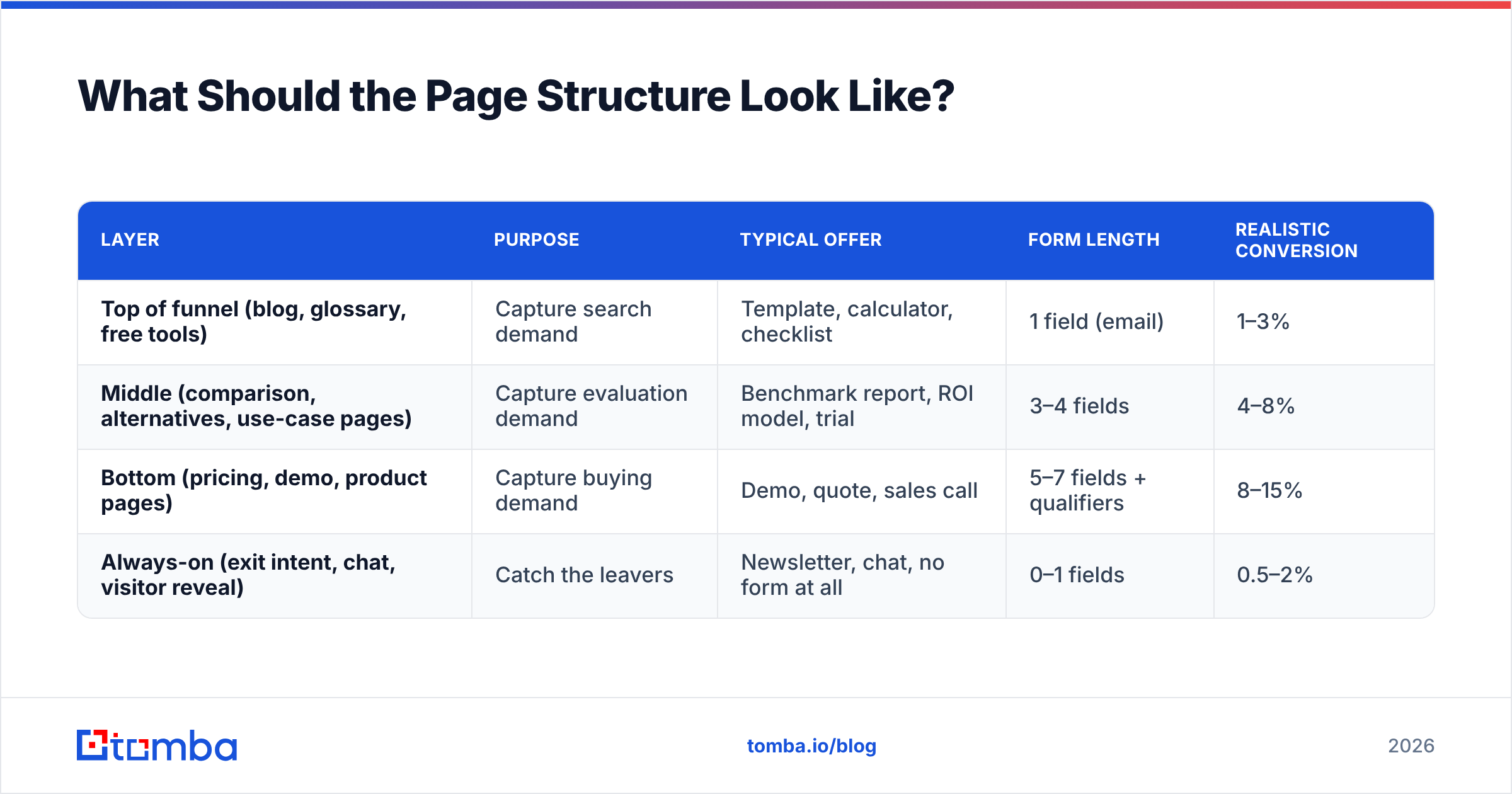
Build in three layers. Each layer has a different job, a different offer, and a different conversion benchmark.
| Layer | Purpose | Typical offer | Form length | Realistic conversion |
|---|---|---|---|---|
| Top of funnel (blog, glossary, free tools) | Capture search demand | Template, calculator, checklist | 1 field (email) | 1–3% |
| Middle (comparison, alternatives, use-case pages) | Capture evaluation demand | Benchmark report, ROI model, trial | 3–4 fields | 4–8% |
| Bottom (pricing, demo, product pages) | Capture buying demand | Demo, quote, sales call | 5–7 fields + qualifiers | 8–15% |
| Always-on (exit intent, chat, visitor reveal) | Catch the leavers | Newsletter, chat, no form at all | 0–1 fields | 0.5–2% |
The mistake almost everyone makes is running bottom-of-funnel offers on top-of-funnel pages. Someone reading a glossary entry about email deliverability is not ready to talk to sales. Give them the deliverability checklist, capture the email, and let nurture do its job.
Free tools deserve special mention. A single-purpose utility that solves a real micro-problem is the highest-leverage lead asset in B2B. An SPF checker, a subject line tester, or a pricing calculator all qualify. Each one ranks, earns links, and converts at rates a blog post cannot touch, because the user already got value before you asked for anything.
How Do You Design Forms That Actually Convert?#
Cut fields until it hurts, then cut one more. Every field is a tax on your conversion rate. Most of what you would ask for is available through enrichment anyway.
Start with these three rules on length:
- Always ask for a work email. This is the only field that is genuinely irreplaceable. Everything else can be derived.
- Ask for company only if you cannot infer it. You can usually derive it from the email domain.
- Never ask for phone at the top of funnel. It is the single biggest drop-off field in B2B forms. Use a phone finder after the lead is in your system if you need dial coverage.
The remaining rules are about quality, not length:
- Use qualifiers only on bottom-of-funnel forms. Budget, timeline, and team size belong on the demo request, nowhere else.
- Validate the email at the point of entry. Typos and disposable addresses poison your database and your sender reputation. An email verifier running as an inline check on submit keeps junk out before it reaches the CRM.
- Never use a captcha unless you are under active attack. Honeypot fields catch most bots without costing you real submissions.
That last point about verification matters more than it looks. A form that accepts jhon@gmial.com does not produce a lead. It produces a bounce. Enough bounces will damage your sender reputation for every legitimate email you send afterward.
What Tech Stack Do You Actually Need?#
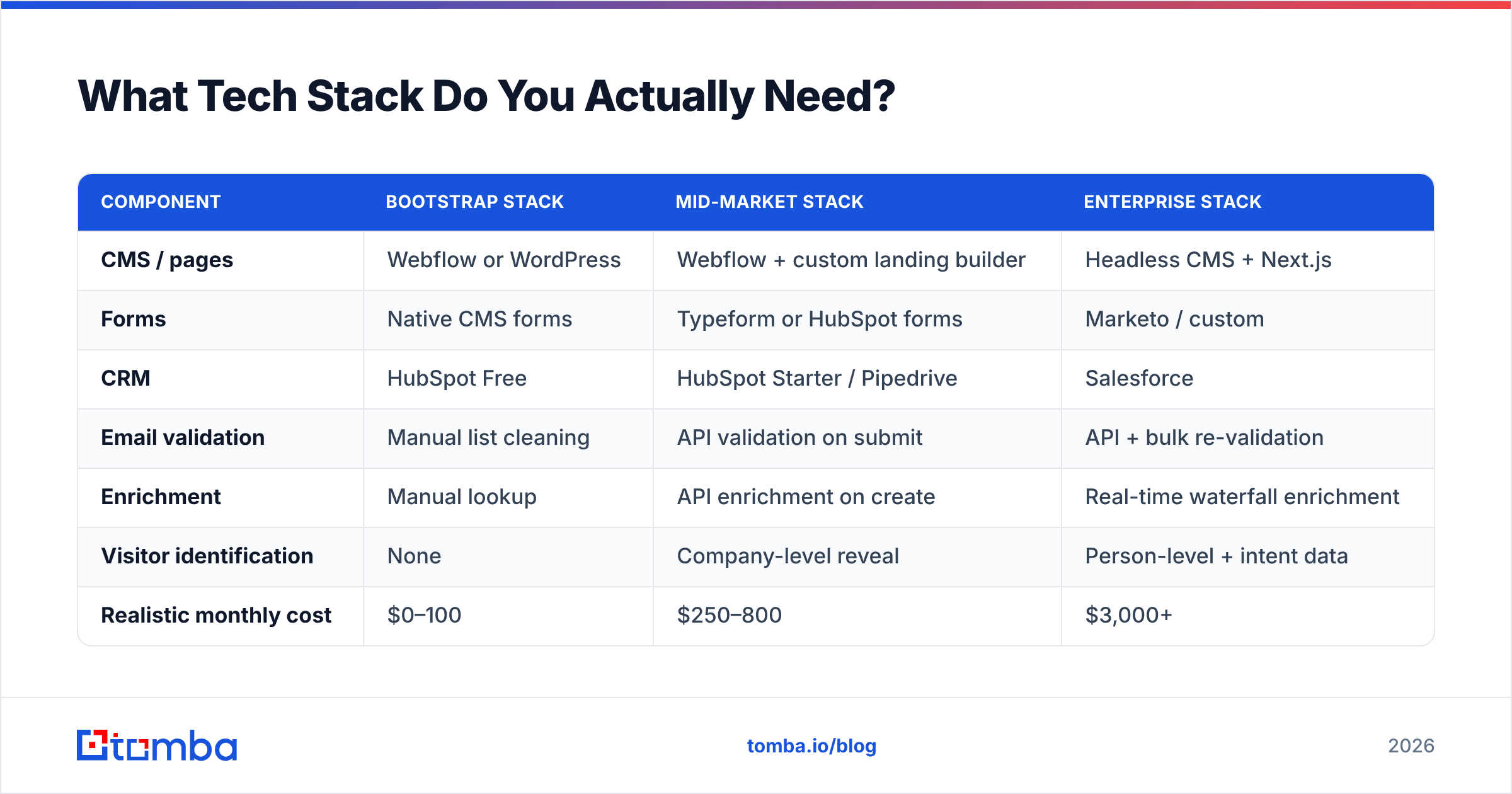
You need fewer tools than vendors will tell you. Here is a comparison of the three realistic stack tiers, with the honest tradeoffs.
| Component | Bootstrap stack | Mid-market stack | Enterprise stack |
|---|---|---|---|
| CMS / pages | Webflow or WordPress | Webflow + custom landing builder | Headless CMS + Next.js |
| Forms | Native CMS forms | Typeform or HubSpot forms | Marketo / custom |
| CRM | HubSpot Free | HubSpot Starter / Pipedrive | Salesforce |
| Email validation | Manual list cleaning | API validation on submit | API + bulk re-validation |
| Enrichment | Manual lookup | API enrichment on create | Real-time waterfall enrichment |
| Visitor identification | None | Company-level reveal | Person-level + intent data |
| Realistic monthly cost | $0–100 | $250–800 | $3,000+ |
| Time to launch | 1–2 weeks | 4–6 weeks | 3–4 months |
Most companies reading this belong in the mid-market column. They are either overspending on the enterprise column or stuck in bootstrap because nobody wired the plumbing. The plumbing is the part that pays.
The critical integration is form → validation → enrichment → CRM, in that order. It should run in under two seconds so the visitor never sees it happen. Tomba's email finder API and the HubSpot integration handle the middle two steps. Whatever CRM you use, the pattern is identical.
How Do You Capture the 95% Who Never Fill In a Form?#
This is where most "lead generating website" advice stops, and it is exactly where the volume is. Even a well-optimized B2B site converts around 3% of traffic. The other 97% is your real demand pool.
Three approaches, ranked by practicality:
Company-level visitor identification. Reverse-IP and device-graph tools tell you which companies visited, which pages they read, and how often. You do not get a person. You get an account signal. Tools like website visitor reveal turn anonymous traffic into a named company list, which you then work as an account-based outbound motion.
Domain-to-contact expansion. Once you have the company, you need people. A domain search does the heavy lifting here. Feed it the visiting company's domain, filter by department and seniority, and you get a contactable list of the humans most likely to have been on your pricing page.
Content-signal outbound. Say someone downloaded your benchmark report with a personal Gmail address. A reverse email lookup can often resolve it to a work identity and company, which turns a low-value record into a routable lead.

The ethical line matters here. Company-level identification from your own traffic is standard practice and legal in most places under legitimate interest. Person-level de-anonymization without consent is a different conversation, and GDPR treats it as such. Know which side of that line your tooling sits on, and document it.
How Do You Measure Whether It Is Working?#
Track four numbers and ignore the rest until these are healthy.
- Visitor-to-lead rate, segmented by page type. A single site-wide number hides everything. Your pricing page and your glossary need completely different benchmarks.
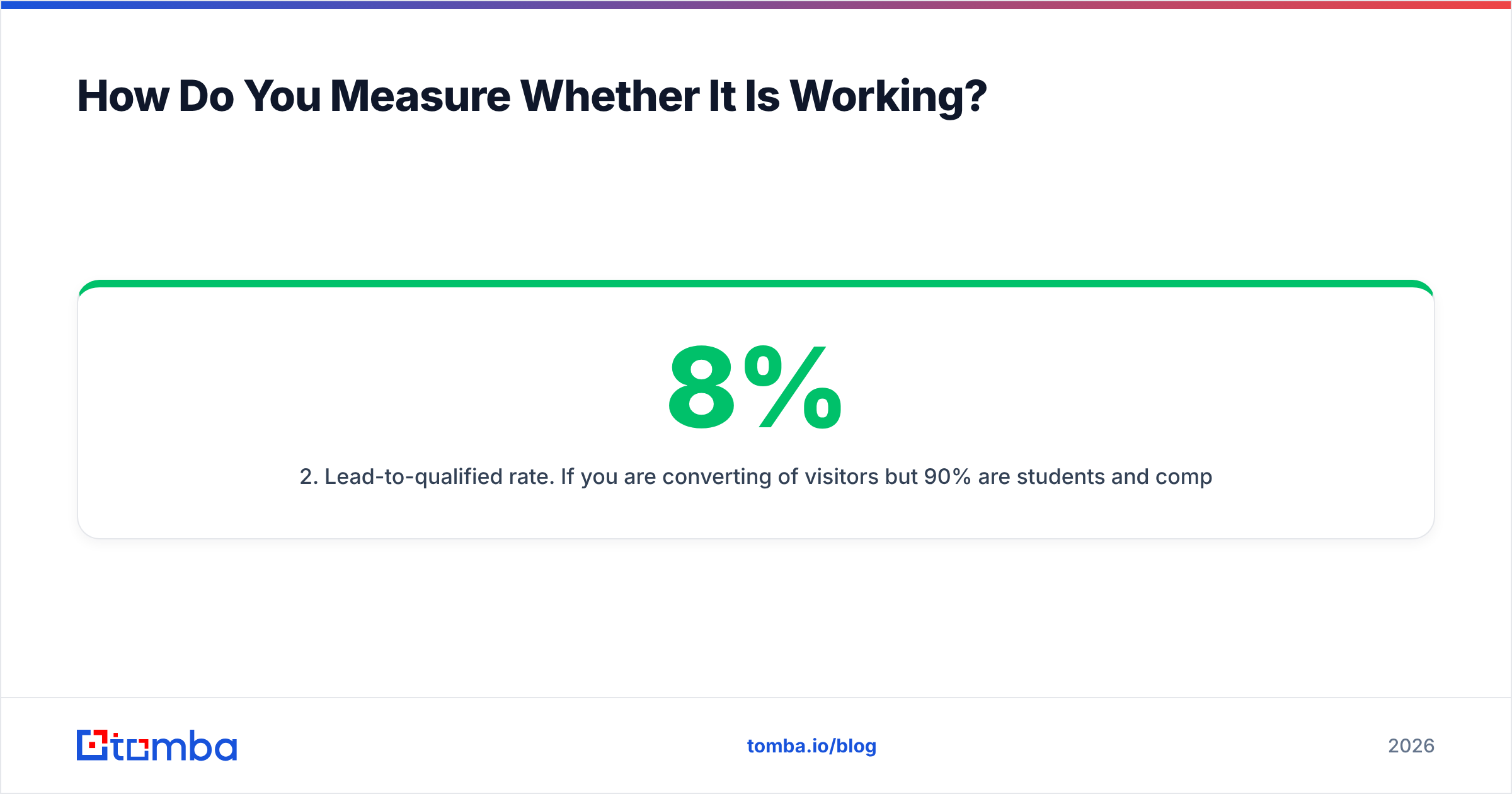
- Lead-to-qualified rate. If you convert 8% of visitors but 90% are students and competitors, your offer attracts the wrong people. Tighten the offer, not the form.
- Speed to first human contact. Measure in minutes, not days. This is the cheapest metric to improve and the one with the highest payoff.
- Cost per qualified lead by channel. Organic content, paid, and outbound each need their own number. They will differ by 10x, and the average is meaningless.
A note on attribution: multi-touch models are seductive and mostly noise below about 500 leads per month. Until you hit that volume, self-reported attribution beats any tracking script. Add one optional field to the demo form: "How did you hear about us?"
G2's buyer behavior research has repeatedly found that buyers touch a dozen or more sources before they convert. Your last-click data is telling you about the finish line, not the race.
How to Build a Lead Generating Website in 90 Days#
If you are starting close to zero, sequence it like this.
Days 1–30 — Fix the plumbing. Pick your CRM. Wire form submissions into it with validation and enrichment on the path. Set a follow-up SLA and hold someone accountable to it. Add self-reported attribution. Do not build a single new page in this window. If your existing pages converted at all, better plumbing will already lift the number.
Days 31–60 — Build the offers. Create two or three genuine assets: one free tool, one data or benchmark asset, one template pack. Put each on a dedicated page with a matched form. Then retrofit your top ten traffic pages with a contextual call-to-action pointing at whichever asset fits that page's intent.
Days 61–90 — Add the anonymous layer. Install visitor identification. Build the workflow that takes a revealed company, expands it into contacts, and hands it to whoever owns outbound. Start bulk email finding against your identified-account list. Only now should you look at paid traffic, because only now can you actually convert it.
The order matters. Sending paid traffic to a site without conversion plumbing is a way to buy expensive analytics data about strangers.
Common Mistakes That Kill Conversion#
Three of these are about what you publish:
- Gating everything. If your best content sits behind a form, nobody links to it and it never ranks. Gate the tool and the data, publish the ideas.
- Redesigning instead of restructuring. A new color palette will not fix a page that offers a demo to someone researching a definition.
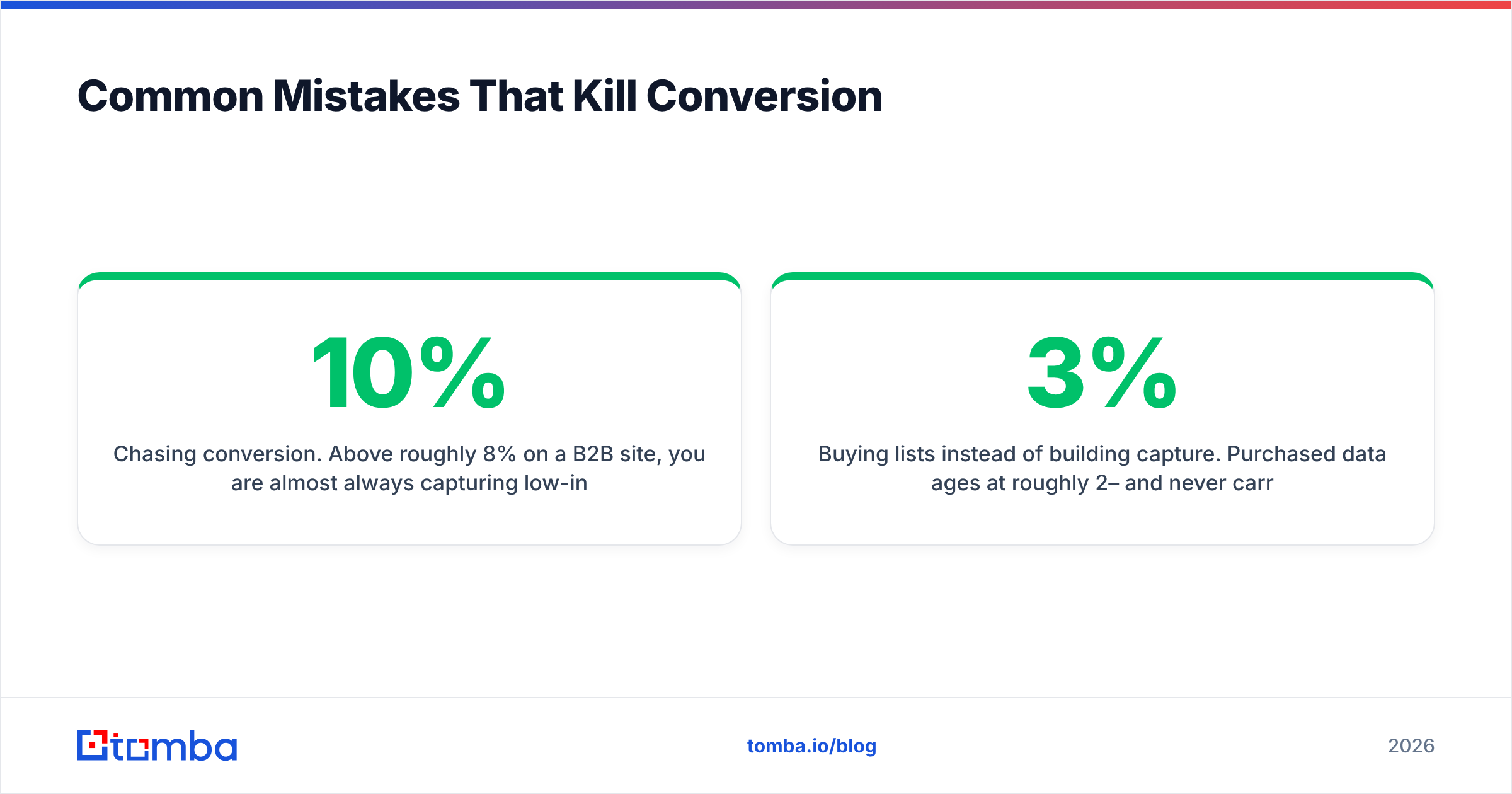
- Chasing 10% conversion. Above roughly 8% on a B2B site, you are almost always capturing low-intent signups. Optimize for qualified leads, not raw counts.
Two more are about the data and the device:
- Buying lists instead of building capture. Purchased data ages at roughly 2–3% per month and never carries the intent signal your own traffic does. If you do supplement with third-party data, established providers like BookYourData offer verified B2B records. Treat that as fuel for outbound, not a replacement for your own capture layer.
- No mobile form testing. Roughly half your traffic is mobile. A form that works on a laptop can be unusable on a phone. Test on a real device, not a browser resize.
Where Should You Start This Week?#
Pick the single highest-traffic page on your site that has no offer, and give it one. Then wire that form into your CRM with validation and enrichment on the path. Those two moves take a day, and they will out-perform a quarter of redesign work.
Once your capture layer works, the constraint shifts. You now have to turn identified companies into named, contactable people. That is where the Tomba Email Finder fits.
Feed it a company domain and a name, or just a domain. It returns verified work email addresses with confidence scores, so the accounts your site identifies become real conversations. The free tier gives you 25 searches a month to test the workflow. The Starter plan at $49/mo covers most early-stage teams; see Tomba pricing for Growth ($99/mo) and Pro ($249/mo).
That is how to build a lead generating website: capture layer first, then make sure nothing that walks through it goes to waste.
Related guides#
Ready to find emails that actually work?
Join 150,000+ professionals who stopped guessing and started sending. Free credits on signup — no credit card required.
Get the Tomba newsletter
Practical outbound tactics and product updates — once every two weeks.
About the author