How to Build an Email List Fast: 7 Methods That Work in 2026
Most "grow your list" advice produces volume, not revenue. Here are seven methods to build a B2B email list fast — with real timelines, costs, and the compliance traps that kill deliverability.
TL;DR
- The fastest legitimate way to build a B2B email list is pattern-based email finding against a target account list — you can go from zero to 1,000 verified contacts in a single afternoon.
- Speed and quality trade off in a predictable way: scraped lists are fastest and worst, opt-in lead magnets are slowest and best, and verified email finding sits in the sweet spot.
- Never send to an unverified list. A 12% bounce rate on a cold domain can cost you the domain, not just the campaign.
- Budget roughly $49–$99/month for tooling if you need 1,000–5,000 verified contacts per month. Anything advertised as "10 million emails for $99" is a database dump, not a list.
- Verification is not optional overhead — it is the single highest-ROI step in the whole process.
What does "building an email list fast" actually mean in B2B?#
Two completely different jobs share the same phrase, and conflating them is why most advice on this topic is useless to you.
Job one: inbound list building. You want subscribers who asked to hear from you — newsletter readers, webinar registrants, gated-content downloaders. These people opted in. They convert well and they almost never complain. They also arrive slowly. A brand-new site with modest traffic will add maybe 50–200 subscribers a month, and no tactic changes that math without more traffic.
Job two: outbound list building. You want a list of specific people at specific companies who match an ideal customer profile, so your SDRs or founders can reach out. Nobody opted in. Speed here is entirely a function of your data pipeline, not your traffic.
This guide covers both, but weights toward job two — because that's where "fast" is actually achievable and where most of the expensive mistakes happen.
The uncomfortable truth: if someone promises you 50,000 subscribers next week, they're describing a purchased database. Those addresses are stale, frequently role-based (info@, sales@), and will torch your sender reputation before you get to your third campaign.
Which methods actually build a list fast?#
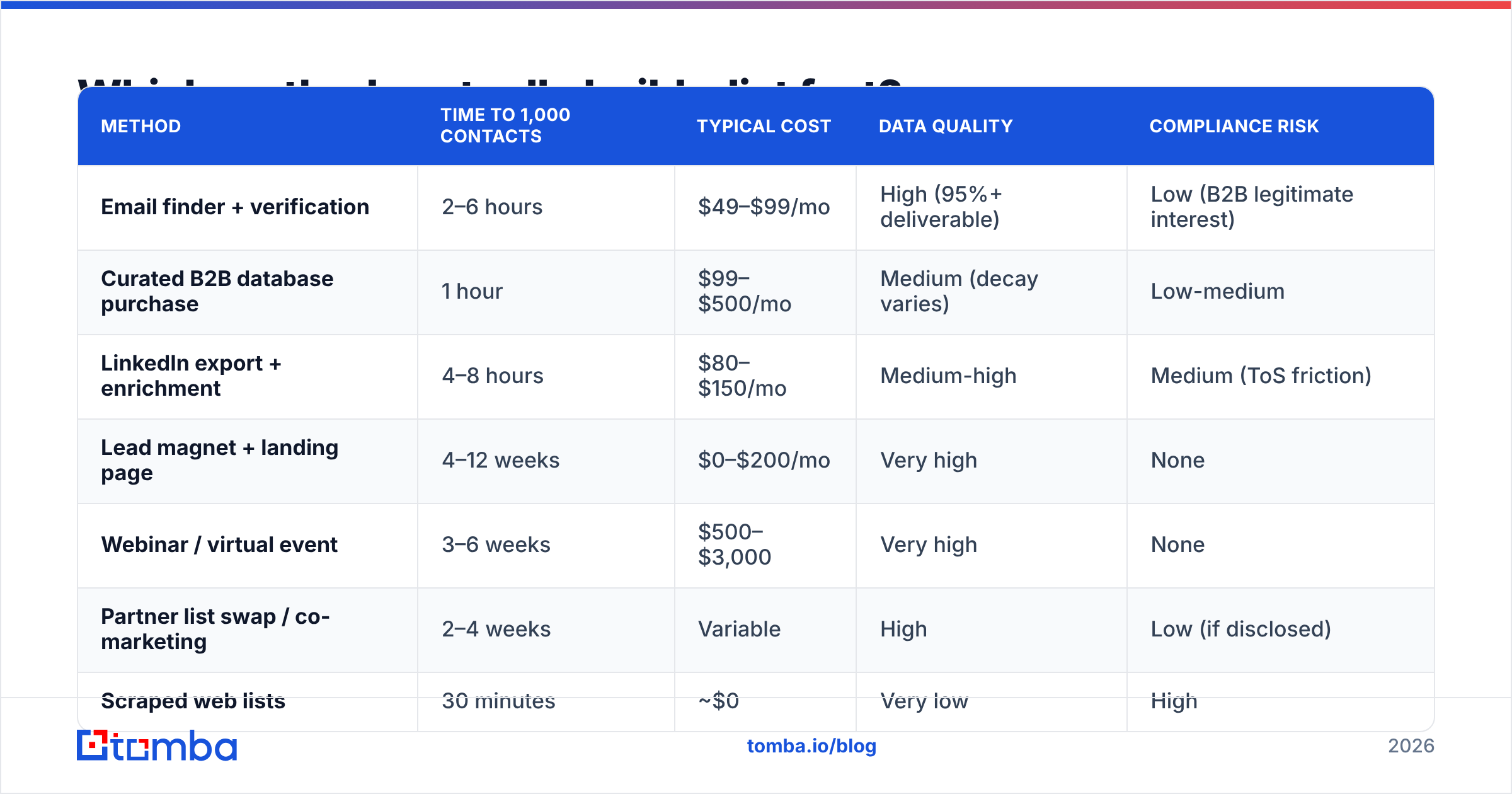
Here's the honest ranking by time-to-usable-list, with the trade-offs attached.
| Method | Time to 1,000 contacts | Typical cost | Data quality | Compliance risk |
|---|---|---|---|---|
| Email finder + verification | 2–6 hours | $49–$99/mo | High (95%+ deliverable) | Low (B2B legitimate interest) |
| Curated B2B database purchase | 1 hour | $99–$500/mo | Medium (decay varies) | Low-medium |
| LinkedIn export + enrichment | 4–8 hours | $80–$150/mo | Medium-high | Medium (ToS friction) |
| Lead magnet + landing page | 4–12 weeks | $0–$200/mo | Very high | None |
| Webinar / virtual event | 3–6 weeks | $500–$3,000 | Very high | None |
| Partner list swap / co-marketing | 2–4 weeks | Variable | High | Low (if disclosed) |
| Scraped web lists | 30 minutes | ~$0 | Very low | High |
Note the last row. Scraping is genuinely the fastest thing on this table and it is also the only method I'd tell you to skip outright. A scraped list is unverified, unsegmented, and heavy on catch-all domains and abandoned mailboxes. You will pay for it in bounce rate.

How do you build a verified outbound list in one afternoon?#
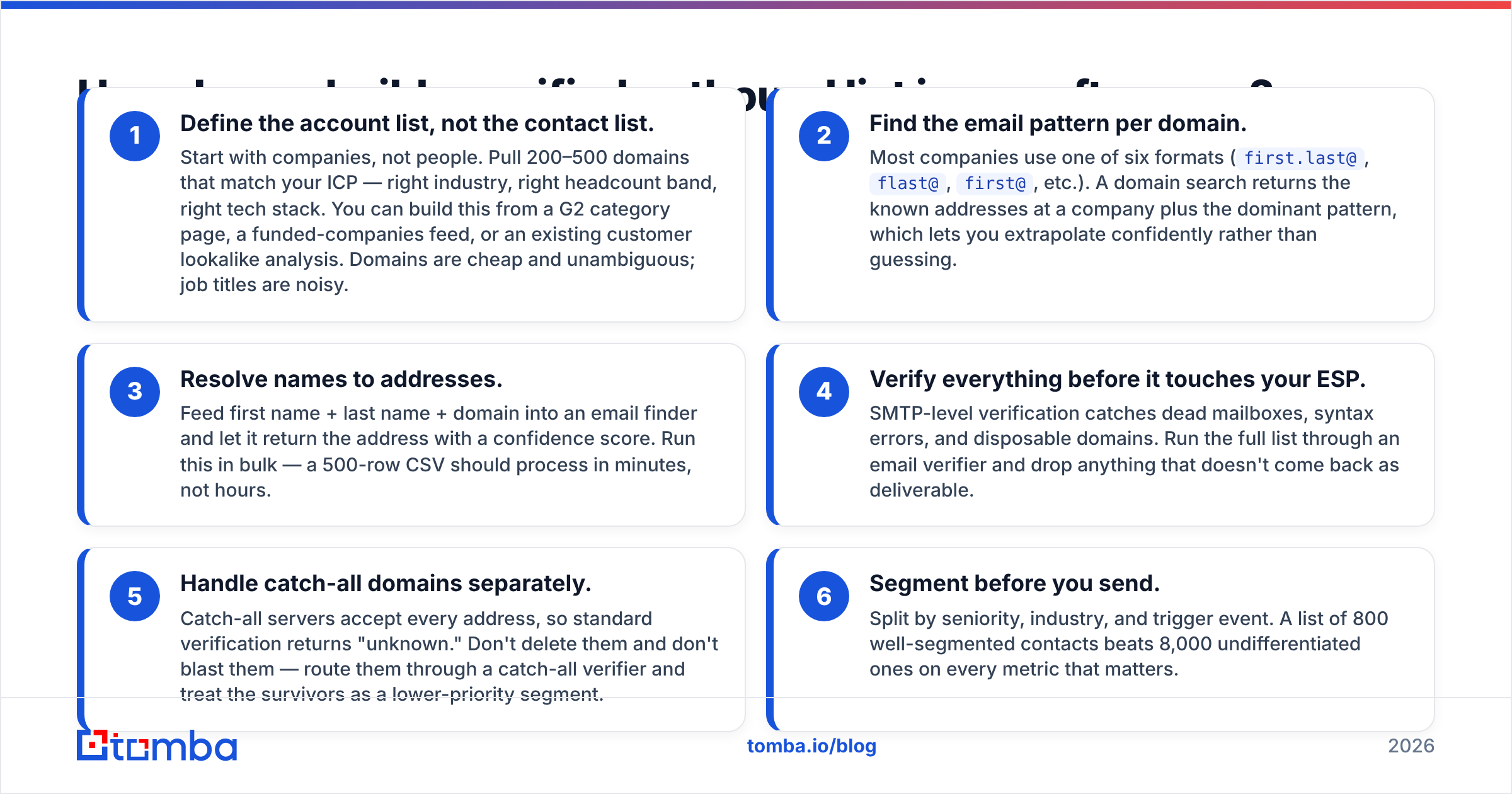
This is the workflow that produces the best speed-to-quality ratio. It takes about four hours the first time and under an hour once you've done it twice.
Define the account list, not the contact list. Start with companies, not people. Pull 200–500 domains that match your ICP — right industry, right headcount band, right tech stack. You can build this from a G2 category page, a funded-companies feed, or an existing customer lookalike analysis. Domains are cheap and unambiguous; job titles are noisy.
Find the email pattern per domain. Most companies use one of six formats (
first.last@,flast@,first@, etc.). A domain search returns the known addresses at a company plus the dominant pattern, which lets you extrapolate confidently rather than guessing.Resolve names to addresses. Feed first name + last name + domain into an email finder and let it return the address with a confidence score. Run this in bulk — a 500-row CSV should process in minutes, not hours.
Verify everything before it touches your ESP. SMTP-level verification catches dead mailboxes, syntax errors, and disposable domains. Run the full list through an email verifier and drop anything that doesn't come back as deliverable.
Handle catch-all domains separately. Catch-all servers accept every address, so standard verification returns "unknown." Don't delete them and don't blast them — route them through a catch-all verifier and treat the survivors as a lower-priority segment.
Segment before you send. Split by seniority, industry, and trigger event. A list of 800 well-segmented contacts beats 8,000 undifferentiated ones on every metric that matters.
The whole point of this sequence is that verification happens before the first send, not after the bounce report arrives. Reversing that order is the most common and most expensive mistake in outbound.
Why does list quality matter more than list size?#
Because mailbox providers score you on engagement, and a bloated list drags every signal down.
Google and Microsoft both evaluate sender behavior at the domain level. Bounce rate, spam complaints, and open-to-delete ratios feed into whether your mail lands in the inbox or the promotions tab or nowhere at all. Google's bulk sender guidelines set a spam complaint threshold of 0.3% — three complaints per thousand messages. A purchased list will blow past that on the first campaign.
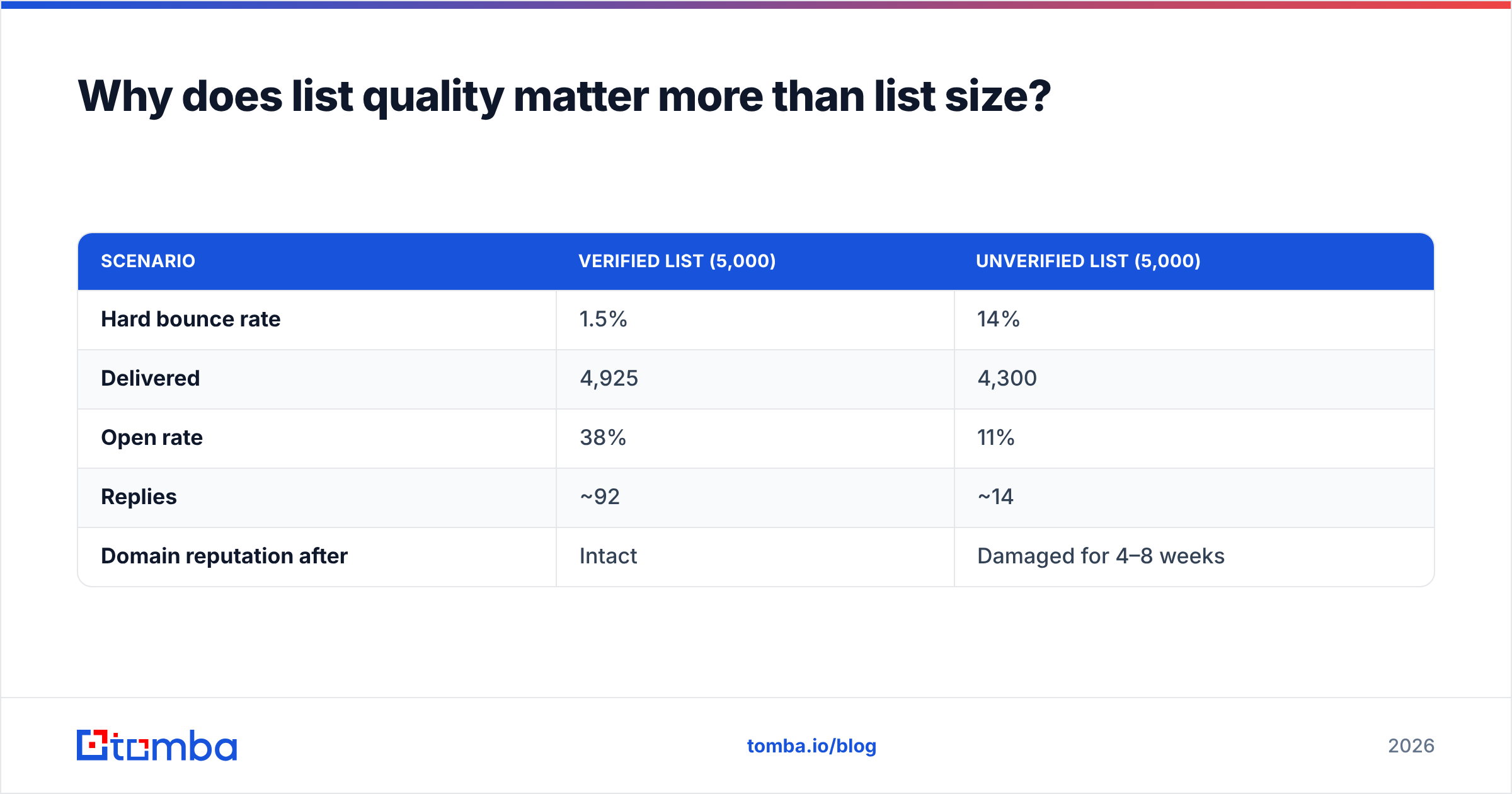
Run the arithmetic on a 5,000-contact list:
| Scenario | Verified list (5,000) | Unverified list (5,000) |
|---|---|---|
| Hard bounce rate | 1.5% | 14% |
| Delivered | 4,925 | 4,300 |
| Open rate | 38% | 11% |
| Replies | ~92 | ~14 |
| Domain reputation after | Intact | Damaged for 4–8 weeks |
The unverified list has the same number of rows and roughly one-sixth the output. Worse, the reputation damage carries into your next campaign, so the real cost is two months of degraded performance, not one bad send.
If you want to sanity-check your setup before scaling volume, run your sending domain through an SPF checker and a blacklist checker first. Authentication problems masquerade as list-quality problems and waste weeks of diagnosis.
What about inbound? How do you accelerate opt-in list growth?#
You can't make inbound instant, but you can compress the timeline meaningfully.
- Swap the generic newsletter box for a specific promise. "Subscribe for updates" converts at roughly 1–2% of visitors. "Get the 2026 SaaS pricing benchmark (37 pages, free)" routinely converts at 6–12% on the same traffic. The asset does the work.
- Put the form where intent peaks. Mid-article inline forms and exit-intent modals outperform footer forms by a wide margin. Sidebar forms are close to dead.
- Gate the tool, not the blog post. Free calculators, checkers, and generators pull emails far better than PDFs because the user gets value immediately and repeatedly.
- Run one co-marketing webinar per quarter. A partner with an audience of 5,000 can add 300–600 registrants in three weeks. That's the single fastest legitimate inbound channel.
- Ask on the thank-you page. Anyone who just converted on anything is your warmest possible subscriber. Most sites never ask twice.
HubSpot's research on conversion rate optimization consistently finds that offer specificity beats form placement and design tweaks combined. Fix the offer first.

Which tools should you use to build the list?#
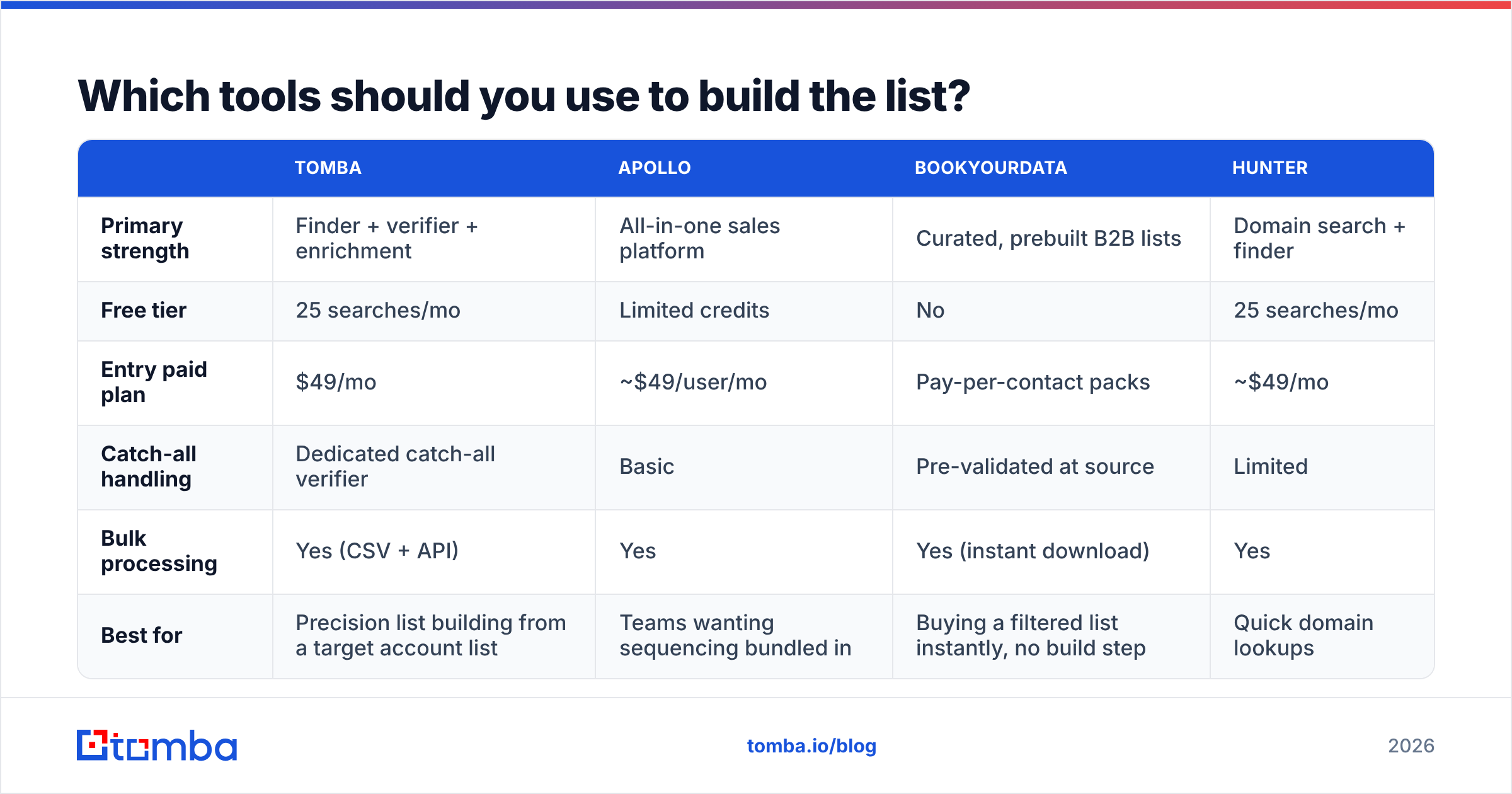
The category splits into three groups that people constantly confuse: finders (resolve a person to an address), verifiers (confirm an address is deliverable), and databases (pre-built contact records you filter and export).
| Tomba | Apollo | BookYourData | Hunter | |
|---|---|---|---|---|
| Primary strength | Finder + verifier + enrichment | All-in-one sales platform | Curated, prebuilt B2B lists | Domain search + finder |
| Free tier | 25 searches/mo | Limited credits | No | 25 searches/mo |
| Entry paid plan | $49/mo | ~$49/user/mo | Pay-per-contact packs | ~$49/mo |
| Catch-all handling | Dedicated catch-all verifier | Basic | Pre-validated at source | Limited |
| Bulk processing | Yes (CSV + API) | Yes | Yes (instant download) | Yes |
| Best for | Precision list building from a target account list | Teams wanting sequencing bundled in | Buying a filtered list instantly, no build step | Quick domain lookups |
Read that table as a fit question, not a winner question:
- If you already know which companies you want and need addresses for named people, a finder-first stack is correct. That's Tomba's core case, and it's the cheapest path to a clean list.
- If you don't have an account list yet and want to skip the build entirely, a curated database like BookYourData is a legitimate shortcut — you're paying for someone else's compilation and validation work, which is a real service and often the right call under deadline.
- If you want prospecting, sequencing, and dialing in one login and can absorb per-seat pricing, an all-in-one platform makes sense despite the higher blended cost.
Most teams end up running two: a database for breadth, a finder plus verifier for precision on named accounts. Check current Tomba pricing against your monthly contact volume — the Growth tier at $99/mo covers most teams doing 3,000–5,000 contacts a month, and the Tomba API handles it if you'd rather build the pipeline into your own stack.
For teams already living inside a spreadsheet, the Google Sheets add-on removes the CSV round-trip entirely — paste domains in column A, get verified addresses in column C.
What compliance rules apply to a cold B2B list?#
Short version: B2B cold email is legal in most jurisdictions if you follow the rules, and the rules differ by region.
- United States (CAN-SPAM). No prior consent required. You must include a physical address, honor opt-outs within 10 business days, and not use deceptive subject lines or headers. The FTC's CAN-SPAM compliance guide is the authoritative source and is short enough to read in full.
- EU/UK (GDPR + PECR). Business addresses can be processed under legitimate interest, but you need a documented basis, a clear purpose, and an easy objection route. Role-based addresses at corporate domains carry lower risk than personal-format addresses at small partnerships.
- Canada (CASL). Strictest of the three. Implied consent exists for business relationships and published business addresses, but the burden of proof sits with you.
Practical rule regardless of geography: keep a record of where each contact came from, honor unsubscribes instantly and permanently, and never email a personal Gmail address you found on a LinkedIn profile. That last one is where most "B2B is exempt" arguments fall apart.
How do you keep the list from decaying?#
B2B contact data decays at roughly 22–30% per year. People change jobs, companies get acquired, domains get consolidated. A list you built in January is measurably worse by July.
Three habits keep it usable:
- Re-verify quarterly. Run the entire active list back through verification every 90 days and suppress anything that flipped to invalid. This costs credits and saves your reputation.
- Suppress hard bounces permanently. Once, immediately, across every tool. Re-mailing a hard bounce is the fastest way to look like a spammer.
- Enrich rather than replace. When a contact bounces, the company is often still a good account. Run data enrichment to find the replacement person rather than deleting the row.
Segmentation by engagement helps too. Anyone who hasn't opened in six months should move to a low-frequency track or a sunset sequence — mailing dormant contacts is a pure reputation cost with almost no upside.
What's the realistic timeline?#
For a team starting from zero:
- Day 1: Define ICP, assemble 300–500 target domains.
- Day 1 (afternoon): Run domain search, bulk find, bulk verify. Expect 800–1,500 verified contacts.
- Day 2: Segment, write two sequences, configure authentication (SPF, DKIM, DMARC).
- Week 1–2: Warm the sending domain. Do not skip this if the domain is new.
- Week 3: First real send at controlled volume, 50–100/day per mailbox.
- Ongoing: Add 500–1,000 verified contacts weekly; run inbound lead magnets in parallel so the opt-in list compounds behind the outbound one.
That's a working, compliant, high-quality list in under three weeks — most of which is domain warmup, not list building. The list itself genuinely takes an afternoon.
Start with the accounts you already want#
The fastest path to a usable email list isn't a bigger database — it's a tighter account list run through a finder that returns verified addresses instead of guesses. Pick 300 companies you'd genuinely like as customers, run them through the Tomba Email Finder, verify the output, and you'll have a segment worth sending to before the end of the day. The free tier gives you 25 searches to test the accuracy on domains you already know, which is the only benchmark that actually tells you anything.
Related guides#
Ready to find emails that actually work?
Join 150,000+ professionals who stopped guessing and started sending. Free credits on signup — no credit card required.
Get the Tomba newsletter
Practical outbound tactics and product updates — once every two weeks.
About the author