How to Calculate Email Delivery Rate (2026 Formula Guide)
Delivery rate and inbox placement are not the same number, and most senders confuse them. Here is the exact formula, the benchmarks that matter, and how to fix a rate stuck below 95%.
TL;DR
- Email delivery rate = (emails delivered ÷ emails sent) × 100, where "delivered" simply means "not bounced." It is a bounce metric, not an inbox metric.
- A 99% delivery rate can coexist with 40% of your mail sitting in spam. Delivery rate and inbox placement rate measure different things — you need both.
- Healthy benchmarks for 2026: 98%+ delivery rate for cold outbound, 99%+ for opt-in marketing, and hard bounces under 2%.
- The fastest lever on delivery rate is list hygiene at the source — verifying addresses before send removes the bounces that drag the number down.
- Soft bounces, deferrals, and silent drops each distort the formula differently. Know which one your ESP is counting.
Most senders quote a delivery rate they cannot actually defend. They read 98.7% off a dashboard, assume the campaign landed, and never notice that a third of it went to spam. This guide gives you the formula, the variants your ESP might be using behind the scenes, the benchmarks that matter, and the specific fixes that move the number.
What is email delivery rate?#
Email delivery rate is the percentage of emails you sent that were accepted by the recipient's mail server instead of being bounced back.
Think of it like a courier delivering parcels to an apartment building. Delivery rate tells you the parcel got past the front desk without being refused. It says nothing about whether the concierge put it in the right mailbox, dumped it in a "junk" bin in the basement, or left it in the lobby. That second question — where the message ended up — is inbox placement, and it is a separate measurement entirely.
This distinction is where most reporting breaks. Your email service provider knows one thing with certainty: whether the receiving server returned an SMTP error. It does not know whether Gmail filed the message under Primary, Promotions, or Spam. So when a dashboard shows "delivered," it means "not rejected."
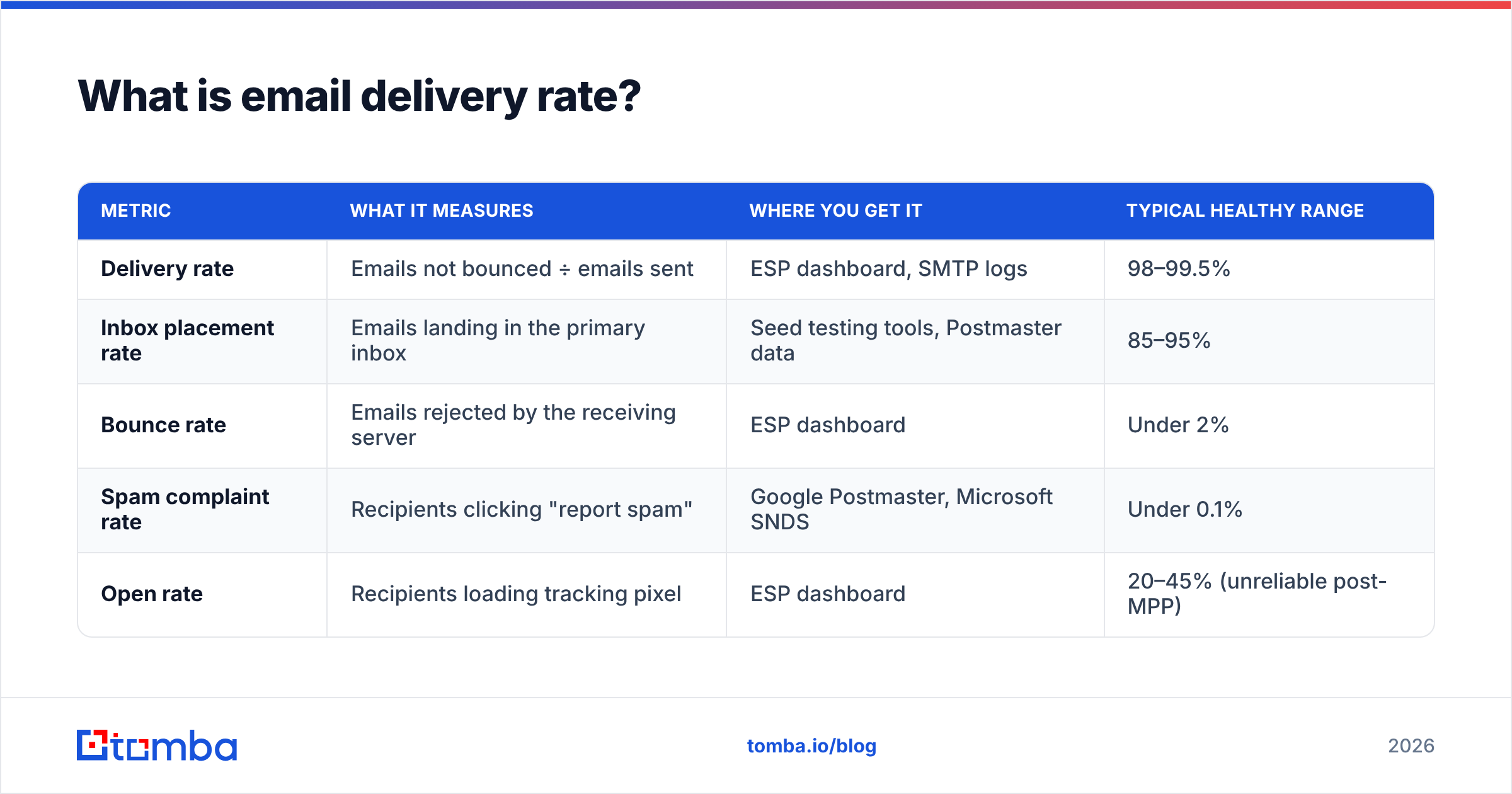
| Metric | What it measures | Where you get it | Typical healthy range |
|---|---|---|---|
| Delivery rate | Emails not bounced ÷ emails sent | ESP dashboard, SMTP logs | 98–99.5% |
| Inbox placement rate | Emails landing in the primary inbox | Seed testing tools, Postmaster data | 85–95% |
| Bounce rate | Emails rejected by the receiving server | ESP dashboard | Under 2% |
| Spam complaint rate | Recipients clicking "report spam" | Google Postmaster, Microsoft SNDS | Under 0.1% |
| Open rate | Recipients loading tracking pixel | ESP dashboard | 20–45% (unreliable post-MPP) |
If you only track one of these, track inbox placement. If you track two, add delivery rate — because a collapsing delivery rate is usually the earliest warning that your list quality or sender reputation is deteriorating.
How do you calculate email delivery rate?#
The formula is one line:
Delivery rate = (Emails sent − Bounces) ÷ Emails sent × 100
Or equivalently: (Emails delivered ÷ Emails sent) × 100
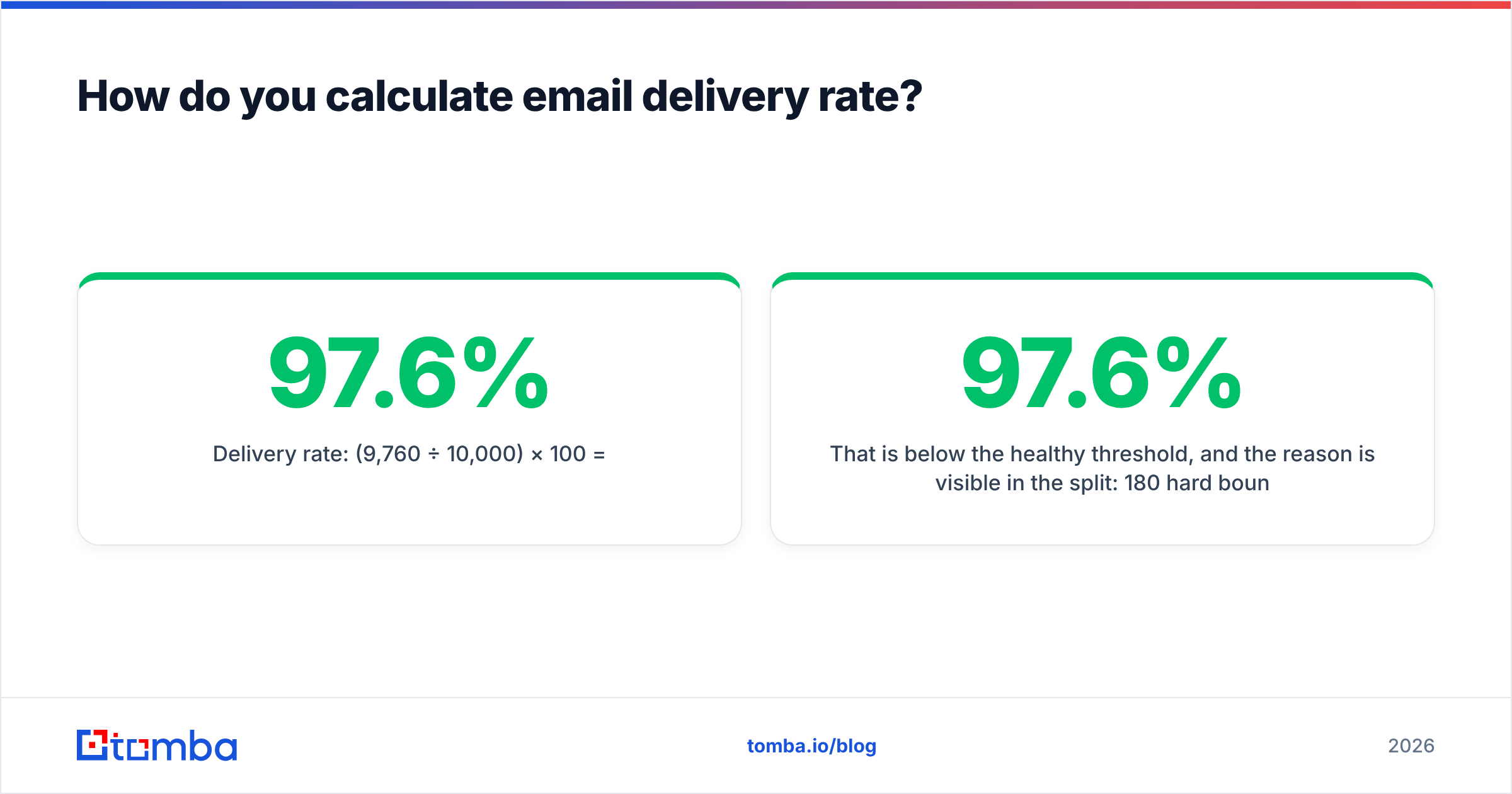
A worked example. You send 10,000 emails. 180 hard bounce (address does not exist), 60 soft bounce and never retry successfully, and 9,760 are accepted.
- Emails sent: 10,000
- Total bounces: 240
- Delivered: 9,760
- Delivery rate: (9,760 ÷ 10,000) × 100 = 97.6%
That 97.6% is below the healthy threshold, and the reason is visible in the split: 180 hard bounces on 10,000 sends is a 1.8% hard bounce rate. Mailbox providers read that as a sender who does not clean their list.
Here is the step-by-step you should run every campaign:
- Pull the raw send count. Not "recipients," not "contacts targeted" — the actual number of SMTP transactions attempted. Suppressed addresses that never left your server should be excluded from the denominator, or you will understate your rate.
- Separate hard bounces from soft bounces. Hard bounces are permanent (5xx codes: no such user, domain does not exist). Soft bounces are temporary (4xx: mailbox full, server busy, greylisting). Most ESPs retry soft bounces for 24–72 hours.
- Decide how you count deferrals. A deferred message that succeeds on retry is delivered. A deferred message that ages out is a bounce. Count it at the end of the retry window, not at send time.
- Apply the formula. Delivered ÷ sent × 100.
- Segment the result. Calculate delivery rate per domain (gmail.com, outlook.com, company domains) and per list source. An aggregate number hides the problem; a per-domain number names it.
- Log it over time. A single campaign's delivery rate is noise. The trend line across 8–12 sends is the signal.
Why does a 99% delivery rate still mean spam folder?#
Because delivery rate has a ceiling that spam filtering sits above.
Gmail and Microsoft rarely reject mail outright at the SMTP layer for reputation reasons alone. They accept it, then decide where it goes. That decision happens after your ESP has already logged "delivered." So a sender with a poisoned domain reputation can post a 99.4% delivery rate while 55% of the volume routes to spam — and the dashboard shows nothing wrong.
Three signals will tell you what delivery rate cannot:
- Google Postmaster Tools — domain and IP reputation, spam complaint rate, authentication pass rates, for Gmail traffic specifically. Free, and the single most useful deliverability data source available. Set it up at postmaster.google.com.
- Spam complaint rate — anything over 0.10% is a problem, and over 0.30% will get you throttled. Both Google and Yahoo formalized this threshold in their 2024 bulk sender requirements, and enforcement has only tightened since.
- Seed list / inbox placement testing — send to a panel of monitored accounts across providers and measure where each copy landed. Imperfect (seed accounts have no engagement history) but directionally useful.
Run a spam checker on your template before a big send, and confirm your authentication with an SPF checker. Missing or misaligned SPF, DKIM, or DMARC records are the most common cause of a healthy delivery rate paired with terrible placement.
What is a good email delivery rate in 2026?#
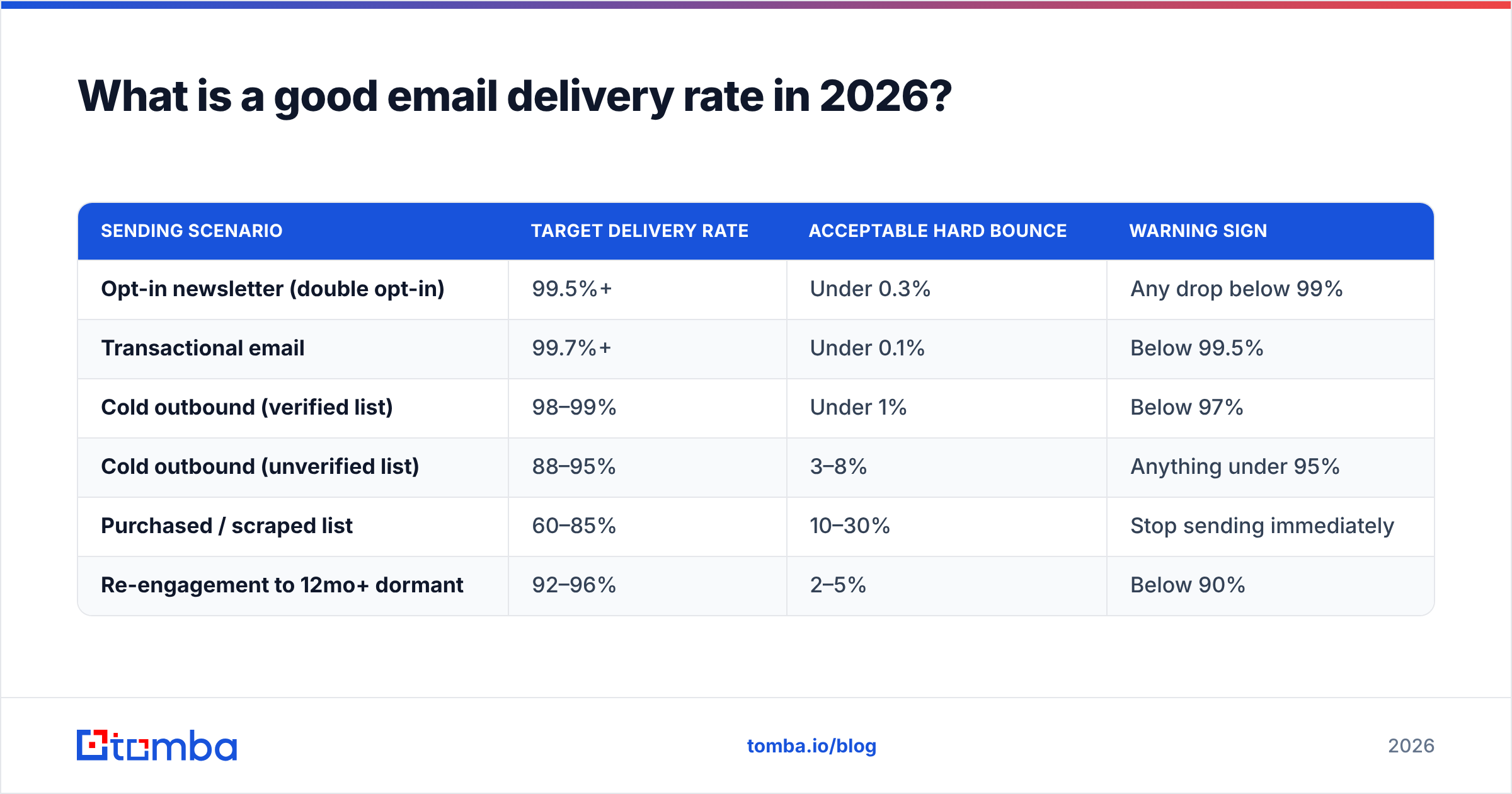
Benchmarks depend heavily on list source. Here is what to hold yourself to:
| Sending scenario | Target delivery rate | Acceptable hard bounce | Warning sign |
|---|---|---|---|
| Opt-in newsletter (double opt-in) | 99.5%+ | Under 0.3% | Any drop below 99% |
| Transactional email | 99.7%+ | Under 0.1% | Below 99.5% |
| Cold outbound (verified list) | 98–99% | Under 1% | Below 97% |
| Cold outbound (unverified list) | 88–95% | 3–8% | Anything under 95% |
| Purchased / scraped list | 60–85% | 10–30% | Stop sending immediately |
| Re-engagement to 12mo+ dormant | 92–96% | 2–5% | Below 90% |
The gap between rows four and three is the entire business case for verification. An unverified cold list running at 92% delivery is burning 8% of every send on addresses that do not exist — and each of those bounces is a reputation signal telling Gmail you do not know who your recipients are.
Note also that "delivery rate" on a purchased list is misleadingly high on catch-all domains. A catch-all server accepts everything, including addresses that route nowhere. Your delivery rate looks fine; your actual reach does not. That is why a catch-all verifier matters for any list heavy in mid-market and enterprise domains, where catch-all configuration is common.
Which bounce types actually hurt your rate?#
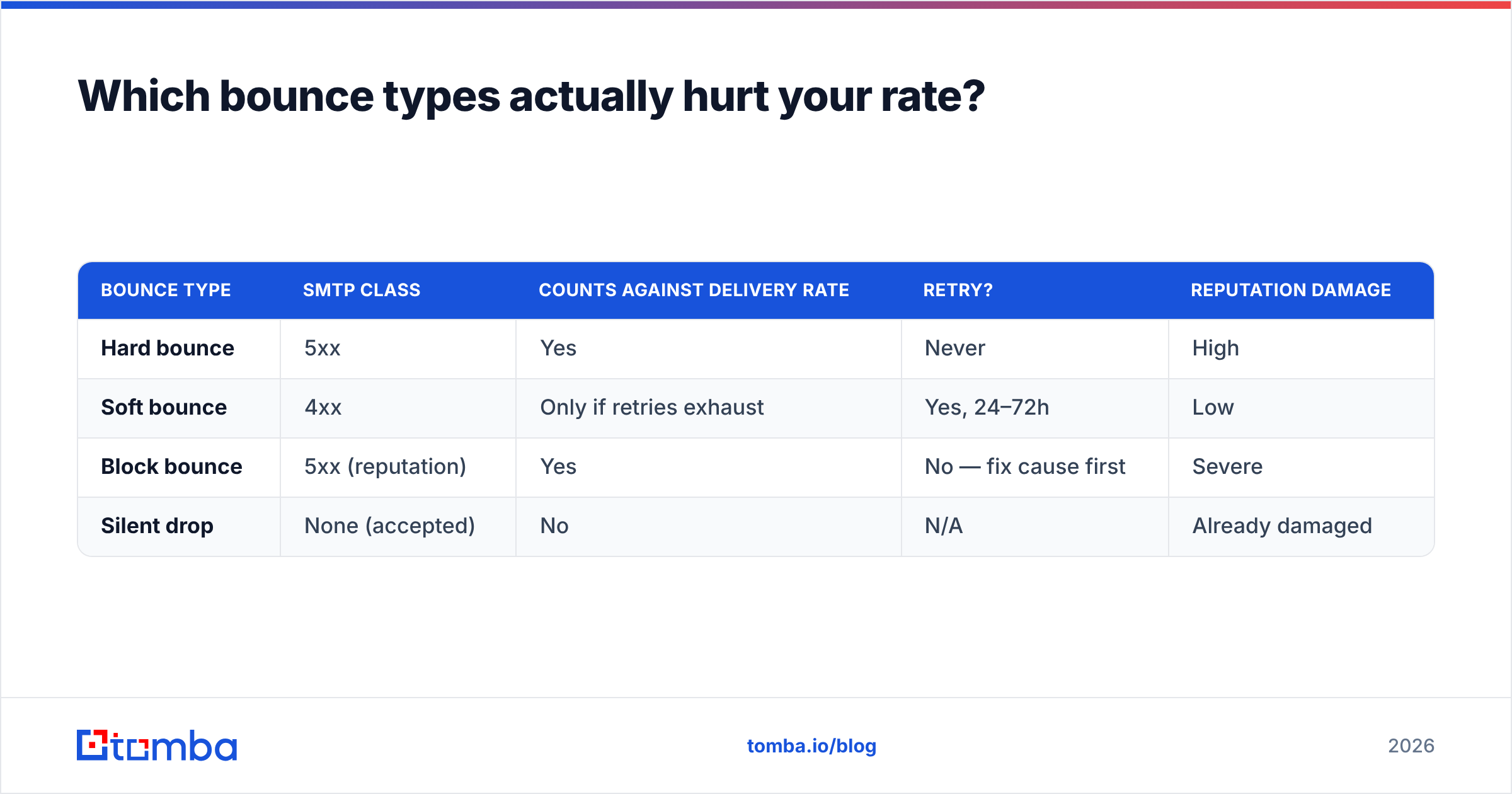
Not all bounces cost the same. Categorize them before you react.
Hard bounces (5xx) — permanent failures. The mailbox does not exist, the domain has no MX record, or the server has explicitly blocked you. These are the ones that damage reputation. Suppress the address immediately and never retry.
Soft bounces (4xx) — temporary. Full mailbox, server timeout, rate limiting, greylisting. Retry logic handles most of these. But a soft bounce that repeats across three consecutive campaigns should be treated as hard and suppressed.
Block bounces — a subtype worth isolating. The receiving server accepted the connection but refused the message due to content, reputation, or blocklist status. These are not list-quality problems; they are reputation problems. Check your domain and IP against a blacklist checker when block bounces spike.
Silent drops — the message is accepted (counted as delivered) and then discarded without notice. Invisible in your delivery rate. Only detectable through placement testing or a sudden collapse in engagement with a stable delivery number.
| Bounce type | SMTP class | Counts against delivery rate | Retry? | Reputation damage |
|---|---|---|---|---|
| Hard bounce | 5xx | Yes | Never | High |
| Soft bounce | 4xx | Only if retries exhaust | Yes, 24–72h | Low |
| Block bounce | 5xx (reputation) | Yes | No — fix cause first | Severe |
| Silent drop | None (accepted) | No | N/A | Already damaged |
The practical takeaway: chase hard bounces to zero through verification, treat block bounces as an emergency, and do not panic about soft bounces unless they trend upward across sends.
How do you improve a delivery rate that is stuck below 95%?#
Fix the inputs in this order — the first two do most of the work.
1. Verify every address before it enters the sending queue. This is the highest-leverage action available. A real-time email verifier checks syntax, domain MX records, and mailbox existence via SMTP handshake before you commit a send. Removing invalid addresses at the point of capture prevents the bounce from ever being recorded.
2. Stop guessing email formats. Pattern-guessing (first.last@domain.com) produces bounces at scale because format varies wildly across companies. Sourcing addresses from a verified index instead of a permutation script changes the bounce profile completely. If you build lists from company domains, a domain search returns known-good addresses with confidence scores rather than guesses.
3. Authenticate properly. SPF, DKIM, and DMARC — all three, aligned. Google and Yahoo now require them for bulk senders. Missing DMARC alone can turn a 99% delivery rate into a 60% one overnight when a provider tightens enforcement. HubSpot maintains a solid plain-English breakdown of the requirements in their email deliverability guide.
4. Warm the domain before volume. New domains and new IPs have no reputation history. Ramping from 20 sends/day to 2,000 over four to six weeks builds it. Skipping the ramp is the fastest way to get a fresh domain filtered.
5. Suppress aggressively. Hard bounces, complaints, and unsubscribes go into a permanent suppression list. Re-sending to a hard-bounced address is the clearest possible signal that you are not maintaining your data.
6. Segment by engagement. Send your highest-frequency campaigns only to contacts who opened or clicked in the last 90 days. Recipient engagement is a direct input to placement decisions at every major provider.

How does list verification change the math?#
Run the numbers on a 20,000-address cold list.
Without verification: assume a typical unverified B2B list carries 12% invalid addresses. You send 20,000, get 2,400 bounces, and post an 88% delivery rate. Your hard bounce rate is 12% — high enough that most ESPs will suspend the account, and high enough that Gmail will start filtering the mail that did get through.
With verification: you run the list through verification first. 2,400 addresses are flagged invalid and removed. You now send 17,600 and get roughly 180 bounces (a residual 1% from addresses that went stale between verification and send). Delivery rate: 98.98%.
Same list, same copy, same domain. The difference is entirely in what you chose not to send.
The second-order effect matters more. Your reputation stays clean, so the 17,600 that were delivered land in inboxes at a much higher rate. You did not just improve a metric — you improved actual reach on a smaller list. Comparing tools on this dimension is worthwhile; G2's email verification category is a reasonable starting point for reading real user reports on accuracy claims.
For teams processing lists at volume, bulk verify handles the whole file in one pass rather than address by address, and the email verification API lets you gate form submissions and CRM imports at the source — which is where the problem is cheapest to fix.
What should you track alongside delivery rate?#
Delivery rate on its own is a lagging, low-resolution signal. Build a small dashboard with these five, reviewed weekly:
- Delivery rate, segmented by recipient domain. A 97% aggregate that is 99.5% on Gmail and 82% on Outlook is an Outlook problem, not a list problem.
- Hard bounce rate. The leading indicator of list decay. B2B data degrades roughly 22–30% per year as people change jobs.
- Spam complaint rate. Pull from Google Postmaster Tools and Microsoft SNDS. Under 0.1% or you have a targeting problem.
- Domain reputation. Google Postmaster's four-tier rating (Bad / Low / Medium / High). Anything below High deserves investigation.
- Reply rate for outbound. The only metric that survives Apple Mail Privacy Protection intact, and the truest proxy for whether messages are being seen at all. See how yours compares against typical email response rate benchmarks.
Track these together and delivery rate becomes useful — a component in a diagnostic picture rather than a vanity number quoted in a QBR.
Start with data that does not bounce#
Every delivery-rate problem traces back to the same root cause: addresses that should never have entered the list. You cannot fix that at send time, and no amount of warmup or authentication compensates for sending to mailboxes that do not exist.
Tomba Email Finder sources professional email addresses by domain, name, or company and returns them with a confidence score and verification status attached — so the addresses entering your sequence are the ones that will actually accept mail. The free tier gives you 25 searches per month to test the accuracy against a list you already know the answers on; paid plans start at $49/mo on Starter with 5,000 addresses per month, $99/mo on Growth, and $249/mo on Pro. Full Tomba pricing is public, with no per-seat charges.
Verify before you send. The delivery rate takes care of itself.
Related guides#
Ready to find emails that actually work?
Join 150,000+ professionals who stopped guessing and started sending. Free credits on signup — no credit card required.
Get the Tomba newsletter
Practical outbound tactics and product updates — once every two weeks.
About the author